Test Execution
Test Execution is the stage in the Software Testing Life Cycle (STLC) where planning and preparation transform into measurable quality validation. After requirements are analyzed and test cases are designed, the real evaluation of the product begins during execution. This is the phase where the application is actually tested against defined expectations, and defects are uncovered.
Test Execution answers the most practical and decisive question in testing:
“Does the application behave as expected?”
It is during this phase that theoretical validation becomes real evidence. Testers interact with the application, compare actual behavior with expected results, and determine whether the system is ready for release.
For manual testers, test execution is a disciplined and structured activity. It requires focus, precision, observation skills, and strong documentation practices. Poor execution leads to missed defects, incorrect reporting, and unreliable release decisions.
Definition of Test Execution
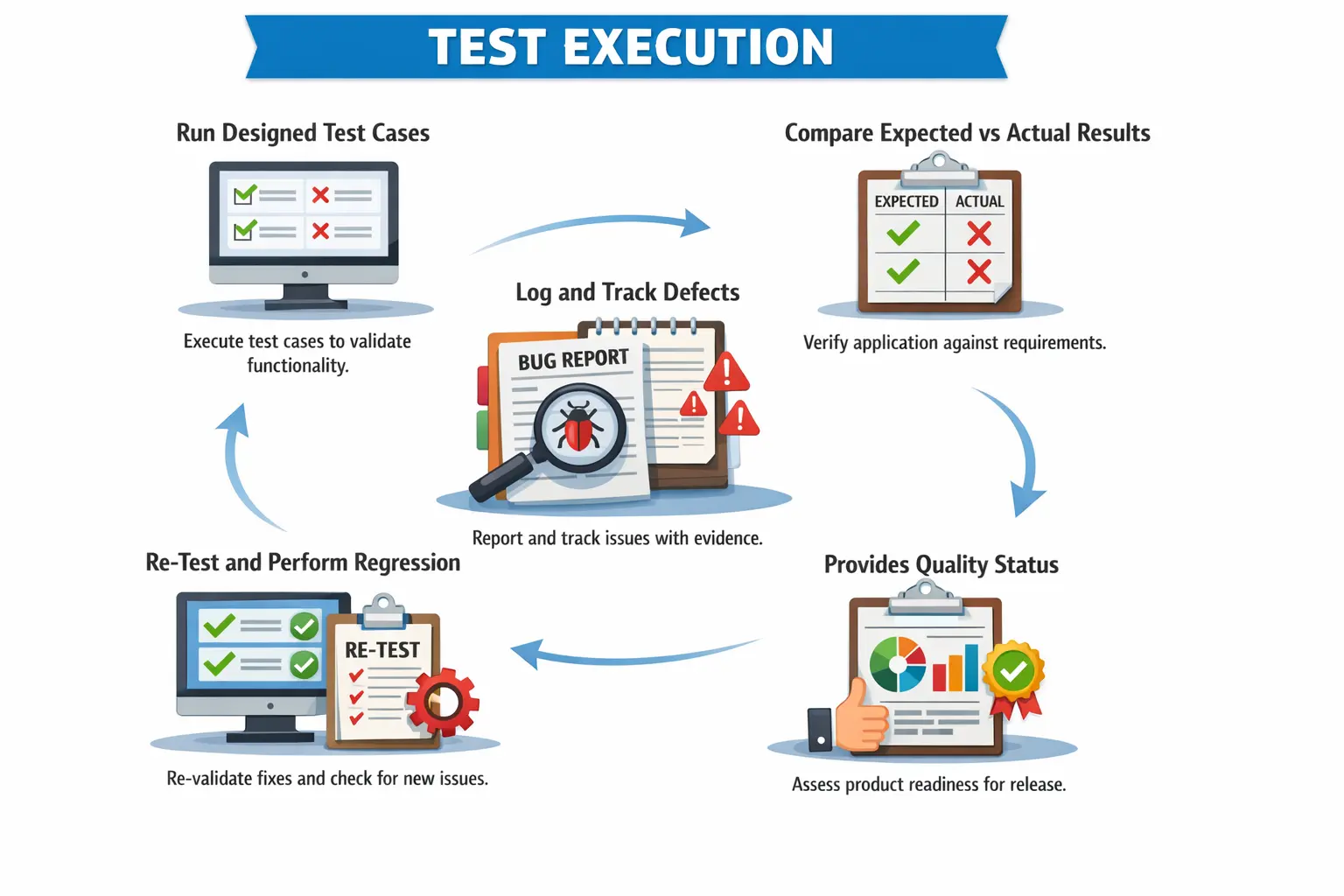
Test Execution is the process of running approved test cases in a prepared environment, comparing actual results with expected results, and identifying deviations in the form of defects.
It is not simply clicking through the application. Test execution is a structured activity governed by entry criteria, execution strategy, defect management processes, and reporting mechanisms.
During execution, testers validate implemented functionality against documented requirements. If the system behaves as expected, the test case is marked as passed. If it does not, a defect is logged.
Test execution transforms test design artifacts into measurable outcomes. It provides visibility into product quality and stability.
Without effective test execution, test planning and test design have no value.
Purpose of Test Execution
The primary purpose of test execution is to validate implemented functionality against requirements. Every executed test case verifies whether the application meets defined expectations.
Test execution identifies defects and quality risks. Even well-designed systems may contain logic flaws, integration gaps, or validation errors.
It provides evidence of testing. Execution records, defect logs, and status reports demonstrate that validation activities were performed.
Test execution supports release decisions. Pass rates, open defect counts, and severity distribution influence Go or No-Go decisions.
Test execution also validates non-functional aspects when applicable, such as usability observations or response behavior.
Ultimately, test execution provides a factual quality assessment of the application.
Preconditions for Test Execution
Effective test execution requires proper preparation. Execution should never begin without meeting defined entry criteria.
Approved and reviewed test cases must be available. Unreviewed or incomplete test cases lead to confusion and inconsistent validation.
The test environment must be ready and stable. An unstable environment can produce misleading results.
The build must be deployed successfully and verified through smoke testing. Execution should not begin on an unstable build.
Test data must be prepared and validated. Missing or incorrect test data blocks execution and wastes time.
Dependencies such as APIs, third-party services, and configurations must be confirmed.
Only when entry criteria are satisfied should execution proceed.
Test Execution Activities – Step by Step
Executing Test Cases
Execution begins by following test steps precisely as documented. Testers must avoid assumptions and deviations unless performing exploratory testing.
Defined test data must be used unless specific exploratory validation is intended.
Each action must be performed carefully to ensure accurate validation.
Execution requires attention to detail. Even small discrepancies may indicate defects.
Discipline during execution prevents false positives and false negatives.
Recording Results
After executing each test case, testers must record the result clearly.
Test cases are typically marked as Pass, Fail, or Blocked.
Actual results must be documented accurately. Clear documentation helps developers reproduce issues.
Incomplete result documentation reduces defect quality.
Accurate result recording ensures reliable reporting and traceability.
Logging Defects
When actual results differ from expected results, a defect must be logged.
Defect reports should include clear steps to reproduce, expected results, actual results, and supporting evidence such as screenshots.
Severity and priority must be assigned correctly based on impact and urgency.
High-quality defect logging improves resolution efficiency.
Poorly written defects delay fixes and increase rejection rates.
Re-Testing Fixes
After developers fix defects, testers re-test them in new builds.
Re-testing verifies whether the defect has been resolved.
If the issue persists, the defect is reopened.
If resolved successfully, the defect is closed.
Re-testing ensures validation of fixes and prevents premature closure.
Regression Testing
Regression testing is a critical part of test execution.
When fixes or changes are implemented, previously working functionality may break.
Regression testing re-executes impacted test cases to ensure system stability.
Risk-based regression prioritizes high-impact areas.
Regression testing prevents defect leakage into production.
Types of Manual Test Execution
Functional test execution validates business rules and system behavior.
Smoke test execution verifies build stability before detailed testing begins.
Sanity test execution validates specific fixes or minor changes.
Regression test execution ensures existing functionality remains unaffected by changes.
Exploratory test execution involves simultaneous learning and testing without predefined steps.
User Acceptance Testing support execution assists business users in validating functionality.
Each execution type serves a distinct purpose within the testing lifecycle.
Manual Tester’s Responsibilities
Manual testers must execute test cases accurately and consistently.
They must maintain discipline during execution to avoid missing defects.
They must log high-quality defects with reproducible steps.
They must update execution status regularly in test management tools.
They must communicate blockers, risks, and environment issues promptly.
Testers must also prioritize high-risk areas when time constraints exist.
Professional execution behavior strengthens testing credibility.
Test Execution vs Test Design
Test Design focuses on preparing validation artifacts.
Test Execution focuses on validating functionality.
Test Design produces test cases and scenarios.
Test Execution produces pass/fail results and defect reports.
Test Design occurs before build availability.
Test Execution begins after build deployment.
Both phases are interconnected and equally important.
Test Execution Deliverables
Executed test cases provide evidence of coverage and validation.
Defect reports document deviations from expected behavior.
Daily or weekly execution reports provide status visibility.
Updated Requirement Traceability Matrix ensures requirement coverage.
Execution summary reports support release decisions.
Deliverables reflect the quality status of the application.
Common Issues During Test Execution
Environment instability is a frequent challenge. Server crashes or configuration issues disrupt execution.
Incomplete test data may block test scenarios.
Frequent build changes require re-validation and slow progress.
Time pressure may force prioritization of critical tests.
Blocked test cases due to dependencies delay coverage.
Managing these challenges requires communication and planning.
Best Practices in Test Execution
Execute tests systematically rather than randomly.
Prioritize high-risk and high-impact areas.
Maintain evidence for failed cases.
Communicate issues immediately rather than delaying reporting.
Follow defined exit criteria before concluding execution.
Track daily progress to avoid last-minute surprises.
Structured execution improves reliability and transparency.
Importance of Documentation During Execution
Documentation ensures traceability and audit readiness.
Execution logs demonstrate compliance with testing processes.
Defect records provide historical reference.
Accurate documentation supports quality metrics and reporting.
Clear records improve stakeholder confidence.
Test Execution in Agile Projects
In Agile environments, test execution occurs continuously within sprints.
Testers validate user stories as they are developed.
Defect turnaround cycles are short.
Regression testing is incremental.
Execution feedback influences backlog prioritization.
Agile test execution emphasizes speed and collaboration.
Risk-Based Test Execution
Not all test cases carry equal importance.
Risk-based execution prioritizes critical business flows.
High-impact scenarios receive early validation.
Low-risk cosmetic issues may be deferred under time constraints.
Risk-based strategies optimize effort without compromising quality.
Test Execution Readiness
Before test execution begins, the team must confirm that execution is meaningful and practical. Starting execution too early often creates noise instead of useful quality information. If requirements are unclear, test cases are incomplete, the environment is unstable, or test data is missing, testers may spend more time reporting blockers than validating the product. Test execution readiness protects the team from wasting effort on a build that is not ready to be tested.
Readiness begins with approved test cases. A tester should know what needs to be tested, what data must be used, and what result is expected. If test cases are still under review, execution can become inconsistent because different testers may interpret the same flow differently. Reviewed test cases create a common understanding of scope and expected behavior.
The test environment must also be stable. The application should be deployed successfully, required services should be running, databases should be available, and external dependencies should be accessible or properly mocked. If the environment is frequently down, test results become unreliable. A failed test case may indicate an environment issue rather than an application defect.
Test data readiness is equally important. Many execution delays happen because testers cannot find the right user account, transaction state, product record, or configuration. Good preparation includes valid data, invalid data, boundary data, role-based accounts, and any special records needed for specific scenarios. Test execution works best when data is planned before the execution cycle begins.
Build readiness should be confirmed through smoke testing. Smoke testing verifies that the build is stable enough for detailed testing. If login, navigation, or core workflows fail during smoke testing, detailed execution should not proceed. Rejecting an unstable build early is more professional than spending days logging avoidable failures.
Understanding Test Case Statuses
During execution, every test case should have a clear status. Common statuses include Pass, Fail, Blocked, Not Run, In Progress, and sometimes Not Applicable. These statuses provide visibility into execution progress and product quality. If statuses are used inconsistently, reports become misleading and release decisions become unreliable.
A test case is marked Pass when the actual result matches the expected result completely. Passing a case means the tested scenario behaved correctly under the specified conditions. It does not prove that the entire feature is defect-free; it only confirms that the tested scenario passed. Testers should avoid marking a case as passed if any expected validation was skipped.
A test case is marked Fail when the actual result differs from the expected result because of an application issue. A failure should be supported by evidence and, where appropriate, linked to a defect. The tester should not mark a test as failed simply because data was missing or the environment was unavailable. Those situations are usually blockers, not product failures.
A test case is marked Blocked when execution cannot continue due to an external dependency, environment issue, missing data, unavailable build, access problem, or unresolved defect that prevents testing. Blocked cases should be tracked carefully because they represent unvalidated scope. A release cannot be considered fully tested if important cases remain blocked.
A test case remains Not Run when execution has not yet started. In Progress indicates that the tester has started but not completed the case. Not Applicable may be used when a case no longer applies due to requirement changes, scope removal, or configuration differences. Each status should be used with discipline so execution reports remain accurate.
Executing Test Cases with Discipline
Good test execution requires discipline. A tester should follow the documented steps, use the required test data, observe the actual result carefully, and compare it against the expected result. Execution is not a mechanical activity, but it must be controlled. If testers randomly skip steps or change data without recording it, results become difficult to trust.
Following steps precisely is especially important for repeatability. When a defect is found, developers must be able to reproduce it. If the tester does not know the exact data, sequence, browser, role, or environment used during execution, the defect may be rejected or delayed. Disciplined execution creates reproducible evidence.
At the same time, testers should remain observant beyond the written steps. A test case may focus on one validation, but the tester may notice layout issues, unexpected messages, slow response, or inconsistent behavior. These observations should not be ignored. Test execution combines structured validation with professional awareness.
When testers intentionally deviate from a test case to explore related behavior, they should record that as exploratory observation or additional testing. This distinction matters because planned execution and exploratory findings serve different purposes. Planned execution proves coverage; exploratory testing discovers additional risks.
Comparing Expected and Actual Results
The core of test execution is comparison. The expected result describes what should happen according to the requirement, test case, or acceptance criteria. The actual result describes what the system did during execution. A defect exists when the actual result does not match the expected result under valid test conditions.
Expected results should be specific. A vague expected result such as "system should work correctly" is not useful during execution. A better expected result states that the order should be created, a confirmation message should appear, the payment should be captured, and the confirmation email should be sent. Specific expected results make pass and fail decisions objective.
Actual results should be recorded honestly and precisely. If the system displays the wrong message, the tester should capture the exact message. If a calculation is incorrect, the tester should record the input values, expected calculation, actual calculation, and difference. If a page crashes, the tester should capture the error, browser console details if available, and steps before the crash.
Sometimes the actual result differs from the test case because the requirement changed but the test case was not updated. In such situations, the tester should not immediately log a defect. The correct action is to verify the latest requirement, update the test case if necessary, and then execute again. Test execution must validate current approved behavior, not outdated expectations.
Handling Failed Test Cases
When a test case fails, the tester must first confirm that the failure is genuine. The tester should check whether the correct build was used, whether the right environment was selected, whether the test data is valid, and whether all preconditions were satisfied. This quick verification prevents false defects and saves developer time.
After confirming the failure, the tester should capture evidence. Evidence may include screenshots, videos, logs, request and response details, database references, timestamps, browser information, and user role details. The goal is to make the failure understandable and reproducible. A defect without evidence often creates back-and-forth communication.
The failed test case should be linked to the defect in the test management tool. This linkage supports traceability and reporting. Stakeholders can see which requirements are affected, how many test cases failed, and which defects block completion. Without linkage, execution reports become disconnected from defect status.
The tester should also decide whether related test cases can continue. Some failures block only one scenario, while others block an entire module. For example, if login fails, many test cases may be blocked. If one validation message is incorrect, other scenarios may still proceed. This judgment helps the team use execution time effectively.
Handling Blocked Test Cases
Blocked test cases are a normal part of execution, but they must be managed actively. A blocked case means the tester cannot complete validation due to a dependency or obstacle. Common blockers include environment downtime, missing access, unavailable data, unresolved high-severity defects, unavailable third-party services, and incomplete builds.
Blocked cases should not be hidden. They represent untested areas, and untested areas represent release risk. Testers should report blockers quickly with clear details: what is blocked, why it is blocked, who can resolve it, and what testing is affected. This allows leads and stakeholders to act before the schedule is damaged.
A blocked case should be revisited once the blocker is removed. It should not remain forgotten in the execution tool. Testers should maintain a blocker list and follow up regularly. If a blocker persists for a long time, the team may need to revise the execution plan or escalate the dependency.
In execution reporting, blocked cases should be separated from failed cases. A failed case indicates product behavior did not meet expectations. A blocked case indicates testing could not be completed. Mixing these statuses distorts quality metrics and makes it harder to understand the real condition of the product.
Defect Logging During Execution
Defect logging is one of the most important responsibilities during test execution. A well-written defect report helps developers understand and fix the issue quickly. A poorly written defect creates confusion, delays, duplicate discussions, and sometimes rejection. The quality of defect reporting directly affects the efficiency of the execution cycle.
A good defect report includes a clear title, environment details, build version, preconditions, steps to reproduce, test data, expected result, actual result, severity, priority, screenshots or video, and any relevant logs. The title should summarize the problem, not merely state that a test failed. For example, "Payment confirmation not generated after successful card payment" is better than "Payment test failed."
Steps to reproduce should be complete and sequential. A developer should be able to follow the steps and see the same issue. If special data is required, the tester should mention it. If the defect occurs only for a specific role, browser, region, or configuration, that context should be included. Context prevents unnecessary investigation.
Severity and priority should be assigned carefully. Severity describes business or technical impact. Priority describes urgency for fixing. A typo may have low severity but high priority if it appears on a public homepage. A rare crash in an internal admin feature may have high severity but lower priority depending on release scope. Testers should understand this distinction.
Evidence Collection During Execution
Evidence gives credibility to test execution. For passed cases, evidence may not always be required in detail, but critical workflows often need proof of successful validation. For failed cases, evidence is essential. It helps developers reproduce issues, helps test leads review defects, and helps stakeholders understand impact.
Screenshots are useful for visual issues, incorrect messages, failed validations, and displayed data problems. Videos are useful for multi-step workflows, intermittent issues, animations, navigation problems, and timing-related defects. Logs are useful for backend errors, API failures, server-side exceptions, and integration problems. The type of evidence should match the defect.
Evidence should be captured at the right moment. A screenshot after navigating away may not show the issue. A video that starts too late may miss the triggering step. Testers should capture preconditions, action, and result where possible. This improves defect quality and reduces repeated clarification.
Evidence should also protect sensitive information. Screenshots and logs may contain personal data, credentials, tokens, payment details, or internal system information. Testers should follow project guidelines for masking or avoiding sensitive data in attachments. Good evidence supports debugging without creating security risk.
Daily Test Execution Tracking
Execution tracking keeps the team aware of progress and risk. During active test execution, test leads and stakeholders need to know how many test cases are planned, how many are executed, how many passed, how many failed, how many are blocked, and how many remain. This information helps the team manage time and priorities.
Daily execution tracking should not be treated as paperwork. It allows early detection of schedule problems. If execution progress is slower than planned, the team can add support, reduce scope based on risk, resolve blockers, or adjust release expectations. Without daily tracking, problems often become visible only near the deadline.
Execution tracking should include defect trends. A high number of critical defects may indicate that the build is unstable. Many blocked cases may indicate environment or data issues. Repeated failures in one module may indicate a defect cluster. These patterns help the team focus attention where it is needed most.
Good tracking also improves transparency. Stakeholders can see whether testing is progressing, where risks exist, and what decisions may be required. This builds confidence in the testing process because status is based on evidence rather than opinion.
Test Execution Metrics
Test execution produces useful metrics that support quality assessment. Common metrics include total test cases, executed test cases, pass count, fail count, blocked count, not-run count, pass percentage, defect count, defect severity distribution, defect density, and re-test status. These metrics help summarize execution in a measurable way.
Pass percentage is useful but should not be interpreted blindly. A high pass percentage may still hide risk if critical cases are not executed or if many cases are blocked. Similarly, a lower pass percentage may be acceptable early in execution if defects are being found and fixed quickly. Metrics need context.
Defect severity distribution is often more important than total defect count. Ten minor UI defects may be less risky than one critical payment defect. Test execution reporting should highlight severity and business impact, not only numbers. Stakeholders need to know what the defects mean for release readiness.
Blocked test percentage is also important. A high blocker count means coverage is incomplete. Even if executed cases pass, unexecuted blocked areas remain unknown. Execution metrics should help the team understand both known quality and unknown risk.
Re-Testing During Test Execution
Re-testing is an important part of the execution cycle. After a developer fixes a defect and a new build is deployed, the tester re-executes the same scenario that originally failed. The purpose is to verify whether the defect is truly resolved. Re-testing should be focused, controlled, and based on the original failure.
During re-testing, the tester should use the same or equivalent data and follow the same steps that exposed the defect. If the issue is fixed, the defect can be marked as verified or closed according to the project workflow. If the issue persists, the defect should be reopened with updated evidence. If behavior changes but remains incorrect, the tester should document the new actual result clearly.
Re-testing should not be confused with regression testing. Re-testing confirms that a specific defect is fixed. Regression testing confirms that the fix did not break other areas. Both activities are needed. Closing a defect without regression consideration can allow side effects to escape.
Testers should also track re-test pending items. If many defects are fixed late, re-testing effort can become significant. Execution planning should include time for fix verification, not only first-cycle testing. This is especially important near release deadlines.
Regression Testing During Execution
Regression testing during execution protects existing functionality from side effects caused by changes and fixes. Every defect fix changes the application in some way. Even a small fix can affect shared components, validation rules, workflows, or data processing. Regression testing gives confidence that old functionality still works after updates.
Regression scope should be determined based on impact analysis. If a defect fix affects only a label, regression may be minimal. If a fix affects calculation logic, authentication, payment, order processing, or integration, regression must be broader. Testers should not apply the same regression depth to every change.
Regression testing can be performed in cycles. After the first test cycle, defects are fixed, re-tested, and selected regression cases are executed. This may repeat until exit criteria are met. The goal is not only to reduce open defects but also to ensure that fixes do not destabilize the application.
Automation can support regression execution, but manual judgment remains important. Automated suites may catch known stable scenarios, while manual testers focus on changed areas, user experience, complex flows, and newly discovered risks. A balanced approach improves efficiency and confidence.
Managing Test Execution Under Time Pressure
Time pressure is common during test execution. Builds may arrive late, defects may take longer to fix, environments may fail, or business deadlines may remain fixed. Under pressure, testers must prioritize intelligently rather than attempting to test everything equally. Risk-based execution becomes essential.
The first priority should be critical business flows. These are workflows that directly affect revenue, compliance, security, customer access, data integrity, or core operations. If these flows fail, the release is risky regardless of how many minor cases pass. Testers should execute high-impact cases early so major issues are discovered sooner.
The second priority should be changed and impacted areas. New features, defect fixes, and change requests carry higher risk because they were recently modified. The third priority should be historically defect-prone areas. If a module frequently fails, it deserves attention even if it was not directly changed.
When coverage must be reduced, testers should communicate what is not being tested. Silent scope reduction is dangerous. Stakeholders should understand the residual risk so they can make informed decisions. Good testers do not simply say testing is complete; they explain what was covered and what remains risky.
Test Execution in Different Testing Levels
Test execution appears across multiple testing levels, but the focus changes by level. In unit testing, developers execute small tests to validate individual code units. In integration testing, teams validate interactions between modules or systems. In system testing, testers validate the complete application against requirements. In acceptance testing, business users validate readiness for real-world use.
Manual testers are most heavily involved in system testing, regression testing, functional testing, usability checks, exploratory testing, and UAT support. Their execution focuses on user workflows, business rules, data correctness, error handling, and observable behavior. The goal is to evaluate the product from a practical user and business perspective.
Execution at each level produces different evidence. Unit tests may produce automated results. Integration tests may produce API responses or logs. System tests produce pass/fail records and defects. UAT produces business acceptance feedback. Together, these execution results build a complete quality picture.
Understanding execution levels helps testers avoid confusion. A defect found during system testing may originate from a unit-level issue, integration mismatch, or requirement gap. Test execution reveals the symptom, while investigation identifies the underlying cause.
Test Execution in Real Projects
In real projects, test execution rarely happens in perfect conditions. Requirements may change, builds may be delayed, test data may be incomplete, environments may be shared, and defects may block major workflows. Professional testers must work within these realities while still maintaining accuracy and discipline.
A typical execution cycle begins after a build is deployed and smoke tested. Testers execute planned cases, log defects, attend defect triage, re-test fixed defects, perform regression testing, update execution reports, and communicate risks. This cycle continues until exit criteria are satisfied or stakeholders make a release decision based on known risk.
Execution also involves collaboration. Testers communicate with developers to clarify defects, with business analysts to confirm expected behavior, with test leads to report progress, and with environment teams to resolve blockers. Test execution is not isolated clicking; it is coordinated quality validation.
The best execution teams maintain a balance between speed and accuracy. They move quickly, but they do not skip evidence, status updates, or defect clarity. They prioritize risk, but they do not hide untested areas. This balance makes execution reliable and useful for decision-making.
Practical Example: E-Commerce Test Execution
Consider an e-commerce application release. The planned execution scope includes registration, login, product search, cart management, checkout, payment, order confirmation, order history, and refund flow. Before execution begins, testers verify that the environment is ready, products are loaded, payment sandbox is configured, user accounts are available, and test cases are approved.
During execution, the tester runs a successful order placement case. The expected result is that the order is created, payment is captured, inventory is reduced, confirmation email is sent, and order appears in history. If payment succeeds but the order is not visible in history, the test case fails. The tester logs a defect with steps, test data, screenshots, transaction ID, and actual behavior.
If the defect is fixed, the tester re-tests the order history scenario. Then regression testing may include checkout, payment confirmation, order email, and refund flow because the fix may affect order processing. This shows how test execution connects defect logging, re-testing, and regression testing in a single cycle.
If the payment gateway sandbox goes down during execution, related payment cases are marked blocked, not failed. The blocker is reported, and testers may continue with non-payment scenarios if possible. This keeps execution productive while accurately reporting untested scope.
Practical Example: Banking Test Execution
In a banking application, test execution requires extra care because defects can affect money, security, and customer trust. Suppose the scope includes fund transfer. Testers execute cases for successful transfer, insufficient balance, invalid beneficiary, daily transfer limit, transaction confirmation, account balance update, and transaction history.
For a successful transfer, the expected result includes debit from the sender, credit to the receiver, transaction ID generation, updated balance, notification, and history entry. The tester must validate all relevant outcomes, not just the success message. A message alone is not enough if the balance update is wrong.
For negative scenarios, the tester verifies that invalid transfers are rejected safely. If insufficient balance exists, the transfer should fail, no money should be debited, and a clear message should be shown. This confirms both business rule enforcement and data integrity.
If a defect fix changes balance calculation, regression should include transfer, bill payment, deposit, withdrawal, statement generation, and alerts. The execution strategy must reflect risk because banking workflows are tightly connected. This example shows why high-impact domains require disciplined execution.
Common Mistakes During Test Execution
One common mistake is executing test cases without verifying preconditions. If the required user role, data state, or environment setup is wrong, the result may be invalid. Testers should confirm preconditions before marking a case pass or fail.
Another mistake is logging vague defects. A defect that says "not working" does not help developers. Defects should explain what was done, what was expected, what happened, where it happened, and which data was used. Clear reporting improves turnaround time.
Some testers mark blocked cases as failed. This distorts defect metrics and makes the product look worse than it is. Others mark cases as passed even when some validations were skipped. This creates false confidence. Accurate status usage is essential.
Another frequent mistake is ignoring minor observations. Small inconsistencies in messages, formatting, alignment, or workflow behavior may indicate larger quality issues. Not every observation is critical, but testers should record meaningful issues rather than assuming they are unimportant.
Teams also make the mistake of postponing defect logging until the end of the day. Delayed logging can cause lost details and slower fixes. Defects should be logged as soon as enough evidence is available. Fast reporting supports faster resolution.
Best Practices for Professional Test Execution
Professional test execution starts with preparation. Testers should understand the feature, review test cases, verify data, confirm environment access, and know the execution priority. Preparation reduces hesitation and prevents avoidable blockers.
Execution should be systematic. Testers should follow the planned sequence where appropriate, update statuses promptly, attach evidence for failures, and link defects to test cases. This creates a reliable execution trail that supports reporting and release decisions.
Communication should be proactive. Blockers, critical defects, unclear requirements, and environment problems should be raised quickly. Waiting silently wastes execution time. A tester’s responsibility includes making risks visible.
Testers should balance planned execution with observation. The test case may define the main validation, but the tester should still notice unusual behavior around the flow. Strong testers think like users, analysts, and risk reviewers while executing.
Finally, execution should end with clear closure. The team should know what was executed, what passed, what failed, what was blocked, what defects remain open, and what risks are still present. This clarity makes test execution valuable beyond the test team.
Interview Perspective
Test execution is a fundamental interview topic for manual testers.
A short answer defines test execution as running test cases and comparing results.
A detailed answer explains environment preparation, defect logging, re-testing, and regression testing.
Interviewers may ask how to handle blocked cases or unstable builds.
Strong execution knowledge reflects practical experience.
Key Takeaway
Test Execution is the phase where designed test cases are run, results are recorded, and defects are identified.
It validates implemented functionality against requirements and provides measurable evidence of quality.
Manual testers must execute systematically, log defects clearly, and perform regression testing thoroughly.
Test Execution converts planning and design into real quality validation, revealing the true state of the product before release.