Validation in Software Testing: Ensuring the Right Product Is Built
Introduction to Validation
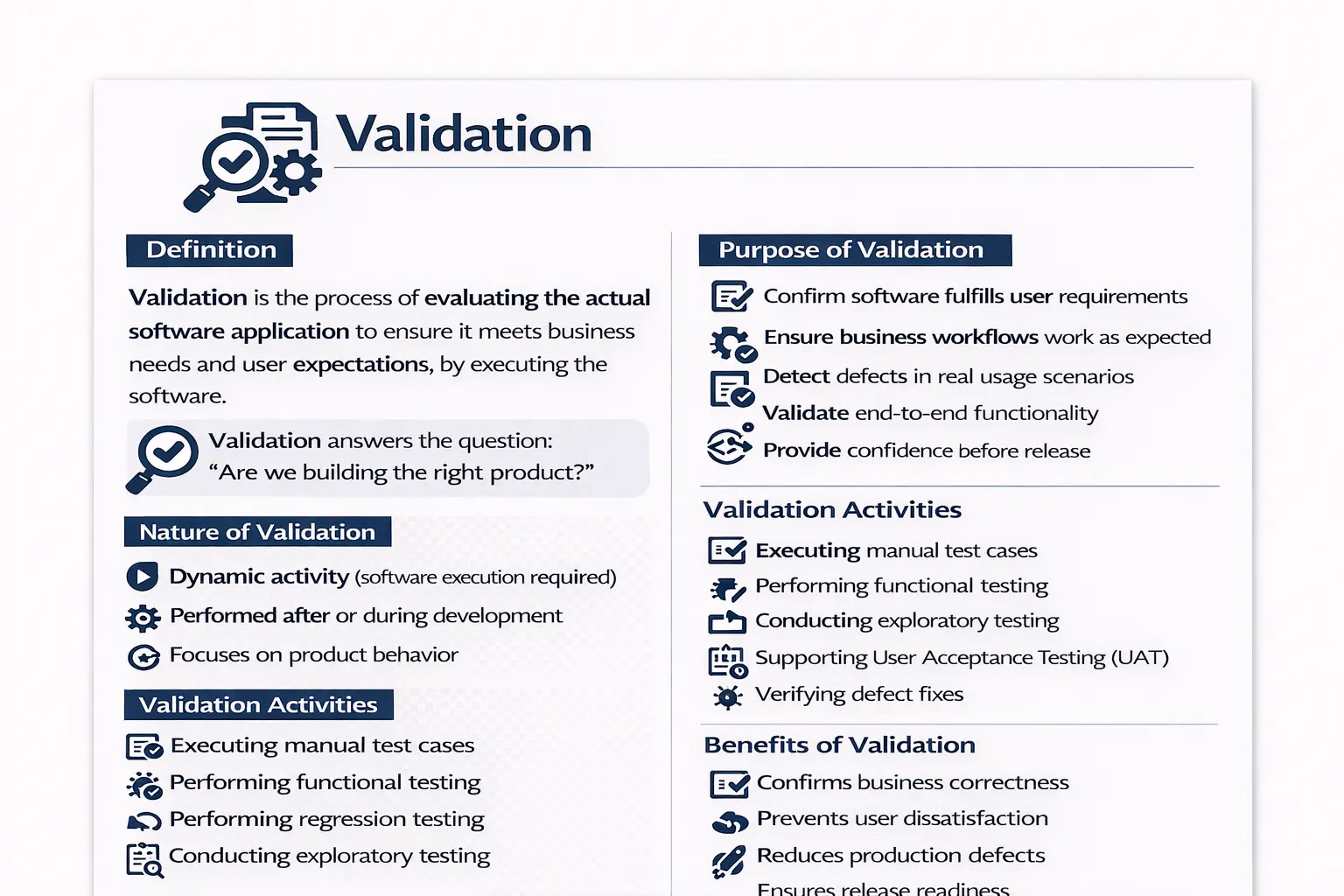
Validation is a key concept in software testing that focuses on evaluating the actual software application to ensure it meets business needs and user expectations. Unlike verification, which reviews documents and artifacts, validation involves executing the software and observing how it behaves. It answers a critical question: are we building the right product? Through validation, teams confirm that the system delivers real value and works as intended in practical situations.
Why Validation Matters in Software Quality
Validation matters because software is not successful merely because it matches a written requirement. A requirement can be incomplete, ambiguous, outdated, or technically correct but still fail to support the user’s real objective. Validation closes this gap by checking the working product against practical expectations. It asks whether the user can complete the intended task, whether the business process is supported without confusion, and whether the delivered feature actually creates value. This makes validation one of the most important quality activities before release, because it moves the discussion from documents and assumptions to observable product behavior.
In real projects, many defects are not visible during document review. A requirement may state that users should be able to submit a form, but only validation reveals whether the form behaves properly with realistic data, whether confirmation messages are understandable, whether related systems receive the submitted information, and whether users can continue the workflow without interruption. These are practical concerns that become clear only when the software is executed. Validation therefore protects the team from releasing a product that is technically implemented but functionally weak from the user’s point of view.
Validation as Dynamic Product Evaluation
Validation is called a dynamic activity because the software must be running. Testers interact with the application, enter data, click buttons, move through workflows, inspect responses, and compare actual behavior with expected business outcomes. This execution-based nature makes validation different from static review activities. While static review can identify missing requirements or design inconsistencies, validation reveals runtime behavior such as broken navigation, incorrect calculations, data not being saved, delayed responses, permission failures, integration issues, and unexpected errors.
Dynamic evaluation is especially valuable because modern applications often depend on multiple moving parts. A single user action may involve the user interface, client-side validation, server-side processing, database updates, authentication, email services, third-party APIs, and reporting modules. A document can describe this flow, but validation proves whether all parts work together. When testers validate the working product, they observe the application as users will experience it. This gives the team evidence that the system behaves correctly beyond isolated code changes.
Validation Starts When Working Software Exists
Validation usually begins when a feature, module, build, or product increment is available for execution. It does not have to wait until the end of the project. In Agile and iterative development, validation can happen continuously as each user story becomes ready for testing. The earlier a team validates working software, the sooner it can discover mismatches between what was built and what users actually need. This reduces rework because problems are found while the feature is still fresh in the development cycle.
Early validation is also useful for clarifying expectations. When business users, testers, developers, and product owners see the working feature, they often identify details that were not obvious in the requirement discussion. A field label may be confusing, a workflow may require one extra confirmation step, or a validation message may need to be more specific. These issues may not be severe technical bugs, but they affect usability and business acceptance. Validation brings such issues into the open before the product reaches real users.
Validation and User Expectations
User expectations are central to validation. Users rarely think in terms of internal design, database tables, or system architecture. They care about whether they can complete a meaningful task efficiently and correctly. For example, a customer wants to reset a password, place an order, download a report, update a profile, or track an application status. Validation evaluates whether the software supports these goals in a realistic manner. If the feature works only under ideal conditions but fails during normal variation, validation should expose that weakness.
A strong validation approach considers both explicit requirements and implicit expectations. Some expectations may not be written in detail, but they are still important. Users expect saved data to remain available, error messages to be understandable, buttons to respond predictably, payments to be processed safely, and personal information to be protected. Validation checks whether the product respects these expectations. This is why validation is closely connected to customer satisfaction and business confidence.
Validating Business Workflows
Business workflow validation is one of the most practical parts of testing. A feature may pass when tested alone, but the full business process may still fail. For example, in an e-commerce application, adding a product to the cart is only one part of the journey. Validation must also cover login, address selection, coupon application, payment, order confirmation, email notification, order history, and inventory update. If one step fails, the user’s goal is not achieved even if several individual screens appear correct.
This workflow perspective helps testers think like users rather than like isolated component checkers. It encourages end-to-end thinking and reveals integration defects. A tester validating a travel booking workflow, for instance, should not stop after checking the search page. The validation should continue through passenger details, fare selection, seat preference, payment, ticket generation, and cancellation rules where relevant. The purpose is to confirm that the business process works as a complete experience, not merely as separate pages.
Validation Through Functional Testing
Functional testing is a primary validation technique because it verifies that features behave according to business requirements. Testers execute scenarios using valid inputs, invalid inputs, boundary values, and realistic combinations of data. They compare the actual system response with the expected result. If a login feature accepts valid credentials and rejects invalid credentials with a clear message, it passes a basic functional validation. If it allows unauthorized access, fails to create a session, or displays a misleading error, validation identifies a defect.
Functional validation should go beyond checking only the happy path. While happy path testing confirms that normal successful usage works, real users may enter incomplete data, repeat actions, refresh pages, use older records, or follow workflows in unexpected ways. A feature is truly validated only when testers understand how it behaves across meaningful scenarios. This does not mean testing every possible input combination, but it does mean selecting scenarios that represent real usage, important business rules, and likely failure points.
Validation Through Regression Testing
Regression testing supports validation by confirming that existing functionality still works after changes. Software is constantly modified through bug fixes, enhancements, refactoring, configuration updates, and integration changes. A new feature may work correctly, but it can accidentally break an older feature. Validation is incomplete if it checks only the new change and ignores the surrounding product behavior. Regression testing protects established workflows and helps ensure the product remains stable as it evolves.
In practical terms, regression validation should focus on high-risk and high-value areas. Login, payment, search, reporting, access control, data saving, notifications, and integrations often deserve repeated validation because many other workflows depend on them. Manual testers may execute focused regression suites, while automation can help repeat stable checks quickly. The purpose is not to run every test blindly, but to validate that the product still supports important user and business operations after each meaningful change.
Validation Through End-to-End Testing
End-to-end testing validates complete user journeys across different components of the system. It is important because many defects occur not inside one screen, but between screens, services, modules, or systems. A user registration flow may look correct in the front end, but the confirmation email may not be triggered. A payment may appear successful on the UI, but the order may not be created in the backend. End-to-end validation connects these points and checks whether the entire outcome is correct.
Effective end-to-end validation requires careful scenario selection. Not every small feature needs a long end-to-end scenario, but critical business flows do. A banking transfer, insurance claim submission, online exam registration, hospital appointment booking, or stock trading order placement should be validated from beginning to end because users depend on the full process. These scenarios often uncover issues related to data consistency, permissions, messaging, timing, and third-party service behavior.
Validation Through Exploratory Testing
Exploratory testing strengthens validation because testers use observation, experience, and curiosity to investigate the product beyond scripted test cases. Scripted test cases are useful, but they cannot predict every possible user behavior or system condition. During exploratory validation, testers may follow an unexpected path, combine actions in a different order, use unusual data, compare related screens, or test how the system responds after interruptions. This approach often finds defects that formal test cases miss.
Exploratory validation is not random clicking. It is disciplined investigation guided by a testing goal. A tester may choose a mission such as validating the checkout workflow under interrupted payment conditions, exploring how filters behave with large result sets, or checking whether error messages help users recover from mistakes. The tester observes, learns, adjusts, and documents findings. This makes exploratory testing a powerful complement to planned validation because it reflects the unpredictable nature of real user behavior.
User Acceptance Testing and Business Validation
User acceptance testing, often called UAT, is one of the clearest forms of validation because business users or product representatives confirm whether the product supports real operational needs. Testers can validate functional behavior, but business stakeholders often understand subtle workflow expectations, regulatory needs, approval rules, and user priorities. Their involvement helps ensure that the product is not only technically working but also acceptable for business use.
UAT is most effective when business users test realistic scenarios rather than only checking screens superficially. They should use data close to real business cases, follow actual workflow sequences, and confirm that outputs are meaningful. For example, in a loan processing system, business validation should include eligibility checks, document submission, approval routing, rejection reasons, notification rules, and final status tracking. When UAT is treated seriously, it becomes a strong final confirmation that the delivered product is fit for purpose.
Validation Data and Realistic Conditions
Test data has a major impact on validation quality. If testers use only simple or artificial data, the product may appear correct while hidden problems remain. Real users may have long names, duplicate records, special characters, multiple addresses, expired documents, different roles, large transaction histories, or unusual combinations of settings. Validation should include realistic data that reflects the diversity of actual usage. This helps reveal formatting issues, performance delays, business rule conflicts, and data handling defects.
Realistic validation also includes environment conditions. A feature tested in a clean environment with perfect data and no integration delays may behave differently in production-like conditions. Testers should consider browser differences, device sizes, network behavior, permissions, user roles, time zones, and dependencies on external systems. The closer validation is to real operating conditions, the more reliable the release confidence becomes.
Validation Compared to Verification in Practice
Verification and validation are often explained together because both are part of quality control, but they answer different questions. Verification asks whether the product is being built according to specifications. It involves reviewing requirements, design documents, test cases, code, and other artifacts. Validation asks whether the built product satisfies the user’s real need. It involves executing the software and evaluating actual behavior. A team can pass verification and still fail validation if the specification itself does not reflect the right business need.
Consider a requirement that says a report should export customer data in PDF format. Verification may confirm that the requirement is documented, the design covers PDF generation, and test cases are written. Validation checks whether the working export actually creates the right report, includes the correct fields, preserves formatting, handles large data, respects access permissions, and is useful to the user. Verification builds confidence in the plan and artifacts; validation builds confidence in the working product.
Practical Example: Password Reset Validation
A password reset feature is a good example because it looks simple but includes several validation points. The user enters an email address, the system checks whether the account exists, a reset link is generated, an email is sent, the user opens the link, enters a new password, password rules are applied, the password is updated, and the user logs in with the new password. Validation must check this entire journey, not just whether one page displays correctly.
A tester should also validate related conditions. What happens if the email address is not registered? Does the system reveal sensitive information? Does the reset link expire? Can the same link be reused? Are password complexity rules enforced? Does the old password stop working? Is the success message clear? Does the user receive confirmation? These checks prove whether the feature supports a secure and usable real-world workflow. This is the strength of validation: it examines the actual user outcome.
Validation in Agile Projects
In Agile projects, validation should be continuous and closely connected to user stories. Each story should have acceptance criteria that describe expected behavior. Testers validate the story by executing scenarios that prove those criteria are met. The product owner may review the completed story and confirm whether it delivers the intended value. This tight feedback loop helps the team correct misunderstandings early and keeps development aligned with business expectations.
Agile validation also supports incremental delivery. Instead of waiting for a large final testing phase, teams validate small pieces of working software sprint by sprint. This does not remove the need for broader regression and end-to-end testing, but it reduces the chance that major business gaps remain hidden until late in the project. The best Agile teams treat validation as a shared responsibility involving testers, developers, product owners, designers, and business stakeholders.
Validation in Waterfall and Sequential Projects
In sequential models, validation often becomes more visible during the dedicated testing phase after development is completed. This can make validation more formal, with detailed test plans, test cases, execution cycles, defect tracking, and sign-off activities. The advantage is structure and documentation. The risk is that validation feedback may arrive late, when changes are more expensive. Because of this, even sequential projects benefit from early prototypes, walkthroughs, and partial validations whenever possible.
When validation happens late, test coverage and realistic scenarios become especially important. The team must confirm that the completed product meets business goals before release. Defects found during late validation can affect schedule, cost, and stakeholder confidence. A disciplined validation approach helps reduce this risk by focusing on critical workflows, major requirements, integration points, and release-blocking issues.
Role of Manual Testers in Validation
Manual testers play a central role in validation because they observe the product from a user-oriented perspective. They interpret requirements, design realistic scenarios, prepare test data, execute workflows, compare actual results with expected outcomes, and report defects clearly. Their work provides direct evidence about product behavior. A strong manual tester does not simply follow steps mechanically; they question whether the application makes sense, whether the workflow is complete, and whether the user can achieve the intended goal.
Manual testers also help bridge communication between business and technical teams. When a defect is found, they explain the practical impact, provide reproduction steps, attach evidence, and clarify expected behavior. During retesting, they verify whether the fix actually solves the problem without creating new issues. This makes validation an active quality practice rather than a checklist activity.
Common Validation Mistakes
One common mistake is validating only positive scenarios. If testers confirm only that valid data works, they may miss problems in error handling, boundary behavior, invalid workflow handling, and recovery paths. Real users make mistakes, systems face interruptions, and data can be incomplete. Validation should include successful flows and meaningful failure conditions. A product is ready only when it works correctly and fails gracefully.
Another mistake is using test cases that are disconnected from real business usage. A test case may be technically correct but too narrow to reveal workflow issues. Validation should include realistic journeys that connect multiple steps. Teams also weaken validation when they skip UAT, ignore edge cases, use stale test data, or treat validation as a last-minute formality. Effective validation requires preparation, execution discipline, and genuine attention to user value.
Validation Evidence and Reporting
Validation should produce clear evidence. Test execution results, screenshots, logs, defect reports, test summaries, UAT sign-offs, and release notes all help stakeholders understand product readiness. Evidence is important because release decisions should be based on facts rather than assumptions. If a critical workflow was validated successfully, the team should be able to show what was tested, what data was used, what result occurred, and whether any defects remain open.
Good reporting does not need to be unnecessarily complex. It should communicate coverage, pass and fail status, major risks, unresolved defects, blocked areas, and recommendations. Validation reporting helps product owners, project managers, developers, and business stakeholders decide whether to release, delay, fix, or perform additional testing. In this way, validation supports both product quality and decision quality.
Interview-Ready Understanding of Validation
In interviews, validation should be explained as the process of evaluating the actual working software to ensure it meets user needs and business requirements. The key point is that validation is dynamic because it requires execution. It confirms whether the right product has been built. A strong answer should mention functional testing, system testing, regression testing, end-to-end testing, exploratory testing, and user acceptance testing as validation activities. It should also clearly distinguish validation from verification.
A practical interview example makes the answer stronger. For a password reset feature, validation means executing the full reset flow and confirming that the user receives the email, opens the link, creates a new password, and logs in successfully. This demonstrates that validation is not just checking documents. It is checking real product behavior against user expectations. That is the essence of validation in software testing.
Practical Validation Checklist
A practical validation checklist begins with understanding the user goal. The tester should identify the main workflow, prepare realistic data, execute positive and negative scenarios, verify business rules, check end-to-end behavior, confirm error messages, validate data persistence, perform regression around impacted areas, and involve business users when acceptance confirmation is needed. The tester should also verify fixed defects and update execution results honestly.
This checklist should not be treated as a rigid script for every project. Instead, it should guide thinking. Different applications require different validation emphasis. A financial application may need stronger validation around calculations, audit trails, and security. A learning portal may need stronger validation around navigation, content display, progress tracking, and mobile usability. A healthcare application may need strict validation around privacy, accuracy, and workflow reliability. The principle remains the same: validate the software against the real purpose it is meant to serve.
Purpose of Validation
The purpose of validation is to confirm that the software fulfills user requirements and supports business workflows effectively. It checks whether the application behaves as expected in real usage scenarios and whether end-to-end functionality operates smoothly. Validation helps detect defects that only appear during execution and provides confidence that the system is ready for release. In essence, validation ensures that what was built truly solves the intended problem.
Nature of Validation
Validation is a dynamic activity because it requires running the software. It typically takes place during and after development when functional parts of the system are available. The focus is on product behavior rather than documentation. By interacting with the working application, testers and stakeholders can judge whether the system performs correctly under realistic conditions.
Validation Activities
Validation includes hands-on testing of the application. Testers execute manual test cases, perform functional and regression testing, and explore the system to uncover unexpected issues. They support user acceptance efforts and verify that reported defects are properly fixed. These activities provide direct evidence of how the system behaves in practice.
Validation Techniques
A variety of techniques support validation. Functional testing confirms that features operate according to requirements. Scenario-based testing evaluates realistic user journeys. Exploratory testing allows testers to investigate the system beyond predefined steps. End-to-end testing checks complete workflows across components. User acceptance testing involves business users confirming that the system supports their needs. Together, these approaches ensure thorough evaluation.
Validation Across the SDLC
Validation appears at multiple points in the lifecycle. During development, teams validate individual features as they are built. In the testing phase, broader system and regression validation takes place. During user acceptance testing, business stakeholders validate that the system supports real operations. Even after release, post-release validation helps confirm stability in the production environment. This continuous presence ensures alignment with user needs.
Validation Compared to Verification
Validation and verification serve complementary roles. Validation is dynamic and requires execution, while verification is static and based on reviews. Validation focuses on the product’s behavior, whereas verification focuses on documents and process alignment. The goal of validation is to ensure user needs are met, while verification ensures specifications are followed. Both are necessary for delivering quality software.
A Practical Example
Consider a requirement that a user should be able to reset a password via email. During validation, testers execute the feature to see how it works in reality. They observe whether the reset link is received, whether the link functions correctly, whether password rules are enforced, and whether the user can log in with the new password. This practical execution confirms whether the feature truly meets user expectations.
Benefits of Validation
Validation confirms business correctness and reduces the risk of releasing unsuitable features. It helps prevent user dissatisfaction by ensuring that real-world scenarios are handled properly. By catching issues before release, validation reduces production defects and supports confident delivery. It acts as a final confirmation that the system is ready for users.
Common Pitfalls in Validation
Validation can be weakened when teams use unrealistic or insufficient test data. Focusing only on positive scenarios may hide important issues. Ignoring edge cases or skipping user acceptance involvement can lead to gaps in evaluation. Effective validation requires realistic scenarios, thoughtful coverage, and collaboration with business stakeholders.
Conclusion
Validation ensures that the right product is delivered, not just a correctly built one. It evaluates real behavior, confirms business value, and builds confidence before release. While verification ensures correctness on paper, validation ensures usefulness in reality. Together, they form a complete quality approach, but validation is what ultimately proves that the software works for its users.