Acceptance Testing (UAT): Validating Business Readiness Before Release
Introduction to Acceptance Testing
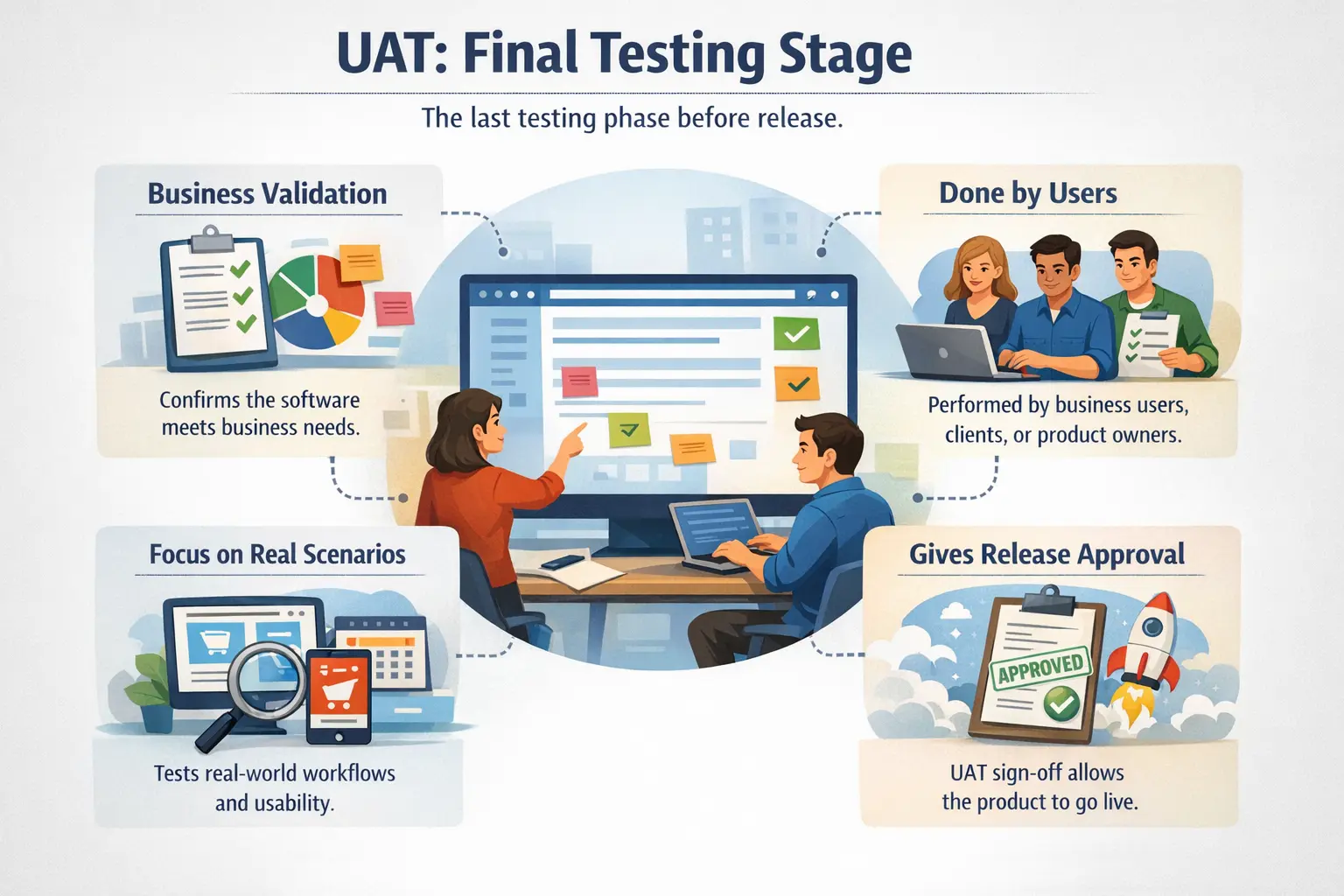
Acceptance Testing, commonly known as User Acceptance Testing (UAT), is the final level of testing conducted to confirm that a software system meets business requirements and is ready for release. While earlier testing levels focus on technical correctness, UAT focuses on business value and real-world usability. It answers a critical question: is this system acceptable to the business and its end users?
Why Acceptance Testing Matters in Real Projects
Acceptance Testing matters because software is not successful merely because it was coded correctly or tested technically. A product is successful only when it supports real business work, satisfies user needs, and is acceptable for release. Earlier testing levels such as unit testing, integration testing, and system testing provide technical and functional confidence. Acceptance Testing adds business confidence. It asks whether the delivered system is useful, usable, and ready for the people who will depend on it.
In real projects, a feature can pass system testing and still fail from a business perspective. The screens may work, the validations may pass, and the workflow may complete, but the process may not match how users actually operate. A report may generate successfully but not contain the fields the business needs. A payroll calculation may run technically but not align with company policy. An approval flow may work but not match the real authority structure. UAT helps uncover these gaps before go-live.
UAT also creates accountability for release readiness. When business users review the system and provide sign-off, they are confirming that the product is acceptable for real use. This does not mean that the software is perfect or that no minor issue exists. It means the business has reviewed the evidence, tested important workflows, understood remaining risks, and agreed that the system is ready to move forward.
The Business Focus of UAT
The strongest difference between UAT and earlier testing levels is focus. System testing asks whether the application works according to requirements. Acceptance Testing asks whether the application works for the business. This difference may sound small, but it is important. Requirements can be interpreted technically, while business readiness requires practical judgment from people who understand real operations.
For example, a tester may verify that an invoice can be generated, downloaded, and printed. A business user may notice that the invoice layout does not match the format required by customers, that tax fields are grouped incorrectly, or that the approval note is missing. These may not be obvious technical defects, but they can make the system unacceptable for business use. UAT gives the business a structured opportunity to identify such issues.
UAT is therefore not a replacement for QA testing. It is a business validation layer. QA teams should not hand over an unstable system to business users and expect UAT to find basic defects. UAT should begin after the system is stable enough for business evaluation. The purpose is to validate readiness, not to perform basic defect discovery that should have happened earlier.
Purpose of Acceptance Testing
The primary purpose of Acceptance Testing is to confirm that the delivered software aligns with business needs. It checks whether the product supports real workflows, real roles, realistic data, operational rules, and expected outcomes. It verifies whether the system can be used effectively by the people for whom it was built. This makes UAT a practical readiness assessment rather than only a testing activity.
Another purpose is to reduce go-live risk. Releasing a system without business acceptance can lead to serious disruption. Users may be unable to complete important tasks, teams may revert to manual workarounds, customers may receive incorrect outputs, and support teams may face urgent issues immediately after release. UAT helps identify these business risks before they reach production.
UAT also supports formal sign-off. Sign-off is not just a signature or email approval. It is the documented result of business validation. It shows that stakeholders have reviewed the system, tested agreed scenarios, considered open issues, and accepted the product for release. This sign-off is especially important in enterprise, client-facing, regulated, or contract-driven projects.
Who Performs UAT
UAT is usually performed by business users, product owners, clients, operations representatives, subject matter experts, or actual end users. These people understand business workflows deeply. They know how work is performed outside test documents. They can judge whether a system supports real usage, whether outputs are meaningful, and whether the process is acceptable for day-to-day operations.
Manual testers and QA teams still play an important supporting role. They may help prepare UAT scenarios, arrange the environment, coordinate test schedules, create or refresh test data, explain defect reporting procedures, support users during execution, and track issues found during UAT. However, QA should not be the only group deciding whether the system is acceptable. That decision belongs to the business stakeholders.
This separation of responsibility matters. Testers are skilled at finding defects and validating requirements, but business users are best placed to judge operational usefulness. When both groups work together, UAT becomes stronger. Testers provide structure and discipline, while business users provide domain judgment.
Scope of UAT
The scope of UAT should focus on business workflows, end-to-end user journeys, data correctness, role-based activities, business rules, reports, approvals, outputs, and operational usability. UAT should validate the tasks users will actually perform after release. It should not be limited to isolated features or technical checks. The question is whether the system works as a business tool.
A good UAT scope is based on real scenarios. For example, in a sales application, UAT may include creating a lead, converting it to an opportunity, generating a quote, obtaining approval, creating an order, and reviewing sales reports. In a payroll system, UAT may include employee setup, attendance import, salary calculation, tax deduction, payslip generation, and approval. These scenarios reflect real operations.
UAT should not focus deeply on internal code logic, API contracts, database schemas, or technical architecture. Those should already be covered by earlier testing levels. Business users should not be asked to debug technical implementation. They should validate whether the system supports business needs and whether remaining issues are acceptable for release.
Types of Acceptance Testing
Acceptance Testing can take different forms depending on the project. Business Acceptance Testing confirms that the product supports business processes and expected outcomes. User Acceptance Testing focuses on the needs of actual users and whether they can perform their work effectively. Operational Acceptance Testing validates readiness for production support, deployment, backup, monitoring, and operational procedures.
Regulatory Acceptance Testing is important in domains such as finance, healthcare, insurance, education, and government, where the product must comply with laws, policies, or standards. Contract Acceptance Testing applies when a vendor or delivery team must meet contractual obligations. Alpha and beta acceptance testing may involve selected internal or external users before wider release.
These forms have different emphasis, but they share a common goal: confirming that the product is suitable for real use. The exact approach should match the product, business risk, user group, and release context.
Entry Criteria for UAT
UAT should not begin too early. A common mistake is starting UAT when the build is still unstable, major defects are open, requirements are unclear, or test data is incomplete. This wastes business users' time and reduces confidence in the process. UAT entry criteria help ensure that business validation begins only when the system is ready for meaningful review.
Typical entry criteria include completion of system testing, resolution of critical and high-severity defects, availability of a stable build, prepared UAT scenarios, realistic test data, user access, configured UAT environment, and clear instructions for defect logging and support. Business users should also be available and aware of their responsibilities.
A production-like environment is especially important. UAT should resemble real usage as much as possible. If the environment, data, roles, or configuration are unrealistic, users may approve a system that behaves differently after release. Good entry control protects UAT quality and stakeholder trust.
Exit Criteria and UAT Sign-Off
UAT exit criteria define when acceptance testing can be considered complete. They usually include executed UAT scenarios, resolved or accepted critical defects, documented known issues, completed retesting, user satisfaction with key workflows, and formal sign-off from authorized stakeholders. These criteria create a clear stopping point and prevent vague release decisions.
Sign-off is a key output of UAT. It indicates that the business accepts the system for release based on the agreed scope and known risks. Sign-off may be provided by product owners, business leads, client representatives, compliance owners, or operational stakeholders depending on the project. The sign-off should be documented clearly.
UAT sign-off does not mean there are zero defects. Some low-priority issues may be accepted for a future release. The important point is that open issues are visible and consciously accepted. A release should not proceed because users were unaware of risk. It should proceed because the business has reviewed and accepted the risk.
UAT Compared to System Testing
System testing and UAT are closely related but not the same. System testing is usually performed by QA testers and focuses on verifying that the complete application meets requirements. UAT is performed by business users or stakeholders and focuses on whether the application is acceptable for business use. System testing asks, "Does the system work correctly?" UAT asks, "Does the system work for us?"
System testing may include broad functional, regression, UI, compatibility, and non-functional checks. UAT is narrower in some ways and deeper in business relevance. It looks at real workflows, real outputs, real decisions, and operational fit. A system may pass system testing but fail UAT because it does not match a business process or user expectation.
In a healthy testing lifecycle, system testing should prepare the product for UAT. UAT should not be used as a substitute for missing QA testing. If UAT users spend most of their time finding basic functional defects, the system was probably not ready for UAT.
A Practical Payroll UAT Example
Consider a payroll system. QA testers may verify that employee records can be created, salary calculations run, payslips generate, and reports export. In UAT, payroll users validate whether the system supports real payroll operations. They check salary rules, tax deductions, allowances, leave deductions, approval flows, payslip layout, compliance fields, and reporting needs from a business perspective.
A technically correct calculation may still fail UAT if it does not match company policy or local legal rules. A report may export successfully but fail UAT if finance users cannot reconcile it. A payslip may generate but fail UAT if the format does not match employee communication standards. These are business acceptance issues.
This example shows why UAT is valuable. It validates the system in the hands of people who understand the business impact. They can catch issues that testers may not recognize because testers may not own the business process.
Common Defects Found in UAT
UAT often reveals business rule mismatches, missing reports, incorrect workflow assumptions, unclear messages, role permission gaps, usability concerns, and data issues. These issues may not be obvious during technical testing because the system may behave according to documented requirements, while still not fitting real business operation.
Missing or incorrect reports are common. Business users often rely on reports for decisions, compliance, or reconciliation. If a report lacks a required column, groups data incorrectly, or uses a wrong calculation, UAT users are likely to identify the problem. Workflow issues are also common, especially when approval rules or handoffs differ from real operations.
Usability concerns may also appear in UAT. Users may find that a process takes too many steps, screen labels are unclear, mandatory actions are hard to find, or outputs are confusing. These issues may not be technical blockers, but they can affect adoption and productivity after release.
Common Pitfalls in UAT
One major pitfall is treating UAT as another QA test cycle. If testers write all scenarios, execute most tests, and make acceptance decisions, the process is not true UAT. Business users must be actively involved because they provide the acceptance judgment. QA can support, but the business must validate.
Another pitfall is poor test data. UAT needs realistic data that reflects real operations. If users test with artificial or incomplete data, they may miss important issues. For example, payroll users need realistic employee categories, tax conditions, leave balances, allowances, and deductions. Simplified data may hide business problems.
Delayed defect resolution is also harmful. If users report issues but fixes are slow or communication is unclear, stakeholder confidence drops. UAT requires quick triage, clear ownership, retesting support, and transparent status updates. Otherwise, UAT becomes frustrating and loses credibility.
Best Practices for Successful UAT
Successful UAT starts with preparation. Define UAT scope clearly, identify the right business users, prepare realistic scenarios, arrange the environment, create test data, explain the process, and define how defects will be reported. Users should know what they are validating and how much time is expected from them.
Scenarios should be business-oriented. They should reflect real tasks rather than technical test cases. Instead of asking users to verify every field individually, ask them to complete meaningful workflows: approve an invoice, process payroll, submit a claim, generate a compliance report, or close a customer request. This makes UAT more realistic and valuable.
Communication is also critical. UAT participants need support when they encounter issues. Testers or UAT coordinators should help distinguish defects from questions, environment issues, data problems, or training gaps. Clear communication helps users stay focused and helps the delivery team respond effectively.
Interview-Ready Understanding of UAT
In interviews, Acceptance Testing or UAT should be explained as the final testing level where business users validate whether the software meets business needs and is ready for release. A strong answer should mention that UAT is performed by business users, product owners, clients, or end users, with QA providing support.
The answer should also distinguish UAT from system testing. System testing validates the complete system against requirements, while UAT validates business acceptance and real-world readiness. UAT focuses on workflows, usability, business rules, outputs, and sign-off. It is not primarily about code correctness.
A concise interview answer could be: User Acceptance Testing is the final level of testing where business users validate that the system supports real business workflows and is acceptable for release. It provides formal business sign-off and helps ensure that the product is ready for production use.
Final Practical Guidance
Acceptance Testing should be treated as a business readiness activity. It is not simply another round of QA testing, and it should not be used to compensate for weak earlier testing. A stable system, realistic scenarios, engaged business users, and clear sign-off criteria are all required for meaningful UAT.
When UAT is done well, it protects the organization from releasing software that is technically complete but operationally unsuitable. It gives business users a voice before go-live and gives stakeholders confidence that the system is ready for real work. That is why UAT is one of the most important final checkpoints in the software delivery lifecycle.
At this stage, the goal is not to deeply analyze code or technical design, but to ensure the system actually supports how the business operates.
Purpose of Acceptance Testing
The primary purpose of UAT is to validate that the delivered software aligns with business needs. It confirms that real-world workflows are supported and that the system can be used effectively in day-to-day operations. UAT also serves as a final checkpoint before production release, ensuring that stakeholders are confident in the product.
Most importantly, UAT provides formal business sign-off. This sign-off indicates that the organization agrees the system is ready to go live.
Who Performs UAT
Unlike other testing levels that are mainly handled by QA teams, UAT is performed by business users, product owners, clients, or actual end users. These participants understand business processes deeply and can judge whether the system supports them correctly.
Manual testers still play an important supporting role. They help coordinate UAT activities, prepare UAT scenarios, arrange environments and test data, and log or track defects found by users. Their role is facilitative rather than evaluative.
Scope of UAT
UAT concentrates on business workflows, end-to-end scenarios, data correctness, and usability from a business perspective. It examines whether the system helps users complete their tasks effectively.
UAT does not focus on internal code logic or deep technical validation. Those concerns should already be addressed in earlier testing phases. UAT looks at the system as a business tool, not as a technical product.
Types of Acceptance Testing
Acceptance testing can take different forms depending on context. Business Acceptance Testing ensures alignment with business processes. User Acceptance Testing focuses on day-to-day user needs. Regulatory Acceptance Testing checks compliance with laws or standards. Contract Acceptance Testing verifies that contractual obligations are met.
All of these share the same goal: confirming suitability for real use.
Entry and Exit Considerations in UAT
UAT typically begins only after system testing is completed and a stable build is available. Major system defects should already be resolved, and realistic UAT scenarios should be prepared. Starting UAT too early reduces its effectiveness.
UAT concludes when business stakeholders are satisfied, critical defects are addressed, and formal sign-off is provided. This sign-off is often the final approval before production release.
UAT Compared to System Testing
System testing is performed by testers and focuses on verifying requirements. UAT is performed by business users and focuses on acceptance. System testing asks whether the system works correctly, while UAT asks whether the system works for the business.
The environments also differ slightly. UAT is often conducted in a production-like environment to simulate real usage as closely as possible.
A Practical Example
Consider a payroll system. In UAT, users validate salary calculations, tax deductions, payslip generation, and compliance rules. Even if the system is technically correct, it will fail UAT if it does not align with business policies or legal requirements.
This shows how UAT protects business interests.
Common Defects Found in UAT
UAT frequently reveals business rule mismatches, missing reports, incorrect workflows, and usability concerns. These issues may not be obvious in technical testing but become clear when real users interact with the system.
Common Pitfalls in UAT
One common mistake is treating UAT like another round of system testing. UAT should be business-driven, not tester-driven. Limited user involvement reduces its value. Poor test data can also hide real issues. Delayed defect resolution can weaken stakeholder confidence.
Successful UAT requires active business participation and realistic scenarios.
Interview Perspective
In interviews, UAT is usually described as testing that validates business requirements before release. A strong explanation highlights that it is performed by business users and results in formal approval. Mentioning real-world scenario validation shows practical understanding.
Key Takeaway
Acceptance Testing is about business confidence, not just technical correctness. It ensures the software is truly usable and valuable in real operations. When UAT is done well, it acts as a final safety net that protects both the business and its users before go-live.