Priority in Software Testing
Priority is one of the most important attributes in defect management because it determines the order in which defects should be fixed. During software testing, many defects may be discovered in a single release cycle, and not all of them can be fixed immediately. Some defects block business revenue, some disturb a key customer journey, some affect only internal users, and some are minor improvements that can safely wait. Priority gives the team a practical way to decide where development effort should go first.
Priority answers a direct and useful question in defect management: how soon must this defect be fixed? This question is different from asking how technically serious the defect is. A defect can be technically serious but not urgent for the current release, and a small-looking defect can become urgent if it affects a public page, an important customer, a legal commitment, or a feature that is about to go live.
While severity describes the technical or functional impact of a defect on the system, priority focuses on the business urgency of fixing it. Severity tells us what the defect does to the application. Priority tells us when the business needs the defect to be fixed. This distinction is important because software projects are not managed only by technical impact; they are also managed by timelines, customer commitments, market needs, compliance risk, and available capacity.
Priority ensures that defect fixing is aligned with business goals and release schedules. Without priority classification, teams may fix defects in the order they are reported, in the order they are easiest to fix, or based on personal preference. That creates risk because urgent business problems may remain open while less important issues are resolved first. Priority prevents this by creating a shared understanding of urgency.
In modern software projects, priority influences release planning, sprint planning, defect triage, escalation, hotfix decisions, and resource allocation. Manual testers, developers, product owners, business analysts, project managers, and support teams all use priority to understand what requires immediate attention and what can be deferred. A tester who understands priority can report defects in a more useful way because the report explains not only what failed, but also why the failure matters.
Understanding Priority
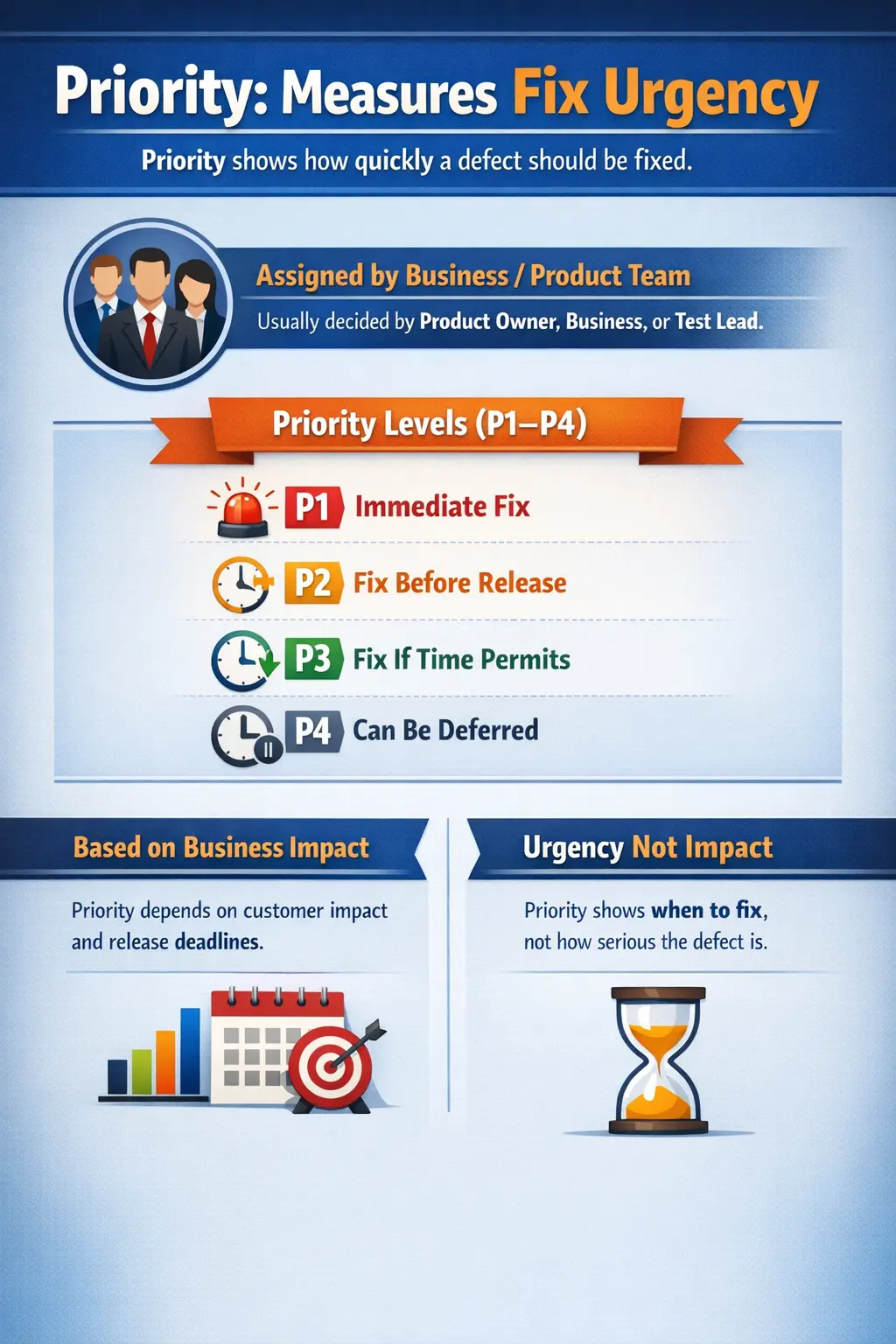
Priority represents the urgency with which a defect should be fixed. It determines how quickly the development team should address a reported issue compared with other open issues. When a defect is assigned high priority, the team is saying that the defect needs attention soon because delaying the fix may affect release readiness, user confidence, business operations, or customer commitments.
Priority is driven primarily by business impact and customer needs rather than only by technical considerations. When stakeholders assign priority, they consider release deadlines, customer visibility, contractual obligations, regulatory risks, marketing campaigns, operational dependencies, workaround availability, and the importance of the affected feature. A defect in a feature used by thousands of customers every day will usually receive greater urgency than a defect in a rarely used internal screen.
Priority is not necessarily related to how serious a defect is from a technical standpoint. A defect that causes an application crash may have medium priority if it occurs only in an unsupported browser or in an internal tool that is not part of the upcoming release. On the other hand, a spelling mistake on the home page may have high priority if the page is part of a public launch and the issue damages brand perception.
This is why priority should always be understood in context. The same defect may receive different priorities in different projects or at different times. A broken report may be low priority during early development, but high priority one day before a compliance audit. A small display issue may be low priority in a test environment, but high priority if it appears in a production banner seen by every user.
Priority helps teams manage limited development resources effectively. Since developers cannot fix all defects at the same time, the team needs an agreed order of work. Priority creates that order. It protects the project from spending too much time on low-value fixes while urgent customer-facing issues remain unresolved.
Priority also gives structure to communication. When a defect is marked as P1 or high priority, the meaning is clear: this item needs immediate attention, quick decision-making, and close tracking. When a defect is marked as low priority, the team understands that it can be planned later without blocking current goals. This shared language reduces confusion and helps stakeholders make faster decisions.
Purpose of Priority
Priority plays a crucial role in organizing defect fixing activities. Its most obvious purpose is to guide the order in which defects are addressed. When a project has dozens or hundreds of open defects, priority prevents the backlog from becoming a flat list where every item appears equally important. It separates urgent issues from less urgent ones.
Priority also helps teams protect business value. Software testing does not exist only to find defects; it exists to help the organization release useful, reliable software with controlled risk. If a defect prevents users from purchasing a product, submitting an application, viewing account information, or completing a payment, that defect has direct business impact. Priority ensures that such issues rise to the top of the fixing queue.
Another purpose of priority is to support release planning. Before a release, stakeholders must decide which defects must be fixed before shipment and which can be deferred. Priority provides a structured way to make those decisions. High-priority defects are usually expected to be resolved before release, while lower-priority defects may be documented as known issues, moved to a future sprint, or accepted with business approval.
Priority improves the efficient use of resources. Development capacity is always limited. Even in large teams, there are constraints around time, people, code review, testing effort, deployment windows, and business deadlines. Priority ensures that available effort is used where it reduces the most risk or creates the most value.
Priority also strengthens communication between technical teams and business stakeholders. A defect report that includes priority can be quickly understood by project managers and product owners. They can see whether the issue requires escalation, immediate planning, or routine backlog handling. This helps defect reports become decision-making tools rather than just technical records.
In Agile teams, priority is especially important because defect fixing competes with new feature development. A sprint may include user stories, enhancements, technical tasks, and defects. Priority helps the team decide which defects should enter the sprint and which can remain in the backlog. Without priority, teams may either overreact to every defect or ignore important issues until late in the release.
Who Assigns Priority
Priority is usually assigned by product owners, business analysts, test leads, project managers, or a defect triage group. These roles understand the business goals, release timelines, customer commitments, and operational risks behind the software. Because priority is a business urgency decision, it should not be made only from a technical viewpoint.
Testers often suggest priority when reporting defects. This suggestion is valuable because testers are the first people to observe the failure, reproduce it, and understand how it affects a user flow. A tester may identify that a defect blocks checkout, prevents login, corrupts data, or affects a high-visibility page. That information helps stakeholders assign the correct urgency.
However, the final priority decision often belongs to business or product stakeholders. A tester may think a defect is urgent because it looks serious during execution, but the product owner may know that the affected feature is not part of the current release. Similarly, a tester may report a cosmetic issue as low priority, but the business may raise it because the page is part of a public campaign.
Developers also participate in priority discussions, especially when the fix effort, technical risk, or dependency chain must be understood. A defect may appear simple from the outside but require a risky change in a shared component. Another defect may appear serious but be easy to fix quickly. Developer input helps the team balance urgency with practicality.
Many organizations use defect triage meetings to assign or adjust priority. During triage, representatives from testing, development, product, support, and sometimes business operations review open defects. They discuss user impact, release impact, workaround availability, fix complexity, and deadlines. The outcome is an agreed priority and often an owner or target release.
Priority can change over time as project conditions evolve. A defect that is low priority during early development may become high priority near release if it affects a feature included in the launch. A defect that is high priority today may become lower priority if the affected feature is removed from scope. Unlike severity, priority is dynamic and may be adjusted throughout the project lifecycle.
Common Priority Levels
Most software projects use a standard set of priority levels. Although naming conventions may vary between organizations, the general idea is similar. Some teams use P1, P2, P3, and P4. Others use Critical, High, Medium, and Low. Some defect tools allow custom labels such as Immediate, Urgent, Normal, and Deferred.
The important point is not the exact name of the level, but the meaning behind it. Every team should define priority levels clearly so that defects are classified consistently. If one person treats P2 as urgent and another person treats P2 as optional, the defect process becomes confusing. Good priority definitions reduce debate and make triage faster.
P1 – High or Immediate Priority
P1 defects represent the highest level of urgency. These defects must be fixed immediately because they block critical business operations, prevent product release, affect production users severely, or expose the organization to major business risk. A P1 defect usually requires quick attention from developers, testers, and decision-makers.
P1 defects often affect core functionality or high-visibility features. They may involve payment failure, login outage, order creation failure, data loss in a critical workflow, production downtime, or a legal compliance issue that must be resolved before release. If a release cannot proceed without fixing a defect, it is usually treated as P1.
For example, if users cannot complete payments in an e-commerce application, the defect is likely P1 because revenue is directly affected. If customers cannot log in after a production deployment, the issue is also P1 because the application is effectively unusable for a large user group. If a tax calculation is wrong before a finance release, the defect may be P1 because it creates legal or financial exposure.
P1 defects require active tracking. They are often discussed in daily status meetings, escalation calls, war-room sessions, or release readiness reviews. The expectation is not simply that the defect will be fixed someday; the expectation is that the team will treat it as an immediate priority until it is resolved, mitigated, or formally accepted by leadership.
Because P1 carries strong urgency, teams should use it carefully. If too many defects are marked P1, the label loses meaning. A healthy defect process reserves P1 for issues that genuinely require immediate action.
P2 – Medium or High Priority
P2 defects are important issues that should be fixed soon, often before release, but they may not completely block testing or development. These defects usually affect important functionality, visible workflows, or meaningful user experience, but the team may have a workaround or the impact may be limited compared with P1 defects.
A P2 defect may affect a secondary but still important workflow. It may cause incorrect formatting in a report, failure in a non-critical export, a broken validation message, or an issue that affects a subset of users. The business wants the defect fixed, but it may not require emergency handling unless the release date is close or the affected customer segment is important.
For example, if a reporting feature produces incorrect formatting but the displayed data remains accurate, the defect might be P2. If a user can complete registration but does not receive a welcome email, the issue may be P2 depending on the business process. If a dashboard chart is not loading but the raw data is still available elsewhere, the issue may be important but not necessarily release-blocking.
P2 defects are usually planned into the current release cycle or the nearest suitable sprint. They receive serious attention, but they are not always escalated like P1 issues. The team may compare P2 defects with other planned work and decide the best order based on risk, effort, and release goals.
A practical way to understand P2 is this: the defect matters and should not be ignored, but it does not always demand immediate interruption of all other work. It belongs near the top of the defect backlog, but it may be scheduled rather than treated as an emergency.
P3 – Low or Medium Priority
P3 defects represent issues that should be fixed if time permits or scheduled for a future release. These defects usually have limited business impact, affect non-critical features, or have reasonable workarounds. They are valid defects, but they do not require urgent action.
A P3 defect may involve minor alignment problems, wording inconsistencies, non-critical filter behavior, low-impact usability issues, or problems in rarely used administrative screens. The defect should be tracked because it affects quality, but it may be deferred when the team must focus on higher-priority risks.
For example, a minor layout issue in a rarely used administrative screen might be assigned P3. If a tooltip is missing on a field but users can still complete the workflow, the issue may be P3. If a report takes an extra few seconds to load in a non-critical module, the team may choose to fix it later.
P3 defects are often grouped into maintenance work, cleanup sprints, stabilization phases, or future backlog grooming. They may remain open across multiple releases if higher-priority work continues to take precedence. This does not mean P3 defects are unimportant; it means their urgency is lower compared with other project risks.
Teams should still review P3 defects periodically. A defect that is low priority today may become more important if customer usage increases, if the affected screen becomes part of a major workflow, or if multiple low-priority issues combine to create a poor user experience.
P4 – Very Low Priority
P4 defects represent the lowest level of urgency. These defects can be deferred for a long time if necessary and may be handled during future maintenance, enhancement, or cleanup work. They usually involve cosmetic improvements, minor wording changes, small display issues, or suggestions that do not affect functionality or business operations.
For example, a small spelling issue in a rarely viewed help page may be P4. A minor color mismatch in an internal screen, a spacing inconsistency that does not affect readability, or a low-value improvement suggestion may also fall into this category. These defects are recorded because they are real quality observations, but they do not need urgent fixing.
P4 defects are often useful for long-term product polish. They may be addressed when teams have available capacity or when a larger redesign touches the same area. In mature organizations, even low-priority defects are not ignored completely; they are managed through backlog review and cleanup planning.
The risk with P4 defects is accumulation. One minor issue may not matter, but many minor issues across the product can make the application feel unprofessional. Therefore, teams should not treat P4 as a trash bin. It should represent genuine low urgency, not forgotten work.
Clear definitions for P4 help teams avoid unnecessary escalation. If a defect does not affect users, release goals, compliance, data, revenue, or critical workflows, it is usually safe to classify it as very low priority.
Priority vs Severity
Priority and severity are closely related but fundamentally different concepts. Severity focuses on the impact of the defect on the system, while priority focuses on the urgency of fixing the defect. Severity asks what damage or failure the defect causes. Priority asks when the team needs to address it.
Severity is usually more technical and functional. A defect that crashes the application, causes data loss, prevents a critical workflow, or produces incorrect calculations has high severity because the system behavior is seriously affected. Testers often assign or suggest severity because they directly evaluate the failed behavior during testing.
Priority is business-driven. A defect becomes high priority when it affects release goals, user experience, revenue, compliance, customer commitments, or operational urgency. Product owners, business analysts, project managers, or triage groups usually decide priority because they understand the broader business context.
Severity usually remains stable unless the understanding of the defect changes. If a defect causes data corruption, it remains technically serious whether the release is today or next month. Priority, however, may change quickly. A defect can become more urgent as a release approaches or less urgent if a feature is removed from scope.
A high-severity, low-priority defect can occur when the technical impact is serious but the business urgency is low. For example, a crash in an old unsupported browser may be severe because the application fails, but low priority because the browser is not used by target customers. Similarly, a failure in an admin tool used once a quarter may be severe but not urgent during a customer-facing release.
A low-severity, high-priority defect can occur when the technical impact is small but the business urgency is high. A spelling mistake on a public landing page, an incorrect company logo, a broken promotional link, or a wrong label in a legal notice may not break functionality, but the business may require immediate correction because customers can see it.
Understanding this distinction prevents poor defect decisions. If teams confuse severity and priority, they may fix technically serious but low-business-impact defects first while urgent customer-facing issues wait. Effective defect management requires both attributes because together they show what the defect does and how quickly the team must act.
Real-Time Examples of Priority
Real-world examples help clarify how priority works in practice. Consider an e-commerce application where the checkout page fails for all users. This defect would likely be both high severity and high priority because it blocks revenue, affects customers directly, and prevents the core business flow from completing.
Now consider an application crash that occurs only when a rarely used report is opened by an internal administrator using a specific data filter. The severity may be high because the application crashes, but the priority may be medium if the report is not needed for the current release and only one internal user group is affected.
A spelling error on a company homepage is a classic example of low severity but high priority. The technical impact is low because the application still functions. However, the page is public, visible to customers, and tied to brand reputation. The business may ask for the issue to be fixed immediately.
A broken password reset email can also receive high priority. Even if users can still contact support to reset passwords manually, the defect affects account recovery and may increase support workload. If the product depends heavily on self-service access, the priority becomes even higher.
A minor alignment issue in a rarely used settings page may be low priority. It should be reported and tracked, but it may not be worth delaying a release. However, the same kind of alignment issue on a checkout confirmation page may receive higher priority because users see it at an important moment in the purchase flow.
These examples show why priority cannot be assigned mechanically. The same technical problem can have different urgency depending on user visibility, business timing, affected customers, workaround availability, and release goals.
Factors That Influence Priority
Several factors influence priority assignment, and teams should consider them together rather than in isolation. The first major factor is business impact. Defects that affect revenue, customer satisfaction, legal obligations, business operations, or executive commitments usually receive higher priority because the cost of delay is significant.
Customer visibility is another major factor. A defect visible to many users, important customers, external partners, or public audiences often receives higher priority than a defect hidden in an internal screen. Visibility matters because even small defects can reduce trust when they appear in important customer journeys.
Release timing strongly affects priority. A defect discovered months before release may be handled through normal planning, while the same defect discovered one day before release may become urgent. The closer the team gets to a release milestone, the more priority is influenced by go-or-no-go decisions.
Regulatory and contractual requirements can also raise priority. If a defect affects tax calculations, data privacy, consent handling, financial reporting, accessibility compliance, or contractual service commitments, the business may require faster resolution even if the defect is not frequently encountered.
Feature importance plays a large role. Defects in core business workflows usually receive higher priority than defects in optional or rarely used features. Login, payment, account management, order processing, reporting, and data submission workflows often receive close attention because many other activities depend on them.
Workaround availability may reduce priority. If users can complete the same task through another reliable path, the urgency may be lower. However, a workaround should not automatically make a defect low priority. The team must consider whether the workaround is practical, documented, acceptable for customers, and safe for business operations.
Development effort and fix risk may also influence priority planning. A high-priority defect may still require careful scheduling if the fix touches sensitive code or creates regression risk. Priority does not mean careless speed; it means the issue should be planned and handled with urgency appropriate to its business impact.
Historical defect patterns can influence priority as well. If a module has repeatedly caused production incidents, new defects in that area may receive higher attention. Customer complaints, support tickets, analytics data, and production monitoring can all provide evidence that changes the priority discussion.
Role of Manual Testers in Priority Management
Manual testers play an important role in priority management even though they may not make the final priority decision. A good tester does more than report that something failed. The tester explains the user flow, the affected feature, the frequency of occurrence, the business consequence, and whether there is a workaround. This information helps stakeholders judge urgency accurately.
When reporting a defect, testers should include clear steps to reproduce, expected and actual results, screenshots or logs where useful, environment details, affected data, and a suggested severity and priority if the project process allows it. The priority suggestion should be based on evidence, not emotion. A tester should explain why the defect is urgent instead of simply marking everything as high priority.
Testers also help distinguish between technical seriousness and business urgency. For example, a tester may report that a crash is high severity but explain that it occurs only in a low-use admin path. Conversely, a tester may report a low-severity text issue but explain that it appears on the public landing page for a campaign launch. This level of context improves triage decisions.
During defect triage meetings, manual testers provide practical evidence. They may demonstrate the defect, clarify reproduction conditions, confirm whether the issue is intermittent, explain whether related flows are affected, and identify regression areas that need retesting after the fix. This makes priority decisions more reliable.
Testers should also monitor priority changes. If a defect is deferred, the tester should know whether it remains in scope for later testing, whether it has a documented workaround, and whether it should appear in release notes or known issues. Priority management is not only about initial reporting; it also involves tracking the defect until a clear decision is made.
A strong manual tester understands business context. The tester learns which features are critical, which customers are important, which workflows generate revenue, which modules are legally sensitive, and which release goals matter most. This knowledge leads to better priority suggestions and more useful defect reports.
Priority in Defect Triage
Defect triage is the process of reviewing reported defects and deciding how they should be handled. Priority is one of the most important outcomes of triage. During triage, the team determines whether a defect must be fixed immediately, fixed before release, scheduled for a later sprint, deferred, rejected, duplicated, or converted into an enhancement.
A typical triage discussion includes testers, developers, product owners, business analysts, project managers, and sometimes support representatives. The tester explains the failure and impact. The developer explains likely cause, fix effort, and technical risk. The product or business representative explains release importance, customer impact, and business urgency.
Priority levels may be adjusted during triage based on new information. A defect initially reported as medium priority may become high priority when the product owner confirms that the affected flow is part of a contractual delivery. A defect reported as high priority may be lowered if the team discovers it affects only test data or an out-of-scope configuration.
Triage also helps avoid priority inflation. When every defect is marked urgent, teams lose the ability to focus. A disciplined triage process challenges high-priority labels and asks for evidence. What business process is blocked? How many users are affected? Is there a workaround? Is the issue in scope for this release? What happens if we defer it?
Defect triage improves transparency because priority decisions are made collaboratively. Instead of testers, developers, or managers making isolated assumptions, the team creates a shared view of urgency. This reduces conflict and helps everyone understand why certain defects are fixed before others.
Regular triage is especially useful in active projects where defects are found continuously. Without periodic review, the defect backlog becomes outdated. Priorities may no longer reflect the current release plan, fixed defects may remain open, and urgent items may be hidden among lower-value work.
Common Mistakes in Priority Assignment
One common mistake is assigning priority without understanding business context. A defect may look important from a tester's perspective, but without knowing the release scope, affected customer group, and business timeline, the priority may be inaccurate. Priority should be supported by context, not guesswork.
Another common mistake is confusing priority with severity. Teams sometimes mark every high-severity defect as high priority and every low-severity defect as low priority. This approach ignores business urgency. Severity and priority often relate to each other, but they are not the same and should be evaluated separately.
Some teams assign the same priority to all defects, which defeats the purpose of prioritization. If every defect is high priority, none of them are truly high priority. Developers then have no meaningful guidance about what to fix first. Clear priority distribution is necessary for effective backlog management.
Priority inflation is another serious problem. It happens when stakeholders mark too many defects as urgent to get attention. Over time, teams stop trusting the priority field. Developers may begin ignoring priority labels because they know the labels are exaggerated. This weakens the entire defect management process.
Another mistake is using priority to express frustration. A tester may be annoyed because a defect was missed earlier, or a stakeholder may be upset because the issue affects a favorite feature. But priority should not represent emotion. It should represent business urgency based on evidence and impact.
Teams also make mistakes when they do not review priority over time. A defect's urgency can change. If the release plan changes, if customers begin reporting the issue, or if a workaround becomes unavailable, priority should be revisited. Static priority values can become misleading in dynamic projects.
Finally, some defect reports do not explain why a priority was chosen. A high-priority defect without impact details creates confusion. Good reports include enough reasoning for stakeholders to understand urgency: affected users, blocked workflow, business risk, workaround status, and release impact.
Importance of Priority in Release Planning
Priority plays a central role in release planning because releases always involve risk decisions. Before releasing software, teams review open defects and decide whether the product is ready. Priority helps identify which open defects are release blockers, which require business approval, and which can be deferred safely.
High-priority defects usually must be resolved before release. If they remain open, the team may delay the release, create a hotfix plan, reduce release scope, or obtain explicit business approval to proceed. A release with unresolved high-priority defects carries visible risk and should not move forward casually.
Medium-priority defects may be accepted depending on the business situation. If there is a workaround, the affected user group is small, or the fix is risky, stakeholders may choose to defer the issue. The decision should be documented so that everyone understands the remaining risk.
Low-priority defects are often moved to future releases or maintenance backlogs. They may still affect product polish, but they usually do not prevent release. This helps teams avoid delaying important launches for issues that have little business impact.
Priority also supports go-or-no-go meetings. Instead of discussing hundreds of defects one by one, stakeholders can focus first on P1 and P2 defects. They can review aging high-priority defects, unresolved release blockers, customer-facing issues, and known risks. This makes release decisions more structured and less emotional.
Priority is also useful after release. If a production issue is discovered, priority helps determine whether it should be handled as an emergency hotfix, a planned patch, or a future improvement. Production support teams often use priority along with severity to decide response times and escalation paths.
In mature teams, priority trends become useful metrics. The number of open high-priority defects, the average age of P1 and P2 defects, the rate of priority changes, and the number of deferred high-priority issues can reveal release health. These metrics help leadership understand whether the product is stabilizing or accumulating risk.
Priority from an Interview Perspective
Priority is a common interview topic in software testing because it shows whether a candidate understands real project defect management. Interviewers often ask what priority means, who assigns it, how it differs from severity, and whether a defect can have high severity but low priority or low severity but high priority.
A simple interview answer is that priority defines how urgently a defect should be fixed. It is based on business impact, customer importance, release timelines, and stakeholder needs. Priority helps teams decide the order in which defects should be resolved.
A stronger answer explains that priority is business-driven while severity is technically driven. Severity describes the impact of the defect on the application, while priority describes the urgency of fixing it. Severity is often suggested by testers, while priority is usually decided by product owners, business analysts, project managers, test leads, or triage teams.
A good example for high severity and low priority is a crash in a rarely used module that is not part of the current release. The defect is technically serious, but the business may decide it can wait. A good example for low severity and high priority is a spelling mistake on the public homepage during a major campaign. The technical impact is low, but the business wants it fixed immediately.
Interviewers also value practical language. Instead of memorizing definitions only, candidates should explain how priority is used in defect triage and release planning. Mentioning P1, P2, P3, and P4 levels, explaining dynamic priority changes, and showing awareness of business context makes the answer stronger.
An interview-ready summary could be: priority is the urgency of fixing a defect based on business needs, customer impact, and release timelines. It helps teams decide what to fix first. Severity tells how badly the defect affects the system, while priority tells how soon the defect should be fixed.
Key Takeaway
Priority indicates how urgently a defect should be fixed based on business importance, customer impact, release timelines, and operational risk. It is not simply a technical label. It is a planning and decision-making tool that helps teams use limited development effort wisely.
Priority helps teams focus on the most important issues first and ensures that development effort aligns with business goals. It supports triage, sprint planning, release readiness, customer commitments, hotfix decisions, and defect backlog management. Without priority, defect handling becomes reactive and inefficient.
The most important idea is that priority reflects when a defect should be fixed, not how technically serious the defect is. Severity and priority should work together. Severity explains impact; priority explains urgency. A tester who understands both can report defects clearly, support better triage decisions, and contribute more effectively to product quality.