Defect States
Defect States – Complete Guide
Defect management is a critical part of software testing, and tracking defects effectively requires a well-defined workflow. Each defect reported during testing moves through several stages before it is resolved. These stages are known as Defect States, and they represent the current status of a defect at any point in time. Defect states provide visibility into the progress of defect resolution and clearly indicate who is responsible for the next action.
Defect States answer the important question: “Where is this defect right now?” By understanding defect states, teams can track defects efficiently, coordinate work between testers and developers, and ensure that no issue is overlooked.
A defect state reflects the exact condition of a defect within the defect life cycle. It shows whether the defect is newly reported, under investigation, fixed, or verified. In real-world projects, defect states are tracked using defect management tools such as Jira, Azure DevOps, or Bugzilla. These tools allow teams to update defect states and monitor progress throughout the testing process.
Understanding defect states is essential for manual testers because it helps them manage defects professionally and communicate effectively with development teams. It is also a common topic in software testing interviews and is considered fundamental knowledge for quality assurance professionals.
Understanding Defect States
A defect state represents the current position of a defect within the defect life cycle. Every defect has exactly one active state at any given time, and this state determines what action is required next and who is responsible for performing it.
When a tester reports a defect, it enters the first state of the workflow. As the defect progresses through review, fixing, and verification, its state changes accordingly. Each state change represents a specific activity performed by testers, developers, or project managers.
Defect states provide a structured method for tracking issues. Without clearly defined states, it would be difficult to know whether a defect is still under investigation, waiting for a fix, or already resolved.
Defect states also improve communication across teams. When stakeholders review defect reports, they can immediately understand the current progress simply by looking at the defect state.
Another important function of defect states is accountability. Each state indicates which team member is responsible for the next step, ensuring that defects are handled efficiently.
Defect states are useful because a defect is not solved in one action. It may need reporting, review, assignment, root cause analysis, code change, build deployment, retesting, regression checking, and closure. If these steps are not represented clearly, defects can remain stuck without anyone noticing. A state gives the team a simple and visible signal about the current condition of the issue.
In a busy release cycle, dozens or hundreds of defects may exist at the same time. Some may be waiting for developer action, some may be waiting for tester verification, some may be blocked by environment problems, and some may already be accepted for a future release. Defect states prevent all these issues from appearing as one unmanaged list. They turn the defect list into an organized workflow.
Defect states also help with reporting. A test lead can quickly identify how many defects are new, assigned, open, fixed, ready for retest, reopened, closed, rejected, or deferred. These counts help stakeholders understand product stability and release risk. Without states, defect reporting becomes vague and unreliable.
Core Defect States
Most software projects follow a set of standard defect states that represent the typical workflow from defect discovery to closure. Although the exact naming conventions may vary between organizations, the underlying concepts remain consistent.
New
The New state represents the beginning of the defect workflow. A defect enters this state when a tester discovers an issue and logs it into the defect tracking system.
At this stage, the tester documents the problem in detail. This includes the steps required to reproduce the defect, the expected behavior, the actual behavior, and the environment where the defect occurred. The tester also assigns severity and priority levels based on the impact of the issue.
The New state indicates that the defect has been reported but has not yet been reviewed or assigned. Typically, a test lead or project manager performs an initial review to confirm that the defect is valid and contains sufficient information.
The New state ensures that the issue is formally recorded and becomes part of the project’s defect tracking process.
A defect in New state should not be treated as ready for development until it has enough information. If the title is vague, steps are missing, test data is unclear, or the expected result is not explained, the defect may need clarification before assignment. Good teams review New defects quickly so valid issues move forward and weak reports are corrected early.
The New state is also where duplicate checking often begins. Before assigning a newly reported issue, leads or testers may check whether a similar defect already exists. If it does, the new defect may be linked to the original and marked Duplicate. This keeps tracking clean and avoids repeated work.
Assigned
After initial review, the defect moves to the Assigned state. In this state, responsibility for fixing the defect is assigned to a developer or development team.
Assignment is an important step because it establishes accountability. The assigned developer becomes responsible for analyzing and resolving the issue.
The Assigned state indicates that the defect has been accepted for investigation but development work has not yet started.
During this stage, developers may review the defect details and request additional information from testers if needed.
Assignment should be accurate. If a defect is assigned to the wrong developer or wrong team, it may sit without progress. In applications with multiple services, modules, and integration points, correct ownership is especially important. A defect in checkout may belong to UI, pricing service, payment gateway, database, or configuration depending on the root cause.
The Assigned state does not always mean active fixing has started. It means ownership has been identified. The assignee may still need to reproduce the issue, analyze logs, review code, or clarify expected behavior before moving the defect to Open or In Progress.
Open
The Open state indicates that the developer has accepted the defect and has started working on a fix. This state represents active development activity.
The developer analyzes the root cause of the defect and modifies the code to correct the problem. Sometimes developers discover that the issue is caused by configuration problems or data issues rather than coding errors.
The Open state is one of the most important stages in the defect workflow because it represents active progress toward resolution.
Communication between testers and developers often occurs during this stage to clarify defect behavior or verify assumptions.
In the Open state, developers usually perform root cause analysis. They may compare expected behavior with code logic, review recent commits, inspect API responses, check database values, or reproduce the issue in a local environment. If the defect is not reproducible, they may request more details before continuing.
Open defects are important for release monitoring because they represent unresolved problems. A large number of open high-severity defects usually indicates that the build is not stable enough for release. Project managers and QA leads often review open defects daily during active test cycles.
Fixed
Once the developer resolves the issue, the defect moves to the Fixed state. This state indicates that the developer believes the problem has been corrected.
The developer provides a new build containing the fix and updates the defect with information about the solution.
Although the defect is marked as Fixed, it is not yet considered resolved. The fix must be verified by testers before the defect can be closed.
The Fixed state represents the transition from development activity to testing activity.
A good Fixed-state update should mention the fixed build, a short summary of the change, and any related areas that may need regression. If the developer simply changes the state to Fixed without comments, testers may not know where to verify the fix or whether the fix is included in the latest build.
Fixed does not mean the defect is closed. It means the developer has completed a fix from the development side. The quality decision still depends on tester verification. This distinction is important because defects marked Fixed but not retested still represent unverified quality.
Re-Test or Ready for Test
After a fixed build becomes available, the defect moves into the Re-Test or Ready for Test state. This state indicates that the tester must verify the fix.
During re-testing, the tester executes the same steps that originally produced the defect. The goal is to confirm that the problem no longer exists.
Testers must carefully verify the fix because some defects may appear resolved but still occur under certain conditions.
Re-testing ensures that defect fixes are validated rather than assumed.
This state plays a critical role in maintaining software quality because it prevents unresolved issues from reaching production.
During Re-Test, the tester should use the same data, environment, and steps that originally exposed the defect. If the issue occurred only for a specific user role, browser, account type, or date condition, the retest should include that condition. Otherwise, the tester may miss the original failure path.
Retesting should also consider obvious nearby impact. If a fix was made in password validation, the tester may check registration, forgot password, and change password flows. This is not a full regression cycle, but it is a practical way to catch direct side effects before closure.
Closed
If the tester confirms that the defect has been successfully fixed, the defect moves to the Closed state.
The Closed state indicates that the defect has been resolved and verified. No further action is required.
Closing a defect represents the successful completion of the defect resolution process.
Closed defects remain in the defect tracking system as part of project documentation and historical records.
These records help teams analyze defect trends and improve future development processes.
Closing a defect should be done with care. The tester should confirm that the fix is available in the correct build, the original issue no longer occurs, and the expected behavior is achieved. If required, closure comments should mention the build tested and the result of retesting.
Closed defects remain useful even after release. Teams can analyze closed defects to identify which modules produced the most issues, which defect types were common, and which areas may need stronger regression or automation in future cycles.
Special Defect States in Real Projects
In addition to the core defect states, real-world projects often include additional states to handle special situations. These states provide flexibility and allow teams to manage defects more realistically.
Reopened
The Reopened state is used when a tester verifies a fix but finds that the defect still exists.
Reopened defects are returned to the developer for further investigation and fixing.
This state ensures that defects are not incorrectly marked as resolved.
Reopening a defect usually requires clear evidence that the issue persists.
A reopened defect should include updated retest details. The tester should mention the build, steps followed, actual result, and evidence showing that the issue still exists. A comment such as "still failing" is usually not enough. Developers need to understand whether the same issue remains or a related new issue appeared.
Reopened defects are important quality signals. If many defects are reopened, it may indicate incomplete fixes, weak developer testing, unclear defect reports, unstable environments, or misunderstood requirements. Teams should review reopened defects carefully instead of treating them as routine status changes.
Rejected
A defect may be marked as Rejected if it is determined not to be a valid defect.
This may occur when the reported behavior matches the intended system design or when the tester misunderstood the requirement.
Rejected defects should include clear justification to avoid confusion.
This state helps prevent unnecessary development work.
Duplicate
The Duplicate state is used when the same defect has already been reported.
Instead of fixing the issue multiple times, duplicate defects are linked to the original defect report.
Duplicate defects are then closed or marked accordingly.
This state helps maintain an organized defect tracking system.
Duplicate defects should not always be ignored completely. Sometimes a duplicate report provides additional evidence, such as another browser, another user role, or another environment where the same problem occurs. Good defect management links the duplicate to the original while preserving useful supporting information.
Deferred
A defect may be marked as Deferred if the decision is made to postpone fixing it until a future release.
Deferred defects are usually low priority issues that do not significantly impact functionality.
This state allows teams to focus on higher priority defects.
Deferred defects remain in the tracking system for future consideration.
Deferred does not mean forgotten. A deferred defect should have a reason, target release if known, and business agreement when the impact is meaningful. If deferred defects are not reviewed later, they become hidden technical or quality debt.
Not Reproducible
The Not Reproducible state is used when developers or testers cannot reproduce the reported defect.
This may occur if the defect depends on specific data or environment conditions.
Testers may need to provide additional details before the defect can be investigated further.
This state highlights the importance of clear defect reporting.
Not Reproducible should be used carefully. Some defects are intermittent and depend on timing, data, network speed, session state, cache, or third-party service behavior. Before closing such defects, teams should try to collect additional evidence and understand the conditions under which the issue appeared.
Won’t Fix
The Won’t Fix state is used when the decision is made not to fix a defect.
This decision is typically based on factors such as low impact, high fixing cost, or feature obsolescence.
Won’t Fix defects are documented for reference but remain unresolved.
This state reflects business or technical decisions.
Won’t Fix decisions should be transparent. If the issue is real but the team chooses not to fix it, the reason should be documented clearly. Common reasons include low user impact, high implementation risk, feature retirement, or business acceptance of the current behavior.
Defect State Flow
Defect states follow a logical sequence from reporting to resolution.
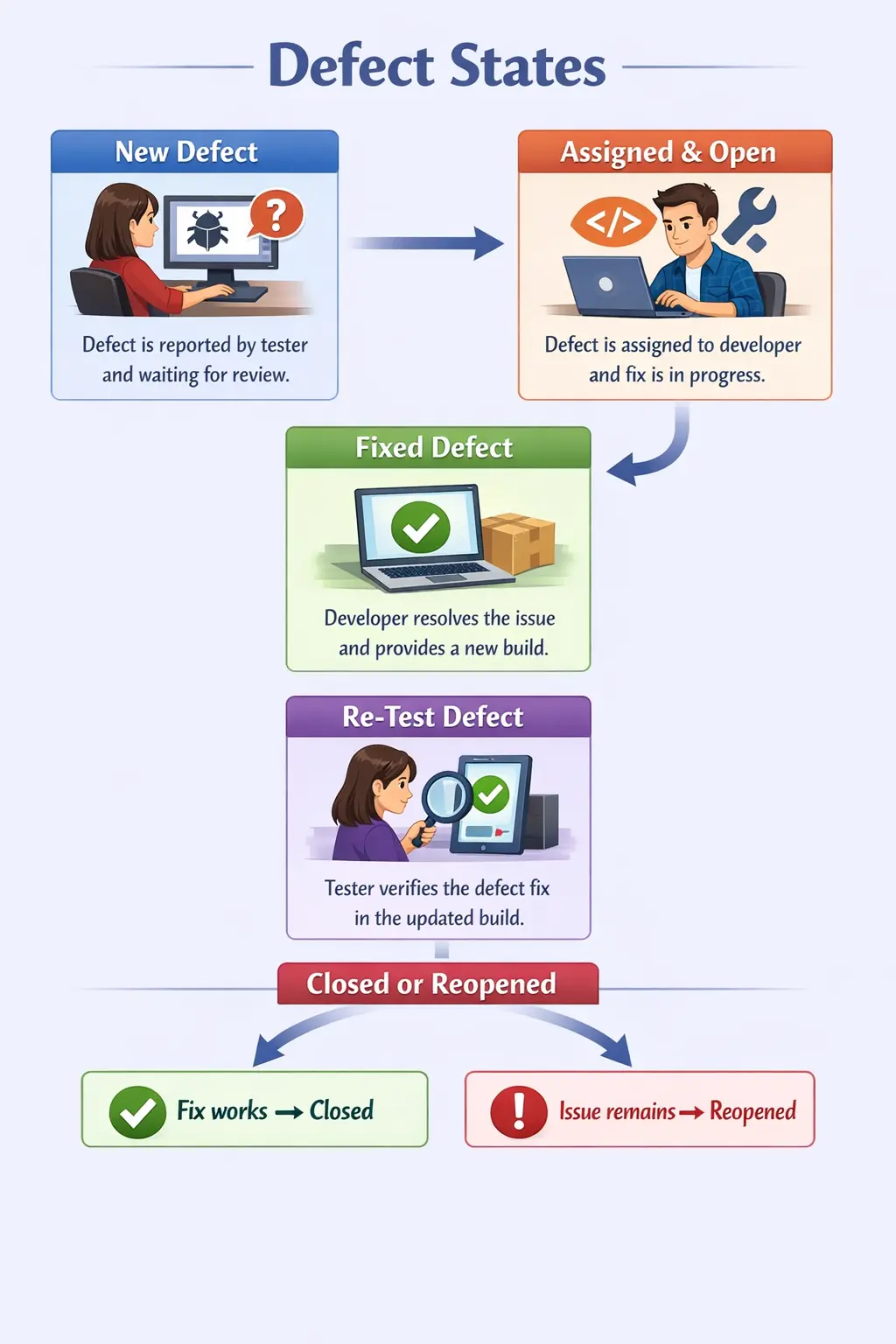
A defect begins in the New state and then moves to Assigned after review. Once development work begins, the defect becomes Open.
After the fix is implemented, the defect moves to Fixed and then to Re-Test when a new build becomes available.
If the tester confirms the fix, the defect is Closed. If the issue persists, the defect is Reopened.
This structured flow ensures that defects are handled consistently and efficiently.
The exact flow may vary across organizations. Some teams use New → Open → Fixed → Retest → Closed. Others use New → Assigned → In Progress → Resolved → Verified → Closed. The names differ, but the purpose is the same: every state should clearly show the current condition of the defect and the next expected action.
A workflow should be simple enough for the team to follow consistently. Too few states may hide important information, while too many states may slow the team with unnecessary administration. A good workflow reflects the real responsibilities of testers, developers, leads, and business stakeholders.
State transitions should also be controlled. For example, developers may move defects to Fixed, testers may move them to Closed or Reopened after retesting, and leads may decide Rejected or Deferred during triage. Clear transition ownership prevents accidental closure or inappropriate status changes.
Ownership by Defect State
Each defect state corresponds to a specific owner responsible for the next action.
In the New state, the tester owns the defect because they reported it.
During the Assigned state, the test lead or manager typically assigns responsibility.
In the Open and Fixed states, the developer owns the defect because they are responsible for fixing it.
During the Re-Test state, the tester again becomes responsible for verifying the fix.
In the Closed state, the tester confirms that the issue is resolved.
States such as Rejected or Deferred may involve developers, testers, or business stakeholders.
Clear ownership ensures accountability throughout the defect resolution process.
Ownership is one of the most practical benefits of defect states. If a defect remains in New, the review owner must act. If it remains in Assigned or Open, the developer or development team must act. If it remains in Re-Test, QA must act. This makes delay visible and helps leads remove bottlenecks.
Ownership may also shift based on the outcome. If a developer marks a defect Not Reproducible, ownership may return to the tester to provide more details. If a defect is Deferred, ownership may shift to product management for release planning. If a defect is Duplicate, the original defect owner continues the main resolution path.
Defect States and Triage
Defect triage is the activity where reported defects are reviewed and decisions are made about validity, ownership, severity, priority, and next state. Triage is closely connected to defect states because many state changes happen as a result of triage decisions.
During triage, a New defect may become Assigned, Rejected, Duplicate, Deferred, or Need More Information. An Open defect may be escalated if it blocks release. A Fixed defect may be prioritized for retesting. A Reopened defect may receive higher attention if the same fix failed multiple times.
Triage decisions should be documented in the defect record. If a defect is rejected, the reason should be clear. If it is deferred, the business reason should be visible. If priority changes, the reason should be mentioned. This keeps defect state changes transparent.
Manual Tester Responsibilities
Manual testers play an essential role in managing defect states.
Testers begin by logging defects in the New state with accurate and complete information. Clear reproduction steps are essential for efficient defect resolution.
During the Re-Test state, testers verify defect fixes carefully. Proper validation prevents unresolved issues from being closed incorrectly.
If a defect persists, testers must reopen it with clear evidence.
Testers must also update defect states promptly to maintain accurate reporting.
Effective defect state management improves testing efficiency and communication.
Testers should update defect states promptly. If a fix is verified but the defect remains in Re-Test, reports become inaccurate. If a failed retest is not reopened quickly, developers may assume the issue is resolved. Accurate status updates support reliable defect reporting.
Testers should also add useful comments during state changes. When reopening a defect, they should explain what was retested and what failed. When closing a defect, they can mention the build where it was verified. These comments create a helpful history for future reference.
Manual testers also help identify incorrect states. For example, if a defect is marked Fixed but no build is available, it may not be ready for retest. If a defect is marked Rejected without proper justification, it may need clarification. Testers should pay attention to workflow accuracy, not only test execution.
Defect State Metrics
Defect states produce useful metrics for project monitoring. Teams can count how many defects are New, Assigned, Open, Fixed, Re-Test, Reopened, Closed, Deferred, or Rejected. These counts help identify the current health of the release.
A high number of New defects may indicate that triage is delayed. A high number of Open defects may indicate development backlog or product instability. A high number of Fixed defects waiting for Re-Test may indicate QA capacity constraints or build delays. A high number of Reopened defects may indicate poor fix quality.
Defect aging is another useful metric. It shows how long defects stay in a particular state. A critical defect open for several days may require escalation. A defect stuck in Need More Information may require a conversation between tester and developer. State metrics help teams act before issues become release blockers.
Defect States in Agile Projects
Agile teams may use lighter workflows, but defect states remain important. Bugs found during a sprint may be discussed quickly, but defects that affect acceptance, regression, or release quality should still be tracked with clear states.
In Agile boards, defects may appear alongside user stories and tasks. A story should not be considered Done if critical defects linked to it remain Open or Reopened. Defect states help the team understand whether the story is truly ready for acceptance.
Agile teams often use statuses such as To Do, In Progress, Ready for QA, Done, or Blocked. These may differ from traditional defect states, but they should still communicate ownership and next action clearly.
Common Mistakes in Managing Defect States
One common mistake is closing defects without proper re-testing. This can allow unresolved defects to reach production.
Another mistake is reopening defects without sufficient proof. Reopened defects should always include clear evidence.
Valid defects are sometimes incorrectly marked as rejected due to misunderstanding requirements.
Delays in updating defect states can cause confusion and inaccurate reporting.
Avoiding these mistakes improves defect tracking accuracy.
Another common mistake is treating Fixed as the same as Closed. Fixed means the developer believes the issue is resolved. Closed means the tester has verified the fix. If teams skip the verification step, unresolved defects may reach production.
Some teams also leave defects in outdated states. A defect may be fixed but still show Open, or verified but still show Re-Test. This creates inaccurate reports and weakens stakeholder trust. State hygiene is an important part of defect management.
Another mistake is using special states without explanation. Rejected, Deferred, Duplicate, Not Reproducible, and Won’t Fix should include comments. Without explanation, these states create confusion and may lead to repeated discussions.
Best Practices for Defect States
A good defect workflow should define every state clearly. Team members should know what New, Assigned, Open, Fixed, Re-Test, Closed, Reopened, Deferred, Rejected, Duplicate, and Not Reproducible mean in their project. Clear definitions reduce confusion.
The workflow should also define who can move a defect from one state to another. Testers should usually close defects only after successful retesting. Developers should usually move defects to Fixed after code changes are completed. Leads or product owners may decide Deferred or Won’t Fix based on business impact.
Teams should review defect states regularly. Daily defect review helps identify aging defects, blocked defects, fixes waiting for retest, and reopened defects. Regular review keeps the workflow moving and prevents important issues from being forgotten.
Interview Perspective
Defect states are frequently discussed in software testing interviews.
A simple answer typically explains that defect states represent the stages a defect passes through during its lifecycle.
A more detailed answer describes states such as New, Open, Fixed, Re-Test, Closed, and Reopened.
Interviewers often expect candidates to explain defect ownership and responsibilities.
Understanding defect states demonstrates practical testing experience.
In interviews, a strong answer should explain that defect states show the current status of a defect in its life cycle. Common states include New, Assigned, Open, Fixed, Re-Test, Closed, and Reopened. Additional states such as Duplicate, Rejected, Deferred, Not Reproducible, and Won’t Fix may be used in real projects.
If asked about ownership, explain that testers usually own New reporting, Re-Test verification, Closed confirmation, and Reopened evidence. Developers usually own Assigned, Open, and Fixed states. Leads, managers, or product owners may be involved in triage decisions such as Deferred or Rejected.
If asked why defect states are important, explain that they provide visibility, accountability, workflow control, release readiness information, and accurate reporting. This connects the topic to real project value rather than memorized state names.
Key Takeaway
Defect States represent the current status of a defect within the defect life cycle. They provide visibility into defect progress and clearly indicate who is responsible for the next action.
Well-defined defect states improve communication, accountability, and quality control. They ensure that defects are tracked systematically from discovery to closure.
Effective management of defect states is essential for successful software testing and high-quality software delivery.
Defect states are valuable only when the team uses them honestly and consistently. New defects must be reviewed, assigned defects must have ownership, open defects must be investigated, fixed defects must be retested, reopened defects must include evidence, and closed defects must represent verified resolution.
For manual testers, understanding defect states is a core professional skill. It helps testers communicate clearly, update reports accurately, verify fixes responsibly, and support better release decisions. A clean defect-state workflow turns defect handling from confusion into a controlled quality process.