Defect / Bug Report for Software Testing
A Defect Report, also known as a Bug Report, is one of the most important artifacts produced during software testing. It serves as the primary communication channel between testers and developers for identifying, analyzing, and resolving issues in a software application. A well-written defect report allows developers to understand the problem quickly, reproduce it reliably, and implement an effective fix.
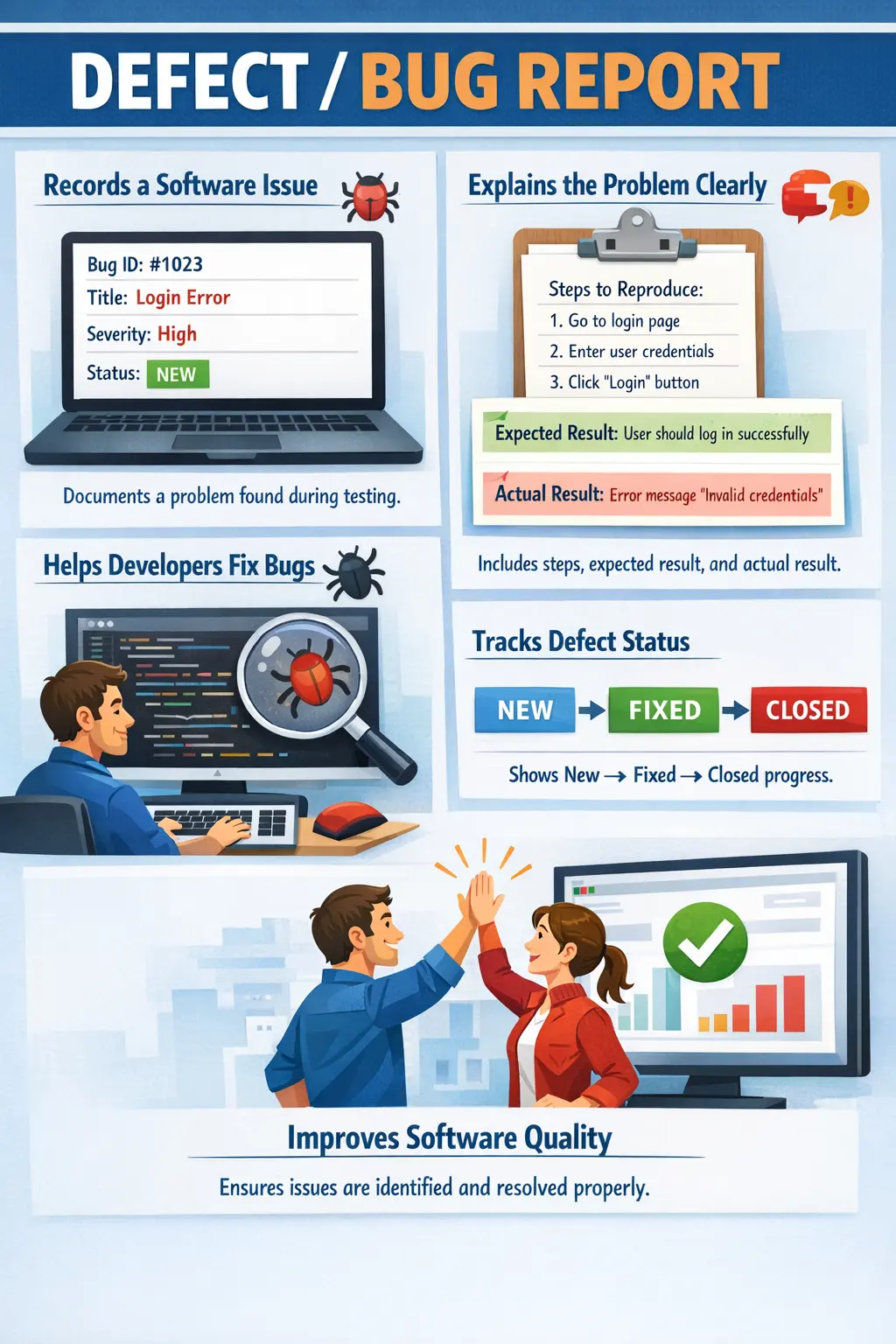
A defect report is a formal record that documents an issue found during testing, describing how the actual behavior of the software differs from the expected behavior. Every defect report captures essential information such as the environment, build version, steps to reproduce the issue, and the observed results.
A defect report answers a fundamental question in software testing:
“What is wrong, where is it happening, and how can it be reproduced?”
In real-world projects, hundreds or even thousands of defects may be logged during a release cycle. Proper defect reporting ensures that these issues are tracked systematically and resolved efficiently.
Understanding Defects in Software Testing
A defect represents any deviation between expected and actual system behavior. Whenever the software behaves differently from what the requirements specify, a defect is said to exist. Defects may arise due to coding mistakes, design issues, misunderstood requirements, or integration problems.
Not every defect is equally important. Some defects may be minor visual issues, while others may cause application crashes or data loss. The defect report captures enough detail to allow teams to evaluate the impact and urgency of each issue.
The defect report also acts as a historical record. It provides traceability for issues discovered during testing and helps teams analyze defect trends over time. This information is valuable for improving development processes and preventing similar issues in the future.
Without structured defect reporting, defect resolution becomes chaotic and inefficient.
In real projects, defects are not just technical observations. They affect schedules, release decisions, customer confidence, and business risk. A login defect may block all users from entering the system. A calculation defect may create financial loss. A small spelling mistake may be harmless in an internal admin screen but serious on a public homepage before a marketing launch. The defect report gives the team a structured way to understand that context.
A defect report also prevents loss of information. When a tester observes a problem, many details matter: the test data used, the browser, the build, the exact action sequence, the expected behavior, the observed behavior, and any supporting logs. If these details are not captured immediately, they may be forgotten or miscommunicated. A proper defect report preserves the evidence needed for analysis.
Defect reporting is also a collaboration activity. Testers do not write reports to blame developers. Developers do not review reports to reject tester findings. Both roles use the report to understand the gap between expected and actual behavior. When the report is clear, neutral, and evidence-based, the team can focus on solving the problem rather than debating what happened.
Purpose of a Defect / Bug Report
The primary purpose of a defect report is to communicate issues clearly to developers. Developers rely on defect reports to understand what went wrong and how to reproduce the problem. A clear defect report reduces the time required to analyze and fix the issue.
Another important purpose of defect reporting is enabling quick reproduction. Developers must be able to reproduce the issue consistently in order to diagnose the root cause. Detailed steps and environment information make reproduction possible.
Defect reports also help track defect status and resolution. Each defect moves through a lifecycle from discovery to closure. The defect report serves as the central record for tracking progress.
Accountability is another important aspect of defect reporting. Defects are assigned to responsible team members, and progress is monitored until resolution. This ensures that issues are not overlooked.
Defect reporting also contributes to overall product quality. By systematically identifying and fixing defects, teams improve software reliability and user satisfaction.
Defect reports also support impact analysis. When a defect is linked to a module, requirement, test case, and build version, the team can understand which business area is affected. This helps product owners decide whether the defect must be fixed immediately, whether it can be deferred, or whether a workaround is acceptable for the release.
Another purpose is building a knowledge base. Past defect reports reveal recurring patterns. If many defects appear in the same module, the team may need code review, refactoring, better unit testing, clearer requirements, or improved design. If many defects are caused by environment issues, the team may need stronger deployment controls. Defect reports therefore help improve the process, not only the product.
Defect reporting also supports audit and compliance needs in regulated projects. In banking, healthcare, insurance, and government systems, teams may need evidence that defects were identified, assessed, fixed, retested, and closed properly. A complete defect report provides this traceability.
Key Components of a Defect Report
A well-written defect report contains several essential components. These components ensure that the defect is described clearly and completely.
One of the most basic elements of a defect report is the Defect ID. This is a unique identifier assigned to each defect. The Defect ID allows teams to track and reference the defect easily throughout the project lifecycle.
The Title or Summary provides a short description of the issue. A good summary allows readers to understand the problem quickly without reading the entire report. The summary should clearly describe the defect in a few words.
The Module or Feature field identifies the part of the application where the defect occurs. This information helps developers locate the problem area quickly.
Environment details describe where the defect was observed. Environment information typically includes operating system, browser, database version, and hardware configuration. Many defects occur only in specific environments, so this information is essential.
The Build Version identifies the exact version of the application where the defect was found. This ensures that developers analyze the correct version of the software.
Steps to Reproduce describe the exact sequence of actions required to trigger the defect. This section is one of the most important parts of the defect report. The steps must be clear, precise, and easy to follow.
The Expected Result describes how the system should behave according to requirements. This establishes the correct behavior against which the defect is evaluated.
The Actual Result describes what actually happened during testing. This section explains the incorrect behavior observed by the tester.
Severity indicates the impact of the defect on the system. Severity levels typically range from minor issues to critical system failures.
Priority indicates how urgently the defect should be fixed. Priority is usually determined based on business impact and release timelines.
Status shows the current state of the defect in its lifecycle. Status values may include New, Open, Fixed, Re-tested, Closed, or Reopened.
Attachments such as screenshots, logs, and videos provide additional evidence. Visual evidence helps developers understand issues more quickly.
Together, these components create a complete and useful defect report.
Some teams also include requirement ID, test case ID, assigned developer, reported by, reported date, fixed build, retest date, root cause, and resolution comments. These fields are useful when defects must be traced across the full lifecycle. For example, linking a defect to a failed test case helps the tester retest it later, while linking it to a requirement helps stakeholders understand business impact.
The defect title deserves special attention because it is the first thing most people read. A vague title such as "Login issue" is weak. A stronger title is "User is not redirected to dashboard after successful login." This title identifies the action and the incorrect result. Good titles reduce triage time because the team can understand the issue quickly.
Steps to reproduce should be written as a clean sequence. Each step should describe one action. If special data is required, that data should be included or referenced clearly. If the defect happens only under specific conditions, those conditions should be mentioned before the steps. A defect that cannot be reproduced is difficult to fix, even if it is real.
Attachments should support the report, not replace it. A screenshot may show the error, but it may not show how the tester reached that state. A video may show the flow, but the written steps are still needed for quick review and searching. Logs may show technical details, but the expected and actual business behavior must still be explained in plain language.
Severity vs Priority
Severity and priority are two important attributes of a defect report, but they represent different concepts. Understanding the difference is essential for software testers.
Severity refers to the impact of the defect on the system. A high-severity defect may cause system crashes, data corruption, or security vulnerabilities. A low-severity defect may involve minor visual issues.
Priority refers to how urgently the defect must be fixed. Priority is often determined by business needs and release schedules.
A defect with high severity and high priority must be fixed immediately. For example, an application crash during login is both severe and urgent.
Sometimes severity and priority do not match. A minor cosmetic issue on the homepage may have low severity but high priority if it affects customer perception.
Severity is usually assigned by testers because they understand the technical impact. Priority is often assigned by product owners or project managers because they understand business impact.
Understanding severity and priority helps teams allocate resources effectively.
Severity is usually tied to the damage caused by the defect. A critical severity defect may stop the system completely, corrupt data, expose sensitive information, or block a core business process. A major severity defect may break an important feature but allow some work to continue. A minor severity defect may affect display, wording, or non-critical usability. These levels help teams understand technical and functional impact.
Priority is tied to timing and business urgency. A defect may be low severity but high priority if it appears on a public landing page before a major release. A defect may be high severity but lower priority if it occurs only in a rarely used admin function that is not part of the upcoming release. Priority helps decide what should be fixed first.
Testers should assign severity carefully and avoid exaggeration. If every defect is marked critical, the classification loses value. At the same time, testers should not understate serious issues. A defect that causes wrong financial calculation, data loss, security exposure, or blocked user access must be marked with appropriate severity so it receives attention.
In many teams, testers propose severity while product owners, project managers, or triage groups decide priority. This separation is healthy because severity reflects impact on the application, while priority reflects business planning. Both values together guide defect resolution.
Writing an Effective Defect Report
Writing a good defect report requires clarity and precision. The goal is to provide enough information for developers to reproduce and fix the issue quickly.
Clear and concise language is essential. The defect description should be easy to understand without unnecessary technical jargon.
Exact steps must be provided. Each step should be described in the correct order so that developers can reproduce the issue consistently.
Evidence should always be included whenever possible. Screenshots, logs, and videos provide strong support for defect reports.
Simple language is preferred over complex descriptions. The goal is effective communication rather than technical complexity.
Assumptions and blame should be avoided. The defect report should describe facts rather than opinions. Statements such as "developer mistake" should never appear in defect reports.
Neutral and professional communication improves collaboration between testers and developers.
Effective defect reporting begins before the report is created. The tester should first confirm the issue, repeat the steps if possible, check whether the behavior violates a requirement or accepted expectation, and ensure that the environment is correct. Reporting too quickly without basic verification can create noise. Waiting too long can cause loss of detail. A balanced tester verifies enough to be confident and then reports promptly.
A good report should explain the difference between expected and actual behavior clearly. The expected result should not be invented randomly; it should come from requirement documents, acceptance criteria, user stories, design specifications, business rules, or agreed product behavior. If the expected result is uncertain, the tester should mention the uncertainty or clarify with the team before logging a formal defect.
The actual result should describe what happened, not what the tester thinks caused it. For example, "application displays a blank page after clicking Submit" is better than "backend service is broken" unless the tester has evidence for the backend failure. Reports should separate observation from diagnosis. Developers can investigate root cause after reproduction.
Test data must also be included when relevant. If a defect happens only for a certain user role, customer type, product, date, amount, or file, that information is essential. Many defects are data-dependent. Without the exact data, developers may try normal data and conclude that the issue does not exist.
Before Logging a Defect
Before logging a defect, the tester should confirm that the issue is not caused by incorrect test data, wrong environment, outdated build, missed configuration, or misunderstanding of requirements. This does not mean testers must solve the issue themselves. It means the report should be based on a reasonable level of validation.
The tester should check whether the same issue already exists in the defect tracking tool. Duplicate defects waste time and split discussion across multiple records. If the issue already exists, the tester can add additional evidence, environment details, or reproduction notes to the existing defect instead of creating a new one.
The tester should also decide whether the observed behavior is truly a defect, a change request, a usability suggestion, or a question. A defect means the application differs from expected behavior. A change request means the product may work as designed but needs improvement. Separating these categories keeps defect tracking clean.
Real-Time Example of a Defect Report
Consider a defect found during login testing.
The tester opens the login page and enters valid credentials. After clicking the login button, nothing happens. The user is not logged in, and no error message appears.
The defect report may include the following information:
The defect title may be "Login button not responding after entering valid credentials."
The steps to reproduce may include opening the login page, entering valid credentials, and clicking the login button.
The expected result may state that the user should be logged in successfully and redirected to the dashboard.
The actual result may state that clicking the login button produces no response.
Such a report provides enough information for developers to analyze the problem.
A more complete version of the same report would include the build version, browser, user role, test credentials or account reference, timestamp, screenshot of the login page after clicking the button, and console or network errors if available. These details help developers determine whether the issue is related to frontend behavior, backend response, session creation, user account state, or environment configuration.
Another example may involve an e-commerce checkout defect. The tester adds an item to the cart, applies a valid coupon, proceeds to payment, and observes that the final amount does not include the discount. The expected result is that the coupon discount should be applied before payment. The actual result is that the full amount is charged. This defect is more serious than a display issue because it affects financial correctness.
In a reporting module, a tester may find that exported Excel data does not match the filtered screen results. The report should include the selected filters, date range, user role, number of records shown on screen, exported file, and the mismatch observed. Without these details, developers may not know which filter combination caused the defect.
Defect Lifecycle Overview
Defects move through a series of states from discovery to closure. This sequence of states is known as the defect lifecycle.
When a tester identifies an issue, the defect is initially created with a status of New. After review, the defect is assigned to a developer and marked as Assigned or Open.
The developer analyzes the defect and implements a fix. Once the fix is completed, the defect status is updated to Fixed.
The tester then performs re-testing to verify the fix. If the defect is resolved successfully, the status is changed to Closed. If the issue still exists, the defect is Reopened.
The defect lifecycle ensures systematic tracking and resolution of issues.
Some defects may also move through statuses such as Duplicate, Deferred, Rejected, Cannot Reproduce, Need More Information, or Won't Fix. These statuses are normal in real projects, but they must be used carefully. A rejected defect should include a clear reason. A deferred defect should include business approval or release planning context. A cannot reproduce defect should mention what was tried and what information is missing.
Retesting is an important part of the lifecycle. When a developer marks a defect as fixed, the tester should verify the fix using the same data and steps that originally exposed the defect. If the issue is resolved, the defect can be closed. If the issue still occurs, it should be reopened with updated evidence. Retesting confirms the specific fix, while regression testing checks whether the fix caused side effects elsewhere.
The lifecycle also supports accountability. Each status tells the team where the defect currently stands. If defects remain open for too long, the team can review them in triage. If many defects are reopened, the team may need better root cause analysis or developer testing. If many defects are rejected due to unclear requirements, the team may need better requirement review.
Common Defect Types
Defects may occur in many different forms. Functional defects occur when application features do not behave according to requirements. These defects often affect business workflows.
User interface defects involve visual or layout issues. Examples include misaligned fields and incorrect fonts.
Performance defects occur when the application responds slowly or becomes unstable under load.
Security defects involve vulnerabilities that allow unauthorized access or data exposure.
Data defects occur when data is stored or processed incorrectly.
Understanding defect types helps testers classify issues properly.
Integration defects occur when two or more systems fail to communicate correctly. For example, an order may be placed successfully in the application but not sent to the warehouse system. These defects are common in enterprise applications where APIs, databases, queues, and external services are involved.
Validation defects occur when the system accepts invalid input or rejects valid input. Examples include allowing an invalid email address, accepting a negative quantity, rejecting a valid phone number, or failing to enforce mandatory fields. These defects affect data quality and user experience.
Workflow defects occur when a sequence of business steps does not behave correctly. For example, an approval request may skip the manager stage, a cancelled order may still be shipped, or a password reset link may remain valid after use. These defects often require strong business understanding to identify.
Compatibility defects occur when the application behaves differently across browsers, devices, operating systems, or screen sizes. A feature may work in Chrome but fail in Safari, or a layout may appear correctly on desktop but break on mobile. Capturing environment details is essential for these defects.
Common Mistakes in Defect Reporting
One common mistake is writing vague defect descriptions. Descriptions such as "Application not working" do not provide enough information.
Missing steps to reproduce is another frequent problem. Developers cannot fix defects that they cannot reproduce.
Incorrect severity or priority assignments can mislead project teams. Overstating severity may reduce credibility, while understating severity may delay critical fixes.
Lack of screenshots or logs is another common issue. Visual evidence often speeds up defect resolution.
Poorly written defect reports waste time and create confusion.
Avoiding these mistakes improves defect management efficiency.
Another common mistake is combining multiple unrelated issues in one defect report. For example, a tester may write one report saying that the login button is misaligned, the forgot password link is broken, and the error message is unclear. These may all be on the same page, but they are separate issues. Combining them makes assignment, fixing, retesting, and closure difficult.
Some reports also fail because they describe only the tester's frustration rather than the product behavior. A statement such as "this page is completely wrong" does not help. A better report says which field, rule, message, calculation, navigation, or response is incorrect. Defect reporting should be specific and evidence-based.
Another mistake is logging defects without checking the latest build. A defect found in an older build may already be fixed in the current build. Reporting it again wastes time and creates duplicate work. Testers should verify the build version before logging, especially in projects with frequent deployments.
Poorly chosen severity is also a problem. Marking a cosmetic issue as critical may reduce credibility. Marking a data corruption issue as minor may delay a serious fix. Testers should understand the impact of the issue and classify it responsibly.
Defect Reproducibility
Reproducibility is one of the most important qualities of a defect report. A reproducible defect can be triggered again by following the same steps under the same conditions. Developers need reproducibility because they must observe the failure before they can confidently diagnose and fix it.
Some defects are consistently reproducible. These are easier to investigate. Others are intermittent, meaning they occur only sometimes. Intermittent defects should still be reported if they are serious, but the report must mention frequency, conditions, timestamps, logs, and any observed pattern. For example, "issue occurred three out of five attempts on Chrome after session timeout" is more useful than "sometimes not working."
If a defect cannot be reproduced later, the original report should still provide as much evidence as possible. Screenshots, videos, logs, user account details, network traces, and timestamps may help developers investigate. However, testers should avoid closing serious intermittent issues too quickly simply because they are hard to reproduce.
Defect Triage
Defect triage is the process of reviewing reported defects and deciding their priority, ownership, and next action. In triage meetings, testers, developers, product owners, and project managers may discuss open defects, clarify impact, remove duplicates, reject invalid issues, and decide what must be fixed for release.
A good defect report makes triage faster. If the title is clear, severity is reasonable, steps are reproducible, and evidence is attached, the team can focus on decision-making. If the report is vague, triage time is wasted asking basic questions.
Triage also helps balance quality and timelines. Not every defect can always be fixed immediately. Some may be deferred with business approval. Some may require workaround documentation. Some may block release. The defect report provides the information needed to make those decisions responsibly.
Attachments and Evidence
Attachments strengthen defect reports because they provide visual or technical proof. Screenshots are useful for UI defects, error messages, incorrect values, and layout problems. Videos are useful for workflow defects, intermittent behavior, animations, or issues that require several steps to understand.
Logs are useful when the defect involves errors, crashes, API failures, or backend processing. Browser console logs, network traces, server logs, request and response details, and application logs may help developers identify the failure point. Testers do not always need to analyze logs deeply, but attaching relevant logs can reduce investigation time.
Evidence must be handled carefully when sensitive data is visible. Screenshots or videos should not expose passwords, personal information, financial data, or confidential business details unless approved and protected. Testers should mask or avoid sensitive information when possible.
Defect Report vs Incident Report
A defect report is usually created during testing when the application behaves differently from expected behavior. An incident report is often used when an issue occurs in production or an operational environment. The two are related, but the context is different.
A production incident may later result in one or more defect reports. For example, if users cannot complete payment in production, an incident may be raised immediately to restore service. After investigation, a defect may be created to fix the underlying application issue. Understanding this difference helps testers communicate clearly in support and maintenance projects.
Defect Report vs Change Request
Not every unwanted behavior is a defect. If the application behaves according to approved requirements but the business now wants different behavior, that is usually a change request. If the application fails to meet approved requirements, that is a defect.
For example, if a requirement states that passwords must be at least eight characters and the application allows six characters, that is a defect. If the application correctly enforces eight characters but the business now wants twelve characters, that is a change request. This distinction matters because defects and change requests follow different approval and planning processes.
Defect Report in Agile Projects
In Agile projects, defect reporting should be fast, clear, and integrated into sprint workflow. Defects may be logged against user stories, sprint tasks, builds, or test cases. The goal is not heavy documentation but effective communication and traceability.
Some Agile teams discuss small issues directly with developers before logging formal defects, especially when the story is still under development. This can be efficient, but important issues should still be tracked when they affect acceptance, release quality, or regression history. Informal communication should not replace necessary traceability.
Defects found during sprint testing should be visible in the team board. This allows the team to understand whether a story is truly done. A story with unresolved critical defects should not be treated as complete simply because development is finished.
Interview Perspective
Defect reporting is a common topic in software testing interviews. Candidates are often asked to explain what a defect report is and what it contains.
A short answer typically describes a defect report as a document that records an issue with steps to reproduce and expected versus actual results.
A detailed answer explains that a defect report is a structured document used to communicate software issues to developers for analysis, fixing, and tracking.
Interviewers may also ask about severity and priority differences or defect lifecycle stages.
Strong knowledge of defect reporting demonstrates practical testing experience.
In interviews, a strong answer should include both purpose and contents. For example: "A defect report is a structured record used to communicate an issue found during testing. It includes defect ID, title, module, environment, build version, steps to reproduce, expected result, actual result, severity, priority, status, and attachments. It helps developers reproduce and fix issues and helps the team track defect resolution."
If asked about severity and priority, explain that severity is the impact of the defect on the system, while priority is the urgency of fixing it. Give an example where both are high, such as application crash during login, and an example where they differ, such as a spelling mistake on the homepage that is low severity but high priority before public launch.
If asked how you write a good defect report, describe your process: reproduce the issue, verify the build and environment, check for duplicates, write clear steps, include expected and actual results, assign appropriate severity, attach evidence, and communicate professionally. This answer shows real testing discipline.
Importance of Defect Reporting in Real Projects
Defect reporting is essential for successful software development. Without structured defect reporting, issues may remain unresolved and software quality may suffer.
Defect reports improve communication between testers and developers. Clear communication reduces misunderstandings and speeds up defect resolution.
Defect tracking also provides visibility into product quality. Managers can monitor defect trends and evaluate release readiness.
Historical defect data helps organizations improve development processes. Frequent defect patterns may indicate process weaknesses.
Defect reporting is not just a testing activity; it is a key part of quality assurance.
Defect reports also help teams understand release risk. If many defects remain open in low-priority areas, the release decision may be different from a situation where only one defect remains open in a core payment flow. Managers and product owners use defect data to make informed decisions about release readiness.
Historical defect reports are useful for process improvement. If many defects come from unclear requirements, the team may improve requirement reviews. If many defects come from integration points, the team may improve integration testing. If many defects are reopened, the team may improve developer testing or fix verification. Defect reports provide evidence for these improvements.
In maintenance projects, defect reports also help support teams understand recurring customer issues. A well-maintained defect history can reveal which modules are unstable, which environments create issues, and which fixes have already been attempted. This reduces repeated investigation.
Best Practices for Defect Reporting
Effective defect reporting requires discipline and consistency. Reports should be written immediately after defects are discovered to avoid missing details.
Each defect should represent a single issue. Combining multiple issues into one report makes analysis difficult.
Reproducibility must always be verified before reporting a defect. Non-reproducible defects waste development time.
Evidence should be included whenever possible. Visual proof strengthens defect reports.
Professional communication should always be maintained. Testing is a collaborative activity, and respectful communication improves teamwork.
Following best practices improves defect management and product quality.
Another best practice is to write the report from the user's perspective when possible. Instead of saying only that an API returned an error, explain what the user experienced and what business action failed. Technical evidence is useful, but business impact helps prioritize the defect correctly.
Testers should also keep defect reports updated. If a developer asks for more information, the tester should provide it in the defect record. If the issue is reproduced in another browser or environment, that information should be added. If the defect is retested and still fails, updated evidence should be included before reopening.
It is also useful to maintain consistent language and formatting. Teams that use a standard defect template produce reports that are easier to read and compare. Consistency reduces ambiguity and helps new team members understand the defect tracking process quickly.
Finally, testers should remember that defect reports are professional documents. They may be read by developers, managers, clients, auditors, or support teams. Clear, respectful, and factual writing improves credibility and collaboration.
Key Takeaway
A Defect or Bug Report is a structured document used to record and communicate software issues discovered during testing. It provides essential information such as steps to reproduce, expected and actual results, environment details, and defect severity.
A well-written defect report saves time, reduces confusion, and improves collaboration between testers and developers.
Clear and accurate defect reporting ensures that issues are resolved efficiently and that software quality continues to improve.
A strong defect report captures the problem, the context, the reproduction path, the expected behavior, the actual behavior, the impact, and the supporting evidence. When these details are present, developers can investigate faster, testers can retest more reliably, and stakeholders can make better decisions.
Defect reporting is therefore not just documentation. It is a quality communication skill. A tester who writes precise, reproducible, and professional defect reports directly improves the speed and effectiveness of the entire software delivery process.