Verification in Software Testing: Building the Product Right
Introduction to Verification
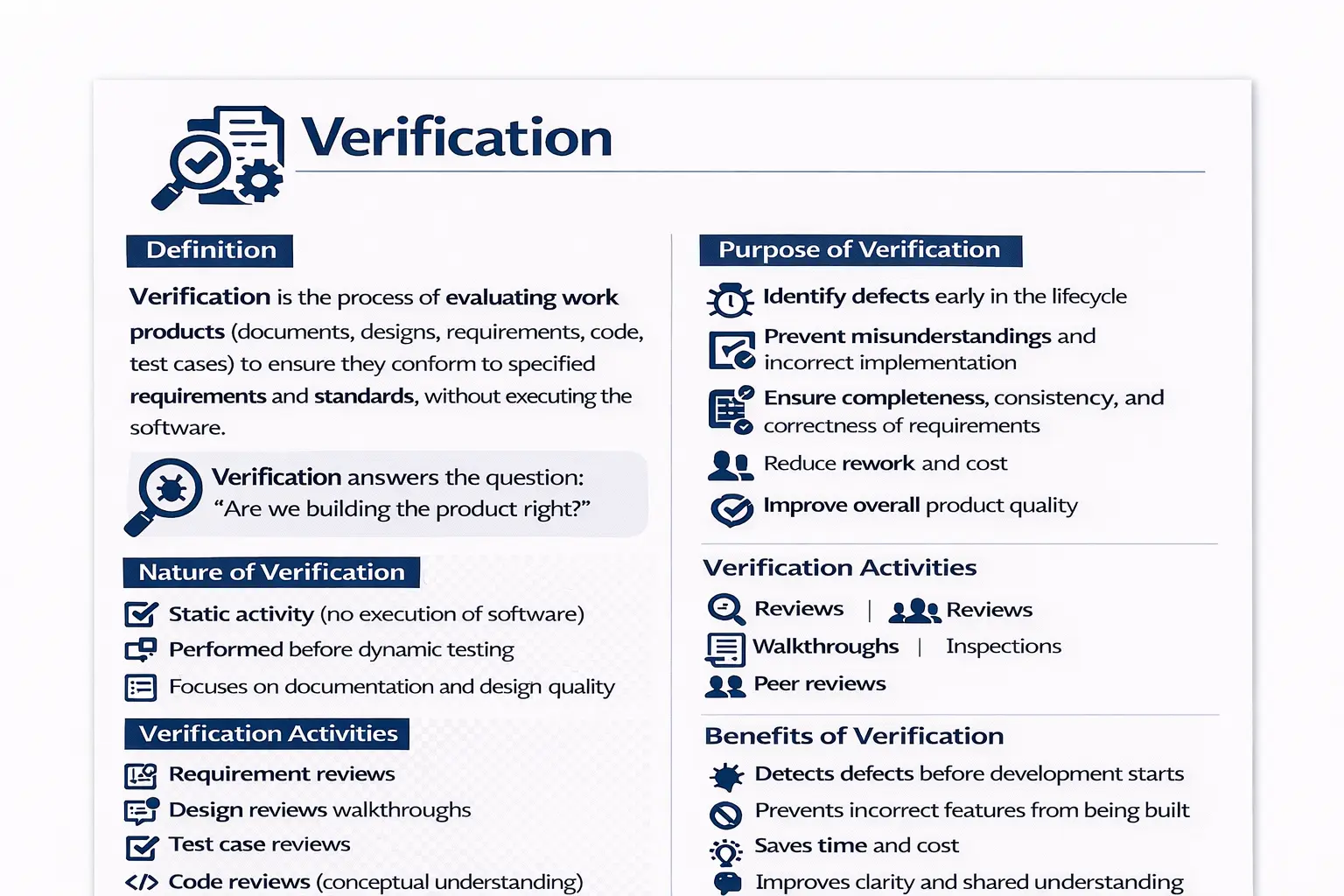
Verification is a foundational concept in software quality that focuses on evaluating work products to ensure they conform to specified requirements and standards. These work products can include requirements documents, designs, code, and test cases. Unlike testing, verification does not involve executing the software. Instead, it examines whether what is being prepared and documented is correct and aligned with expectations. Verification answers a critical question: are we building the product right? By addressing this early, teams reduce the chance of building the wrong thing in the wrong way.
Why Verification Matters
Verification matters because many software defects are created before a single line of production code is executed. A requirement may be incomplete, a design may miss an important dependency, a test case may not cover a business rule, or a user story may be interpreted differently by different team members. If these issues are not discovered early, they move forward into development and testing, where they become more expensive and harder to correct.
The central idea behind verification is simple: check the quality of work products before they are used to build the product. If the requirement is wrong, the code built from that requirement is likely to be wrong. If the design is incomplete, implementation may require rework. If test cases are weak, defects may escape even when test execution is completed. Verification prevents these downstream problems by strengthening the foundation first.
This is why verification is often described with the phrase "building the product right." It does not ask whether the running application behaves correctly; that is the role of validation and dynamic testing. Verification asks whether the artifacts guiding development are correct, complete, consistent, and aligned with standards. When teams verify early, they reduce ambiguity, improve communication, and make later testing more effective.
Verification Is Static, but Highly Practical
Verification is called a static testing activity because it does not require executing the software. This sometimes makes beginners underestimate its value. Since no application is opened, no button is clicked, and no output is observed, verification may look less visible than test execution. In reality, it is one of the most practical and cost-effective quality activities in the lifecycle.
Static does not mean passive. During verification, team members actively analyze requirements, review designs, inspect test cases, evaluate code logic, question assumptions, identify contradictions, and confirm alignment. These activities require domain understanding, technical awareness, testing skill, and clear communication. A good verification review can prevent several defects before development starts.
For example, if a password reset requirement does not define link expiry time, maximum retry attempts, email content, security rules, or behavior for unregistered users, a tester can identify these gaps during verification. If the team clarifies them before coding, multiple defects are prevented. That is the real power of verification.
Verification and the Cost of Defects
Defects become more expensive as they move later in the lifecycle. A missing requirement discovered during a review may require only a short clarification meeting. The same issue discovered after development may require code changes, test case updates, retesting, regression testing, and schedule adjustment. If the same issue reaches production, it may cause customer dissatisfaction, support tickets, emergency fixes, revenue loss, or reputational damage.
Verification reduces this cost by catching problems while they are still in documents, diagrams, user stories, acceptance criteria, or test artifacts. At that stage, changes are usually cheaper because the system has not yet been built around the mistake. A corrected requirement is less expensive than rewritten code. A corrected design is less expensive than reworked architecture. A corrected test case is less expensive than a missed production defect.
This is why teams should not treat verification as optional paperwork. Time spent reviewing early artifacts saves much more time later. In fast-moving projects, skipping verification may appear to save time in the short term, but it often creates rework in later sprints or release cycles.
Verification During Requirement Analysis
Requirement verification is one of the most important forms of verification. Requirements define what the team intends to build. If they are unclear, incomplete, conflicting, or not testable, the entire project is placed at risk. Verification helps ensure that requirements are good enough to guide design, development, and testing.
During requirement verification, the team checks whether each requirement is clear, complete, consistent, feasible, testable, and traceable. A clear requirement avoids vague words such as "fast," "easy," or "secure" without measurable meaning. A complete requirement includes necessary rules and conditions. A consistent requirement does not conflict with other requirements. A testable requirement can be verified through review, testing, or measurable acceptance criteria.
A manual tester plays an important role here by thinking from a validation perspective. The tester asks what inputs are allowed, what outputs are expected, what happens in error conditions, what boundary values exist, and how success will be judged. These questions often expose gaps before the team starts implementation.
Verification of User Stories and Acceptance Criteria
In Agile projects, requirements are often expressed as user stories. A user story may be short, but it must still be clear enough for development and testing. Verification checks whether the story has a clear user, a clear goal, business value, and acceptance criteria. A story without acceptance criteria is difficult to test because the team may not agree on what "done" means.
Acceptance criteria should define specific conditions that must be satisfied. For example, a user story may say, "As a customer, I want to reset my password so that I can regain account access." Verification checks whether acceptance criteria cover valid email, unregistered email, expired reset link, weak password, reused link, success message, and security constraints. Without these details, the story can be interpreted in multiple ways.
This type of verification improves sprint execution. When stories are reviewed properly before development, developers have fewer assumptions, testers can prepare better scenarios, and product owners receive behavior closer to what they intended. Verification supports readiness before a story enters implementation.
Verification During Design
Design verification checks whether the proposed solution aligns with requirements and standards. A design may include architecture diagrams, database models, API contracts, UI wireframes, workflow diagrams, or technical specifications. If design issues are missed, the development team may build a solution that is difficult to test, difficult to maintain, or inconsistent with business expectations.
For example, if a requirement needs audit tracking but the design does not include audit log storage, the issue should be caught during verification. If a workflow requires approval from multiple roles but the design supports only one approval state, the mismatch should be identified before coding. If a screen design omits mandatory error messages, testers can raise the issue during review.
Design verification also supports non-functional quality. The team can review whether the design considers performance, scalability, accessibility, security, maintainability, and compatibility. These concerns are easier to address during design than after the product is built.
Verification of Test Plans and Test Cases
Test artifacts also need verification. A test plan may look complete but miss a critical scope area. Test cases may be written but not cover negative scenarios, boundary values, role-based conditions, or important business rules. If weak test cases are executed, the team may feel testing is complete while important defects remain hidden.
Test case verification checks whether test cases map to requirements, have clear steps, use appropriate test data, include expected results, and cover important scenarios. It also checks whether duplicate or low value test cases can be removed. Test cases should be understandable, executable, and maintainable. If a tester cannot understand the expected result, execution will become subjective.
Reviewing test cases before execution improves testing quality. It helps identify missing coverage early, prevents wasted execution effort, and ensures that the test suite is aligned with requirements. This is a practical verification activity that directly improves later validation.
Verification Techniques in Detail
Reviews are the most common verification technique. A review may be informal or formal. In an informal review, a peer may read a requirement or test case and provide feedback. In a formal review, participants may follow defined roles, checklists, entry criteria, exit criteria, and documented outcomes. Both forms can be useful depending on project risk and complexity.
Walkthroughs are useful when the author explains an artifact to others. For example, a business analyst may walk through a requirement, a designer may walk through a workflow, or a tester may walk through a test suite. The purpose is to create understanding and collect feedback. Walkthroughs are especially helpful for complex flows where silent document review may not be enough.
Inspections are more structured and rigorous. They usually involve preparation, defined roles, defect logging, and follow-up. Inspections are useful for critical artifacts where mistakes can have serious impact. Peer reviews, checklist reviews, and technical reviews are also common verification methods. The right technique depends on the project's risk, timeline, domain, and maturity.
Verification Across the SDLC
Verification is not limited to one phase. During requirement analysis, it checks whether business needs are clear and testable. During design, it checks whether proposed solutions match requirements. During development, code reviews and static analysis can verify code quality, standards, logic, and maintainability. During testing, test cases, test data, test environments, and test reports can be verified.
This continuous presence makes verification a lifecycle activity. It supports quality before dynamic testing begins and continues to support quality as artifacts evolve. For example, if a requirement changes, related design documents, test cases, traceability matrices, and automation scenarios may need verification again. Verification keeps artifacts synchronized with current expectations.
In maintenance projects, verification is also valuable. When production defects are analyzed, teams may review whether the original requirement was unclear, whether the design missed a condition, whether test cases failed to cover the scenario, or whether review practices were weak. This learning can improve future work.
Verification vs Validation
Verification and validation are often discussed together because they represent two sides of software quality. Verification asks, "Are we building the product right?" Validation asks, "Are we building the right product?" Verification checks artifacts and preparation. Validation checks the running product against user needs and business expectations.
For example, reviewing a login requirement to confirm that password rules, error messages, lockout behavior, and role-based access are clearly specified is verification. Executing the login feature in the application to confirm that it actually works is validation. Both are necessary. Verification helps prevent mistakes before implementation, while validation confirms behavior after implementation.
A strong quality process uses both. If verification is skipped, validation may discover many preventable issues late. If validation is skipped, verified documents may still result in a product that does not work correctly in practice. Together, they provide early prevention and later confirmation.
Benefits for Manual Testers
Verification gives manual testers influence earlier in the lifecycle. Instead of waiting for a build, testers can contribute during requirement reviews, acceptance criteria discussions, test plan reviews, and test case reviews. This helps testers understand the feature deeply before execution and allows them to identify risks early.
Early involvement also improves test design. When testers participate in verification, they learn why the feature exists, what business rules matter, what edge cases are likely, and what areas are risky. This leads to better test scenarios and stronger defect detection later. Testers become quality contributors, not only execution resources.
Verification also improves communication with developers and product owners. Questions raised during review prevent misunderstandings. A tester who asks, "What should happen if the user submits the form twice?" may prevent a production issue. This is why verification is a practical skill for manual testers and not only a theoretical concept.
Common Mistakes in Verification
A common mistake is performing reviews too casually. If reviewers simply scan a document without preparation, important issues may be missed. Effective verification requires attention, checklists, domain knowledge, and willingness to ask questions. A review should not be treated as a formality.
Another mistake is failing to document review findings. If issues are discussed but not recorded, there may be no accountability for resolution. Review comments, action items, decisions, and open questions should be tracked until closure. This makes verification useful and auditable.
Teams also sometimes skip verification under time pressure. This may appear faster, but the risk is that defects are discovered later when they are more expensive. Skipping a requirement review may save one hour today and create several days of rework later. Mature teams understand that verification is an investment in delivery quality.
Interview-Ready View of Verification
In interviews, verification should be explained as a static quality activity that evaluates work products such as requirements, design documents, code, and test cases to ensure they meet standards and specifications before execution. It does not involve running the software. Its purpose is to prevent defects early and confirm that the team is building the product right.
A strong interview answer can be: Verification is the process of reviewing and evaluating software artifacts to ensure they are correct, complete, consistent, and aligned with requirements and standards. It is a static activity performed through reviews, walkthroughs, inspections, and peer reviews. It helps prevent defects early in the SDLC and reduces rework.
This answer is strong because it covers the nature of verification, the artifacts involved, common techniques, the timing, and the purpose. It also clearly separates verification from testing and validation, which is a common interview expectation.
Practical Verification Checklist
A practical verification checklist helps teams review artifacts consistently. For requirements, the team can check whether each requirement is clear, complete, testable, feasible, traceable, and free from conflict. For user stories, the team can check whether the user role, business goal, acceptance criteria, dependencies, and edge cases are clear. For design documents, the team can check whether the proposed solution supports the requirement, handles integrations, follows standards, and considers important non-functional needs.
For test artifacts, reviewers can check whether test scenarios cover positive, negative, boundary, and business-rule conditions. They can verify whether expected results are specific, whether test data is defined, whether preconditions are clear, and whether each test case maps back to a requirement. This is especially useful in manual testing because unclear test cases often lead to inconsistent execution and weak defect reporting.
The checklist should not become a mechanical formality. Its purpose is to guide thinking. Reviewers should still use domain knowledge, project context, and risk awareness. A checklist helps prevent common omissions, but good verification also depends on asking intelligent questions. When used properly, verification checklists make reviews more consistent, more transparent, and easier to improve over time.
Purpose of Verification
The main purpose of verification is to identify issues as early as possible in the lifecycle. When requirements or designs contain gaps, ambiguities, or inconsistencies, those problems can easily flow into development and become expensive defects later. Verification helps ensure that requirements are complete, consistent, and correct before implementation begins. This early scrutiny reduces rework, lowers costs, and contributes to better overall product quality. It also builds a shared understanding among stakeholders, which is essential for successful delivery.
Nature of Verification
Verification is considered a static activity because it does not require running the software. It is performed before dynamic testing and focuses on the quality of documentation, specifications, and designs. By concentrating on artifacts rather than execution, verification allows teams to catch problems at a stage where changes are easier and cheaper to make. It acts as a quality filter before development and testing efforts intensify.
Verification Activities
Verification includes structured evaluations of project artifacts. Teams examine requirements to ensure they are clear and testable. They review designs to confirm alignment with requirements and standards. Test cases are checked for coverage and correctness before execution. Conceptually, even code can be reviewed for logic and standards compliance. Many teams use checklist-based approaches to ensure reviews are thorough and consistent. These activities promote discipline and reduce oversight.
Verification Techniques
Several well-established techniques support verification. Reviews allow stakeholders to examine artifacts and provide feedback. Walkthroughs involve authors explaining their work to peers for discussion and clarification. Inspections are more formal and structured, often following defined roles and procedures. Peer reviews encourage collaboration and shared ownership of quality. Each technique aims to uncover issues early and improve clarity.
Work Products Subject to Verification
Verification can be applied to many types of artifacts. Business requirement documents and functional specifications are commonly reviewed to ensure they reflect true needs. User stories are examined for clarity and acceptance criteria. Design documents are checked for feasibility and alignment. Test plans and test cases are also verified to confirm they are meaningful and complete. By reviewing these artifacts, teams ensure that downstream work is built on a solid foundation.
Verification Across the SDLC
Verification plays a role throughout the software development lifecycle. During requirements, teams review and refine needs. In design, they evaluate architectural and detailed solutions. During development, conceptual code reviews support quality and standards. In the testing phase, test artifacts themselves are verified before use. This continuous presence ensures that quality is considered at every step, not only at the end.
Benefits of Verification
The value of verification lies in early prevention. Detecting problems before development begins prevents incorrect features from being built. This saves time, reduces cost, and avoids frustration. Verification also improves communication and shared understanding among team members. When everyone agrees on what is being built and why, execution becomes smoother and more predictable.
Verification Compared to Testing
Verification and testing are complementary but different. Verification is static and does not involve execution, while testing is dynamic and evaluates running software. Verification focuses on documents and process alignment, whereas testing focuses on product behavior. The goal of verification is prevention, while testing aims at detection. Together, they provide both early and late quality control.
A Practical Example
Consider a requirement stating that a user should receive an email notification. During verification, the team would examine whether the requirement is clear. They would check if the type of email is defined, whether the trigger condition is specified, and whether any timing or content details are missing. All of this happens before development starts. By clarifying these points early, the team avoids building an incomplete or incorrect feature.
Common Pitfalls in Verification
Teams sometimes skip reviews due to time pressure or assume that requirements are clear without discussion. Others may perform reviews but fail to document findings, reducing accountability and learning. Treating verification as optional weakens quality practices. Effective teams recognize that time spent on verification saves far more time later.
Conclusion
Verification ensures that defects are prevented early, before they evolve into costly failures. It strengthens the foundation on which software is built by ensuring clarity, correctness, and alignment with expectations. While it may seem less visible than testing, verification is one of the most cost-effective quality practices in software development. By confirming that the product is being built correctly from the start, verification plays a vital role in delivering reliable software.