Loop Control Best Practices
Loop constructs are among the most frequently used control structures in Java, forming the backbone of iteration, data processing, and algorithm implementation. Loops such as for, while, and do-while appear simple on the surface, but improper usage can introduce subtle bugs, performance bottlenecks, and maintainability challenges. In real-world applications, poorly designed loops are a common source of infinite execution, high CPU utilization, and unreadable code. This is why loop control best practices are not merely stylistic recommendations; they are essential engineering principles.
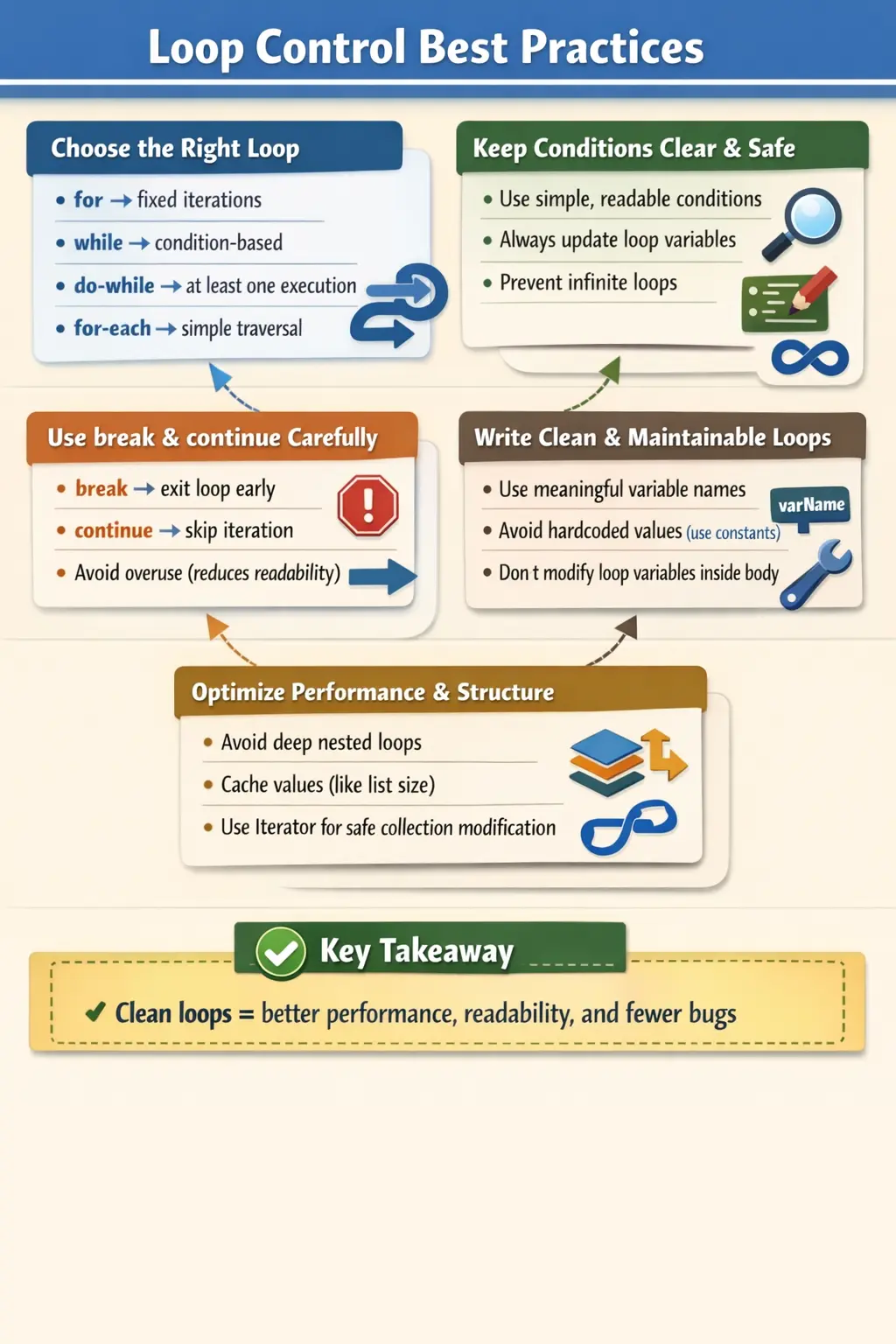
Writing effective loops requires more than understanding syntax. It involves choosing the right construct, maintaining clarity, ensuring correctness, and optimizing performance. These practices are especially critical in production-grade systems, where loops may process large datasets, run continuously, or operate in multi-threaded environments. By following disciplined loop control techniques, developers can produce code that is not only correct but also efficient and maintainable.
Why Loop Control Best Practices Matter
The importance of loop control becomes evident when considering the potential risks associated with poor loop design. One of the most common issues is the infinite loop, where a condition never becomes false due to incorrect updates or flawed logic. Such loops can freeze applications, consume system resources, and even crash production systems.
Another concern is readability. Complex or poorly structured loops make code difficult to understand, especially for other developers. This increases the cost of maintenance and debugging. In collaborative environments, where multiple developers work on the same codebase, clarity is as important as correctness.
Performance is also a key factor. Inefficient loops, especially those with unnecessary nesting or repeated computations, can significantly degrade application performance. In data-intensive applications, even minor inefficiencies can scale into major bottlenecks.
Finally, adhering to best practices aligns code with industry standards. This not only improves code quality but also prepares developers for interviews and professional environments, where such standards are expected.
Choosing the Right Loop Type
One of the fundamental decisions in loop design is selecting the appropriate loop construct. Each type of loop is designed for a specific use case, and using the wrong one can lead to confusion or inefficiency.
The for loop is ideal when the number of iterations is known in advance. It provides a compact structure that includes initialization, condition, and update in a single line. This makes it suitable for scenarios such as iterating over a fixed range or processing arrays using an index.
The while loop is better suited for condition-based execution, where the number of iterations is not predetermined. It is commonly used in scenarios such as reading input, polling conditions, or waiting for events.
The do-while loop guarantees at least one execution, making it appropriate for situations where the loop body must run before the condition is evaluated. This is often used in menu-driven programs or retry mechanisms.
The enhanced for-each loop is designed for simple traversal of arrays and collections. It eliminates the need for index management and improves readability when the goal is to access elements sequentially without modification.
Choosing the correct loop type simplifies logic and reduces the likelihood of errors.
Keeping Loop Conditions Simple and Clear
Loop conditions should be straightforward and easy to understand. Complex conditions that combine multiple logical expressions can lead to confusion and increase the risk of bugs.
When conditions become overly complicated, it becomes difficult to predict loop behavior. This is especially problematic during debugging, where understanding why a loop continues or terminates is critical.
A better approach is to simplify conditions and use meaningful variables. For example, instead of embedding multiple checks directly in the loop condition, it is often better to encapsulate them in a descriptive method or boolean variable. This improves readability and makes the code self-explanatory.
Clear conditions also make it easier to maintain the code, as future developers can quickly understand the intent of the loop.
Avoiding Infinite Loops
Infinite loops are one of the most common and dangerous issues in loop control. They occur when the loop condition never becomes false, often due to missing or incorrect updates to the loop variable.
To prevent infinite loops, it is essential to ensure that the loop variable is updated correctly in every iteration. The update should be clearly visible and logically consistent with the loop condition.
In some cases, infinite loops are intentional, such as in server processes or event listeners. However, even in these cases, there should be a clear exit strategy, such as a break condition or external trigger.
Careful design and thorough testing are key to avoiding unintended infinite loops.
Using break and continue Judiciously
The break and continue statements provide additional control over loop execution. While they are powerful tools, they should be used carefully.
The break statement is used to exit a loop immediately when a specific condition is met. This is useful in scenarios such as searching for an element, where further iterations are unnecessary once the target is found.
The continue statement skips the remaining code in the current iteration and moves to the next iteration. It is useful for filtering logic, where certain conditions should be ignored.
However, excessive use of these statements can make the loop logic difficult to follow. Multiple break and continue statements scattered throughout a loop can obscure the flow of execution and reduce readability.
The key is to use these statements sparingly and only when they improve clarity.
Prefer Enhanced for-each for Read-Only Traversal
When iterating over arrays or collections without needing index access, the enhanced for-each loop is the preferred choice. It simplifies code by removing the need for manual index management and reduces the risk of off-by-one errors.
The for-each loop is particularly useful for read-only operations, such as printing elements or performing calculations. Its simplicity makes the code more readable and less error-prone.
However, it is not suitable for scenarios that require index access, reverse iteration, or modification of the collection. In such cases, a traditional loop or iterator should be used.
Avoid Modifying Loop Variables Inside the Loop Body
Modifying loop variables within the loop body can lead to unpredictable behavior. When the loop variable is updated in multiple places, it becomes difficult to track its value and understand the loop’s progression.
A better practice is to handle all updates in the loop’s update section. This keeps the logic centralized and easier to follow. It also reduces the risk of errors such as skipping iterations or creating infinite loops.
Maintaining a clear and consistent update mechanism is essential for reliable loop execution.
Minimizing Nested Loops
Nested loops are often necessary for tasks such as matrix processing or multi-dimensional data handling. However, excessive nesting can significantly increase time complexity and reduce readability.
Each additional level of nesting multiplies the number of iterations, leading to performance issues in large datasets. For example, two nested loops result in O(n²) complexity, while three nested loops result in O(n³).
Whenever possible, nested loops should be minimized or replaced with more efficient data structures such as maps or sets. Refactoring complex logic into separate methods can also improve readability.
Balancing functionality and performance is key when working with nested loops.
Using Meaningful Variable Names
Variable naming plays a crucial role in code readability. While single-letter variables such as i and j are acceptable in simple loops, more descriptive names should be used in complex scenarios.
Meaningful variable names help convey the purpose of the loop and make the code easier to understand. This is especially important in collaborative environments, where multiple developers work on the same codebase.
Clear naming conventions improve maintainability and reduce the cognitive load required to understand the code.
Avoiding Hardcoded Values
Hardcoded values, often referred to as “magic numbers,” can make loops inflexible and difficult to maintain. If the value needs to change, it must be updated in multiple places, increasing the risk of errors.
Using constants or configuration values instead of hardcoded numbers improves flexibility and readability. It also makes the code easier to adapt to different scenarios.
This practice aligns with the principle of writing clean and maintainable code.
Preferring Early Exit Over Deep Nesting
Deeply nested conditions within loops can make code difficult to read and understand. An alternative approach is to use early exit techniques, such as continue or break, to simplify the structure.
By handling exceptional or unwanted cases early, the main logic can remain clean and straightforward. This reduces nesting and improves readability.
Early exit is a powerful technique for simplifying complex loop logic.
Handling Collections Safely
Modifying collections during iteration can lead to runtime exceptions such as ConcurrentModificationException. This is particularly common when using enhanced for-each loops.
To safely modify collections, iterators should be used. Iterators provide methods such as remove() that allow elements to be removed without causing errors.
Understanding how to handle collections safely is essential for writing robust and error-free code.
Considering Performance in Large Loops
Performance becomes critical when loops process large datasets. Inefficient loops can significantly impact application performance.
One common optimization is caching loop-invariant values. For example, calling list.size() repeatedly inside a loop can be avoided by storing the value in a variable.
Avoiding heavy computations or method calls inside loops also improves performance. Where possible, such operations should be moved outside the loop.
Optimizing loops ensures that applications remain efficient and responsive.
Designing Loops Around Intent
A good loop begins with a clear reason for existing. Before writing the loop, a developer should be able to explain what is being repeated, why it must be repeated, what data is involved, and when the repetition should stop. This sounds basic, but many loop-related defects happen because code is written directly from a rough idea instead of from a clear intention. A loop that says "process every order until there are no pending orders" is easier to reason about than a loop that only increments a counter and checks several unrelated flags.
Intent also influences the choice of loop structure. If the intent is to visit every element in a collection, an enhanced for-each loop communicates that intent directly. If the intent is to count from one value to another, a traditional for loop is natural. If the intent is to continue while an external condition remains true, a while loop may be appropriate. When the loop type matches the intention, the code becomes self-explanatory, and future changes are less likely to damage the logic.
In professional Java code, clarity of intent matters because loops are often modified later. A developer may add validation, logging, filtering, error handling, or performance improvements. If the original loop is already confusing, every future change becomes risky. A well-designed loop creates a stable foundation for maintenance. It lets other developers understand the purpose quickly, identify the boundaries of the operation, and make changes without guessing.
Making Termination Conditions Obvious
Every loop should make its stopping condition obvious. A reader should not have to inspect several branches, nested conditions, and side effects to understand when the loop ends. In a for loop, the termination condition is usually visible in the loop header. In a while loop, the condition may depend on a variable updated inside the body. In both cases, the relationship between the condition and the update should be direct. If the loop checks whether an index is less than a size, the index should clearly move toward that size.
Termination becomes especially important when the loop depends on external data. For example, reading from a file, consuming messages, retrying a failed operation, or waiting for user input may not have a fixed number of iterations. In these cases, the loop should include a reliable exit path. Retry loops should usually have a maximum retry count. Input loops should have a way to cancel. Polling loops should avoid running endlessly without delay or timeout. These controls prevent code from becoming unstable when external systems behave unexpectedly.
One practical habit is to review a loop by asking, "What exact change makes this loop stop?" If the answer is not visible, the design needs improvement. Another useful question is, "Can this condition remain true forever?" If the answer is yes, the loop should include an intentional safety mechanism. These questions are simple, but they help catch many real-world defects before the code ever reaches production.
Keeping Loop Bodies Focused
A loop body should normally do one kind of work. When a loop reads data, validates it, transforms it, saves it, logs it, updates counters, and controls error recovery all in one place, the reader must track too many concerns at once. This makes defects harder to find. A focused loop is easier to test because the expected behavior is limited and predictable. If the loop has to do multiple steps, the body can still remain clean by delegating meaningful operations to well-named methods.
For example, a loop that processes customer records may call methods such as validateCustomer, calculateEligibility, and saveCustomerResult. This approach does not remove the loop, but it keeps the loop readable. The loop controls iteration, while the methods express the work being performed. This separation is especially useful when business rules change. The loop structure can remain stable while the processing logic evolves inside focused methods.
Keeping the loop body focused also reduces accidental side effects. When too much logic is placed inside a loop, it becomes easier to update the wrong variable, call an expensive operation repeatedly, or change shared state in a way that affects later iterations. A smaller loop body helps developers see what changes during each iteration and what remains constant. That visibility is one of the strongest protections against subtle loop bugs.
Using break with Clear Purpose
The break statement is useful when continuing the loop no longer adds value. Searching is the classic example. If a program is looking for a matching item, it should usually stop once the match is found. Continuing after the result is known wastes time and may introduce unnecessary complexity. In such cases, break improves both performance and readability because it expresses the idea that the loop has completed its purpose early.
However, break should not become a hidden escape route from unclear logic. If a loop contains several break statements at different nesting levels, the reader has to mentally simulate many possible paths. This can make the loop difficult to maintain. A good break condition is usually simple, close to the reason for exiting, and easy to name. For example, breaking when a target account is found is clearer than breaking after a long sequence of unrelated checks.
When break is used in nested loops, extra care is required. A normal break exits only the nearest loop, not all surrounding loops. Java supports labeled break, but labeled flow control should be rare because it can make code harder to follow. If nested breaks become necessary, it may be a sign that the logic should be extracted into a method. Returning from a well-named method is often clearer than jumping out of deeply nested loops.
Using continue as a Guard
The continue statement is most helpful when it works like a guard. It allows the loop to skip records that should not be processed and then keep the main logic clean. For example, if a list contains inactive users, a loop may skip inactive users at the top and then process only active users in the remaining body. This pattern can reduce nesting because the main path does not need to sit inside a large if block.
At the same time, continue can harm readability when it appears repeatedly throughout a long loop body. If different parts of the loop skip execution for different reasons, it becomes hard to know which statements run for each item. In that situation, the loop may need to be reorganized. Conditions can be combined into a clearly named predicate method, or separate processing paths can be split into separate methods. The goal is not to avoid continue entirely, but to use it where it makes the main flow easier to read.
A simple best practice is to keep continue near the beginning of the loop whenever possible. Early continue statements tell the reader which records are ignored before the main processing begins. Late continue statements can be more surprising because some work has already been performed before the iteration is skipped. When the skip condition is business-significant, the condition should be named clearly so the code explains why the item is being ignored.
Understanding Index-Based Risks
Index-based loops are powerful because they allow direct access to positions in arrays, lists, and strings. They are necessary when the index itself matters, when comparing neighboring elements, when iterating backward, or when updating values by position. But this power also creates common risks. Off-by-one errors, incorrect boundary checks, and mismatched collection sizes are frequent sources of defects in index-based loops.
The safest index-based loops use bounds derived from the data structure itself. For arrays, use length. For lists, use size. Hardcoding loop limits creates fragile code because the loop no longer adapts when the data changes. A hardcoded limit may work during initial testing and fail later when the collection grows or shrinks. This is especially dangerous in applications that process dynamic input, database results, API responses, or user-selected data.
Index loops should also avoid unnecessary cleverness. Incrementing by unusual values, changing the index inside the body, or mixing forward and backward movement in the same loop can make correctness difficult to verify. If such logic is truly needed, it should be explained through clean structure and meaningful names. Most business code benefits from boring, predictable iteration. A loop that is easy to understand is usually easier to trust.
Managing Nested Loops with Care
Nested loops are not automatically wrong. They are natural for grids, matrices, combinations, parent-child data, and comparisons between groups. The problem is that nested loops multiply work. If the outer loop runs one thousand times and the inner loop also runs one thousand times, the inner body may execute one million times. When data grows, this can quickly become a performance problem.
Before accepting a nested loop, developers should ask whether a different data structure can reduce the work. A map can often replace repeated searching. A set can make membership checks faster. Pre-grouping data can avoid scanning the same collection again and again. These changes are not premature optimization when the nested loop processes realistic business volumes. They are basic design decisions that keep applications responsive as data grows.
Nested loops also affect readability. A loop inside a loop inside another loop makes it harder to understand what each level represents. Descriptive variable names are important here. Names such as rowIndex and columnIndex are more helpful than i and j when the loop operates on a table. Names such as customer and order are clearer when iterating through business entities. If the nested structure still feels heavy, extracting inner work into a method can make the outer flow easier to scan.
Handling Collection Modification Correctly
One of the most important Java loop best practices is understanding how collections behave during iteration. Removing or adding items while using an enhanced for-each loop can cause ConcurrentModificationException because the collection is being structurally changed while it is being traversed. This is a common beginner mistake, but it also appears in real projects when filtering logic is added quickly.
When elements must be removed during iteration, developers should use the correct tool for the situation. An Iterator can remove the current item safely through its remove method. In many cases, collection methods such as removeIf provide even clearer intent. Another approach is to create a new collection containing the desired results instead of changing the original collection during traversal. The best option depends on readability, performance, and whether the original collection must be preserved.
Collection modification also requires attention to business meaning. Removing an item from a temporary list is different from deleting a record from persistent storage. A loop that modifies data should make that responsibility clear. Hidden changes inside iteration can surprise other developers and create hard-to-debug defects. When loop logic changes a collection, the code should make the change intentional and easy to review.
Balancing Performance and Readability
Loop performance matters, but performance should be improved with understanding rather than guesswork. In small loops, readability usually matters more than micro-optimization. In large loops, repeated expensive operations can become serious bottlenecks. The practical skill is knowing which parts of the loop are truly costly. Database calls, network requests, file operations, complex calculations, object creation, and repeated parsing inside loops deserve attention.
A common improvement is to move loop-invariant work outside the loop. If a value does not change during iteration, it should not be recalculated each time. Another improvement is to avoid repeated lookups when a precomputed map or set would make access faster. For example, checking whether each item exists in another list can be slow if it scans the second list repeatedly. Converting the second list to a set can make the loop much more efficient while keeping the intent clear.
At the same time, developers should not make loops cryptic only to save a tiny amount of time. Code that is difficult to understand can create more cost than it saves. The best loop code is both clear and efficient enough for the expected workload. If performance becomes a concern, profiling and realistic test data should guide decisions. Optimization is most valuable when it addresses a measured problem.
Testing Loop Boundary Conditions
Loops should be tested at their boundaries because many loop defects appear at the first iteration, the last iteration, or when there are no iterations at all. For a loop over a collection, test with an empty collection, one item, multiple items, and the maximum realistic size. For a numeric range, test the minimum value, maximum value, values just inside the boundary, and values just outside when applicable. These tests reveal off-by-one errors and missing termination logic.
Testing should also cover early exit behavior. If a loop uses break when an item is found, test when the item appears first, in the middle, last, and not at all. If a loop uses continue to skip invalid records, test all valid records, all invalid records, and mixed records. These combinations confirm that the loop does not accidentally skip needed work or process data that should be ignored.
For loops that process external resources, testing should include failure and timeout scenarios. A retry loop should stop after the allowed number of attempts. A polling loop should not run forever if the expected condition never occurs. A file-reading loop should handle end-of-file correctly. These cases are not just testing details; they are part of responsible loop design because they prove the code behaves safely when reality does not follow the happy path.
Debugging Loop Problems Systematically
When a loop behaves incorrectly, the best debugging approach is systematic. First, identify the loop's expected start state, update rule, and termination condition. Then check what changes in each iteration. Many loop bugs become clear when the developer traces the value of the counter, the condition result, and the data being processed. Random changes often make loop problems worse because they hide the real cause.
Logging can help, but it should be used carefully. Excessive logging inside large loops can create huge logs and slow the application. During debugging, focused temporary logging is useful for understanding a specific issue. In production code, logging inside loops should be limited to meaningful events, failures, or summaries. A loop that logs every item in a high-volume process may create a performance problem of its own.
Debugging also benefits from simplifying the loop. If a loop contains too many responsibilities, temporarily extracting parts into methods or writing smaller tests can isolate the problem. Once the issue is understood, the final code should remain clean. The goal of debugging is not only to fix the immediate defect but also to leave the loop easier to understand for the next developer who reads it.
Common Beginner Mistakes
Beginners often make mistakes such as creating infinite loops, overusing control statements, and writing deeply nested loops. They may also modify collections incorrectly or use unclear variable names.
Recognizing and avoiding these mistakes is an important step in becoming a proficient Java developer.
Interview Perspective
From an interview standpoint, loop control best practices demonstrate a candidate’s understanding of clean coding principles and performance considerations.
A concise answer should mention choosing the right loop type, keeping conditions simple, avoiding infinite loops, and minimizing nesting. A more detailed answer should include examples of optimization techniques and safe handling of collections.
Interviewers often look for practical understanding rather than theoretical knowledge, so explaining real-world scenarios can be beneficial.
Key Takeaway
Loop control best practices are essential for writing efficient, readable, and maintainable Java code. By choosing the right loop type, simplifying conditions, avoiding unnecessary complexity, and optimizing performance, developers can create robust and scalable applications.
Well-designed loops not only prevent bugs but also improve code quality and maintainability. In both interviews and real-world projects, mastering these practices is a critical skill for any Java developer.
1. Prefer for Loop When Iteration Count Is Known
for (int i = 1; i <= 5; i++) {
System.out.println(i);
}
Explanation
- Best when start, end, and step are known.
- Improves readability and predictability.
2. Prefer while Loop When Condition Is Primary
int i = 1;
while (i <= 5) {
System.out.println(i);
i++;
}
Explanation
- Best when loop depends on a condition rather than a fixed count.
- Common in input validation and polling.
3. Use do-while When Loop Must Execute At Least Once
int attempts = 0;
do {
System.out.println("Attempting login");
attempts++;
} while (attempts < 1);
Explanation
- Guarantees at least one execution.
- Useful for menus and retries.
4. Avoid Infinite Loops Without Exit Strategy
while (true) {
System.out.println("Running");
break;
}
Explanation
- Always provide a break or return condition.
- Prevents hanging applications.
5. Increment/Decrement Before continue in while Loops
int i = 0;
while (i < 5) {
i++;
if (i == 3) {
continue;
}
System.out.println(i);
}
Explanation
- Prevents infinite loops.
- Common beginner mistake avoided.
6. Use break for Early Exit (Performance Optimization)
int[] nums = {10, 20, 30, 40};
for (int n : nums) {
if (n == 30) {
System.out.println("Found");
break;
}
}
Explanation
- Stops loop as soon as target is found.
- Improves performance.
7. Prefer continue to Reduce Nested if Blocks
for (int i = 1; i <= 5; i++) {
if (i % 2 == 0) {
continue;
}
System.out.println(i);
}
Explanation
- Keeps main logic flat and readable.
- Avoids deep nesting.
8. Avoid Deeply Nested Loops (Refactor When Possible)
for (int i = 1; i <= 3; i++) {
for (int j = 1; j <= 3; j++) {
System.out.println(i + "," + j);
}
}
Explanation
- Nested loops increase complexity.
- Consider refactoring if nesting grows beyond 2 levels.
9. Use Enhanced for-each for Read-Only Traversal
int[] nums = {1, 2, 3};
for (int n : nums) {
System.out.println(n);
}
Explanation
- Cleaner and safer.
- Avoids index errors.
10. Do NOT Modify Collection Inside Enhanced for-each
// Incorrect – throws ConcurrentModificationException
// for (String s : list) {
//     list.remove(s);
// }
Explanation
- Modifying collection during for-each is unsafe.
- Use Iterator instead.
11. Use Iterator When Removal Is Required
import java.util.*; Listlist = new ArrayList>(List.of("A", "B", "C")); Iterator it = list.iterator(); while (it.hasNext()) { if (it.next().equals("B")) { it.remove(); } }
Explanation
- Safe removal during iteration.
- Best practice for collections.
12. Use Meaningful Loop Variable Names
for (int index = 0; index < 3; index++) {
System.out.println(index);
}
Explanation
- Improves readability.
- Especially important in nested loops.
13. Avoid Hardcoded Loop Bounds
int[] nums = {10, 20, 30};
for (int i = 0; i < nums.length; i++) {
System.out.println(nums[i]);
}
Explanation
- Prevents bugs when data size changes.
- Always prefer .length or .size().
14. Minimize Work Inside Loop Body
int limit = 5;
for (int i = 1; i <= limit; i++) {
System.out.println(i);
}
Explanation
- Avoid repeated calculations inside loops.
- Improves performance.
15. Use Flags Carefully (Prefer break When Possible)
boolean found = false;
for (int i = 1; i <= 5; i++) {
if (i == 4) {
found = true;
break;
}
}
System.out.println(found);
Explanation
- Flags are acceptable when post-loop decision is required.
- break simplifies control flow.
16. Prefer Labeled break/continue Sparingly
outer:
for (int i = 1; i <= 3; i++) {
for (int j = 1; j <= 3; j++) {
if (j == 2) {
break outer;
}
}
}
Explanation
- Useful in rare, complex cases.
- Overuse reduces readability.
17. Avoid Empty Loop Bodies
// Bad practice
// while (i < 10);
// Better
while (i < 10) {
i++;
}
Explanation
- Empty loops confuse readers.
- Always be explicit.
18. Choose Correct Loop Type for Collections vs Arrays
Listlist = List.of("A", "B"); for (String s : list) { System.out.println(s); }
Explanation
- Enhanced for-each preferred for collections.
- Index-based loop only when index is needed.
19. Keep Loop Logic Simple and Single-Purpose
for (int i = 1; i <= 5; i++) {
System.out.println(i);
}
Explanation
- One loop = one responsibility.
- Avoid mixing unrelated logic.
20. Interview Summary Example (Best Practices)
for (int i = 1; i <= 3; i++) {
if (i == 2) continue;
System.out.println(i);
}
Explanation
- Demonstrates:
- Clean loop
- Controlled flow
- continue usage
- Shows good loop hygiene (very common interview topic).