Nested Loops in Java
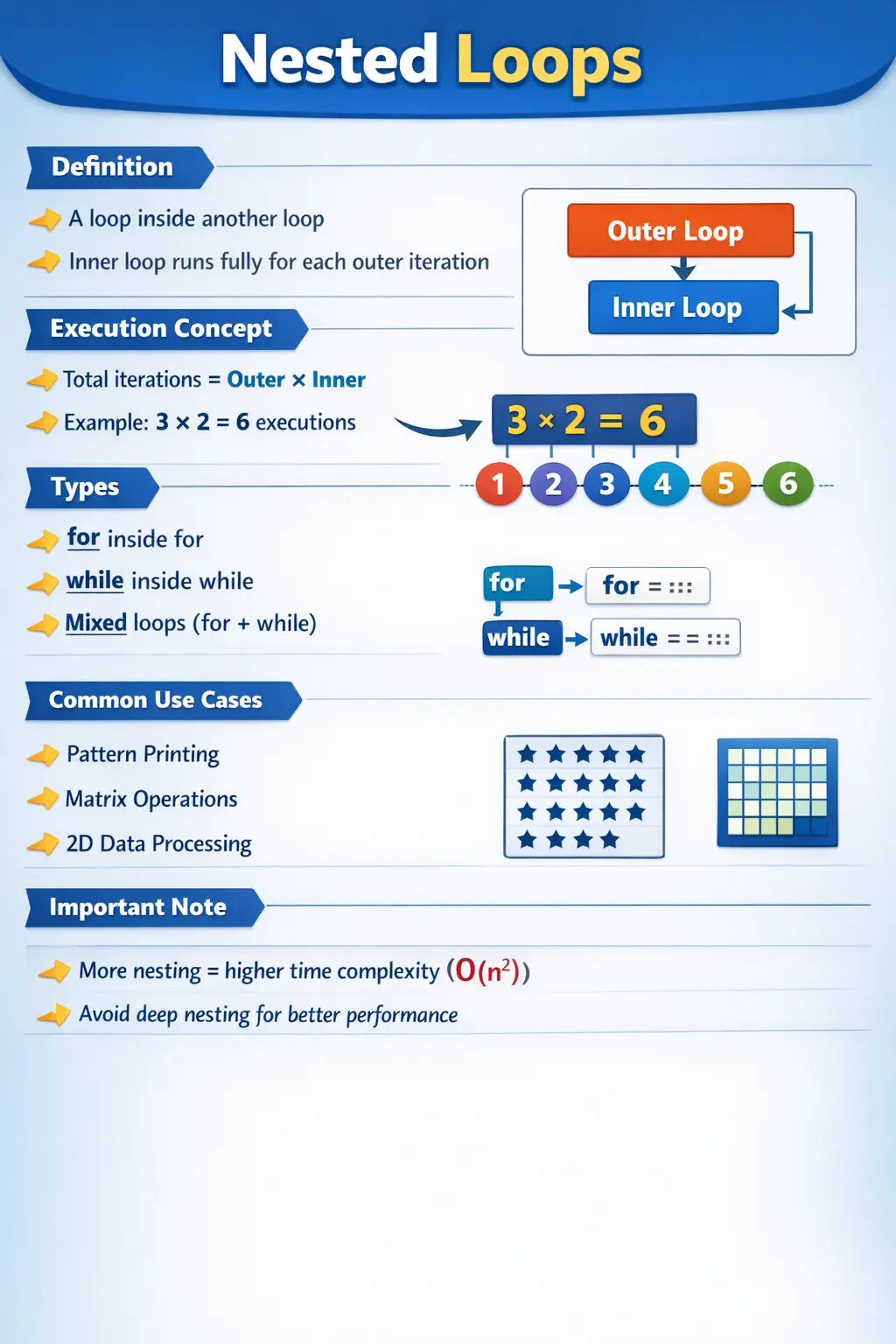
Nested loops are one of the most important constructs in Java for solving problems that involve multi-level iteration. At a fundamental level, a nested loop is simply a loop placed inside another loop. However, their significance goes far beyond this simple definition. Nested loops enable developers to process multi-dimensional data, generate patterns, perform matrix operations, and implement complex algorithms that require repeated execution within repeated execution.
In real-world programming, many problems cannot be solved using a single loop. When dealing with grids, tables, combinations, or hierarchical data, nested loops become essential. They are also a frequent topic in technical interviews because they test a developer’s understanding of execution flow, logic building, and performance implications.
To truly master nested loops, it is important not just to understand their syntax, but also how they execute, where they are applied, and how to use them efficiently without compromising readability or performance.
Understanding Nested Loops Conceptually
A nested loop consists of two or more loops, where one loop is placed inside another. The outer loop controls how many times the inner loop will execute. For every single iteration of the outer loop, the inner loop runs completely from start to finish.
This means that if the outer loop runs n times and the inner loop runs m times, the total number of executions of the inner block is n × m. This multiplicative behavior is what makes nested loops powerful, but also potentially expensive in terms of performance.
Nested loops can be created using any combination of loop types available in Java, including for, while, and do-while. The most commonly used form is the nested for loop due to its compact and readable structure.
Basic Structure of Nested Loops
A typical nested loop structure looks like this:
for (int i = 1; i <= 3; i++) {
    for (int j = 1; j <= 2; j++) {
        System.out.println(i + "," + j);
    }
}
In this structure, the outer loop controls the variable i, while the inner loop controls the variable j. For each value of i, the inner loop runs completely, iterating through all values of j.
This pattern is the foundation of all nested loop logic and is used extensively in real-world programming.
Execution Flow of Nested Loops
Understanding the execution flow of nested loops is critical. The process follows a predictable sequence:
- The outer loop initializes and checks its condition
- If true, control enters the inner loop
- The inner loop runs completely until its condition becomes false
- Control returns to the outer loop, which updates and checks its condition again
- Steps repeat until the outer loop condition fails
To illustrate this, consider:
for (int i = 1; i <= 3; i++) {
    for (int j = 1; j <= 2; j++) {
        System.out.print("* ");
    }
    System.out.println();
}
The output will be:
* *
* *
* *
Here, the outer loop runs 3 times, and for each iteration, the inner loop runs 2 times. This results in a total of 6 executions of the inner statement.
This predictable execution flow is essential for designing logic involving grids, matrices, and repeated patterns.
Nested for Loop (Most Common Usage)
The nested for loop is the most widely used form due to its clarity and control.
for (int i = 1; i <= 3; i++) {
    for (int j = 1; j <= 3; j++) {
        System.out.print(i + j + " ");
    }
    System.out.println();
}
In this example, each combination of i and j is processed, demonstrating how nested loops can be used to generate combinations or perform calculations across multiple dimensions.
This pattern is frequently used in algorithms that require pairwise comparisons or grid-based traversal.
Nested while Loop
Nested loops are not limited to for loops. The same concept applies to while loops.
int i = 1;
while (i <= 3) {
    int j = 1;
    while (j <= 2) {
        System.out.println(i + "," + j);
        j++;
    }
    i++;
}
Here, the outer while loop controls i, and the inner while loop controls j. The logic remains the same: the inner loop completes fully for each iteration of the outer loop.
This form is useful when the number of iterations is not known in advance and depends on dynamic conditions.
Mixed Nested Loops
Java allows mixing different loop types within nested structures.
for (int i = 1; i <= 2; i++) {
    int j = 1;
    while (j <= 3) {
        System.out.println(i + "," + j);
        j++;
    }
}
This flexibility allows developers to choose the most appropriate loop type based on the problem. For example, a for loop may control a fixed iteration, while a while loop handles dynamic conditions.
Mixed nesting is common in real-world applications where different levels of iteration have different constraints.
Nested Loops with break
The break statement can be used to exit the inner loop prematurely.
for (int i = 1; i <= 3; i++) {
    for (int j = 1; j <= 3; j++) {
        if (j == 2) {
            break;
        }
        System.out.println(i + "," + j);
    }
}
In this case, the inner loop stops when j equals 2, but the outer loop continues.
This behavior is useful when searching for a value or condition within a subset of iterations.
Labeled break in Nested Loops
Java provides labeled break to exit outer loops directly.
outer:
for (int i = 1; i <= 3; i++) {
    for (int j = 1; j <= 3; j++) {
        if (i == 2 && j == 2) {
            break outer;
        }
        System.out.println(i + "," + j);
    }
}
Here, the break outer statement terminates both loops at once. This is particularly useful in search operations where continuing further iterations is unnecessary once a condition is met.
However, labeled breaks should be used carefully, as they can reduce code readability if overused.
Nested Loops with continue
The continue statement skips the current iteration of the inner loop.
for (int i = 1; i <= 3; i++) {
    for (int j = 1; j <= 3; j++) {
        if (j == 2) {
            continue;
        }
        System.out.println(i + "," + j);
    }
}
In this example, when j equals 2, the loop skips the print statement and proceeds to the next iteration.
This allows selective processing within nested loops and is commonly used for filtering conditions.
Common Use Cases of Nested Loops
Nested loops are widely used in practical programming scenarios. One of the most common applications is pattern printing, where rows and columns must be controlled independently.
They are also essential in matrix operations, such as addition, multiplication, and traversal of two-dimensional arrays. In such cases, one loop iterates over rows while the other iterates over columns.
Another important use case is searching within multi-dimensional data structures. For example, locating an element in a grid or processing combinations of values requires nested iteration.
Nested loops are also used in generating tables, performing combinational logic, and implementing algorithms like sorting and graph traversal.
Performance Considerations
One of the most critical aspects of nested loops is their impact on performance. Since the inner loop runs multiple times for each iteration of the outer loop, the time complexity increases significantly.
For example, two nested loops with n iterations each result in a time complexity of O(n²). Adding more levels of nesting increases complexity further.
This can become problematic when working with large datasets. Therefore, it is important to avoid unnecessary nesting and optimize logic wherever possible.
Techniques such as breaking early, reducing redundant computations, and using efficient data structures can help mitigate performance issues.
Why Nested Loops Are Needed
Nested loops are needed whenever one level of repetition is not enough to describe the problem. A single loop can move through one sequence of values. A nested loop can move through relationships between values. This makes nested loops suitable for rows and columns, products and customers, users and roles, students and subjects, files and lines, or any situation where one repeated process contains another repeated process.
The important idea is that nested loops model structure. If the data itself has two levels, such as a table with rows and columns, nested loops often match the data naturally. The outer loop can represent each row, and the inner loop can represent each column in that row. If the problem requires comparing every item with every other item, the outer loop can choose the first item and the inner loop can choose the second item.
This is why nested loops are common in both beginner exercises and real systems. Pattern printing teaches the mechanics, but the same execution model appears in reports, matrix calculations, grid processing, test data combinations, scheduling logic, and algorithm design. Once you understand the relationship between outer and inner loops, many complex-looking problems become easier to break down.
Outer Loop and Inner Loop Responsibilities
A clean nested loop usually gives a clear responsibility to each loop. The outer loop controls the larger unit of work. The inner loop controls the repeated work that happens inside each outer unit. In a table, the outer loop may control rows and the inner loop may control columns. In a multiplication table, the outer loop may select the base number and the inner loop may generate the multiples. In a list comparison, the outer loop may select one item and the inner loop may compare it with others.
When these responsibilities are clear, nested loops become easier to read. The reader can understand what each level represents. Problems begin when both loops appear to control the same idea, or when variable names are confusing. If the outer and inner loops do not have distinct meanings, the code may be harder to maintain and more likely to contain logic mistakes.
In short examples, names like i and j are acceptable because they are familiar loop counters. In business code, descriptive names may be better. Variables such as rowIndex, columnIndex, userIndex, roleIndex, currentRow, or currentItem can make nested logic easier to understand. Naming is especially important when the loop body contains business rules rather than simple printing.
Understanding Total Iterations
The total number of iterations is one of the first things to understand when working with nested loops. If the outer loop runs three times and the inner loop runs four times each time, the inner body runs twelve times. If both loops depend on the same input size n, the inner body may run n multiplied by n times, which is commonly described as quadratic behavior.
This multiplication effect is what makes nested loops powerful and also potentially expensive. A loop that runs one thousand times may be acceptable. Two nested loops that each run one thousand times may execute the inner body one million times. Three nested loops may grow even faster. Performance can change dramatically as data grows.
Developers should therefore learn to estimate nested loop execution. Before writing or approving nested-loop code, ask how many times the inner work will run for typical and maximum input sizes. If the input is small and fixed, nested loops may be perfectly fine. If the input can grow large, optimization or a different approach may be needed.
Nested Loops with Two-Dimensional Arrays
Two-dimensional arrays are one of the most natural uses of nested loops in Java. A two-dimensional array can be imagined as a grid of rows and columns. The outer loop typically moves through rows, and the inner loop moves through columns within each row. This structure mirrors how the data is organized.
For example, a matrix of numbers can be traversed row by row. The outer loop selects a row index, and the inner loop selects a column index. The code can then access the value at that row and column. This approach is used in matrix addition, matrix multiplication, table formatting, board games, image processing, and grid-based algorithms.
When working with two-dimensional arrays, it is important to use the correct length for each dimension. The outer loop often uses array.length for the number of rows. The inner loop often uses array[row].length for the number of columns in that specific row. This matters because Java supports jagged arrays, where different rows can have different lengths. Assuming every row has the same length may cause errors.
Nested Loops for Pattern Printing
Pattern printing is a popular way to learn nested loops because it makes execution visible. The outer loop usually controls the number of rows. The inner loop controls what appears in each row. By changing the inner loop condition, the program can create squares, rectangles, triangles, pyramids, number patterns, and other shapes.
Although pattern programs may look academic, they teach important skills. They train developers to understand how loop counters relate to output structure. A right triangle pattern, for example, often uses the outer loop as the row number and the inner loop to print values up to that row number. This builds intuition about dependent loops, where the inner loop limit changes based on the outer loop value.
This skill transfers to real programming. Many report layouts, table builders, grid renderers, and data transformation tasks require similar thinking. Pattern printing is not just about stars and numbers; it is about learning how repeated inner work changes as the outer context changes.
Nested Loops for Pairwise Comparisons
Pairwise comparison is another common nested-loop pattern. Sometimes a program needs to compare each item with every other item. For example, a duplicate-checking algorithm may compare each value in a list with later values. A scheduling program may compare time slots. A recommendation system may compare pairs of items. A testing tool may generate combinations of inputs.
In this pattern, the outer loop chooses the first item and the inner loop chooses the second item. Often the inner loop starts at the next index after the outer loop to avoid comparing an item with itself or repeating the same pair twice. This small design choice can cut unnecessary work and make the algorithm more correct.
Pairwise nested loops should be reviewed carefully for performance. Comparing every item with every other item becomes expensive as the list grows. For small lists, the approach is simple and acceptable. For large lists, using sets, maps, sorting, indexing, or more specialized algorithms may be better. The nested loop is easy to write, but it is not always the most scalable solution.
Nested Loops in Test Data and Automation
Nested loops are useful in testing and automation when combinations must be generated. A test may need to run across multiple browsers and multiple user roles. The outer loop can select the browser, and the inner loop can select the role. Another test may combine environments, data sets, and input values. Each level of repetition represents another dimension of coverage.
This can be useful, but it can also create too many combinations. If there are five browsers, ten roles, and twenty data sets, fully nested loops may create one thousand executions. That may be unnecessary or too slow. Test automation should choose combinations based on risk, coverage value, and execution time rather than blindly multiplying every option.
Nested loops in automation should therefore be intentional. They are excellent for small, meaningful combinations and for generating structured coverage. For larger coverage spaces, pairwise testing, parameterized tests, filtering rules, or data-driven frameworks may provide better control.
Nested Loops with break and continue
Break and continue behave differently depending on where they appear in nested loops. A normal break inside the inner loop exits only the inner loop. The outer loop continues with its next iteration. This is useful when the current inner search is complete but the outer process should continue. For example, once a match is found in the current row, the program may stop scanning that row and move to the next row.
A normal continue inside the inner loop skips only the current inner iteration. It does not skip the outer loop. If the goal is to skip the rest of the outer iteration, Java provides labeled continue, but it should be used carefully. Labeled break can exit an outer loop directly, and labeled continue can move to the next outer iteration directly.
These control statements are powerful, but they can make nested logic harder to read if overused. When using break or continue in nested loops, make sure the target of the control flow is clear. If the reader cannot quickly tell which loop is affected, the code may need restructuring or comments.
Labeled break and Labeled continue
Labels in Java allow break and continue to target a specific outer loop. A labeled break exits the labeled loop completely. A labeled continue skips to the next iteration of the labeled loop. These features are especially useful when nested loops are searching for a condition and there is no need to continue once the condition is found.
For example, when searching a matrix for a target value, a labeled break can stop both row and column loops immediately. Without a label, a normal break would only exit the inner column loop, and the outer row loop would continue. Developers sometimes use boolean flags to solve this, but labeled break can be cleaner in simple cases.
However, labels should not become a habit for every nested-loop problem. If labeled control flow appears frequently or makes the code feel abrupt, extracting the nested search into a method and using return may be clearer. Labeled break and continue are tools for specific cases, not replacements for good structure.
Reducing Nested Loop Complexity
Nested loops are sometimes necessary, but they should not be used carelessly. If a nested loop performs repeated work that could be avoided, performance may suffer. One common improvement is to move calculations that do not depend on the inner loop outside the inner loop. This prevents the same value from being recomputed many times.
Another improvement is to use better data structures. For example, checking whether one list contains items from another list with nested loops may be slow. Converting one list to a HashSet can reduce repeated searching and make lookups faster. Similarly, maps can replace nested searches when values can be accessed by key.
Early termination can also help. If the desired result has already been found, break can stop unnecessary iterations. Filtering data before nested processing can reduce the number of combinations. Sorting data can make certain searches faster. Optimization starts with understanding how many times the inner work runs and whether all that work is necessary.
Readability and Maintainability
Nested loops can become difficult to read when the loop body is large. The reader must keep track of the outer loop, the inner loop, the loop variables, the conditions, and any control statements. If the body contains complex business rules, the code can quickly become hard to maintain.
To improve readability, keep nested loop bodies focused. Extract complex logic into methods with clear names. Use meaningful variable names when the domain matters. Keep braces and indentation consistent. Avoid changing loop variables in surprising places. These practices reduce the mental effort required to understand the code.
If a nested loop cannot be explained in plain language, it probably needs refactoring. Good nested-loop code should have a clear purpose: process each row and column, compare each pair, generate each combination, or search each level. When the purpose is clear, the structure becomes easier to trust.
Testing Nested Loop Logic
Testing nested loops requires attention to combinations and boundaries. A test should cover normal cases, empty data, single-row or single-item data, and boundary values. If a loop processes a matrix, test matrices with multiple rows and columns, one row, one column, and possibly jagged rows. These cases reveal assumptions that normal examples may hide.
If nested loops use break, tests should confirm that the correct loop stops. If they use continue, tests should confirm that only the intended iteration is skipped. If labeled break or labeled continue is used, tests should prove that the outer loop behavior is correct. These are important because nested control flow is easy to misunderstand.
Performance-oriented tests may also be needed when input can grow. A nested loop that works fine for ten items may be too slow for ten thousand. Testing with realistic data sizes helps reveal scalability issues before production. Nested loops should be validated for both correctness and practical execution cost.
Debugging Nested Loops
Debugging nested loops is easiest when you trace the loop variables. Start with the outer loop value, then follow the inner loop from its initialization to termination. Repeat this for the next outer iteration. Writing down the values of i and j for a small example often makes the flow obvious.
If the output is wrong, check whether the inner loop is initialized in the right place. In many nested-loop problems, the inner loop variable must be reset for each outer iteration. If it is initialized outside the outer loop by mistake, the inner loop may run only once or behave unexpectedly. This is a common beginner error.
Also check break and continue statements. A break may stop only the inner loop when the developer expected both loops to stop. A continue may skip an update or a print statement. A labeled statement may jump farther than expected. Debugging nested loops is mostly about confirming which loop is active and which statement controls the next step.
How to Explain Nested Loops in Interviews
In interviews, a strong answer should begin with the definition: a nested loop is a loop inside another loop. Then explain the execution rule: for every iteration of the outer loop, the inner loop runs completely. This is the most important concept because it explains both output and performance.
A good answer should include practical examples such as pattern printing, matrix traversal, table generation, pairwise comparison, and searching in two-dimensional data. These examples show that nested loops are not just syntax but a way to handle multi-level repetition.
Finally, mention performance and readability. Nested loops can lead to O(n squared) behavior when both loops depend on input size, so they should be used carefully with large data. Use clear variable names, avoid excessive nesting, break early when appropriate, and consider better data structures when nested searching becomes expensive. This gives a complete, practical interview explanation.
Common Beginner Mistakes
Beginners often make mistakes when working with nested loops. One common issue is forgetting to update the inner loop variable, leading to infinite loops.
Another mistake is confusing loop variables, especially when using similar names like i and j. This can result in incorrect logic or unexpected behavior.
Excessive nesting is another problem. Deeply nested loops make code difficult to read, understand, and maintain.
Forgetting braces {} is also a common mistake that can lead to logical errors, especially when adding multiple statements inside loops.
Avoiding these mistakes requires careful planning, clear naming conventions, and disciplined coding practices.
Interview Perspective
Nested loops are a favorite topic in interviews because they test multiple aspects of programming knowledge, including logic building, execution flow, and performance analysis.
Candidates may be asked to write programs for pattern printing, matrix traversal, or searching problems using nested loops. They may also be asked to analyze time complexity or optimize nested loop logic.
A strong answer should clearly explain that nested loops involve placing one loop inside another, where the inner loop executes fully for each iteration of the outer loop.
Understanding how to control execution flow and optimize nested loops is a key skill for technical interviews.
Key Takeaway
Nested loops are a powerful tool for handling multi-level iteration in Java. They enable developers to solve complex problems involving grids, matrices, and combinations by executing logic within repeated execution layers.
However, with this power comes responsibility. Improper use of nested loops can lead to performance issues and reduced code readability.
The key to mastering nested loops lies in understanding their execution flow, applying them only when necessary, and writing clean, optimized logic.
When used correctly, nested loops become an indispensable part of a developer’s toolkit, enabling efficient and structured problem-solving in both interviews and real-world applications.
1. Basic Nested for Loop
for (int i = 1; i <= 3; i++) {
for (int j = 1; j <= 3; j++) {
System.out.println("i=" + i + ", j=" + j);
}
}
Explanation
- Outer loop runs 3 times.
- Inner loop runs fully for each outer iteration.
- Total executions: 3 × 3 = 9.
2. Nested Loop Printing a Square Pattern
for (int i = 1; i <= 3; i++) {
for (int j = 1; j <= 3; j++) {
System.out.print("* ");
}
System.out.println();
}
Explanation
- Inner loop prints stars in one row.
- Outer loop moves to the next row.
- Output:
* * *
* * *
* * *
3. Nested Loop Printing a Right Triangle
for (int i = 1; i <= 4; i++) {
for (int j = 1; j <= i; j++) {
System.out.print("* ");
}
System.out.println();
}
Explanation
- Inner loop runs up to i.
- Forms a right-angled triangle.
- Output:
*
* *
* * *
* * * *
4. Nested Loop Printing Numbers Pattern
for (int i = 1; i <= 3; i++) {
for (int j = 1; j <= 3; j++) {
System.out.print(j + " ");
}
System.out.println();
}
Explanation
- Inner loop prints numbers 1 to 3.
- Repeats for each outer iteration.
5. Nested Loop Multiplication Table
for (int i = 1; i <= 3; i++) {
for (int j = 1; j <= 3; j++) {
System.out.println(i + " * " + j + " = " + (i * j));
}
}
Explanation
- Common real-world example.
- Used in table and matrix logic.
6. Nested Loop with break (Inner Loop Only)
for (int i = 1; i <= 3; i++) {
for (int j = 1; j <= 3; j++) {
if (j == 2) {
break;
}
System.out.println("i=" + i + ", j=" + j);
}
}
Explanation
- break exits only the inner loop.
- Outer loop continues normally.
7. Nested Loop with continue (Inner Loop)
for (int i = 1; i <= 3; i++) {
for (int j = 1; j <= 3; j++) {
if (j == 2) {
continue;
}
System.out.println("i=" + i + ", j=" + j);
}
}
Explanation
- Skips j == 2 only.
- Remaining inner iterations execute.
8. Labeled break in Nested Loop
outer:
for (int i = 1; i <= 3; i++) {
for (int j = 1; j <= 3; j++) {
if (j == 2) {
break outer;
}
System.out.println("i=" + i + ", j=" + j);
}
}
Explanation
- break outer exits both loops.
- Useful in deeply nested logic.
9. Labeled continue in Nested Loop
outer:
for (int i = 1; i <= 3; i++) {
for (int j = 1; j <= 3; j++) {
if (j == 2) {
continue outer;
}
System.out.println("i=" + i + ", j=" + j);
}
}
Explanation
- Skips remaining inner loop.
- Continues with next outer iteration.
10. Nested while Loops
int i = 1;
while (i <= 3) {
int j = 1;
while (j <= 3) {
System.out.println("i=" + i + ", j=" + j);
j++;
}
i++;
}
Explanation
- Same behavior as nested for.
- Initialization handled manually.
11. Nested do-while Loops
int i = 1;
do {
int j = 1;
do {
System.out.println("i=" + i + ", j=" + j);
j++;
} while (j <= 2);
i++;
} while (i <= 2);
Explanation
- Both loops execute at least once.
- Rare but valid interview case.
12. Nested Loop for 2D Array Traversal
int[][] arr = {
{1, 2},
{3, 4}
};
for (int i = 0; i < arr.length; i++) {
for (int j = 0; j < arr[i].length; j++) {
System.out.println(arr[i][j]);
}
}
Explanation
- Outer loop → rows.
- Inner loop → columns.
13. Nested Loop for Matrix Addition
int[][] a = {{1, 2}, {3, 4}};
int[][] b = {{5, 6}, {7, 8}};
int[][] sum = new int[2][2];
for (int i = 0; i < 2; i++) {
for (int j = 0; j < 2; j++) {
sum[i][j] = a[i][j] + b[i][j];
}
}
Explanation
- Common real-world matrix operation.
- Uses nested loops for row-column access.
14. Nested Loop with Condition on Both Indices
for (int i = 1; i <= 3; i++) {
for (int j = 1; j <= 3; j++) {
if (i == j) {
System.out.println("Diagonal: " + i);
}
}
}
Explanation
- Executes logic when i == j.
- Used in diagonal matrix logic.
15. Nested Loop Skipping One Combination
for (int i = 1; i <= 3; i++) {
for (int j = 1; j <= 3; j++) {
if (i == 2 && j == 2) {
continue;
}
System.out.println("(" + i + "," + j + ")");
}
}
Explanation
- Skips only (2,2).
- All other pairs print.
16. Nested Loop for Counting Combinations
int count = 0;
for (int i = 1; i <= 3; i++) {
for (int j = 1; j <= 3; j++) {
count++;
}
}
System.out.println(count);
Explanation
- Total combinations = 3 × 3 = 9.
- Used in complexity analysis.
17. Nested Loop for String Comparison
String[] a = {"A", "B"};
String[] b = {"1", "2"};
for (String x : a) {
for (String y : b) {
System.out.println(x + y);
}
}
Explanation
- Produces all string combinations.
- Output: A1 A2 B1 B2
18. Nested Loop with Flag
boolean found = false;
for (int i = 1; i <= 3 && !found; i++) {
for (int j = 1; j <= 3; j++) {
if (i == 2 && j == 3) {
found = true;
break;
}
}
}
System.out.println(found);
Explanation
- Flag helps control outer loop exit.
- Common interview pattern.
19. Nested Loop for Pyramid Pattern
for (int i = 1; i <= 4; i++) {
for (int j = 1; j <= i; j++) {
System.out.print(j + " ");
}
System.out.println();
}
Explanation
- Builds increasing numeric pyramid.
- Output:
1
1 2
1 2 3
1 2 3 4
20. Interview Summary Example (Nested Loops)
for (int i = 1; i <= 2; i++) {
for (int j = 1; j <= 2; j++) {
System.out.println(i + "," + j);
}
}
Explanation
- Output:
1,1
1,2
2,1
2,2
- Demonstrates:
- Outer loop
- Inner loop
- Cartesian combinations
- Very common interview question.