Methods Basics
Methods are one of the most fundamental constructs in Java and form the backbone of structured and object-oriented programming. At their core, methods allow developers to encapsulate logic into reusable, well-defined units of work. Instead of writing repetitive blocks of code, you define a method once and invoke it whenever needed. This not only improves readability but also enforces modular design, making applications easier to maintain, test, and scale.
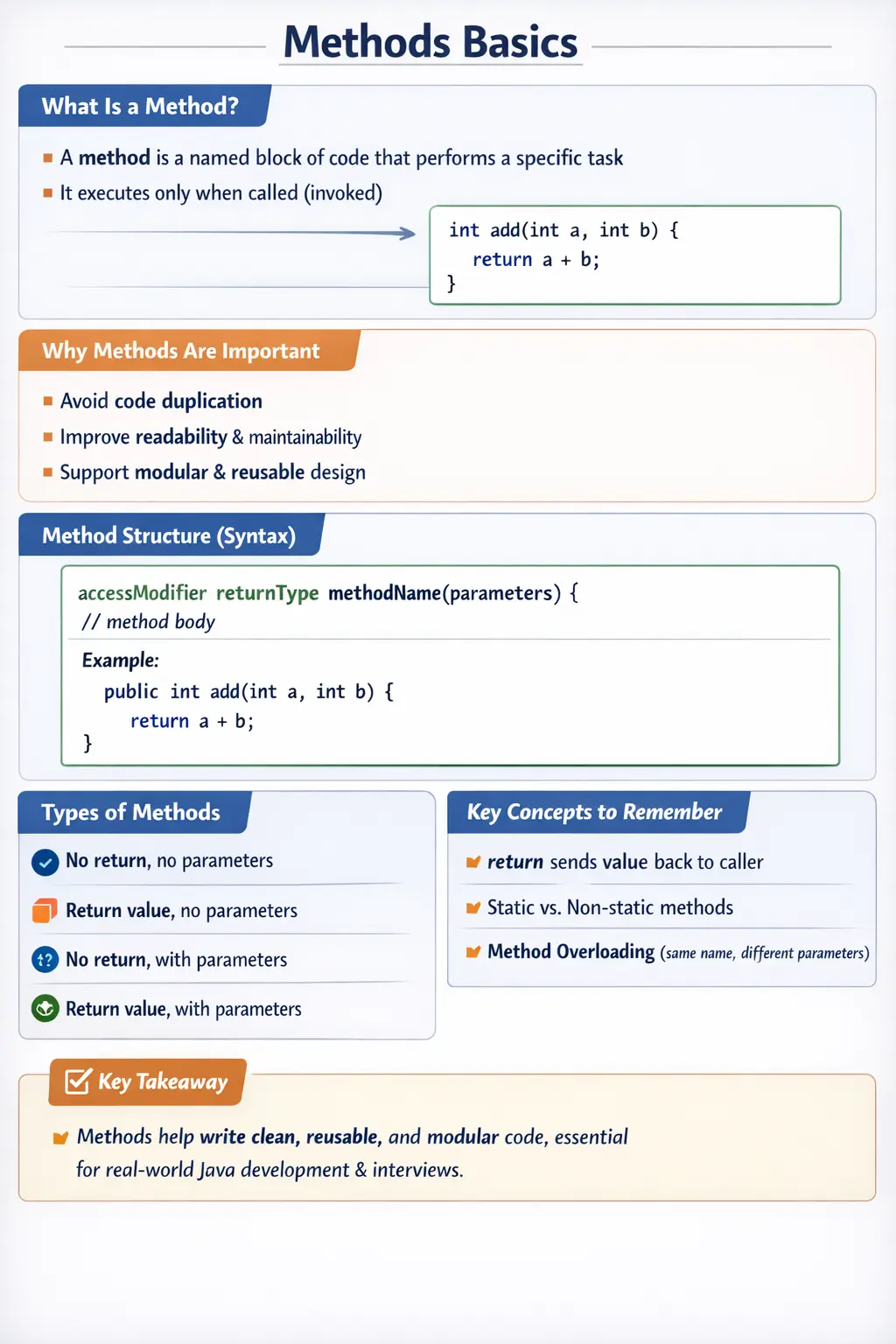
In real-world applications, methods are everywhere. Whether you are processing user input, interacting with a database, performing calculations, or handling API responses, methods act as the execution units that drive program behavior. Understanding how methods work both syntactically and conceptually is essential for mastering Java and succeeding in technical interviews.
What Is a Method?
A method in Java is a named block of code that performs a specific task and executes only when it is called. It can accept input values, process them, and optionally return a result. This design allows developers to break down complex problems into smaller, manageable pieces.
Consider a simple example:
int add(int a, int b) {
    return a + b;
}
This method takes two integers as input, adds them, and returns the result. The logic is isolated within the method, making it reusable and easy to understand.
A key point to remember is that defining a method does not execute it. Execution happens only when the method is invoked. This separation between definition and execution is central to how Java programs are structured.
Why Methods Are Important
Methods play a critical role in software development because they address several core challenges in programming. One of the primary benefits is code reuse. Instead of duplicating logic across different parts of the application, you can define it once in a method and reuse it multiple times.
Another important benefit is readability. Well-named methods make code self-explanatory. For example, a method named calculateTotal() clearly conveys its purpose, making the code easier to understand for other developers.
Methods also simplify debugging and testing. When logic is encapsulated in small, focused methods, it becomes easier to isolate and fix issues. Unit testing frameworks rely heavily on methods, as each method can be tested independently.
From an architectural perspective, methods support modular design. They allow developers to organize code into logical units, which is a key principle of object-oriented programming. This modularity is essential for building scalable and maintainable systems.
Basic Syntax of a Method
Every method in Java follows a standard structure:
accessModifier returnType methodName(parameterList) {
    // method body
}
Each component of this structure has a specific role, and understanding these components is crucial for writing correct and effective methods.
Breakdown of Method Components
Access Modifier
The access modifier defines the visibility of the method—who can access it and from where. Java provides four primary access levels: public, protected, default (no modifier), and private.
A public method is accessible from anywhere, making it suitable for APIs and widely used functionality. A private method is restricted to the class in which it is defined, often used for internal helper logic. Protected and default access levels provide intermediate visibility, typically used in inheritance and package-level access.
For example:
public int add(int a, int b)
Here, the method is publicly accessible.
Return Type
The return type specifies what kind of value the method will return after execution. If the method does not return any value, the return type is declared as void.
For example:
void display() {
    System.out.println("Hello");
}
In this case, the method performs an action but does not return a value.
Choosing the correct return type is important because it defines how the method interacts with the rest of the program.
Method Name
The method name identifies the method and should clearly describe its purpose. By convention, method names follow camelCase and are typically verbs or verb phrases, such as calculateTotal() or printDetails().
A well-chosen method name improves code readability and makes the program self-documenting.
Parameters
Parameters are input values passed to the method. They allow methods to operate on dynamic data rather than fixed values.
For example:
int add(int a, int b)
Here, a and b are parameters that receive values when the method is called.
Parameters make methods flexible and reusable, as the same method can be used with different inputs.
Method Body
The method body contains the actual logic that the method executes. It is enclosed within curly braces and can include statements, loops, conditionals, and other method calls.
The body defines what the method does, making it the core of the method’s functionality.
Example: Complete Method Usage
To understand how methods work in a real program, consider the following example:
public class Calculator {
    int add(int a, int b) {
        return a + b;
    }

    public static void main(String[] args) {
        Calculator c = new Calculator();
        int result = c.add(10, 20);
        System.out.println(result);
    }
}
In this example, the add method is defined inside the Calculator class. The main method creates an object of the class and invokes the add method. The result is then printed to the console.
This demonstrates how methods are defined, invoked, and integrated into a program.
Method Invocation
Calling a method is known as method invocation. The way a method is called depends on whether it is static or non-static.
Non-static methods require an object of the class:
Calculator c = new Calculator();
c.add(10, 20);
Static methods, on the other hand, can be called directly using the class name:
Math.max(10, 20);
Understanding the difference between static and non-static methods is important, as it affects how methods are accessed and used.
Types of Methods in Java
Methods can be broadly categorized into predefined and user-defined methods. Predefined methods are provided by the Java API, such as println(), length(), and max(). These methods are ready to use and simplify common tasks.
User-defined methods are created by developers to implement custom logic. These methods form the core of application-specific functionality.
Another way to classify methods is based on parameters and return types. Some methods do not take parameters or return values, while others may take inputs and produce outputs. This flexibility allows methods to handle a wide range of scenarios.
The return Statement
The return statement is used to send a value back to the caller. It also terminates the execution of the method.
For example:
return a + b;
In methods with a return type, the return statement is mandatory. In void methods, it is optional and can be used to exit the method early.
Understanding how and when to use return is essential for controlling method behavior.
Method Execution Flow
When a method is invoked, a specific sequence of steps is followed. First, the method call transfers control from the caller to the method. The parameters are then initialized with the provided values.
Next, the method body executes, performing the required operations. If the method has a return type, the result is returned to the caller. Finally, control is transferred back to the calling method.
This flow is important for understanding how programs execute and how data moves between different parts of the code.
Method Overloading (Introduction)
Method overloading allows multiple methods with the same name but different parameter lists to coexist in the same class. This is a form of compile-time polymorphism.
For example:
int add(int a, int b) { }
int add(int a, int b, int c) { }
Both methods are named add, but they differ in the number of parameters. This makes the code more intuitive and flexible.
Methods as Units of Responsibility
A well-designed method should represent one clear responsibility. This does not mean a method must always contain only one line of code. It means the method should have one understandable purpose. A method named calculateInvoiceTotal should calculate an invoice total. A method named validateUserInput should validate input. A method named printReport should print a report. When a method tries to calculate, validate, save, format, and print at the same time, it becomes harder to understand and harder to change safely.
This idea is important because methods are the first level of organization inside a Java class. Classes organize related data and behavior, but methods organize the actual work. If methods are messy, the class becomes difficult to maintain even when the overall object-oriented design looks correct. Small, focused methods help developers read code quickly, isolate defects, and reuse logic without copying it.
In real projects, method responsibility becomes more valuable as the codebase grows. A payment application may contain methods for validating card details, calculating charges, applying discounts, checking limits, saving transactions, and generating confirmation messages. Keeping these operations separated makes the system easier to test and extend. If a discount rule changes, the developer should not have to modify a giant method that also handles database updates and email notifications.
Method Naming and Readability
Method names are one of the strongest tools for making code readable. A good method name tells the reader what the method does without requiring them to inspect every line inside it. Names such as getUserName, calculateTax, isValidEmail, sendNotification, and buildResponseMessage communicate intent clearly. Poor names such as process, handle, doWork, or testMethod often hide meaning and force readers to guess.
Java method names normally use camelCase and usually begin with verbs because methods perform actions. Boolean methods often read like questions, such as isActive, hasPermission, or canRetry. This style makes conditions easier to understand. For example, if (user.hasPermission()) reads naturally and explains the business rule. The better the method name, the less extra commenting is needed.
Good naming also helps in interviews and code reviews. When a developer writes clean method names, it shows that they think beyond syntax. They are designing code for humans as well as the compiler. The Java compiler does not care whether a method is named calculateFinalAmount or x, but teammates, interviewers, and future maintainers care a lot. Readable names reduce confusion and make logic easier to verify.
Parameters as Method Inputs
Parameters allow a method to receive data from the caller. This makes methods flexible. A method that adds two numbers can work with any two integers passed to it. A method that validates an email can validate different email values. A method that calculates salary can work for different employees. Without parameters, many methods would be locked to fixed values and would not be reusable.
Good parameter design means passing only what the method actually needs. If a method needs a price and tax rate, it should receive those values directly rather than receiving a large unrelated object unless the object is meaningful to the design. Too many parameters can make a method difficult to call correctly. When a method has many inputs, it may be a sign that the method is doing too much or that the data should be grouped into a class.
Parameter names should also be meaningful. In a method calculateDiscount(double price, double discountRate), the names explain how the values are used. Names such as a and b are acceptable in tiny mathematical examples, but business code benefits from descriptive names. Clear parameter names reduce mistakes because callers and maintainers can understand the method contract more easily.
Return Values and Method Output
A return value is the method's way of sending a result back to the caller. Methods that calculate, search, validate, convert, or build something usually return a value. For example, calculateTotal returns a number, isValidPassword returns a boolean, findUser returns a user object, and buildMessage returns a string. The return type communicates what the caller can expect after the method completes.
Choosing between returning a value and using void is a design decision. A void method performs an action but does not produce a result for the caller. Printing to the console, saving to a file, updating a field, or sending a notification may be void operations. A non-void method produces a value that can be used in further logic. If the caller needs to make a decision based on the result, returning a value is usually better.
Return values also make methods easier to test. A method that returns calculateTax can be tested by passing inputs and checking the returned output. A method that only prints or changes external state is harder to test because the result is not directly available. This is why clean business logic is often written as return-based methods, while side effects such as printing and saving are kept separate when possible.
Static Methods vs Instance Methods
Static methods belong to the class, while instance methods belong to objects created from the class. This distinction is important in Java because it reflects whether the method needs object-specific state. A utility method such as Math.max does not depend on one particular Math object, so it can be static. A method such as account.deposit(amount) depends on the balance of a specific account object, so it should be an instance method.
Beginners often try to solve static access errors by making everything static. This may silence the compiler, but it weakens object-oriented design. If behavior belongs to a real object and uses object state, it should usually remain an instance method. Static methods are useful for utilities, factory methods, constants-related logic, and operations that do not depend on object fields.
A practical question helps decide: does this method need data from a specific object? If yes, it is likely an instance method. If no, and the method only depends on its parameters, it may be static. This reasoning is more useful than memorizing syntax. It connects method design to object-oriented thinking.
Methods and Code Reuse
One of the biggest benefits of methods is avoiding duplication. If the same logic appears in multiple places, it becomes harder to maintain. When a rule changes, every duplicate copy must be updated. If one copy is missed, the application becomes inconsistent. Extracting repeated logic into a method creates one reliable place for the rule.
For example, if an application validates phone numbers in registration, profile update, and checkout flows, the validation should not be copied three times. A method such as isValidPhoneNumber can centralize the rule. When the validation rule changes, the method can be updated once. This reduces defects and makes code easier to review.
Reuse should still be meaningful. Not every two similar lines need a method. A method is useful when it represents a real concept, removes meaningful duplication, or makes code easier to understand. Over-extracting tiny methods with unclear names can make code fragmented. Good method design balances reuse with readability.
Methods and Testing
Methods are central to testing because they define testable units of behavior. A small method with clear inputs and outputs can be tested easily. For example, a method that calculates discount can be tested with normal values, boundary values, and invalid values. If the method behaves correctly for those cases, confidence in that part of the program increases.
Large methods are harder to test because they often mix many responsibilities. A method that reads input, validates data, calculates results, saves records, and prints output requires more setup and produces many possible side effects. Splitting such logic into smaller methods makes testing simpler. The calculation can be tested separately from database saving or console printing.
For automation and SDET learners, methods are especially important. Page object methods, utility methods, data preparation methods, assertion helpers, and reporting helpers all depend on clean method design. A Selenium framework becomes maintainable when repeated actions such as login, search, wait, click, and validation are wrapped in clear reusable methods. This is how programming fundamentals directly support automation quality.
Methods in Real-World Application Flow
Real applications are built from chains of method calls. A controller method may receive a request, call a validation method, call a service method, call a repository method, and then build a response. Each method handles one part of the workflow. This separation makes the application easier to understand because each layer has a responsibility.
For example, in an e-commerce application, placeOrder may call validateCart, calculateTotal, applyDiscount, processPayment, saveOrder, and sendConfirmation. Each smaller method can be understood independently. If payment fails, debugging starts near processPayment rather than inside one enormous method containing the whole order flow. Method structure therefore affects maintainability and debugging speed.
Good method flow also improves collaboration. Different developers can work on different parts of a system when responsibilities are separated. A business rule can be reviewed in one method. A database operation can be reviewed in another. A test can target a specific behavior. This modularity is one of the reasons methods are fundamental to professional Java development.
Pass by Value in Java Methods
Java is pass by value. This statement often confuses beginners because objects are involved. When a primitive value is passed to a method, a copy of the value is passed. Changing the parameter inside the method does not change the original variable. When an object reference is passed, a copy of the reference is passed. The method can use that reference to modify the object's internal state, but reassigning the parameter does not change the caller's reference.
This distinction matters when methods receive arrays, objects, StringBuilder, or custom classes. If a method receives an array and changes array[0], the caller sees the change because both references point to the same array object. If the method assigns the parameter to a new array, the caller's reference does not change. Understanding this behavior prevents confusion when methods appear to modify data.
Strings add another layer because they are immutable. A method that receives a String cannot modify the original string object. If it concatenates or replaces text, a new String is created. The caller will not see that new value unless the method returns it and the caller assigns it. This is why method design and return values are closely connected to Java's memory model.
Method Size and Refactoring
A method that grows too large becomes difficult to read, test, and maintain. Long methods often contain multiple responsibilities, deep nesting, repeated logic, and unclear variable lifetimes. Refactoring such a method into smaller methods can improve clarity without changing behavior. Each extracted method should have a meaningful name and a clear purpose.
Refactoring is not just cleanup. It reduces risk. When code is divided into focused methods, defects are easier to isolate. A developer can test one method, review one rule, or change one behavior without disturbing unrelated logic. This matters in production code where changes must be made carefully and quickly.
A practical rule is to read a method and ask whether its purpose can be described in one sentence. If the sentence contains many "and" phrases, the method may be doing too much. Another signal is excessive comments explaining sections inside the method. Sometimes those sections should become separate methods with names that explain the intent directly.
Interview-Ready Explanation Strategy
In interviews, a strong answer should define a method as a named block of code that performs a specific task and can accept parameters and return a value. Then explain why methods are used: code reuse, readability, modularity, debugging, and testing. This gives both the definition and the practical purpose.
Next, describe the method structure: access modifier, return type, method name, parameter list, and method body. Mention that methods execute only when called. If the question continues, explain static versus instance methods, void versus return methods, and method overloading. These points show a complete beginner-to-intermediate understanding.
A practical example strengthens the answer. You can say that instead of writing login logic in every test case, an automation framework can define a login method once and reuse it. Instead of repeating tax calculation in multiple modules, a business application can define calculateTax. This connects Java syntax with real software development and makes the answer more convincing.
Side Effects and Clean Method Design
A side effect occurs when a method changes something outside its local calculation, such as modifying an object field, updating a database, writing a file, printing output, or changing an object passed as a parameter. Side effects are not always bad. Many useful methods exist specifically to save data, update state, or send output. The problem begins when side effects are hidden or mixed with unrelated logic.
Clean method design makes side effects obvious. A method named saveUser clearly suggests that data will be persisted. A method named calculateTotal should not unexpectedly update a database. A method named validateInput should ideally return a validation result rather than silently changing many unrelated fields. When method names and behavior match, code becomes easier to trust.
Separating pure calculations from side-effect operations also improves testing. A pure method that receives values and returns a result is easy to test with different inputs. A method that performs external actions needs more setup and may require mocks, files, databases, or environment configuration. By keeping calculation logic separate from output or persistence logic, developers make the application more maintainable and the tests more reliable.
Common Beginner Mistakes
Beginners often make mistakes when working with methods. One common issue is forgetting the return statement in methods that require it. Another is mismatching the return type with the actual returned value.
Confusion between static and non-static methods is also common. Developers may attempt to call a non-static method without creating an object, leading to errors.
Another mistake is writing large, complex methods instead of breaking them into smaller, reusable ones. This reduces readability and makes debugging more difficult.
Best Practices for Writing Methods
Writing effective methods requires following certain best practices. Methods should be small and focused, performing a single task. This aligns with the principle of single responsibility.
Method names should be clear and descriptive, reflecting the purpose of the method. Parameters should be minimal and meaningful, avoiding unnecessary complexity.
It is also important to avoid duplication by reusing methods wherever possible. Consistent use of access modifiers ensures proper encapsulation and security.
Interview Perspective
In interviews, methods are often used to evaluate a candidate’s understanding of core programming concepts. A concise answer should define a method as a block of code that performs a specific task and executes when called.
A more detailed answer should include the components of a method, such as access modifier, return type, parameters, and body. Candidates should also explain the benefits of methods, including code reuse, modularity, and maintainability.
Providing examples and discussing real-world usage demonstrates a deeper level of understanding.
Key Takeaway
Methods are the foundation of structured programming in Java. They enable developers to write clean, modular, and reusable code. Mastering methods is essential for building scalable applications and understanding advanced concepts such as object-oriented programming and design patterns.
One-Line Insight
A method is a reusable unit of logic that encapsulates a specific task, enabling clean, modular, and maintainable Java programs.
1. Simple Method Without Parameters
class Demo {
static void greet() {
System.out.println("Hello Java");
}
public static void main(String[] args) {
greet();
}
}
Explanation
- No parameters
- No return value
- Output: Hello Java
2. Method With Parameters
class Demo {
static void greet(String name) {
System.out.println("Hello " + name);
}
public static void main(String[] args) {
greet("Selenium");
}
}
Explanation
- name is a parameter
- Output: Hello Selenium
3. Method With Return Value
class Demo {
static int add(int a, int b) {
return a + b;
}
public static void main(String[] args) {
int sum = add(10, 20);
System.out.println(sum);
}
}
Explanation
- Uses return
- Output: 30
4. Ignoring a Return Value
class Demo {
static int add(int a, int b) {
return a + b;
}
public static void main(String[] args) {
add(10, 20);
}
}
Explanation
- Return value ignored
- No output
5. Method Returning String
class Demo {
static String getTool() {
return "Selenium";
}
public static void main(String[] args) {
System.out.println(getTool());
}
}
Explanation
- Methods can return objects
- Output: Selenium
6. Multiple Return Statements
class Demo {
static String check(int age) {
if (age >= 18) {
return "Eligible";
}
return "Not Eligible";
}
public static void main(String[] args) {
System.out.println(check(16));
}
}
Explanation
- Only one return executes
- Output: Not Eligible
7. Method Calling Another Method
class Demo {
static void start() {
System.out.println("Start");
}
static void process() {
start();
System.out.println("Process");
}
public static void main(String[] args) {
process();
}
}
Explanation
- Method-to-method call
- Output:
Start
Process
8. Method Overloading (Different Parameters)
class Demo {
static int add(int a, int b) {
return a + b;
}
static int add(int a, int b, int c) {
return a + b + c;
}
public static void main(String[] args) {
System.out.println(add(2, 3));
System.out.println(add(2, 3, 4));
}
}
Explanation
- Same name, different parameter list
- Output:
5
9
9. Method Overloading (Different Data Types)
class Demo {
static void show(int a) {
System.out.println("int");
}
static void show(double a) {
System.out.println("double");
}
public static void main(String[] args) {
show(10);
show(10.5);
}
}
Explanation
- Compile-time resolution
- Output:
int
double
10. Automatic Type Promotion
class Demo {
static void show(double a) {
System.out.println("double");
}
public static void main(String[] args) {
show(10);
}
}
Explanation
- int promoted to double
- Output: double
11. Local Variable Inside Method
class Demo {
static void test() {
int x = 10;
System.out.println(x);
}
public static void main(String[] args) {
test();
}
}
Explanation
- Local scope
- Output: 10
12. Local Variable Scope Error
class Demo {
static void test() {
int x = 10;
}
public static void main(String[] args) {
// System.out.println(x); // Compile-time error
}
}
Explanation
- Local variables are not accessible outside method
13. Call by Value (Primitive)
class Demo {
static void change(int x) {
x = 100;
}
public static void main(String[] args) {
int a = 10;
change(a);
System.out.println(a);
}
}
Explanation
- Only value copy is passed
- Output: 10
14. Call by Value (Object Reference)
class Demo {
static void change(StringBuilder sb) {
sb.append(" Java");
}
public static void main(String[] args) {
StringBuilder sb = new StringBuilder("Hello");
change(sb);
System.out.println(sb);
}
}
Explanation
- Object is mutable
- Output: Hello Java
15. Reassigning Reference Inside Method
class Demo {
static void change(StringBuilder sb) {
sb = new StringBuilder("New");
}
public static void main(String[] args) {
StringBuilder sb = new StringBuilder("Old");
change(sb);
System.out.println(sb);
}
}
Explanation
- Reference reassignment is local
- Output: Old
16. Recursive Method
class Demo {
static void count(int n) {
if (n == 0) return;
System.out.println(n);
count(n - 1);
}
public static void main(String[] args) {
count(3);
}
}
Explanation
- Base condition required
- Output:
3
2
1
17. Method Execution Order (Stack Behavior)
class Demo {
static void a() {
System.out.println("A");
}
static void b() {
a();
System.out.println("B");
}
public static void main(String[] args) {
b();
System.out.println("Main");
}
}
Explanation
- LIFO execution
- Output:
A
B
Main
18. Static vs Non-Static Methods
class Demo {
void nonStatic() {
System.out.println("Non-static");
}
static void staticMethod() {
System.out.println("Static");
}
public static void main(String[] args) {
staticMethod();
Demo d = new Demo();
d.nonStatic();
}
}
Explanation
- Static → class-level
- Non-static → object-level
- Output:
Static
Non-static
19. Varargs Method
class Demo {
static void sum(int... nums) {
int total = 0;
for (int n : nums) {
total += n;
}
System.out.println(total);
}
public static void main(String[] args) {
sum(1, 2, 3);
sum(5, 10);
}
}
Explanation
- Variable arguments
- Output:
6
15
20. Interview Summary Example (Methods)
class Demo {
static int calc(int x) {
x = x + 10;
return x;
}
public static void main(String[] args) {
int a = 5;
int b = calc(a);
System.out.println(a);
System.out.println(b);
}
}
Explanation
- Call by value
- Output:
5
15