for Loop in Java
The for loop is one of the most fundamental and widely used control flow constructs in Java. It provides a compact and structured way to execute a block of code repeatedly for a known number of iterations. Whether you are iterating through a range of numbers, processing arrays, generating patterns, or implementing algorithms, the for loop plays a central role in almost every Java program.
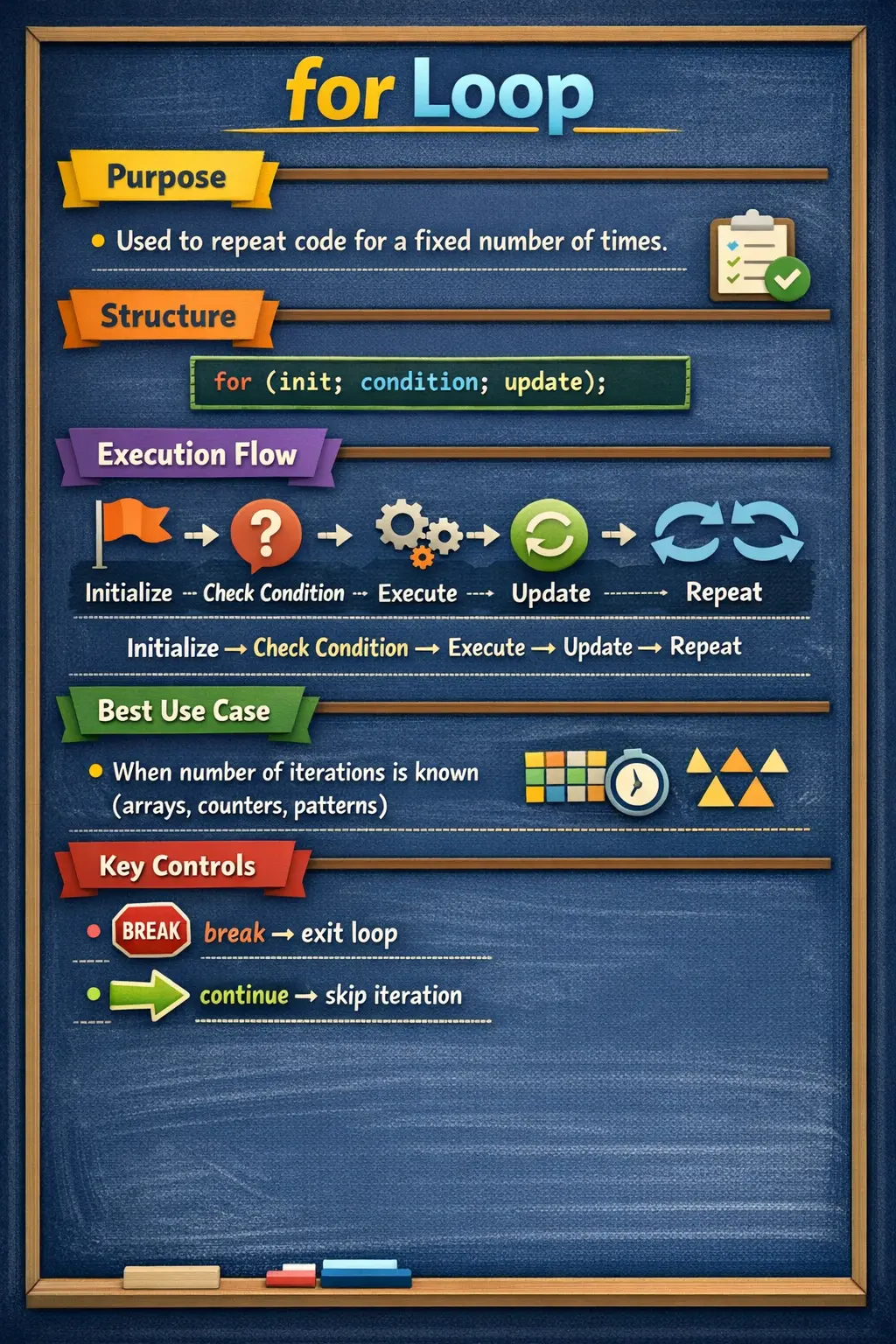
At its core, the for loop is designed for count-controlled iteration, where the number of repetitions is either known beforehand or can be determined logically. Unlike other looping constructs such as while or do-while, the for loop brings initialization, condition checking, and update logic together in a single, readable statement. This makes it not only powerful but also highly expressive when used correctly.
Understanding the for loop deeply is essential—not just for beginners, but also for writing efficient, bug-free, and maintainable code in real-world applications and interviews.
Understanding the Concept of a for Loop
A for loop allows a program to repeat a block of code multiple times based on a condition. Instead of writing the same statement repeatedly, a loop automates repetition, making the code concise and scalable.
The defining characteristic of a for loop is that it combines three critical components into one line: initialization, condition, and update. This design provides a clear lifecycle for the loop variable and ensures predictable execution.
Conceptually, the loop works like a controlled counter. It starts from an initial value, checks whether a condition is satisfied, executes the loop body if the condition is true, updates the counter, and repeats the process until the condition becomes false.
This predictable flow is what makes the for loop ideal for scenarios where iteration count is well-defined.
Basic Syntax and Structure
The syntax of a for loop is compact but expressive. It consists of three parts enclosed within parentheses, followed by a block of code.
The structure looks like this:
for (initialization; condition; update) {
    // code to execute
}
Each part of the loop serves a specific purpose. The initialization sets up the loop variable. The condition determines whether the loop should continue. The update modifies the loop variable after each iteration.
A simple example helps illustrate this clearly:
for (int i = 1; i <= 5; i++) {
    System.out.println(i);
}
This loop prints numbers from 1 to 5. It starts by initializing i to 1, checks if i is less than or equal to 5, executes the print statement, increments i, and repeats the process.
Breakdown of for Loop Components
To fully understand how a for loop works, it is important to analyze each of its components individually.
The initialization part is executed only once, at the beginning of the loop. It is typically used to declare and initialize the loop variable. In most cases, this variable acts as a counter.
The condition is evaluated before every iteration. If the condition evaluates to true, the loop body executes. If it evaluates to false, the loop terminates immediately. This condition acts as the controlling factor for the loop.
The update expression is executed after each iteration of the loop body. It is responsible for modifying the loop variable, usually by incrementing or decrementing it. This ensures that the loop progresses toward termination.
Together, these three components define the lifecycle of the loop.
Execution Flow of the for Loop
The execution of a for loop follows a well-defined sequence. First, the initialization is executed. Then the condition is evaluated. If the condition is true, the loop body runs. After that, the update expression is executed. The process then repeats from the condition check.
This cycle continues until the condition becomes false. Once the condition fails, the loop exits, and control moves to the next statement after the loop.
Understanding this flow is critical, especially when debugging or analyzing complex loops. Many logical errors arise from misunderstanding when and how these components are executed.
Simple Example and Practical Understanding
Consider a loop that prints a message multiple times:
for (int i = 1; i <= 3; i++) {
    System.out.println("Java");
}
In this case, the loop runs three times. Each iteration prints the word "Java." The loop variable i is used only to control the number of iterations and is not directly used inside the loop body.
This demonstrates a common use case where the loop acts purely as a repetition mechanism.
Using Decrement in for Loop
While incrementing loops are more common, for loops can also decrement values. This is useful when iterating in reverse order.
For example:
for (int i = 5; i >= 1; i--) {
    System.out.println(i);
}
This loop starts from 5 and counts down to 1. The logic remains the same, but the update expression decreases the value of the loop variable.
Reverse iteration is often used in scenarios like traversing arrays backward or implementing certain algorithms.
Multiple Initialization and Update Expressions
One of the advanced features of the for loop is the ability to handle multiple variables in the initialization and update sections.
For example:
for (int i = 1, j = 5; i <= j; i++, j--) {
    System.out.println(i + " " + j);
}
In this loop, two variables are initialized and updated simultaneously. This type of loop is useful when working with pairs of values or performing symmetric operations.
Although powerful, such constructs should be used carefully to maintain readability.
Infinite for Loop
A for loop does not require all three components. In fact, all parts are optional, making it possible to create an infinite loop.
for (;;) {
    System.out.println("Infinite loop");
}
In this case, there is no initialization, condition, or update. Since there is no condition to terminate the loop, it runs indefinitely.
Infinite loops are useful in specific scenarios such as servers, event listeners, or continuous monitoring systems. However, they must be controlled using statements like break to prevent unintended behavior.
Using break and continue in for Loop
The for loop becomes even more powerful when combined with control statements like break and continue.
The break statement immediately terminates the loop. It is commonly used when a specific condition is met and further iterations are unnecessary.
for (int i = 1; i <= 5; i++) {
    if (i == 3) {
        break;
    }
    System.out.println(i);
}
In this example, the loop stops when i becomes 3.
The continue statement, on the other hand, skips the current iteration and moves to the next one.
for (int i = 1; i <= 5; i++) {
    if (i == 3) {
        continue;
    }
    System.out.println(i);
}
Here, the value 3 is skipped, but the loop continues executing for other values.
These statements provide fine-grained control over loop execution.
Nested for Loops
A for loop can be placed inside another for loop, creating a nested loop structure. This is commonly used for working with multi-dimensional data, generating patterns, or performing matrix operations.
for (int i = 1; i <= 3; i++) {
    for (int j = 1; j <= 2; j++) {
        System.out.println(i + "," + j);
    }
}
In this example, the outer loop controls the rows, and the inner loop controls the columns. Each iteration of the outer loop triggers a complete execution of the inner loop.
Nested loops are powerful but can become computationally expensive if not used carefully.
Common Use Cases of for Loop
The for loop is widely used in many scenarios. It is ideal for iterating over a fixed range of values, processing arrays using index-based access, generating numerical sequences, and implementing algorithmic logic.
In real-world applications, it is often used in data processing, report generation, and iterative computations. Its predictable structure makes it a preferred choice for developers.
Why the for Loop Is So Common in Java
The for loop is common because many programming tasks involve predictable repetition. A program may need to run a calculation ten times, print values from one range, visit every element in an array, compare each record in a list, or generate a fixed number of rows in a pattern. In all these cases, the developer knows the structure of repetition before the loop begins. The for loop captures that structure neatly.
Unlike a while loop, where setup, condition checking, and update logic may be spread across different lines, a for loop places the core loop control information in one location. This makes the loop easy to scan. A reader can quickly identify where the loop starts, when it should stop, and how the loop variable changes after each iteration. That compactness is one of the main reasons for loops are favored for count-based logic.
The for loop is also strongly connected to algorithmic thinking. Many beginner and interview problems use repeated steps: summing numbers, finding maximum values, reversing arrays, counting characters, printing patterns, checking primes, or searching for an element. The for loop provides a reliable structure for expressing these repeated operations clearly.
Understanding Count-Controlled Iteration
Count-controlled iteration means the loop is controlled by a counter or index. The program starts from an initial value, moves toward a boundary, and updates the counter in a predictable way. This makes the for loop especially useful when the number of iterations is known or can be calculated before the loop starts.
For example, if an array has ten elements, a for loop can start at index zero and continue while the index is less than the array length. If a report needs twelve months, a for loop can run from one to twelve. If a countdown should print from ten to one, the update expression can decrement the counter. The loop structure mirrors the counting logic directly.
This predictability helps reduce errors when the loop is written carefully. The initialization establishes the starting point. The condition defines the boundary. The update moves the loop toward that boundary. When all three parts are aligned, the loop is easy to reason about and easy to test.
Initialization, Condition, and Update as a Lifecycle
The three parts of a for loop form a lifecycle. Initialization happens once before the first condition check. The condition is checked before each iteration. The loop body runs only when the condition is true. The update expression runs after the loop body completes. Then the condition is checked again. This sequence repeats until the condition becomes false.
Many mistakes happen when developers misunderstand this lifecycle. The update does not run before the first iteration. It runs after the body. The condition is checked before the body, so a for loop may execute zero times if the condition is false from the beginning. The initialization does not repeat with every iteration; it happens only once.
Once this lifecycle is clear, for loops become predictable. You can trace a loop by writing down the value of the loop variable before the condition check, during the body, and after the update. This step-by-step tracing is especially useful when solving interview output questions or debugging loops that behave unexpectedly.
for Loop and Loop Variables
The loop variable is usually the center of a for loop. It tracks progress and often represents an index, counter, position, or step number. In most Java code, simple names such as i, j, and k are used for short loops, especially when the variable represents an index. For longer or more meaningful loops, descriptive names can improve readability.
A loop variable declared inside the for loop header is scoped to that loop. This means it cannot be accessed after the loop finishes. This is useful because it prevents accidental reuse of the variable outside its intended context. If the value is needed after the loop, the variable must be declared before the loop.
It is usually best to avoid modifying the loop variable inside the loop body unless there is a clear reason. The update expression already controls how the variable changes. Changing it in another place can make the loop harder to understand and may cause skipped values, repeated values, or unexpected termination. Clean loops keep loop control logic centralized.
for Loop with Arrays
Arrays are one of the most common reasons to use a for loop. Because arrays use indexes, and indexes follow a numeric range, the for loop fits naturally. A typical array loop starts at index zero and continues while the index is less than the array length. This covers every valid element without exceeding the array boundary.
Understanding array indexes is critical. Java arrays are zero-based, so the first element is at index zero and the last element is at length minus one. A common beginner mistake is using a condition such as i <= array.length, which tries to access an invalid index and causes an ArrayIndexOutOfBoundsException. The correct condition is usually i < array.length.
For loops are useful with arrays when the index itself matters. If you need to update an element by position, compare neighboring elements, process values backward, or access multiple arrays using the same index, a traditional for loop is appropriate. If you only need each value and do not care about its index, the enhanced for loop may be cleaner.
for Loop with Collections
Java collections such as lists are also commonly processed with loops. A traditional for loop can iterate through a list using indexes, especially when the position matters. For example, a program may need to compare the current element with the previous one, update a value at a specific index, or process only a certain range of positions.
However, when the goal is simply to read each element, the enhanced for loop is often easier to understand. It removes index management and lets the code focus on the current item. Choosing between a traditional for loop and an enhanced for loop depends on whether index control is required.
When modifying collections while looping, developers must be careful. Removing elements from a list using a normal index-based loop can cause skipped elements or index errors if not handled properly. In such cases, iterators, careful reverse iteration, or collection methods may be safer. The for loop is powerful, but collection modification requires an understanding of how indexes shift.
Enhanced for Loop vs Traditional for Loop
The enhanced for loop, also known as the for-each loop, is designed for simple traversal. It reads each element from an array or collection without exposing the index. This makes it concise and readable when the loop only needs the current value. It is commonly used for printing values, checking records, calculating totals, or applying simple processing to every item.
The traditional for loop is better when the index matters. If you need to start from a specific position, skip by a custom step, iterate backward, compare positions, or update values by index, the traditional form gives more control. It also makes the initialization, condition, and update explicit.
Both forms are useful, and neither is universally better. The best choice depends on the task. If the loop is about each item, use enhanced for when possible. If the loop is about positions, counters, ranges, or custom movement, use the traditional for loop.
for Loop with break and continue
The break and continue statements give extra control inside a for loop. Break stops the loop completely. It is commonly used when the desired result is found and further iteration is unnecessary. For example, while searching for a specific value, break can exit the loop as soon as the value appears.
Continue skips the remaining statements in the current iteration and moves to the next update and condition check. It is useful when some values should be ignored but the loop should keep running. For example, a loop may skip invalid records, blank strings, even numbers, or disabled users while continuing to process the rest.
These statements should be used with clear intention. One or two obvious control points can make a loop cleaner. Too many break or continue statements can make the loop difficult to follow. The reader should always be able to understand why the loop stops or why an iteration is skipped.
for Loop and Off-by-One Errors
Off-by-one errors are among the most common loop defects. They occur when a loop runs one iteration too many or one iteration too few. In Java, this often happens when choosing between less than and less than or equal to. The difference may look small, but it can change the behavior completely.
For ranges that include both endpoints, less than or equal to may be correct. For array indexes, less than the length is usually correct because the last valid index is length minus one. Understanding the difference between count values and index values is essential. Counting from one to five is not the same as indexing an array of five elements from zero to four.
A practical way to avoid off-by-one errors is to test boundary cases. Check the first iteration, the last expected iteration, and the point where the loop stops. If the loop processes an array, verify that it never tries to access index equal to the array length. Careful boundary thinking prevents many runtime errors.
Infinite for Loops and Safe Termination
A for loop can intentionally be written as an infinite loop by leaving all three header sections empty. This is valid Java. It is sometimes used in servers, event loops, continuous monitors, menu programs, and systems that wait for external signals. In these cases, the loop is expected to continue until a break, return, exception, or external shutdown condition stops it.
Accidental infinite loops are different. They usually happen when the loop condition never becomes false because the update expression is wrong or missing. For example, a loop that should increment a counter may accidentally decrement it, moving away from the termination boundary. Such mistakes can cause programs to hang or consume resources unnecessarily.
Every loop should have a clear termination strategy. If the loop is finite, the initialization, condition, and update should move toward stopping. If the loop is intentionally infinite, the code should contain a clear exit condition inside the body. A loop without a believable way to stop deserves careful review.
Nested for Loops in Detail
Nested for loops are used when one repeated process must happen inside another. The outer loop controls the larger cycle, and the inner loop completes its full cycle for each iteration of the outer loop. This structure is common in tables, grids, matrices, pattern printing, pair comparisons, and multi-dimensional arrays.
Understanding nested loops requires counting total iterations. If the outer loop runs three times and the inner loop runs four times for each outer iteration, the inner body runs twelve times. This multiplication effect is powerful but can become expensive. When loops are nested over large datasets, performance can degrade quickly.
Nested loops should be used carefully and clearly. Variable names should avoid confusion, usually using i for the outer loop and j for the inner loop in short examples. For real business logic, more descriptive names may be better. If nested loops become too complex, helper methods or different data structures may improve readability and performance.
for Loop in Real-World Programs
In real applications, for loops appear in many ordinary tasks. A reporting module may loop through records to calculate totals. A billing system may loop through invoice items. A testing utility may loop through browsers, datasets, or test inputs. A user interface may loop through menu options or table rows. A backend service may loop through validation rules or event messages.
The pattern is always similar: take a set of values, process each value, and stop when the defined boundary is reached. The for loop gives a clean structure for that pattern. Its predictability makes it useful in both beginner programs and production systems.
At the same time, not every repeated operation requires a manual for loop. Modern Java also provides collection APIs, streams, and built-in methods that can express certain operations more declaratively. Still, understanding the for loop remains essential because it teaches the mechanics of iteration that other abstractions build upon.
Testing Code That Uses for Loops
Testing for-loop logic requires checking normal execution, boundary behavior, and zero-iteration cases. A loop may work for common values but fail when the collection is empty, when it contains one item, or when it reaches the last index. These edge cases are where loop defects often appear.
If a loop calculates a sum, test with no values, one value, and multiple values. If a loop searches for an element, test when the element appears first, appears last, appears in the middle, and does not appear at all. If a loop uses break, verify that it stops at the correct time. If it uses continue, verify that skipped values are truly ignored and valid values are still processed.
For nested loops, tests should consider the combination of outer and inner boundaries. Empty rows, empty columns, single-row data, and single-column data can reveal mistakes that normal multi-row examples hide. Good loop testing focuses on the edges of repetition, not only the typical case.
Debugging for Loop Problems
When a for loop behaves incorrectly, start by inspecting the three header components. Check whether initialization starts at the right value, whether the condition stops at the right boundary, and whether the update moves in the correct direction. Most loop bugs can be traced to one of these three areas.
Next, inspect changes inside the loop body. If the loop variable is modified inside the body, the loop may skip values or terminate unexpectedly. If break or continue appears inside the loop, confirm whether those statements are reached and whether they are intended. Debugging with a watch on the loop variable often makes the issue visible quickly.
Finally, trace a small example manually. Write down the value before the condition, after the body, and after the update. This simple technique is extremely effective for interview questions and real debugging. A loop that seems confusing in code often becomes obvious when traced step by step.
How to Explain for Loop in Interviews
In interviews, a strong explanation starts with the purpose of the for loop: it is used for repeated execution when the number of iterations is known or controlled by a counter. Then explain the three parts: initialization runs once, condition is checked before each iteration, and update runs after each iteration.
A good answer should also describe execution order. Java initializes the loop variable, checks the condition, executes the body if true, performs the update, and repeats. If the condition is false at the beginning, the loop body does not run even once. This shows that you understand behavior, not just syntax.
Finally, mention practical use cases and pitfalls. For loops are used for ranges, arrays, collections, patterns, searching, and algorithms. Common mistakes include off-by-one errors, infinite loops, incorrect update expressions, and modifying the loop variable inside the body. This gives a complete, interview-ready answer.
Common Beginner Mistakes
Despite its simplicity, the for loop is prone to common mistakes. One of the most frequent errors is the off-by-one mistake, where the loop runs one time too many or one time too few. This usually happens due to incorrect use of < versus <=.
Another common issue is creating infinite loops unintentionally. This occurs when the condition never becomes false, often due to incorrect update logic.
Modifying the loop variable inside the loop body can also lead to unpredictable behavior. It is generally recommended to control the loop variable only through the update expression.
Overcomplicating loop conditions is another mistake. Complex conditions reduce readability and increase the chances of logical errors.
Interview Perspective
From an interview standpoint, the for loop is a fundamental topic. Candidates are often expected to explain its structure, execution flow, and use cases clearly.
A strong answer should highlight that the for loop is used for count-controlled iteration and consists of initialization, condition, and update expressions. It should also demonstrate understanding of execution order and common pitfalls.
Interviewers may also test edge cases, such as infinite loops, nested loops, or the use of break and continue.
Key Takeaway
The for loop is a powerful and essential construct in Java. It provides a concise and structured way to perform repeated operations, making it ideal for scenarios where the number of iterations is known.
Mastering the for loop is not just about understanding its syntax—it is about understanding its behavior, execution flow, and edge cases. With this knowledge, developers can write efficient, readable, and reliable code.
In essence, the for loop is more than just a looping mechanism—it is a foundational building block for logic, algorithms, and real-world problem-solving in Java.
1. Basic for Loop (Print 1 to 5)
for (int i = 1; i <= 5; i++) {
System.out.println(i);
}
Explanation
- Initializes i to 1.
- Loop runs while i <= 5.
- Increments i by 1 each iteration.
- Output: 1 2 3 4 5
2. for Loop with Custom Increment
for (int i = 0; i <= 10; i += 2) {
System.out.println(i);
}
Explanation
- i increases by 2 each time.
- Prints even numbers only.
- Output: 0 2 4 6 8 10
3. Reverse for Loop
for (int i = 5; i >= 1; i--) {
System.out.println(i);
}
Explanation
- Loop runs backward.
- Decrements i each iteration.
- Output: 5 4 3 2 1
4. for Loop without Initialization
int i = 1;
for (; i <= 3; i++) {
System.out.println(i);
}
Explanation
- Initialization happens outside the loop.
- Valid Java syntax.
- Output: 1 2 3
5. for Loop without Increment
for (int i = 1; i <= 3;) {
System.out.println(i);
i++;
}
Explanation
- Increment done inside the loop body.
- Useful when increment depends on logic.
6. Infinite for Loop
for (;;) {
System.out.println("Running once");
break;
}
Explanation
- All three parts are optional.
- Acts as an infinite loop.
- break is required to stop execution.
7. for Loop with break
for (int i = 1; i <= 5; i++) {
if (i == 3) {
break;
}
System.out.println(i);
}
Explanation
- Loop terminates when i == 3.
- Output: 1 2
8. for Loop with continue
for (int i = 1; i <= 5; i++) {
if (i == 3) {
continue;
}
System.out.println(i);
}
Explanation
- Skips only iteration i == 3.
- Output: 1 2 4 5
9. for Loop with Multiple Variables
for (int i = 1, j = 5; i <= 5; i++, j--) {
System.out.println(i + " " + j);
}
Explanation
- Two variables updated in one loop.
- Output:
1 5
2 4
3 3
4 2
5 1
10. Nested for Loop (Matrix Style)
for (int i = 1; i <= 3; i++) {
for (int j = 1; j <= 3; j++) {
System.out.print(j + " ");
}
System.out.println();
}
Explanation
- Inner loop runs fully for each outer loop.
- Output:
1 2 3
1 2 3
1 2 3
11. Nested for Loop (Multiplication Table)
for (int i = 1; i <= 3; i++) {
for (int j = 1; j <= 3; j++) {
System.out.println(i + " * " + j + " = " + (i * j));
}
}
Explanation
- Used for tables and grid processing.
12. Enhanced for Loop (Array Traversal)
int[] nums = {10, 20, 30};
for (int n : nums) {
System.out.println(n);
}
Explanation
- Simplifies array iteration.
- No index required.
13. for Loop with Array Index
int[] nums = {10, 20, 30};
for (int i = 0; i < nums.length; i++) {
System.out.println(nums[i]);
}
Explanation
- Index-based iteration.
- Needed when index manipulation is required.
14. for Loop with Conditional Logic
for (int i = 1; i <= 10; i++) {
if (i % 2 == 0) {
System.out.println(i + " is even");
}
}
Explanation
- Executes logic only when condition matches.
- Output: even numbers only.
15. Labeled for Loop
outer:
for (int i = 1; i <= 3; i++) {
for (int j = 1; j <= 3; j++) {
if (j == 2) {
continue outer;
}
System.out.println("i=" + i + ", j=" + j);
}
}
Explanation
- continue outer jumps to next outer loop iteration.
- Used in complex nested logic.
16. for Loop for String Characters
String s = "JAVA";
for (int i = 0; i < s.length(); i++) {
System.out.println(s.charAt(i));
}
Explanation
- Iterates character by character.
- Common in string processing.
17. for Loop for Sum Calculation
int sum = 0;
for (int i = 1; i <= 5; i++) {
sum += i;
}
System.out.println(sum);
Explanation
- Accumulates values.
- Output: 15
18. for Loop for Searching an Element
int[] nums = {5, 10, 15, 20};
for (int n : nums) {
if (n == 15) {
System.out.println("Found");
break;
}
}
Explanation
- Stops loop once element is found.
- Improves performance.
19. for Loop with Boolean Flag
boolean found = false;
for (int i = 1; i <= 5; i++) {
if (i == 4) {
found = true;
break;
}
}
System.out.println(found);
Explanation
- Flag stores result after loop.
- Common interview pattern.
20. Interview Summary Example
for (int i = 1; i <= 3; i++) {
System.out.println(i);
}
Explanation
- Demonstrates:
- Initialization
- Condition
- Increment
- Most fundamental for loop structure.