Expressions & Evaluation in Java
Expressions are the fundamental building blocks of logic in Java. Every meaningful computation, decision, or transformation in a program is ultimately expressed through an expression. Whether you are calculating a total, validating a condition, invoking a method, or updating a variable, you are working with expressions. Understanding how expressions are formed and, more importantly, how they are evaluated is essential for writing correct, predictable, and maintainable Java code.
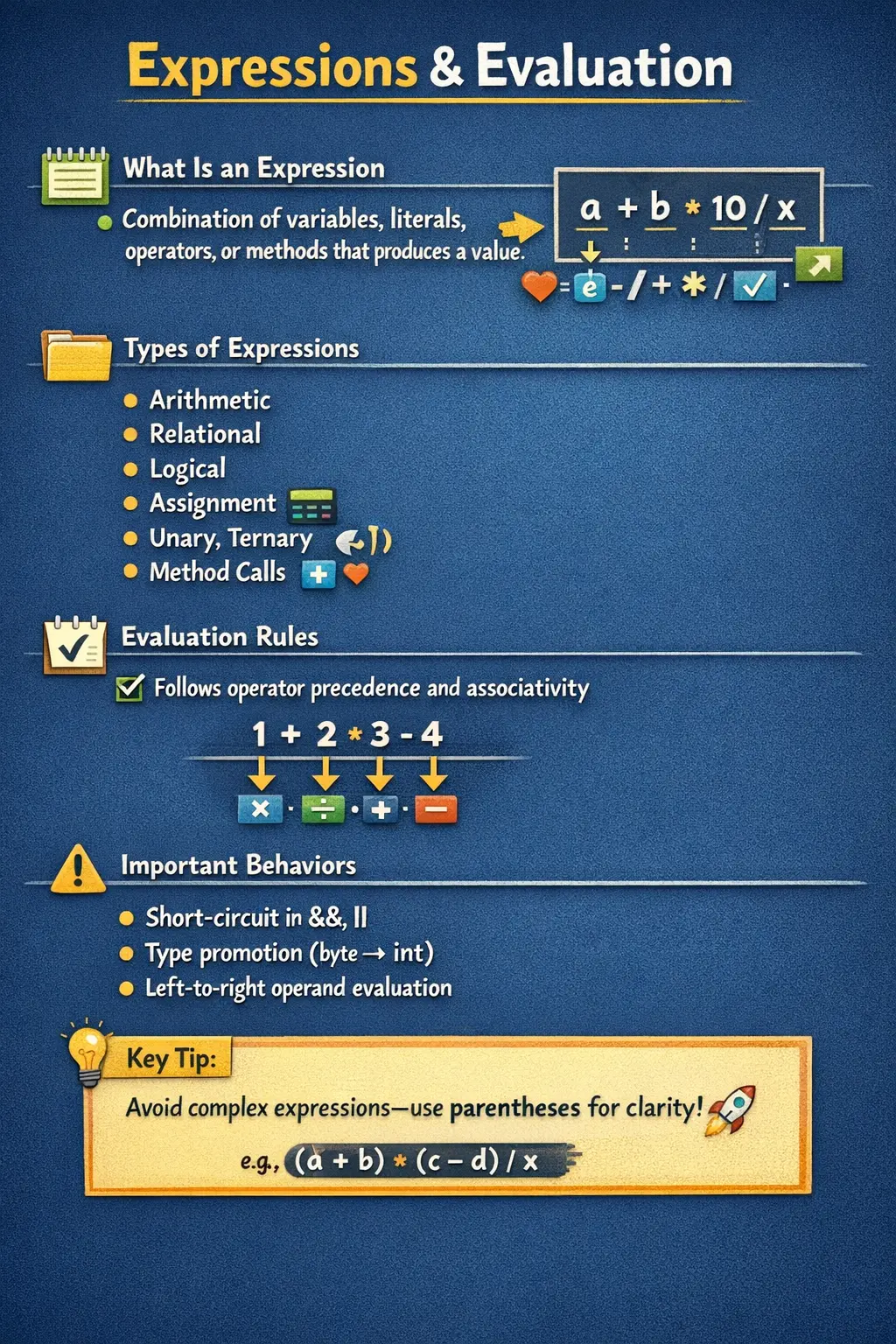
At a deeper level, expression evaluation ties together multiple core concepts in Java, including operators, operator precedence, associativity, type promotion, and execution order. Many subtle bugs in real-world applications arise not from syntax errors, but from incorrect assumptions about how Java evaluates expressions. This is why expressions and their evaluation are a favorite topic in technical interviews and a critical concept for every developer to master.
What Is an Expression?
An expression in Java is any valid combination of variables, literals, operators, and method calls that produces a single value. This value can be of any type—numeric, boolean, object, or even void in certain contexts (such as method calls used for side effects).
Expressions are not complete statements by themselves, but they can be part of larger statements. For example, a calculation, a comparison, or a method invocation can all be considered expressions.
Simple examples of expressions include arithmetic calculations, logical comparisons, and even increment operations. Each of these produces a result that can be used directly or assigned to a variable.
The key idea is that an expression always evaluates to a value. This property distinguishes expressions from statements, which perform actions but do not necessarily produce a value.
Types of Expressions in Java
Java supports several categories of expressions, each serving a different purpose in programming. Understanding these categories helps in structuring logic clearly and effectively.
Arithmetic Expressions
Arithmetic expressions involve mathematical operations such as addition, subtraction, multiplication, division, and modulus. These expressions produce numeric results and are widely used in calculations.
In an arithmetic expression, operator precedence plays a crucial role. For example, multiplication is evaluated before addition, ensuring that mathematical rules are followed correctly. This behavior is consistent and predictable, but it requires developers to be aware of precedence when writing expressions.
Relational Expressions
Relational expressions compare two values and return a boolean result—either true or false. These expressions are commonly used in conditional statements and loops.
The result of a relational expression is always a boolean, making it suitable for decision-making logic. Understanding how comparisons work, especially with different data types, is essential for writing correct conditions.
Logical Expressions
Logical expressions combine multiple boolean conditions using operators such as AND, OR, and NOT. These expressions are used to build complex decision-making logic.
One important aspect of logical expressions is short-circuit evaluation. In logical AND operations, if the first condition is false, the second condition is not evaluated. Similarly, in logical OR operations, if the first condition is true, the second condition is skipped. This behavior improves performance and prevents runtime errors, such as division by zero.
Assignment Expressions
Assignment expressions are used to assign values to variables. Interestingly, assignment itself is an expression in Java, meaning it produces a value—the value being assigned.
This allows assignments to be used within other expressions, enabling concise code. However, this feature must be used carefully, as it can reduce readability if overused.
Unary Expressions
Unary expressions operate on a single operand. These include increment, decrement, negation, and logical inversion.
Unary operators have unique evaluation behavior, especially when dealing with pre-increment and post-increment forms. Understanding the difference between these forms is critical, as they can produce different results depending on when the value is updated.
Conditional (Ternary) Expressions
Conditional expressions use the ternary operator to evaluate a condition and return one of two possible values. This provides a compact alternative to if-else statements.
While ternary expressions improve conciseness, they should be used carefully. Overuse or nesting can make code difficult to read and understand.
Method Invocation Expressions
Method calls that return values are also expressions. When a method is invoked and returns a value, that value can be used directly in another expression.
This allows for flexible and powerful composition of logic, where method results are combined with other operations.
Core Rules of Expression Evaluation
Understanding expressions is not just about recognizing their types—it is about knowing how Java evaluates them. Several key rules govern this process.
Operator Precedence
Operator precedence determines which operations are performed first in an expression. Operators with higher precedence are evaluated before those with lower precedence.
For example, in an expression involving both addition and multiplication, multiplication is performed first. This ensures that expressions follow standard mathematical rules.
Associativity
When multiple operators have the same precedence, associativity determines the order of evaluation. Most operators are evaluated from left to right, but some, such as assignment operators, are evaluated from right to left.
Associativity is particularly important in chained expressions, where multiple operations occur at the same precedence level.
Short-Circuit Evaluation
Short-circuit evaluation applies to logical operators. It ensures that expressions are evaluated efficiently and safely by skipping unnecessary computations.
This behavior is especially useful in conditions where evaluating the second operand could cause an error. By evaluating only what is necessary, Java prevents potential runtime issues.
Type Promotion
During expression evaluation, Java may automatically promote smaller data types to larger ones. For example, when performing arithmetic operations on byte or short values, the result is promoted to an int.
Type promotion ensures consistency and prevents data loss during calculations. However, it also requires developers to be aware of implicit conversions and potential casting requirements.
Order of Evaluation
Java evaluates operands from left to right, regardless of operator precedence. This means that in an expression involving method calls, the leftmost method is executed first.
However, while operands are evaluated left to right, operators are applied based on precedence. This distinction is crucial for understanding how complex expressions are executed.
Expression Result Types
Every expression in Java has a type. This is one of the most important ideas behind expression evaluation. The type of an expression determines where it can be used and how later operations will interpret it. An arithmetic expression such as adding two integers produces a numeric result. A relational expression such as comparing two values produces a boolean result. A method call expression produces the return type of that method. A string concatenation expression produces a String. A ternary expression produces a type based on the two possible result branches.
This result type is not just theoretical. It directly affects compilation and runtime behavior. For example, the condition inside an if statement must evaluate to boolean. You cannot place an integer expression there and expect Java to treat zero as false or non-zero as true, as some other languages allow. Java is strict about this. Similarly, when assigning the result of an expression to a variable, the expression type must be compatible with the variable type. If the result is wider, narrower, or reference-based in a way that does not match the target variable, Java requires a valid conversion or reports a compilation error.
Understanding expression result types also helps explain why some expressions surprise beginners. The expression 10 divided by 4 produces an integer result when both operands are integers, even if the result is later assigned to a double variable. The evaluation happens first, then assignment happens. By the time the value reaches the double variable, the decimal part has already been lost. To produce 2.5, at least one operand must be a floating-point type during the expression itself. This is a small example, but the same principle applies across Java: the result type is decided by the expression rules before the value is used elsewhere.
Evaluation Order and Precedence Are Not the Same
One of the most common misunderstandings about Java expressions is confusing evaluation order with operator precedence. These concepts are related, but they are not identical. Evaluation order describes the sequence in which operands are evaluated. Operator precedence describes how operations are grouped and applied. Java evaluates operands from left to right, but the operators are applied according to precedence and associativity rules.
For example, in an expression that contains a method call on the left side and another method call on the right side, Java evaluates the left operand before the right operand. However, if the expression also contains multiplication and addition, multiplication has higher precedence than addition when the final operation is applied. This means Java can evaluate values left to right while still applying multiplication before addition. Developers who assume that precedence changes operand evaluation order may misunderstand code that includes method calls, increments, assignments, or side effects.
The distinction becomes especially important when expressions contain operations that change state. If both operands are simple numbers, evaluation order may not seem important. But if an operand calls a method, increments a variable, assigns a value, reads from an object, or triggers some visible side effect, knowing which operand is evaluated first becomes critical. Java's left-to-right operand evaluation rule gives predictability, but the code can still become difficult to read if too many effects are packed into one expression.
Operand Evaluation from Left to Right
Java's rule that operands are evaluated from left to right gives developers a reliable mental model. In an expression such as a method call followed by another method call, the first method call is evaluated first. If that method changes a variable, logs output, updates an object, or throws an exception, that effect occurs before Java evaluates the next operand. This predictable sequence is useful, but it should not be abused to create clever expressions.
Consider an expression that combines post-increment, pre-increment, multiplication, and addition in one line. Java can evaluate it according to formal rules, and an experienced developer may be able to compute the result. However, the expression may still be poor code because it hides state changes inside a calculation. Code that requires careful tracing to understand a simple result is fragile. It increases the chance of misunderstanding during maintenance, and it makes defects harder to identify.
A practical guideline is to keep expressions pure whenever possible. A pure expression calculates a value without changing external state. Arithmetic calculations, comparisons, and boolean checks are easier to understand when they do not modify variables as part of the same expression. When a state change is required, such as incrementing a counter or assigning a new value, it is often clearer to place that operation on its own line. The program may be a few lines longer, but the intention becomes much easier to read.
Side Effects in Expressions
A side effect occurs when evaluating an expression changes something outside the produced value. Incrementing a variable, assigning a value, modifying an object, calling a method that updates data, writing to a file, or changing a collection are all examples of side effects. Java allows expressions with side effects, and many of them are perfectly normal. For example, assigning a value to a variable is a common operation, and calling a method that saves data is sometimes necessary. The risk appears when side effects are hidden inside complex expressions.
Post-increment and pre-increment are the most common examples. The expression a++ produces the old value of a and then increases a. The expression ++a increases a first and then produces the new value. Both forms are valid, but when they are mixed with other operations in the same expression, the result becomes harder to predict. The issue is not that Java is unclear; the issue is that humans are poor at reading dense state-changing expressions reliably.
Method calls can also introduce side effects. A method named calculateTotal may sound harmless, but if it also updates a database field, clears a cache, or changes an object property, using it inside another expression can make the code misleading. Good naming and clean method design reduce this risk. Methods that calculate values should ideally return values without hidden updates. Methods that change state should make that intention visible through their name and usage. Expression evaluation becomes much safer when expressions mostly calculate and statements clearly perform actions.
Arithmetic Expressions and Numeric Promotion
Arithmetic expressions are often the first expressions Java learners understand, but they still contain rules that matter in professional code. Java supports arithmetic operations on numeric types, but it does not always keep the exact original type during evaluation. Smaller integer types such as byte and short are promoted to int during arithmetic operations. This means adding two byte values does not automatically produce a byte result; it produces an int result unless explicitly cast back.
Numeric promotion helps Java perform calculations consistently, but it can surprise developers who expect the result to stay in the same type. It also matters when working with decimal values. If both operands are integers, division performs integer division. The decimal part is discarded before assignment. If one operand is a double or float, Java performs floating-point division. This difference is important in financial calculations, percentage calculations, averages, measurements, and any situation where precision matters.
Arithmetic expressions also require attention to overflow. An int expression can overflow if the result exceeds the range of int. Java does not automatically convert the result to long just because the mathematical result is large. If all operands are int, the expression is evaluated as int unless a wider type is introduced. To avoid overflow in large calculations, developers should use long or BigDecimal where appropriate and make the intended numeric type clear. Correct arithmetic in Java is not only about choosing the right operator; it is about choosing the right operand types before the expression is evaluated.
Boolean Expressions and Short-Circuit Logic
Boolean expressions control decisions in Java. They appear in if statements, while loops, for loop conditions, validation checks, authorization rules, and business logic. A boolean expression should communicate intent clearly because it often determines whether an action is allowed, rejected, skipped, or repeated. When boolean expressions become too long or too technical, they become a major source of misunderstanding.
Short-circuit evaluation is one of the most useful features of Java boolean logic. With the logical AND operator, if the first condition is false, the whole expression cannot become true, so Java does not evaluate the second condition. With the logical OR operator, if the first condition is true, the whole expression is already true, so Java skips the second condition. This behavior is commonly used to guard against errors. For example, a null check can be placed before accessing an object's method, ensuring that the second part is evaluated only when the object is not null.
However, short-circuit logic should be used intentionally. If the second condition contains a method call with a side effect, that method may not run. This can create bugs when developers expect every part of the expression to execute. Boolean expressions are strongest when each condition simply checks a fact and does not perform an action. If an operation must always occur, it should not be hidden behind short-circuit behavior.
Assignment Expressions and Readability
In Java, assignment is an expression because it produces the assigned value. This is why code such as assigning a value inside a condition can compile if the final result is boolean. This feature can be useful in limited cases, such as reading data in a loop, but it can also make code confusing. Many teams discourage assignments inside conditions because they are easy to mistake for equality checks and can hide important state changes.
Compound assignment operators add another layer of behavior. An expression such as total += tax is not only shorter than total = total + tax; it also performs an implicit cast when needed. This can be useful, but it means compound assignment is not always exactly the same as writing the full expression in all type scenarios. A developer who understands expression evaluation will know when compound assignment is safe and when explicit conversion is clearer.
Readable assignment logic is especially important in business applications. Variables often represent meaningful values such as balance, discount, tax, eligibility, quantity, or score. When these values change, the code should make the change obvious. A clear assignment statement communicates intent better than a dense expression that both calculates and updates multiple values at once.
Method Calls Inside Expressions
Method invocation expressions make Java code expressive because they allow returned values to participate directly in larger calculations or decisions. A condition may call a method to check whether a user is active. A calculation may call a method to retrieve a price. A string expression may call methods to format values. This composition is one of the reasons Java code can be written cleanly and modularly.
The challenge is that method calls can hide complexity. A method name may look simple, but the method may perform validation, access a database, make a network call, update state, or throw an exception. When such method calls are placed inside large expressions, the expression becomes harder to reason about. This is why developers should be careful when mixing method calls with complex operators. If a method call has cost, risk, or side effects, assigning its result to a well-named variable before using it can make the code easier to understand.
There is also a debugging advantage. When each important method result is stored in a named variable, it becomes easier to inspect values during debugging and easier to log meaningful information. A long expression may be compact, but it can force the developer to evaluate too much mentally. Clear intermediate variables are not a weakness; they are often a sign that the logic has been made understandable.
String Expressions and Concatenation
String expressions are another area where evaluation order matters. In Java, the plus operator can mean numeric addition or string concatenation depending on the operands. If both operands are numeric, Java performs arithmetic addition. If one operand is a String, Java converts the other operand to text and performs concatenation. Once concatenation begins in a left-to-right expression, later plus operations may continue as string concatenation rather than numeric addition.
This behavior is common in logging, messages, labels, and output formatting. It can also produce unexpected results. For example, adding two numbers before a string produces a different result than starting with a string and then using plus with the same numbers. Parentheses are the simplest way to make the intended meaning explicit. If arithmetic should happen before concatenation, wrap the arithmetic part in parentheses.
In production code, string expressions should also be written with readability and performance in mind. For simple messages, concatenation is fine. For repeated concatenation inside loops, StringBuilder may be more appropriate. For formatted messages, format methods or template-style construction can improve clarity. The expression rules remain the same, but the design choice depends on how the string is being built and how often the operation runs.
Ternary Expressions and Value Selection
The ternary operator is an expression, not a statement. It evaluates a condition and produces one of two possible values. This makes it useful when a variable should receive one value under one condition and another value under a different condition. Used well, it makes simple value selection concise and readable.
The problem starts when ternary expressions are nested or used to perform complex logic. A deeply nested ternary expression can become more difficult to read than a normal if-else block. The goal of using the ternary operator should be clarity, not cleverness. If the condition and the two possible values are simple, ternary is a good fit. If the branches require explanation, multiple conditions, method calls with side effects, or longer calculations, an if-else statement is usually easier to maintain.
The result type of a ternary expression also matters. Java determines a compatible type between the second and third operands. In simple cases this is obvious, but in mixed numeric or reference scenarios, the inferred type may not be what a beginner expects. When using ternary expressions in important logic, make sure both branches represent the same conceptual kind of value. This keeps the expression meaningful and reduces conversion surprises.
How to Explain Expressions and Evaluation in Interviews
In interviews, expressions and evaluation questions are rarely about memorizing one output. Interviewers want to see whether you can reason step by step. A good explanation starts by identifying the operators involved, then applying precedence, associativity, operand evaluation order, and type conversion rules. If increment operators or method calls appear, explain when the value is used and when the side effect happens. If strings are involved, explain when concatenation starts. If boolean logic is involved, explain whether short-circuit evaluation skips any part of the expression.
A strong interview answer also mentions readability. After solving a tricky expression, it is reasonable to say that although Java evaluates the expression predictably, such code should usually be simplified in real projects. This shows maturity. Professional Java development is not about writing expressions that only the compiler can understand; it is about writing logic that other developers can safely maintain.
The best way to prepare is to practice small expression examples and write down each evaluation step. Over time, the rules become natural. Once you understand the order in which Java evaluates operands, applies operators, promotes types, and produces final values, expression questions become manageable instead of intimidating.
Tricky Evaluation Scenarios
Some expressions in Java can produce unexpected results due to the interaction of multiple evaluation rules. These scenarios are often used in interviews to test a developer’s understanding.
One common example involves increment operators used within expressions. The difference between pre-increment and post-increment can lead to different results depending on when the value is updated.
Another example involves string concatenation. When numeric values are combined with strings, the evaluation order determines whether arithmetic addition or string concatenation occurs. Once a string is encountered, subsequent operations are treated as concatenation.
Short-circuit evaluation provides another interesting scenario. In conditions where one operand can determine the result, the other operand is not evaluated. This can prevent errors but also requires careful reasoning about execution flow.
Expressions vs Statements
Although expressions and statements are closely related, they are not the same. An expression produces a value, while a statement performs an action.
For example, a calculation or comparison is an expression, but assigning the result to a variable is a statement. Statements often contain expressions, but not all expressions form complete statements.
Understanding this distinction helps in structuring code correctly and avoiding confusion between computation and execution.
Common Mistakes
Many developers make mistakes when working with expressions due to incorrect assumptions about evaluation rules. One common mistake is ignoring operator precedence and assuming that expressions are evaluated strictly from left to right.
Another frequent error involves misuse of increment operators, especially in complex expressions. Combining multiple operations in a single line can lead to unexpected results and reduce readability.
Overcomplicating expressions is another issue. While Java allows concise expressions, writing overly complex logic in a single statement can make code difficult to understand and maintain.
Failing to account for short-circuit evaluation can also lead to logical errors. Developers must understand when parts of an expression are skipped and how that affects the overall result.
Best Practices
To write reliable and maintainable code, developers should follow best practices when working with expressions. One of the most important practices is to use parentheses to make the intended order of evaluation explicit.
Breaking complex expressions into smaller, simpler parts can also improve readability and reduce the risk of errors. Clear and explicit logic is always preferable to concise but confusing code.
Developers should also avoid relying too heavily on implicit behavior, such as type promotion or short-circuit evaluation. Being explicit about conversions and conditions can make code more predictable.
Interview Perspective
Expressions and their evaluation are commonly tested in interviews because they require a solid understanding of multiple concepts. Candidates are often asked to evaluate expressions and determine their output.
A strong answer involves explaining how operator precedence, associativity, and evaluation order work together. Candidates should also demonstrate awareness of common pitfalls, such as increment behavior and string concatenation.
Providing clear reasoning and step-by-step evaluation is often more important than simply giving the correct answer.
Final Thoughts
Expressions are at the heart of Java programming. They define how data is manipulated, how decisions are made, and how logic is executed. Mastering expressions and their evaluation is essential for writing correct and efficient programs.
By understanding operator precedence, associativity, type promotion, and evaluation order, developers can avoid common pitfalls and write code that behaves exactly as intended. More importantly, they can read and maintain complex expressions in real-world codebases with confidence.
Ultimately, expressions are not just about syntax—they are about logic. A deep understanding of how Java evaluates expressions enables developers to write clean, predictable, and bug-free code, which is the foundation of professional software development.
1. Simple Arithmetic Expression Evaluation
int result = 10 + 5 * 2;
System.out.println(result);
Explanation
	• * has higher precedence than +.
	• Expression evaluated as 10 + (5 * 2) → 20.
2. Expression with Parentheses
int result = (10 + 5) * 2;
System.out.println(result);
Explanation
	• Parentheses force evaluation order.
	• (10 + 5) evaluated first → 30.
3. Expression with Multiple Operators
int result = 100 / 10 + 5 * 3;
System.out.println(result);
Explanation
	• / and * evaluated first (left to right).
	• 100 / 10 = 10, 5 * 3 = 15, then 10 + 15 = 25.
4. Integer vs Floating Expression Evaluation
double result = 10 / 4;
System.out.println(result);
Explanation
	• 10 / 4 is integer division → 2.
	• Assigned to double as 2.0.
5. Correct Floating Evaluation
double result = 10 / 4.0;
System.out.println(result);
Explanation
	• int promoted to double.
	• Result is 2.5.
6. Expression with Unary Operators
int a = 5;
int result = -a + ++a;
System.out.println(result);
Explanation
	• -a uses old value 5 → -5
	• ++a increments to 6
	• Final result: -5 + 6 = 1
7. Post-Increment in Expression
int a = 5;
int result = a++ + 10;
System.out.println(result);
System.out.println(a);
Explanation
	• a++ uses 5, then increments to 6
	• Result: 5 + 10 = 15
8. Pre-Increment in Expression
int a = 5;
int result = ++a + 10;
System.out.println(result);
System.out.println(a);
Explanation
	• ++a increments first → 6
	• Result: 6 + 10 = 16
9. Expression with Relational Operators
int a = 10;
int b = 20;
boolean result = a < b;
System.out.println(result);
Explanation
	• Relational expression evaluates to a boolean.
	• 10 < 20 → true.
10. Combined Relational + Logical Expression
int a = 10;
int b = 20;
boolean result = a < b && b > 15;
System.out.println(result);
Explanation
	• Relational expressions evaluated first.
	• Logical AND combines results.
11. Short-Circuit Evaluation (&&)
int x = 0;
if (x != 0 && 10 / x > 1) {
System.out.println("Safe");
}
Explanation
	• First condition is false.
	• Second expression not evaluated.
	• Prevents exception.
12. Non-Short-Circuit Evaluation (&)
int x = 0;
// if (x != 0 & 10 / x > 1) { } // ArithmeticException
Explanation
	• Both expressions evaluated.
	• Causes division by zero.
	• Demonstrates evaluation difference.
13. Expression with Ternary Operator
int a = 10;
String result = (a > 5) ? "Greater" : "Smaller";
System.out.println(result);
Explanation
	• Condition evaluated first.
	• Only one branch is executed.
14. Nested Expression Evaluation (Ternary)
int a = -5;
String result = (a > 0) ? "Positive"
: (a < 0) ? "Negative"
: "Zero";
System.out.println(result);
Explanation
	• Expressions evaluated left to right.
	• Nested ternary resolves sequentially.
15. Expression with Assignment Inside
int a = 5;
if ((a = 10) > 5) {
System.out.println(a);
}
Explanation
	• Assignment happens first.
	• Then comparison is evaluated.
	• Risky but valid Java expression.
16. Expression with Compound Assignment
int a = 10;
a += 5 * 2;
System.out.println(a);
Explanation
	• 5 * 2 evaluated first → 10
	• a += 10 → 20
17. Expression with Type Promotion
byte a = 10;
byte b = 20;
int result = a + b;
System.out.println(result);
Explanation
	• byte operands promoted to int.
	• Result type is int.
18. Expression with Casting
int a = 10;
int b = 3;
double result = (double) a / b;
System.out.println(result);
Explanation
	• Explicit cast changes evaluation type.
	• Prevents integer division.
19. Expression with Bitwise Operator
int a = 6;   // 110
int b = 3;   // 011
int result = a & b;
System.out.println(result);
Explanation
	• Bitwise AND evaluated bit-by-bit.
	• Result is 2.
20. Expression with Shift Operator
int a = 2;
int result = a << 3;
System.out.println(result);
Explanation
	• Left shift evaluated after literal resolution.
	• 2 << 3 → 16.
21. Expression with Equality and Arithmetic
int a = 5;
System.out.println(a + 5 == 10);
Explanation
	• Arithmetic evaluated first.
	• Result compared using ==.
22. Expression with Logical NOT
boolean flag = false;
boolean result = !flag;
System.out.println(result);
Explanation
	• Unary NOT evaluated first.
	• Flips boolean value.
23. Expression with Wrapper Unboxing
Integer a = 10;
int result = a + 5;
System.out.println(result);
Explanation
	• Wrapper is unboxed.
	• Arithmetic evaluated on primitives.
24. Expression in Loop Condition
int i = 0;
while (i < 5 && i != 3) {
System.out.println(i);
i++;
}
Explanation
	• Condition expression evaluated every iteration.
	• Stops when either condition fails.
25. Interview Summary Expression
int a = 5;
int result = a++ + ++a * 2;
System.out.println(result);
System.out.println(a);
Explanation
	• Step 1: a++ → uses 5, then a = 6
	• Step 2: ++a → a = 7
	• Step 3: 7 * 2 = 14
	• Final result: 5 + 14 = 19
	• Final a = 7