Variables in Java (Local, Instance, Static)
Variables are one of the most fundamental concepts in Java programming. A variable is a named location in memory used to store data that a program can read, modify, calculate with, compare, pass to methods, and use for decision-making. Almost every Java program, from a simple beginner example to a large enterprise application, depends on variables to hold values and represent state. Without variables, a program could not remember user input, count records, process transactions, store object details, or control execution flow.
At first, variables may look simple because the syntax is easy to recognize. A statement such as int age = 25; declares a variable named age, gives it the data type int, and stores the value 25. However, variables in Java have deeper behavior depending on where they are declared. A variable declared inside a method behaves differently from a variable declared inside a class. A variable marked with static behaves differently from a normal object variable. Understanding these differences is essential for writing correct, memory-aware, object-oriented Java code.
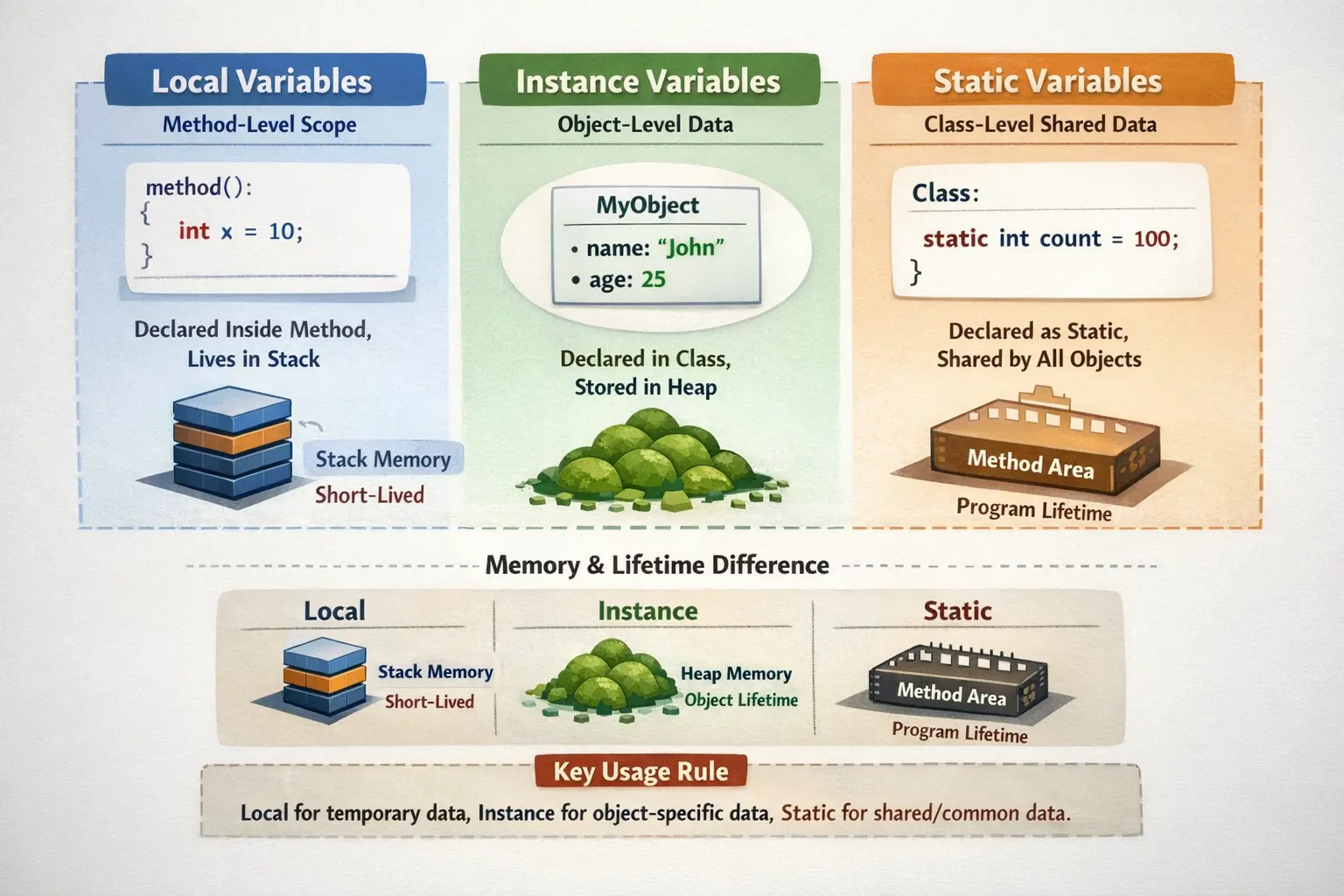
Java variables are commonly classified into three major types: local variables, instance variables, and static variables. This classification is based on scope, lifetime, memory location, ownership, and access style. Local variables belong to a method or block. Instance variables belong to an object. Static variables belong to a class. Once this distinction becomes clear, many Java concepts such as object state, method execution, class loading, memory management, and shared data become much easier to understand.
What Is a Variable?
A variable is a named storage location used to hold a value. Every variable has a data type, a name, and usually a value. The data type tells Java what kind of value the variable can store. The name is the identifier used to access the value. The value is the actual data stored in the variable at a particular moment.
int age = 25;In this example, int is the data type, age is the variable name, and 25 is the value. The variable name should follow Java identifier rules and naming conventions. A meaningful name such as studentAge or employeeSalary is usually better than a vague name such as x or data.
Variables allow programs to store intermediate results, perform calculations, maintain application state, pass data between methods, and represent real-world information. For example, a banking application may use variables for account number, balance, interest rate, transaction status, and customer name. A testing framework may use variables for timeout duration, retry count, browser name, environment URL, and execution result.
Basic Syntax of Variable Declaration
The basic syntax of a Java variable declaration includes the data type followed by the variable name. Initialization means assigning an initial value to the variable. A variable can be declared and initialized in the same statement, or it can be declared first and assigned later depending on the context.
int count;
count = 10;

double price = 99.99;
String name = "Java";
The variable count is declared first and assigned later. The variables price and name are declared and initialized in one statement. Java uses the variable’s type to decide what values can be assigned. An int variable cannot directly store text, and a boolean variable cannot store a number.
Variables can use primitive data types such as int, double, char, and boolean, or non-primitive data types such as String, arrays, classes, and collections. The rules of scope and lifetime apply to both primitive and reference variables.
Classification of Variables in Java
Java variables are classified mainly by where they are declared. A variable declared inside a method, constructor, or block is a local variable. A variable declared inside a class but outside any method, constructor, or block is an instance variable unless it is marked static. A variable declared inside a class with the static keyword is a static variable, also called a class variable.
This classification matters because it affects how the variable is stored, when it is created, when it is destroyed, whether it gets a default value, and how it is accessed. Local variables are temporary and method-specific. Instance variables represent object state. Static variables represent class-level shared data.
class Demo {
    static int count = 0;   // static variable
    int value = 10;         // instance variable

    void display() {
        int localValue = 5; // local variable
    }
}
This example shows all three types. The variable count belongs to the class, value belongs to each object, and localValue belongs only to the display() method execution.
Local Variables
Local variables are variables declared inside a method, constructor, or block. They are called local because their scope is limited to the place where they are declared. A local variable exists only while that method or block is executing. Once execution leaves that block, the local variable is no longer available.
void calculateTotal() {
    int total = 100;
    System.out.println(total);
}
In this method, total is a local variable. It can be used only inside calculateTotal(). Code outside the method cannot access it. This limited scope makes local variables useful for temporary calculations and method-specific logic.
Local variables are usually stored in stack memory. The stack is used for method execution and temporary data. When a method is called, a stack frame is created. Local variables live inside that stack frame. When the method finishes, its stack frame is removed, and the local variables are destroyed automatically.
This short lifetime is one reason local variables are efficient. They are created only when needed and disappear when the method completes. They are ideal for loop counters, temporary totals, intermediate calculations, and values that are not needed outside a method.
Local Variable Initialization
One of the most important rules about local variables is that Java does not assign default values to them. A local variable must be explicitly initialized before it is used. If you declare a local variable and try to read it before assigning a value, the compiler reports an error.
void test() {
    int x;
    // System.out.println(x); // compilation error
}
This rule prevents accidental use of unknown values. Java forces the developer to make the initial value clear. This is different from instance and static variables, which do receive default values when they are not explicitly initialized.
Beginners often confuse this rule because they learn that int defaults to 0. That default applies to fields, not local variables. A local variable inside a method must be assigned before use.
Scope of Local Variables
The scope of a local variable is the block in which it is declared. A block is usually defined by braces. If a variable is declared inside an if block, loop, or method, it cannot be used outside that block.
void demo() {
    if (true) {
        int number = 10;
        System.out.println(number);
    }

    // System.out.println(number); // not accessible here
}
The variable number exists only inside the if block. Once the block ends, the variable is out of scope. This helps prevent accidental misuse and keeps temporary logic isolated.
Loop variables are also local variables. A variable declared in a for loop header is available only inside that loop.
for (int i = 0; i < 5; i++) {
    System.out.println(i);
}
// i is not accessible here
This is why loop counters such as i are safe to reuse in separate loops. Each declaration belongs to its own scope.
Use Cases for Local Variables
Local variables should be used when the data is temporary and needed only within a method or block. They are good for calculations, counters, formatted messages, method-specific decisions, and short-lived values.
double calculateDiscount(double amount) {
    double discountRate = 0.10;
    double discount = amount * discountRate;
    return discount;
}
Here, discountRate and discount are local variables. They are part of the calculation and do not need to exist after the method returns. Keeping them local makes the method self-contained and avoids unnecessary object state.
A good practice is to keep variables as local as possible. If a value is needed only inside a method, it should not be made an instance variable. Smaller scope reduces complexity and makes code easier to reason about.
Instance Variables
Instance variables are variables declared inside a class but outside methods, constructors, and blocks. They belong to objects, not to individual methods. Each object created from the class gets its own copy of the instance variables. This is why instance variables are used to represent object-specific state.
class Employee {
    int id;
    String name;
    double salary;
}
In this class, id, name, and salary are instance variables. Every Employee object has its own values for these variables. One employee can have ID 101 and another can have ID 102 because each object maintains separate state.
Instance variables are stored as part of the object in heap memory. When an object is created using new, memory is allocated for its instance variables. The variables exist as long as the object is reachable. When the object is no longer referenced, it becomes eligible for garbage collection.
Object-Level Behavior of Instance Variables
The most important feature of instance variables is that each object has its own copy. Changing the instance variable of one object does not change the same variable in another object.
Employee e1 = new Employee();
Employee e2 = new Employee();

e1.id = 101;
e2.id = 102;
Here, e1.id and e2.id are different values stored in different objects. Both variables are named id because they come from the same class definition, but each object has its own actual storage.
This behavior allows Java to model real-world entities. Every student can have a different roll number, every account can have a different balance, and every order can have a different status. Instance variables make object state possible.
Default Values of Instance Variables
Unlike local variables, instance variables receive default values if they are not explicitly initialized. Numeric instance variables default to 0 or 0.0, boolean defaults to false, char defaults to '\u0000', and reference variables default to null.
class Test {
    int count;        // 0
    double price;     // 0.0
    boolean active;   // false
    String name;      // null
}
This automatic initialization makes object creation predictable. However, relying too much on default values can reduce readability. In many cases, it is better to initialize fields explicitly or through a constructor so that the object starts in a meaningful state.
Accessing Instance Variables
Instance variables are usually accessed through an object reference. Inside the same class, they can be accessed directly by instance methods. Outside the class, access depends on access modifiers such as private, public, and getter or setter methods.
class Student {
    int rollNumber;
    String name;

    void display() {
        System.out.println(rollNumber + " " + name);
    }
}
The instance method display() can access rollNumber and name directly because they belong to the same object. When the method runs, it works with the fields of the object on which the method was called.
In professional Java code, instance variables are often declared private and accessed through methods. This supports encapsulation, one of the core ideas of object-oriented programming.
Use Cases for Instance Variables
Instance variables should be used when data belongs to an object and must remain available across multiple methods. For example, an Employee object may store ID, name, department, salary, and joining date. A BankAccount object may store account number, balance, account type, and customer details.
class BankAccount {
    String accountNumber;
    double balance;

    void deposit(double amount) {
        balance = balance + amount;
    }
}
Here, balance is an instance variable because it represents the state of a specific bank account. It should not be local to the deposit() method because the balance must exist before and after the method call.
Static Variables
Static variables are declared inside a class using the static keyword. They belong to the class rather than to individual objects. Only one copy of a static variable exists per class, and that copy is shared by all objects of the class.
class Company {
    static String companyName = "SoftwareTips4U";
}
The variable companyName is static because it represents data common to all objects. If every employee belongs to the same company, storing the company name separately in every object would be unnecessary. A static variable allows shared data to be stored once at the class level.
Static variables are created when the class is loaded. They usually exist for as long as the class remains loaded in the JVM. This gives them a longer lifetime than local variables and often longer than individual objects.
Shared Nature of Static Variables
Because a static variable is shared, changes made through one object or through the class name are visible to all references. This shared behavior is useful when the data is genuinely common, but dangerous if used for object-specific data.
class Demo {
    static int count = 0;
}

Demo d1 = new Demo();
Demo d2 = new Demo();

d1.count = 5;
System.out.println(d2.count); // 5
Both d1 and d2 see the same count value because count belongs to the class. Although Java allows static variables to be accessed through objects, the recommended style is to access them using the class name.
System.out.println(Demo.count);Using the class name makes the shared nature clear. It tells the reader that the variable is not object-specific.
Use Cases for Static Variables
Static variables are useful for shared data, constants, counters, configuration values, and class-level settings. For example, a company name common to all employee objects can be static. A counter that tracks how many objects were created can also be static.
class Employee {
    static int employeeCount = 0;

    Employee() {
        employeeCount++;
    }
}
Each time an Employee object is created, the constructor increments the shared counter. Because employeeCount is static, all objects contribute to the same count.
Static variables are also used for constants when combined with final. A constant is usually declared as static final and named using uppercase letters with underscores.
static final int MAX_LOGIN_ATTEMPTS = 3;This means the value belongs to the class and cannot be changed after initialization. Constants are one of the safest and most common uses of static variables.
Local vs Instance vs Static Variables
The difference between local, instance, and static variables can be understood through ownership. A local variable belongs to a method or block. An instance variable belongs to an object. A static variable belongs to a class.
Local variables are declared inside methods, constructors, or blocks. Their scope is limited to that block, they are usually stored on the stack, they do not get default values, and they exist only during execution of the block. They are accessed directly inside their scope.
Instance variables are declared inside a class but outside methods. They belong to objects, are stored as part of objects in heap memory, receive default values, and exist as long as the object exists. They are accessed through object references or directly inside instance methods.
Static variables are declared inside a class using the static keyword. They belong to the class, are shared across objects, receive default values, and exist from class loading until the class is unloaded. They should be accessed using the class name.
Example Using All Three Variable Types
The following example shows local, instance, and static variables working together in one class. Reading this kind of example is one of the best ways to understand the difference.
class Demo {
    static int count = 0;   // static variable
    int value = 10;         // instance variable

    void display() {
        int localVar = 5;   // local variable

        System.out.println("Local: " + localVar);
        System.out.println("Instance: " + value);
        System.out.println("Static: " + count);
    }
}
The local variable localVar exists only while display() is running. The instance variable value belongs to each Demo object. The static variable count belongs to the Demo class and is shared by all objects.
When to Use Each Variable Type
Use a local variable when the value is temporary and needed only inside one method or block. Examples include loop counters, temporary totals, validation flags, intermediate results, and method-specific messages. Keeping temporary data local reduces object state and makes methods easier to understand.
Use an instance variable when the value belongs to a specific object and must be available across multiple methods. Examples include employee ID, student marks, account balance, customer email, order status, and product price. Instance variables are appropriate when they describe the state of an object.
Use a static variable when the value belongs to the class as a whole and should be shared across all objects. Examples include constants, application-wide settings, common organization name, and object counters. Static variables should not be used for data that differs from object to object.
Common Mistakes
A common beginner mistake is expecting local variables to have default values. They do not. Local variables must be initialized before use. This is one of the most frequently tested rules in Java interviews.
Another mistake is making variables static just to access them easily. This can create shared state where object-specific state is needed. If a value belongs to each object separately, it should be an instance variable, not static.
A third mistake is using instance variables for temporary method calculations. If a value is needed only inside one method, it should usually be local. Making it an instance variable increases object state unnecessarily and can make the class harder to maintain.
A fourth mistake is accessing static variables through object references. Although Java allows it, using the class name is clearer and more professional. Write Company.companyName instead of employee.companyName.
A fifth mistake is confusing scope with lifetime. Scope means where a variable can be accessed in code. Lifetime means how long the variable exists in memory. A local variable has block scope and method-execution lifetime. An instance variable has object scope and object lifetime. A static variable has class-level access and class lifetime.
Best Practices
Keep variable scope as small as possible. If a value is needed only inside a method, declare it as a local variable. Smaller scope reduces accidental modification and makes code easier to read.
Use meaningful names that explain the purpose of the variable. Names such as totalAmount, studentName, retryCount, and isEligible are clearer than names such as x, temp, or flag when business meaning matters.
Initialize variables clearly. Local variables must be initialized before use. Instance variables and static variables have defaults, but explicit initialization or constructor initialization often makes the code easier to understand.
Avoid unnecessary static variables. Shared mutable state can create hard-to-find bugs, especially in larger applications or multithreaded environments. Use static variables only when the value is truly class-level.
Use constants for fixed shared values. Declare them with static final and use uppercase naming, such as MAX_RETRY_COUNT or DEFAULT_TIMEOUT_SECONDS. This improves readability and prevents accidental reassignment.
Interview Perspective
In interviews, variables in Java are usually explained as named memory locations used to store data. A strong answer should then classify variables into local, instance, and static variables and explain how they differ.
A local variable is declared inside a method, constructor, or block. It has block scope, exists only during execution of that block, does not get a default value, and must be initialized before use.
An instance variable is declared inside a class but outside methods. It belongs to an object, each object gets its own copy, it is stored with the object, and it receives default values if not explicitly initialized.
A static variable is declared using the static keyword. It belongs to the class, only one copy exists, it is shared by all objects, and it is best accessed using the class name.
A concise interview answer could be: “Java has local, instance, and static variables. Local variables are method-level and must be initialized before use. Instance variables are object-level and each object gets its own copy. Static variables are class-level and shared across all objects.”
Key Takeaway
Variables store data, but their behavior depends on where and how they are declared. Local variables are temporary and limited to methods or blocks. Instance variables represent object-specific state. Static variables represent class-level shared data.
Understanding local, instance, and static variables helps you write cleaner Java code, avoid memory and scope confusion, model objects correctly, and answer interview questions confidently. The difference between these variable types is also the foundation for understanding methods, objects, constructors, static members, encapsulation, and memory behavior.
The golden rule is simple: use local variables for temporary method data, instance variables for object state, and static variables only for truly shared class-level data. Choosing the right variable type makes Java programs more reliable, readable, and maintainable.