do-while Loop in Java
The do-while loop in Java is a specialized control flow construct designed for scenarios where a block of code must execute at least once before any condition is evaluated. Unlike the for and while loops-both of which check their conditions before executing-the do-while loop follows a post-condition evaluation model. This subtle difference makes it uniquely suited for real-world use cases such as user interaction, menu-driven systems, input validation, and retry mechanisms.
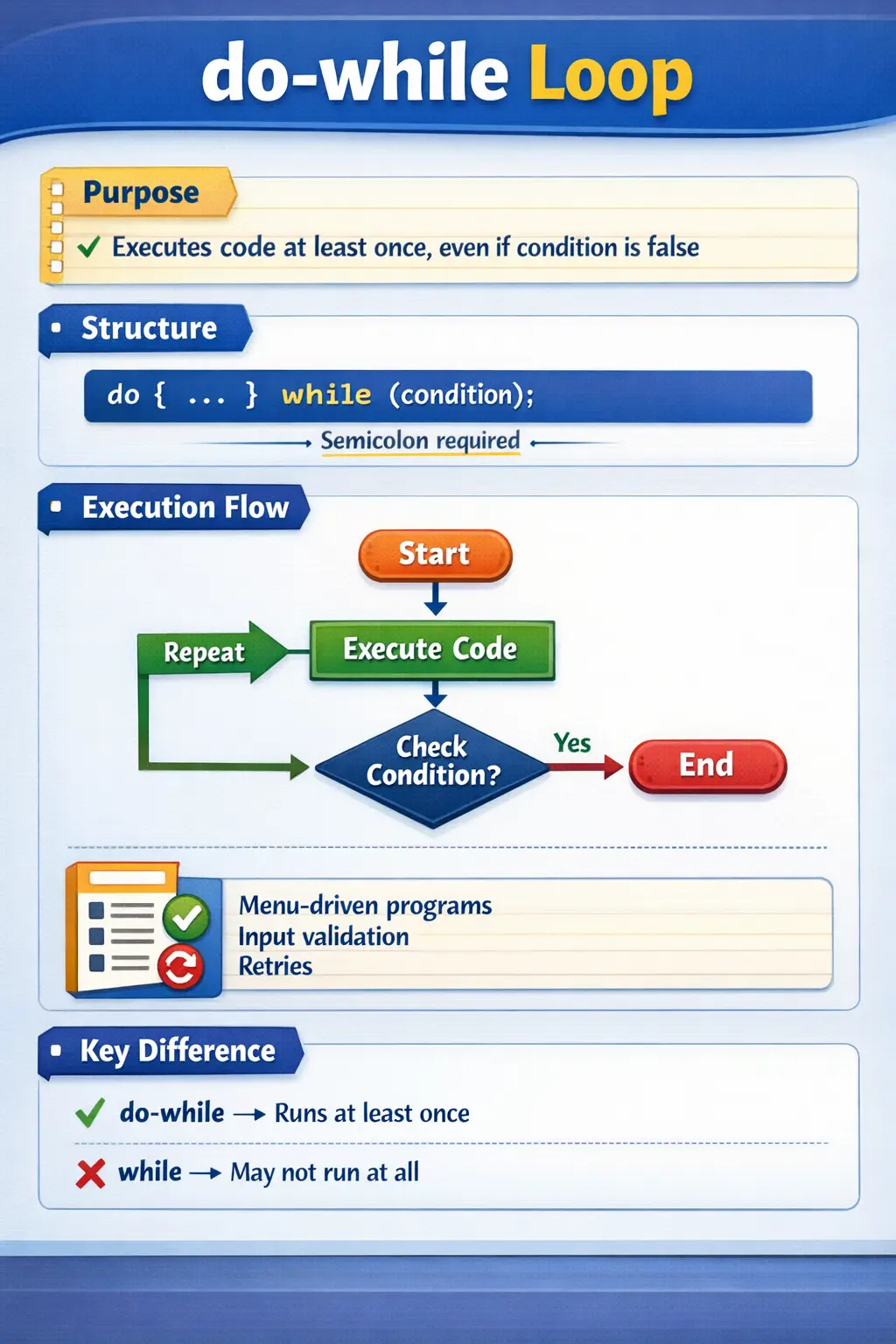
At a conceptual level, the do-while loop answers a specific requirement in programming: "Execute first, then decide whether to continue." This behavior is critical in situations where skipping execution entirely would lead to incorrect or incomplete logic. For example, prompting a user for input must happen at least once, regardless of any condition.
Understanding the do-while loop is essential not only for mastering Java control flow but also for designing robust, user-driven applications and handling real-time execution scenarios effectively.
Understanding the Concept of do-while Loop
The defining characteristic of the do-while loop is that it executes the loop body before evaluating the condition. This guarantees that the loop body runs at least once, even if the condition is false from the beginning.
This behavior distinguishes it from the while loop, where the condition is checked first. If the condition is false initially, the while loop will not execute at all. In contrast, the do-while loop ensures at least one execution, making it ideal for scenarios where an initial action is mandatory.
The loop continues executing as long as the condition remains true. Once the condition evaluates to false, the loop terminates, and control moves to the next statement.
Basic Syntax and Structure
The syntax of the do-while loop reflects its execution model:
do {
    // code to execute
} while (condition);
One important detail is the semicolon at the end of the while statement. Unlike other loops, this semicolon is mandatory and often overlooked by beginners.
The structure is simple: the loop body is written inside the do block, and the condition is specified after the while keyword.
Simple Example and Practical Understanding
Consider a basic example that prints numbers from 1 to 5:
int i = 1;
do {
    System.out.println(i);
    i++;
} while (i <= 5);
In this example, the loop begins by executing the print statement, then increments the value of i, and finally checks the condition. If the condition is true, the loop repeats.
This process continues until i becomes 6, at which point the condition fails, and the loop terminates.
This example demonstrates the standard behavior of the do-while loop, where execution and condition evaluation occur in a specific sequence.
Guaranteed One-Time Execution
One of the most important features of the do-while loop is that it guarantees at least one execution of the loop body.
Consider the following example:
int x = 10;
do {
    System.out.println("Executed once");
} while (x < 5);
In this case, the condition x < 5 is false from the beginning. However, the loop body still executes once before the condition is checked. This behavior is intentional and is the primary reason for using a do-while loop.
This feature is particularly useful in user-driven applications, where at least one interaction is required before making decisions.
Execution Flow of do-while Loop
The execution flow of the do-while loop follows a clear sequence:
- Execute the loop body
- Evaluate the condition
- If the condition is true, repeat the loop
- If the condition is false, exit the loop
This flow ensures that the loop body is always executed first, making it fundamentally different from pre-condition loops.
Understanding this flow is critical when debugging or designing logic that depends on initial execution.
Using break in do-while Loop
The break statement can be used within a do-while loop to terminate execution immediately, regardless of the condition.
do {
    if (conditionMet) {
        break;
    }
} while (true);
This pattern is commonly used in scenarios where the loop is designed to run indefinitely but should exit when a specific condition is met.
The break statement provides flexibility and control over loop execution, especially in complex logic.
Using continue in do-while Loop
The continue statement skips the remaining code in the current iteration and proceeds to the next iteration.
int i = 0;
do {
    i++;
    if (i == 3) {
        continue;
    }
    System.out.println(i);
} while (i <= 5);
In this example, when i equals 3, the loop skips the print statement and continues with the next iteration. This allows selective execution within the loop.
It is important to ensure that loop variables are updated correctly before using continue, as improper handling can lead to infinite loops.
Nested do-while Loop
A do-while loop can be nested within another loop to handle multi-level iteration.
int i = 1;
do {
    int j = 1;
    do {
        System.out.println(i + "," + j);
        j++;
    } while (j <= 2);
    i++;
} while (i <= 3);
In this example, the outer loop controls one dimension, while the inner loop controls another. Each iteration of the outer loop triggers a complete execution of the inner loop.
Nested loops are commonly used in pattern generation, matrix operations, and multi-dimensional data processing.
Common Use Cases of do-while Loop
The do-while loop is particularly useful in scenarios where at least one execution is required. One common use case is menu-driven programs, where the user is presented with options and must make a selection.
Another important use case is input validation. For example, a program may prompt the user to enter valid data and repeat the prompt until the input meets certain criteria.
Retry mechanisms also benefit from the do-while loop. For instance, attempting a network connection multiple times until it succeeds or reaches a maximum limit.
These scenarios highlight the importance of guaranteed execution, which is the core strength of the do-while loop.
Why do-while Is Called a Post-Condition Loop
The do-while loop is called a post-condition loop because the condition is checked after the loop body executes. This is the defining feature that separates it from while and for loops. In a normal while loop, Java asks the question first: should the body run? In a do-while loop, Java performs the action first and then asks: should the body run again?
This execution model is useful when the first action must happen regardless of the condition. A menu must be displayed before the user can choose an option. A prompt must appear before the user can enter input. A retry attempt must occur before the program can know whether another retry is needed. These situations are common in interactive and condition-driven programs.
Because the condition comes after the body, the do-while loop communicates a different intention from a while loop. It says that the body is mandatory once, and repetition is optional afterward. This makes the code match the real-world process more closely in scenarios where an initial action is unavoidable.
The Guaranteed Execution Principle
The guaranteed one-time execution of a do-while loop is both its greatest strength and its biggest design responsibility. It is a strength because it allows developers to write natural code for workflows that must begin with an action. It is a responsibility because developers must remember that the body will run even when the condition is false from the start.
This matters when the loop body performs important operations. If the body updates data, makes a network call, displays a message, writes to a file, or charges a payment, it will happen at least once. The condition cannot prevent the first execution. Therefore, do-while should be used only when that first execution is truly intended.
A good question to ask before using do-while is: should this code run at least once no matter what? If the answer is yes, do-while may be appropriate. If the answer is no, while or for is usually safer. This simple question prevents many design mistakes.
Execution Order in Detail
The execution order of a do-while loop is straightforward, but understanding it deeply helps prevent mistakes. First, Java enters the do block. It executes every statement in the loop body unless a control statement such as break or continue changes the flow. After the body finishes, Java evaluates the while condition. If the condition is true, execution returns to the beginning of the do block. If the condition is false, the loop ends.
This means the condition controls repetition, not initial entry. The first execution is unconditional. Later executions depend on the condition. This is why the do-while loop is commonly described as an "execute first, check later" loop.
When debugging a do-while loop, trace the body before the condition. Many beginners mentally check the condition first because they are used to while loops. That mental model is wrong for do-while. The correct trace begins with the body, then the update, then the condition check.
do-while for Menu-Driven Programs
Menu-driven programs are one of the best examples of do-while logic. A menu must be shown before the user can decide what to do. The program cannot check the user's choice before displaying the menu and receiving input. Therefore, the first display and input operation must happen at least once.
A typical menu loop shows available options, reads the user's choice, performs the selected action, and repeats until the user chooses to exit. The condition often checks whether the choice is not equal to the exit option. This maps naturally to do-while because the menu interaction begins before the exit condition can be evaluated.
This pattern is common in console applications, small utilities, learning exercises, and command-driven systems. Even in larger applications, the underlying idea appears in workflows where the user must first interact before the application can decide whether to repeat the process.
do-while for Input Validation
Input validation is another practical use case. A program may need to ask the user for a value and keep asking until the value is valid. Since the user must be prompted at least once, the do-while loop fits naturally. The body asks for input, reads the value, validates it, and then repeats if the value is invalid.
This keeps the validation flow easy to understand. The body contains the interaction. The condition represents whether another attempt is needed. For example, the loop may continue while the entered age is less than or equal to zero, while a password is empty, or while a selected menu option is outside the accepted range.
Good validation loops should provide clear feedback. If the input is invalid, the program should explain what needs to change before repeating. Otherwise, the user may be trapped in a loop without understanding why. The do-while loop controls repetition, but good user communication makes the repetition useful.
do-while for Retry Mechanisms
Retry mechanisms often require at least one attempt before deciding whether another attempt is needed. A program may attempt to connect to a service, call an API, read a resource, or process a transaction. Only after the first attempt can it know whether the operation succeeded or failed. This makes do-while a natural option for retry-style logic.
A safe retry loop usually combines success status with an attempt limit. The loop performs the operation, updates whether it succeeded, increments the attempt count, and repeats only if the operation failed and attempts remain. This prevents uncontrolled retrying while still allowing temporary failures to recover.
Retry loops should be designed carefully in production systems. They may need delays between attempts, error logging, timeout handling, and clear failure responses after the limit is reached. The do-while loop can express the repetition, but robust retry behavior requires thoughtful surrounding logic.
do-while with break
The break statement can exit a do-while loop immediately. This is useful when the loop condition is broad, such as while true, but the actual exit decision is made inside the loop body. In menu programs, break may exit when the user selects a quit command. In search logic, break may exit when the target is found. In validation logic, break may exit when a blocking error occurs.
Break changes the normal flow by skipping the condition check and moving control to the statement after the loop. This can make the loop easier to write when several internal conditions may stop execution. However, too many break statements can make the loop harder to follow. The reader must understand every possible exit point.
A do-while loop with break is clearest when the exit condition is simple and directly tied to the purpose of the loop. If the loop contains many unrelated break paths, it may be better to refactor the logic into smaller methods or clearer conditions.
do-while with continue
The continue statement in a do-while loop skips the remaining statements in the current iteration and jumps to the condition check at the bottom. If the condition is true, the next iteration begins. If the condition is false, the loop ends. This behavior is similar to while loops, but the condition location makes the flow easier to misunderstand.
The most important rule is to update loop variables before continue if those updates are needed for termination. If a variable is supposed to change after the continue statement, that change will be skipped. This can cause an infinite loop or repeated processing of the same value.
Continue is useful when one iteration should be skipped but the loop should keep running. For example, a do-while loop may skip blank input, invalid records, or unsupported values. As with other loops, continue is most readable when used near the top of the loop body as a clear guard condition.
do-while and Infinite Loop Risks
A do-while loop can become infinite if its condition never becomes false. Because the condition is checked after the body, developers sometimes focus on the body action and forget to update the state that controls repetition. This is a common source of errors in beginner programs.
For example, if a counter is used in the condition but never incremented or decremented properly, the loop can continue forever. If a boolean flag controls the loop but is never changed, the loop also never ends. If continue skips the update logic, the same problem can occur even when the update exists in the code.
Every do-while loop should have a clear termination strategy. The body should either update the condition state, receive new input, change a flag, increment an attempt count, or use break when a stopping event occurs. If you cannot explain what makes the condition false, the loop is not safe yet.
do-while vs for Loop
The for loop is usually best when the number of iterations is known in advance or when iteration is driven by a clear counter. Its initialization, condition, and update are grouped together in the loop header. This makes it ideal for ranges, arrays, indexes, pattern generation, and count-based repetition.
The do-while loop is different because it emphasizes guaranteed first execution. It is not primarily about counting, though it can use counters. It is about performing an action first and deciding afterward whether repetition is needed. This makes it better for prompts, menus, validation, and retry attempts.
Choosing between for and do-while depends on the problem. If you know how many times to run, for is usually clearer. If you must run once before checking whether to repeat, do-while is usually clearer. Good loop selection makes code read like the real process it represents.
do-while in Real-World Programs
In real-world programs, do-while loops appear in user-facing and state-driven workflows. A console application may show a menu until the user exits. A form-processing routine may request input until valid data is received. A connection routine may try once and retry while failure conditions remain. A simple game may ask whether the player wants another round after each round completes.
These examples share one pattern: the first action must happen before the continuation decision can be made. That is the natural home of do-while. The loop is not chosen merely because it is available; it is chosen because its execution model matches the workflow.
In larger systems, developers may use frameworks, event loops, or higher-level abstractions instead of direct do-while loops. Still, understanding do-while helps developers reason about post-condition repetition wherever it appears.
Readability and Maintainability
Because do-while is less common than for and while, readability is especially important. Developers should use it when its guaranteed-execution behavior is clearly beneficial. If the same logic can be expressed more naturally with a while loop, the simpler or more familiar structure may be better.
The condition should be easy to understand. A do-while condition that contains many combined checks can be difficult to read because the reader must connect it back to the body that already executed. Clear boolean variables or helper methods can improve readability. For example, repeatMenu or shouldRetry communicates intent better than a long expression.
It is also important to keep the loop body focused. A do-while loop that prompts, validates, updates multiple objects, logs data, and performs unrelated operations becomes hard to maintain. If the body grows too large, extract meaningful methods so the loop structure remains clear.
Testing do-while Logic
Testing do-while logic requires confirming the guaranteed first execution. A test should verify that the body runs even when the condition is false after the first pass. This is the defining behavior, and it should be intentional. If that behavior is not desired, the code may need a while loop instead.
Tests should also cover repeated execution. If the loop is used for input validation, test invalid input followed by valid input. If it is used for retries, test success on the first attempt, success after multiple attempts, and failure after the maximum attempts. If it uses break, verify that break exits at the right time. If it uses continue, verify that required updates still happen.
Boundary testing is also important when counters are involved. If the loop allows three attempts, test exactly one attempt, exactly three attempts, and the behavior after the third failure. These tests prove that the loop repeats and stops correctly.
Debugging do-while Problems
When a do-while loop behaves incorrectly, begin by remembering that the body runs before the condition. If something happens once even though the condition appears false, that may not be a bug; it may be the expected behavior of do-while. The question is whether do-while was the correct loop choice.
Next, inspect the condition and the state updates inside the body. If the loop never stops, check whether the values used in the condition change. If continue is used, check whether it skips the update. If break is used, check whether the break condition is reached. These control-flow points usually explain unexpected behavior.
Finally, trace the loop manually with one or two iterations. Write down the initial values, execute the body, update the values, then evaluate the condition. This trace matches the real execution order and quickly reveals mistakes caused by thinking like a while loop.
How to Explain do-while in Interviews
In interviews, a strong answer should define do-while as a post-condition loop that executes the body at least once and checks the condition afterward. This one-time execution guarantee is the most important point. Mention the syntax and the required semicolon after the while condition.
Then compare it with while. A while loop checks the condition before execution and may run zero times. A do-while loop checks after execution and always runs at least once. This difference is commonly tested through output prediction questions.
Finally, give practical use cases such as menu-driven programs, input validation, and retry mechanisms. Also mention common mistakes: forgetting the semicolon, missing updates, infinite loops, and using do-while when first execution is not required. This makes the answer complete and practical.
do-while vs while Loop
Although both loops are used for repetition, they differ in their execution models.
The while loop checks the condition before executing the loop body. This means the loop may not execute at all if the condition is false initially.
The do-while loop, on the other hand, executes the loop body first and checks the condition afterward. This guarantees at least one execution.
This distinction is crucial when choosing the appropriate loop for a given problem. If initial execution is mandatory, the do-while loop is the correct choice.
Common Beginner Mistakes
One of the most common mistakes is forgetting the semicolon after the while condition. This leads to compilation errors.
Another frequent issue is creating infinite loops due to missing or incorrect updates to loop variables. Since the condition is checked after execution, it is easy to overlook the need for proper updates.
Beginners also sometimes confuse the do-while loop with the while loop, leading to incorrect assumptions about execution behavior.
Overusing nested loops is another mistake that can make code difficult to read and maintain.
Avoiding these pitfalls requires careful attention to syntax, logic, and execution flow.
Interview Perspective
In interviews, the do-while loop is often used to test a candidate’s understanding of control flow differences.
A strong answer should clearly state that the do-while loop executes the loop body at least once and evaluates the condition afterward. It should also highlight common use cases such as menu-driven programs and input validation.
Candidates may be asked to compare do-while with while, identify errors in loop logic, or write programs using this construct.
Demonstrating clarity in execution flow and awareness of edge cases is essential for answering such questions effectively.
Key Takeaway
The do-while loop is a powerful control structure that guarantees at least one execution of the loop body. This makes it ideal for scenarios where initial execution is required before evaluating conditions.
Mastering the do-while loop involves understanding its execution flow, proper syntax, and appropriate use cases. When used correctly, it enables developers to build robust, user-driven, and condition-aware applications.
In essence, the do-while loop is not just another looping construct-it is a specialized tool designed for situations where execution must precede validation, making it an essential part of Java programming.
1. Basic do-while Loop (Print 1 to 5)
int i = 1;
do {
System.out.println(i);
i++;
} while (i <= 5);
Explanation
- Loop executes at least once.
- Condition is checked after execution.
- Output: 1 2 3 4 5
2. do-while Loop Executes Even When Condition Is False
int i = 10;
do {
System.out.println(i);
} while (i < 5);
Explanation
- Condition is false initially.
- Still executes once.
- Output: 10
3. do-while Loop Printing Even Numbers
int i = 1;
do {
if (i % 2 == 0) {
System.out.println(i);
}
i++;
} while (i <= 10);
Explanation
- Prints only even numbers.
- Output: 2 4 6 8 10
4. do-while Loop Printing Odd Numbers
int i = 1;
do {
if (i % 2 != 0) {
System.out.println(i);
}
i++;
} while (i <= 10);
Explanation
- Prints only odd numbers.
- Output: 1 3 5 7 9
5. Reverse do-while Loop
int i = 5;
do {
System.out.println(i);
i--;
} while (i >= 1);
Explanation
- Loop runs backward.
- Output: 5 4 3 2 1
6. do-while Loop with break
int i = 1;
do {
if (i == 3) {
break;
}
System.out.println(i);
i++;
} while (i <= 5);
Explanation
- Loop terminates early when i == 3.
- Output: 1 2
7. do-while Loop with continue
int i = 0;
do {
i++;
if (i == 3) {
continue;
}
System.out.println(i);
} while (i <= 5);
Explanation
- Skips printing when i == 3.
- Output: 1 2 4 5
8. Infinite do-while Loop (Controlled with break)
do {
System.out.println("Running");
break;
} while (true);
Explanation
- Condition always true.
- break is required to stop execution.
9. do-while Loop for Array Traversal
int[] nums = {10, 20, 30};
int i = 0;
do {
System.out.println(nums[i]);
i++;
} while (i < nums.length);
Explanation
- Traverses array elements.
- Output: 10 20 30
10. do-while Loop to Skip Negative Values
int[] nums = {5, -1, 8, -3, 10};
int i = 0;
do {
if (nums[i] < 0) {
i++;
continue;
}
System.out.println(nums[i]);
i++;
} while (i < nums.length);
Explanation
- Skips negative numbers.
- Output: 5 8 10
11. do-while Loop for Sum Calculation
int i = 1;
int sum = 0;
do {
sum += i;
i++;
} while (i <= 5);
System.out.println(sum);
Explanation
- Accumulates values.
- Output: 15
12. do-while Loop for Factorial
int num = 5;
int fact = 1;
do {
fact *= num;
num--;
} while (num > 0);
System.out.println(fact);
Explanation
- Calculates factorial.
- Output: 120
13. do-while Loop for String Traversal
String s = "JAVA";
int i = 0;
do {
System.out.println(s.charAt(i));
i++;
} while (i < s.length());
Explanation
- Iterates character by character.
- Output:
J
A
V
A
14. do-while Loop for Digit Extraction
int num = 1234;
do {
System.out.println(num % 10);
num /= 10;
} while (num > 0);
Explanation
- Extracts digits from right to left.
- Output: 4 3 2 1
15. do-while Loop for Palindrome Check
int num = 121;
int temp = num;
int rev = 0;
do {
rev = rev * 10 + temp % 10;
temp /= 10;
} while (temp > 0);
System.out.println(num == rev);
Explanation
- Reverses number.
- Checks palindrome.
- Output: true
16. Nested do-while Loop
int i = 1;
do {
int j = 1;
do {
System.out.println("i=" + i + ", j=" + j);
j++;
} while (j <= 3);
i++;
} while (i <= 3);
Explanation
- Inner loop completes for each outer loop.
- Used in matrix/grid logic.
17. do-while Loop with Boolean Flag
int i = 1;
boolean found = false;
do {
if (i == 4) {
found = true;
break;
}
i++;
} while (i <= 5);
System.out.println(found);
Explanation
- break exits loop.
- Flag holds result after loop.
18. do-while Loop for Menu Simulation
int choice = 3;
do {
System.out.println("Menu shown");
} while (choice != 3);
Explanation
- Menu displays at least once.
- Common in menu-driven programs.
19. do-while Loop Skipping Empty Strings
String[] data = {"A", "", "B", "", "C"};
int i = 0;
do {
if (data[i].isEmpty()) {
i++;
continue;
}
System.out.println(data[i]);
i++;
} while (i < data.length);
Explanation
- Skips empty values.
- Output: A B C
20. Interview Summary Example (do-while Guarantee)
int i = 5;
do {
System.out.println("Executed once");
} while (i < 3);
Explanation
- Output: Executed once
- Demonstrates:
- Guaranteed execution
- Condition checked after body
- Very common interview concept.