if Statement in Java
The if statement is one of the most fundamental constructs in Java and serves as the backbone of decision-making logic in any program. At its core, the if statement allows a program to evaluate a condition and execute a block of code only when that condition is true. While the concept may appear simple at first glance, the if statement plays a critical role in building real-world applications, handling validations, enforcing business rules, and controlling program flow.
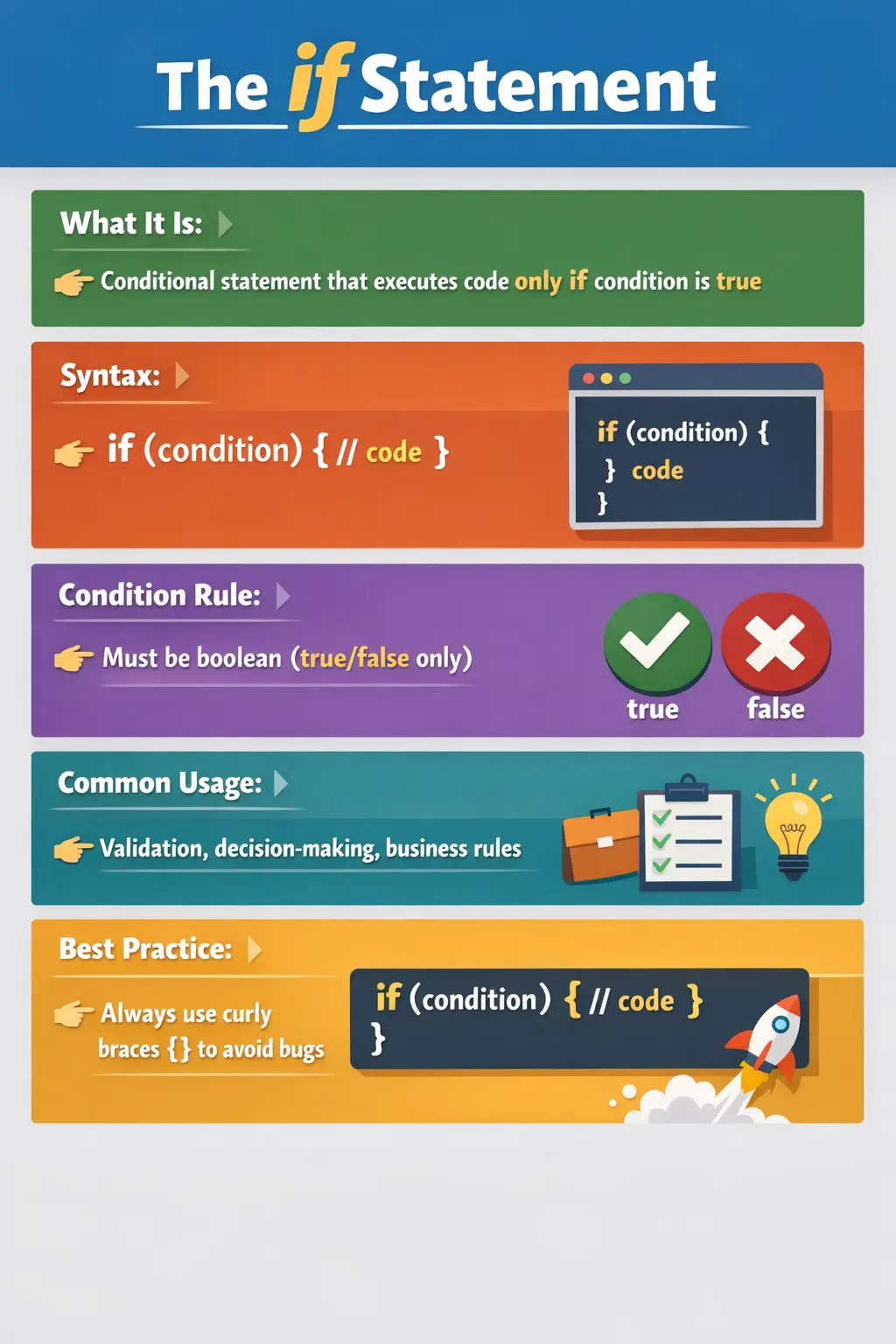
Understanding the if statement deeply is not just important for beginners—it is essential for writing clean, maintainable, and logically correct code. Many runtime bugs, unexpected behaviors, and interview challenges revolve around improper usage of conditional statements. Therefore, mastering the if statement is a foundational step toward becoming a strong Java developer.
Understanding the Purpose of the if Statement
In any application, decisions are constantly being made. Whether it is checking if a user is eligible to log in, validating input data, or determining the next step in a workflow, decision-making logic is everywhere. The if statement provides a structured and readable way to express these decisions in code.
Conceptually, the if statement answers a simple question: “Should this block of code run?” The answer depends entirely on whether a given condition evaluates to true. If it does, the code inside the if block is executed. If not, the program simply skips that block and continues execution.
This behavior makes the if statement indispensable in both simple scripts and complex enterprise systems.
Basic Syntax and Flow
The structure of an if statement is straightforward. It consists of a condition enclosed in parentheses, followed by a block of code enclosed in braces. When the program reaches the if statement, it evaluates the condition. If the result is true, the block executes; otherwise, it is ignored.
For example, when checking whether a user is eligible to vote, the condition might verify if the age is greater than or equal to a certain value. If the condition is satisfied, the corresponding message is displayed.
What is important here is that the condition must always evaluate to a boolean value—either true or false. Java strictly enforces this rule, unlike some other languages that allow non-boolean values in conditions.
The Importance of Boolean Conditions
One of the defining characteristics of Java’s if statement is its strict requirement for boolean conditions. This ensures clarity and prevents ambiguous logic.
In Java, you cannot directly use numeric or object values as conditions. Instead, you must explicitly define a comparison or logical expression that evaluates to true or false. This design choice eliminates many common programming errors and enforces disciplined coding practices.
Conditions are typically built using relational operators such as greater than or less than, and logical operators such as AND and OR. These operators allow developers to construct meaningful and precise conditions.
if Statement Without Braces
Java allows the omission of braces when the if block contains only a single statement. While this might seem convenient, it is generally discouraged in professional coding practices.
The absence of braces can lead to confusion, especially when additional statements are added later. This often results in logical errors that are difficult to detect during code reviews.
For example, a developer might assume that multiple lines are part of the if block when, in reality, only the first line is controlled by the condition. To avoid such pitfalls, it is considered best practice to always use braces, even for single-line conditions.
Using Logical Operators in if Statements
Real-world conditions are rarely simple. Most scenarios require evaluating multiple conditions together. This is where logical operators come into play.
Logical operators allow developers to combine conditions using AND, OR, and NOT operations. For instance, access to a system might require both a valid age and a valid identification. In such cases, the if statement evaluates multiple conditions simultaneously.
An important concept associated with logical operators is short-circuit evaluation. In an AND condition, if the first condition is false, the second condition is not evaluated. Similarly, in an OR condition, if the first condition is true, the second condition is skipped.
This behavior not only improves performance but also prevents potential runtime errors, such as division by zero.
Using if with Method Calls
In modern Java applications, conditions are often abstracted into methods. Instead of writing complex logic directly inside the if statement, developers create reusable methods that return boolean values.
This approach improves code readability and maintainability. For example, instead of writing multiple conditions inline, a method like isValidUser() can encapsulate all the validation logic.
When the if statement calls such a method, the program becomes easier to understand and debug. This practice is widely used in enterprise applications where business logic is complex and frequently reused.
Nested if Statements
Nested if statements occur when one if statement is placed inside another. This structure is used when decisions depend on multiple levels of conditions.
For example, before allowing a user to perform a specific action, the system might first check eligibility and then verify additional permissions. Each condition builds upon the previous one.
While nesting is sometimes necessary, excessive nesting can make code difficult to read and maintain. Deeply nested structures often indicate that the logic needs to be refactored into simpler, more modular components.
Assignment vs Comparison: A Common Pitfall
One of the most common mistakes developers make with if statements is confusing the assignment operator with the comparison operator.
Using the assignment operator inside an if condition does not compare values—it assigns a value and returns that value. Since the assigned value is often true, the condition always evaluates to true, leading to unexpected behavior.
This mistake is particularly dangerous because it does not produce a compilation error. Instead, it silently introduces a logical flaw in the program.
To avoid this issue, developers must be careful to use the correct operator when writing conditions.
Real-World Use Cases of if Statements
The if statement is used extensively across all types of applications. In validation logic, it ensures that user inputs meet required criteria before processing.
In authorization systems, it determines whether a user has the necessary permissions to access a resource. In business workflows, it controls the execution of different paths based on specific conditions.
Error handling is another common use case. Programs often use if statements to detect invalid states and take corrective actions.
These examples highlight how central the if statement is to application logic. Without it, programs would lack the ability to adapt to different scenarios.
Best Practices for Using if Statements
Writing effective if statements requires more than just understanding syntax. Developers should focus on clarity, readability, and maintainability.
Using meaningful variable names makes conditions easier to understand. Instead of writing complex expressions, breaking them into smaller parts improves readability.
Avoiding deep nesting is another important practice. When conditions become too complex, it is better to refactor the logic into separate methods.
Consistent use of braces ensures that the code behaves as expected and reduces the risk of errors during modifications.
How the if Statement Controls Program Flow
The main purpose of an if statement is to make a program selective. Without conditional logic, a program would execute instructions in the same order every time, regardless of input, user role, data state, or business requirement. The if statement gives the program the ability to choose. It allows one path to execute when a condition is true and another part of the program to continue when that condition is false.
This selective execution is what turns simple sequential code into useful application behavior. A login screen checks whether credentials are valid before opening the dashboard. A payment workflow checks whether the available balance is sufficient before completing a transfer. A shopping cart checks whether stock is available before accepting an order. In each case, the if statement represents a decision point where the application responds to facts available at runtime.
It is useful to think of an if statement as a gate. The condition is the rule that decides whether the gate opens. If the rule evaluates to true, the code inside the block runs. If the rule evaluates to false, Java skips the block completely. This simple model helps beginners understand not only syntax, but also execution flow. The block is not partially executed, delayed, or remembered for later. It either runs at that moment or it does not run.
Designing Clear Conditions
The quality of an if statement depends heavily on the clarity of its condition. A condition should express a meaningful question in code. Instead of reading like a technical puzzle, it should communicate the business or programming rule being checked. For example, a condition named isEligible is easier to understand than a long expression repeated directly inside the parentheses. The program behaves the same, but the named condition makes the intention visible.
Clear conditions are especially important when multiple checks are combined. A condition involving age, account status, location, and permission level may be technically valid, but if it is written as one long expression, it becomes difficult to review. Developers may miss a wrong operator or misunderstand the grouping of conditions. Breaking the logic into smaller boolean variables or helper methods makes the code easier to read and safer to change.
When writing conditions, ask what the condition means in plain language. If the answer is "the user can access premium content," then the code should try to reflect that idea. A method such as canAccessPremiumContent(user) communicates intent better than exposing every low-level check inline. This style becomes more valuable as applications grow because business rules change frequently, and readable conditional logic is easier to update correctly.
if Statement and Boolean Expressions
The expression inside an if statement must produce a boolean value. This means the condition must ultimately be either true or false. Java does not allow an integer, string, or object reference to be used directly as a condition. This strictness is one reason Java code is generally easier to reason about than code in languages where many values can be treated as truthy or falsy.
Boolean expressions are usually built through comparisons and logical combinations. A comparison such as age >= 18 produces true or false. A logical expression such as isActive && hasPermission combines two boolean values and produces another boolean value. The if statement does not care whether the boolean result came from a simple variable, a comparison, or a method call. It only cares about the final result.
This rule also explains why conditions should be designed carefully. If a method is used inside an if condition, the method should return boolean when it is meant to answer a yes-or-no question. Method names such as isValid, hasAccess, canProceed, shouldRetry, and containsValue are common because they read naturally inside conditions. Good naming makes the if statement almost self-explanatory.
Single if vs if-else vs Nested if
A single if statement is best when there is one optional action. If the condition is true, perform the action. If it is false, do nothing special and continue. This is common for validation messages, optional logging, conditional formatting, and simple safeguards. The code remains clean because there is only one branch to understand.
An if-else structure is better when the program must choose between two alternative paths. For example, if a user is authenticated, show the dashboard; otherwise, show an error message. In this case, both true and false outcomes matter, so an else block makes the logic explicit. The if block handles the successful condition, and the else block handles the alternative condition.
Nested if statements are used when one decision depends on a previous decision. For example, the program may first check whether a user is logged in and then check whether that user has admin permission. This is valid, but too much nesting makes code hard to read. When if statements go several levels deep, it often helps to use guard clauses, helper methods, or separate decision functions. The goal is not to avoid nesting completely; the goal is to keep decision logic understandable.
Guard Conditions in Java
A guard condition is an if statement placed early in a method to handle invalid or exceptional situations. Instead of wrapping the main logic inside a large if block, the method checks for a condition that should stop execution and returns early. This keeps the main flow flatter and easier to read.
For example, a method may first check whether the input object is null. If it is null, the method can return, throw an exception, or handle the invalid case immediately. After that guard condition, the rest of the method can assume the object is available. This reduces unnecessary nesting and makes the main logic clearer.
Guard conditions are widely used in production Java code because they separate exceptional checks from normal processing. They are especially useful in validation, service-layer logic, controller methods, and utility methods. A well-placed guard condition makes the code read like a sequence of decisions: reject invalid input first, then process the valid case.
Short-Circuit Evaluation in if Conditions
Short-circuit evaluation is one of the most practical concepts connected to if statements. When Java evaluates a condition using the logical AND operator, it stops as soon as the final result is known to be false. When Java evaluates a condition using the logical OR operator, it stops as soon as the final result is known to be true. This behavior saves unnecessary work and also protects code from errors.
A common example is checking whether an object is not null before accessing one of its methods. If the null check fails, Java does not evaluate the second part of the condition. This prevents a NullPointerException. The order of conditions therefore matters. The safer condition should usually come first when later checks depend on it.
Short-circuit behavior also affects method calls inside conditions. If a method call appears in the second part of an AND or OR expression, it may not run. This is usually desirable when the method is only a check, but it can surprise developers if the method has side effects. Conditions should generally avoid side effects. An if condition should decide whether something should happen; it should not hide important actions inside the decision itself.
Using if Statements for Validation
Validation is one of the most common real-world uses of the if statement. Applications constantly verify user input before processing it. A registration form checks whether required fields are present. A password reset feature checks whether the token is valid. A payment system checks whether the amount is positive and the account is active. These checks prevent invalid data from entering the system.
Good validation logic is explicit and user-focused. The if statement should represent a clear rule, and the result should guide the user or system toward the correct next step. If an email address is missing, the application should not fail later in the workflow. It should detect the issue early and respond with a meaningful message. This is controlled through conditional logic.
Validation also benefits from ordering. Basic checks should happen before dependent checks. For example, check whether a value exists before checking its length or format. This makes validation safer and easier to understand. The if statement gives developers precise control over this order, which is why it is such a central tool in input handling.
Using if Statements for Business Rules
Business rules are another major area where if statements appear. A discount may apply only if the customer is a member and the order amount exceeds a certain threshold. A loan may be approved only if the applicant meets income, age, and credit score requirements. A ticket may be escalated only if it remains unresolved beyond a specific time. These rules are often implemented through conditional logic.
When if statements represent business rules, readability becomes even more important. The code should make the rule understandable to another developer who may not know the full business background. If the rule is complex, placing it inside a well-named method can improve clarity. For example, isEligibleForLoanApproval communicates the rule better than a long expression repeated in several places.
Business rules also change over time. A threshold may increase, a condition may be added, or a policy may differ by region. If the original if logic is scattered and difficult to read, changes become risky. Well-structured if statements help teams maintain business behavior without accidentally breaking existing rules.
Common Patterns with if Statements
One common pattern is the positive path check, where the if statement verifies that a condition is satisfied before proceeding. This works well when the main logic should run only under valid circumstances. Another pattern is the negative guard, where the if statement checks for an invalid condition and exits early. Both patterns are useful, but they serve different readability goals.
Another pattern is the decision flag. A boolean variable is calculated first and then used in the if statement. This is helpful when the condition is meaningful but slightly complex. The variable name acts as documentation. Instead of forcing the reader to parse multiple comparisons, the code tells the reader what decision is being made.
A third pattern is rule extraction. When an if condition grows large or appears in multiple places, it can be moved into a method. This improves reuse and ensures the rule is maintained in one location. Rule extraction is especially useful in service classes, validation utilities, and domain logic where the same decision must be made consistently.
Readability and Maintainability
The if statement is simple, but it can still create messy code when overused or poorly structured. Long conditions, deeply nested branches, repeated checks, and unclear variable names all reduce maintainability. Code may still compile and run, but future developers will struggle to understand it. In professional software development, code readability matters because most code is read and modified many times after it is first written.
One practical way to improve readability is to prefer meaningful boolean expressions. Instead of writing a large condition directly inside the if statement, calculate smaller conditions first. Names such as hasValidCredentials, isAccountLocked, canRetryPayment, and requiresManagerApproval reveal intent. The if statement then becomes easier to scan.
Another way is to avoid mixing too many responsibilities inside one conditional block. If an if block validates input, calculates values, updates data, and sends notifications all together, it may be doing too much. Splitting responsibilities into smaller methods makes the decision logic cleaner and testing easier. The if statement should guide flow, not become a container for all business behavior.
Testing Code That Uses if Statements
Every if statement creates at least two possible paths: the condition is true or the condition is false. Good testing should consider both. If only the true path is tested, defects may remain hidden in the skipped path. If only the false path is tested, the intended action may not be verified. This is why conditional logic naturally increases the number of test cases required.
For simple if statements, testing both outcomes may be enough. For conditions that combine multiple logical operators, more cases are needed. Each important combination should be considered, especially when the condition represents a business rule, security decision, or financial calculation. Boundary values are also important. A condition such as age >= 18 should be tested with values below, at, and above the boundary.
Testing conditional logic also helps reveal unclear requirements. If it is difficult to decide what should happen when a condition is false, the requirement may need clarification. In this way, if statements are not only programming constructs; they also expose decision rules that should be understood by the team.
How to Think About if Statements in Interviews
Interview questions about if statements usually test more than syntax. Interviewers want to know whether you understand control flow, boolean evaluation, comparison operators, logical operators, and common mistakes. They may show a small code snippet and ask what output it produces, or they may ask how to improve a confusing conditional block.
A strong answer explains the condition first. Identify what is being checked, whether the expression evaluates to true or false, and which block will execute. If logical operators are involved, explain short-circuit behavior. If nested if statements are involved, explain the outer condition before the inner condition. This step-by-step explanation shows clear reasoning.
It is also useful to mention best practices. In real projects, always use braces, keep conditions readable, avoid unnecessary nesting, and extract complex rules into meaningful methods. This shows that you understand both how Java works and how maintainable Java code should be written.
Common Beginner Mistakes
Many beginners struggle with if statements due to a lack of understanding of evaluation rules. One common mistake is forgetting to use braces, leading to unintended execution of code.
Another frequent error is using assignment instead of comparison, which results in conditions that always evaluate to true.
Writing non-boolean conditions is also a common issue, especially for those transitioning from other programming languages.
Overusing nested if statements can make code difficult to follow. Developers should aim to keep logic simple and well-structured.
Ignoring short-circuit behavior can lead to runtime errors, particularly when conditions involve operations that may fail under certain circumstances.
Interview Perspective
The if statement is a fundamental topic in interviews, often used to assess a candidate’s understanding of control flow and logical reasoning.
Interviewers may ask candidates to evaluate conditions, identify errors in if statements, or explain how short-circuit evaluation works.
A strong answer demonstrates not only knowledge of syntax but also an understanding of best practices and common pitfalls.
Candidates should be able to explain how conditions are evaluated, why boolean expressions are required, and how to write clean and maintainable conditional logic.
Key Takeaway
The if statement is the foundation of decision-making in Java. It enables programs to respond dynamically to different conditions, making it essential for building real-world applications.
Mastering the if statement involves understanding boolean expressions, operator behavior, evaluation rules, and best coding practices. It also requires awareness of common mistakes and the ability to write clear, readable logic.
Ultimately, the power of the if statement lies in its simplicity. When used correctly, it allows developers to create flexible, reliable, and maintainable code that behaves exactly as intended.
1. Simple if Statement
int age = 20;
if (age >= 18) {
System.out.println("Eligible to vote");
}
Explanation
	• Condition must evaluate to boolean.
	• Code executes only if condition is true.
2. if with Boolean Variable
boolean isLoggedIn = true;
if (isLoggedIn) {
System.out.println("Access granted");
}
Explanation
	• Direct boolean condition.
	• No need to compare with == true.
3. if with Relational Operator
int marks = 75;
if (marks > 60) {
System.out.println("First Class");
}
Explanation
	• Relational expression evaluated first.
	• Result controls execution.
4. if with Logical AND (&&)
int age = 25;
boolean hasID = true;
if (age >= 18 && hasID) {
System.out.println("Entry allowed");
}
Explanation
	• Both conditions must be true.
	• Uses short-circuit evaluation.
5. if with Logical OR (||)
boolean isAdmin = false;
boolean isManager = true;
if (isAdmin || isManager) {
System.out.println("Privileged access");
}
Explanation
• Executes if any one condition is true.6. if with NOT Operator (!)
boolean isBlocked = false;
if (!isBlocked) {
System.out.println("User is active");
}
Explanation
• Logical NOT reverses the condition.7. if–else Basic Example
int number = 7;
if (number % 2 == 0) {
System.out.println("Even");
} else {
System.out.println("Odd");
}
Explanation
	• Exactly one block executes.
	• Very common interview question.
8. Multiple Independent if Statements
int score = 85;
if (score > 50) {
System.out.println("Passed");
}
if (score > 80) {
System.out.println("Excellent");
}
Explanation
	• Each if is evaluated independently.
	• Both can execute.
9. if–else if–else Ladder
int score = 72;
if (score >= 90) {
System.out.println("Grade A");
} else if (score >= 75) {
System.out.println("Grade B");
} else if (score >= 60) {
System.out.println("Grade C");
} else {
System.out.println("Fail");
}
Explanation
	• Conditions evaluated top to bottom.
	• First matching block executes.
10. Nested if Statement
int age = 22;
boolean hasLicense = true;
if (age >= 18) {
if (hasLicense) {
System.out.println("Can drive");
}
}
Explanation
	• Inner if executes only if outer if is true.
	• Use carefully to avoid complexity.
11. Nested if with else
int age = 16;
if (age >= 18) {
System.out.println("Adult");
} else {
if (age >= 13) {
System.out.println("Teenager");
} else {
System.out.println("Child");
}
}
Explanation
	• Nested structure for multiple levels.
	• Can often be simplified using else if.
12. if with Method Call Condition
if (Math.max(10, 20) == 20) {
System.out.println("Correct");
}
Explanation
	• Method call evaluated first.
	• Result used in condition.
13. if with Assignment (Valid but Risky)
int x = 5;
if ((x = 10) > 5) {
System.out.println(x);
}
Explanation
	• Assignment happens first.
	• Can introduce bugs.
	• Avoid in production code.
14. if with Short-Circuit Safety
String name = null;
if (name != null && name.length() > 3) {
System.out.println("Valid name");
}
Explanation
	• name.length() evaluated only if name != null.
	• Prevents NullPointerException.
15. Wrong Order Causing Exception
String name = null;
// if (name.length() > 3 && name != null) { } // NullPointerException
Explanation
	• Left side evaluated first.
	• Always place null check first.
16. if with Wrapper Class
Integer value = 10;
if (value == 10) {
System.out.println("Matched");
}
Explanation
	• Wrapper is unboxed.
	• Comparison happens on primitives.
17. if with Boolean Wrapper (Null Trap)
Boolean flag = null;
// if (flag) { } // NullPointerException
Explanation
	• Auto-unboxing of null causes exception.
	• Must check for null.
18. Safe Boolean Check in if
Boolean flag = null;
if (Boolean.TRUE.equals(flag)) {
System.out.println("True");
}
Explanation
	• Null-safe pattern.
	• Recommended for wrappers.
19. if with Bitwise Operator (Rare but Valid)
int a = 6;  // 110
int b = 2;  // 010
if ((a & b) != 0) {
System.out.println("Bit is set");
}
Explanation
	• Uses bitwise AND inside condition.
	• Common in low-level logic.
20. if with Ternary Equivalent (Comparison)
int temp = 30;
if (temp > 25) {
System.out.println("Hot");
} else {
System.out.println("Cool");
}
Explanation
	• Equivalent to a ternary expression.
	• if is clearer for complex logic.
21. if in Loop Condition
for (int i = 0; i < 5; i++) {
if (i == 3) {
break;
}
System.out.println(i);
}
Explanation
	• if controls loop behavior.
	• Used with break and continue.
22. if with continue
for (int i = 1; i <= 5; i++) {
if (i % 2 == 0) {
continue;
}
System.out.println(i);
}
Explanation
• Skips current iteration when condition is true.23. if Without Braces (Single Statement)
int x = 10;
if (x > 5)
System.out.println("Greater than 5");
Explanation
	• Valid for one statement.
	• Braces recommended to avoid bugs.
24. Common Bug Due to Missing Braces
int x = 3;
if (x > 5)
System.out.println("Greater");
System.out.println("Always printed");
Explanation
	• Second statement is not inside if.
	• Very common interview trap.
25. Interview Summary Example
int a = 10;
int b = 20;
if (a < b) {
System.out.println("a is smaller");
} else {
System.out.println("a is greater or equal");
}
Explanation
	• Simple, clean if–else
	• Frequently asked in interviews.