Enhanced for-each Loop in Java
The enhanced for-each loop, commonly referred to simply as the “for-each loop,” is one of the most practical and developer-friendly features introduced in Java 5. It represents a shift toward more expressive and readable code by simplifying how developers iterate over arrays and collections. Instead of manually managing loop counters and index boundaries, the for-each loop allows you to focus purely on the elements themselves, making iteration both safer and easier to understand.
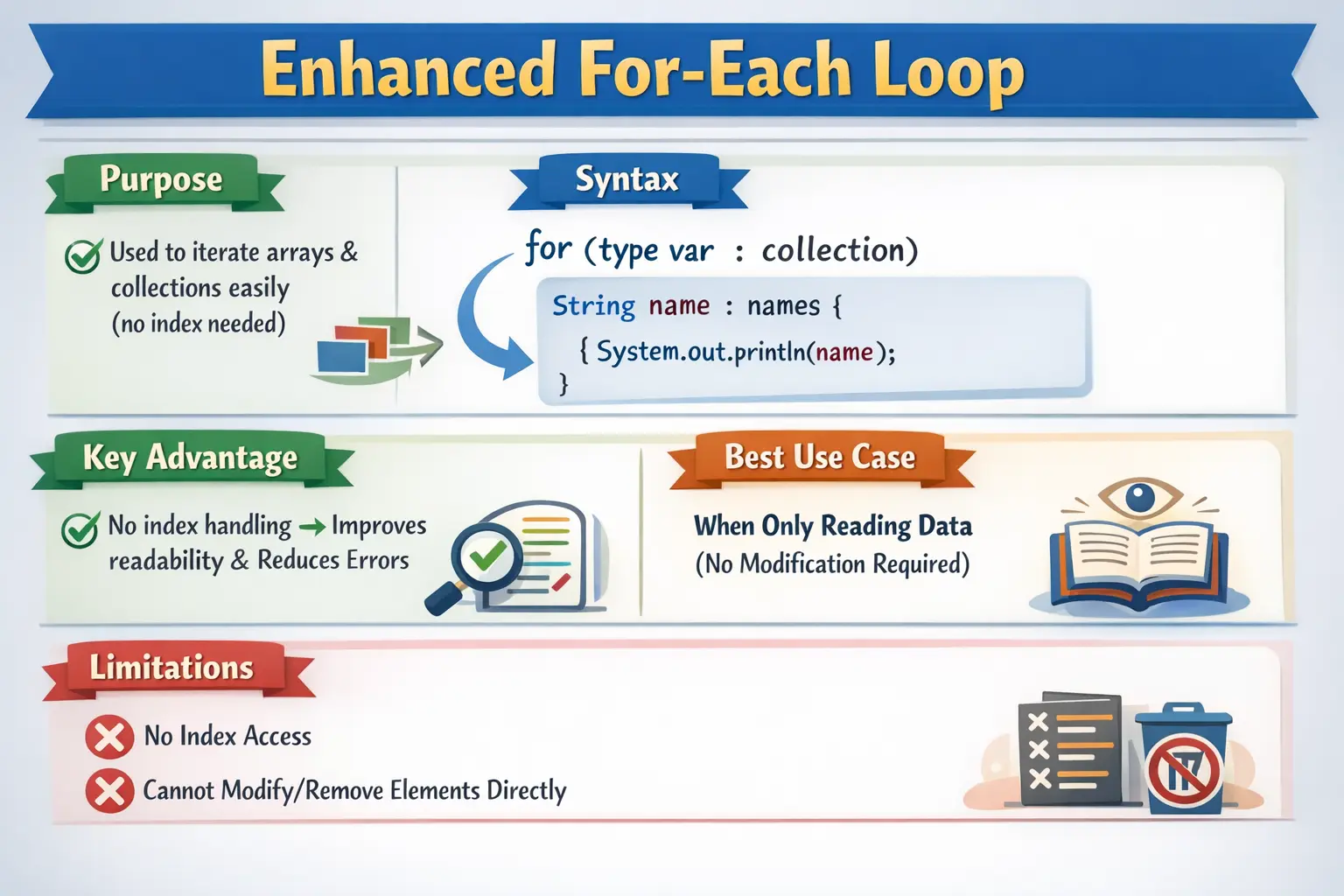
In real-world Java development, iteration is one of the most frequent operations. Whether you are processing test data, validating API responses, traversing UI elements in automation, or working with collections such as lists and sets, iteration logic appears everywhere. The enhanced for-each loop addresses common problems associated with traditional loops, such as off-by-one errors, index mismanagement, and unnecessary complexity. It is especially valuable in scenarios where the goal is simply to traverse and read data without needing positional control.
Understanding the enhanced for-each loop is not just about syntax—it is about knowing when to use it, when to avoid it, and how it behaves internally. This distinction becomes critical in both interviews and real-world projects, particularly in automation frameworks and data processing pipelines.
What Is the Enhanced for-each Loop?
The enhanced for-each loop is a control flow construct used to iterate over elements in an array or collection sequentially. It abstracts away the index-based iteration mechanism and provides direct access to each element in the data structure.
At its core, the loop works by assigning each element of the collection or array to a temporary variable, one at a time, until all elements have been processed. This means that developers no longer need to write code to initialize an index, check boundaries, or increment counters.
The syntax of the enhanced for-each loop is simple and expressive:
for (dataType variable : collectionOrArray) {
    // code to execute
}
Here, dataType represents the type of elements stored in the collection, variable is a temporary variable that holds each element during iteration, and collectionOrArray is the data structure being traversed.
This design emphasizes clarity. Instead of focusing on how to iterate, the developer focuses on what to do with each element.
Basic Example with Arrays
To understand the enhanced for-each loop, consider a simple example with an array of integers:
int[] numbers = {10, 20, 30, 40};
for (int num : numbers) {
    System.out.println(num);
}
In this example, the loop automatically retrieves each element from the numbers array and assigns it to the variable num. The loop runs once for each element, printing the values sequentially.
The output will be:
10
20
30
40
What is important here is that there is no explicit index variable. There is no need to write i = 0, no need to check i < numbers.length, and no need to increment i. The loop handles all of that internally.
Example with String Arrays
The enhanced for-each loop works equally well with non-primitive types such as strings:
String[] languages = {"Java", "Python", "C"};
for (String lang : languages) {
    System.out.println(lang);
}
Here, each string in the array is assigned to the variable lang, and the loop prints each value. This approach is significantly more readable than using a traditional index-based loop, especially when the index itself is not needed.
Example with Collections
One of the most powerful use cases of the enhanced for-each loop is with Java collections such as List, Set, and Queue.
List<String> names = new ArrayList<>();
names.add("Alice");
names.add("Bob");

for (String name : names) {
    System.out.println(name);
}
Collections are widely used in enterprise applications and automation frameworks. The for-each loop integrates seamlessly with them, making iteration straightforward and less error-prone.
Under the hood, when used with collections, the for-each loop utilizes an iterator. However, this complexity is hidden from the developer, allowing for cleaner and more maintainable code.
Execution Flow of the Enhanced for-each Loop
To use the enhanced for-each loop effectively, it is important to understand how it executes.
The loop follows a simple flow:
- The loop retrieves the first element from the array or collection
- The element is assigned to the loop variable
- The loop body executes using that variable
- The next element is retrieved
- Steps repeat until all elements are processed
This process continues until there are no more elements left. Unlike traditional loops, there is no explicit condition check visible in the syntax, but internally, the loop ensures that it stops when all elements are consumed.
When to Use the Enhanced for-each Loop
The enhanced for-each loop is ideal in situations where the goal is to traverse a collection or array without needing positional control.
It is best suited for:
- Reading elements from arrays
- Iterating through collections such as lists and sets
- Performing operations on each element independently
- Writing clean and readable iteration logic
- Avoiding index-related errors
For example, in a Selenium automation framework, if you are iterating through a list of web elements to validate their text, the enhanced for-each loop provides a clean and intuitive solution.
When NOT to Use the Enhanced for-each Loop
Despite its advantages, the enhanced for-each loop is not suitable for all scenarios. There are important limitations that developers must be aware of.
It should not be used when:
- You need access to the index of elements
- You need to iterate in reverse order
- You need to modify the structure of the collection during iteration
- You need conditional skipping based on position
- You need fine-grained control over iteration
For example, removing elements from a list while using a for-each loop will result in a runtime exception:
for (String s : list) {
    list.remove(s); // unsafe
}
This happens because the underlying iterator detects structural modification during iteration, leading to a ConcurrentModificationException.
In such cases, using an explicit iterator or a traditional loop is more appropriate.
Enhanced for-each vs Traditional for Loop
Understanding the difference between the enhanced for-each loop and the traditional for loop is crucial for making the right choice.
The traditional for loop provides full control over iteration. It allows index access, reverse traversal, and modification of elements. However, it is more verbose and prone to errors.
The enhanced for-each loop, on the other hand, prioritizes readability and simplicity. It removes the need for index management but sacrifices control.
In practical terms, the enhanced for-each loop is best for traversal, while the traditional for loop is better for control-driven logic.
Enhanced for-each with 2D Arrays
The enhanced for-each loop can also be used with multi-dimensional arrays.
int[][] matrix = {
    {1, 2},
    {3, 4}
};

for (int[] row : matrix) {
    for (int value : row) {
        System.out.print(value + " ");
    }
    System.out.println();
}
In this example, the outer loop iterates through rows, and the inner loop iterates through elements within each row. This demonstrates how nested for-each loops can be used to process multi-dimensional data structures.
Internal Working (Advanced Understanding)
Although the enhanced for-each loop appears simple, it behaves differently depending on whether it is used with arrays or collections.
For arrays, the compiler translates the loop into a traditional index-based loop internally.
For collections, the loop is translated into an iterator-based loop. This is why structural modification during iteration is not allowed unless handled properly.
Understanding this internal behavior helps explain why certain operations are restricted and why errors occur in specific scenarios.
Why the Enhanced for-each Loop Improves Readability
The biggest advantage of the enhanced for-each loop is that it removes unnecessary index-management code when the index is not important. In many loops, the developer does not actually care about the position of an element. The goal is simply to read each value and perform an action. Traditional loops still require an index variable, a boundary condition, and an update expression, even when those details do not contribute to the business logic. The enhanced for-each loop removes that noise.
This makes the code read closer to plain language. Instead of saying, "start at index zero, continue while the index is less than the length, increment the index, and access the element at that index," the enhanced loop says, "for each element in this collection, do this." That is exactly how many iteration problems are naturally understood.
Readable iteration is especially valuable in larger applications. A developer reviewing the code can focus on what happens to each element rather than verifying whether the loop boundary is correct. This reduces the chance of off-by-one errors and makes code easier to maintain. The enhanced for-each loop is therefore not only a convenience feature; it is a readability tool.
Element-Focused Iteration
The enhanced for-each loop is element-focused. This means the loop variable represents the current element, not the current position. In a traditional for loop, the loop variable usually represents an index. The developer then uses that index to retrieve the element. In an enhanced for-each loop, Java provides the element directly.
This difference changes how the code is designed. If the task is to print every name, validate every record, calculate a total from every amount, or check every object in a list, element-focused iteration is ideal. The loop body can work directly with meaningful values. The code becomes simpler because there is no extra lookup step.
Element-focused iteration also improves naming. Instead of using a generic index such as i, the loop can use names such as name, amount, employee, order, testCase, or webElement. These names communicate the domain directly. When the loop variable represents the actual item being processed, the code becomes easier to understand.
Enhanced for-each with Arrays
When used with arrays, the enhanced for-each loop gives a clean way to process every element from beginning to end. Java handles the index internally, so the developer does not need to write the array boundary condition. This avoids common errors such as using less than or equal to the array length, which can cause an ArrayIndexOutOfBoundsException.
The enhanced loop is best for reading array values or performing actions based on each value. For example, printing all numbers, calculating a sum, finding a matching value, or counting elements that satisfy a condition can all be written clearly with for-each syntax. If the loop does not need the index, the enhanced form is usually more expressive.
However, the enhanced loop does not give direct access to the index. If the program needs to update a specific array position, compare neighboring elements, process elements in reverse order, or skip based on position, a traditional for loop is usually better. The enhanced loop is about clean traversal, not positional control.
Enhanced for-each with Collections
Collections are one of the most common places where the enhanced for-each loop shines. Lists, sets, queues, and other iterable structures can be traversed without exposing iterator details. This is useful because most collection-processing code is concerned with each item, not with the internal mechanics of iteration.
For a List, the loop visits elements in the list's iteration order. For a Set, the loop visits elements according to that set's iteration behavior, which may not always be insertion order. For a Queue, iteration follows the queue's defined traversal behavior. The enhanced loop respects the collection's Iterable implementation and lets the developer write simple item-processing code.
This is especially helpful in enterprise applications where collections are used heavily. A service may loop through orders, a controller may loop through request items, an automation script may loop through web elements, and a report generator may loop through records. The enhanced loop keeps these tasks direct and readable.
Read-Only Traversal and Element Updates
The enhanced for-each loop is often described as best for read-only traversal. This means it is ideal when you want to read or use each element without changing the structure of the underlying array or collection. But the phrase "read-only" needs careful understanding. For object references, the loop variable refers to the current object. You may be able to modify the object's internal state, but you should not structurally modify the collection during iteration.
For example, if a list contains Employee objects, a for-each loop can call methods on each employee object and may update fields through setters if that is appropriate. But removing employees from the list inside the same enhanced loop can cause problems. The collection structure is being changed while an iterator is active.
With arrays of primitives, assigning a new value to the loop variable does not update the original array element. The loop variable receives a copy of the current value. This can surprise beginners who expect changes to the loop variable to modify the array. If array elements must be updated by position, use a traditional index-based loop.
Why Structural Modification Is Unsafe
When the enhanced for-each loop iterates over a collection, it uses an iterator internally. Java collection iterators generally detect structural modification made outside the iterator during iteration. Structural modification means adding or removing elements in a way that changes the collection's size or structure. When this happens, Java may throw a ConcurrentModificationException.
This behavior protects the integrity of iteration. If a collection changes while it is being traversed, the iterator may no longer know what the next element should be. Rather than continuing unpredictably, Java reports the problem. This is why removing elements directly from a list inside a for-each loop is unsafe.
If elements must be removed during traversal, use an explicit Iterator and its remove method where appropriate, or collect items to remove in a separate list and remove them after iteration. In modern Java, methods such as removeIf may also be clearer for filtering collections. The enhanced for-each loop is clean for traversal, but not for structural modification.
Enhanced for-each and Null Handling
The enhanced for-each loop requires the array or iterable source itself to be non-null. If the collection or array reference is null, the loop will throw a NullPointerException before it can iterate. This is an important practical point because data often comes from external sources, APIs, optional fields, or method returns that may be null.
Before using a for-each loop, ensure the source is initialized. In many codebases, returning an empty collection is preferred over returning null because it allows callers to iterate safely without special checks. An empty collection simply results in zero iterations, which is often the desired behavior.
The elements inside the collection may also be null. If that is possible, the loop body should handle it. A common pattern is to check whether the current element is null and continue to the next iteration. This prevents errors when calling methods on the element and keeps the main processing logic safe.
Enhanced for-each with Generics
Generics make the enhanced for-each loop safer and more expressive. When a collection is declared with a type, such as List<String> or List<Employee>, the loop variable can use that same type. This allows Java to check type correctness at compile time and avoids unnecessary casting inside the loop body.
Without generics, older-style collections store elements as Object, and developers may need to cast each element manually. This is more verbose and more error-prone. With generics and enhanced for-each together, the code becomes cleaner: each element is delivered as the expected type.
This combination is common in professional Java code. A List<Order> can be processed with for (Order order : orders), making the loop readable and type-safe. The loop variable name and type together communicate exactly what the code is processing.
Enhanced for-each in Automation Frameworks
In automation frameworks, enhanced for-each loops are useful because tests often process collections of elements, data rows, browser names, environments, or validation messages. For example, Selenium code may retrieve a list of web elements and then verify the text of each element. A for-each loop makes this logic easy to read because the code works directly with each element.
Test data processing is another strong use case. A test may loop through usernames, expected messages, input values, or rows loaded from a file. If the test simply needs to apply the same validation to each item, enhanced for-each syntax keeps the loop compact and focused.
However, if the test requires index-based assertions, such as comparing element text with an expected value at the same position in another list, a traditional for loop may be better. The enhanced loop is ideal for independent item processing, but index-based comparison needs positional control.
Enhanced for-each vs Iterator
The enhanced for-each loop is simpler than using an Iterator directly, but it is less flexible. An explicit iterator gives more control over traversal and can safely remove elements through the iterator's remove method when supported. The enhanced loop hides the iterator, which improves readability but removes access to iterator operations.
Use enhanced for-each when you only need to visit each element. Use an explicit iterator when you need iterator-specific behavior, especially safe removal during iteration. This distinction is important in interviews because candidates are often asked why removing from a collection inside a for-each loop can fail and what alternative should be used.
In modern Java, there are also collection methods and stream operations that may replace some iterator use cases. Still, understanding the relationship between enhanced for-each and Iterator helps explain the internal behavior and limitations of the loop.
Enhanced for-each vs Streams
Java streams provide another way to process collections, especially when operations are functional in nature, such as filtering, mapping, collecting, or reducing. A stream can be concise and expressive for data transformation. The enhanced for-each loop, however, remains very readable for straightforward procedural logic.
If the loop body contains multiple statements, logging, condition checks, or calls to existing imperative methods, the enhanced for-each loop may be clearer than a stream. If the operation is a clean transformation or filter pipeline, a stream may be more appropriate. The choice depends on readability, team style, and the nature of the operation.
For beginners, enhanced for-each is often easier to understand because execution is explicit. Streams are powerful, but they introduce additional concepts such as lambdas, intermediate operations, terminal operations, and lazy evaluation. Both tools are valuable, and each has a proper place.
Limitations of Enhanced for-each
The enhanced for-each loop has clear limitations. It does not expose an index. It does not naturally support reverse traversal. It does not allow easy skipping based on position. It is not suitable when two collections must be processed in parallel by matching indexes. It is not the right choice when elements must be replaced inside an array using their positions.
These limitations are not defects. They are design tradeoffs. The enhanced loop intentionally favors simplicity over control. When you need control, use a traditional for loop. When you need simple traversal, use enhanced for-each. Good developers choose the loop structure based on the problem rather than using one style everywhere.
Understanding limitations also prevents forced code. If you find yourself manually tracking an index variable inside a for-each loop, that is often a sign that a traditional for loop would be clearer. The enhanced loop should simplify code, not require workarounds.
Performance Considerations
For most everyday code, the enhanced for-each loop performs well and should be chosen for readability when appropriate. With arrays, the compiler can translate it into efficient index-based traversal. With collections, it uses the collection's iterator. In typical application code, the performance difference between enhanced for-each and equivalent manual iteration is usually not the main concern.
The larger performance issue is what happens inside the loop body. If each iteration performs expensive database calls, network requests, file operations, or repeated searches, the loop body matters far more than the loop syntax. Choosing enhanced for-each will not fix inefficient inner logic.
Still, developers should understand collection behavior. Iterating a List and iterating a Set may have different ordering guarantees. Iterating certain concurrent collections may behave differently from ordinary collections. The enhanced loop follows the data structure's iteration behavior, so performance and ordering depend partly on the chosen collection.
Testing Code That Uses Enhanced for-each
Testing enhanced for-each logic means checking how the loop behaves with different collection contents. Test normal collections with multiple elements, empty collections with no elements, single-element collections, and collections containing null elements if nulls are possible. These cases confirm that the loop handles realistic inputs safely.
If the loop performs filtering, test both processed and skipped elements. If it uses break, test when the target appears early, late, and not at all. If it uses continue, test that skipped elements do not affect later valid elements. If it processes objects, verify whether object state changes are intended and correct.
For collection modification scenarios, tests should confirm that the code uses a safe removal strategy. This is important because structural modification mistakes may not appear until runtime. Good tests make the loop's assumptions visible.
Debugging Enhanced for-each Issues
When an enhanced for-each loop behaves unexpectedly, first inspect the source collection or array. Confirm that it is not null, contains the expected number of elements, and contains values in the expected order. Many loop issues are actually data issues rather than loop syntax issues.
Next, inspect the loop variable. Remember that for primitives, the loop variable is a copy of the value. Assigning to it does not update the original array. For object references, the variable points to the current object, so changing the object's state may affect the object stored in the collection. Understanding this distinction helps explain many surprises.
Finally, check whether the collection is being modified during iteration. If a ConcurrentModificationException occurs, look for add or remove operations inside the loop or inside methods called by the loop. The modification may not be on the visible line; it may be hidden inside a helper method.
How to Explain Enhanced for-each in Interviews
In interviews, a strong explanation should define the enhanced for-each loop as a simplified loop used to iterate over arrays and Iterable collections without manually managing indexes. It provides direct access to each element and improves readability when index control is not required.
Then explain when to use it and when not to use it. Use it for simple traversal, reading elements, processing each item independently, and reducing index errors. Avoid it when you need the index, reverse traversal, structural modification during iteration, or parallel processing of multiple collections by position.
A strong answer should also mention internal behavior. For arrays, the compiler can translate it into index-based iteration. For collections, it uses an iterator internally, which explains why direct structural modification can cause ConcurrentModificationException. This gives the answer practical depth beyond syntax.
Common Beginner Mistakes
Many beginners misuse the enhanced for-each loop due to misunderstanding its limitations.
One common mistake is expecting access to the index. Since the loop does not expose index values, attempting to use it for position-based logic leads to incorrect solutions.
Another mistake is trying to modify the collection during iteration, which results in runtime exceptions.
Some developers also confuse the for-each loop with iterator-based loops, assuming they behave identically.
Choosing the for-each loop when index control is required is another frequent error. This leads to unnecessary complexity or incorrect logic.
Avoiding these mistakes requires a clear understanding of when the for-each loop is appropriate.
Interview Perspective
The enhanced for-each loop is a common interview topic, especially in Java-focused roles.
A concise answer would define it as a loop used to iterate over arrays and collections without using indexes.
A more detailed answer would explain that it simplifies iteration, improves readability, and internally uses indexing or iterators depending on the data structure.
Interviewers may also test your understanding of its limitations, such as the inability to modify collections or access indexes.
Being able to compare it with the traditional for loop and explain when to use each is a key expectation.
Key Takeaway
The enhanced for-each loop is a powerful and elegant feature that simplifies iteration in Java. It eliminates the need for manual index handling and allows developers to focus on processing elements directly.
It is best suited for scenarios where readability, safety, and simplicity are priorities. However, it is not a replacement for traditional loops in all cases. Understanding its limitations is just as important as understanding its benefits.
In modern Java development, especially in frameworks, automation, and data processing, the enhanced for-each loop plays a crucial role in writing clean, maintainable, and efficient code. Mastering it ensures that your iteration logic is both correct and expressive, which is essential for both interviews and real-world applications.
1. Basic Enhanced for-each Loop (Array)
int[] nums = {10, 20, 30};
for (int n : nums) {
System.out.println(n);
}
Explanation
- Iterates over each element in the array.
- No index management required.
- Output: 10 20 30
2. Enhanced for-each Loop with String Array
String[] names = {"Java", "Python", "C++"};
for (String name : names) {
System.out.println(name);
}
Explanation
- Iterates over String elements.
- Read-only access to elements.
3. Enhanced for-each Loop with Conditional Logic
int[] nums = {1, 2, 3, 4, 5};
for (int n : nums) {
if (n % 2 == 0) {
System.out.println(n);
}
}
Explanation
- Prints only even numbers.
- Conditions are allowed inside for-each.
4. Enhanced for-each Loop with break
int[] nums = {5, 10, 15, 20};
for (int n : nums) {
if (n == 15) {
break;
}
System.out.println(n);
}
Explanation
- Loop stops when 15 is encountered.
- Output: 5 10
5. Enhanced for-each Loop with continue
int[] nums = {1, 2, 3, 4, 5};
for (int n : nums) {
if (n == 3) {
continue;
}
System.out.println(n);
}
Explanation
- Skips only the value 3.
- Output: 1 2 4 5
6. Enhanced for-each Loop over List
import java.util.*;
List<String> list = Arrays.asList("A", "B", "C");
for (String s : list) {
System.out.println(s);
}
Explanation
- Works with all Iterable collections.
- Cleaner than index-based loops.
7. Enhanced for-each Loop with Set
import java.util.*;
Set<Integer> set = new HashSet<>(Arrays.asList(10, 20, 30));
for (int n : set) {
System.out.println(n);
}
Explanation
- Order is not guaranteed.
- Common for unique value traversal.
8. Enhanced for-each Loop with Map (entrySet)
import java.util.*;
Map<String, Integer> map = new HashMap<>();
map.put("A", 1);
map.put("B", 2);
for (Map.Entry<String, Integer> entry : map.entrySet()) {
System.out.println(entry.getKey() + " = " + entry.getValue());
}
Explanation
- Recommended way to iterate maps.
- Accesses both key and value.
9. Enhanced for-each Loop with Map (keySet)
import java.util.*;
Map<String, String> map = Map.of("US", "USA", "IN", "India");
for (String key : map.keySet()) {
System.out.println(key);
}
Explanation
- Iterates only over keys.
- Values accessed separately if needed.
10. Enhanced for-each Loop with Map (values)
import java.util.*;
Map<String, String> map = Map.of("A", "Apple", "B", "Ball");
for (String value : map.values()) {
System.out.println(value);
}
Explanation
- Iterates only over values.
- Useful when keys are not required.
11. Enhanced for-each Loop for 2D Array
int[][] matrix = {
{1, 2},
{3, 4}
};
for (int[] row : matrix) {
for (int val : row) {
System.out.println(val);
}
}
Explanation
- Outer loop iterates rows.
- Inner loop iterates columns.
12. Enhanced for-each Loop with Objects
class Student {
String name;
Student(String name) {
this.name = name;
}
}
Student[] students = {
new Student("John"),
new Student("Alice")
};
for (Student s : students) {
System.out.println(s.name);
}
Explanation
- Used heavily in real-world applications.
- Iterates over object references.
13. Enhanced for-each Loop – Read-Only Limitation
int[] nums = {1, 2, 3};
for (int n : nums) {
n = n * 2; // does NOT modify array
}
for (int n : nums) {
System.out.println(n);
}
Explanation
- Enhanced loop variable is a copy.
- Original array remains unchanged.
14. Enhanced for-each Loop vs Index Loop (Comparison)
int[] nums = {10, 20, 30};
for (int i = 0; i < nums.length; i++) {
System.out.println(nums[i]);
}
for (int n : nums) {
System.out.println(n);
}
Explanation
- for-each is simpler.
- Index loop needed when index manipulation is required.
15. Enhanced for-each Loop with Filtering Logic
int[] nums = {5, -2, 8, -1};
for (int n : nums) {
if (n < 0) continue;
System.out.println(n);
}
Explanation
- Skips negative numbers.
- Clean filtering pattern.
16. Enhanced for-each Loop with Boolean Flag
int[] nums = {3, 6, 9};
boolean found = false;
for (int n : nums) {
if (n == 6) {
found = true;
break;
}
}
System.out.println(found);
Explanation
- Common search pattern.
- break exits early.
17. Enhanced for-each Loop with Enum
enum Day { MON, TUE, WED }
for (Day d : Day.values()) {
System.out.println(d);
}
Explanation
- Iterates over enum constants.
- Very common interview question.
18. Enhanced for-each Loop with Var (Java 10+)
int[] nums = {1, 2, 3};
for (var n : nums) {
System.out.println(n);
}
Explanation
- var infers type automatically.
- Improves readability.
19. Enhanced for-each Loop with Lambda Comparison
List<Integer> list = List.of(1, 2, 3);
for (int n : list) {
System.out.println(n);
}
list.forEach(n -> System.out.println(n));
Explanation
- Shows traditional vs lambda iteration.
- for-each is more readable for beginners.
20. Interview Summary Example (Enhanced for-each)
String[] langs = {"Java", "Python"};
for (String lang : langs) {
System.out.println(lang);
}
Explanation
- Best used when:
- No index needed
- Read-only traversal
- Very common interview example.