while Loop in Java
The while loop is one of the most fundamental control flow constructs in Java, designed to execute a block of code repeatedly as long as a specified condition remains true. Unlike the for loop, which is typically used when the number of iterations is known in advance, the while loop is best suited for scenarios where execution depends on a dynamic condition. This makes it especially valuable in real-world applications involving user input, continuous monitoring, polling mechanisms, and condition-driven workflows.
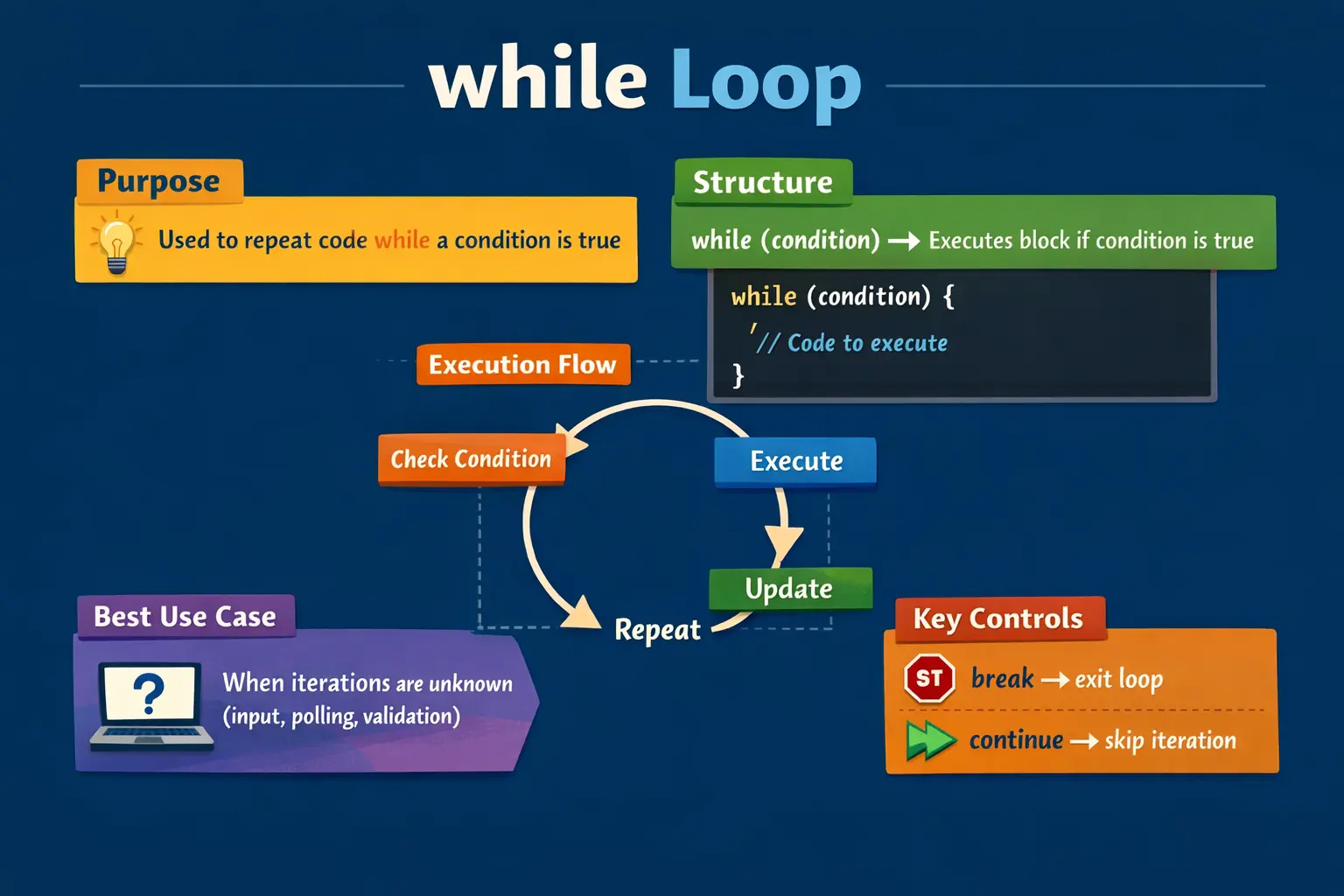
At a conceptual level, the while loop represents a condition-controlled loop. It does not rely on a fixed number of iterations; instead, it continues execution until a logical condition becomes false. This flexibility allows developers to build responsive and adaptive logic, where the program reacts to changing states rather than predefined counts.
Understanding the while loop deeply is essential not only for writing correct programs but also for debugging complex logic, designing efficient algorithms, and performing well in technical interviews.
Understanding the Concept of a while Loop
The while loop operates on a simple principle: evaluate a condition, and if it is true, execute a block of code. After executing the block, the condition is evaluated again. This cycle continues until the condition becomes false.
One important characteristic of the while loop is that the condition is evaluated before the loop body executes. This means that if the condition is false from the beginning, the loop body will not execute even once. This behavior distinguishes it from the do-while loop, which guarantees at least one execution.
The while loop is particularly useful when the number of iterations cannot be determined beforehand. For example, reading user input until a valid value is entered, waiting for a resource to become available, or processing data until a specific condition is met.
Basic Syntax and Structure
The syntax of a while loop is straightforward and easy to understand:
while (condition) {
    // code to execute
}
The condition must always evaluate to a boolean value. If the condition is true, the loop body executes. If it is false, the loop terminates.
A simple example illustrates this clearly:
int i = 1;
while (i <= 5) {
    System.out.println(i);
    i++;
}
In this example, the loop prints numbers from 1 to 5. The variable i is initialized before the loop begins, and it is updated inside the loop body. The condition i <= 5 controls how long the loop runs.
Execution Flow of the while Loop
The execution of a while loop follows a predictable sequence. First, the condition is evaluated. If the condition is true, the loop body executes. After executing the body, control returns to the condition check. This cycle repeats until the condition becomes false.
The flow can be summarized as follows:
- Evaluate the condition
- If true, execute the loop body
- Update loop variables (if applicable)
- Return to condition check
- Exit when the condition becomes false
This flow highlights an important responsibility for the developer: ensuring that the condition will eventually become false. Failure to do so results in an infinite loop.
Simple Example and Practical Understanding
Consider a scenario where a program needs to print a sequence of numbers:
int i = 1;
while (i <= 5) {
    System.out.println(i);
    i++;
}
Here, the loop starts with i = 1. It checks whether i is less than or equal to 5. If true, it prints the value and increments i. This process continues until i becomes 6, at which point the condition fails, and the loop terminates.
This example demonstrates a typical use case where the loop variable is controlled manually inside the loop body.
Using Decrement in while Loop
Just like incrementing, the while loop can also be used for decrementing values. This is useful when iterating in reverse order.
int i = 5;
while (i > 0) {
    System.out.println(i);
    i--;
}
In this case, the loop starts from 5 and counts down to 1. The logic remains the same, but the update operation decreases the loop variable instead of increasing it.
Infinite while Loop
An infinite loop occurs when the condition of the while loop never becomes false. This can happen intentionally or accidentally.
while (true) {
    System.out.println("Infinite loop");
}
This loop runs indefinitely because the condition is always true. Infinite loops are useful in certain scenarios, such as server processes, event listeners, or continuous monitoring systems.
However, in most cases, infinite loops must be controlled using a break statement to exit when a specific condition is met.
Using break in while Loop
The break statement is used to terminate the loop immediately, regardless of the condition.
while (true) {
    if (conditionMet) {
        break;
    }
}
This pattern is commonly used when the loop depends on an external condition that is checked inside the loop body. Once the condition is satisfied, the loop exits.
Using continue in while Loop
The continue statement skips the remaining code in the current iteration and moves control back to the condition check.
int i = 0;
while (i < 5) {
    i++;
    if (i == 3) {
        continue;
    }
    System.out.println(i);
}
In this example, when i equals 3, the loop skips the print statement and continues with the next iteration. This allows selective execution within the loop.
Nested while Loop
A while loop can be placed inside another while loop to create a nested structure. This is useful for working with multi-dimensional data or performing repeated operations within another loop.
int i = 1;
while (i <= 3) {
    int j = 1;
    while (j <= 2) {
        System.out.println(i + "," + j);
        j++;
    }
    i++;
}
In this example, the outer loop controls one dimension, while the inner loop controls another. Each iteration of the outer loop triggers a full execution of the inner loop.
Nested loops are powerful but should be used carefully to avoid performance issues.
Common Use Cases of while Loop
The while loop is widely used in real-world applications where execution depends on dynamic conditions. It is commonly used for reading user input until a valid value is entered, polling system states, processing files, and monitoring network connections.
For example, a program may use a while loop to continuously read input until the user enters a specific command. Similarly, it can be used to check whether a resource is available before proceeding.
These scenarios highlight the strength of the while loop in handling unpredictable or condition-driven execution.
while vs for Loop
Although both while and for loops are used for repetition, they serve different purposes.
The for loop is ideal when the number of iterations is known in advance. It provides a compact structure that includes initialization, condition, and update in one place.
The while loop, on the other hand, is better suited for situations where the number of iterations is not known. It offers a simpler structure but requires manual management of loop variables.
Choosing between the two depends on the nature of the problem. Understanding their differences helps in writing more readable and efficient code.
Why while Loop Is Called Condition-Controlled
The while loop is called condition-controlled because the loop depends primarily on a boolean condition rather than a fixed counter. A for loop often communicates how many times the loop should run. A while loop communicates under what condition the loop should keep running. This difference is small in syntax but important in design.
In many real-world problems, the number of iterations is not known before execution begins. A program may need to keep asking for user input until the input is valid. A service may need to keep checking whether a file exists. A game loop may continue until the player exits. A retry mechanism may continue until a connection succeeds or a maximum condition is reached. In these situations, the loop is controlled by a changing state, not by a simple count.
This makes the while loop flexible. It allows code to express "keep doing this while the condition remains true." The condition may depend on user behavior, data availability, system state, external responses, or values calculated during execution. Because of this flexibility, the while loop is a natural choice for adaptive and event-driven logic.
Pre-Test Loop Behavior
The while loop is a pre-test loop because it checks the condition before executing the loop body. If the condition is false at the beginning, the body is skipped completely. This behavior is important because it allows a while loop to safely represent logic that may not need to run at all.
For example, if a collection has no records to process, a while loop can skip processing immediately. If a user is already authenticated, a loop that asks for login attempts may not need to run. If a resource is already unavailable, a monitoring loop may not start. The loop does not force execution; it respects the initial condition.
This is the main difference between while and do-while. A do-while loop always runs at least once because it checks the condition after the body. A while loop is safer when the body should run only if the condition is already true. Choosing between the two depends on whether at least one execution is required.
Managing Loop State Manually
In a while loop, the developer is responsible for managing the state that controls the loop. The initialization usually happens before the loop. The condition is placed in the while statement. The update happens somewhere inside the loop body. Because these parts are separated, the while loop is flexible, but it also demands discipline.
If the update is missing, the condition may never change, causing an infinite loop. If the update happens in the wrong place, the loop may skip values, repeat values, or stop too early. If multiple branches inside the loop update the same variable differently, the flow can become difficult to reason about. This is why while loops should be written with a clear termination plan.
A good while loop makes progress toward its stopping condition. Each iteration should either update the controlling state, receive new input, consume data, or otherwise move closer to completion. If the loop body does not visibly affect the condition, the code deserves careful review. The question to ask is simple: what will eventually make this condition false?
while Loop for Unknown Iteration Counts
The while loop is strongest when the number of repetitions is unknown. A program may need to read lines until the end of a file, retry an operation until it succeeds, ask for input until it is valid, or process items until a queue becomes empty. In these cases, the count emerges during execution rather than being known ahead of time.
This is different from a for loop that iterates from one number to another. The while loop is not primarily about counting; it is about continuing while a condition remains true. Sometimes a counter is still used, but the counter is not always the main reason for the loop. The real control may be an input value, a boolean flag, a data structure state, or an external response.
Because unknown iteration counts can create uncertainty, while loops should be guarded carefully. If there is any risk that the condition may remain true forever, the code should include a timeout, maximum attempt count, break condition, or other safety mechanism. This is especially important in production systems that interact with networks, files, APIs, or user input.
while Loop for User Input
User input is a classic use case for the while loop because users may not provide valid data on the first attempt. A program may ask for a password, menu option, age, email address, or command. The loop continues until the input meets the required condition. The exact number of attempts is unknown, so a while loop expresses the behavior naturally.
In this type of logic, the condition often depends on a validation result. The program reads input, checks it, and either exits the loop or asks again. The loop should provide clear feedback so the user understands what must be corrected. Without good feedback, the loop may technically work but create a poor user experience.
Input loops should also consider safety. Some workflows should not allow unlimited attempts. Login attempts, payment retries, and security-sensitive actions often need a maximum attempt count. A while loop can combine condition-driven behavior with a counter so the program remains flexible but controlled.
while Loop for Polling and Monitoring
Polling means repeatedly checking whether something has changed. A program may check whether a file has appeared, whether a service is ready, whether a background job has finished, or whether a response has arrived. The while loop is often used for this type of condition-driven waiting.
Monitoring logic may also use while loops. A process may continue while an application is running, while a connection is active, or while a stop signal has not been received. These loops are common in servers, background workers, schedulers, and automation utilities. The condition represents the operational state of the system.
Polling and monitoring loops must be designed carefully. A tight loop that constantly checks a condition without pause can waste CPU resources. Many real systems include sleep intervals, timeout limits, retry counters, or event-based alternatives. The while loop gives control, but responsible design prevents unnecessary resource usage.
while Loop for File and Stream Processing
File and stream processing often uses while-style logic because data is consumed until no more data is available. The program may read one line, process it, and then read the next line. The loop continues while the read operation returns usable data. The number of lines may not be known before reading begins.
This pattern is common when reading logs, CSV files, configuration files, network streams, or user-provided text. The loop condition is tied to the availability of data. Once there is no more data, the condition becomes false and processing stops.
Such loops should handle invalid or blank data carefully. Continue can skip irrelevant lines. Break can stop processing when a special marker appears. Error handling should ensure that resources are closed properly. While loops are powerful for streams because they allow the program to respond to data as it arrives.
while Loop with Flags
A boolean flag is often used to control a while loop. The flag starts with a value such as true, and the loop continues while the flag remains true. Inside the loop, some event or condition may change the flag to false, causing the loop to stop. This pattern is useful when the stopping condition is easier to express as a state than as a numeric boundary.
For example, a menu loop may continue while a variable named running is true. If the user chooses the exit option, running becomes false. A search loop may continue while found is false. Once the target is found, the flag changes. This makes the code read like the problem it represents.
Flags should be named clearly. A variable named flag does not explain much, but names like isRunning, isValidInput, foundMatch, or shouldContinue communicate intent. Clear names are especially important in while loops because the condition controls the whole structure.
Using break in while Loops
Break is useful in while loops when the main condition is broad but a specific event should stop the loop immediately. For example, a loop may run while true because the stopping condition depends on logic inside the body. When the desired condition is reached, break exits the loop. This pattern is common in menu systems, retry logic, and input loops.
Break can make a while loop clearer when the exit event is easier to detect inside the loop body than in the loop header. However, it should be used intentionally. If a loop has many break points, the flow becomes harder to follow. The reader must inspect every condition to understand all possible exits.
A clean while loop usually has either a clear condition in the header or a clear break condition inside the body. Both styles are acceptable when the intent is obvious. The goal is to make it easy to understand when and why the loop stops.
Using continue in while Loops
Continue in a while loop skips the rest of the current iteration and returns to the condition check. This can be useful for skipping invalid or irrelevant data, but it requires care. If the loop variable is supposed to be updated after the continue statement, that update may be skipped, creating an infinite loop.
For this reason, updates should usually happen before a continue path or be placed in a structure that cannot be bypassed accidentally. In the example where blank values are skipped, the index must be incremented before continue. Otherwise, the same blank value would be checked repeatedly.
Continue is most readable when used as a guard near the top of the loop. It can reject unwanted cases early and keep the main logic clean. But like break, it should not be scattered throughout a long loop body. Too many continue paths make the loop harder to reason about.
while Loop and Infinite Loop Prevention
Infinite loops are the most important risk with while loops. Since the loop depends on a condition, the program must ensure that something eventually changes that condition. If nothing changes, the loop keeps running forever. This may freeze a program, consume CPU, block a thread, or prevent later code from executing.
To prevent accidental infinite loops, check three things. First, confirm that the condition can become false. Second, confirm that the loop body updates the values used in the condition. Third, confirm that control statements such as continue do not skip required updates. These checks catch most while-loop defects.
Intentional infinite loops should still have safe exit mechanisms. A server loop may stop when a shutdown signal arrives. A menu loop may stop when the user selects exit. A polling loop may stop after a timeout. Infinite by design should not mean uncontrolled forever.
while Loop vs do-while Loop
The while loop checks the condition before running the body. The do-while loop runs the body first and checks the condition afterward. This means a while loop may run zero times, while a do-while loop always runs at least once. This difference is the main factor when choosing between them.
Use while when the action should happen only if the condition is already true. Use do-while when the action must happen once before deciding whether to repeat. For example, displaying a menu at least once may fit do-while. Processing available data only if data exists may fit while.
In interviews, this distinction is frequently tested. A clear answer should mention pre-condition checking for while and post-condition checking for do-while. It should also explain that while is safer when zero execution is a valid outcome.
while Loop in Real-World Programs
Real-world programs use while loops whenever execution depends on changing conditions. A login module may allow attempts while the user has not exceeded the retry limit. A queue processor may continue while the queue is not empty. A scheduler may run while the service is active. A file reader may process content while lines are available.
These examples show that the while loop is not just a beginner construct. It appears in practical software systems where processes are driven by state, input, or availability. The loop supports adaptive behavior because it can continue or stop based on runtime information.
At the same time, production while loops should be readable and safe. They should have clear conditions, predictable state updates, and safeguards against uncontrolled execution. The more dynamic the loop, the more important the design becomes.
Testing while Loop Logic
Testing while loops requires checking normal execution, zero execution, early exit, and boundary behavior. Since a while loop may not run at all, one test should confirm that behavior when the initial condition is false. Another should confirm that the loop runs the expected number of times when the condition starts true.
If the loop uses break, tests should confirm that the break condition stops the loop correctly. If it uses continue, tests should confirm that skipped iterations do not prevent required updates. If the loop processes input, tests should include valid input, invalid input, repeated invalid input, and eventual valid input.
For loops controlled by external state, tests should simulate state changes. A polling loop should be tested when the condition becomes true quickly, after several attempts, and never within the allowed limit. Good tests prove that the loop can continue correctly and also stop safely.
Debugging while Loop Problems
When a while loop behaves unexpectedly, start with the condition. Check the exact values used in the condition before each iteration. If the loop never runs, the condition may be false at the start. If the loop never stops, the condition may never become false. If the loop stops too early, the update may be too aggressive or the condition may be incorrect.
Next, inspect updates inside the loop body. Make sure the controlling variable changes on every relevant path. Pay special attention to continue statements, because they skip the rest of the current iteration. If an update appears after continue, it may not execute.
Finally, trace a small example manually. Write down the initial value, condition result, body execution, update, and next condition result. This simple process often reveals loop mistakes faster than guessing. While loops are easier to debug when their state changes are visible and predictable.
How to Explain while Loop in Interviews
In interviews, a strong explanation should define the while loop as a condition-controlled loop that executes as long as a boolean condition remains true. Mention that the condition is checked before the loop body, so the loop may execute zero or more times. This is the core behavior.
Then explain the structure: initialization usually happens before the loop, the condition appears in the while statement, and the update usually happens inside the loop body. Because the update is manual, developers must ensure the condition eventually becomes false. This shows practical understanding.
Finally, compare it with for and do-while. Use for when the iteration count is known, while when repetition depends on a condition, and do-while when the body must execute at least once. Mention common mistakes such as missing updates, infinite loops, incorrect conditions, and confusing while with do-while.
Common Beginner Mistakes
One of the most common mistakes with the while loop is forgetting to update the loop variable. This results in an infinite loop, as the condition never changes.
Another mistake is using an incorrect condition, which may cause the loop to terminate prematurely or run longer than expected.
Developers also sometimes confuse the while loop with the do-while loop, leading to incorrect assumptions about execution.
Overcomplicating loop logic is another issue. Complex conditions and nested structures can make the code difficult to read and debug.
Avoiding these mistakes requires a clear understanding of loop behavior and careful attention to detail.
Interview Perspective
In interviews, the while loop is often used to assess a candidate’s understanding of control flow and logical reasoning.
A strong answer should explain that the while loop is a condition-controlled loop that evaluates a boolean condition before each iteration. It should also highlight that the loop may execute zero or more times.
Candidates may be asked to write programs using while loops, identify errors in loop logic, or compare it with other looping constructs.
Demonstrating clarity in execution flow and awareness of common pitfalls is key to performing well in such questions.
Key Takeaway
The while loop is a powerful and flexible construct in Java, designed for condition-driven execution. It allows programs to respond dynamically to changing conditions, making it ideal for real-world scenarios where iteration counts are not predetermined.
Mastering the while loop involves understanding its execution flow, managing loop variables correctly, and avoiding common pitfalls such as infinite loops.
In essence, the while loop is not just a repetition tool-it is a mechanism for building intelligent, responsive, and adaptive logic in Java programs.
1. Basic while Loop (Print 1 to 5)
int i = 1;
while (i <= 5) {
System.out.println(i);
i++;
}
Explanation
- Initializes i before the loop.
- Loop runs while condition is true.
- Output: 1 2 3 4 5
2. while Loop Printing Even Numbers
int i = 1;
while (i <= 10) {
if (i % 2 == 0) {
System.out.println(i);
}
i++;
}
Explanation
- Checks even condition inside the loop.
- Output: 2 4 6 8 10
3. while Loop Printing Odd Numbers
int i = 1;
while (i <= 10) {
if (i % 2 != 0) {
System.out.println(i);
}
i++;
}
Explanation
- Prints only odd numbers.
- Output: 1 3 5 7 9
4. Reverse while Loop
int i = 5;
while (i >= 1) {
System.out.println(i);
i--;
}
Explanation
- Loop runs backward.
- Output: 5 4 3 2 1
5. while Loop with break
int i = 1;
while (i <= 5) {
if (i == 3) {
break;
}
System.out.println(i);
i++;
}
Explanation
- Loop terminates when i == 3.
- Output: 1 2
6. while Loop with continue
int i = 0;
while (i < 5) {
i++;
if (i == 3) {
continue;
}
System.out.println(i);
}
Explanation
- Skips only iteration where i == 3.
- Output: 1 2 4 5
7. Infinite while Loop (Controlled with break)
while (true) {
System.out.println("Running");
break;
}
Explanation
- Condition is always true.
- break is mandatory to stop execution.
8. while Loop for Array Traversal
int[] nums = {10, 20, 30};
int i = 0;
while (i < nums.length) {
System.out.println(nums[i]);
i++;
}
Explanation
- Uses index to traverse array.
- Output: 10 20 30
9. while Loop with Enhanced Logic (Skip Negatives)
int[] nums = {5, -2, 8, -1, 10};
int i = 0;
while (i < nums.length) {
if (nums[i] < 0) {
i++;
continue;
}
System.out.println(nums[i]);
i++;
}
Explanation
- Skips negative numbers.
- Output: 5 8 10
10. while Loop for Summation
int i = 1;
int sum = 0;
while (i <= 5) {
sum += i;
i++;
}
System.out.println(sum);
Explanation
- Accumulates sum of numbers.
- Output: 15
11. while Loop for Factorial Calculation
int num = 5;
int fact = 1;
while (num > 0) {
fact *= num;
num--;
}
System.out.println(fact);
Explanation
- Calculates factorial.
- Output: 120
12. while Loop for String Traversal
String s = "JAVA";
int i = 0;
while (i < s.length()) {
System.out.println(s.charAt(i));
i++;
}
Explanation
- Iterates over each character.
- Output:
J
A
V
A
13. while Loop for Digit Extraction
int num = 1234;
while (num > 0) {
System.out.println(num % 10);
num /= 10;
}
Explanation
- Extracts digits from right to left.
- Output: 4 3 2 1
14. while Loop for Palindrome Check
int num = 121;
int temp = num;
int rev = 0;
while (temp > 0) {
rev = rev * 10 + temp % 10;
temp /= 10;
}
System.out.println(num == rev);
Explanation
- Reverses number using while.
- Output: true
15. Nested while Loop
int i = 1;
while (i <= 3) {
int j = 1;
while (j <= 3) {
System.out.println("i=" + i + ", j=" + j);
j++;
}
i++;
}
Explanation
- Inner loop completes fully for each outer loop.
- Used in matrix/grid logic.
16. while Loop with Boolean Flag
int i = 1;
boolean found = false;
while (i <= 5) {
if (i == 4) {
found = true;
break;
}
i++;
}
System.out.println(found);
Explanation
- Flag stores result after loop.
- Output: true
17. while Loop for User Validation (Simulation)
int attempts = 0;
while (attempts < 3) {
System.out.println("Trying login");
attempts++;
}
Explanation
- Limits attempts.
- Common real-world pattern.
18. while Loop to Skip Blank Values
String[] data = {"A", "", "B", "", "C"};
int i = 0;
while (i < data.length) {
if (data[i].isEmpty()) {
i++;
continue;
}
System.out.println(data[i]);
i++;
}
Explanation
- Skips empty strings.
- Output: A B C
19. while Loop with Decrement Logic
int i = 10;
while (i > 0) {
System.out.println(i);
i -= 2;
}
Explanation
- Decreases by 2 each iteration.
- Output: 10 8 6 4 2
20. Interview Summary Example
int i = 1;
while (i <= 3) {
System.out.println(i);
i++;
}
Explanation
- Demonstrates:
- Initialization outside loop
- Condition check
- Increment inside loop
- Very common interview question.