continue Statement in Java
In programming, controlling how loops execute is just as important as defining what they execute. While loops allow repetition, real-world scenarios often require selective execution, where certain iterations are skipped while others continue normally. This is where the continue statement in Java becomes highly valuable. It provides developers with a precise mechanism to skip the remaining part of the current iteration and move directly to the next cycle of the loop.
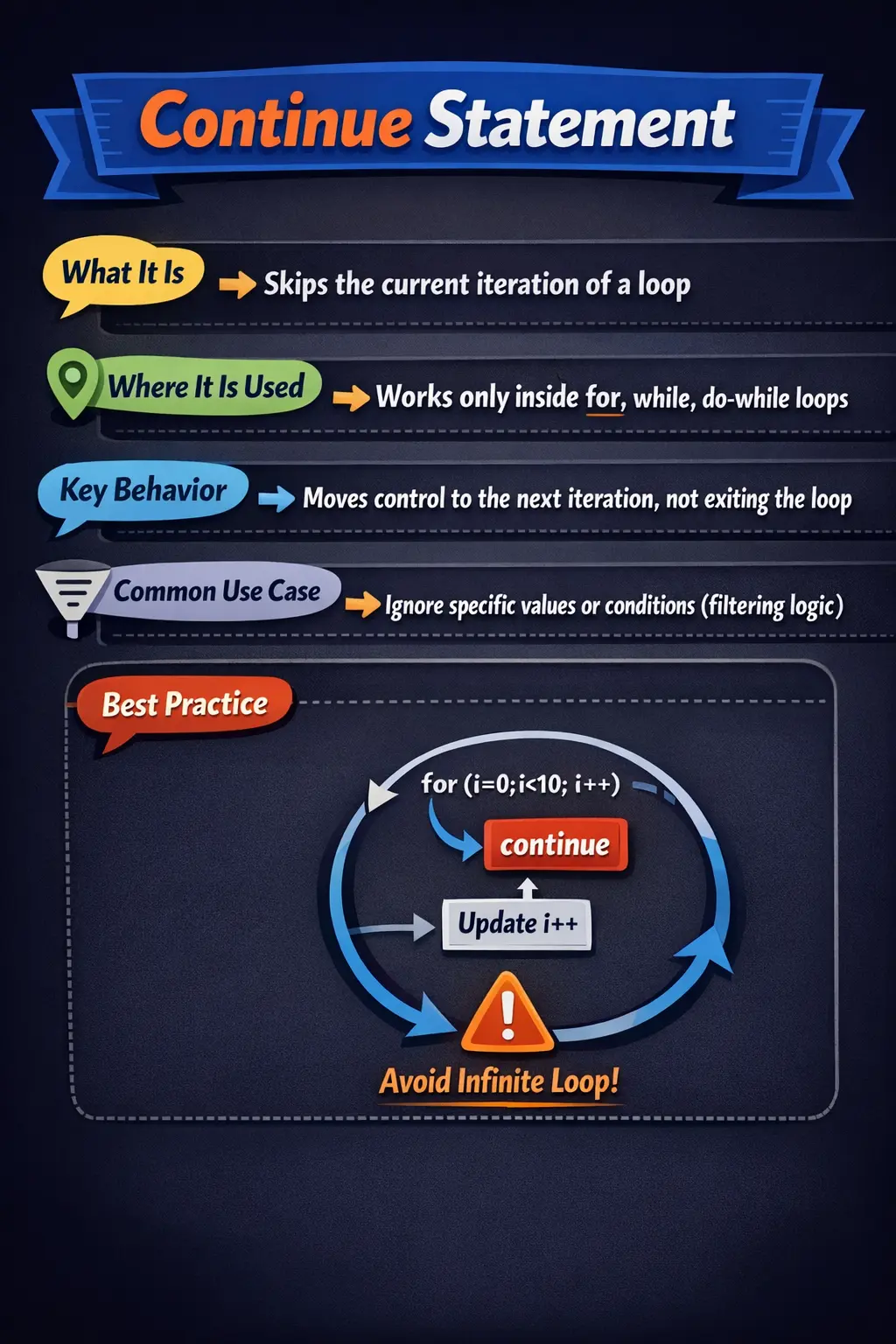
At first glance, continue may seem like a simple keyword, but its correct usage can significantly improve code clarity, efficiency, and maintainability. It allows developers to avoid deeply nested conditions, filter unwanted data, and streamline loop logic. However, like many control flow statements, it must be used thoughtfully to avoid confusion and unintended behavior.
Understanding the continue statement in depth is essential for mastering loop control in Java. It is also a commonly tested concept in interviews, where subtle differences between break and continue often become key discussion points.
What the continue Statement Really Does
The continue statement is a loop control statement that affects the flow of execution within loops. When Java encounters a continue statement during a loop iteration, it immediately skips the remaining statements in that iteration and proceeds to the next iteration of the loop.
Unlike the break statement, which terminates the loop entirely, continue allows the loop to keep running. It simply bypasses the rest of the current iteration. This distinction is crucial because it enables fine-grained control over loop execution without interrupting the overall process.
The behavior of continue depends slightly on the type of loop being used. In a for loop, it transfers control to the update expression and then re-evaluates the loop condition. In a while or do-while loop, it transfers control directly to the condition check. Regardless of the loop type, the core idea remains the same: skip the current iteration and continue with the next one.
Why the continue Statement Matters
In real-world programming, loops often process large amounts of data or handle multiple conditions. Not every iteration needs to execute the same logic. Sometimes, certain values must be ignored or skipped based on specific criteria. Without continue, this would require additional conditional checks and nested if statements, making the code more complex and harder to read.
The continue statement simplifies such scenarios by allowing developers to filter out unwanted cases early in the iteration. This leads to cleaner and more readable code. Instead of wrapping the main logic inside multiple conditions, developers can use continue to skip irrelevant cases and keep the core logic straightforward.
Another important benefit is improved maintainability. Code that uses continue effectively is often easier to understand because it clearly separates valid and invalid cases. This is especially useful in data processing, validation logic, and input handling.
continue in Different Types of Loops
The continue statement behaves consistently across different loop types, but the exact point at which control is transferred varies slightly.
In a for loop, continue causes the loop to skip directly to the update expression. After the update is executed, the loop condition is evaluated again, and the next iteration begins. This makes continue particularly useful in for loops where iteration variables are updated automatically.
In a while loop, continue skips the remaining statements and immediately checks the loop condition again. This means that developers must ensure the loop variable is updated before the continue statement is encountered. Failing to do so can result in infinite loops, which is a common mistake among beginners.
In a do-while loop, the behavior is similar to the while loop, but the condition is evaluated after the iteration. The continue statement skips the remaining statements and proceeds to the condition check at the end of the loop.
Understanding these subtle differences is important for writing correct and predictable code.
Practical Use Cases of continue
The continue statement is widely used in real-world applications where selective processing is required. One common use case is input validation. When processing user input or data from external sources, certain values may need to be ignored. Instead of complicating the logic with nested conditions, continue can be used to skip invalid inputs and proceed with valid ones.
Another common scenario is filtering data. For example, when iterating through a list of numbers, a developer may want to process only even numbers. Using continue, odd numbers can be skipped immediately, allowing the loop to focus only on relevant data.
In automation testing, continue is often used to skip certain test cases or conditions that do not meet specific criteria. This helps streamline test execution and avoid unnecessary processing.
The continue statement is also useful in scenarios involving error handling within loops. If an error is detected during an iteration, continue can be used to skip the problematic case and proceed with the rest of the data.
Improving Code Readability with continue
One of the most significant advantages of the continue statement is its ability to improve code readability. Without continue, developers often rely on nested if statements to control which parts of the code should execute. This can quickly lead to deeply nested and hard-to-read code.
By using continue, developers can handle edge cases or invalid conditions at the beginning of the loop iteration. This allows the main logic to remain uncluttered and easier to follow.
For example, instead of writing multiple nested conditions, a developer can check for invalid cases first and use continue to skip them. This approach is often referred to as the “guard clause” pattern, where unwanted cases are handled early, and the main logic is kept clean and focused.
Readable code is not just easier to understand—it is also easier to maintain and less prone to bugs.
Labeled continue: Advanced Usage
In more complex scenarios involving nested loops, Java provides an advanced feature known as labeled continue. By default, continue affects only the innermost loop. However, with a label, it can be used to skip to the next iteration of an outer loop.
This is achieved by defining a label before the outer loop and referencing it in the continue statement. When the labeled continue is executed, control jumps to the next iteration of the labeled loop, bypassing the inner loops entirely.
While this feature can be powerful, it should be used sparingly. Overusing labeled continue can make the code harder to read and understand. In many cases, alternative approaches such as restructuring the logic or using helper methods may be more appropriate.
How continue Changes the Current Iteration
The continue statement does not stop the loop itself. It stops only the current iteration. This distinction is the heart of the concept. When Java reaches continue, it ignores the remaining statements inside the loop body for that one pass and moves control to the next iteration process. The loop may still continue many more times if its condition allows it.
This behavior is useful when the loop is generally valid, but a particular item should not be processed. For example, a list may contain some null values, invalid records, disabled users, expired tokens, or unsupported file types. The program still needs to continue processing the remaining items, but it should skip the problematic or irrelevant item. Continue gives a direct way to express that decision.
Thinking of continue as "skip this one and move on" helps avoid confusion. It is not an error handler by itself, and it is not a loop terminator. It is a selective-flow tool. The loop remains alive, but the current iteration ends early.
continue as a Filtering Tool
One of the cleanest uses of continue is filtering. Many loops process a collection of values, but not every value qualifies for the main logic. Instead of wrapping the main processing code inside a large if block, developers can reject unwanted values early and continue to the next item. This keeps the main logic closer to the left side of the code and easier to read.
For example, when processing user records, the loop may skip inactive users. When reading files, it may skip hidden files or unsupported extensions. When validating input, it may skip blank lines. When calculating totals, it may skip cancelled transactions. In each case, continue separates the filtering rule from the main processing rule.
This style is especially helpful when there are multiple skip conditions. A loop can handle each unwanted case near the top and then leave the main logic below. The result is often clearer than deeply nested code because the reader first sees what is ignored and then sees what is actually processed.
continue and Guard-Style Loop Logic
The guard style is a common readability pattern in programming. A guard checks for a condition that should prevent normal processing. In a method, a guard often returns early. In a loop, a guard often uses continue. This approach handles exceptional or irrelevant cases first and lets the normal flow remain simple.
For example, a loop that processes customer data may first check whether the customer object is null. If it is null, continue skips that iteration. Next, the loop may check whether the customer is inactive. If inactive customers should not be processed, continue skips them too. After these guard checks, the remaining code can assume the customer is valid and active.
This style reduces indentation and makes the loop easier to maintain. The reader does not need to mentally track several nested conditions to find the real work. The unwanted cases are removed early, and the main processing code becomes more direct.
continue in for Loops
In a for loop, continue transfers control to the update expression. This means the increment or update part of the loop still runs before the next condition check. That behavior makes continue relatively safe in standard counter-based for loops because the loop variable is usually updated automatically.
For example, if a for loop uses i++ as its update expression, continue does not skip that update. Java jumps to the update section, increments the counter, checks the loop condition again, and then starts the next iteration if appropriate. This is why continue is commonly seen in for loops that skip specific values such as even numbers, odd numbers, multiples, or invalid indexes.
Even though continue is convenient in for loops, it should still be used clearly. If the skip condition is hidden in the middle of a long loop body, the reader may miss it. A continue condition is often most readable near the beginning of the loop, where it acts as a filter before the main processing begins.
continue in while and do-while Loops
Continue requires more care in while and do-while loops because the loop variable is often updated manually inside the loop body. If continue is executed before the update happens, the loop may repeat forever with the same value. This is one of the most common mistakes beginners make with continue.
In a while loop, continue jumps directly to the condition check. If the condition still evaluates to true and the variable was not updated, the same iteration can happen again and again. In a do-while loop, continue jumps to the condition at the bottom of the loop, but the same risk exists if the required update was skipped.
The safest approach is to update the loop variable before any continue statement that could bypass the rest of the loop. Another approach is to design the loop so that updates happen in a predictable place that cannot be skipped. This is one reason for loops are often simpler when the number of iterations is known in advance.
continue in Enhanced for Loops
The enhanced for loop is frequently used to iterate through arrays and collections. Continue works naturally in this style because the loop automatically moves to the next element. This makes it useful for skipping null values, blank strings, invalid records, or items that do not match a required condition.
For example, when processing a list of names, the loop can skip null or empty names before applying formatting. When processing test data rows, the loop can skip disabled rows. When reading objects from a collection, the loop can skip records that do not belong to the current category. The enhanced for loop keeps iteration simple, and continue keeps filtering readable.
One limitation is that the enhanced for loop does not expose the index directly. If the skip decision depends on the index position, a traditional for loop may be better. But when the decision depends only on the current element, enhanced for plus continue is often clean and expressive.
continue in Data Processing
Data processing often involves incomplete, invalid, or irrelevant records. A file may contain blank lines. A data feed may contain cancelled transactions. A user list may include inactive accounts. A report may need only records from a specific region. Continue helps handle these situations by skipping records that should not be processed.
This matters because data processing logic can become difficult to read when every rule is nested. If the main calculation is buried inside several if statements, the purpose of the loop becomes unclear. With continue, the code can reject unwanted records first and then process the valid records plainly.
However, skipped records should not always disappear silently. In some systems, skipped data should be logged, counted, or reported. Continue controls flow, but it does not replace good observability. If skipped records matter for auditing or troubleshooting, the code should record enough context before continuing.
continue in Validation and Error Handling
When validating a group of inputs, continue can be used to skip invalid items and keep processing the rest. This is useful when one bad item should not stop the entire operation. For example, a batch upload may process valid rows and skip invalid rows while collecting error details. Continue allows the loop to move past each invalid row after recording the issue.
This approach is different from using break. Break would stop the whole batch at the first invalid record. Continue allows partial success by processing the remaining records. Choosing between them depends on the business requirement. Some processes must stop immediately on the first failure, while others should process everything possible and report failures afterward.
Continue is also useful when handling recoverable errors inside loops. If an operation fails for one item but the rest of the items can still be processed safely, the loop can log the problem and continue. This keeps one bad item from blocking the entire operation.
continue in Nested Loops
In nested loops, a normal continue affects only the innermost loop. If continue is used inside the inner loop, Java skips the remaining statements in that inner iteration and moves to the next iteration of the inner loop. The outer loop is not skipped unless a labeled continue is used.
This behavior matters when working with grids, tables, matrices, combinations, or nested collections. Suppose an outer loop represents rows and an inner loop represents columns. A normal continue inside the inner loop skips only the current column processing. It does not skip the rest of the row unless the code is written to do so.
If the goal is to skip the rest of the current outer-loop iteration, labeled continue can be used. That said, labeled continue should be reserved for cases where it makes the flow clearer. In many situations, extracting logic into a method or using clearer conditions is easier to maintain.
continue vs if Conditions
Any loop that uses continue could usually be rewritten using if conditions. Instead of skipping invalid cases early, the program could wrap the main logic inside an if block that checks for valid cases. Both approaches can produce the same behavior, but they read differently.
Continue is often clearer when the loop has obvious skip conditions and one main processing path. It keeps the main path free from unnecessary nesting. A normal if condition may be clearer when there is only one small conditional action and no need to skip the rest of the loop. The better choice depends on readability.
A good rule is to use continue when the current item should be ignored completely. Use a normal if block when the item should still be processed, but only one part of the processing is conditional. This distinction helps prevent continue from being used where ordinary conditional logic would be simpler.
continue and Readability Risks
Continue can improve readability, but it can also hurt readability when overused. If a loop contains many continue statements scattered throughout a long body, the flow becomes harder to follow. The reader must identify every possible place where the iteration can end early. This can make debugging and maintenance more difficult.
Readability is strongest when continue statements appear near the top of the loop as clear guard conditions. This allows the reader to quickly understand which cases are skipped before reaching the main logic. Continue statements placed deep inside complex logic require more careful reading and can hide important behavior.
If a loop needs many different continue points, it may be doing too much. The code may benefit from smaller helper methods, clearer filtering before the loop, or a redesigned data-processing flow. Continue should simplify the loop, not make it feel unpredictable.
Testing Logic That Uses continue
Testing continue logic means verifying both skipped and processed paths. If a loop skips even numbers, tests should confirm that even numbers are not processed and odd numbers are processed. If a loop skips null records, tests should confirm that null values do not cause errors and valid records still produce the expected result.
For while and do-while loops, tests should also protect against infinite-loop behavior. Any path that reaches continue must still allow the loop condition to eventually become false. This is especially important when loop variables are updated manually.
When continue is used in batch processing, tests should check that one skipped item does not prevent later valid items from being processed. This confirms the purpose of continue: skip the current iteration while allowing the loop as a whole to continue.
Debugging continue-Related Issues
When a loop behaves unexpectedly with continue, first check whether the continue condition is too broad. If more items are being skipped than expected, the condition may be matching values that should be processed. Logging the skipped values can quickly reveal this problem.
Second, check whether important statements appear after continue. Any statement after continue in the same loop iteration will not run when the continue path is taken. If updates, counters, logs, or cleanup actions are placed after continue, they may be skipped accidentally.
Third, inspect loop-variable updates in while and do-while loops. If the update happens after continue, the loop can get stuck. Moving the update before the continue condition or redesigning the loop often fixes the issue.
How to Explain continue in Interviews
In interviews, a strong answer should begin with the definition: continue skips the remaining statements in the current loop iteration and moves control to the next iteration. It does not terminate the loop. This should be contrasted clearly with break, which exits the loop completely.
Then explain behavior by loop type. In a for loop, continue moves to the update expression before checking the condition again. In while and do-while loops, it moves to the condition check, so loop variables must be updated carefully. This detail shows practical understanding.
Finally, mention use cases and risks. Continue is useful for skipping invalid data, filtering items, avoiding nested conditions, and handling recoverable errors inside loops. It should not be overused, and in while loops it can cause infinite loops if updates are skipped. This gives a complete, interview-ready explanation.
continue vs break: A Critical Distinction
A common source of confusion for beginners is the difference between continue and break. Both are control flow statements used in loops, but they serve very different purposes.
The continue statement skips the current iteration and moves to the next one, allowing the loop to continue running. In contrast, the break statement terminates the loop entirely, exiting it immediately.
Understanding this difference is crucial because using the wrong statement can lead to incorrect program behavior. For example, using break when continue is needed may stop the loop prematurely, while using continue when break is required may result in unnecessary iterations.
Common Mistakes with continue
Despite its simplicity, the continue statement can lead to several common mistakes if not used carefully. One of the most frequent issues is forgetting to update the loop variable before encountering continue, especially in while and do-while loops. This can result in infinite loops, which can crash the program or cause it to hang.
Another mistake is attempting to use continue outside of a loop, which leads to a compilation error. Developers must remember that continue is valid only within loop structures.
Overusing labeled continue is another pitfall. While it can simplify certain scenarios, excessive use can make the code difficult to follow and maintain.
Confusing continue with break is also a common error, particularly for beginners who are still learning control flow concepts.
Best Practices for Using continue
To use the continue statement effectively, developers should follow a few best practices. First, use continue to handle edge cases early in the loop iteration. This helps keep the main logic clean and readable.
Second, ensure that loop variables are updated correctly before using continue, especially in while and do-while loops. This prevents infinite loops and ensures proper execution.
Third, avoid overusing continue. While it can simplify certain scenarios, excessive use can make the code harder to understand. In some cases, restructuring the loop or using clear conditions may be a better approach.
Finally, use labeled continue only when necessary. Simpler alternatives should always be considered first.
Interview Perspective
The continue statement is a frequently asked topic in Java interviews. Interviewers often test candidates’ understanding of loop control and the difference between continue and break.
Candidates may be asked to write code that skips certain iterations or to identify errors in loops where continue is misused. Questions may also involve predicting the output of code snippets that use continue in different types of loops.
A strong answer should clearly define the continue statement, explain its behavior, and highlight its differences from break. Providing practical examples can demonstrate a deeper understanding of the concept.
Key Takeaway
The continue statement is a powerful tool for controlling loop execution in Java. It allows developers to skip unnecessary iterations and focus on relevant logic, improving both performance and readability.
When used correctly, continue simplifies code, reduces complexity, and enhances maintainability. However, it must be used carefully to avoid common pitfalls such as infinite loops and reduced readability.
By mastering the continue statement and understanding its behavior in different contexts, developers can write more efficient, clean, and reliable Java programs.
1. continue in a for Loop (Skip a Value)
for (int i = 1; i <= 5; i++) {
if (i == 3) {
continue;
}
System.out.println(i);
}
Explanation
- Skips only the iteration when i == 3.
- Output: 1 2 4 5
- Control moves to the next loop iteration (does not exit the loop).
2. continue in a for Loop (Skip Even Numbers)
for (int i = 1; i <= 10; i++) {
if (i % 2 == 0) {
continue;
}
System.out.println(i);
}
Explanation
- Skips all even numbers.
- Output: 1 3 5 7 9
3. continue in a for Loop (Skip Multiples of 3)
for (int i = 1; i <= 12; i++) {
if (i % 3 == 0) {
continue;
}
System.out.println(i);
}
Explanation
- Skips numbers divisible by 3.
- Output: 1 2 4 5 7 8 10 11
4. continue in a while Loop (Skip a Value)
int i = 0;
while (i < 5) {
i++;
if (i == 3) {
continue;
}
System.out.println(i);
}
Explanation
- Skips printing when i == 3.
- Output: 1 2 4 5
- Increment happens before continue, so loop does not get stuck.
5. continue in a while Loop (Skip Even Numbers)
int i = 0;
while (i < 10) {
i++;
if (i % 2 == 0) {
continue;
}
System.out.println(i);
}
Explanation
- Skips even numbers in a while loop.
- Output: 1 3 5 7 9
6. continue in a do-while Loop (Skip a Value)
int i = 0;
do {
i++;
if (i == 2) {
continue;
}
System.out.println(i);
} while (i < 5);
Explanation
- Loop runs at least once.
- Skips printing when i == 2.
7. continue with Enhanced for Loop (Skip Null Values)
String[] names = {"John", null, "Alice", null, "Bob"};
for (String name : names) {
if (name == null) {
continue;
}
System.out.println(name);
}
Explanation
- Skips null values to avoid issues.
- Output: John Alice Bob
8. continue with Enhanced for Loop (Skip Empty/Blank Strings)
String[] names = {"John", "", "   ", "Alice"};
for (String name : names) {
if (name == null || name.trim().isEmpty()) {
continue;
}
System.out.println(name);
}
Explanation
- Skips empty and whitespace-only strings.
- Output: John Alice
9. continue in Nested Loop (Skip Inner Iteration Only)
for (int i = 1; i <= 2; i++) {
for (int j = 1; j <= 3; j++) {
if (j == 2) {
continue;
}
System.out.println("i=" + i + ", j=" + j);
}
}
Explanation
- Skips only the inner loop iteration when j == 2.
- Outer loop continues normally.
10. Labeled continue (Skip to Next Outer Loop Iteration)
outer:
for (int i = 1; i <= 3; i++) {
for (int j = 1; j <= 3; j++) {
if (j == 2) {
continue outer;
}
System.out.println("i=" + i + ", j=" + j);
}
}
Explanation
- When j == 2, control jumps directly to the next i.
- Useful for skipping remaining inner loop work.
11. continue in switch Inside Loop (continue affects loop, not switch)
for (int i = 1; i <= 3; i++) {
switch (i) {
case 2:
continue;
default:
System.out.println(i);
}
}
Explanation
- For i == 2, continue skips the rest and moves to next loop iteration.
- Output: 1 3
12. continue to Skip Invalid Test Data (Automation Style)
int[] testData = {10, -1, 20, -5, 30};
for (int value : testData) {
if (value < 0) {
continue;
}
System.out.println("Processing: " + value);
}
Explanation
- Skips invalid (negative) data rows.
- Common in data-driven testing.
13. continue in Search Filtering (Skip Until Match Criteria)
int[] nums = {5, 12, 7, 20, 9};
for (int n : nums) {
if (n < 10) {
continue;
}
System.out.println(">=10: " + n);
}
Explanation
- Skips values less than 10.
- Output prints only values 10 or higher.
14. continue in String Processing (Skip Non-Letters)
String s = "a1b2c#d";
for (int i = 0; i < s.length(); i++) {
char ch = s.charAt(i);
if (!Character.isLetter(ch)) {
continue;
}
System.out.println(ch);
}
Explanation
- Skips digits and symbols.
- Prints only letters: a b c d
15. continue to Skip Vowels
String s = "education";
for (int i = 0; i < s.length(); i++) {
char ch = Character.toLowerCase(s.charAt(i));
if (ch == 'a' || ch == 'e' || ch == 'i' || ch == 'o' || ch == 'u') {
continue;
}
System.out.print(ch);
}
Explanation
- Skips vowels.
- Output: dctn
16. continue in Array Summation (Ignore Zeros)
int[] nums = {1, 0, 2, 0, 3};
int sum = 0;
for (int n : nums) {
if (n == 0) {
continue;
}
sum += n;
}
System.out.println(sum);
Explanation
- Skips zeros and sums only non-zero values.
- Output: 6
17. continue in Input Validation (Skip Invalid Ages)
int[] ages = {25, -1, 30, 0, 45};
for (int age : ages) {
if (age <= 0) {
continue;
}
System.out.println("Valid age: " + age);
}
Explanation
- Skips invalid ages (0 or negative).
- Prints only valid ages.
18. continue in Login Attempts (Skip Locked Users)
String[] users = {"tom:ACTIVE", "bob:LOCKED", "amy:ACTIVE"};
for (String u : users) {
if (u.contains("LOCKED")) {
continue;
}
System.out.println("Login allowed: " + u);
}
Explanation
- Skips locked users.
- Processes only active users.
19. continue in Nested Loop (Skip Specific Pair)
for (int i = 1; i <= 3; i++) {
for (int j = 1; j <= 3; j++) {
if (i == 2 && j == 2) {
continue;
}
System.out.println("(" + i + "," + j + ")");
}
}
Explanation
- Skips only the (2,2) iteration.
- All other pairs print.
20. Interview Summary Example (continue vs normal flow)
for (int i = 1; i <= 5; i++) {
if (i == 2) {
continue;
}
System.out.println(i);
}
Explanation
- Output: 1 3 4 5
- Demonstrates:
- Loop
- Condition
- continue skips only one iteration (does not end the loop)