Test Execution Report to Tracking Testing Progress
A Test Execution Report is one of the most important artifacts produced during the software testing process. It provides a clear and structured view of testing progress and helps stakeholders understand the current status of testing activities. Unlike planning documents such as the Test Plan or Test Strategy, the Test Execution Report focuses on real-time information about test case execution, defect status, and testing risks.
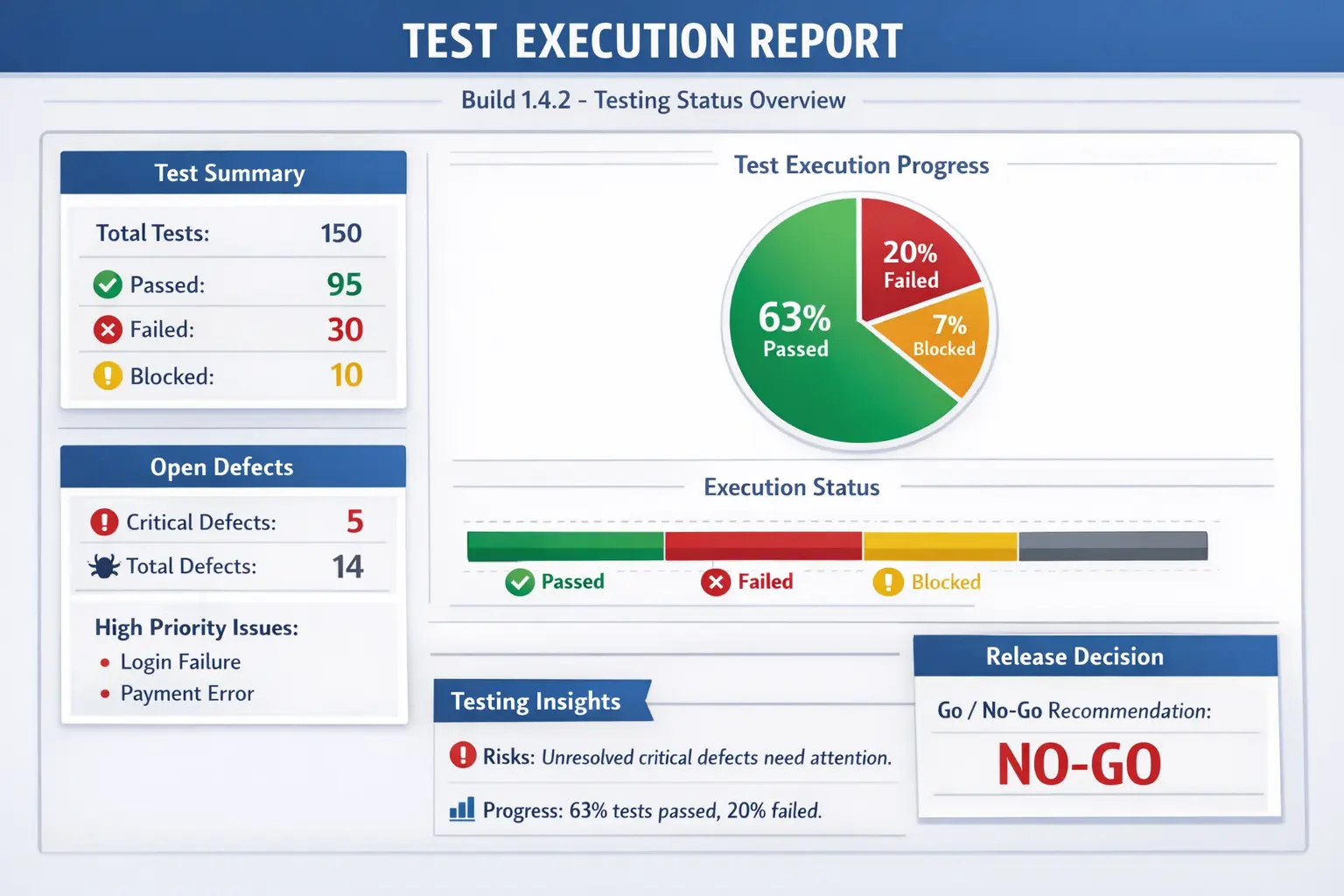
A Test Execution Report is a formal document or report that provides a snapshot of test execution status for a specific build or testing cycle. It summarizes what has been tested, what remains to be tested, and what issues have been identified.
The Test Execution Report answers a critical question:
“What is the current testing status?”
This report plays a vital role in communication between testers, developers, project managers, and business stakeholders. It provides visibility into testing progress and supports decision-making related to releases and project timelines.
Understanding the Test Execution Report
Software testing typically involves hundreds or even thousands of test cases executed over multiple test cycles. Without structured reporting, it becomes difficult for stakeholders to understand how testing is progressing and whether the software is ready for release.
The Test Execution Report provides a clear and concise summary of testing activities. It shows how many test cases have been executed, how many have passed or failed, and what defects have been identified. This information allows stakeholders to assess the quality and stability of the application.
Unlike detailed test case documents, the Test Execution Report focuses on high-level status rather than execution details. It presents testing information in a format that is easy to understand and review.
In real-world projects, Test Execution Reports are often shared regularly with project teams and management. These reports help ensure transparency and alignment across all stakeholders.
A good execution report does more than list numbers. It explains what those numbers mean in the current project context. For example, eighty percent execution may be acceptable early in a cycle but risky one day before release. Ten open defects may be manageable if they are minor, but one open critical defect in payment, login, or data security may block the entire release. The report must therefore present both status and interpretation.
Test execution reporting is also important because testing is rarely a silent activity. Project managers want schedule visibility, developers want defect clarity, product owners want risk information, and business stakeholders want release confidence. The Test Execution Report becomes the single communication point where these different expectations are brought together in a structured format.
In mature teams, the report is not created only at the end of the day as an administrative task. It is continuously supported by accurate test case updates, defect logging, blocker tracking, environment notes, and coverage monitoring. The final report is only as reliable as the execution discipline behind it.
Purpose of a Test Execution Report
The primary purpose of a Test Execution Report is to communicate testing progress clearly and accurately. Testing activities involve multiple team members and complex workflows, and stakeholders need regular updates to stay informed.
The report shows the pass and fail status of executed test cases. This information helps teams understand how stable the application is and whether major issues exist.
Another important purpose of the Test Execution Report is highlighting open defects and testing risks. Stakeholders need to know about unresolved issues that may affect release readiness.
The Test Execution Report also supports go/no-go decisions. Before releasing software to production or moving to the next testing phase, stakeholders must decide whether the product is ready. The execution report provides the data needed to make that decision.
Transparency is another major benefit. The report ensures that all stakeholders have the same understanding of testing progress and product quality.
Without a Test Execution Report, testing progress becomes unclear and decision-making becomes difficult.
Another purpose of the report is to separate actual progress from assumed progress. A team may feel that testing is going well because testers are busy, but effort alone does not prove readiness. The report shows measurable execution: planned cases, executed cases, passed cases, failed cases, blocked cases, deferred items, and open defects. This makes progress visible rather than emotional.
The report also helps identify whether testing effort is being spent in the right areas. If low-risk modules are fully tested but high-risk modules remain untouched, the overall execution percentage may look healthy while release risk remains high. A strong report highlights coverage by feature, priority, or business flow so stakeholders can see whether critical areas are receiving enough attention.
Test Execution Reports also create accountability. When blockers are recorded clearly, responsible teams can act on them. When defects are linked to failed test cases, developers can investigate them faster. When open risks are documented, stakeholders cannot later claim they were unaware of the release condition. This transparency protects both the product and the team.
When Test Execution Reports Are Prepared
Test Execution Reports are prepared at different stages of the testing process depending on project requirements. One common practice is preparing daily reports during active test execution.
Daily Test Execution Reports, often called Daily Status Reports, provide updates on test execution progress. They help teams track testing activities and identify issues quickly.
Execution reports are also prepared at the end of a test cycle. A test cycle may represent a sprint, a release iteration, or a specific testing phase. At this stage, the report provides a consolidated view of testing results.
Another important time to prepare a Test Execution Report is before release or User Acceptance Testing sign-off. Stakeholders rely on this report to evaluate whether the product is stable enough for release.
Regular reporting improves communication and prevents surprises late in the project.
In Agile projects, execution reports may be prepared during every sprint, especially when a story moves into QA validation. Some teams use lightweight reports inside Jira or Azure DevOps dashboards, while others send daily email summaries. The format can vary, but the need remains the same: the team must know what has been tested, what is failing, and what is blocking progress.
During regression testing, execution reports become especially important because the test suite may be large and time-bound. Stakeholders need to know whether critical regression flows such as login, checkout, reports, role access, and integrations are passing. A regression execution report helps the team decide whether new changes have damaged existing functionality.
Before release, the Test Execution Report often becomes part of release readiness discussion. At that stage, the report should be accurate, complete, and easy to review. It should not hide failures under broad percentages. Stakeholders need to understand remaining defects, incomplete coverage, blocked areas, and any accepted risks before approving release.
Build Information in Test Execution Reports
A Test Execution Report typically begins with build information. Each testing cycle is associated with a specific build of the application, and identifying the correct build is essential for traceability.
Build information usually includes the build number or version identifier. This ensures that stakeholders know exactly which version of the software was tested.
Environment details are also included. Testing results depend heavily on the environment used, such as operating systems, browsers, and databases. Environment information helps teams reproduce issues if needed.
Test cycle dates are another important part of build information. These dates define the time period covered by the report and help track testing progress over time.
Clear build information prevents confusion and improves traceability.
Build information is especially important when multiple deployments happen close together. If testers report defects without mentioning the build, developers may investigate the wrong version of the application. A defect may already be fixed in a later build, or a new issue may exist only in a specific deployment. Recording the tested build avoids this confusion.
Environment information should also be specific. It is not enough to say "tested in QA." The report should mention the relevant browser, device, operating system, database version, application URL, API environment, or integration configuration when these details affect testing. Environment mismatches are a common reason for inconsistent results.
In some projects, reports also include deployment notes, configuration changes, and known environment limitations. For example, an email service may be disabled in QA, a payment gateway may use sandbox cards, or a third-party integration may be mocked. These notes help stakeholders interpret test results correctly.
Test Case Execution Summary
One of the most important sections of a Test Execution Report is the test case execution summary. This section provides a numerical overview of test execution progress.
The summary typically includes the total number of test cases planned for execution. This number represents the scope of testing for the cycle.
The number of executed test cases is also reported. This shows how much testing has been completed.
The report also includes counts of passed, failed, and blocked test cases. Passed test cases indicate working functionality, while failed test cases indicate defects or issues.
Blocked test cases represent scenarios that could not be executed due to environment problems, missing data, or other issues. Tracking blocked tests is important because they may delay project schedules.
A typical execution summary might look like this:
Total test cases planned for execution may be two hundred. Out of these, one hundred eighty test cases may have been executed. Among executed tests, one hundred fifty may have passed while thirty may have failed. Twenty test cases may remain blocked due to environment issues.
Such summaries allow stakeholders to quickly understand testing progress.
The execution summary should be easy to scan but not oversimplified. A high pass count is useful, but stakeholders also need to know the quality of what passed. If most passed test cases are low priority and critical cases remain unexecuted, the report should show that clearly. This is why execution summaries often include priority-wise or module-wise breakdowns.
Blocked test cases deserve special attention. A blocked test is not the same as a passed test, and it is not always the same as a failed test. It means the team could not complete validation because of a dependency. Examples include missing test data, unavailable environment, incomplete build, inaccessible service, or unresolved prerequisite defect. If blockers are not tracked, incomplete testing may be mistaken for successful testing.
Reports should also distinguish not executed test cases from blocked test cases. Not executed may simply mean testing has not reached that area yet. Blocked means testing attempted or planned execution but could not proceed. This distinction helps project managers understand whether the issue is scheduling, dependency, or product stability.
A useful execution summary may include planned test cases, executed test cases, passed, failed, blocked, not executed, execution percentage, pass percentage, fail percentage, and remaining effort. In larger projects, this information may also be shown by module, sprint, tester, priority, or requirement area.
Defect Summary
The defect summary is another critical part of a Test Execution Report. Defects represent issues discovered during testing and must be tracked carefully.
The report usually includes the total number of defects logged during the test cycle. This number gives an overall indication of product quality.
The number of open and closed defects is also included. Open defects represent unresolved issues, while closed defects represent resolved problems.
Severity-wise defect distribution is often included as well. Critical and high-severity defects are especially important because they may block releases.
A defect summary allows stakeholders to assess risk levels and determine whether the product is stable enough for release.
Without defect tracking, testing results would be incomplete.
Defect summary should not focus only on defect count. Ten minor spelling issues do not carry the same risk as one critical payment failure. Severity and priority provide the context needed to understand defect impact. A release may proceed with known low-severity cosmetic issues, but it should not proceed with unresolved critical defects affecting core business flows.
A strong defect summary usually includes new defects, open defects, closed defects, reopened defects, deferred defects, and rejected defects. Reopened defects are especially important because they may indicate poor fix quality or incomplete understanding of the issue. Deferred defects should also be visible because they represent known risk accepted for a later release.
The report may also include defect aging. A critical defect open for several days may represent a major release risk. Aging helps stakeholders identify issues that are not moving toward resolution. It also helps teams prioritize discussions during defect triage meetings.
Defect trends can provide additional insight. If defects are increasing rapidly near the end of testing, the product may be unstable. If defect discovery is slowing while coverage is high, the build may be stabilizing. These patterns help stakeholders evaluate quality beyond a simple open defect count.
Test Coverage Information
Test coverage is another important aspect of a Test Execution Report. Coverage information shows which requirements and features have been tested.
Requirement coverage indicates whether testing activities have addressed all planned requirements. This helps ensure that important functionality has not been overlooked.
Feature coverage shows which application features have been validated during testing. Coverage information helps identify areas that still require testing.
Test coverage provides confidence that testing activities are comprehensive and aligned with project goals.
Incomplete coverage may indicate potential quality risks.
Coverage information should connect test execution to business value. It is possible to execute many test cases and still miss important requirements. Requirement coverage confirms whether each planned requirement has at least one related test case executed. Feature coverage shows which functional areas have been validated. Risk coverage shows whether high-impact areas have received enough attention.
In some projects, coverage is shown through a traceability matrix. The matrix maps requirements to test cases and execution status. This is useful when stakeholders ask whether a specific requirement, user story, or acceptance criterion has been tested. Instead of searching through execution notes manually, the report can show coverage directly.
Coverage gaps should be documented honestly. If a module was not tested because the build was late, the environment was unavailable, or test data was missing, the report should say so. Hidden coverage gaps are dangerous because they create false confidence. Visible gaps allow stakeholders to decide whether to delay release, accept risk, or reduce scope.
Risks and Blockers
Every testing cycle faces challenges and uncertainties. The Test Execution Report includes a section dedicated to risks and blockers.
Risks represent potential issues that could affect testing progress or product quality. For example, incomplete requirements or unstable builds may represent risks.
Blockers represent issues that prevent testing from continuing. Environment outages, missing test data, or unavailable services may block test execution.
Reporting risks and blockers is essential for transparency. Stakeholders need to know about problems early so that corrective action can be taken.
Ignoring risks and blockers can lead to project delays and unexpected failures.
A risk is not always an immediate failure. It may be a condition that could become a problem if not addressed. For example, limited test data, unstable third-party services, incomplete requirements, frequent build changes, or insufficient testing time may all be risks. Reporting them early gives the team a chance to reduce their impact.
Blockers require more urgent attention because they stop execution. A blocker should be reported with clear ownership and expected resolution path. For example, "payment gateway sandbox unavailable" is more useful when the report also mentions affected test cases, affected module, responsible team, and expected restoration time if known.
Test Execution Reports should also distinguish product risks from testing risks. A product risk affects the quality or behavior of the application. A testing risk affects the ability to validate the application. Both matter, but they require different actions. Product risks may require fixes or business decisions, while testing risks may require environment support, data preparation, or schedule adjustment.
Manual Tester’s Role in Test Execution Reporting
Manual testers play a major role in preparing Test Execution Reports. They are responsible for updating the status of executed test cases.
Accurate test case status updates are essential for reliable reporting. Incorrect status updates can mislead stakeholders and result in poor decisions.
Testers must also ensure that defects are properly linked to test cases. Proper mapping allows teams to understand which functionality is affected by each defect.
Manual testers must report blockers and risks clearly. If testing is delayed or incomplete, stakeholders must be informed.
Timely updates are another important responsibility. Reports must reflect the most recent testing activities to remain useful.
The quality of the Test Execution Report depends heavily on accurate tester input.
Manual testers should update execution status as soon as test cases are completed. Waiting until the end of the day increases the chance of mistakes. If a tester executes many cases but updates status later from memory, failed steps, blocked cases, and defect links may be missed. Timely updates make reporting reliable.
Testers also need judgment when marking status. A test case should not be marked as passed if only part of the expected result was checked. It should not be marked as failed if the issue is actually environment unavailability. It should not be marked as blocked if the tester simply did not get time to execute it. Correct status classification is essential for meaningful reporting.
Manual testers also contribute comments that numbers cannot explain. For example, a module may technically pass but feel unstable due to intermittent slowness. A defect may be minor in severity but affect an important client demo. A blocker may affect only one browser but that browser may be mandatory for the customer. These contextual notes make the report more useful.
Common Sections in a Test Execution Report
Although report formats differ across organizations, most useful execution reports contain a common set of sections. These include project name, build number, test cycle, testing phase, execution date, environment, prepared by, overall status, execution summary, defect summary, coverage summary, risks, blockers, assumptions, and next steps.
The overall status section gives a quick view of whether testing is on track, delayed, blocked, or completed. The execution summary provides numerical details. The defect summary explains quality concerns. The risks and blockers section explains what may affect schedule or release readiness. The next steps section tells the team what action is expected after reading the report.
A report should be structured so that different readers can use it at different levels. A manager may read the overall status and risks first. A developer may focus on failed cases and defect links. A tester may review blocked cases and remaining execution. A product owner may focus on coverage of business-critical flows. Good structure supports all of these readers.
Daily Status Report vs Cycle Execution Report
A daily status report provides short-term visibility. It answers what happened today, what is planned next, and what is blocking progress. It is useful during active execution because teams need frequent updates and quick corrective action.
A cycle execution report provides a broader view of a complete testing cycle. It summarizes total planned execution, final pass and fail status, defects logged, defects resolved, remaining risks, and overall quality condition for that cycle. It is more consolidated than a daily report.
Both reports are useful, but they should not be confused. A daily report is operational and time-sensitive. A cycle report is broader and often used for phase completion or release discussions. In many teams, daily reports feed into the final cycle report.
Test Execution Report vs Test Summary Report
The Test Execution Report is often confused with the Test Summary Report, but the two serve different purposes.
The Test Execution Report is prepared during testing and focuses on current status. It provides operational information about ongoing testing activities.
The Test Summary Report is prepared after testing is completed. It provides an overall evaluation of product quality and testing effectiveness.
Execution reports are detailed and frequent, while summary reports are analytical and final.
Understanding the difference between these reports is important for both interviews and real projects.
The easiest way to remember the difference is timing and purpose. The Test Execution Report is active while testing is happening. It helps the team manage current work. The Test Summary Report is prepared after testing is complete. It helps the team evaluate the overall testing outcome and record final conclusions.
For example, during a sprint, the QA team may share daily execution reports showing how many stories have been tested and how many defects are open. At the end of the sprint or release, the team may prepare a Test Summary Report describing the overall testing performed, major defects found, coverage achieved, lessons learned, and recommendation for release.
In interviews, candidates should avoid saying that both reports are the same. They are related, but they serve different audiences and moments. Execution reports support monitoring and control. Summary reports support closure and evaluation.
Real-Time Example
Consider a scenario where a software product is approaching release. Testing has been underway for several weeks, and stakeholders need to determine whether the product is ready.
The Test Execution Report may show that ninety-five percent of planned test cases have passed. It may also show that no critical defects remain open and that only minor issues exist.
Such information helps stakeholders decide whether to proceed with release.
Without the Test Execution Report, stakeholders would lack the information needed to make informed decisions.
Consider another example from an e-commerce release. The report may show that checkout, login, product search, cart, and order history have passed regression testing. It may also show that invoice download is blocked because a reporting service is unavailable and that two medium defects remain open in coupon validation. With this information, stakeholders can decide whether invoice download is release-critical or whether the release can proceed with a known limitation.
In a banking project, a Test Execution Report may show that fund transfer test cases are seventy percent complete, but several high-severity defects remain open in beneficiary validation and transaction limit rules. Even if many lower-risk cases have passed, the report would clearly indicate release risk because the affected flows are business-critical.
These examples show why execution reports must connect numbers to business impact. A report is not useful simply because it contains counts. It is useful when it helps stakeholders understand what the counts mean for product readiness.
Important Metrics in Test Execution Reports
Test Execution Reports often include metrics, but metrics must be interpreted carefully. Common metrics include execution percentage, pass percentage, fail percentage, blocked percentage, defect density, defect severity distribution, requirement coverage, and open defect count.
Execution percentage shows how much of the planned testing scope has been executed. It is useful for tracking progress, but it does not prove quality by itself. A team may execute many simple cases while critical cases remain pending. Therefore execution percentage should be read together with priority and coverage information.
Pass percentage shows how many executed cases passed. This gives a quick view of stability, but it must be interpreted with defect severity. A high pass percentage with one critical open defect may still block release. A lower pass percentage with only minor cosmetic failures may be less risky depending on the project context.
Blocked percentage is important because it reveals testing limitations. If many cases are blocked due to environment, data, or dependency issues, the team does not yet have enough evidence to judge product quality. Blocked cases should not be treated as harmless. They represent unknown quality.
How to Interpret Execution Percentages
Execution percentages can be misleading when viewed alone. Suppose a report says ninety percent of test cases are executed. That sounds good, but the remaining ten percent may include payment, security, or production-critical workflows. In that situation, the release risk may still be high.
A better interpretation looks at execution by priority. Critical and high-priority test cases should be executed early, not left until the end. If low-priority test cases are complete but high-priority tests are pending, the report should highlight that imbalance.
Execution should also be viewed by feature or requirement. A product may have strong execution coverage in profile management but weak coverage in billing. If billing is more important to the business, the overall percentage does not tell the full story. Good reporting makes this visible.
Dashboard-Based Reporting
Many modern teams use test management tools and dashboards instead of manually prepared documents. Tools can automatically show execution status, defect links, trends, and coverage. This improves speed and reduces manual calculation errors.
However, dashboards do not remove the tester's responsibility. A dashboard is only as accurate as the data entered into it. If testers do not update test case status, link defects, or mark blockers correctly, the dashboard will show misleading information.
Even when dashboards are used, teams often need a short written summary. Stakeholders may not have time to inspect every chart. A concise summary explaining current status, major risks, blockers, and next actions makes dashboard data easier to understand.
Test Execution Report in Agile Projects
In Agile projects, test execution reporting should be lightweight but frequent. The goal is not to create heavy documentation. The goal is to keep the sprint team informed about story validation, defects, blocked testing, and release risk.
During a sprint, a tester may report how many stories are ready for QA, how many are under testing, how many have passed, how many are blocked, and which defects affect sprint completion. This helps the team adjust quickly. If a story is blocked due to missing test data or incomplete acceptance criteria, the issue can be handled before the sprint ends.
Agile execution reports may also support daily standups. A tester can use the report to explain what was tested yesterday, what will be tested today, and what blockers require help. This keeps testing integrated with team delivery rather than isolated at the end.
Test Execution Report and Release Readiness
Release readiness depends on evidence. A Test Execution Report provides that evidence by showing what has been validated and what remains risky. Stakeholders can use the report to decide whether to release, delay, reduce scope, or accept known issues.
A release-focused report should clearly mention critical test coverage, open critical and high defects, unresolved blockers, deferred defects, known limitations, and business approval status. It should avoid vague language such as "mostly tested" or "looks fine." Release decisions require clear facts.
The report should also show whether exit criteria are met. If exit criteria require all critical test cases to pass and no high-severity defects to remain open, the report should explicitly show whether those conditions are satisfied. This connects test execution to formal quality gates.
Common Mistakes in Test Execution Reporting
One common mistake is providing incorrect or outdated test execution status. Reports must reflect actual testing progress, not planned progress.
Another mistake is hiding blockers or risks. Transparency is essential for effective project management.
Missing severity information for defects is another frequent problem. Stakeholders need to understand the impact of defects, not just their count.
Poorly prepared reports reduce trust and make decision-making difficult.
Avoiding these mistakes improves report quality and project success.
Another common mistake is reporting only positive information. A report that hides failures, blockers, or uncertainty may look good temporarily, but it damages trust when problems appear later. Test reporting must be honest. Stakeholders can handle bad news better than hidden risk.
Some reports also become too detailed for the audience. Listing every test case in an email may overwhelm managers, while providing only one percentage may be too shallow for release decisions. The report should provide summary information with links or references to detailed evidence where needed.
Another mistake is failing to explain changes from the previous report. If pass percentage dropped, blocked cases increased, or defect count rose sharply, the report should explain why. Trends are often more useful than isolated numbers because they show whether quality is improving or deteriorating.
Testers should also avoid mixing planned scope and actual execution without clarity. If the report says two hundred test cases are in scope, but only one hundred fifty are ready for execution because the remaining features are not delivered, that distinction should be visible. Otherwise stakeholders may misunderstand team progress.
Best Practices for Preparing Test Execution Reports
A good Test Execution Report should be accurate, timely, concise, and actionable. Accuracy means the report reflects real execution data. Timeliness means it is shared while the information is still useful. Conciseness means stakeholders can understand the status quickly. Actionable reporting means the report identifies what needs attention.
The report should use consistent status definitions. Passed, failed, blocked, not executed, deferred, and not applicable should have clear meanings. If each tester uses these statuses differently, the report loses reliability. Teams should agree on status rules before execution begins.
Defects should be linked to failed test cases wherever possible. This helps trace failures to product issues and allows stakeholders to understand impact. Blockers should include reason, owner, affected area, and expected resolution if known. Risks should include possible impact and mitigation plan.
The report should also include next steps. A status update without action may leave readers informed but inactive. Next steps may include retesting fixes, resolving environment issues, executing pending high-priority cases, preparing data, or conducting defect triage.
Sample Narrative for a Test Execution Report
A useful report narrative may read like this: "Testing for Build 2.4.1 is in progress in the QA environment. Out of two hundred planned test cases, one hundred sixty have been executed. One hundred thirty-eight passed, fifteen failed, and seven are blocked due to payment gateway sandbox unavailability. No critical defects are open, but two high-severity defects remain in checkout validation. Regression testing for login, product search, cart, and profile modules is complete. Payment and invoice flows remain at risk until the sandbox issue is resolved."
This narrative is stronger than only providing numbers because it explains progress, failures, blockers, risk, and next focus areas. Stakeholders can immediately understand what is healthy, what needs action, and what may affect release readiness.
Who Uses the Test Execution Report?
Testers use the report to track progress and plan remaining execution. QA leads use it to monitor team productivity, identify blockers, and manage coverage. Developers use it to understand failed areas and defect impact. Project managers use it to track schedule risk. Product owners and business stakeholders use it to assess release confidence.
Because different people use the report for different purposes, the report should not be written only for the QA team. It should be understandable to non-testers as well. Technical details can be referenced through links, but the main status should be clear in business and project terms.
Interview Perspective
Test Execution Reports are a common topic in software testing interviews. Candidates are often asked to explain what a Test Execution Report is and why it is important.
A short answer typically describes the report as a document that shows the current status of test execution and defects.
A detailed answer explains that the Test Execution Report provides stakeholders with test progress, pass and fail statistics, defect status, and risks to support release decisions.
Interviewers may also ask candidates about report contents or preparation methods.
Understanding Test Execution Reports is essential for professional testers.
In interviews, a strong answer should include both definition and practical usage. For example: "A Test Execution Report is a testing status report prepared during a test cycle to show execution progress, pass and fail status, defect summary, blockers, coverage, and risks. It helps QA leads, project managers, and stakeholders understand current quality and make release decisions."
If asked what sections are included, mention build details, environment, test cycle dates, planned and executed test cases, pass and fail counts, blocked cases, defect summary, severity distribution, coverage, risks, blockers, and next steps. This shows that you understand reporting beyond a simple pass/fail count.
If asked about your role, explain that you update test case status accurately, link defects to failed cases, report blockers early, keep execution data current, and communicate risks honestly. This answer shows practical responsibility rather than textbook memorization.
Importance of Test Execution Reports
Test Execution Reports provide visibility into testing progress and product quality. They ensure that stakeholders understand testing activities and project risks.
The reports help teams identify delays and problems early. Early detection allows corrective actions to be taken before deadlines are missed.
Execution reports also support communication across teams. Developers, testers, and managers rely on the same information to make decisions.
Most importantly, Test Execution Reports support release readiness decisions. Organizations depend on accurate testing information before releasing software.
Test Execution Reports also reduce confusion during fast-moving projects. When many people discuss testing progress verbally, details can be lost or misunderstood. A written report provides a common reference. If there is disagreement about status, the team can return to the report and review the actual execution data.
Reports also create historical learning. Past execution reports can show which modules frequently failed, which environments caused blockers, how long regression usually took, and how defect trends changed across releases. This information helps teams improve estimation, planning, and risk management in future cycles.
Most importantly, execution reporting builds trust when it is honest and consistent. Stakeholders do not expect every build to be perfect. They expect the testing team to provide reliable information. A clear Test Execution Report gives them that confidence.
Key Takeaway
A Test Execution Report provides real-time visibility into testing progress and product quality. It summarizes test case execution, defect status, coverage, and risks in a structured format that stakeholders can easily understand.
Accurate Test Execution Reports improve transparency, support decision-making, and ensure successful releases.
A well-prepared Test Execution Report allows teams to answer the most important testing question:
“What is the current testing status?”
A strong report combines numbers with context. It does not simply say how many test cases passed; it explains whether critical flows are covered, whether major defects remain open, whether blockers limit confidence, and what actions are needed next. This makes the report useful for real decision-making.
For manual testers, preparing and supporting Test Execution Reports is a professional responsibility. Accurate status updates, clear defect links, honest blocker reporting, and timely communication all contribute to better project control. When execution reporting is done well, teams can manage quality with facts rather than assumptions.