Autoboxing & Unboxing in Java
In Java, one of the most practical and widely used features that bridges primitive data types and object-oriented programming is autoboxing and unboxing. Introduced in Java 5, these features fundamentally changed how developers interact with primitive values in object-based APIs such as collections, generics, and frameworks.
Before Java 5, developers had to manually convert primitives into wrapper objects and vice versa. This resulted in verbose, less readable code and increased chances of errors. Autoboxing and unboxing were introduced to eliminate this friction by enabling automatic conversion between primitives and their corresponding wrapper classes.
While these features significantly simplify development, they also introduce subtle complexities—especially around performance, null handling, and object comparison. Understanding both their benefits and pitfalls is essential for writing efficient, safe, and production-ready Java code.
What Is Autoboxing?
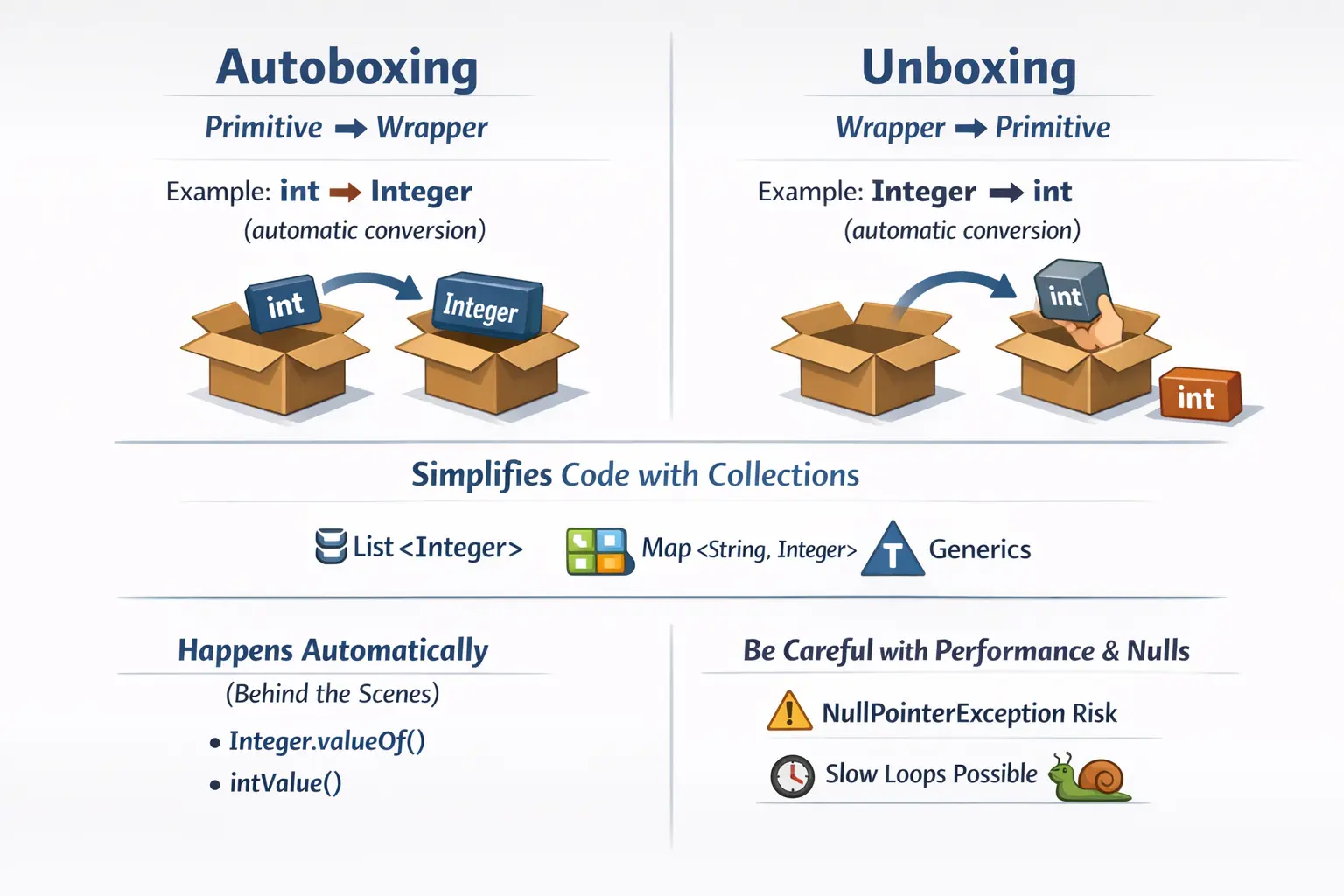
Autoboxing refers to the automatic conversion of a primitive data type into its corresponding wrapper object. This conversion is handled by the Java compiler, allowing developers to write cleaner and more intuitive code without explicitly invoking conversion methods.
For example:
int a = 10;
Integer b = a;   // autoboxing
At first glance, this looks like a simple assignment. However, behind the scenes, the compiler transforms this into:
Integer b = Integer.valueOf(a);
This means that the primitive value 10 is wrapped inside an Integer object.
Autoboxing is particularly useful in scenarios where APIs require objects rather than primitives. Instead of manually calling valueOf(), developers can rely on automatic conversion, improving readability and reducing boilerplate code.
From a conceptual standpoint, autoboxing enables primitives to participate in object-oriented operations without requiring explicit intervention from the developer.
What Is Unboxing?
Unboxing is the reverse process of autoboxing. It refers to the automatic conversion of a wrapper object into its corresponding primitive type.
For example:
Integer x = 20;
int y = x;   // unboxing
Behind the scenes, this is converted into:
int y = x.intValue();
Here, the Integer object x is unwrapped to extract its primitive value.
Unboxing allows wrapper objects to be used seamlessly in arithmetic operations, comparisons, and other scenarios where primitives are required. It ensures that developers can work with wrapper objects without constantly worrying about manual conversions.
Together, autoboxing and unboxing create a smooth bridge between primitive types and object-oriented constructs.
Why Autoboxing & Unboxing Exist
To understand the importance of autoboxing and unboxing, it is necessary to look at the limitations of primitive data types in Java.
Primitives are efficient and fast, but they lack flexibility. They cannot be used in collections, generics, or frameworks that expect objects. This creates a gap between low-level data representation and high-level application design.
Autoboxing and unboxing were introduced to address this gap. Their primary benefits include:
- Simplifying code by removing manual conversions
- Enabling primitives to work with collections and generics
- Improving readability and developer productivity
Consider the following example:
List<Integer> list = new ArrayList<>();
list.add(5);      // autoboxing
int n = list.get(0); // unboxing
Without autoboxing and unboxing, developers would have to explicitly convert values using Integer.valueOf() and intValue(), making the code more complex.
These features allow Java to maintain both performance (through primitives) and flexibility (through objects), creating a balanced programming model.
Wrapper Mapping – The Foundation
Autoboxing and unboxing rely on the mapping between primitive types and their corresponding wrapper classes. This mapping is fixed and forms the foundation of these conversions.
| Primitive | Wrapper |
|---|---|
| byte | Byte |
| short | Short |
| int | Integer |
| long | Long |
| float | Float |
| double | Double |
| char | Character |
| boolean | Boolean |
Each wrapper class provides methods for conversion, parsing, and value extraction, enabling seamless interaction between primitives and objects.
Common Autoboxing Scenarios
Autoboxing occurs in several common programming scenarios, often without developers even realizing it.
One of the most straightforward cases is assignment:
Integer i = 100;
Here, the primitive value 100 is automatically converted into an Integer object.
Autoboxing also occurs when passing arguments to methods:
void print(Integer x) {}
print(10); // autoboxing
In this case, the primitive 10 is converted into an Integer object before being passed to the method.
Another scenario involves return values:
Integer getValue() {
    return 20;  // autoboxing
}
The returned primitive is automatically boxed into an object.
These examples demonstrate how autoboxing simplifies interactions with APIs that expect objects.
Common Unboxing Scenarios
Unboxing is equally common and occurs in various contexts.
A simple example is assignment:
Integer a = 50;
int b = a;  // unboxing
Here, the wrapper object is converted into a primitive.
Unboxing also occurs during expressions:
Integer x = 10;
Integer y = 20;
int sum = x + y; // unboxing
In this case, both x and y are unboxed into primitives, the addition is performed, and the result is stored as a primitive.
These conversions happen automatically, making arithmetic operations involving wrapper objects seamless.
Internal Mechanics – What Really Happens
Although autoboxing and unboxing appear simple, they involve multiple steps behind the scenes.
For example:
Integer c = a + b;
This operation involves:
- Unboxing a and b into primitives
- Performing the arithmetic operation
- Boxing the result back into an Integer object
This hidden complexity can have performance implications, especially in loops or large-scale computations.
Understanding these internal steps is crucial for writing efficient code.
Important Interview Traps & Edge Cases
Autoboxing and unboxing introduce several edge cases that frequently appear in interviews and real-world debugging scenarios.
One of the most critical issues is the NullPointerException during unboxing:
Integer x = null;
int y = x;   // Exception
This occurs because unboxing internally calls intValue() on a null object, which leads to a runtime exception.
Another important consideration is performance. For example:
for (Integer i = 0; i < 1000; i++) {
    // repeated boxing and unboxing
}
Each iteration involves multiple conversions, creating unnecessary overhead. Using primitives in such cases is a better approach.
Wrapper object comparison is another common trap:
Integer a = 100;
Integer b = 100;
System.out.println(a == b);      // true

Integer x = 200;
Integer y = 200;
System.out.println(x == y);      // false
This behavior occurs due to Integer caching, where values between -128 and 127 are cached. Outside this range, new objects are created, leading to unexpected results when using ==.
Developers should always use .equals() for value comparison.
Performance Considerations
While autoboxing and unboxing improve code readability, they introduce performance overhead due to object creation and method calls.
Primitives are stored directly in memory, making them faster and more efficient. Wrapper objects, however, require additional memory and processing.
In performance-critical code, excessive autoboxing can lead to:
- Increased memory usage
- Slower execution
- Garbage collection overhead
Therefore, developers should prefer primitives in loops, calculations, and low-level operations.
When to Use and When to Avoid
Autoboxing and unboxing should be used strategically.
They are ideal when working with collections, generics, and frameworks that require objects. They also improve readability and reduce boilerplate code.
However, they should be avoided in performance-sensitive areas such as tight loops or high-frequency calculations.
A balanced approach ensures both efficiency and maintainability.
Common Beginner Mistakes
Many developers misuse autoboxing and unboxing due to a lack of understanding of their internal behavior.
Common mistakes include assuming wrapper objects never become null, using == instead of .equals(), and ignoring performance costs.
Another frequent issue is overusing wrapper classes in situations where primitives would be more appropriate.
Recognizing these mistakes early helps in writing robust and efficient code.
Interview-Ready Perspective
Autoboxing and unboxing are frequently asked topics in Java interviews. A strong answer should explain both concepts clearly and highlight their practical implications.
A concise answer would describe autoboxing as the conversion from primitive to wrapper and unboxing as the reverse.
A detailed answer should include examples, internal behavior, and common pitfalls such as null handling and performance impact.
Being able to explain these concepts with clarity demonstrates strong foundational knowledge.
How Autoboxing Fits into Java's Type System
Autoboxing makes Java feel more natural when primitive values need to move through object-oriented APIs, but
it does not remove the distinction between primitives and wrapper objects. Java still treats int
and Integer as different types with different behavior. A primitive stores the raw value directly,
while a wrapper is an object that contains a value and can also be null. This difference matters
because Java programs often move between low-level calculation code and higher-level application code.
Autoboxing simply makes that movement easier by letting the compiler insert the required conversion code.
This is why autoboxing should be understood as compiler support rather than magic. When a primitive is
assigned to a wrapper reference, passed to a method that expects a wrapper, or stored in a generic collection,
the compiler rewrites the code so that the correct wrapper object is created or reused. When a wrapper is
used where a primitive is required, the compiler inserts a method call such as intValue(),
doubleValue(), or booleanValue(). The developer sees clean code, but the compiled
program still performs real conversion steps.
This distinction is important in interviews and production work because it explains many confusing behaviors. If autoboxing were truly the same as primitive assignment, wrapper comparison would behave exactly like primitive comparison and unboxing a null value would not fail. In reality, wrappers remain objects. They have identity, memory overhead, methods, and the possibility of null. Autoboxing reduces syntax, but it does not erase object semantics.
Autoboxing in Collections and Generics
Collections are the most common reason beginners encounter autoboxing. Java collection classes such as
ArrayList, HashSet, and HashMap work with objects, not primitives.
A list cannot be declared as ArrayList<int> because generics require reference types.
Instead, developers use ArrayList<Integer>. This design allows collections to store values
uniformly as objects, but it also means primitive values must be boxed before they can be added.
Autoboxing makes this process almost invisible. When code calls list.add(10), the primitive
literal 10 is boxed into an Integer. When code later reads the value using
int value = list.get(0), the retrieved Integer is unboxed back into an
int. This is convenient and readable, which is exactly why the feature was introduced. Without
it, collection code would be filled with explicit calls to Integer.valueOf() and
intValue().
However, this convenience should not hide the cost. A collection of wrapper objects is not the same as an
array of primitives. An int[] stores primitive values compactly, while a
List<Integer> stores object references that point to wrapper objects. For ordinary business
applications, this difference may not matter. For large data processing, numeric algorithms, or memory-heavy
workloads, it can become significant. The right choice depends on the context: use collections when you need
collection behavior, and use primitives or primitive arrays when raw performance and memory efficiency matter.
Autoboxing in Method Calls and Overloading
Method calls are another important place where autoboxing appears. If a method expects an
Integer and the caller passes an int, the compiler boxes the argument automatically.
This makes APIs easier to use because callers do not have to think constantly about conversion syntax.
Frameworks and libraries benefit from this because they often work with objects while application code may
naturally produce primitive values.
Autoboxing also interacts with method overloading, and this is a common interview area. If one overloaded
method accepts an int and another accepts an Integer, Java will prefer the primitive
version when the argument is a primitive. If only the wrapper version is available, boxing will be used. This
follows Java's method resolution rules, where exact matches and widening conversions usually take priority
over boxing. Understanding this helps developers predict which method will run when multiple overloads appear
similar.
In real projects, overloaded methods should be designed carefully when primitives and wrappers are involved.
Too many similar overloads can make code harder to reason about. A method accepting Integer may
allow null, while a method accepting int cannot. That difference should be intentional. If null
has business meaning, a wrapper may be appropriate. If a value is always required, a primitive often expresses
the contract more clearly.
Null Handling and Safe Unboxing
The most dangerous unboxing problem is null handling. A wrapper object can be null because it is a reference
type. A primitive cannot be null because it directly stores a value. When Java unboxes a wrapper, it must call
a method on that wrapper object. For an Integer, the method is intValue(). If the
reference is null, there is no object on which to call the method, so Java throws a
NullPointerException.
This issue often appears in production code when data comes from databases, APIs, maps, configuration files,
or optional form fields. For example, a map lookup may return null when a key is missing. If that value is
immediately assigned to an int, unboxing happens and the program fails. The source of the error
may not be obvious because the line looks like a normal assignment. The hidden unboxing operation is what
turns a missing object into a runtime exception.
Safe unboxing requires defensive thinking. If a wrapper can be null, check it before assigning it to a
primitive. A ternary expression such as value != null ? value : 0 is a simple option when a
default value is acceptable. In more expressive code, Optional, validation, or explicit business
rules may be better. The important point is that unboxing should never be treated as harmless when the wrapper
comes from an uncertain source.
Object Identity, Value Equality, and Wrapper Caching
Wrapper comparison is one of the most misunderstood parts of autoboxing. Primitive comparison with
== compares values. Object comparison with == compares references. Since wrappers
are objects, using == between two wrapper variables checks whether both references point to the
same object, not whether the wrapped values are equal. This can produce results that look inconsistent until
wrapper caching is understood.
Java caches certain wrapper values, most famously Integer values from -128 to 127. When code
boxes a value in this range using Integer.valueOf(), Java may reuse an existing object from the
cache. Therefore, two boxed values of 100 may point to the same cached object, making == return
true. Two boxed values of 200 may create or use separate objects, making == return false. The
values are equal in both cases, but the object references may not be.
The practical rule is simple: use .equals() for wrapper value comparison. If null is possible,
use a null-safe approach such as Objects.equals(a, b). This avoids cache-dependent behavior and
communicates the intention clearly. In business logic, relying on wrapper reference equality is almost always
a bug unless object identity is deliberately being tested.
Performance and Memory Implications
Autoboxing improves readability, but it can create performance overhead when used heavily. Boxing may require
object creation or cache lookup. Unboxing requires method calls. In isolation, these costs are usually small.
In tight loops, large calculations, or high-volume data processing, they can accumulate. Code such as
Integer sum = 0 followed by repeated sum += i looks innocent, but each iteration
may involve unboxing the current value, performing arithmetic, and boxing the result again.
The memory impact can also be meaningful. Primitive values are compact. Wrapper objects require object headers and references, and many wrapper objects increase pressure on the garbage collector. In a small web application form, this difference is irrelevant. In a system processing millions of numbers, it can affect response time and resource usage. Experienced developers know when readability matters more and when raw primitive efficiency is the better choice.
The best practice is not to avoid autoboxing everywhere. That would make Java code unnecessarily verbose. Instead, use it naturally in ordinary application code, collections, framework interactions, and APIs where object types are required. Avoid it in tight numeric loops, performance-sensitive calculations, and data structures where primitives are sufficient. Good Java programming is not about rejecting language features; it is about using them with awareness.
Choosing Between Primitive Types and Wrapper Classes
A common beginner question is whether to use primitives or wrappers by default. In most cases, if a value is
mandatory and does not need object behavior, a primitive is the better choice. For example, a counter, loop
index, arithmetic result, or required boolean flag is usually clearer as int,
long, double, or boolean. A primitive communicates that the value is
always present and avoids null-related problems.
Wrapper classes are appropriate when an API requires objects, when generics are involved, when null has a
meaningful role, or when object methods are needed. Database fields, JSON mapping, configuration values, and
optional user input often use wrappers because a missing value must be represented. For example, an
Integer age may mean age is unknown, while an int age must always contain a number.
This distinction is a design decision, not just a syntax preference.
In enterprise Java, wrapper classes are common in data transfer objects, entity classes, and framework-bound models because frameworks often need to distinguish between "not provided" and "provided as zero." In core computation and control flow, primitives remain valuable because they are simple, fast, and safe from null. Knowing where each belongs makes code more expressive and less error-prone.
Autoboxing in Real-World Java Applications
Autoboxing appears constantly in real Java projects, even when developers do not mention it explicitly. A web
application may receive numeric input from a form, convert it into an Integer inside a request
object, validate it, store it in a collection, and later unbox it for calculation. A testing framework may
pass values through object arrays, where primitives become wrappers automatically. A Selenium or TestNG
automation framework may use collections of Integer values to represent test data, retry counts,
wait durations, or configuration settings.
These examples show why the feature matters beyond textbook code. Autoboxing helps Java integrate primitive values into object-based architectures. Without it, everyday code would be more repetitive. At the same time, real-world systems expose the risks: a missing configuration value can become a null unboxing error, a wrapper comparison can create a subtle logic defect, and excessive boxing in repeated processing can reduce efficiency.
For testers and automation engineers learning Java, autoboxing is especially useful to understand because it
explains failures that may appear unrelated to conversion. A test may fail with NullPointerException
even though no method was explicitly called in the test step. A condition may behave unexpectedly because
wrapper references were compared with ==. These are not random Java problems; they are direct
consequences of how boxing and unboxing work.
Best Practices for Production Code
In production code, autoboxing should be allowed where it improves clarity, but developers should remain aware
of the conversion points. Use primitives for required values and calculations. Use wrappers when a value can
be absent or when an object type is required. Avoid wrapper comparison with ==; prefer
.equals() or Objects.equals(). Check for null before unboxing values that come from
external systems, maps, databases, or user input.
Code reviews should pay attention to hidden boxing in loops and calculations. A single boxed assignment is
not a concern, but repeated boxing in large loops can be wasteful. Similarly, APIs should make null behavior
clear. If a method returns Integer, callers should understand whether null is possible. If null
is not meaningful, returning int may be a stronger contract.
Another useful practice is to write test cases for null and boundary behavior when wrappers are used in business logic. For example, if a discount percentage, retry count, or age field is represented as a wrapper, tests should cover the null case explicitly. This prevents accidental unboxing from becoming a production defect. Autoboxing is safe when its rules are respected; it becomes risky when hidden conversions are forgotten.
How to Explain Autoboxing in Interviews
A strong interview answer should begin with a simple definition. Autoboxing is the automatic conversion of a
primitive into its corresponding wrapper object, and unboxing is the automatic conversion of a wrapper object
back into its primitive value. After giving this definition, it is important to show a small example such as
Integer x = 10 for autoboxing and int y = x for unboxing.
A better answer then explains why the feature exists. Java collections and generics require objects, while
primitives are efficient and commonly used. Autoboxing bridges this gap and reduces boilerplate code. From
there, the answer should mention internal behavior: Integer.valueOf() is used for boxing, and
methods such as intValue() are used for unboxing.
The strongest answers include pitfalls. Unboxing a null wrapper causes NullPointerException.
Wrapper comparison should use .equals(), not ==. Excessive boxing in loops can
affect performance. This combination of definition, example, purpose, internal behavior, and risk shows that
the candidate understands the concept practically rather than memorizing a one-line answer.
Autoboxing & Unboxing Examples
1. Basic Autoboxing
int x = 10;
Integer y = x;
Explanation
- Primitive int is automatically converted to Integer.
- Done by the compiler, not JVM at runtime.
2. Basic Unboxing
Integer x = 20;
int y = x;
Explanation
- Wrapper object is converted to primitive.
- Safe only if wrapper is not null.
3. Autoboxing in Method Arguments
void print(Integer x) {
System.out.println(x);
}
print(50);
Explanation
- Primitive literal 50 is autoboxed to Integer.
- Very common in framework APIs.
4. Unboxing in Method Return
Integer getValue() {
return 100;
}
int x = getValue();
Explanation
- Return value is unboxed automatically.
- Happens silently at compile time.
5. Autoboxing in Collections
ArrayList<Integer> list = new ArrayList<>();
list.add(10);
list.add(20);
Explanation
- Collections accept objects only.
- Primitives are autoboxed.
6. Unboxing While Iterating Collection
for (int value : list) {
System.out.println(value);
}
Explanation
- Each Integer is unboxed to int.
- Happens behind the scenes.
7. Autoboxing in Arithmetic Expression
Integer a = 10;
Integer b = 20;
int sum = a + b;
Explanation
- Both wrappers are unboxed.
- Arithmetic is performed on primitives.
8. Autoboxing with Compound Assignment
Integer x = 10;
x += 5;
Explanation
- Unboxing → addition → boxing happens internally.
- Can impact performance in loops.
9. Unboxing null (Runtime Exception)
Integer x = null;
// int y = x; // NullPointerException
Explanation
- Unboxing null throws NullPointerException.
- Very common production bug.
10. Safe Unboxing with Null Check
Integer x = null;
int y = (x != null) ? x : 0;
Explanation
- Prevents runtime exception.
- Defensive coding practice.
11. Autoboxing and == Comparison (Cached Values)
Integer a = 100;
Integer b = 100;
System.out.println(a == b);
Explanation
- Cached range: -128 to 127.
- Both references point to same object.
12. Autoboxing and == (Outside Cache)
Integer a = 200;
Integer b = 200;
System.out.println(a == b);
Explanation
- Outside cache → different objects.
- == returns false.
13. Correct Comparison with .equals()
Integer a = 200;
Integer b = 200;
System.out.println(a.equals(b));
Explanation
- Compares values.
- Always preferred for wrappers.
14. Wrapper vs Primitive Comparison
Integer a = 10;
int b = 10;
System.out.println(a == b);
Explanation
- Wrapper is unboxed.
- Primitive comparison happens.
15. Autoboxing in Ternary Operator
Integer x = true ? 10 : 20;
Explanation
- Both literals are boxed.
- Result type is Integer.
16. Unboxing in Logical Comparison
Integer a = 10;
Integer b = 20;
System.out.println(a < b);
Explanation
- Both operands unboxed.
- Numeric comparison performed.
17. Autoboxing Performance Trap (Loop)
Integer sum = 0;
for (int i = 0; i < 1000; i++) {
sum += i;
}
Explanation
- Each iteration:
- Unboxing
- Addition
- Boxing
- Avoid wrappers in tight loops.
18. Correct Performance-Safe Version
int sum = 0;
for (int i = 0; i < 1000; i++) {
sum += i;
}
Explanation
- Uses primitive only.
- Much faster and safer.
19. Autoboxing with switch
Integer x = 2;
switch (x) {
case 1:
System.out.println("One");
break;
case 2:
System.out.println("Two");
}
Explanation
- Wrapper is unboxed before switch.
- switch works on primitives.
20. Interview Summary Example
Integer a = 10;      // autoboxing
Integer b = null;
// int c = b;        // NPE
int c = (b != null) ? b : 0;
System.out.println(a + c);
Explanation
- Demonstrates:
- Autoboxing
- Unboxing
- Null safety
- Very common interview discussion.
Key Takeaway
Autoboxing and unboxing are powerful features that simplify Java programming by automatically converting between primitives and wrapper objects. They enable seamless integration with collections, generics, and modern APIs, improving developer productivity and code readability.
However, these conveniences come with trade-offs. Understanding their internal behavior, performance implications, and edge cases is essential for writing efficient and reliable applications.
In essence, autoboxing and unboxing are not just syntactic sugar—they are fundamental mechanisms that connect Java’s primitive efficiency with its object-oriented flexibility. Mastering them allows developers to write cleaner, safer, and more effective code in real-world scenarios.