Primitive Data Types in Java
In Java programming, every useful program begins with data. A program may calculate marks, process payments, store user age, validate login status, compare prices, count records, or display characters on the screen. Behind all these operations, Java must store values in memory in a predictable way. Primitive data types are the most basic data types provided by Java for storing simple values directly. They form the foundation on which variables, expressions, calculations, conditions, loops, arrays, and larger object-oriented programs are built.
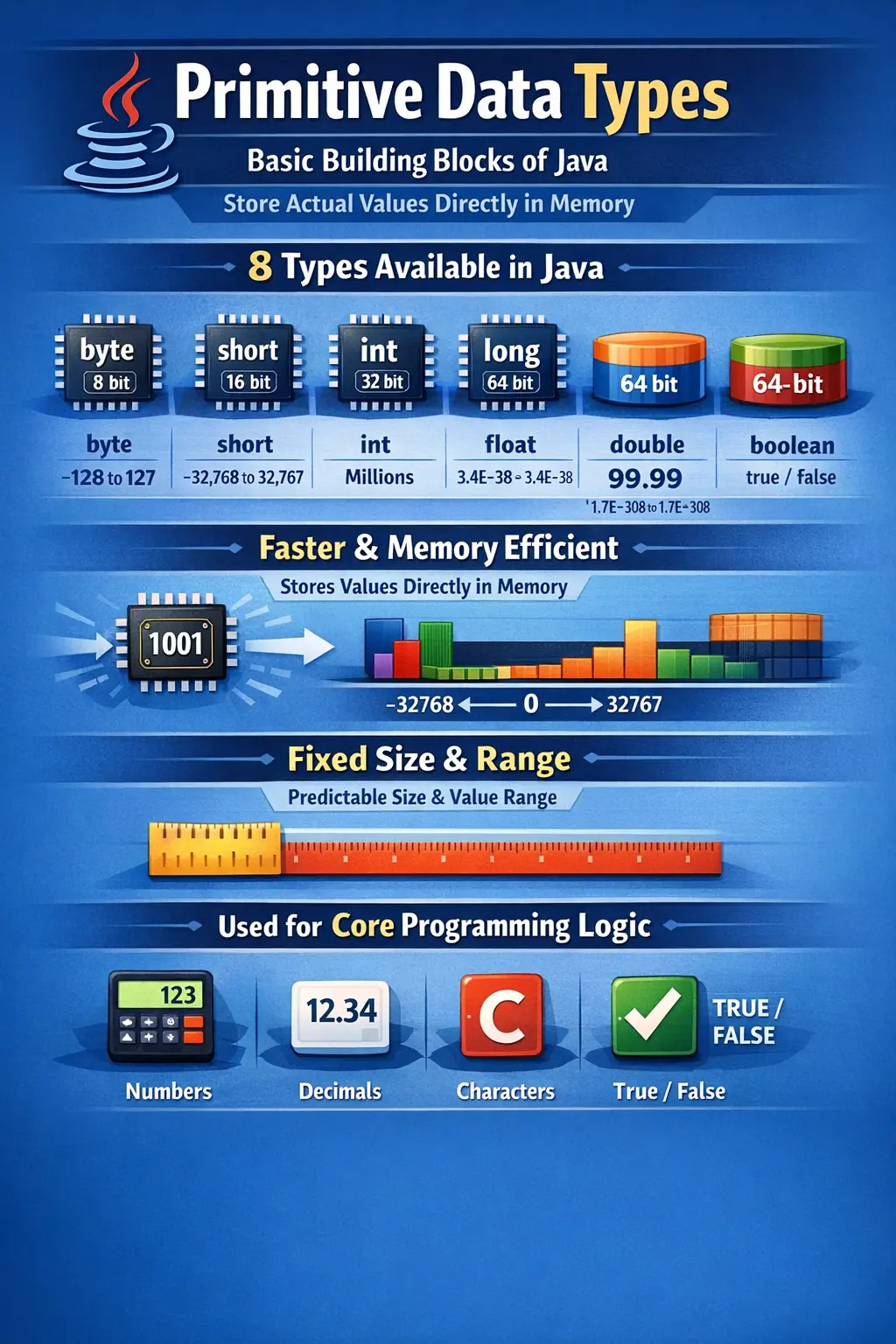
Primitive data types are called primitive because they are built into the Java language and represent simple values rather than objects. They do not belong to a class, they do not store references, and they do not provide methods like ordinary objects. Instead, a primitive variable stores the actual value itself. This direct storage makes primitive types fast, memory-efficient, and suitable for the most common low-level operations in a Java program.
Understanding primitive data types is essential for every Java beginner because these types appear almost everywhere. When you write int count = 10;, double price = 99.99;, char grade = 'A';, or boolean active = true;, you are using primitive values. Even when you later learn classes, objects, arrays, inheritance, collections, exceptions, and frameworks, primitive data types remain part of the core language.
Primitive data types answer a practical programming question: how should simple values be stored and processed efficiently? The answer depends on the kind of value, the required range, the amount of memory available, and the precision needed. Java provides eight primitive data types so that developers can choose the right type for the right situation.
What Are Primitive Data Types?
Primitive data types in Java are predefined data types that store simple values directly in memory. They are not created from classes, and they do not behave like objects. A primitive variable holds a value such as a number, a character, or a true-or-false state. This makes primitives simpler and lighter than non-primitive types.
For example, an int variable stores a whole number, a double variable stores a decimal number, a char variable stores a single character, and a boolean variable stores either true or false. Each primitive type has a fixed size and a fixed range. This means Java clearly defines how much memory each type uses and what values it can represent.
int age = 25;
double salary = 55000.75;
char grade = 'A';
boolean isActive = true;
In this example, each variable stores a simple value directly. The age variable stores a whole number, salary stores a decimal value, grade stores one character, and isActive stores a logical state. These are not object references; they are primitive values.
This distinction becomes important when comparing primitive types with wrapper classes such as Integer, Double, Character, and Boolean. Wrapper classes are objects, while primitive types are direct values. Java supports both, but they are used for different purposes.
The Eight Primitive Data Types
Java provides eight primitive data types: byte, short, int, long, float, double, char, and boolean. These types can be grouped into four categories based on the kind of data they represent.
The first category is integer types, which store whole numbers. These include byte, short, int, and long. The second category is floating-point types, which store decimal values. These include float and double. The third category is the character type, represented by char. The fourth category is the logical type, represented by boolean.
This classification helps developers choose the correct type. If a value is a whole number, an integer type is appropriate. If the value contains decimals, a floating-point type is needed. If the value is a single character, char is used. If the value represents a condition, decision, or state, boolean is used.
Integer Data Types
Integer data types store whole numbers without decimal points. Java provides four integer types because not every whole number requires the same amount of memory or range. The four integer types are byte, short, int, and long. They differ mainly in size and the range of values they can store.
The byte type is the smallest integer type. It uses 1 byte, or 8 bits, of memory. Its range is from -128 to 127. Because its range is small, byte is not commonly used for general arithmetic. However, it is useful when working with binary data, file streams, network data, or large arrays where memory savings matter.
byte b1 = 10;
byte b2 = -128;
byte b3 = 127;
All three assignments are valid because the values fall within the valid range of byte. If a value is outside the range, Java reports a compilation error when assigning a literal directly. This range limitation protects the program from storing values that cannot fit in the selected type.
A common behavior with small numeric types is overflow. If a byte value reaches its maximum value and is incremented, it wraps around. Java does not throw an exception for integer overflow. This is why developers must understand the range of each primitive type before using it in calculations.
byte b = 127;
b++;
System.out.println(b); // -128
Here, 127 is the maximum value of byte. Incrementing it causes overflow and wraps the value around to -128. This behavior surprises many beginners because the program runs, but the result is not mathematically expected. Range awareness is part of writing reliable Java code.
The short type uses 2 bytes, or 16 bits, of memory. Its range is from -32,768 to 32,767. It provides a larger range than byte but is still smaller than int. Like byte, it is less common in everyday application code but may be useful when memory savings are important across large amounts of data.
short s1 = 32000;
short s2 = -20000;
Both values are valid because they fit inside the short range. In modern applications, developers often choose int instead of short because it is simpler and usually efficient on modern processors. Still, knowing short is important for interviews, memory-sensitive work, and understanding Java’s numeric type system.
The int type is the most commonly used integer type in Java. It uses 4 bytes, or 32 bits, of memory. Its range is from -2,147,483,648 to 2,147,483,647. This range is large enough for most counting, indexing, calculation, and general numeric use cases.
int i1 = 100;
int i2 = -50000;
int i3 = 1_000_000;
The int type is Java’s default type for integer literals. When you write a whole number such as 100, Java treats it as an int unless the context or suffix indicates otherwise. The underscore in 1_000_000 is allowed in numeric literals to improve readability. It is ignored by the compiler.
In most cases, if you need to store a whole number and do not have a special reason to use another type, int is the best default choice. It offers a good balance between memory, range, and performance.
The long type is used when the range of int is not enough. It uses 8 bytes, or 64 bits, of memory and can store very large whole numbers. It is commonly used for timestamps, large identifiers, population counts, file sizes, and values that may exceed the int range.
long l1 = 123456789L;
long l2 = 9_876_543_210L;
The L suffix tells Java that the literal is a long. This is especially important for values larger than the int range. Without the suffix, Java first tries to treat the number as an int, which may cause a compilation error. The uppercase L is preferred over lowercase l because lowercase can look like the digit 1.
Floating-Point Data Types
Floating-point data types store decimal values. Java provides two floating-point types: float and double. These types are used when values may contain fractions, such as prices, measurements, averages, percentages, scientific values, or mathematical results.
The float type uses 4 bytes of memory and provides approximately 6 to 7 decimal digits of precision. When assigning a decimal literal to a float, the value must end with f or F. Without this suffix, Java treats decimal literals as double by default.
float f1 = 10.5f;
float f2 = -3.14f;
The suffix is required because a decimal such as 10.5 is automatically considered a double. Assigning a double literal directly to a float without casting or suffix is not allowed because it may lose precision. The f suffix makes the developer’s intention explicit.
The double type uses 8 bytes of memory and provides approximately 15 decimal digits of precision. It is the default choice for decimal numbers in Java because it is more precise than float. Most Java programs use double unless memory is a concern or a specific API requires float.
double d1 = 99.99;
double d2 = 3.141592653589793;
Because decimal literals are treated as double by default, no suffix is needed here. The double type is suitable for many scientific, mathematical, and general decimal calculations. However, developers must understand that floating-point types are not always exact for financial calculations.
Floating-point precision issues occur because many decimal fractions cannot be represented exactly in binary form. For example, adding 0.1 and 0.2 may not produce exactly 0.3. This is not a Java-only issue; it is a general behavior of binary floating-point arithmetic.
double a = 0.1;
double b = 0.2;
System.out.println(a + b); // often prints 0.30000000000000004
For financial calculations where exact decimal accuracy is required, Java developers often use BigDecimal instead of float or double. Primitive floating-point types are fast and useful, but they are not always the right choice for money, tax, interest, or currency calculations that require exact decimal behavior.
Character Data Type
The char data type stores a single character. It uses 2 bytes of memory and supports Unicode characters. This means Java can represent characters from many languages and symbol sets, not just basic English letters. A char value is written inside single quotes.
char grade = 'A';
char digit = '5';
char symbol = '#';
Even though '5' looks like a number, it is a character because it is enclosed in single quotes. It is different from the integer value 5. This distinction matters when reading input, processing text, or comparing characters.
Java uses Unicode for characters, which makes it suitable for global applications. A char can represent letters, digits, punctuation, symbols, and many international characters. This design choice reflects Java’s goal of supporting platform-independent and internationally usable applications.
Although char is useful for single characters, most real-world text is stored using String, which is a non-primitive type. A String can store a sequence of characters, while char stores only one character. Understanding this difference helps beginners choose the correct type for text-related values.
Boolean Data Type
The boolean data type represents logical values. It can hold only two values: true or false. Boolean values are used in decision-making, conditional statements, loops, validation logic, flags, and state checks.
boolean isLoggedIn = true;
boolean hasPermission = false;
The boolean type is heavily used with control flow statements such as if, while, and for. For example, a program may allow access only if isLoggedIn is true and hasPermission is also true. Boolean values make program decisions clear and readable.
if (isLoggedIn && hasPermission) {
    System.out.println("Access granted");
}
Unlike some languages, Java does not allow integers to be used as booleans. You cannot use 0 as false or 1 as true in a condition. Java requires an actual boolean expression. This strictness improves code clarity and prevents accidental logical errors.
Default Values of Primitive Data Types
Java assigns default values to instance variables and static variables when they are not explicitly initialized. Integer types default to 0, floating-point types default to 0.0, char defaults to the null character '\u0000', and boolean defaults to false.
class DefaultValues {
    int count;        // 0
    double price;     // 0.0
    char grade;       // '\u0000'
    boolean active;   // false
}
This automatic initialization applies to fields, not local variables. Local variables declared inside methods do not receive default values. They must be explicitly initialized before use. If a local variable is used before initialization, the compiler reports an error.
void printValue() {
    int number;
    // System.out.println(number); // compilation error
}
This distinction is frequently tested in interviews. Beginners often assume all variables get default values, but Java treats local variables differently because they are temporary and method-scoped. Explicit initialization makes local logic safer and clearer.
Primitive Types and Memory
Primitive data types are designed for memory efficiency. Because they store values directly, they avoid the extra overhead associated with objects. A primitive int stores a 32-bit value directly, while an Integer object stores additional object metadata and is accessed through a reference.
This difference matters in large-scale or performance-sensitive code. If a program stores millions of numeric values, using primitive arrays can save significant memory compared to storing wrapper objects. This is one reason primitive types are still important even though Java is an object-oriented language.
Choosing the correct primitive type also affects memory usage. A byte uses less memory than an int, and an int uses less memory than a long. However, developers should balance memory savings with simplicity and safety. Using a type with too small a range may cause overflow or require unnecessary conversions.
Primitive Types and Performance
Primitive types are generally faster than object types because they avoid object creation, reference indirection, and method dispatch. Arithmetic operations on primitives are direct and efficient. This makes primitives suitable for loops, calculations, counters, indexes, and performance-sensitive operations.
However, performance should not be the only consideration. Correctness matters more. For example, using float instead of double may save memory, but it may also reduce precision. Using byte instead of int may save memory in an array, but it may create extra casting issues during arithmetic because Java promotes smaller integer types to int in many expressions.
Good Java programming means choosing a type that fits the value, the range, the precision requirement, and the program context. In everyday application code, int, double, char, and boolean are commonly used. The smaller and larger numeric types are used when their specific benefits are needed.
Primitive Types vs Wrapper Classes
Java provides wrapper classes for every primitive type. The wrapper for byte is Byte, for short is Short, for int is Integer, for long is Long, for float is Float, for double is Double, for char is Character, and for boolean is Boolean.
Primitive types store actual values. Wrapper classes are objects that wrap primitive values and provide methods, object behavior, and compatibility with APIs that require objects. For example, Java collections such as ArrayList cannot store primitive int values directly, so they use Integer.
int primitiveNumber = 10;
Integer wrapperNumber = 10;
The first variable stores a primitive value. The second variable stores a reference to an Integer object. Java supports autoboxing and unboxing, which automatically convert between primitives and wrappers in many situations. This feature is convenient, but developers should still understand the difference because wrappers can be null, while primitives cannot.
Type Conversion with Primitive Data Types
Primitive data types often interact through type conversion. Widening conversion happens when a smaller type is converted to a larger type automatically. For example, an int can be assigned to a long, and a float can be assigned to a double. Java allows this because the larger type can safely hold the smaller value.
int count = 100;
long bigCount = count;
Narrowing conversion happens when a larger type is converted to a smaller type. This requires explicit casting because data may be lost. For example, converting a long to an int or a double to an int can lose information.
double price = 99.99;
int roundedPrice = (int) price; // 99
In this example, the decimal part is removed. The result is not rounded mathematically; it is truncated. Understanding type casting is important because careless conversions can introduce hidden bugs.
Common Beginner Mistakes
One common mistake is forgetting the L suffix for large long literals. If the number is larger than the int range and no suffix is provided, compilation fails. Using uppercase L makes the literal clear and avoids confusion.
Another common mistake is forgetting the f suffix for float literals. Since decimal literals are double by default, assigning one directly to a float produces an error unless the suffix or an explicit cast is used.
A third mistake is using float or double for exact financial calculations without understanding precision limitations. Floating-point types are excellent for many calculations, but money-related logic often requires BigDecimal for exact decimal accuracy.
A fourth mistake is expecting local variables to receive default values. Fields get default values, but local variables must be initialized manually. This rule helps Java prevent accidental use of uninitialized local data.
A fifth mistake is choosing a type that is too small for future data. A value may fit into byte today, but if requirements grow, overflow may occur. Developers should choose types based on realistic current and future ranges, not just the smallest possible memory size.
Real-World Usage
Primitive data types are used in almost every real-world Java application. In a banking application, boolean may indicate whether a transaction succeeded, long may store an account number or transaction ID, and double may be used for approximate calculations. For exact financial values, a non-primitive type such as BigDecimal may be selected instead.
In an e-commerce application, int may store quantity, double may store ratings, boolean may indicate whether a product is available, and char may store a grade or category code. In a game, primitives may store score, speed, coordinates, health points, and state flags.
In automation and testing code, primitives are also common. An int may store retry count, timeout seconds, or loop index. A boolean may store whether an element is displayed or a condition is satisfied. A double may store performance timing or numeric validation results. Strong primitive knowledge supports both development and testing work.
Best Practices
Use int as the default choice for whole numbers unless there is a clear reason to use byte, short, or long. The int type is readable, widely supported, and efficient for most general-purpose logic.
Use long when values can exceed the int range. Timestamps, IDs, file sizes, and large counts often need long. Always use the uppercase L suffix for long literals when needed.
Use double as the default choice for decimal values unless memory constraints or APIs require float. Use BigDecimal when exact decimal precision is required, especially in financial calculations.
Use meaningful variable names that reflect the value being stored. Names such as studentAge, totalMarks, discountRate, and isEligible are better than vague names such as x, num, or flag when business meaning matters.
Initialize variables clearly. Even when fields receive default values, explicit initialization often improves readability. For local variables, initialization is required before use. Clear initialization reduces accidental bugs and makes code easier to review.
Interview Perspective
Primitive data types are a common Java interview topic because they test foundational understanding. A short answer is that primitive data types are built-in Java types that store simple values directly in memory. Java has eight primitive data types: byte, short, int, long, float, double, char, and boolean.
A stronger answer explains their categories. byte, short, int, and long store whole numbers. float and double store decimal values. char stores a single Unicode character. boolean stores true or false values.
Interviewers may also ask about default values, type ranges, wrapper classes, autoboxing, and the difference between primitives and non-primitives. A good explanation should mention that primitive types are faster and more memory-efficient, while wrapper classes provide object behavior and can be used where objects are required.
Key Takeaway
Primitive data types are the foundation of Java’s data handling. They store simple values directly in memory and provide efficient support for numbers, characters, and logical states. Java offers eight primitive types, each with a specific size, range, and purpose.
Choosing the correct primitive type improves memory usage, performance, readability, and correctness. Use int for most whole numbers, long for very large whole numbers, double for most decimal calculations, char for single characters, and boolean for true-or-false decisions.
The golden rule is simple: choose the type that accurately represents the value without wasting memory or losing correctness. Mastering primitive data types gives you a strong base for variables, operators, control flow, arrays, methods, object-oriented programming, and real-world Java development.