switch Statement
In any programming language, decision-making is a fundamental capability. As applications grow in complexity, the need to evaluate multiple possible conditions becomes inevitable. While the if and if-else statements provide a flexible way to handle conditional logic, they can quickly become difficult to manage when dealing with multiple discrete values. This is where the switch statement in Java plays a critical role.
The switch statement is designed as a multi-branch control structure that simplifies decision-making when a single expression must be compared against multiple constant values. It provides a cleaner, more readable, and often more efficient alternative to long if-else-if ladders. Understanding how the switch statement works, when to use it, and how to avoid common pitfalls is essential for writing maintainable and efficient Java code.
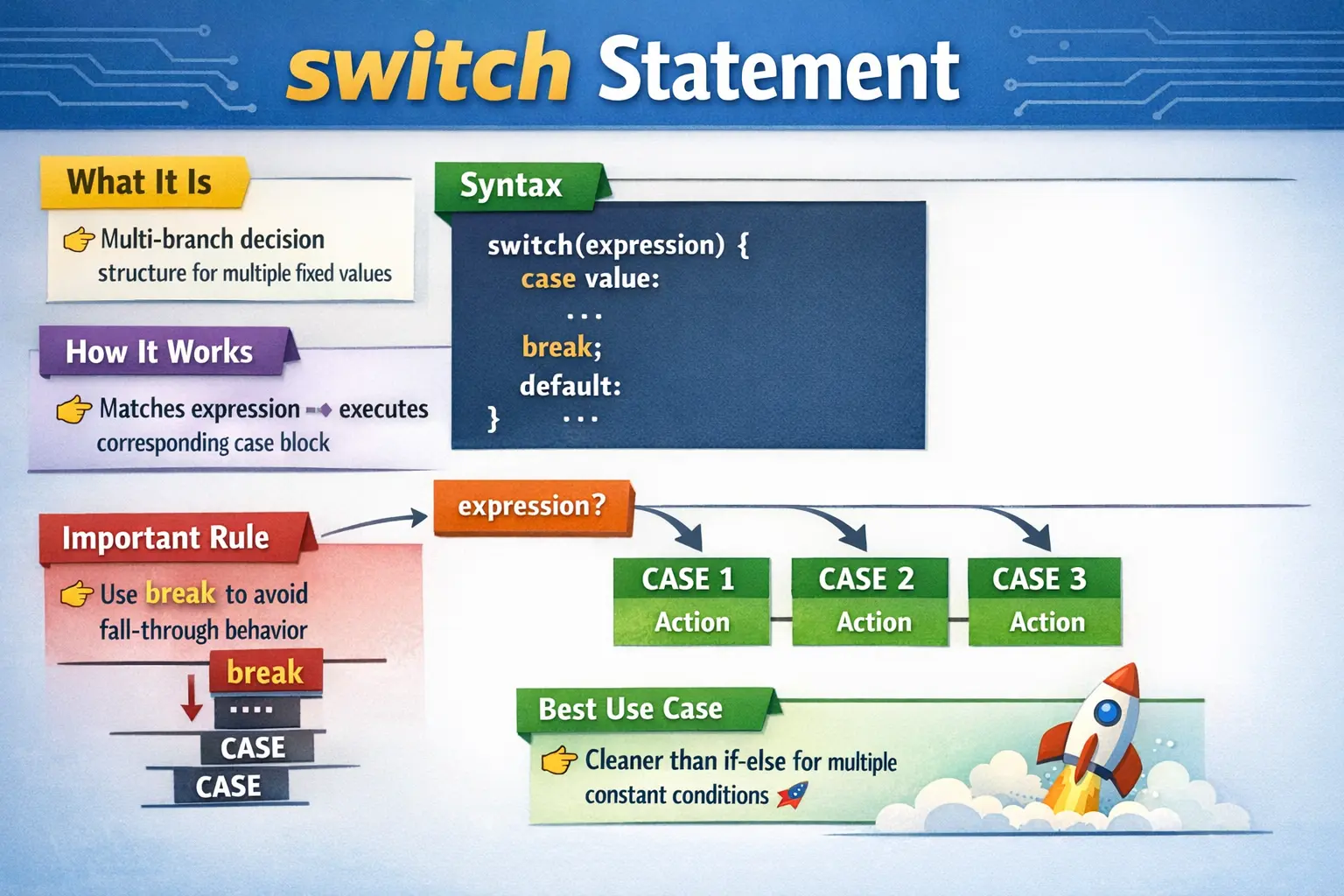
Understanding the switch Statement
At its core, the switch statement evaluates an expression once and compares its value against a set of predefined constants known as cases. When a match is found, the corresponding block of code is executed. This eliminates the need for repeatedly evaluating conditions, as is the case with multiple if-else statements.
The structure of the switch statement is straightforward. It begins with the switch keyword followed by an expression enclosed in parentheses. This expression is evaluated only once. Inside the switch block, multiple case labels define the possible values that the expression can match. Each case is followed by a block of code that executes when the case matches the expression. A break statement is typically used to terminate execution within the switch block, preventing unintended execution of subsequent cases.
Additionally, a default case can be provided to handle situations where none of the defined cases match the expression. This ensures that the program has a fallback path, making the logic more robust.
Why the switch Statement Matters
The primary advantage of the switch statement lies in its ability to simplify complex decision-making logic. When dealing with multiple discrete values, using a series of if-else-if statements can make the code verbose and harder to read. The switch statement provides a structured and organized way to handle such scenarios.
From a performance perspective, the switch statement can be more efficient in certain cases, especially when dealing with a large number of conditions. This is because the compiler may optimize switch statements using jump tables or similar mechanisms, reducing the need for sequential condition checks.
More importantly, the switch statement enhances readability. By clearly listing all possible values and their corresponding actions, it becomes easier for developers to understand and maintain the code. This is particularly valuable in large projects where multiple developers collaborate on the same codebase.
Execution Flow of switch
To fully understand the switch statement, it is important to grasp how its execution flow works. When the switch statement is encountered, the expression is evaluated first. The resulting value is then compared against each case label in a top-down manner.
If a matching case is found, the corresponding block of code is executed. However, unless a break statement is encountered, execution continues into the next case blocks. This behavior is known as fall-through, and it is one of the most important aspects of switch statements.
If no matching case is found, the default block is executed, if present. If the default block is not defined, the switch statement simply exits without executing any code.
This execution model makes the break statement crucial for controlling the flow and ensuring that only the intended block of code is executed.
The Role of break and Fall-Through Behavior
One of the defining characteristics of the switch statement is its fall-through behavior. When a case matches and does not contain a break statement, execution continues into subsequent cases regardless of their labels. While this can be useful in certain scenarios, it is often a source of bugs for beginners.
For example, if multiple cases share the same logic, fall-through can be intentionally used to avoid code duplication. However, in most cases, developers include a break statement at the end of each case to prevent unintended execution.
Understanding when to use and when to avoid fall-through is critical. Misusing it can lead to unexpected results, making debugging more difficult. As a best practice, break statements should be used consistently unless fall-through behavior is explicitly required.
Supported Data Types in switch
The switch statement in Java supports a limited set of data types. These include byte, short, char, and int, as well as their corresponding wrapper classes. With the introduction of Java 7, String values were also added to the list of supported types. Additionally, enum types are supported and are considered one of the best use cases for switch statements.
However, not all data types are supported. The switch statement does not work with long, float, double, or boolean values. This limitation is important to understand, as it influences when the switch statement can be used effectively.
The restriction to specific data types is due to the way switch statements are implemented internally. Since they rely on equality-based comparisons, only certain types can be efficiently handled.
Using switch with String and enum
The addition of String support in Java 7 significantly increased the usability of switch statements. It allowed developers to write more readable code when dealing with textual values, such as user input or configuration options.
Similarly, using switch with enum types is considered a best practice in modern Java development. Enums provide type safety and make the code more expressive. When combined with switch statements, they create a powerful and clean way to handle predefined sets of values.
For example, handling application states or days of the week becomes more intuitive and less error-prone when using enums instead of raw integers or strings.
switch vs if-else: Choosing the Right Approach
While both switch and if-else statements are used for decision-making, they serve different purposes. The switch statement is ideal when the condition involves comparing a single expression against multiple constant values. In contrast, if-else statements are more flexible and can handle complex boolean expressions, including ranges and multiple conditions.
Choosing between the two depends on the nature of the problem. If the logic involves checking equality against multiple values, switch is often the better choice due to its readability and structure. However, if the logic involves relational or logical conditions, if-else remains the preferred approach.
Understanding this distinction is essential for writing efficient and maintainable code.
Real-World Use Cases of switch
The switch statement is widely used in real-world applications where decisions are based on discrete values. For instance, in a user interface, a switch statement can be used to handle different menu options selected by the user.
In automation frameworks, switch statements are often used to handle different browser types or environments. For example, based on a configuration value, the program can decide whether to launch Chrome, Firefox, or Edge.
Another common use case is in parsing input commands or processing status codes. In such scenarios, the switch statement provides a clear and structured way to handle multiple possibilities.
Why switch Is Useful for Multi-Value Decisions
The switch statement becomes valuable when a program must choose behavior based on one known value. That value may represent a menu option, command name, user role, status code, month number, environment name, browser type, or application state. In these situations, the decision is not based on a range or a complex boolean expression. It is based on matching one expression against a defined set of possible values.
This is exactly where long if-else-if ladders become awkward. Each branch repeats the same basic comparison, and the reader must scan through several conditions to understand that the program is really matching one variable against many possible constants. A switch statement makes that structure explicit. The switch expression appears once, and each case represents one expected value. This improves readability because the code visually matches the decision model.
In real projects, this readability matters more than small syntax savings. A developer maintaining the code can quickly see all supported options and understand what happens for each one. When a new option is added, a new case can be added in the same structured area. When an unexpected value appears, the default case can handle it safely. The switch statement therefore supports both clarity and controlled behavior.
How switch Matches Case Values
A switch statement begins by evaluating its expression once. The result of that expression is then compared with the available case labels. Each case label must represent a constant value that is compatible with the switch expression type. If the expression value matches a case label, execution starts at that case.
This equality-based matching is the key difference between switch and general conditional logic. A switch case does not check whether a value is greater than another value, whether it falls within a range, or whether several independent conditions are true. It checks whether the switch expression is equal to a specific case value. If your logic depends on ranges or complex combinations, if-else is usually the better choice.
Because switch uses fixed case values, the case labels must be known at compile time. A normal variable cannot be used as a case label unless it is a compile-time constant. This restriction helps Java build predictable switch logic. It also prevents confusion where case labels might change at runtime and make the switch behavior difficult to reason about.
The Importance of the default Case
The default case handles values that do not match any explicit case. It is optional from a syntax perspective, but it is often important from a design perspective. Real applications frequently receive unexpected input, unsupported commands, unknown status values, or data from external systems. A default case gives the program a controlled response when that happens.
Without a default case, a switch statement with no matching case simply does nothing. Sometimes this is acceptable, but it can also hide defects. If a new status value is introduced and no case handles it, the program may silently skip important logic. A default case can log the unexpected value, show an error message, throw an exception, or apply a safe fallback behavior.
The default case does not have to appear at the end of the switch block, but placing it at the end is the clearest convention. Readers expect to see all known cases first and the fallback case last. This keeps the structure easy to scan and makes the intent obvious.
Understanding Fall-Through Properly
Fall-through is the behavior where execution continues from one case into the next case when there is no break statement. This behavior is one of the most important things to understand about traditional switch statements in Java. It is also one of the most common sources of bugs because beginners often expect only the matching case to execute automatically.
Fall-through is not always wrong. It is useful when several case labels should share the same logic. For example, multiple month numbers may map to the same season. Several command aliases may trigger the same operation. Multiple error codes may require the same response. In such cases, fall-through can reduce duplication and express grouping neatly.
The problem is accidental fall-through. If a developer forgets a break statement, the program may execute logic for later cases that should not run. This can produce confusing output, incorrect state changes, or business defects. When fall-through is intentional, it should be obvious from the structure of the code. When it is not intentional, each case should end with break or another flow control statement such as return or throw.
switch with Strings
String support made switch more useful for many application-level decisions. Before String switch support, developers often wrote long if-else chains to compare command names, menu options, configuration values, and user selections. With String in switch, those decisions can be written more directly.
A String switch is useful when the possible values are known and limited. For example, a command may be "start", "stop", or "restart". A configuration value may be "dev", "qa", or "prod". A user action may be "save", "delete", or "cancel". In these cases, switch makes the list of supported values visible in one place.
Developers should still be careful with String values because they can be affected by spelling, casing, whitespace, and null references. A switch expression that is null causes a NullPointerException in traditional switch usage. It is often wise to validate or normalize input before switching on it, especially when the value comes from a user, file, API, or external system.
switch with Enums
Enums are one of the strongest use cases for switch statements. An enum represents a fixed set of named constants, such as order status, user role, payment type, direction, priority level, or workflow state. Because the set of values is predefined, switching on an enum is clear, type-safe, and expressive.
Compared with raw integers or strings, enums reduce mistakes. A string value can be misspelled, and an integer value may not communicate meaning. An enum constant such as APPROVED, REJECTED, or PENDING is self-descriptive. When used in a switch, each case represents a meaningful state rather than an arbitrary value.
Enum switches are common in business applications because many business processes are state-based. An order moves through statuses. A ticket moves through priorities. A payment moves through outcomes. A switch statement can map each state to the correct behavior, while the enum keeps the set of possible states controlled.
switch and Application Menus
Menu-driven logic is a classic place where switch is easy to understand. A console application may ask the user to enter 1 for creating a record, 2 for updating a record, 3 for deleting a record, and 4 for exiting. Each option maps to a specific action. A switch statement fits this structure naturally because the selected option is compared against known case values.
This idea extends beyond console programs. User interfaces, command processors, keyboard shortcuts, and workflow actions often work in a similar way. The program receives a discrete action value and dispatches control to the matching handler. For small applications, a switch statement is a simple and readable way to implement that dispatch.
In larger systems, menu handling may move into command patterns, routing tables, or controller frameworks. Even then, the conceptual model is similar: one input action maps to one behavior. Learning switch helps developers understand this broader idea of action-based control flow.
switch in Automation and Configuration Logic
In automation frameworks and test utilities, switch statements are often used to choose behavior based on configuration. A framework may switch on browser name to create a Chrome, Firefox, or Edge driver. It may switch on environment name to choose development, testing, staging, or production configuration. It may switch on report type to generate different output formats.
This is useful because configuration values are usually discrete. The framework expects a limited set of known options, and each option maps to a specific setup. A switch statement keeps those mappings visible. When a new browser or environment is added, a new case can be introduced clearly.
However, configuration switch blocks should not grow without control. If each case contains long setup logic, the switch becomes hard to maintain. A cleaner design is to keep the switch responsible for selecting the correct path and move detailed setup into separate methods or classes. This keeps the decision clear and the implementation modular.
switch and Status Code Handling
Status codes are another practical use case. A program may receive numeric or textual status values from an API, database, or service response. A switch statement can map those values to appropriate actions. For example, success may continue processing, not found may show a message, unauthorized may redirect to login, and server error may trigger a retry or alert.
The benefit is that all known statuses can be handled in one organized structure. This makes the code easier to audit. If a status code is missing, it is easier to notice. The default case can catch unexpected values and prevent silent failures.
When status handling becomes complex, developers may eventually replace switch with objects, maps, or handler classes. But for straightforward status-to-action logic, switch remains a clean and practical option.
Limitations of switch
The switch statement is useful, but it is not a universal replacement for if-else. Its biggest limitation is that it matches one expression against constant values. It does not directly handle ranges, inequalities, or unrelated conditions. If a program needs to check whether age is greater than 18, balance is less than a threshold, or two separate conditions are true together, if-else is usually more appropriate.
Another limitation is that traditional switch syntax can become verbose when each case contains repeated break statements. It can also become error-prone when fall-through is accidental. Modern Java has improved switch capabilities in newer versions, but understanding the traditional form remains important because it is still widely seen in existing codebases and interviews.
A final limitation is maintainability when switch blocks become too large. A switch with many cases and long logic inside each case can become as hard to maintain as a long if-else chain. In such situations, the issue is not the syntax but the design. Large decision structures often need refactoring into smaller units.
Designing Clean switch Blocks
A clean switch block should make the decision easy to scan. The switch expression should be simple, the case labels should be meaningful, and each case should contain focused logic. If a case needs several steps, consider moving those steps into a method with a clear name. This keeps the switch block readable and allows each action to be tested separately.
It is also helpful to keep case ordering logical. Cases may be ordered numerically, alphabetically, by workflow sequence, or by business priority. The chosen order should make sense to a future reader. Random ordering makes the switch harder to understand and easier to modify incorrectly.
The default case should be intentional. It should not hide unexpected values unless that is truly safe. In many applications, the default case should report or handle unknown input clearly. A silent default can make defects difficult to detect.
Testing switch Logic
Testing switch logic means testing each meaningful case and the default path. If a switch handles five supported commands, each command should be verified. If the default case handles unknown input, at least one unknown value should be tested. This ensures that every branch behaves as expected.
Fall-through behavior requires special attention. If fall-through is intentional, tests should confirm that grouped cases produce the same expected behavior. If fall-through is not intended, tests should confirm that one case does not accidentally execute the next case. Missing break statements are easy to overlook in code but easy to catch with branch-focused tests.
For String switches, tests should include unexpected casing, leading or trailing spaces, and invalid values where relevant. For enum switches, tests should cover all meaningful enum values. Testing should reflect how the switch value is produced in the real application, not only the ideal values used by developers.
Debugging switch Problems
When a switch statement behaves unexpectedly, the first step is to inspect the value of the switch expression. Many defects happen because the value is not what the developer expected. A string may contain extra whitespace, a command may use different casing, an enum may be in a different state, or a numeric option may come from incorrect input.
The second step is to check whether the matching case contains a break, return, or another statement that stops fall-through. If not, later cases may be running as well. This is one of the fastest ways to identify switch-related bugs.
The third step is to review the default behavior. If no case matches, the default case should explain or handle that situation. If there is no default case, the switch may simply do nothing, which can make the problem harder to detect. A well-designed default case often turns silent errors into visible and diagnosable behavior.
How to Explain switch in Interviews
In interviews, a strong explanation of switch should begin with its purpose: it evaluates one expression and compares it against multiple constant case values. If a case matches, execution begins at that case. A break statement is normally used to stop execution from falling into later cases. The default case handles unmatched values.
It is also important to explain when switch is better than if-else. Switch is best when comparing one value against several known constants. If-else is better for ranges, complex boolean conditions, or unrelated checks. This distinction shows that you understand design choice, not just syntax.
Finally, mention common pitfalls: missing break statements, unsupported data types, assuming switch handles ranges, omitting default handling, and writing too much logic inside each case. A complete interview answer combines definition, execution flow, use cases, limitations, and best practices.
Common Mistakes and Pitfalls
Despite its simplicity, the switch statement is prone to several common mistakes. One of the most frequent errors is forgetting to include the break statement, leading to unintended fall-through behavior.
Another mistake is attempting to use unsupported data types, such as boolean or floating-point values. Developers may also incorrectly assume that switch statements can handle range-based conditions, which is not the case.
Omitting the default case is another issue. While it is optional, including a default case ensures that unexpected values are handled gracefully.
Being aware of these pitfalls helps developers avoid bugs and write more reliable code.
Best Practices for Using switch
To use the switch statement effectively, it is important to follow certain best practices. Always include a break statement at the end of each case unless fall-through is intentionally required. This prevents unintended execution of multiple cases.
Use meaningful and descriptive case values to improve readability. When working with enums, prefer using them over raw constants to enhance type safety.
Include a default case to handle unexpected values and ensure that the program behaves predictably. Keep the logic within each case simple and avoid writing overly complex code inside switch blocks.
By following these practices, developers can leverage the full potential of the switch statement while maintaining clean and maintainable code.
Interview Perspective
The switch statement is a frequently tested topic in Java interviews. Interviewers often focus on understanding the execution flow, the role of the break statement, and the concept of fall-through.
Candidates are expected to explain when to use switch over if-else and to identify common mistakes such as missing break statements. Questions may also involve writing code snippets or predicting the output of switch statements with and without breaks.
A strong answer should clearly define the switch statement, explain its behavior, and highlight its advantages and limitations. Providing real-world examples can further demonstrate practical understanding.
Key Takeaway
The switch statement is a powerful control structure that simplifies multi-branch decision-making in Java. By evaluating an expression once and matching it against multiple values, it provides a cleaner and more efficient alternative to long if-else ladders.
However, its effectiveness depends on proper usage. Understanding concepts such as fall-through behavior, supported data types, and the role of the break statement is essential for avoiding common pitfalls.
When used correctly, the switch statement enhances code readability, maintainability, and performance. It is an essential tool in every Java developer’s toolkit and a foundational concept for writing structured and efficient programs.
1. Basic switch with int
int day = 3;
switch (day) {
case 1:
System.out.println("Monday");
break;
case 2:
System.out.println("Tuesday");
break;
case 3:
System.out.println("Wednesday");
break;
default:
System.out.println("Invalid day");
}
Explanation
- Expression is evaluated once.
- Matching case executes.
- break prevents fall-through.
2. switch Without break (Fall-Through)
int level = 2;
switch (level) {
case 1:
System.out.println("Beginner");
case 2:
System.out.println("Intermediate");
case 3:
System.out.println("Advanced");
}
Explanation
- Execution continues until a break or end of switch.
- Output:
Intermediate
Advanced
3. Controlled Fall-Through (Intentional)
int month = 2;
switch (month) {
case 12:
case 1:
case 2:
System.out.println("Winter");
break;
case 3:
case 4:
case 5:
System.out.println("Spring");
break;
}
Explanation
- Multiple cases share same logic.
- Very common real-world usage.
4. default Case
int option = 5;
switch (option) {
case 1:
System.out.println("Start");
break;
case 2:
System.out.println("Stop");
break;
default:
System.out.println("Unknown option");
}
Explanation
- default executes when no case matches.
- Can appear anywhere, but typically last.
5. switch with char
char grade = 'A';
switch (grade) {
case 'A':
System.out.println("Excellent");
break;
case 'B':
System.out.println("Good");
break;
default:
System.out.println("Average");
}
Explanation
- char is supported.
- Comparisons use character values.
6. switch with String (Java 7+)
String browser = "chrome";
switch (browser) {
case "chrome":
System.out.println("Launch Chrome");
break;
case "firefox":
System.out.println("Launch Firefox");
break;
default:
System.out.println("Unsupported browser");
}
Explanation
- Java 7 introduced String support.
- Internally uses hash codes.
7. switch with enum (Best Practice)
enum Day { MON, TUE, WED }
Day day = Day.TUE;
switch (day) {
case MON:
System.out.println("Monday");
break;
case TUE:
System.out.println("Tuesday");
break;
case WED:
System.out.println("Wednesday");
}
Explanation
- Type-safe and readable.
- Preferred over int constants.
8. Nested switch
int year = 2026;
int month = 2;
switch (year) {
case 2026:
switch (month) {
case 1:
System.out.println("January 2026");
break;
case 2:
System.out.println("February 2026");
break;
}
break;
}
Explanation
- One switch inside another.
- Use carefully to avoid complexity.
9. switch Inside Loop
for (int i = 1; i <= 3; i++) {
switch (i) {
case 1:
System.out.println("One");
break;
case 2:
System.out.println("Two");
break;
case 3:
System.out.println("Three");
}
}
Explanation
- switch executes on every iteration.
10. switch with Multiple Statements per Case
int option = 1;
switch (option) {
case 1:
System.out.println("Option 1 selected");
System.out.println("Processing...");
break;
case 2:
System.out.println("Option 2 selected");
break;
}
Explanation
- Each case can contain multiple statements.
11. switch Expression (Java 12+)
int day = 2;
String result = switch (day) {
case 1 -> "Monday";
case 2 -> "Tuesday";
case 3 -> "Wednesday";
default -> "Invalid";
};
System.out.println(result);
Explanation
- Arrow syntax prevents fall-through.
- Returns a value.
12. switch Expression with yield
int marks = 75;
String grade = switch (marks / 10) {
case 10, 9 -> "A";
case 8, 7 -> {
yield "B";
}
case 6 -> "C";
default -> "Fail";
};
System.out.println(grade);
Explanation
- yield returns value from block.
- Useful for complex logic.
13. switch with break Missing (Bug)
int x = 1;
switch (x) {
case 1:
System.out.println("One");
case 2:
System.out.println("Two");
break;
}
Explanation
- Missing break causes fall-through.
- Output:
One
Two
14. switch vs if–else (Comparison)
int num = 2;
if (num == 1) {
System.out.println("One");
} else if (num == 2) {
System.out.println("Two");
}
Equivalent switch
switch (num) {
case 1:
System.out.println("One");
break;
case 2:
System.out.println("Two");
}
Explanation
- switch is cleaner for fixed values.
- if–else better for ranges.
15. switch with null (Runtime Exception)
String s = null;
// switch (s) { } // NullPointerException
Explanation
- switch on String does not allow null.
- Must check null before switch.
16. Safe switch with Null Check
String s = null;
if (s != null) {
switch (s) {
case "yes":
System.out.println("Yes");
break;
}
}
Explanation
- Prevents runtime exception.
17. switch with Constants Only
final int A = 1;
final int B = 2;
int x = 1;
switch (x) {
case A:
System.out.println("A");
break;
case B:
System.out.println("B");
}
Explanation
- Case labels must be compile-time constants.
18. Invalid switch Case (Not Constant)
int a = 10;
// case a: // compile-time error
Explanation
- Variables cannot be used as case labels.
19. switch with Boolean (Not Allowed)
boolean flag = true;
// switch (flag) { } // compile-time error
Explanation
- boolean not supported in switch.
20. Interview Summary Example
String command = "start";
switch (command) {
case "start":
System.out.println("Starting");
break;
case "stop":
System.out.println("Stopping");
break;
default:
System.out.println("Unknown command");
}
Explanation
- Demonstrates:
- String switch
- break usage
- default case
- Very common interview scenario.