Non-Primitive Data Types in Java
In Java, data handling is not limited to simple values such as numbers, characters, and true-or-false conditions. Real applications need to represent users, employees, products, bank accounts, orders, reports, messages, files, collections of records, and relationships between many different pieces of information. This is where non-primitive data types become essential. They allow Java programs to move beyond simple value storage and model real-world concepts in a structured, reusable, and object-oriented way.
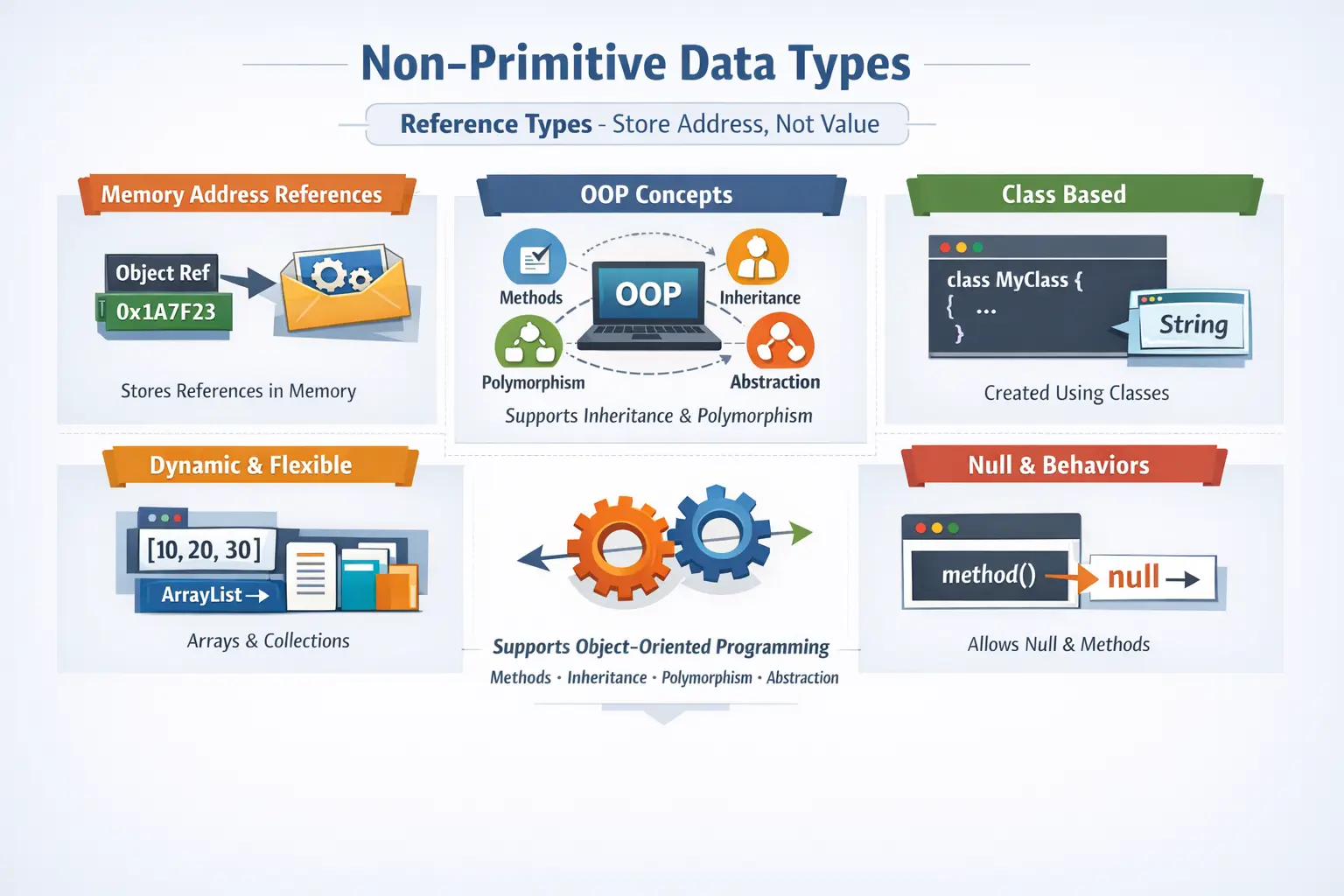
Non-primitive data types are also called reference data types because variables of these types do not usually store the actual object data directly. Instead, they store a reference to the memory location where the object exists. This reference-based behavior is one of the most important concepts in Java. It affects how objects are created, passed to methods, compared, assigned, shared, modified, and garbage collected.
A primitive variable such as int age = 25; stores the value 25 directly. A non-primitive variable such as Employee employee = new Employee(); stores a reference to an Employee object. The variable does not contain the full employee object inside itself. It points to the object. This difference may look small in syntax, but it has a major impact on how Java programs behave.
Non-primitive data types answer a practical programming question: how do we represent and manage complex real-world data in code? The answer is through objects, classes, strings, arrays, interfaces, wrapper classes, and collections. These types make Java suitable for building large, modular, scalable, and maintainable applications.
What Are Non-Primitive Data Types?
Non-primitive data types are data types that are not part of Java’s eight primitive types. They are based on classes, interfaces, arrays, and other object-oriented constructs. Unlike primitive types, which hold simple values directly, non-primitive variables hold references to objects or data structures.
Examples of non-primitive data types include String, arrays, user-defined classes, objects, interfaces, wrapper classes such as Integer and Double, and collection types such as ArrayList, HashSet, and HashMap. Some of these are provided by Java’s standard library, while others are created by developers.
String name = "Suresh";
int[] marks = {80, 90, 85};
Employee employee = new Employee();
ArrayList<String> courses = new ArrayList<>();
In these examples, String, int[], Employee, and ArrayList<String> are non-primitive types. They are more powerful than primitive types because they can represent structured data and provide behavior through methods. For example, a String has methods such as length(), substring(), and toUpperCase().
Non-primitive data types are the foundation of object-oriented programming in Java. They allow developers to combine data and behavior into meaningful units. A class can represent a real-world entity, an object can hold its actual state, an interface can define a contract, and a collection can manage groups of related objects.
Why Non-Primitive Types Are Needed
Primitive types are excellent for storing simple values, but they are not enough for real-world applications. A banking application cannot be built only with individual numbers and booleans. It needs customer objects, account objects, transaction objects, address objects, service interfaces, lists of beneficiaries, maps of account IDs, and many other complex structures.
Non-primitive types make such modeling possible. Instead of storing employee ID, name, salary, department, and status as separate unrelated values, Java lets you create an Employee class that groups these values together. This makes the code more organized and closer to the real business domain.
class Employee {
    int id;
    String name;
    double salary;

    void calculateBonus() {
        // business logic
    }
}
This class represents an employee as a complete concept. It can store data and define behavior. A primitive type cannot do that. This is why non-primitive types are essential for object-oriented design, code reuse, modularity, abstraction, encapsulation, inheritance, and polymorphism.
Key Characteristics of Non-Primitive Data Types
The first major characteristic of non-primitive data types is that they store references. A reference is a value that points to an object in memory. When you assign one reference variable to another, both variables may refer to the same object. This means changes made through one reference can be visible through the other reference.
Employee e1 = new Employee();
Employee e2 = e1;
Here, e1 and e2 refer to the same Employee object. Java has not created a second employee object. It has copied the reference. This behavior is extremely important because it explains why object modifications can appear through multiple variables.
The second characteristic is that non-primitive types can have methods. A String object can calculate its length. An ArrayList can add and remove elements. A user-defined BankAccount object can deposit or withdraw money. This ability to combine data with operations is one of the main strengths of Java.
The third characteristic is that non-primitive variables can hold null. A null reference means the variable does not currently point to any object. This is useful in some situations, but it also introduces one of the most common Java runtime errors: NullPointerException.
The fourth characteristic is that their memory size is not fixed in the same simple way as primitives. A primitive int always uses a fixed amount of memory. A non-primitive object may contain many fields, references, internal structures, and object overhead. The memory usage depends on the object type and its contents.
String as a Non-Primitive Type
String is one of the most commonly used non-primitive data types in Java. It represents a sequence of characters and is used for names, messages, passwords, URLs, file paths, email addresses, labels, logs, JSON content, and almost every kind of textual data.
String courseName = "Java";
String message = "Welcome to SoftwareTips4U";
Although strings are used so frequently that they feel like basic values, String is not a primitive type. It is a class. A String variable stores a reference to a String object. This object provides many useful methods for working with text.
String text = "Java Programming";
System.out.println(text.length());
System.out.println(text.toUpperCase());
System.out.println(text.substring(0, 4));
Strings are immutable in Java. This means once a String object is created, its contents cannot be changed. Methods such as toUpperCase() or replace() do not modify the original string. They create and return a new string. This immutability improves safety, caching, sharing, and security, but beginners must understand it to avoid confusion.
Java also uses a special memory area called the String Constant Pool for string literals. If two variables refer to the same literal, Java can reuse the same string object from the pool. This saves memory and improves performance. However, developers must understand the difference between comparing references with == and comparing content with equals().
String a = "Java";
String b = "Java";
System.out.println(a == b);       // true in this literal case
System.out.println(a.equals(b));  // true
In professional Java code, string content should usually be compared using equals(), not ==. The == operator checks whether two references point to the same object, while equals() checks whether the text content is equal.
Arrays as Non-Primitive Types
An array is a non-primitive data type used to store multiple values of the same type in a single structure. Arrays can store primitive values or object references. Even when an array stores primitive values, the array itself is an object in Java.
int[] marks = {80, 90, 85};
String[] names = {"Asha", "Ravi", "John"};
The first array stores primitive int values. The second array stores references to String objects. In both cases, the array is accessed using indexes. Java array indexes start at 0, so the first element is at index 0, the second element is at index 1, and so on.
Arrays are efficient for fixed-size groups of data because they provide fast index-based access. However, arrays have a fixed length. Once an array is created, its size cannot be changed. If a program needs a structure that can grow or shrink dynamically, collections are usually a better choice.
int[] scores = new int[3];
scores[0] = 75;
scores[1] = 88;
scores[2] = 91;
If you try to access an index outside the valid range, Java throws ArrayIndexOutOfBoundsException. This is a common beginner error. Understanding array length and valid index positions is essential when working with arrays.
Classes and Objects
Classes and objects are the heart of Java’s object-oriented programming model. A class is a blueprint that defines properties and behaviors. An object is an instance of a class created in memory. The class describes what an object should have and what it can do, while the object represents actual data during program execution.
class Student {
    int rollNumber;
    String name;

    void displayDetails() {
        System.out.println(rollNumber + " " + name);
    }
}
This class defines a student with a roll number, a name, and a method to display details. To use it, the program creates an object using the new keyword.
Student student = new Student();
student.rollNumber = 101;
student.name = "Anita";
student.displayDetails();
The variable student is a reference variable. It points to a Student object in memory. The object contains the actual field values. This class-object relationship allows Java programs to model real-world entities in a natural and organized way.
Classes promote modularity because related data and behavior are grouped together. They promote reusability because the same class can be used to create many objects. They also support encapsulation, inheritance, abstraction, and polymorphism, which are core OOP principles.
Interfaces as Non-Primitive Types
An interface is a reference type that defines a contract. It specifies what behavior implementing classes must provide. Interfaces are used to achieve abstraction, loose coupling, and multiple inheritance of type in Java.
interface PaymentService {
    void makePayment(double amount);
}
This interface says that any class implementing PaymentService must provide a makePayment() method. The interface does not need to know how the payment is processed. Different classes can implement the same interface in different ways.
class CardPayment implements PaymentService {
    public void makePayment(double amount) {
        System.out.println("Card payment: " + amount);
    }
}
Interfaces are powerful because they allow code to depend on behavior rather than concrete implementation. A method can accept a PaymentService reference and work with any object that implements that interface. This makes applications flexible and easier to maintain.
Interfaces are widely used in frameworks, APIs, automation tools, service layers, and enterprise applications. They help define clear contracts between different parts of a system.
Wrapper Classes
Wrapper classes convert primitive values into objects. Each primitive type has a corresponding wrapper class. The wrapper for int is Integer, for double is Double, for char is Character, and for boolean is Boolean. Other wrappers include Byte, Short, Long, and Float.
int number = 10;
Integer wrappedNumber = number;
This conversion from primitive to wrapper is called autoboxing. The reverse conversion from wrapper to primitive is called unboxing. Java performs these conversions automatically in many situations.
Integer value = 25;
int result = value;
Wrapper classes are important because many Java APIs work with objects rather than primitives. Collections, for example, cannot store primitive values directly. An ArrayList<int> is not valid, but an ArrayList<Integer> is valid.
ArrayList<Integer> numbers = new ArrayList<>();
numbers.add(10);
numbers.add(20);
Wrapper classes also provide useful methods for parsing, conversion, comparison, and utility operations. For example, Integer.parseInt("100") converts a string into an integer value. This makes wrappers useful in input handling, file processing, API data conversion, and form validation.
Collections as Non-Primitive Types
Collections are advanced non-primitive data structures used to store and manage groups of objects dynamically. Unlike arrays, collections can grow and shrink during program execution. Java’s collection framework provides ready-made classes and interfaces for common data management needs.
Common collection types include ArrayList, LinkedList, HashSet, TreeSet, HashMap, and TreeMap. Each collection type serves a different purpose. Lists preserve order and allow duplicates. Sets avoid duplicates. Maps store key-value pairs.
ArrayList<String> courses = new ArrayList<>();
courses.add("Java");
courses.add("Selenium");
courses.add("API Testing");
This list can grow as new courses are added. The developer does not need to define a fixed size at the beginning. This flexibility makes collections more suitable than arrays for many real-world applications.
HashMap<Integer, String> students = new HashMap<>();
students.put(101, "Anita");
students.put(102, "Ravi");
A map stores data using keys and values. In this example, student IDs are keys and student names are values. Maps are heavily used in applications where fast lookup by key is required.
Memory Representation
Memory behavior is one of the most important differences between primitive and non-primitive data types. A primitive variable stores the actual value. A non-primitive variable stores a reference to an object. The object itself lives elsewhere in memory.
Student s1 = new Student();
Student s2 = s1;
After this assignment, both s1 and s2 refer to the same object. If the object is modified using s1, the change can be observed using s2 because both references point to the same memory location.
s1.name = "Anita";
System.out.println(s2.name); // Anita
This behavior is powerful, but it can also cause bugs if developers assume objects are copied automatically. Assignment copies the reference, not the object. To create a separate object, the developer must explicitly create one and copy the required data.
Null References
Non-primitive variables can hold null. A null value means the reference does not point to any object. This is different from an empty string, an empty array, or an object with default values. Null means no object is available through that reference.
String name = null;If a method is called on a null reference, Java throws NullPointerException. This is one of the most common runtime exceptions in Java. It occurs because there is no object on which the method can be executed.
String name = null;
// System.out.println(name.length()); // NullPointerException
To avoid null-related errors, objects should be initialized before use, and references should be checked when null is a valid possibility. Modern Java code may also use Optional in some cases to represent values that may or may not be present.
Default Values
The default value of non-primitive fields is null. This applies to instance variables and static variables. If a class has a field of type String, Employee, or ArrayList, and it is not initialized, Java assigns null by default.
class Demo {
    String name;       // null
    Employee employee; // null
}
Local variables are different. A local reference variable declared inside a method does not automatically receive a default value. It must be explicitly initialized before use, just like local primitive variables.
void printName() {
    String name;
    // System.out.println(name); // compilation error
}
This distinction is important for both programming and interviews. Fields get default values, but local variables must be initialized manually.
Primitive vs Non-Primitive Data Types
Primitive data types store simple values directly. Non-primitive data types store references to objects. Primitive types have fixed sizes and fixed ranges. Non-primitive types can vary in size depending on the object and its contents.
Primitive types do not provide methods. Non-primitive types can provide rich behavior through methods. Primitive variables cannot be null, while non-primitive variables can be null. Primitive types are usually faster and more memory-efficient. Non-primitive types are more powerful and flexible.
Both categories are necessary. Primitive types are best for simple, efficient value storage. Non-primitive types are best for modeling complex data, building objects, managing groups of values, and using object-oriented programming features.
Common Beginner Mistakes
One common mistake is assuming that String is a primitive type. It is not. String is a class, even though Java gives it special support through string literals and the string constant pool.
Another common mistake is comparing string content using ==. The == operator compares references, not content. To compare the actual text, use equals() or equalsIgnoreCase() when case should be ignored.
A third mistake is forgetting to initialize objects before using them. Calling a method on a null reference causes NullPointerException. This error is common when fields, arrays, collections, or object references are declared but not created.
A fourth mistake is using arrays when collections are more appropriate. Arrays are useful for fixed-size data, but collections are usually better when the number of elements changes dynamically.
A fifth mistake is confusing a class with an object. A class is the blueprint. An object is the actual instance created from that blueprint. The class defines structure and behavior; the object holds real runtime data.
Real-World Usage
Non-primitive data types are used in every serious Java application. In an e-commerce platform, a Product class may represent items, an Order class may represent purchases, a User class may represent customers, and an ArrayList<Product> may represent cart items.
In a banking application, an Account object can hold account number, balance, customer details, and transaction history. A TransactionService interface can define transaction behavior. A HashMap can store accounts by account number for quick lookup.
In a testing or automation framework, non-primitive types are everywhere. Page objects, WebDriver references, configuration objects, test data models, lists of test cases, maps of environment values, and report objects are all examples of reference-based data handling.
Best Practices
Always initialize objects before using them. If a reference may be null, handle that possibility clearly. Null checks, constructor initialization, defensive programming, and clear ownership of object creation help reduce runtime errors.
Use equals() for object content comparison unless you intentionally want to compare references. This is especially important with strings. Reference comparison and content comparison are different concepts.
Use arrays when the number of elements is fixed and index-based access is enough. Use collections when the data size changes dynamically or when you need richer operations such as searching, sorting, mapping, uniqueness, or key-value lookup.
Design classes with clear responsibility. A class should represent one meaningful concept and should not become a container for unrelated data and methods. Clean classes make non-primitive types powerful and maintainable.
Avoid unnecessary object creation when objects can be reused safely. At the same time, avoid unsafe sharing of mutable objects. Understanding references helps developers decide when to share, copy, or create new objects.
Interview Perspective
In interviews, non-primitive data types are usually explained as reference types that store memory addresses of objects rather than actual values directly. A strong answer should mention examples such as String, arrays, classes, objects, interfaces, wrapper classes, and collections.
A good interview answer should also compare primitives and non-primitives. Primitive types store actual values, have fixed size, cannot be null, and do not provide methods. Non-primitive types store references, can be null, can provide methods, and support object-oriented programming.
Interviewers may ask whether String is primitive. The correct answer is no. String is a class and therefore a non-primitive type, although Java provides special syntax and memory optimization for string literals.
Another common interview point is memory behavior. When one reference variable is assigned to another, the object is not copied. Only the reference is copied. Both variables may point to the same object. This concept is central to understanding Java reference types.
Key Takeaway
Non-primitive data types allow Java to represent complex real-world data, not just simple values. They include strings, arrays, classes, objects, interfaces, wrapper classes, and collections. These types store references, support methods, can be null, and form the foundation of object-oriented programming.
Primitive types are useful for simple and efficient value storage, while non-primitive types are essential for modeling systems, organizing code, managing groups of objects, and building scalable applications. A strong Java developer must understand both categories and know when each is appropriate.
The golden rule is this: use primitive types for simple values, and use non-primitive types when the program needs structure, behavior, relationships, or collections of data. Mastering non-primitive data types is a major step toward writing real-world Java applications with clean object-oriented design.