StringBuilder
The StringBuilder class in Java is one of the most important utilities for efficient string manipulation. While strings are central to almost every application, the default String class comes with a significant limitation: immutability. Every time a String is modified, a new object is created, which can lead to unnecessary memory consumption and performance degradation, especially in loops or dynamic operations.
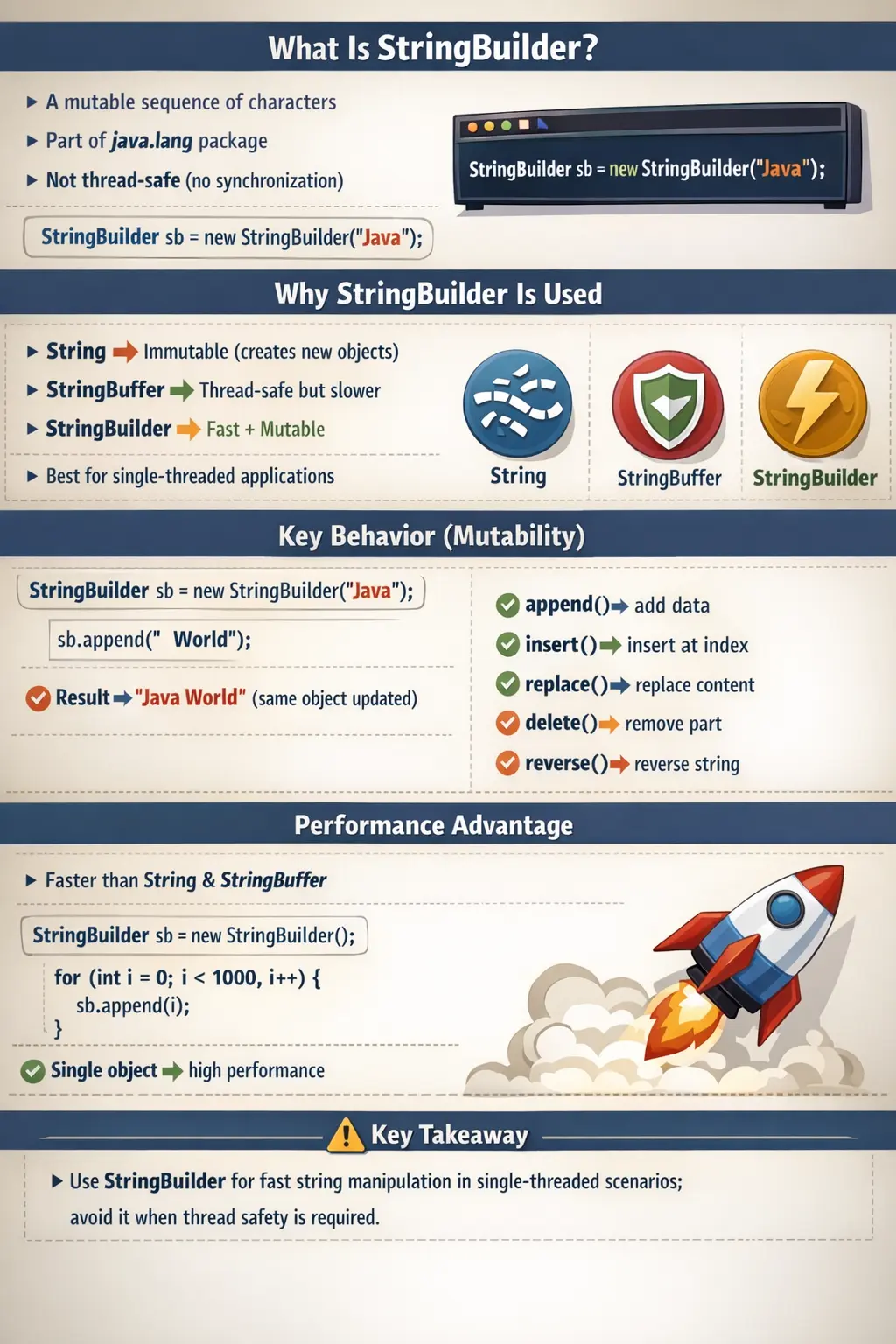
To address this, Java introduced mutable alternatives, among which StringBuilder stands out as the most efficient for single-threaded scenarios. It is designed to provide high-performance string manipulation without the overhead of synchronization, making it a preferred choice in modern Java development. Understanding StringBuilder is essential not only for writing optimized code but also for answering common interview questions related to string handling.
What Is StringBuilder?
StringBuilder is a mutable sequence of characters provided by the java.lang package. Unlike String, which is immutable, StringBuilder allows direct modification of its content without creating new objects. This makes it highly efficient for operations such as concatenation, insertion, deletion, and replacement.
A simple example illustrates its usage:
StringBuilder sb = new StringBuilder("Java");
sb.append(" World");
In this case, the same object is modified to include the additional text, rather than creating a new object as would happen with a String.
Another defining characteristic of StringBuilder is that it is not thread-safe. Its methods are not synchronized, which eliminates the overhead associated with thread safety mechanisms and significantly improves performance in single-threaded environments.
Why StringBuilder Exists
To understand the purpose of StringBuilder, it is helpful to compare it with its counterparts: String and StringBuffer.
The String class is immutable, meaning every modification results in a new object. While this design ensures safety and predictability, it is inefficient for frequent modifications. On the other hand, StringBuffer provides mutability but includes synchronized methods, making it thread-safe but slower due to the overhead of synchronization.
StringBuilder was introduced to strike a balance. It offers mutability like StringBuffer but removes synchronization, resulting in significantly better performance. This makes it ideal for scenarios where thread safety is not required.
In essence, StringBuilder exists to provide fast, memory-efficient string manipulation in single-threaded applications.
Key Characteristics of StringBuilder
The behavior of StringBuilder is defined by a few core characteristics. It is mutable, meaning its content can be changed without creating new objects. It is not synchronized, which makes it unsuitable for multi-threaded environments but highly efficient for single-threaded use.
It also shares the same API as StringBuffer, meaning most methods available in StringBuffer are also available in StringBuilder. This consistency allows developers to switch between the two classes with minimal changes to code.
Another important characteristic is its performance advantage. Because it avoids synchronization, StringBuilder is faster than both String (for modifications) and StringBuffer.
How StringBuilder Works Internally
Internally, StringBuilder uses a resizable array of characters to store its content. When a StringBuilder object is created, it allocates a certain amount of memory known as capacity. As characters are added, the buffer grows dynamically.
When an operation like append() is performed, the new characters are added directly to the existing array. If the capacity is exceeded, a new larger array is created, and the existing data is copied into it.
For example:
StringBuilder sb = new StringBuilder("Java");
sb.append(" Programming");
Here, the same object is modified, and no new StringBuilder object is created. This internal mechanism is what makes StringBuilder highly efficient for repeated modifications.
Constructors of StringBuilder
StringBuilder provides multiple constructors to support different initialization scenarios. The default constructor initializes the buffer with a capacity of 16 characters. Another constructor allows initializing the buffer with a specific string, while a third allows specifying a custom capacity.
For example:
StringBuilder sb1 = new StringBuilder();
StringBuilder sb2 = new StringBuilder("Java");
StringBuilder sb3 = new StringBuilder(50);
These constructors give developers control over initial capacity, which can be important for optimizing performance in applications with predictable string sizes.
Capacity Concept and Growth
Capacity is a critical concept in understanding how StringBuilder manages memory. It represents the number of characters that can be stored before resizing is required.
By default, the capacity is 16. When initialized with a string, the capacity becomes 16 plus the length of the string.
When the capacity is exceeded, the buffer grows using the formula:
newCapacity = (oldCapacity * 2) + 2
This exponential growth strategy minimizes the number of resizing operations, improving performance. However, in performance-critical applications, it is advisable to initialize the buffer with an appropriate capacity to avoid unnecessary resizing.
Commonly Used Methods
StringBuilder provides a comprehensive set of methods for string manipulation. The append() method is used to add content to the end of the buffer. It supports multiple data types, making it versatile for concatenation.
The insert() method allows inserting characters at a specific position, while the replace() method replaces a portion of the string. The delete() and deleteCharAt() methods remove characters from the buffer.
The reverse() method is useful for reversing the sequence of characters, and methods like length() and capacity() provide information about the current state of the buffer.
These methods enable efficient and flexible string manipulation without the overhead of object creation.
Example Program
A simple example demonstrates how multiple operations can be performed on a single StringBuilder object:
StringBuilder sb = new StringBuilder("Java");
sb.append(" Programming");
sb.insert(4, " Core");
sb.replace(0, 4, "Core");
sb.delete(0, 5);
System.out.println(sb);
In this example, all operations modify the same object, highlighting the efficiency of StringBuilder.
Performance Comparison: String vs StringBuilder
One of the most significant advantages of StringBuilder is its performance. Consider a scenario where a string is built inside a loop.
Using String:
String s = "";
for (int i = 0; i < 1000; i++) {
    s = s + i;
}
This approach creates a new object in each iteration, leading to poor performance.
Using StringBuilder:
StringBuilder sb = new StringBuilder();
for (int i = 0; i < 1000; i++) {
    sb.append(i);
}
Here, a single object is modified repeatedly, resulting in significantly better performance and lower memory usage.
StringBuilder vs StringBuffer vs String
Understanding the differences between these three classes is essential for choosing the right tool. String is immutable and thread-safe but inefficient for modifications. StringBuffer is mutable and thread-safe but slower due to synchronization. StringBuilder is mutable and not thread-safe, making it the fastest option for single-threaded scenarios.
In modern applications, StringBuilder is the default choice for string manipulation unless thread safety is explicitly required.
When to Use StringBuilder
StringBuilder should be used in scenarios where strings are modified frequently, especially inside loops or dynamic operations. It is ideal for single-threaded applications where performance is critical.
Common use cases include building dynamic messages, processing large text data, and generating strings in algorithms.
When NOT to Use StringBuilder
Despite its advantages, StringBuilder is not suitable for all scenarios. It should not be used in multi-threaded environments where multiple threads access the same object, as it is not thread-safe.
It is also not appropriate when immutability is required, such as in cases where data integrity and security are critical.
Choosing the right class depends on the specific requirements of the application.
Mutable Text Without Synchronization
The most important idea behind StringBuilder is mutable text without synchronization overhead. A StringBuilder object behaves like a changeable character container. When you append, insert, delete, replace, or reverse content, the same object is updated. This is very different from String, where each apparent modification produces a separate String object. For repeated text construction, that difference can have a major impact on performance and memory usage.
StringBuilder removes synchronization because it is designed for scenarios where one thread owns the builder. This is common in everyday Java code. A method may create a builder, append several values, convert it to a String, and return the result. Since the builder is local to that method, no other thread can access it directly. In such cases, synchronization would only add overhead without improving safety.
This is why StringBuilder is often described as the modern default for dynamic string construction. It is not because StringBuilder is always better than String. It is because StringBuilder fits a specific need: building or modifying text repeatedly in a context where thread safety is not required for the builder object. Understanding that condition helps developers use it correctly rather than automatically.
Why StringBuilder Is Faster in Loops
Loops are the classic place where StringBuilder shows its value. If a String is repeatedly concatenated inside a loop, each iteration may create a new intermediate String. For small loops this may not matter, but for hundreds, thousands, or millions of iterations, the cost can become noticeable. The program spends time creating temporary objects and the garbage collector eventually has to clean them up.
StringBuilder avoids this pattern by appending new content into the same internal buffer. The object grows as needed, but it does not create a new final text object after every append. The final String is created only when toString() is called. This makes StringBuilder especially useful for report generation, CSV construction, log message assembly, dynamic SQL fragments in controlled contexts, file content generation, and large validation messages.
The important point is that performance comes from reducing repeated object creation. It does not mean every use of the + operator is bad. Simple concatenation outside loops is readable and often optimized by the compiler. StringBuilder becomes important when the text is built gradually through repeated operations, especially when the number of operations is not small or fixed.
Capacity Planning in StringBuilder
StringBuilder manages an internal character array. Length tells how many characters are currently stored, while capacity tells how many characters can be stored before resizing is needed. The default capacity is 16. When more space is required, the internal array grows, usually using the formula old capacity multiplied by two plus two. This growth strategy prevents resizing on every append.
Even though automatic resizing is efficient, resizing still has a cost because existing characters must be copied into the new larger array. If a developer already knows that the final text will be large, providing an initial capacity can avoid unnecessary resizing. For example, when building a long report or combining many records, a larger initial capacity can make the operation smoother.
Capacity planning should be practical, not excessive. Setting a huge capacity for every builder wastes memory. Setting a reasonable capacity when the approximate output size is known is useful. For small strings, the default constructor is usually enough. This is a good example of balanced performance thinking: optimize where the workload justifies it, and keep simple code simple where it does not.
StringBuilder Method Behavior
StringBuilder methods modify the existing object and usually return the same builder reference. append() adds content to the end. insert() places content at a specific position. delete() removes a range of characters. replace() substitutes one range with another string. reverse() changes the order of characters. These operations are useful because they let text be built and adjusted step by step without creating a chain of immutable String objects.
Because many methods return the builder itself, method chaining is common. A developer can write sb.append("Name: ").append(name).append(", Age: ").append(age). This is concise and often readable. However, very long chains can become difficult to scan. When string-building logic has business meaning, it can be clearer to break it into several well-named steps or helper methods.
Index-based methods require careful boundary handling. insert(), delete(), replace(), charAt(), and setCharAt() depend on valid positions. If the current length is shorter than expected, an index operation can fail with StringIndexOutOfBoundsException. Developers should check the current length when indexes are dynamic, especially if the builder content has already been changed by earlier operations.
StringBuilder and toString()
StringBuilder is used to build text, but many APIs ultimately expect a String. The toString() method creates the final immutable String representation of the current builder content. This is usually the final step after all appends, inserts, and replacements are complete. Once the String is created, later modifications to the builder do not change that previously returned String.
This separation is useful in method design. A method can use StringBuilder internally for efficiency and return a clean String to callers. The caller does not need to know how the text was built. This keeps the mutable construction detail inside the method and exposes an immutable result outside. That design is often safer and easier to maintain than returning a mutable builder.
Calling toString() too early can create unnecessary intermediate String objects. If the builder is still being modified, keep using the builder until the result is actually needed. Calling toString() repeatedly inside a loop can reduce the performance benefit of using StringBuilder. The best practice is to build first, then convert once at the end unless there is a clear reason to inspect intermediate text.
StringBuilder in Real Projects
StringBuilder appears in many real-world coding scenarios. It is commonly used to build dynamic messages, prepare structured text, generate reports, assemble file content, create comma-separated values, build test output, and create readable logs. Any time text is accumulated gradually, StringBuilder is a natural candidate. It keeps the code efficient and gives the developer control over the construction process.
In backend applications, StringBuilder may be used to build response messages, diagnostic details, or internal summaries. In desktop or console utilities, it may build formatted output. In automation frameworks, it can create assertion messages, execution summaries, dynamic locators, or report text. The exact domain changes, but the pattern is the same: many small text pieces are combined into one final result.
StringBuilder should still be used responsibly. If the text is a simple message with two or three values, normal concatenation may be clearer. If the text is built from many records or inside a loop, StringBuilder is better. Professional code is not about using the most advanced-looking tool; it is about choosing the tool that makes the code clear and efficient for the task.
StringBuilder in Testing and Automation
For testing and automation learners, StringBuilder is useful because test code often builds dynamic strings. A test report may include scenario name, execution time, status, browser, environment, and error details. A failure message may include expected value, actual value, and test data. A utility may build file paths, API request bodies, or table-like output. StringBuilder makes these tasks efficient when multiple pieces are appended repeatedly.
In Selenium automation, dynamic locators are sometimes built from variable values. For example, a locator may include a product name, menu text, or row identifier. StringBuilder can help when the locator is assembled from several parts, although simple concatenation is also acceptable for small expressions. The key is readability. The final locator or message should be easy to inspect and debug.
StringBuilder is also useful when generating summaries from arrays or collections. A test utility may loop through failed validations and append each failure into one message. Without StringBuilder, repeated concatenation can become inefficient and messy. With StringBuilder, the code can collect details cleanly and return a final String at the end. This supports better debugging and clearer reports.
Choosing Between String, StringBuilder, and StringBuffer
The choice between String, StringBuilder, and StringBuffer should be based on mutability, frequency of modification, and thread safety. Use String when the text is stable, simple, or not modified repeatedly. Use StringBuilder when text is modified frequently in a single-threaded or local context. Use StringBuffer when the same mutable text object is shared across threads and synchronized method-level safety is required.
This decision is a common interview topic because it shows whether the developer understands trade-offs. String is immutable and safe to share, but repeated modifications can create many objects. StringBuilder is mutable and fast, but not synchronized. StringBuffer is mutable and synchronized, but slower than StringBuilder in single-threaded scenarios. None of these classes is universally best. Each exists for a different use case.
A practical answer should mention that StringBuilder is usually preferred over StringBuffer in modern single-threaded code. StringBuffer remains useful where thread safety is explicitly needed or in legacy code. String remains the best choice for fixed text, constants, keys, and simple values. This balanced explanation is stronger than simply saying StringBuilder is fastest.
Thread Safety Considerations
StringBuilder is not thread-safe. If multiple threads modify the same StringBuilder object at the same time, the result can become inconsistent. Characters may be appended in unexpected order, content may be corrupted, or output may become unpredictable. This does not mean StringBuilder is dangerous by itself. It means it should be used in the right scope.
Most StringBuilder usage is local to a method. A local builder created inside a method and not shared outside is safe because each method call has its own object. Even in a multi-threaded application, local objects are not automatically shared between threads. This is why StringBuilder is widely used in server applications, automation frameworks, and utilities without issue. The problem appears only when the same builder instance is shared across threads.
If shared mutation is required, consider StringBuffer or external synchronization. In many designs, it may be better to avoid shared mutable text altogether. Each thread can build its own String and then pass the result to a thread-safe collector, logger, or queue. Good concurrency design avoids unnecessary sharing. StringBuilder is fast because it assumes the developer controls its ownership.
Debugging StringBuilder Issues
StringBuilder debugging usually focuses on mutation history. Since the same object changes over time, unexpected output often means content was appended, deleted, inserted, or replaced at the wrong step. Tracing the builder after major operations can show where the value diverges from expectation. Printing both length and content can be useful when index-based operations are involved.
Another common issue is forgetting to call toString() when a String is required. Some APIs accept CharSequence, but many expect String specifically. Passing the builder itself may work in some contexts, but returning the final String is usually clearer. A method that builds a message should often return sb.toString(), not expose the mutable builder unless mutation by the caller is intentional.
Index errors are also common. If delete or replace uses the wrong start and end positions, the output may lose characters or throw an exception. Remember that the end index in many range-based operations is exclusive. This is similar to substring behavior. Careful dry runs with small examples help confirm that the correct character range is being modified.
Best Practices for StringBuilder
The first best practice is to use StringBuilder for repeated modifications, especially inside loops. The second is to keep the builder local when possible. Local ownership avoids thread-safety concerns and makes the mutation path easier to understand. The third is to provide initial capacity when building large predictable output. This reduces resizing overhead without complicating the code too much.
The fourth best practice is to convert to String at the boundary. Use StringBuilder internally while building, then return or pass a String once construction is complete. This keeps mutable implementation details hidden. The fifth best practice is to avoid overusing StringBuilder for simple one-line messages where normal concatenation is clearer. Readability still matters.
The sixth best practice is to be careful with method chaining. Chaining can make straightforward appends concise, but long chains with mixed insert, delete, and replace calls can become hard to debug. Use clear steps when the logic is meaningful. Finally, do not use StringBuilder as a substitute for secure encoding, parameterized queries, or structured serialization. It builds text efficiently, but it does not automatically make that text safe for every context.
Interview-Ready Explanation Strategy
A strong interview explanation of StringBuilder should start with a simple definition: StringBuilder is a mutable, non-synchronized sequence of characters used for efficient string manipulation. From there, explain why it exists. String is immutable, so repeated modifications create new objects. StringBuilder avoids that by modifying the same internal buffer. This makes it faster for repeated appends, inserts, deletes, and replacements in single-threaded code.
The next part of the answer should compare it with StringBuffer. Both StringBuilder and StringBuffer are mutable and have similar methods, but StringBuffer is synchronized and thread-safe, while StringBuilder is not synchronized and therefore faster when thread safety is not required. This comparison is often the heart of the interview question. The interviewer wants to know whether you understand the trade-off, not just the method names.
A practical example makes the answer stronger. You can say that if a loop builds a long message by appending many values, StringBuilder is preferred because it avoids creating many intermediate String objects. If the same mutable builder must be modified by multiple threads, StringBuffer or another thread-safe design should be considered. If the text is fixed or only lightly combined, String is usually sufficient. This kind of answer shows practical judgment.
Common Beginner Mistakes
Many beginners misuse StringBuilder due to a lack of understanding of its characteristics. One common mistake is using it in multi-threaded code without proper synchronization, which can lead to data inconsistency.
Another mistake is assuming that StringBuilder is always the best choice. While it is fast, it is not suitable for all scenarios. Developers should carefully consider whether thread safety or immutability is required.
Ignoring capacity planning is another issue. Frequent resizing can impact performance, especially in large-scale applications.
Interview Perspective
In interviews, StringBuilder is often discussed in comparison with String and StringBuffer. A strong answer should highlight its mutability, lack of synchronization, and performance advantages.
Candidates are typically expected to explain why StringBuilder is faster than StringBuffer and when it should be used. Providing examples and real-world scenarios can strengthen the response.
Understanding the trade-offs between these classes is key to demonstrating a deep understanding of Java.
Key Takeaway
StringBuilder is a powerful and efficient class for string manipulation in Java. It provides mutability without the overhead of synchronization, making it the fastest option for single-threaded scenarios.
However, it is not a one-size-fits-all solution. Developers must carefully consider factors such as thread safety, immutability, and performance when choosing between String, StringBuilder, and StringBuffer.
Mastering StringBuilder enables you to write optimized, maintainable, and high-performance Java code, making it an essential concept for both real-world development and technical interviews.
1. Creating a StringBuilder Object
StringBuilder sb = new StringBuilder("Java");
Explanation
- Creates a mutable sequence of characters.
- Stored in heap memory.
- Not thread-safe (faster than StringBuffer).
2. Default StringBuilder Constructor
StringBuilder sb = new StringBuilder();
System.out.println(sb.length());
Explanation
- Empty builder.
- Initial length = 0.
- Default capacity = 16.
3. StringBuilder with Initial Capacity
StringBuilder sb = new StringBuilder(50);
System.out.println(sb.capacity());
Explanation
- Reserves memory in advance.
- Improves performance when size is known.
4. Appending Text (append())
StringBuilder sb = new StringBuilder("Java");
sb.append(" Selenium");
System.out.println(sb);
Explanation
- Modifies the same object.
- No new object creation.
- Output: Java Selenium
5. Appending Different Data Types
StringBuilder sb = new StringBuilder("Count: ");
sb.append(10);
sb.append(true);
sb.append(5.5);
System.out.println(sb);
Explanation
- Supports multiple data types.
- Output: Count: 10true5.5
6. Inserting Text (insert())
StringBuilder sb = new StringBuilder("Java");
sb.insert(4, " Selenium");
System.out.println(sb);
Explanation
- Inserts at specified index.
- Output: Java Selenium
7. Deleting Characters (delete())
StringBuilder sb = new StringBuilder("Java Selenium");
sb.delete(4, 13);
System.out.println(sb);
Explanation
- Deletes substring between indices.
- Output: Java
8. Deleting Single Character (deleteCharAt())
StringBuilder sb = new StringBuilder("Javva");
sb.deleteCharAt(3);
System.out.println(sb);
Explanation
- Removes character at index.
- Output: Java
9. Reversing Text (reverse())
StringBuilder sb = new StringBuilder("Java");
sb.reverse();
System.out.println(sb);
Explanation
- Reverses characters in place.
- Output: avaJ
10. Replacing Substring (replace())
StringBuilder sb = new StringBuilder("Java Automation");
sb.replace(5, 15, "Selenium");
System.out.println(sb);
Explanation
- Replaces characters between indices.
- Output: Java Selenium
11. Finding Length
StringBuilder sb = new StringBuilder("Java");
System.out.println(sb.length());
Explanation
- Returns number of characters.
- Output: 4
12. Finding Capacity
StringBuilder sb = new StringBuilder("Java");
System.out.println(sb.capacity());
Explanation
- Capacity = 16 + initial string length.
- Output: 20
13. Ensuring Capacity (ensureCapacity())
StringBuilder sb = new StringBuilder();
sb.ensureCapacity(40);
System.out.println(sb.capacity());
Explanation
- Ensures minimum capacity.
- Reduces resizing cost.
14. Character Access (charAt())
StringBuilder sb = new StringBuilder("Java");
System.out.println(sb.charAt(1));
Explanation
- Accesses character by index.
- Output: a
15. Setting Character (setCharAt())
StringBuilder sb = new StringBuilder("Java");
sb.setCharAt(1, 'o');
System.out.println(sb);
Explanation
- Modifies character at index.
- Output: Jova
16. Converting StringBuilder to String
StringBuilder sb = new StringBuilder("Java");
String s = sb.toString();
System.out.println(s);
Explanation
- Creates immutable String.
- Used when returning values.
17. String vs StringBuilder Performance Example
String s = "";
for (int i = 1; i <= 5; i++) {
s = s + i;
}
System.out.println(s);
StringBuilder sb = new StringBuilder();
for (int i = 1; i <= 5; i++) {
sb.append(i);
}
System.out.println(sb);
Explanation
- String creates multiple objects.
- StringBuilder uses single object.
- Preferred in loops.
18. Using StringBuilder in Loops (Best Practice)
StringBuilder sb = new StringBuilder();
for (int i = 0; i < 3; i++) {
sb.append("Test ");
}
System.out.println(sb);
Explanation
- Efficient concatenation.
- Common real-world use.
19. Comparing StringBuilder Objects
StringBuilder sb1 = new StringBuilder("Java");
StringBuilder sb2 = new StringBuilder("Java");
System.out.println(sb1.equals(sb2));
Explanation
- equals() not overridden.
- Compares references.
- Output: false
20. Correct Way to Compare StringBuilder Content
StringBuilder sb1 = new StringBuilder("Java");
StringBuilder sb2 = new StringBuilder("Java");
System.out.println(sb1.toString().equals(sb2.toString()));
Explanation
- Convert to String.
- Output: true
21. Clearing a StringBuilder
StringBuilder sb = new StringBuilder("Java");
sb.setLength(0);
System.out.println(sb.length());
Explanation
- Clears content.
- Output: 0
22. StringBuilder Substring
StringBuilder sb = new StringBuilder("Automation");
String sub = sb.substring(0, 4);
System.out.println(sub);
Explanation
- Returns a String, not StringBuilder.
- Output: Auto
23. StringBuilder with Null Handling
StringBuilder sb = new StringBuilder();
sb.append((String) null);
System.out.println(sb);
Explanation
- Appends literal "null".
- Output: null
24. Thread Safety Difference (Conceptual)
StringBuilder sb = new StringBuilder("Fast");
sb.append(" Unsafe");
Explanation
- Not synchronized.
- Faster than StringBuffer.
- Not safe in multi-threaded environments.
25. Interview Summary Example (StringBuilder)
StringBuilder sb = new StringBuilder("Java");
sb.append(" Builder");
System.out.println(sb);
Explanation
- Demonstrates:
- ○ Mutability
- ○ Performance advantage
- ○ Heap storage
- Very common interview discussion topic.