String Class
The String class in Java is one of the most fundamental and widely used classes in the entire language ecosystem. Whether you are building a simple console application, a large-scale enterprise system, or an automation framework using Selenium, you will constantly interact with strings. Despite appearing simple on the surface, the String class has deep internal behavior, performance implications, and design principles that make it a frequent topic in interviews and a critical concept for writing efficient Java code.
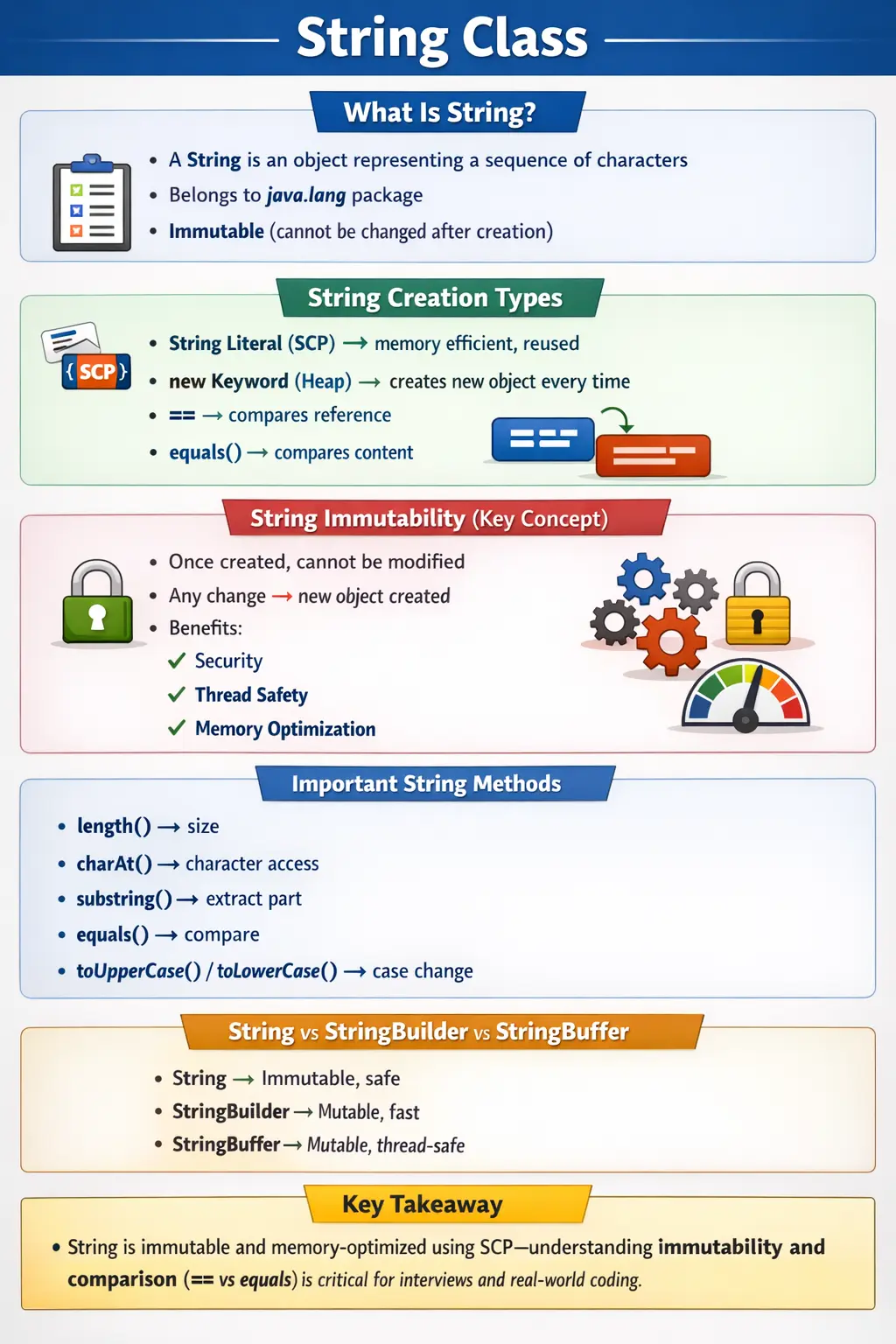
Understanding the String class is not just about knowing how to declare a string or call methods like length() or substring(). It involves understanding immutability, memory management, the String Constant Pool, object creation mechanisms, and comparison strategies. These concepts are essential for avoiding bugs, optimizing performance, and writing production-quality code.
What Is a String in Java?
In Java, a String is an object that represents a sequence of characters. Unlike primitive data types such as int or char, a string is a class defined in the java.lang package. This means it comes with built-in methods and behaviors that allow developers to manipulate textual data efficiently.
A string can be created using a literal or by instantiating the String class. For example, writing String s = "Java"; creates a string object containing the sequence of characters J, a, v, and a. Internally, Java treats this string differently depending on how it is created, which leads to important concepts such as the String Constant Pool and heap memory.
One of the defining characteristics of the String class is that it is immutable. Once a string object is created, its value cannot be changed. This design decision has far-reaching implications for performance, security, and thread safety.
Why the String Class Is So Important
Strings are used everywhere in Java applications. They are essential for handling user input, displaying messages, logging information, processing data, and interacting with APIs. Almost every real-world application involves string manipulation in some form.
From a framework perspective, strings are heavily used in tools like Selenium for locating elements, in REST APIs for handling request and response payloads, and in databases for storing textual data. Because of this widespread usage, understanding how strings behave internally becomes critical.
The importance of strings is also reflected in interviews. Questions about immutability, the difference between == and equals(), and the working of the String Constant Pool are among the most frequently asked topics in Java interviews.
Ways to Create Strings
Java provides multiple ways to create string objects, and the method used has a direct impact on memory usage and object behavior.
The most common way is using string literals. When you write String s1 = "Java";, Java stores this string in a special memory area called the String Constant Pool. If another string with the same value is created using a literal, Java reuses the existing object instead of creating a new one. This optimization improves memory efficiency.
Another way to create strings is using the new keyword. When you write String s2 = new String("Java");, Java creates a new object in the heap memory, even if a similar string already exists in the pool. This means that two strings with the same content can have different memory references.
This distinction is crucial when comparing strings, as it directly affects the behavior of the == operator and the equals() method.
String Immutability
Immutability is one of the most important characteristics of the String class. Once a string object is created, its value cannot be modified. Any operation that appears to modify a string actually creates a new string object.
For example, if you concatenate a string using concat() or the + operator, the original string remains unchanged, and a new string is created with the updated value. This behavior ensures that strings are safe to use in multi-threaded environments, as their state cannot be altered by other threads.
The design of immutability is intentional and provides several advantages. It enhances security by preventing modification of sensitive data such as passwords or file paths. It ensures thread safety, as immutable objects can be shared without synchronization. It also enables performance optimizations such as caching and reuse of string objects in the String Constant Pool.
Why Strings Are Immutable
The immutability of strings is not just a design choice but a necessity for several reasons. One of the primary reasons is security. Strings are used in critical areas such as class loading, file paths, and network connections. If strings were mutable, malicious code could alter these values and compromise the system.
Another reason is thread safety. In multi-threaded applications, immutable objects can be shared across threads without the need for synchronization. This simplifies programming and reduces the risk of concurrency issues.
Performance is another factor. The String Constant Pool relies on immutability to store and reuse string literals. If strings were mutable, this optimization would not be possible.
Finally, immutability ensures consistency. Once a string is created, its value remains constant, making it predictable and reliable.
String Constant Pool (SCP)
The String Constant Pool is a special memory area within the heap where Java stores string literals. Its purpose is to optimize memory usage by ensuring that identical string literals are stored only once.
When a string literal is created, Java checks the pool to see if a string with the same value already exists. If it does, the existing reference is returned. If not, a new string is created and added to the pool.
This mechanism reduces memory consumption and improves performance. However, it also introduces complexity when comparing strings, as two strings with the same content may or may not share the same reference depending on how they were created.
Comparing Strings: == vs equals()
One of the most common pitfalls for beginners is misunderstanding the difference between == and equals() when comparing strings.
The == operator compares memory references. It checks whether two variables point to the same object in memory. This means that two strings with identical content may still return false if they are stored in different memory locations.
The equals() method, on the other hand, compares the actual content of the strings. It checks whether the sequence of characters in both strings is the same.
In real-world applications, equals() should be used for string comparison, as it provides the correct logical comparison. Using == can lead to subtle bugs that are difficult to detect.
Commonly Used String Methods
The String class provides a rich set of methods for manipulating text. These methods allow developers to perform operations such as measuring length, extracting substrings, comparing values, and transforming case.
Methods like length() return the number of characters in a string, while charAt() allows access to individual characters. Methods such as substring() enable extraction of specific portions of a string.
Comparison methods like equals() and equalsIgnoreCase() are used to compare strings, while methods like contains(), startsWith(), and endsWith() are used for pattern matching.
Transformation methods such as toUpperCase(), toLowerCase(), and trim() help in formatting strings. The replace() method allows modification of specific parts of a string, although it still returns a new object due to immutability.
These methods form the backbone of string manipulation in Java and are used extensively in real-world applications.
String Concatenation Internals
String concatenation is a common operation, but it has important performance implications. When concatenating string literals, the Java compiler optimizes the operation at compile time. However, when concatenating variables at runtime, Java uses a StringBuilder internally.
This means that repeated concatenation using the + operator inside loops can lead to performance issues, as it creates multiple intermediate objects. In such cases, using StringBuilder explicitly is more efficient.
Understanding how concatenation works internally helps developers write optimized code and avoid unnecessary object creation.
String vs StringBuilder vs StringBuffer
Java provides alternative classes for handling strings when mutability is required. StringBuilder and StringBuffer are mutable classes that allow modification of their content without creating new objects.
The main difference between these classes lies in thread safety. StringBuilder is not thread-safe but offers better performance, making it suitable for single-threaded environments. StringBuffer is thread-safe but slower due to synchronization overhead.
Choosing the right class depends on the use case. For read-only operations, String is sufficient. For frequent modifications, StringBuilder or StringBuffer should be used depending on the threading requirements.
String as an Object, Not a Primitive
One of the first important points about String is that it is not a primitive data type. Java gives String special syntax support through literals, but String is still a class. This means a string variable stores a reference to an object, and that object has methods, behavior, and memory identity. The syntax String name = "Java"; may look as simple as int count = 10;, but the internal meaning is different.
This distinction matters when developers compare values or pass strings into methods. A primitive value such as int is compared directly with another int using ==. A string reference compared with == checks whether both references point to the same object. The actual characters are compared with equals(). Many beginner bugs happen because strings feel like simple values, but Java treats them as objects with references.
At the same time, Java makes strings convenient because textual data is used everywhere. String literals, automatic import from java.lang, concatenation support, and a rich method library make String easy to use. The skill is to enjoy this convenience while still understanding the object behavior underneath. That understanding helps developers avoid subtle memory, comparison, and performance problems.
How String Literals Improve Memory Usage
String literals are stored through the String Constant Pool, which allows Java to reuse identical text values. If one part of the program writes "Login" and another part also writes "Login", Java can point both references to the same pooled object. This is possible because strings are immutable. Since the object cannot be changed, sharing it is safe.
This reuse is valuable in real applications because many strings repeat. Status values, messages, keys, labels, URLs, role names, and configuration identifiers may appear many times. If every repeated literal created a completely separate object, memory usage would increase unnecessarily. The pool reduces that waste by allowing common literals to be shared.
The new keyword changes this behavior. Writing new String("Java") creates a separate object in heap memory even when the literal "Java" already exists in the pool. This is rarely needed in normal code. It is mostly useful for explaining memory behavior in interviews. In production code, string literals are preferred unless there is a specific reason to create a distinct object.
Immutability in Everyday Coding
String immutability becomes visible whenever a method appears to modify a string. Methods such as toUpperCase(), trim(), replace(), and substring() do not change the original object. They return a new string result. If the result is not assigned or used, the operation has no lasting effect. This is a common beginner mistake. Writing name.trim(); by itself does not update name. The correct usage is name = name.trim(); if the trimmed value should be kept.
This behavior is not a weakness. It makes strings predictable. If one method receives a string, it cannot accidentally change the caller's string object. If multiple parts of an application share the same literal, one part cannot corrupt the value for another part. This predictability is especially helpful in larger systems where strings travel through many layers such as controllers, services, utilities, logs, and database access code.
However, immutability also requires performance awareness. Repeatedly creating new strings inside a loop can produce many temporary objects. For small operations this does not matter much, but for large text processing it can become inefficient. This is why StringBuilder exists. A good Java developer uses String for stable text and StringBuilder when a string is being built through repeated changes.
Comparing Strings Safely
String comparison should almost always be based on content rather than reference. The equals() method checks whether two strings contain the same sequence of characters. This is the correct choice for usernames, passwords, status values, roles, messages, file names, API values, and almost every business comparison. The == operator should not be used for content comparison because it only checks whether two references point to the same object.
There are two common safe comparison habits. The first is to call equals() on a known non-null value. For example, "admin".equals(role) avoids NullPointerException even if role is null. The second is to check for null before calling equals() on a variable. This matters in real applications because strings often come from external input, databases, UI fields, APIs, files, or configuration sources. External data cannot always be trusted to be non-null.
Case sensitivity must also match the requirement. equals() treats "Java" and "java" as different values. equalsIgnoreCase() treats them as equal for letter case. This is useful for user input, browser names, environment names, and simple command values. However, case-insensitive comparison should be used only when the business rule allows it. Password comparison, for example, is usually case-sensitive.
Null, Empty, and Blank Strings
Professional string handling requires understanding the difference between null, empty, and blank strings. A null string means the reference does not point to any object. An empty string means the object exists but contains zero characters. A blank string means the object contains whitespace characters such as spaces or tabs. These three cases often require different handling.
For example, a user registration form may reject null input because no value was supplied, reject an empty string because the field was left blank, and reject a blank string because spaces alone are not meaningful. From a business perspective all three may be invalid, but from a Java perspective they are different conditions. Calling length() on an empty string is safe and returns 0. Calling length() on null throws NullPointerException.
Modern Java provides useful methods such as isEmpty() and isBlank(). isEmpty() checks whether the string length is zero. isBlank() checks whether the string is empty or contains only whitespace. trim() and strip() can remove surrounding whitespace, with strip() being Unicode-aware. Choosing the right method depends on the kind of input being handled and the Java version being used.
Common String Operations in Real Projects
Real projects use strings for many operations beyond simple printing. User input often needs trimming, case normalization, validation, and comparison. API payloads may contain string keys and values that must be parsed or checked. Logs rely heavily on strings to communicate what happened. File handling often depends on paths, extensions, and names. Test automation uses strings for locators, test data, expected messages, and environment configuration.
Because strings appear in so many layers, small mistakes can spread widely. A missing trim() can cause login failure when a user accidentally enters a trailing space. A wrong equals() comparison can cause role checks to fail. A case-sensitive comparison may reject a valid command. A poorly built error message may confuse a user or tester. Good string handling improves both technical correctness and user experience.
String operations should also be readable. Chaining many methods in one long expression may be compact but hard to debug. In business code, it is often clearer to break text processing into meaningful steps: clean the input, validate it, normalize it, then compare or store it. Each step can be named and tested. This makes string logic easier to maintain when rules change.
Strings in Selenium and Test Automation
For automation learners, the String class is especially important. Selenium scripts use strings for URLs, locators, element text, expected messages, browser names, test data, and report output. A locator such as an XPath or CSS selector is a string. A validation such as checking a confirmation message is a string comparison. A test data file often provides string values that must be cleaned and interpreted.
This makes string comparison and normalization practical skills, not just interview theory. Suppose an application displays "Payment Successful" but the expected value contains an extra space. A direct equals() comparison may fail even though the message looks correct visually. Trimming and careful expected-data preparation can prevent false failures. Similarly, equalsIgnoreCase() may be useful for values where case does not matter, but it should not be used blindly.
Automation frameworks also build dynamic strings. A locator may include a variable value, a report message may combine test name and result, or a file path may include a timestamp. When dynamic text is built repeatedly, StringBuilder or formatted strings may improve readability. Understanding String behavior helps automation engineers write stable, maintainable test utilities instead of fragile scripts.
String Methods and Return Values
Many String methods return a value, and that value must be used. Methods such as substring(), replace(), trim(), toUpperCase(), and toLowerCase() return a new String. They do not modify the original object. This is a direct result of immutability. Developers should read method calls as expressions that produce results, not commands that change the existing string.
Methods such as contains(), startsWith(), endsWith(), and matches() return boolean results. They are commonly used in validation and filtering. For example, an email validation may check whether a value contains "@", a file validation may check whether a name ends with ".csv", and a routing rule may check whether a path starts with a specific prefix. These checks are simple but appear constantly in real applications.
Index-based methods such as charAt() and substring() require boundary care. charAt(0) accesses the first character, but it fails if the string is empty. substring() requires valid start and end positions. Just like arrays, strings use zero-based indexing. Good string logic handles empty values before accessing characters. This avoids runtime exceptions and makes validation safer.
Performance Considerations with Strings
String performance usually matters when text is processed repeatedly or at large scale. A single concatenation is not a concern. Repeated concatenation inside a loop can become inefficient because each operation may create intermediate string objects. Java compilers and runtime optimizations handle many common cases, but developers should still know when StringBuilder is the clearer and more efficient option.
StringBuilder is useful when building text gradually. Examples include constructing a large report, building SQL fragments carefully in controlled code, generating logs, creating CSV output, or assembling dynamic messages in loops. The builder allows content to be appended without creating a new immutable string at every step. After the text is complete, toString() creates the final String.
Performance also includes avoiding unnecessary objects. Creating strings with new String("value") usually wastes memory. Calling expensive transformations repeatedly when the result can be stored once is also inefficient. At the same time, readability should remain important. Do not replace every simple concatenation with StringBuilder. Use it where repeated modification makes it practical.
Security and Strings
Strings are used in many security-sensitive places, including credentials, tokens, URLs, file paths, SQL statements, headers, and configuration values. Immutability helps protect shared string values from unexpected modification, but it does not solve every security concern. Sensitive text stored as a String may remain in memory until garbage collection, and developers cannot manually clear its contents because it is immutable.
For highly sensitive data such as passwords, char arrays are sometimes preferred because their contents can be overwritten after use. In many application-level scenarios, frameworks still expose credentials as strings, but developers should understand the tradeoff. The key lesson is that String is convenient and safe for many uses, but sensitive data should be handled according to the security needs of the system.
String handling can also create injection risks when external input is combined into commands, SQL, paths, or scripts without validation. The String class itself is not the problem; unsafe usage is. User input should be validated, encoded, escaped, or parameterized depending on the context. Good string handling is therefore part of secure programming, not just text manipulation.
Debugging String Issues
String bugs are often caused by invisible differences. Extra spaces, case differences, newline characters, tabs, different encodings, or unexpected null values can make two strings behave differently even when they look similar on screen. When debugging, it is useful to print the string length, surround the value with markers, or inspect character by character. This reveals hidden whitespace and formatting issues.
Another common debugging area is reference comparison. If == gives an unexpected result, check whether the code is comparing references rather than content. The fix is usually to use equals() or equalsIgnoreCase() depending on the requirement. If equals() throws NullPointerException, check whether the left-side reference is null and consider using a constant-first comparison pattern.
String transformation bugs often happen when the returned value is ignored. If trim(), replace(), or toUpperCase() appears to have no effect, check whether the result was assigned or passed forward. Remember that the original string never changes. Once this mental model is clear, many confusing string behaviors become predictable.
Common Beginner Mistakes
Many developers make mistakes when working with strings, especially when they are new to Java. One of the most common errors is using == instead of equals() for comparison. This leads to incorrect results and logical bugs.
Another mistake is excessive string concatenation in loops, which can degrade performance. Not understanding immutability can also lead to confusion, as developers may expect strings to change when they do not.
Using new String() unnecessarily is another issue, as it bypasses the String Constant Pool and leads to unnecessary object creation.
Ignoring these aspects can result in inefficient and error-prone code.
Interview Perspective
From an interview standpoint, the String class is a high-priority topic. Candidates are often asked about immutability, the String Constant Pool, and the difference between == and equals().
A strong answer should demonstrate an understanding of how strings are stored, how they behave during operations, and why they are designed to be immutable. Real-world examples and performance considerations can further strengthen the response.
Interviewers often use string-related questions to assess a candidate’s understanding of core Java concepts, memory management, and object behavior.
Key Takeaway
The String class is simple in appearance but complex in behavior. It is immutable, memory-optimized, and deeply integrated into the Java ecosystem. Understanding its internal workings is essential for writing efficient, secure, and maintainable code.
Mastering concepts such as immutability, the String Constant Pool, and proper comparison techniques allows developers to avoid common pitfalls and perform well in interviews.
In real-world applications, strings are everywhere. A strong grasp of the String class is not optional; it is a fundamental requirement for any Java developer aiming to build robust and scalable systems.
1. Creating a String Using Literal
String s = "Java";
Explanation
- Stored in String Constant Pool (SCP).
- Memory efficient.
- Most commonly used approach.
2. Creating a String Using new Keyword
String s = new String("Java");
Explanation
- Creates a new object in heap memory.
- Not reused from SCP.
- Rarely recommended unless explicitly needed.
3. Comparing Strings Using ==
String s1 = "Java";
String s2 = "Java";
System.out.println(s1 == s2);
Explanation
- Compares references, not content.
- Output: true (same SCP reference).
4. Comparing Strings Using .equals()
String s1 = new String("Java");
String s2 = new String("Java");
System.out.println(s1.equals(s2));
Explanation
- Compares content.
- Output: true
- Always use .equals() for string comparison.
5. Case-Insensitive Comparison
String s1 = "java";
String s2 = "JAVA";
System.out.println(s1.equalsIgnoreCase(s2));
Explanation
- Ignores letter case.
- Output: true
6. Finding Length of String
String s = "Automation";
System.out.println(s.length());
Explanation
- Returns number of characters.
- Output: 10
7. Access Character Using charAt()
String s = "Java";
System.out.println(s.charAt(1));
Explanation
- Index starts from 0.
- Output: a
8. Loop Through String Characters
String s = "JAVA";
for (int i = 0; i < s.length(); i++) {
System.out.println(s.charAt(i));
}
Explanation
- Iterates character by character.
- Common interview example.
9. Convert String to Uppercase
String s = "java";
System.out.println(s.toUpperCase());
Explanation
- Creates a new String object.
- Output: JAVA
10. Convert String to Lowercase
String s = "JAVA";
System.out.println(s.toLowerCase());
Explanation
- Original string remains unchanged.
- Output: java
11. Remove Leading and Trailing Spaces (trim())
String s = "  Java  ";
System.out.println(s.trim());
Explanation
- Removes spaces from start and end only.
- Output: Java
12. Check if String Is Empty
String s = "";
System.out.println(s.isEmpty());
Explanation
- Returns true if length is 0.
13. Check if String Is Blank (Java 11+)
String s = "   ";
System.out.println(s.isBlank());
Explanation
- Returns true for whitespace-only strings.
- Interview favorite.
14. Check if String Contains Substring
String s = "Selenium Java";
System.out.println(s.contains("Java"));
Explanation
- Returns true if substring exists.
15. Replace Characters in String
String s = "Java";
System.out.println(s.replace('a', 'o'));
Explanation
- Output: Jovo
- Original string remains unchanged.
16. Replace Substring
String s = "I love Java";
System.out.println(s.replace("Java", "Selenium"));
Explanation
- Replaces entire substring.
- Output: I love Selenium
17. Split String into Array
String s = "Java Selenium TestNG";
String[] parts = s.split(" ");
for (String part : parts) {
System.out.println(part);
}
Explanation
- Splits based on delimiter.
- Very common in automation.
18. Convert String to Char Array
String s = "Java";
char[] chars = s.toCharArray();
for (char c : chars) {
System.out.println(c);
}
Explanation
- Useful for character processing problems.
19. Check String Starts With / Ends With
String s = "automation@test.com";
System.out.println(s.startsWith("automation"));
System.out.println(s.endsWith(".com"));
Explanation
- Used heavily in validations.
20. String Immutability Demonstration
String s = "Java";
s.concat(" Selenium");
System.out.println(s);
Explanation
- Output: Java
- Strings are immutable.
- concat() creates a new object.
21. Proper Way to Modify String
String s = "Java";
s = s.concat(" Selenium");
System.out.println(s);
Explanation
- Reassignment required.
- Output: Java Selenium
22. Substring Extraction
String s = "Automation";
System.out.println(s.substring(0, 4));
Explanation
- Extracts part of string.
- Output: Auto
23. Substring with Single Index
String s = "Automation";
System.out.println(s.substring(5));
Explanation
- Starts from index to end.
- Output: mation
24. String Concatenation Using +
String s = "Java" + " " + "Selenium";
System.out.println(s);
Explanation
- Compiler uses StringBuilder internally.
- Simple and readable.
25. Interview Summary Example (Most Common)
String s1 = "Java";
String s2 = new String("Java");
System.out.println(s1 == s2);
System.out.println(s1.equals(s2));
Explanation
- == → reference comparison → false
- .equals() → content comparison → true
- Very common interview question