Decision Table Testing to Validating Complex Business Logic
Modern software systems are rarely simple. They often operate based on multiple business rules, conditional statements, and combinations of input values that determine specific outcomes. In banking applications, insurance systems, pricing engines, payroll platforms, and e-commerce discount modules, behavior is frequently driven by combinations of conditions rather than single inputs. Testing such systems randomly or using only boundary-based techniques is insufficient. This is where Decision Table Testing becomes essential.
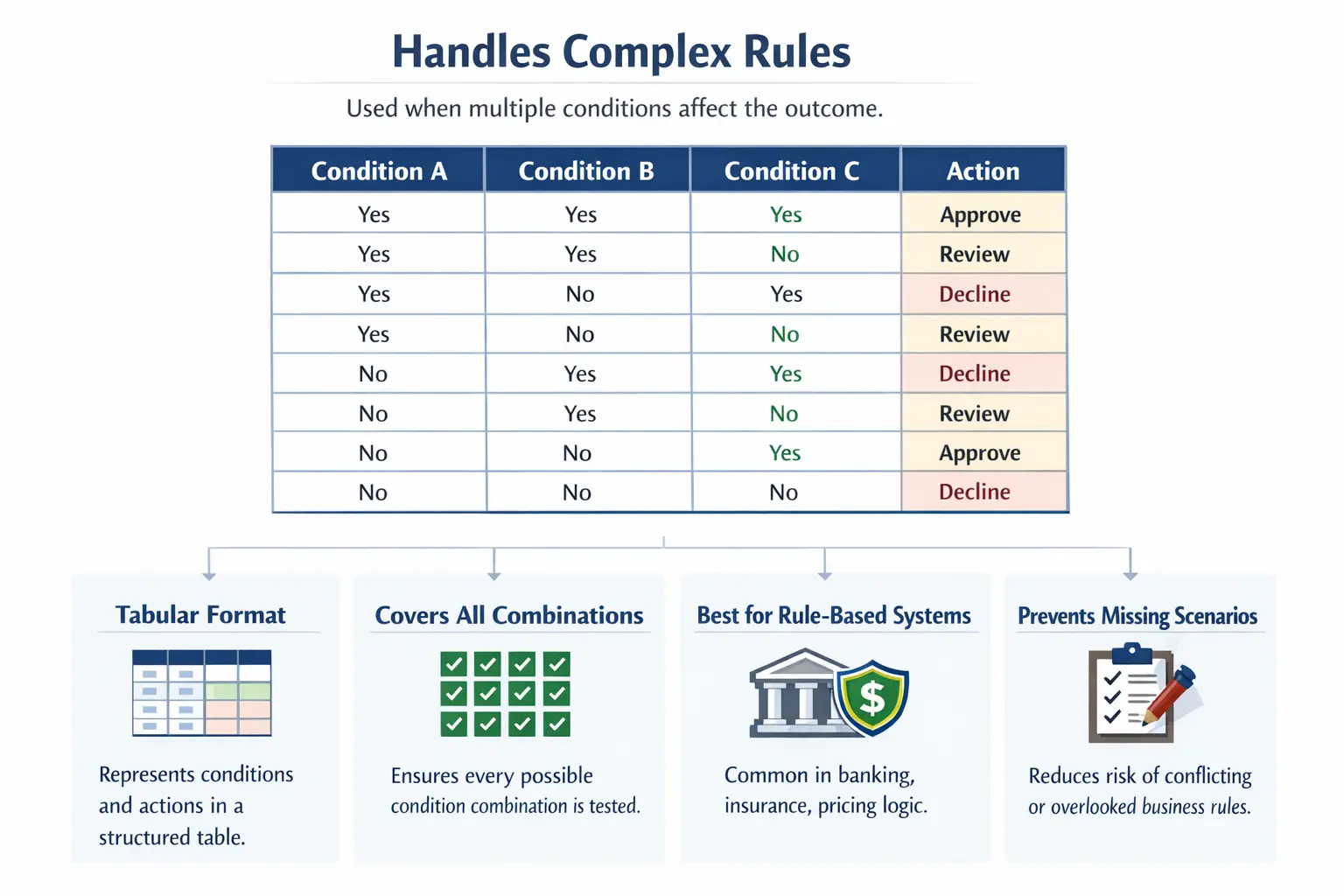
Decision Table Testing is one of the most powerful test case design techniques used to validate complex conditional logic in a structured and systematic manner. It is especially useful when multiple conditions influence a single action or outcome. Rather than writing scattered test cases, this technique organizes business rules into a clear tabular format, ensuring no combination is overlooked.
At its core, Decision Table Testing answers the fundamental question: “What should the system do for each possible combination of conditions?”
Understanding this technique deeply is critical for manual testers, automation engineers, business analysts, and quality assurance professionals who work with rule-driven systems.
Decision Table Testing becomes valuable when the risk is not in a single input, but in the relationship between multiple inputs. A login screen may look simple if we test only username or only password, but the real behavior depends on combinations such as valid username with valid password, valid username with invalid password, locked user with valid password, inactive user with correct password, or expired password with correct credentials. The system must produce the correct outcome for each combination, not just for each individual field.
This is why decision tables are practical beyond theory. They help teams convert unclear business logic into a visible model. Once the conditions, combinations, and expected actions are placed in a table, missing rules become easier to spot. Stakeholders can review the logic, developers can implement it more accurately, and testers can design complete test cases with less guesswork. In rule-heavy applications, a decision table often becomes the bridge between requirement understanding and reliable testing.
Definition of Decision Table Testing
Decision Table Testing is a structured test case design technique used to validate complex business rules by representing different input conditions and their corresponding actions in a tabular format. Each column in the table represents a unique rule or scenario derived from combinations of conditions.
Instead of relying on intuition, this technique ensures that every logical combination of inputs is considered. It eliminates ambiguity in requirements and exposes missing, contradictory, or incomplete rules. Decision tables transform verbal business logic into a visual representation that is easier to analyze and test systematically.
The key idea is that each rule column represents one meaningful business situation. If a decision table has four columns, it generally produces four test scenarios. If it has eight columns, it produces eight possible rule combinations, unless some combinations are logically impossible or intentionally excluded. This makes test coverage transparent. Anyone can look at the table and understand which combinations are covered and what outcome is expected.
Decision tables are especially useful because they separate conditions from actions. Conditions describe what is true or false before the system makes a decision. Actions describe what the system should do after evaluating those conditions. This separation prevents test cases from becoming vague. Instead of writing "check loan approval," the tester can clearly state the exact condition combination and the exact expected approval or rejection result.
Purpose of Decision Table Testing
The primary purpose of Decision Table Testing is to handle complexity. When a system’s behavior depends on multiple inputs interacting with one another, it becomes difficult to ensure complete coverage using traditional techniques like Equivalence Partitioning or Boundary Value Analysis.
Decision tables help testers achieve complete logical coverage. They prevent scenarios from being accidentally ignored. They also reveal inconsistencies in requirements, especially when different combinations lead to unexpected or undefined results.
In real-world projects, business stakeholders often describe rules verbally. These rules may sound clear at first, but when combinations are analyzed, contradictions may appear. Decision tables expose such issues early in the testing lifecycle.
This technique is particularly valuable when:
- Business rules are complex
- Multiple conditions influence outcomes
- Compliance or financial accuracy is critical
- The cost of logical errors is high
Decision tables reduce ambiguity and enforce clarity.
Another important purpose is reviewability. A long paragraph of business rules can be difficult to inspect. A decision table makes the same logic easier to challenge. A business analyst may notice that a particular customer category has no defined outcome. A developer may notice that two rules conflict. A tester may notice that an invalid combination has not been handled. Because the logic is visible, the team can improve the requirement before defects are created in code.
Decision tables also support audit and compliance needs. In regulated domains, teams may need to prove that specific business rules were tested. A decision table provides traceability from requirement to condition combination to test case to result. This is far stronger than saying that the feature was tested generally. It shows exactly which rule combinations were validated.
When to Use Decision Table Testing
Decision Table Testing is most effective when multiple conditions affect the outcome of a system. If a feature behaves differently based on combinations of inputs, this technique is ideal.
Consider systems where eligibility depends on several factors, such as:
- Age and income for loan approval
- Customer type and purchase amount for discounts
- Account balance and transaction type for banking operations
- Subscription level and feature usage for pricing models
In such cases, testing one condition at a time is insufficient. The interaction between conditions must be validated.
This technique is commonly used in industries like banking, insurance, healthcare, payroll, taxation, and e-commerce because these domains depend heavily on conditional logic and rule-based processing.
Decision tables are not necessary for every feature. If a field simply accepts a number between 1 and 100, Boundary Value Analysis may be enough. If a field accepts valid and invalid groups, Equivalence Partitioning may be enough. But when the result depends on two or more conditions working together, decision tables become the better choice. The trigger question is simple: does changing one condition change the meaning of another condition? If yes, a decision table may help.
This technique is also useful when business rules are described with words such as if, when, unless, except, only if, provided that, based on, depends on, and otherwise. These words usually indicate conditional logic. When such phrases appear repeatedly in a requirement, testers should consider creating a decision table before writing individual test cases.
Structure of a Decision Table
A decision table typically consists of four key components:
- Conditions
- Condition values
- Actions
- Action outcomes
Conditions represent the input criteria that influence decisions. These could be yes/no questions, threshold checks, or logical expressions.
Condition values define whether each condition is true or false in a specific rule. Actions describe the result the system should produce when the specified conditions are met.
Each column in the decision table represents a single rule or scenario, and that column becomes a test case. The clarity of this structure is what makes decision tables so powerful.
Conditions should be written clearly and independently. A condition such as "customer is eligible" may be too broad if eligibility itself depends on several factors. Better conditions are specific and measurable, such as "customer is premium", "purchase amount is greater than 500", or "coupon is active". The more precise the conditions are, the easier it becomes to create reliable combinations and expected actions.
Actions should also be specific. Instead of writing "process request", the table should describe whether the system approves, rejects, applies discount, shows warning, requires manual review, sends notification, or blocks the transaction. A decision table is useful only when both the input logic and output behavior are clear.
Simple Example: Loan Approval System
Consider a rule where loan approval depends on two conditions: Age is at least 21, and Income meets a minimum requirement. The decision table below represents all combinations.
| Conditions / Rules | Rule 1 | Rule 2 | Rule 3 | Rule 4 |
|---|---|---|---|---|
| Age ≥ 21 | Yes | Yes | No | No |
| Income ≥ Min | Yes | No | Yes | No |
| Action: Approve Loan | Yes | No | No | No |
Each column represents a unique scenario. Only when both conditions are satisfied does approval occur. Without a decision table, a tester might accidentally skip one combination.
This example also shows why testing only positive flow is dangerous. If a tester validates only Rule 1, the feature appears to work because a qualified customer receives approval. But Rules 2, 3, and 4 validate the rejection logic. In many business systems, rejection logic is as important as approval logic. A system that approves the right users but also approves the wrong users is not correct.
Decision tables make negative and mixed-condition scenarios visible. A customer may satisfy one condition but fail another. These partial-qualification cases are common in real projects, and they often reveal defects because developers may implement only the most obvious successful path. A complete decision table ensures the tester validates all meaningful paths.
Steps to Create Decision Table Test Cases
Creating an effective decision table requires careful requirement analysis.
- Identify all conditions that influence the outcome.
- List all possible combinations of those conditions.
- Define the expected action for each combination.
- Create test cases corresponding to each valid rule.
This structured process ensures that testing is comprehensive rather than guess-based.
While creating the table, testers should also identify impossible or irrelevant combinations. Not every theoretical combination needs to become a test case. For example, a condition such as "user is logged in" and another condition such as "user is guest" may be mutually exclusive in some systems. If a combination cannot occur in real usage or through supported interfaces, it should be marked as not applicable rather than treated as a normal test case.
After the table is created, it should be reviewed with the business owner or analyst. This review is not a formality. It confirms whether the expected actions are correct. Many requirement defects are discovered at this stage because the table forces the team to answer questions that prose requirements often hide.
Decision Table Rules and Test Cases
In a decision table, each rule usually becomes one test case. A rule is the complete combination of condition values in a column, along with the expected action. For example, if Rule 2 says age is valid but income is not valid, the test case should use data that satisfies exactly that combination. The expected result should match the action defined for that rule.
The quality of test cases depends on how accurately the rule is translated into data. If the rule says "premium customer = yes" and "purchase amount greater than 500 = no", the test data must represent a premium customer with an amount of 500 or below. If the selected data accidentally violates the rule, the test case becomes misleading. This is why testers must connect each condition value to concrete test data.
A good decision-table-based test case should include the rule number, condition values, selected test data, expected action, and any important post-condition. For example, if a discount is applied, the test should verify not only that a discount message appears, but also that the correct discount amount is calculated and stored if required. This turns the table into executable quality coverage.
Real-Time Example: Discount Calculation
Consider an e-commerce application with these rules:
- Customer type: Regular or Premium
- Purchase amount: Greater than $500 or less than or equal to $500
The decision table ensures that all combinations are validated:
- Regular customer, amount ≤ 500
- Regular customer, amount > 500
- Premium customer, amount ≤ 500
- Premium customer, amount > 500
Without a decision table, testers may focus only on high-value purchases or premium customers and overlook other combinations.
A more complete discount rule may include additional conditions such as coupon availability, sale period, customer loyalty level, and excluded product category. As conditions increase, manual reasoning becomes harder. A tester may remember to test premium customers and high purchase amounts but forget the case where a premium customer buys an excluded product during a sale period. A decision table prevents this kind of accidental omission.
E-commerce systems are especially suitable for decision tables because pricing and discounts are often controlled by combinations. The final price may depend on customer type, coupon validity, minimum order value, product category, stock status, payment method, delivery region, and membership level. Testing each condition alone is not enough because the defect may appear only when several conditions are true together.
Real-Time Example: Login Access Rules
Consider a login system where access depends on three conditions: credentials are correct, account is active, and password is not expired. If all three are true, the user should log in successfully. If credentials are wrong, access should be denied. If the account is inactive, the user should be blocked even if credentials are correct. If the password is expired, the system should redirect the user to reset the password.
A decision table helps separate these outcomes clearly. It prevents a common testing mistake: validating only valid login and invalid password. Real authentication systems have more business rules than that. A user may be locked, inactive, unverified, expired, or required to complete multi-factor authentication. Each condition can affect the final outcome.
This example also shows why action priority matters. If both password is expired and account is inactive, which message should the system show? Should it show account inactive, password expired, or a generic access denied message? The decision table forces the team to define the expected behavior. Without that clarity, testers and developers may make different assumptions.
Real-Time Example: Insurance Eligibility
Insurance applications often depend on combinations of conditions such as age, medical history, policy type, employment status, existing coverage, and risk category. A person may be eligible for one plan but not another. A user may qualify only if age is within a range and medical history is acceptable. Some combinations may require manual review instead of automatic approval or rejection.
Decision tables are useful here because the cost of logical errors is high. Incorrect eligibility decisions can create financial risk, legal exposure, and customer dissatisfaction. By representing conditions and actions clearly, the testing team can verify that each combination leads to the correct decision: approve, reject, request more information, or send to underwriting review.
Decision Table Testing vs Other Techniques
Decision Table Testing differs from Boundary Value Analysis and Equivalence Partitioning. Equivalence Partitioning focuses on grouping inputs logically. Boundary Value Analysis concentrates on edge values. Decision Table Testing focuses on combinations of conditions.
These techniques complement one another rather than replace one another.
For example, if a discount applies only when purchase amount is above 500 and the customer is premium, Boundary Value Analysis can help test the amount around 500. Equivalence Partitioning can help group customers into premium and non-premium categories. Decision Table Testing then combines those values to verify the rule behavior. A strong testing strategy often uses all three techniques together.
The practical difference is the testing question. Equivalence Partitioning asks, "Which values behave similarly?" Boundary Value Analysis asks, "What happens at the edges?" Decision Table Testing asks, "What happens when these conditions are combined?" Understanding the question helps testers choose the right technique instead of applying one technique everywhere.
Handling Multiple Conditions Without Losing Control
One challenge with decision tables is that the number of combinations can grow quickly. Two yes/no conditions create four combinations. Three conditions create eight. Four conditions create sixteen. Five conditions create thirty-two. This growth is known as combinatorial explosion. If testers create every possible combination without thinking, the table may become too large to maintain.
The solution is not to avoid decision tables, but to use them intelligently. Testers should identify which conditions truly affect the action and which conditions are irrelevant for a particular decision. If a condition does not change the outcome in certain rules, it may be represented as "don't care" using a dash or similar notation. This reduces table size while preserving logic.
Testers should also separate independent decisions into separate tables. A single huge decision table that tries to cover every business rule may become unreadable. Smaller focused tables are often more useful. For example, one table can cover eligibility, another can cover discount calculation, and another can cover approval workflow. This keeps the logic understandable and easier to review.
Using Don't-Care Conditions
A don't-care condition is a condition whose value does not affect the action for a specific rule. It is often represented by a dash. For example, if invalid credentials always lead to access denied, then account status and password expiry may not matter for that rule because the system rejects the login before checking those later conditions. In that case, those conditions can be marked as don't care.
Don't-care notation helps reduce unnecessary combinations. Without it, testers may create many repetitive cases that all produce the same action for the same primary reason. However, it must be used carefully. A condition should be marked as don't care only when the business rule truly does not depend on it. If the system is expected to show different messages for locked accounts versus invalid credentials, then the condition is not irrelevant.
This is why decision table simplification should be reviewed. Reducing combinations is useful, but reducing them incorrectly can hide defects. The goal is to remove redundancy, not remove meaningful logic.
Identifying Impossible and Invalid Combinations
Some condition combinations cannot occur in the real system. For example, a user may not be both "guest" and "registered" at the same time. A payment may not be both "successful" and "failed" at the same stage. A policy may not be both "expired" and "not yet started" for the same effective date. These combinations should be identified and documented rather than blindly turned into test cases.
Other combinations may be technically possible but invalid from a business perspective. For example, a user may attempt to apply a student discount without student verification. The system should reject it. Such combinations are valid test cases because they represent misuse or invalid business conditions. The tester must distinguish between impossible combinations and invalid-but-testable combinations.
This distinction improves coverage quality. Impossible combinations can be excluded to keep the table manageable, while invalid combinations must be tested to verify rule enforcement. Decision tables make this classification visible.
Advantages of Decision Table Testing
Decision Table Testing provides clarity and structure in complex systems. It ensures that no condition combination is missed, reduces ambiguity in requirement interpretation, and highlights missing rules or conflicting outcomes.
It is especially effective in preventing logical defects, which are often harder to detect than simple validation errors. Each column directly corresponds to a rule and a test case, improving traceability and maintainability.
Another advantage is collaboration. Decision tables are understandable to both technical and non-technical stakeholders when written clearly. Business analysts can validate whether the combinations represent real rules. Developers can use the table to implement logic. Testers can use it to create test cases. Product owners can confirm whether the outcomes match business expectations. This shared visibility reduces misunderstandings.
Decision tables also improve defect reporting. If a defect is found, the tester can refer to the specific rule column that failed. Instead of saying "discount calculation is wrong," the tester can say "Rule 4 failed: premium customer with purchase amount greater than 500 and valid coupon should receive 15 percent discount, but only 10 percent was applied." This level of clarity helps developers reproduce and fix issues faster.
Challenges and Limitations
One challenge is combinatorial explosion. As the number of conditions increases, combinations grow exponentially. For example, five binary conditions result in thirty-two combinations, which can be costly to execute without prioritization.
Another challenge is requirement clarity. If requirements are incomplete or ambiguous, the decision table may reflect incorrect assumptions. Testers must collaborate with business analysts and stakeholders to ensure rule accuracy.
Decision tables are also less useful for simple one-field validations. If the rule is only "age must be between 18 and 60," Boundary Value Analysis is more direct. If the rule is "email must be in valid format," Equivalence Partitioning may be more suitable. Using decision tables for every small validation can make testing unnecessarily heavy.
Another limitation is maintenance. When business rules change, the decision table must be updated. If the table is not maintained, it becomes misleading documentation. In fast-changing projects, testers should keep decision tables close to the requirements or test management system so updates are not forgotten.
Common Mistakes in Decision Table Testing
- Failing to include all condition combinations
- Creating too many combinations without prioritization
- Including logically impossible scenarios as valid tests
- Incorrectly defining expected actions
- Using decision tables for simple validations where other techniques are better suited
A serious mistake is writing condition names vaguely. For example, "customer eligible" is unclear if eligibility depends on age, income, region, account status, and document verification. Vague conditions hide complexity instead of clarifying it. Conditions should be broken down until each one can be answered clearly.
Another mistake is ignoring action priority. In many systems, more than one condition may fail at the same time. The application may need to decide which error message to show first or which rule takes precedence. If this priority is not defined, testers may raise defects that developers reject, or developers may implement behavior that business users do not expect.
Testers also sometimes create a table but fail to convert it into executable test cases. A decision table is a design artifact. It becomes useful only when each rule is mapped to test data, steps, expected result, and execution status. Without that mapping, the table may look complete but not actually validate the product.
Decision Table Testing in Agile Projects
In Agile environments, decision tables are useful during requirement grooming sessions. They clarify business rules before development and can serve as documentation for acceptance criteria.
In Behavior-Driven Development (BDD), decision tables often translate directly into scenario outlines. Defining combinations early reduces rework and prevents defects from reaching production.
During backlog refinement, a tester can use a decision table to ask better questions. What happens if the customer is premium but the coupon is expired? What happens if the purchase amount qualifies but the product category is excluded? What happens if two discounts are applicable at the same time? These questions help the team define acceptance criteria more precisely before development begins.
In sprint execution, decision tables help keep test coverage focused. The tester can choose the most important rule combinations for manual validation and mark high-risk combinations for automation. If time is limited, the table still provides visibility into what was tested and what remains a risk. This is far better than relying on memory or informal notes.
Decision tables also support living documentation when combined with BDD. A scenario outline with examples can reflect the same rule combinations from the table. Business stakeholders can read the examples, testers can execute them, and automation can validate them repeatedly. This creates alignment between business rules, test cases, and automated checks.
Decision Table Testing in Automation
Decision tables integrate well with automation frameworks because each column can become a data-driven test case. In automation, they support parameterized tests where combinations are defined in data files and executed systematically.
This improves maintainability and scalability.
In automation frameworks, decision tables can be stored as Excel files, CSV files, JSON files, database rows, or inline data providers depending on the project design. The automation script reads each row or column as a test data set, executes the same business flow, and compares the actual outcome with the expected action. This is a natural fit for data-driven testing.
The main benefit is that logic changes can often be handled by updating data rather than rewriting scripts. If a new customer category is added or a discount rule changes, the test data can be updated to reflect new combinations. The automation code remains focused on performing actions and verifying outcomes.
However, automation teams must avoid over-automating every possible combination blindly. Some combinations may be low risk, impossible, or already covered through lower-level tests. The decision table should guide automation selection, but risk and value should decide what enters the regression suite.
Decision Tables and Requirement Defects
One of the hidden strengths of Decision Table Testing is its ability to find requirement defects before code is written. When requirements are written in paragraphs, missing outcomes may not be obvious. But when the same rules are placed into a table, gaps become visible. If a condition combination has no action, the requirement is incomplete. If two combinations appear identical but produce different actions, the rule may be contradictory.
For example, a policy may say premium users receive free shipping above 500 and coupon users receive free shipping above 700. What happens when a user is both premium and has a coupon? Does the lower threshold apply, the higher threshold apply, or should one offer override the other? A decision table exposes this ambiguity immediately.
Finding this problem during requirement review is much cheaper than finding it during production. That is why decision tables are not just a testing tool. They are also an analysis and communication tool.
Practical Checklist for Decision Table Testing
Before finalizing a decision table, testers should confirm that all decision-driving conditions are listed. Each condition should be measurable and clear. The possible values for each condition should be defined, such as yes/no, true/false, valid/invalid, or specific categories. The table should include all meaningful combinations, and impossible combinations should be marked clearly.
Every rule column should have an expected action. If an action is missing, the requirement needs clarification. If two rules have the same condition values but different actions, the contradiction should be resolved. If many rules produce the same action, the table may be simplified using don't-care conditions where appropriate.
Finally, each rule selected for testing should be mapped to real test data. A table is not enough unless it can be executed. The tester should know what user, input amount, account status, date, role, or product data will be used to represent each rule.
Interview Perspective
Decision Table Testing is a popular interview topic for QA and SDET roles.
Concise explanation:
Decision table testing is a technique used to test multiple condition combinations and their corresponding outcomes.
Detailed explanation:
Decision table testing represents business rules in a structured tabular format. Each column in the table represents a combination of conditions and the expected system action. This ensures systematic and complete validation of rule-based logic.
Interviewers often ask candidates to create a simple decision table on the spot. Practicing real-world examples strengthens understanding.
Project-based explanation:
In a real project, I use Decision Table Testing when the result depends on multiple conditions. I first identify all conditions, list their possible values, create all meaningful combinations, and define the expected action for each combination. Each rule column then becomes a test case. For example, in a loan approval flow, age, income, credit score, and document verification may decide whether the loan is approved, rejected, or sent for manual review. A decision table helps ensure that no combination is missed.
A strong interview answer should also mention limitations. Decision tables are excellent for rule combinations, but they can grow large when conditions increase. Testers must remove impossible combinations, use don't-care values when valid, and prioritize based on risk. This shows practical understanding rather than only textbook knowledge.
Key Takeaway
Decision Table Testing is ideal for rule-heavy and logic-driven systems. It ensures that no condition combination is overlooked and transforms complex requirements into structured and testable logic.
Rather than testing inputs in isolation, this technique validates how conditions interact with each other. It brings clarity, reduces ambiguity, and strengthens coverage.
In complex systems where logic determines outcomes, Decision Table Testing is not optional. It is essential for correctness, reliability, and compliance. When business logic becomes complicated, a decision table becomes your roadmap to complete and systematic testing.