Equivalence Partitioning for Smart Test Case Design
In software testing, one of the biggest challenges testers face is deciding how many test cases are enough. Testing every possible input value is practically impossible in real-world systems. For example, if an input field accepts numbers from 1 to 1,000,000, it is unrealistic to test all one million values. This is where Equivalence Partitioning (EP) becomes a powerful and essential technique.
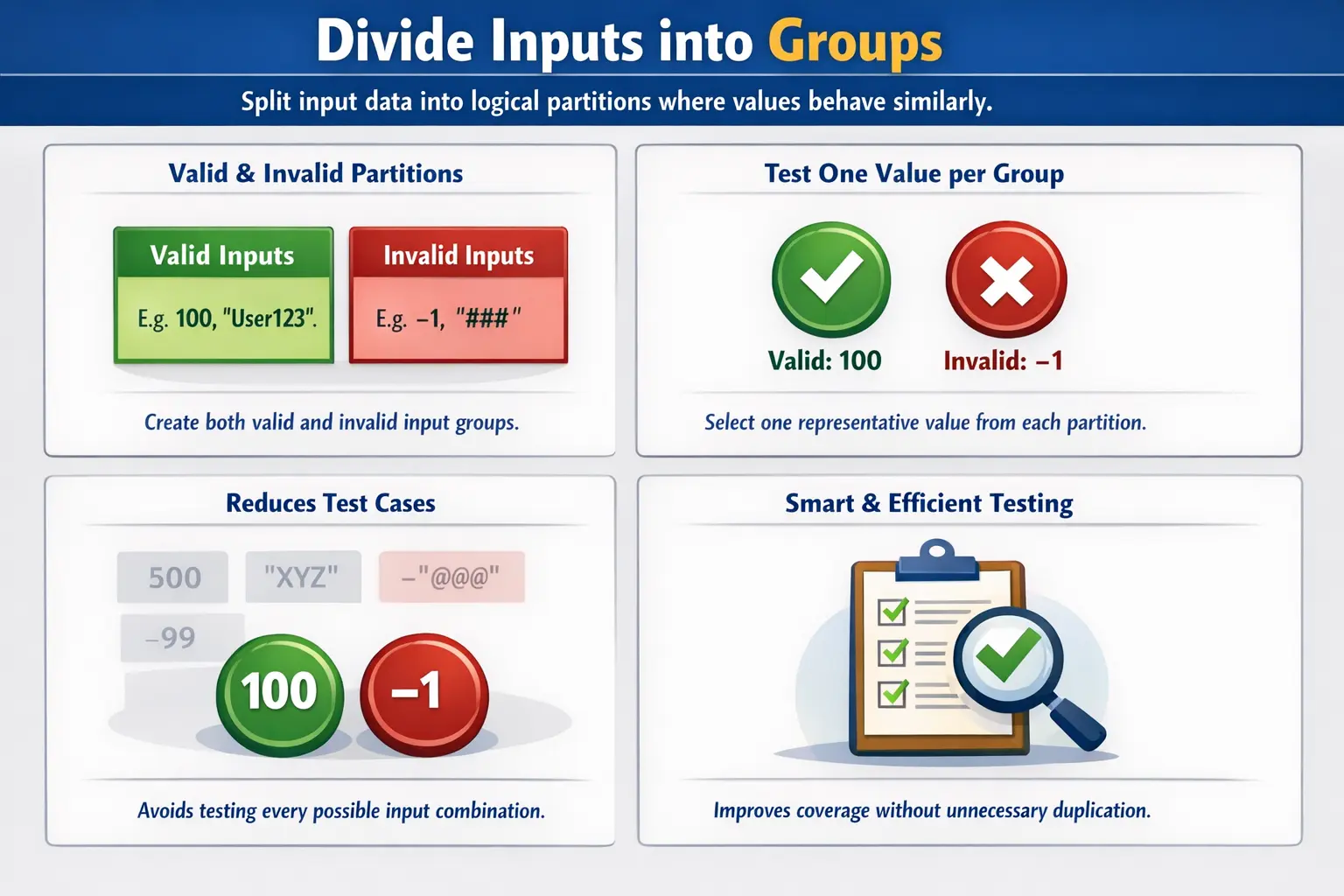
Equivalence Partitioning is one of the most fundamental test case design techniques used in manual and automation testing. It helps testers reduce the number of test cases while maintaining logical and effective coverage.
This article provides a deep understanding of Equivalence Partitioning, including its purpose, types, steps, examples, common mistakes, and interview relevance.
Equivalence Partitioning is especially important because it changes the tester's mindset from quantity to quality. A beginner may believe that more test cases always mean better testing, but experienced testers know that duplicated cases can waste time without increasing confidence. The real value of testing comes from choosing meaningful data that represents different system behaviors. EP gives that selection a clear logic. It helps the tester ask whether two inputs are genuinely different from a system-behavior point of view, or whether they belong to the same group and can be represented by one carefully selected value.
In practical projects, this technique is not limited to textbook range examples. It appears in login forms, registration workflows, payment screens, API request bodies, file upload rules, eligibility checks, discount calculations, tax rules, search filters, and almost every place where the application accepts user input or evaluates a condition. Whenever the system has to accept some values and reject others, Equivalence Partitioning can help testers design cleaner, smaller, and more defensible test coverage.
1. Definition of Equivalence Partitioning
Equivalence Partitioning (EP) is a test case design technique where input data is divided into logical groups, called partitions, such that all values within a partition are expected to behave the same way.
In simpler terms, instead of testing every possible value, we group similar inputs together and test just one representative value from each group.
Equivalence Partitioning answers the key question: “Which inputs can be treated as equivalent?”
If one value from a group works correctly, other values from that same group are assumed to behave similarly.
The word equivalent does not mean the values are identical. It means the application is expected to treat them in the same way. For example, if a rule says that age must be between 18 and 60, the values 25, 35, and 50 are not the same values, but they are equivalent from the rule's point of view because all should be accepted. Similarly, 12 and 15 are different values, but both are equivalent if they belong to the invalid partition below the minimum age. This distinction is what makes EP powerful. The tester is not comparing values mathematically; the tester is grouping them by expected system response.
A well-designed partition must be meaningful. If the system is expected to behave differently for two values, those values should not be placed in the same partition. For example, if users aged 18 to 60 are accepted, but users aged 60 and above also trigger a senior-citizen rule, then 60 may need special consideration. The technique depends on understanding the requirement accurately. EP is simple to explain, but it requires careful thinking to apply well.
2. Why Equivalence Partitioning Is Necessary
In real-world applications, input possibilities are often very large. Consider the following examples:
- Age field: 1 to 120
- Password field: 8 to 20 characters
- Salary field: 0 to 10,000,000
- Text field: unlimited characters
Testing all possible values is impossible. Even if technically possible, it would be inefficient and wasteful.
Equivalence Partitioning solves this problem by:
- Reducing the number of test cases
- Eliminating redundant testing
- Increasing efficiency
- Maintaining logical coverage
- Identifying valid and invalid groups
This makes testing smarter, not heavier.
3. Purpose of Equivalence Partitioning
The main objectives of Equivalence Partitioning are:
- To reduce the number of test cases without reducing coverage
- To improve efficiency and save time
- To avoid duplicate or repetitive testing
- To systematically identify valid and invalid input groups
- To ensure structured testing instead of random testing
Equivalence Partitioning is about optimization. It ensures that each test case adds value.
This optimization matters in real delivery schedules. Testers often work with limited sprint time, changing requirements, unstable builds, and large regression suites. If every field is tested with too many similar values, the suite becomes slow and difficult to maintain. When EP is used properly, testers can explain why a small number of cases is enough for a specific rule. This improves confidence not only for QA, but also for developers, business analysts, and project stakeholders who want to understand why certain scenarios were selected.
EP also supports traceability. When a tester documents valid and invalid partitions clearly, each test case can be traced back to a requirement rule. This makes reviews easier. Instead of reviewing a long list of random values, the team can review the logical groups: valid values, values below range, values above range, invalid formats, missing values, unsupported selections, or restricted business conditions. This gives test design a structured and professional shape.
4. Types of Equivalence Partitions
Equivalence partitions are divided into two primary types:
1. Valid Equivalence Partition
This includes input values that satisfy the requirement. These inputs are expected to be accepted by the system.
2. Invalid Equivalence Partition
This includes input values that do not satisfy the requirement. These inputs are expected to be rejected by the system.
Each partition should be tested using at least one representative value.
5. How to Apply Equivalence Partitioning (Step-by-Step)
Applying Equivalence Partitioning requires structured thinking. Follow these steps:
Step 1: Identify Input Conditions
Understand the requirement clearly. Identify constraints such as range, format, length, type, or business rule.
Step 2: Divide Inputs into Partitions
Split the input space into valid and invalid groups. Each group must contain values that behave similarly.
Step 3: Select Representative Values
Choose one value from each partition to represent that entire group.
Step 4: Design Test Cases
Create test cases using selected representative values. This process ensures logical coverage with minimal effort.
6. Understanding Input Conditions Before Partitioning
The most important step in Equivalence Partitioning happens before test cases are written. The tester must first understand the input condition clearly. An input condition may be a numeric range, a character-length rule, a mandatory or optional field, a format requirement, a list of allowed values, a business eligibility rule, or a combination of several constraints. If the input condition is misunderstood, the partitions will also be wrong.
For example, consider a username field. If the requirement says the username must contain 6 to 20 characters, a simple partitioning approach might create one valid group and two invalid groups based only on length. But if the requirement also says the username may contain only letters, numbers, and underscores, there are additional invalid partitions for unsupported special characters, spaces, and possibly non-English characters depending on the application rules. If the requirement says the username must be unique, another partition appears: existing username versus new username. The more accurately testers read the condition, the more complete the partition model becomes.
This is why EP should not be treated as a mechanical formula. It is a reasoning technique. The tester reads the rule, identifies meaningful groups, challenges ambiguity, and confirms assumptions with the business analyst or product owner when necessary. If a requirement says "valid mobile number" but does not define country code, length, allowed prefixes, or formatting symbols, the tester cannot create reliable partitions. In such cases, EP helps expose requirement gaps early.
7. Valid Partitions Need Careful Thinking
Many testers assume that every field has only one valid partition. Sometimes that is true, but not always. A valid partition is not simply "everything accepted by the system." It is a group of accepted values that are expected to follow the same behavior. If accepted values trigger different outcomes, they may represent different valid partitions.
Imagine an e-commerce discount rule. Customers with order value below 1,000 receive no discount. Customers with order value from 1,000 to 4,999 receive 5 percent discount. Customers with order value from 5,000 and above receive 10 percent discount. All these order values may be valid inputs, but they are not one valid partition because the expected business outcome differs. In this case, the tester should create separate valid partitions for no-discount, 5-percent-discount, and 10-percent-discount ranges.
The same idea applies to user roles. A system may accept login for customer, manager, and administrator accounts, but the landing page, permissions, and available actions may differ. These are all valid users, but they are not equivalent in behavior. A single "valid login" test may not be enough. EP becomes more powerful when the tester groups values by outcome, not just by acceptance.
8. Invalid Partitions Are Just as Important
Invalid partitions confirm that the application rejects incorrect input safely and clearly. This is where many real defects are found. A system that accepts valid data but fails to reject invalid data is still not reliable. Users may leave required fields blank, enter unsupported formats, paste unusually long text, type negative numbers, upload wrong file types, or attempt actions that violate business rules. Each of these may represent a separate invalid partition.
Invalid partitions should not be combined carelessly. For a salary field that accepts numbers between 10,000 and 100,000, "5,000", "200,000", "abc", blank input, and a special character are all invalid, but they are not necessarily equivalent. A below-minimum value tests lower range validation. An above-maximum value tests upper range validation. Alphabetic input tests data type validation. Blank input tests mandatory validation. Special characters may test sanitization or input filtering. If the system handles these differently, each deserves separate representation.
Good invalid partition testing also checks the expected response, not only the rejection. The application should display a meaningful error message, keep the user's valid data where appropriate, avoid crashes, and prevent partial processing. For example, if an invalid payment amount is entered, the transaction should not be created, the balance should not change, and the user should receive a clear reason. EP helps identify the invalid input; good testing also verifies the correct failure behavior.
9. Real-Time Example 1: Age Field
Requirement: Age must be between 18 and 60.
Partitions:
- Valid Partition: 18 to 60
- Invalid Partition 1: Less than 18
- Invalid Partition 2: Greater than 60
Representative Test Values:
- 30 (valid)
- 15 (invalid – below range)
- 65 (invalid – above range)
Instead of testing all values from 18 to 60, we test one representative value.
10. Real-Time Example 2: Password Length Validation
Requirement: Password must be between 8 and 12 characters.
Partitions:
- Valid Partition: 8 to 12 characters
- Invalid Partition 1: Less than 8 characters
- Invalid Partition 2: More than 12 characters
Representative Test Values:
- 10 characters (valid)
- 5 characters (invalid)
- 15 characters (invalid)
This ensures complete logical validation without unnecessary duplication.
11. Real-Time Example 3: Dropdown Selection
Requirement: Country field must have one selected value.
Partitions:
- Valid Partition: One valid country selected
- Invalid Partition 1: No selection
- Invalid Partition 2: Invalid selection (if applicable)
Representative Test Cases:
- Select “USA” (valid)
- Leave blank (invalid)
Even dropdowns can use Equivalence Partitioning.
12. Real-Time Example 4: Salary Input Field
Requirement: Salary must be numeric and between 10,000 and 100,000.
Partitions:
- Valid Partition: Numeric values between 10,000 and 100,000
- Invalid Partition 1: Less than 10,000
- Invalid Partition 2: Greater than 100,000
- Invalid Partition 3: Non-numeric values
Representative Values:
- 50,000 (valid)
- 5,000 (invalid)
- 200,000 (invalid)
- “abc” (invalid)
Notice how multiple invalid partitions may exist.
13. Equivalence Partitioning vs Exhaustive Testing
| Aspect | Equivalence Partitioning | Exhaustive Testing |
|---|---|---|
| Number of test cases | Few | Very many |
| Efficiency | High | Low |
| Practicality | Realistic | Impossible |
| Coverage | Logical | Theoretical complete |
Exhaustive testing means testing every possible input combination. In most systems, this is unrealistic.
Equivalence Partitioning offers a balanced and practical alternative.
14. When to Use Equivalence Partitioning
Equivalence Partitioning is highly effective in:
- Numeric input fields
- Text length validations
- Form validations
- Age, salary, percentage, and amount fields
- Dropdown validations
- Business rule validations
- API parameter validation
Whenever inputs can be grouped logically, EP can be applied.
15. Combining EP with Boundary Value Analysis
Equivalence Partitioning is often used together with Boundary Value Analysis (BVA).
Example: Age range: 18–60.
- EP groups values into valid and invalid partitions.
- BVA tests boundary values like 18, 60, 17, and 61.
EP identifies groups. BVA focuses on edges. They complement each other.
16. EP and BVA Together in Real Test Design
In real test design, Equivalence Partitioning and Boundary Value Analysis are rarely isolated. EP tells the tester which logical groups exist, while BVA tells the tester which values near the edges deserve special attention. If the requirement says age must be between 18 and 60, EP gives three groups: below 18, 18 to 60, and above 60. BVA then pushes the tester to check 17, 18, 19, 59, 60, and 61. Together, they provide stronger coverage than either technique alone.
The reason this combination is useful is simple: defects often occur at boundaries, but boundaries belong to partitions. If testers use only EP and select 30 as the valid representative value, they may miss a defect where the application incorrectly rejects 18 or 60. If testers use only BVA without thinking about partitions, they may miss invalid formats, unsupported data types, or separate business categories. EP creates the map; BVA zooms into the border areas.
A mature test case design approach often starts with EP, then adds BVA for each range-based partition, and finally uses other techniques such as decision tables or state transition testing when rules interact with each other. This layered approach keeps testing efficient while reducing the chance of blind spots.
17. Equivalence Partitioning for Forms
Forms are one of the most common areas where Equivalence Partitioning is applied. A registration form may contain name, email, mobile number, password, date of birth, country, state, postal code, terms acceptance, and optional referral code. Each field has its own partitions. The name field may have valid alphabetic values, blank input, too-short input, too-long input, numeric input, and special-character input. The email field may have valid email format, missing @ symbol, missing domain, unsupported characters, blank value, and duplicate email. The password field may have length partitions, complexity partitions, and confirmation mismatch partitions.
Without EP, testers may either write too few form tests or too many unstructured tests. With EP, the tester can organize validation clearly. For each field, identify valid partitions and invalid partitions. Then select representative values from each group. After field-level validation, design a few scenario-level tests that combine fields realistically. This prevents the suite from becoming a random collection of input attempts.
It is also important to avoid testing every invalid field in one single test case. If a registration form contains invalid name, invalid email, invalid mobile number, invalid password, and unchecked terms in the same case, the result may not clearly identify which validation failed. Better practice is to isolate the partition under test when possible. This makes defects easier to reproduce and easier for developers to fix.
18. Equivalence Partitioning for API Testing
Equivalence Partitioning is not only for user interface testing. It is extremely useful in API testing because APIs often expose input parameters directly. A POST request may contain fields such as userId, amount, status, date, category, currency, and authentication token. Each parameter can be partitioned into valid and invalid groups based on type, format, range, allowed values, mandatory rules, and business constraints.
For example, if an API accepts order status values such as CREATED, PAID, SHIPPED, and CANCELLED, these allowed values may form one or more valid partitions depending on behavior. Unsupported values such as UNKNOWN, blank status, lowercase values if not supported, numeric status, and null status may form invalid partitions. If the API behaves differently for each valid status, then each status should be tested as a separate partition. If all unsupported statuses return the same validation error, one representative value may be enough for that invalid group, while null or missing status may still need separate checks.
API testing also highlights an important EP principle: do not rely only on UI restrictions. A browser field may prevent users from typing letters into a numeric field, but the API may still receive alphabetic values from external clients. EP helps testers validate the system at the service level, where invalid data can bypass UI controls. This is especially important for security, data integrity, and integration reliability.
19. Test Data Selection Using Equivalence Partitioning
Selecting representative values is a skill. The representative value should be simple, clear, and traceable to the partition it represents. For a valid age range of 18 to 60, choosing 30 is easy to understand. For an invalid below-range partition, 15 clearly belongs below the minimum. For an invalid above-range partition, 65 clearly belongs above the maximum. These choices make test cases readable.
However, representative values should not be selected carelessly. If a partition is too broad, one value may not truly represent it. For example, a text field that accepts up to 500 characters may behave differently for ordinary words, Unicode characters, line breaks, emojis, and pasted rich text. If the application has special handling for these inputs, they should be separate partitions. The tester's job is to decide where one behavior group ends and another begins.
Test data should also be realistic when business meaning matters. For a loan application, using random values may technically test a partition, but realistic values make defects easier to understand. A credit score of 720, a monthly income of 75,000, and an age of 35 communicate business intent better than arbitrary numbers. Good test data improves both execution and defect communication.
20. Common Mistakes in Equivalence Partitioning
Even though EP is simple conceptually, testers often make mistakes.
Mistake 1: Ignoring Invalid Partitions
Testing only valid inputs is incomplete. Invalid partitions must be tested.
Mistake 2: Confusing EP with Boundary Testing
EP groups data logically. Boundary testing specifically targets edge values.
Mistake 3: Assuming One Valid Case Is Always Enough
Sometimes multiple valid partitions exist. Each logical group must be represented.
Mistake 4: Overlooking Data Type Constraints
For example, entering letters in numeric fields forms an invalid partition.
Mistake 5: Not Documenting Partitions Clearly
Poor documentation leads to missed scenarios.
21. Advantages of Equivalence Partitioning
- Reduces test case count
- Saves time and effort
- Increases efficiency
- Maintains structured coverage
- Easy to apply
- Ideal for manual testing
- Useful in automation test design
It is one of the simplest yet most powerful test design techniques.
22. Limitations of Equivalence Partitioning
- Does not specifically test boundary values
- May miss defects at edges if used alone
- Requires good requirement understanding
- Not ideal for complex decision logic (Decision Table is better there)
Therefore, EP should be combined with other techniques when needed.
23. EP in Agile and Real Projects
In Agile projects, time is limited. Testers cannot write hundreds of redundant test cases.
Equivalence Partitioning helps:
- During sprint testing
- During regression suite optimization
- While reducing automation scripts
- While designing API validation scenarios
It ensures fast yet reliable validation.
24. EP in Automation Testing
Equivalence Partitioning is extremely useful when creating data-driven automation tests.
Instead of adding hundreds of test data entries, you add:
- One valid partition value
- Multiple invalid partition values
This keeps automation lean and maintainable.
25. EP in Regression Suite Optimization
Regression suites often become large over time. Every sprint adds new features, new fixes, and new scenarios. If teams keep adding similar test cases without reviewing them, regression execution becomes slow and expensive. Equivalence Partitioning helps testers clean and optimize regression coverage without blindly removing important cases.
For example, suppose a username validation suite contains twenty test cases that all use valid usernames between 6 and 20 characters. If all of those usernames belong to the same behavior group, many of those cases may be redundant. The tester can keep one or two strong representatives and focus additional cases on genuinely different partitions such as too short, too long, blank, duplicate, unsupported characters, and reserved words. This reduces execution time while preserving meaningful coverage.
EP also makes automated regression easier to maintain. Automated scripts are not free; they require data management, environment stability, code maintenance, result analysis, and debugging. A small, well-designed automation suite based on partitions is often more valuable than a large suite filled with repeated checks. When automation failures occur, partition-based data also helps teams identify whether the issue belongs to a range rule, format rule, mandatory-field rule, or business-policy rule.
26. EP During Requirement Review
Equivalence Partitioning is not only a test execution technique. It is also useful during requirement review. When testers read a requirement, they can immediately ask what the valid and invalid partitions are. If those partitions cannot be identified, the requirement may be incomplete or ambiguous.
Consider a requirement that says, "The user should enter a valid password." This is not enough for good testing. What is the minimum length? What is the maximum length? Are uppercase letters required? Are special characters required? Are spaces allowed? Are previously used passwords rejected? Are common passwords blocked? Each answer creates or changes partitions. By asking these questions early, testers prevent defects before code is written.
This is one reason EP supports shift-left testing. Instead of waiting until the build is ready, testers can use partition thinking during story refinement, acceptance criteria review, and test planning. The technique improves requirement quality, not just test case quality.
27. EP and Risk-Based Testing
Not all partitions carry the same risk. Some partitions are business-critical, while others have minor impact. A banking amount field, insurance eligibility rule, medical dosage range, or tax calculation rule deserves more careful partition analysis than a simple optional comment field. Risk-based testing helps the team decide where to apply EP deeply and where to keep it lightweight.
For high-risk areas, testers may select more than one representative value from a partition, especially if the partition is broad or has historical defects. They may also combine EP with Boundary Value Analysis, decision tables, exploratory testing, and production defect history. For lower-risk areas, one representative value per partition may be enough. The technique is flexible; the tester should scale the depth of testing based on risk.
Risk also affects negative partitions. Invalid payment amounts, unauthorized role inputs, invalid file uploads, and unsupported API parameters may create security or data-integrity risks. These invalid partitions should be tested carefully because they protect the system from misuse and unexpected behavior.
28. Writing Clear Test Cases from Partitions
A good EP-based test case should clearly show the partition it represents. The title should not be vague. Instead of writing "Validate age field," a better title is "Age below minimum should be rejected" or "Valid age within allowed range should be accepted." Clear titles make reviews easier and help future testers understand why the case exists.
The test data should also be visible. If the selected representative value is 15 for below-minimum age, the expected result should explain that the system rejects the age because it is below 18. This avoids confusion during execution. When a defect is raised, the partition context helps developers understand the failed rule quickly.
In test management tools, testers can add the partition type to the description or tags. Examples include valid-range, invalid-below-minimum, invalid-above-maximum, invalid-format, blank-input, duplicate-value, or unsupported-option. This makes test reporting more meaningful. If many failures occur in invalid-format cases, the team can identify a validation weakness rather than treating each failure as isolated.
29. Practical Checklist for Equivalence Partitioning
Before finalizing EP-based test cases, testers should review the partitions against a practical checklist. First, confirm that the requirement is clear and testable. Second, identify all valid input groups. Third, identify all invalid input groups, including missing values, wrong types, unsupported formats, values below range, values above range, and business-rule violations. Fourth, select representative values that clearly belong to each partition. Fifth, verify whether boundary values should be added using BVA.
Testers should also check whether multiple valid partitions exist. If accepted inputs produce different business outcomes, they should not be grouped together. The checklist should include expected results for each partition, not only input data. Finally, partitions should be reviewed when requirements change. A partition model that was correct in one sprint may become incomplete after a new rule is added.
30. How EP Improves Tester Communication
Equivalence Partitioning gives testers a professional language for explaining coverage. Instead of saying, "I tested some values," the tester can say, "I tested one valid partition, one below-range invalid partition, one above-range invalid partition, one blank-value partition, and one invalid-format partition." This is much stronger. It shows that test data was chosen intentionally.
This communication is useful in defect discussions, review meetings, audit conversations, and interviews. Developers can understand which rule failed. Business analysts can confirm whether the partition model matches business expectations. Test leads can evaluate whether the suite has enough coverage. EP therefore improves not just test design, but also team alignment.
31. Interview-Ready Answers
Short Answer
Equivalence Partitioning is a test case design technique that divides input data into logical groups, where one representative value is tested from each group.
Detailed Answer
Equivalence Partitioning reduces the number of test cases by grouping inputs that are expected to produce similar outcomes. By selecting one value from each valid and invalid partition, testers achieve logical coverage while minimizing redundancy.
Project-Based Answer
In a real project, I use Equivalence Partitioning when a field or rule has many possible inputs. I first study the requirement, identify valid and invalid groups, and then select representative test data from each group. For example, if age must be between 18 and 60, I create partitions for valid age, age below 18, and age above 60. I may combine this with Boundary Value Analysis to test values like 17, 18, 60, and 61. This helps me reduce redundant test cases while still covering the rule logically.
32. Key Takeaway
Equivalence Partitioning is about testing smarter, not testing more.
It allows testers to reduce redundant test cases while ensuring proper validation of both valid and invalid input groups. When applied correctly, it significantly improves efficiency without compromising quality.
A skilled tester does not test every possible value.
A skilled tester identifies logical partitions and tests representative values.
That is the power of Equivalence Partitioning.