Unary Operators in Java to Increment, Decrement, and Expression Behavior
In Java, some of the most powerful operations are also the simplest in appearance. Unary operators are a perfect example of this principle. They operate on a single operand, yet they play a crucial role in loops, expressions, conditional logic, and performance-sensitive code. Despite their simplicity, unary operators are one of the most frequently misunderstood topics—especially when it comes to pre vs post increment/decrement behavior.
In real-world development, unary operators are used everywhere—from controlling loop counters to toggling boolean states and performing quick value transformations. However, subtle mistakes in their usage can lead to unexpected results, making them a common source of bugs and a favorite topic in interviews.
This article provides a complete, structured, and real-world understanding of unary operators in Java, focusing on behavior, execution flow, edge cases, and best practices.
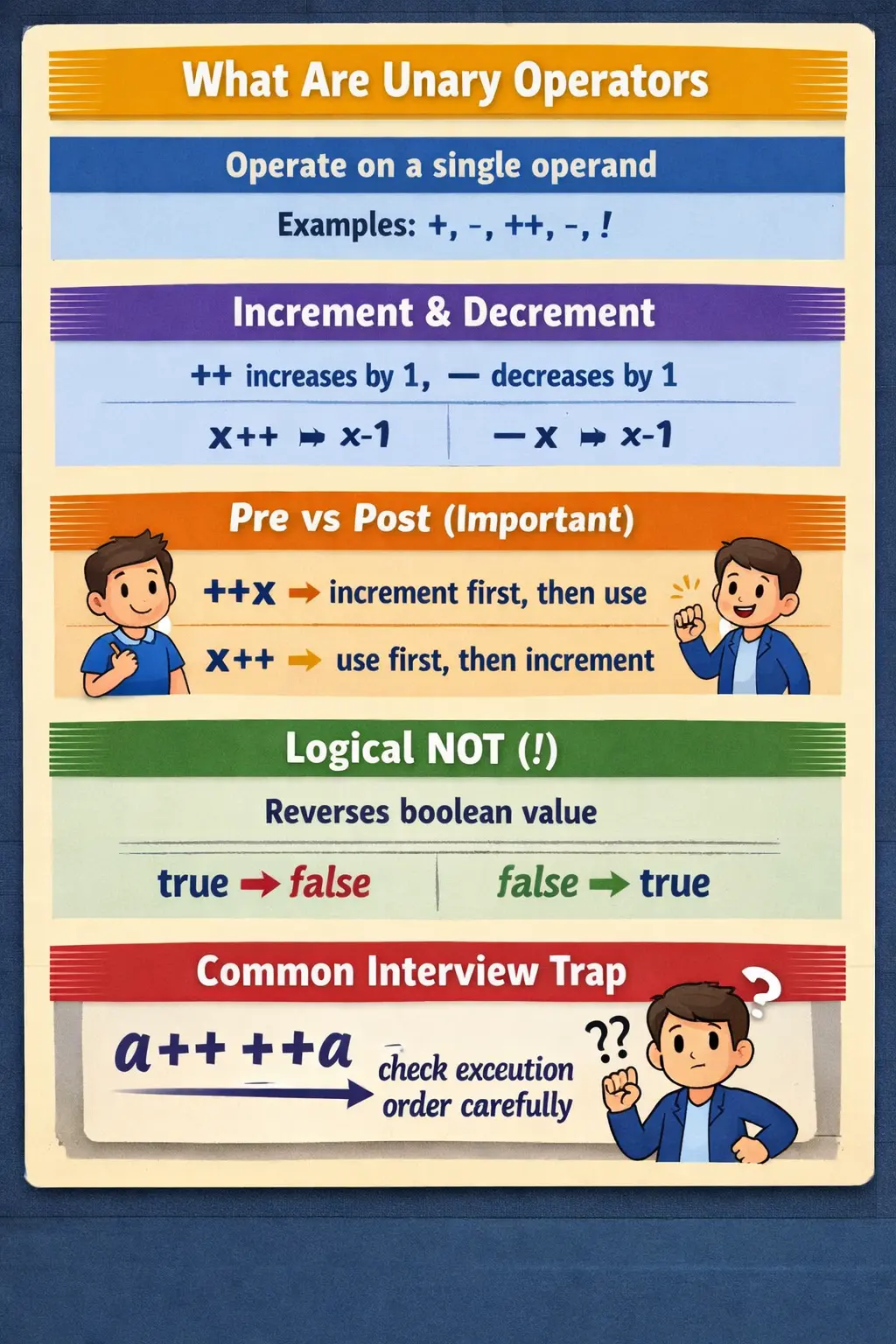
What Are Unary Operators?
Unary operators are operators that work on a single operand. Unlike binary operators (which operate on two values), unary operators modify or evaluate one value at a time.
At a conceptual level, unary operators answer simple questions such as:
- How do we increment or decrement a value efficiently?
- How do we negate a value?
- How do we reverse a boolean condition?
These operators are widely used in:
- Loop counters (for, while)
- Conditional expressions
- Value transformations
- Boolean logic
Although they perform simple operations, their behavior—especially in expressions—can be complex and requires careful understanding.
Types of Unary Operators in Java
Java provides five primary unary operators:
- Unary plus (
+) - Unary minus (
-) - Increment (
++) - Decrement (
--) - Logical NOT (
!)
Each operator serves a specific purpose, and their behavior varies depending on context.
Unary Plus (+) – Indicating Positivity
The unary plus operator indicates that a value is positive.
int a = +10; // same as 10
In practice, this operator is rarely used because numeric values are positive by default unless explicitly negated.
Why It Exists: The unary plus operator exists for syntactic completeness and consistency with mathematical expressions. It can also be useful in certain parsing or expression scenarios. However, in real-world Java programming, it is mostly redundant.
Unary Minus (-) – Negating Values
The unary minus operator converts a value into its negative form.
int a = 10;
int b = -a;  // -10
This operator is commonly used in mathematical calculations, value transformations, and financial or scientific computations.
Increment Operator (++) – Increasing Values Efficiently
The increment operator increases the value of a variable by 1. It is one of the most frequently used unary operators in Java.
There are two forms of increment:
- Pre-increment (
++x) - Post-increment (
x++)
Pre-Increment (++x) – Increment First, Then Use
int x = 5;
int y = ++x;
Result: x = 6, y = 6.
Post-Increment (x++) – Use First, Then Increment
int x = 5;
int y = x++;
Result: x = 6, y = 5. This subtle difference is extremely important and often tested in interviews.
Real Interview Example – Expression Evaluation
int a = 10;
System.out.println(a++ + ++a);
a++returns 10, thenabecomes 11++aincrements to 12, then returns 12- Final result is
10 + 12 = 22
Decrement Operator (--) – Reducing Values
The decrement operator decreases the value of a variable by 1. Like increment, it has two forms: pre-decrement and post-decrement.
Pre-Decrement (--x)
int x = 5;
int y = --x;
Result: x = 4, y = 4.
Post-Decrement (x--)
int x = 5;
int y = x--;
Result: x = 4, y = 5.
Logical NOT (!) – Reversing Boolean Values
boolean isActive = false;
System.out.println(!isActive); // true
This operator is essential in conditional statements, boolean toggling, and simplifying expressions.
if (!isLoggedIn) {
    // redirect to login
}
Unary Operators with char – Hidden Numeric Behavior
In Java, char values are internally represented as integers (Unicode values). This allows unary operators to work on characters.
char ch = 'A';  // 65
ch++;
System.out.println(ch); // 'B'
Important Rules and Restrictions
Only Variables, Not Constants
Increment and decrement operators can only be applied to variables, not constants or literals.
10++; // invalid
Unary Operators and Type Promotion
byte b = 10;
b++;   // allowed

b = b + 1; // compilation error
The expression b + 1 produces an int, and Java does not automatically cast it back to byte. Unary operators like ++ and -- perform implicit casting, making them more flexible than equivalent arithmetic expressions.
Operator Precedence and Evaluation
Unary operators have higher precedence than most other operators.
int x = 5;
int result = ++x * 2;  // 12
Common Real-World Use Cases
Loop Counters
for (int i = 0; i < 10; i++) {
    System.out.println(i);
}
Decrementing Counters
while (count > 0) {
    count--;
}
Boolean Toggle
isActive = !isActive;
Character Iteration
for (char c = 'A'; c <= 'Z'; c++) {
    System.out.print(c);
}
Common Beginner Mistakes
- Confusing pre-increment and post-increment, especially inside expressions.
- Using increment operators in complex expressions, which makes code hard to read and debug.
- Applying unary operators to constants or literals.
- Overusing unary operators in nested expressions and reducing clarity.
Best Practices for Using Unary Operators
- Use unary operators in simple expressions.
- Avoid using multiple increments in a single statement.
- Prefer clarity over cleverness.
- Use parentheses when needed.
- Avoid complex chained operations.
Good practice:
x++;
Example to avoid:
int result = x++ + ++x;
Interview Perspective
Unary operators are a high-frequency interview topic, especially around pre vs post increment, expression evaluation, type promotion, and edge cases. Interviewers test not just syntax but execution order and behavior understanding.
Key Takeaway
Unary operators in Java may appear simple, but they are powerful tools that influence program logic, execution flow, and performance. Understanding pre/post behavior, handling type promotion correctly, and avoiding unnecessarily complex expressions are essential for writing reliable code.
How Unary Operators Affect Program State
Unary operators are closely connected to program state because several of them modify the value stored in a variable. Increment and decrement operators do not merely calculate a temporary value; they update the variable itself. When count++ runs, the value of count changes. This makes unary operators different from simple expressions such as count + 1, which produces a result but does not automatically store it anywhere.
This distinction matters in real code. A loop counter, retry count, page index, stock quantity, or countdown timer depends on state changing at the right time. If the value changes too early or too late, the program can skip elements, repeat work, run one extra time, or stop before completing its task. Unary operators are small, but they control movement through many program flows.
Thinking in terms of state helps clarify when unary operators should be used. If the intention is to update a variable by one, ++ or -- is concise and clear. If the intention is only to calculate a value without changing the original variable, ordinary arithmetic may be safer. A developer should always know whether the unary operator is changing stored state or only contributing to an expression result.
Prefix vs Postfix: The Core Difference
The most important unary operator concept is the difference between prefix and postfix forms. Prefix increment, written as ++x, updates the variable first and then produces the updated value. Postfix increment, written as x++, produces the current value first and then updates the variable. The same rule applies to decrement: --x decrements before use, while x-- uses the current value before decrementing.
When the operator appears alone as a statement, the difference usually does not matter. Both x++; and ++x; increase x by one. The difference becomes important when the operator appears inside a larger expression, method call, assignment, or print statement. In those cases, the value contributed to the expression may be different from the final value stored in the variable.
This is why interview questions often use expressions such as a++ + ++a. They are testing whether the candidate can track both the value returned by each operator and the value stored after each step. In production code, however, such expressions are usually avoided because they are harder to read and easier to misunderstand.
Expression Evaluation with Unary Operators
Java evaluates expressions according to defined rules, but expressions containing multiple unary updates can still be difficult to reason about. Consider int result = x++ + ++x. The first part contributes the old value of x and then increments it. The second part increments the already changed value and contributes the new value. The final result depends on execution order and side effects.
This side-effect behavior is what makes unary operators tricky. A side effect is a change that happens while an expression is being evaluated. Increment and decrement operators have side effects because they modify the variable. Logical NOT and unary minus do not modify the original value unless their result is assigned somewhere. Understanding which operators mutate state and which do not is essential for reading Java expressions accurately.
Readable Java code usually avoids multiple side effects in one expression. Instead of writing a clever one-liner, split the steps. Increment the variable in one statement, then use it in another. This makes debugging easier and prevents misunderstandings during code reviews. The compiler may understand complex expressions, but human readers maintain the code.
Unary Plus and Unary Minus in Practical Code
Unary plus exists mostly for consistency with mathematical notation. It explicitly marks a value as positive, but because numeric literals are positive by default, it is rarely needed in everyday Java code. It may appear in generated code, expression parsers, or examples where positive and negative values are shown symmetrically. In most application code, +x is unnecessary unless it improves clarity in a specific context.
Unary minus is far more useful. It changes the sign of a numeric value. This is common in calculations involving differences, offsets, debt values, refunds, coordinate movement, and reverse direction. For example, a refund may be represented as a negative adjustment, or a game coordinate may move backward by applying unary minus to a distance value.
Developers should remember that unary minus produces a value; it does not automatically change the original variable unless assigned. If x is 10, the expression -x evaluates to -10, but x remains 10. To update the variable, code must write x = -x. This distinction is similar to ordinary arithmetic and helps avoid confusion between expression results and stored state.
Logical NOT in Real Conditions
The logical NOT operator reverses a boolean value. It is commonly used in guard clauses, validations, login checks, feature flags, and toggle behavior. A condition such as if (!isLoggedIn) reads naturally as "if the user is not logged in." This is usually clearer than comparing explicitly with false.
Logical NOT is also useful when a condition should be reversed without rewriting the entire expression. For example, !(age >= 18) means the person is not an adult according to that rule. However, overusing NOT can reduce readability, especially when expressions contain multiple nested conditions. Double negatives can make logic harder to understand than necessary.
A good practice is to name boolean variables positively when possible. Names such as isActive, hasPermission, and isValid work well with NOT because !isActive, !hasPermission, and !isValid are easy to read. Names with negative wording, such as isNotAllowed, can become confusing when negated.
Bitwise Complement and Two's Complement Behavior
The bitwise complement operator ~ flips every bit of an integer value. Although it is often grouped with unary operators, it is different from logical NOT. Logical NOT works on boolean values. Bitwise complement works on integral numeric types. For an integer x, the result of ~x is equivalent to -(x + 1) because Java integers use two's complement representation.
This is why ~5 produces -6. The operator is not simply adding a minus sign. It changes every binary bit. Beginners often find this surprising because they expect a direct negative value. Understanding the two's complement rule makes the result predictable.
In everyday application development, ~ is less common than ++, --, and !. It appears more often in low-level programming, bit masks, flags, compression, encryption-related logic, and performance-sensitive code that manipulates bits directly. For most business applications, it is important mainly for interviews and for reading existing bitwise code correctly.
Unary Operators with Primitive Types
Unary operators behave differently depending on the operand type. Increment and decrement can be used with numeric variables, including byte, short, int, long, float, double, and char. They cannot be used with boolean values because true and false do not have a numeric sequence. Logical NOT works only with boolean values.
For smaller numeric types, unary increment and decrement have a special convenience. A byte variable can be incremented with b++, even though b = b + 1 would fail without casting because arithmetic promotes byte to int. The increment operator handles the required conversion back to the variable type. This makes it convenient, but developers should still be aware of overflow possibilities.
With char, increment and decrement move through Unicode values. Incrementing 'A' produces 'B'. This can be useful for simple character iteration, but it should not be confused with full language-aware text processing. Character sequences in Unicode may not always match human alphabetical expectations across languages and symbols.
Unary Operators with Wrapper Classes
Unary operators can also appear with wrapper classes such as Integer and Boolean, but hidden conversions occur. When Integer a = 10; ++a; runs, Java unboxes the Integer into an int, increments the primitive value, and boxes the result back into an Integer. The code is concise, but several operations happen behind the scenes.
This matters for both performance and null safety. Repeated unary updates on wrapper objects can create overhead compared with primitive updates. More importantly, if the wrapper reference is null, unboxing fails with a NullPointerException. A statement like ++a looks simple, but if a is null, Java has no primitive value to increment.
The practical rule is to use primitives for counters and required numeric state. Use wrappers when object behavior, generics, framework mapping, or null representation is necessary. When wrappers are used with unary operators, check whether null is possible before relying on automatic unboxing.
Unary Operators in Loops
Loops are the most common place where increment and decrement operators appear. A for loop often uses i++ or ++i to move from one iteration to the next. In this context, when the increment appears in the update section of the loop and its returned value is not used, prefix and postfix usually behave the same. Both increase the counter by one before the next condition check.
Decrement operators are useful in countdown loops, retry limits, stack-like processing, and reverse traversal. For example, a loop may start from the last index of an array and use i-- until it reaches zero. Such logic is concise and familiar to Java developers.
The important point is to keep loop updates predictable. Avoid modifying the loop counter in multiple places unless there is a strong reason. If a counter is changed both in the loop update section and inside the loop body, it becomes harder to reason about iteration count. Unary operators are helpful in loops when they are used consistently and visibly.
Unary Operators and Readability
Unary operators can make code concise, but concise code is not always readable code. A statement like x++ is clear. A statement like int result = x++ + --y - z++ is not. The problem is not that Java cannot evaluate it; the problem is that humans must track multiple state changes at the same time.
Readable code separates state changes from calculations when the expression becomes non-trivial. If a variable needs to be incremented, increment it clearly. If a calculation needs to use a value, use the value clearly. Combining several increments and decrements inside one expression may look impressive in an interview puzzle, but it is rarely a good production style.
This is especially important in teams. Code is read many more times than it is written. A future developer should not need to simulate every side effect mentally to understand a business calculation. Unary operators are best when they make intent obvious rather than clever.
Unary Operators with Final Variables and Constants
Increment and decrement operators require a modifiable variable. They cannot be applied to literals such as 10++ because a literal is not a storage location. They also cannot be applied to final variables after initialization because final variables cannot be reassigned. Since ++ and -- modify stored state, they conflict with final's immutability rule.
This restriction reinforces the difference between values and variables. A literal is a value. A final variable is a named value that cannot be changed after assignment. Unary update operators need something whose stored value can change. Without a modifiable storage location, there is nothing to update.
For constants and final values, use ordinary expressions to calculate derived values instead. For example, if final int base = 10, code can calculate int next = base + 1, but it cannot write base++. This keeps the original value stable and makes derived values explicit.
Unary Operators in Real-World Applications
Unary operators appear across real Java applications. In web applications, counters track retry attempts, pagination indexes, notification counts, and login failures. In financial systems, unary minus may represent reversals, refunds, or negative adjustments. In games and simulations, increments and decrements update positions, scores, lives, timers, and resource counts.
Test automation code uses unary operators frequently. A loop counter moves through test data rows. A retry count decreases after each failed wait. A boolean flag may be toggled to enable or disable a test path. Character increments may appear in simple data generation. These are small operations, but they control how automation flows through data and conditions.
Because unary operators often modify state, they can also create subtle test failures when used carelessly. A counter incremented too early may skip a data row. A flag toggled at the wrong time may run the wrong branch. A post-increment used where pre-increment was intended may produce an off-by-one result. Real-world reliability depends on understanding these small differences.
Testing Unary Operator Logic
Unary operator logic should be tested when it affects control flow, counters, indexes, or business state. For loop counters, tests should confirm that the loop starts and stops at the correct values. For decrementing counts, tests should cover the transition to zero. For toggled boolean flags, tests should confirm both true-to-false and false-to-true transitions.
Expressions involving prefix and postfix operators should be tested carefully if they cannot be avoided. The expected intermediate state and final state should both be clear. In most production code, a better approach is to simplify the expression so that fewer special tests are needed. Readable code reduces both defects and test complexity.
Boundary values matter too. Incrementing maximum values or decrementing minimum values can produce overflow or wrap-around for integral types. Incrementing characters near range limits may produce unexpected characters. Wrapper values should include null tests when unboxing may occur. Strong tests focus not only on normal usage but also on edge behavior.
Best Practices for Production Code
Use unary operators for simple, obvious state changes. Statements such as i++, count--, and isActive = !isActive are clear when used in the right context. Avoid multiple increments or decrements in a single expression. If an expression requires careful step-by-step analysis, it is probably too complex for maintainable production code.
Prefer primitives for counters and required numeric values. Be cautious when using unary operators with wrapper classes because unboxing can introduce null pointer exceptions. Use logical NOT with positive boolean names where possible, and avoid double negatives. Use unary minus for clear value transformation, but remember that it does not change the original variable unless assigned.
In loops, keep update logic consistent and easy to locate. Do not modify a loop counter in several places unless the design is intentional and well documented. In business logic, prioritize readability over interview-style cleverness. Unary operators are powerful because they are concise, but they are safest when their effect is immediately obvious.
How to Explain Unary Operators in Interviews
A strong interview answer starts with the definition: unary operators operate on a single operand. Java unary operators include unary plus, unary minus, increment, decrement, logical NOT, and bitwise complement. Then explain that increment and decrement have prefix and postfix forms, where prefix updates before use and postfix uses before update.
The answer should include examples such as int y = ++x and int y = x++, showing both the returned value and the final value of x. It should also mention that increment and decrement require variables, not literals, and that final variables cannot be modified. For deeper understanding, explain type promotion with byte and hidden unboxing with wrapper classes.
The best answers also discuss practical advice: avoid complex expressions like x++ + ++x in production, use unary operators clearly in loops, and understand logical NOT for boolean conditions. This shows the interviewer that you understand both the syntax and the real-world maintainability concerns.
25 Practical Unary Operator Examples
1. Unary Plus (+)
int a = 10;
int b = +a;
System.out.println(b);
Explanation: Unary plus does not change the value; it is mostly used for readability.
2. Unary Minus (-)
int a = 10;
int b = -a;
System.out.println(b);
Explanation: Converts positive value to negative; also works on negative numbers.
3. Unary Minus on Negative Value
int a = -10;
System.out.println(-a);
Explanation: Double negation results in a positive value.
4. Pre-Increment (++a)
int a = 5;
System.out.println(++a);
Explanation: Increments before use; output is 6.
5. Post-Increment (a++)
int a = 5;
System.out.println(a++);
System.out.println(a);
Explanation: Uses value first, then increments; outputs 5, then 6.
6. Pre-Decrement (--a)
int a = 5;
System.out.println(--a);
Explanation: Decrements first, then uses value; output is 4.
7. Post-Decrement (a--)
int a = 5;
System.out.println(a--);
System.out.println(a);
Explanation: Uses value first, then decrements; outputs 5, then 4.
8. Multiple Unary Operators (Order Matters)
int a = 5;
int b = ++a + a++;
System.out.println(b);
System.out.println(a);
Explanation: ++a gives 6, a++ contributes 6 then increments to 7; b = 12, a = 7.
9. Unary Operators with Expressions
int a = 5;
int b = -a + ++a;
System.out.println(b);
Explanation: -a uses old value 5, ++a becomes 6, result is 1.
10. Logical NOT (!)
boolean flag = true;
System.out.println(!flag);
Explanation: Inverts boolean value; true becomes false.
11. Double Logical NOT (!!)
boolean flag = false;
System.out.println(!!flag);
Explanation: Double negation returns the original value.
12. Logical NOT with Condition
int age = 16;
if (!(age >= 18)) {
    System.out.println("Minor");
}
Explanation: Negates the entire condition to reverse logic.
13. Bitwise Complement (~)
int a = 5;
System.out.println(~a);
Explanation: Flips all bits; ~x = -(x + 1), so ~5 = -6.
14. Bitwise Complement on Negative Number
int a = -6;
System.out.println(~a);
Explanation: ~(-6) becomes 5 in two’s complement representation.
15. Unary Operators with byte and short
byte b = 10;
byte c = (byte) -b;
System.out.println(c);
Explanation: Unary operations promote to int; cast needed to store back into byte.
16. Unary Operators with char
char c = 'A';
System.out.println(++c);
Explanation: char is numeric internally; 'A' becomes 'B'.
17. Unary Operators with Wrapper Classes
Integer a = 10;
System.out.println(++a);
Explanation: Java performs unboxing, increment, and boxing again.
18. Unary Operator in for Loop
for (int i = 0; i < 3; ++i) {
    System.out.println(i);
}
Explanation: Prefix increment is commonly used for loop counters.
19. Unary Operator Pitfall (Readability)
int a = 5;
int b = a+++a;
System.out.println(b);
Explanation: Parsed as (a++) + a; valid but confusing.
20. Unary Operator with final Variable (Not Allowed)
final int a = 10;
// ++a; // compile-time error
Explanation: final variables cannot be modified.
21. Unary Operator Precedence
int a = 5;
int b = -a++;
System.out.println(b);
System.out.println(a);
Explanation: Post-increment returns 5 first, unary minus makes it -5, then a becomes 6.
22. Combined Unary and Assignment
int a = 10;
a = -a;
System.out.println(a);
Explanation: Unary minus is applied before assignment.
23. Unary Operators with Ternary Operator
int a = -5;
int b = a < 0 ? -a : a;
System.out.println(b);
Explanation: Common absolute-value logic using unary minus.
24. Real-World Example (Toggle Flag)
boolean isOn = true;
isOn = !isOn;
System.out.println(isOn);
Explanation: Logical NOT toggles boolean state quickly.
25. Interview Summary Example
int a = 5;
System.out.println(a++);    // 5
System.out.println(++a);    // 7
System.out.println(~a);     // bitwise complement
System.out.println(!false); // true
Explanation: Demonstrates post-increment, pre-increment, bitwise complement, and logical NOT in one compact output-style interview pattern.