Type Casting in Java (Implicit & Explicit)
Type casting in Java is the process of converting a value from one data type to another. It is a fundamental concept because Java programs often work with different kinds of values in the same calculation, assignment, method call, API response, database result, or user input flow. A value may start as an int, need to participate in a double calculation, then be stored as another numeric type. Without type casting and type conversion rules, Java would not be able to safely manage these mixed-type operations.
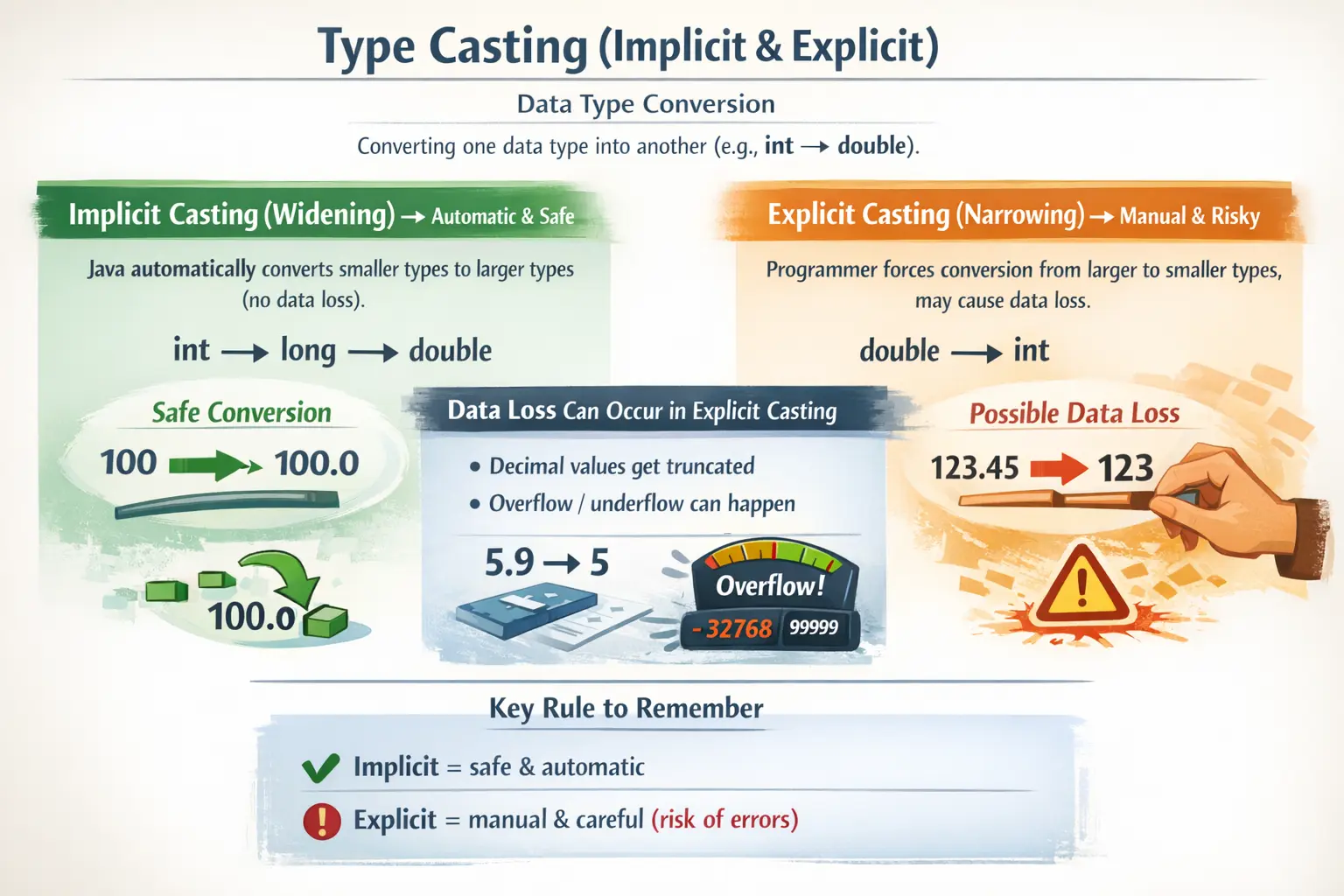
In real Java applications, type casting appears frequently. Sometimes the compiler performs the conversion automatically because it is safe. Sometimes the developer must write the conversion explicitly because Java cannot guarantee that the result will be safe. This difference creates the two main forms of casting: implicit type casting, also called widening, and explicit type casting, also called narrowing. Understanding both is essential for avoiding data loss, overflow, precision problems, and confusing calculation results.
Type casting is closely connected to primitive data types, size and range, arithmetic expressions, assignment rules, and memory behavior. It is also an important interview topic because it tests whether a developer understands how Java protects data during conversion and when the programmer must take responsibility for possible loss.
What Is Type Casting?
Type casting means converting a value from one data type into another data type. The conversion may happen during assignment, calculation, method argument passing, return value handling, or explicit conversion written by the programmer. In simple terms, casting tells Java how a value should be treated when its current type and target type are different.
int a = 10;
double b = a;
In this example, the value stored in a is an int, but it is assigned to a double variable. Java automatically converts 10 into 10.0. This is safe because a double can represent the integer value without narrowing the storage range. No explicit syntax is required.
Now consider the reverse situation. If a double value is assigned to an int, the decimal part cannot fit into an integer. Java will not perform that conversion automatically because information may be lost. The developer must explicitly cast the value.
double price = 99.99;
int wholePrice = (int) price;
Here, the result is 99, not 100. Explicit casting from double to int truncates the decimal part. It does not round. This one example shows why casting must be understood carefully.
Why Type Casting Is Important
Type casting is important because Java is a strongly typed language. Every variable has a declared type, and Java checks whether assignments and operations are type-compatible. This prevents many accidental bugs, but it also means developers must understand conversion rules when values of different types interact.
One reason casting matters is data accuracy. Incorrect casting can remove decimal parts, reduce precision, wrap numeric values around, or produce unexpected results. For example, converting a large int into a byte may not produce the value a beginner expects because byte has a much smaller range.
Casting also matters in arithmetic operations. If two integers are divided, Java performs integer division and removes the decimal part. To get a decimal result, at least one value must be converted to a decimal type before division.
int total = 5;
int count = 2;

double wrongAverage = total / count;          // 2.0
double correctAverage = (double) total / count; // 2.5
The first result is 2.0 because total / count is performed as integer division first, producing 2. Only after that is the result assigned to a double. The second calculation casts total to double before division, so Java performs decimal division and produces 2.5.
Type casting is also useful in real-world integrations. Data from databases, JSON payloads, APIs, files, or user input may not always arrive in the exact type the program needs. Developers often need to convert, parse, or cast values carefully before using them in business logic.
Types of Type Casting in Java
Java supports two main forms of casting for primitive numeric types: implicit casting and explicit casting. Implicit casting is also known as widening conversion. Explicit casting is also known as narrowing conversion. The names describe the direction of conversion.
Widening means converting from a smaller type to a larger type. For example, converting int to long or float to double is widening. Java can do this automatically because the target type can safely hold the original value in terms of range.
Narrowing means converting from a larger type to a smaller type. For example, converting double to int, long to short, or int to byte is narrowing. Java requires explicit syntax because the value may lose information or move outside the target type’s range.
Implicit Type Casting
Implicit type casting happens automatically when Java converts a smaller or safer type into a larger compatible type. The compiler performs the conversion without requiring the programmer to write a cast. This is allowed because the conversion is considered safe from a range perspective.
byte b = 20;
int i = b;
Here, a byte value is assigned to an int. Since int has a much larger range than byte, Java performs the conversion automatically. The original byte value fits safely inside an int.
The widening hierarchy for numeric types is commonly written as follows:
byte -> short -> int -> long -> float -> double
char -> int -> long -> float -> double
This does not mean every conversion in every expression is equally precise, but it shows the general widening direction. Small integer types can move into larger integer or floating-point types. A char can be converted to an int because characters have Unicode numeric values.
char ch = 'A';
int code = ch;
System.out.println(code); // 65
The character 'A' has the Unicode value 65. When assigned to an int, Java stores that numeric code. This is an example of implicit conversion from char to int.
Why Implicit Casting Is Safe
Implicit casting is safe because Java performs it only when the target type can hold the source value without narrowing its range. An int can fit into a long, and a long can fit into a float in terms of range. A float can fit into a double with greater precision.
int quantity = 50;
double result = quantity * 2.5;
In this calculation, quantity is automatically promoted so it can participate in a decimal calculation with 2.5. The result becomes a double. This makes mixed numeric expressions easier to write and read.
Although implicit casting is generally safe from a range perspective, developers should still understand precision. Very large integer values converted to floating-point types may not preserve every exact digit because floating-point types represent values approximately. In everyday beginner examples this rarely matters, but in precision-sensitive systems it can be important.
Explicit Type Casting
Explicit type casting is performed manually by the programmer. It is required when converting from a larger type to a smaller type, or from a type with more information to a type with less information. The developer writes the target type inside parentheses before the value.
double d = 10.75;
int i = (int) d;
The result stored in i is 10. The decimal part is removed. This is not rounding; it is truncation. Java requires the explicit cast because the conversion can lose data. By writing (int), the developer acknowledges that loss may occur.
The syntax of explicit casting is straightforward:
targetType variableName = (targetType) value;The parentheses are mandatory. A statement such as int i = int 10.5; is invalid. Java needs the cast operator in parentheses to understand that a narrowing conversion is intentionally requested.
Data Loss in Explicit Casting
The main risk of explicit casting is data loss. This can happen in several ways: decimal truncation, overflow, underflow, and precision loss. These issues do not always produce compiler errors, so developers must understand the consequences before casting.
Decimal truncation occurs when a floating-point value is cast to an integer type. The fractional part is discarded.
double d = 9.99;
int i = (int) d;
System.out.println(i); // 9
If rounding is required, casting is not enough. Use methods such as Math.round(), Math.floor(), or Math.ceil() depending on the required behavior. Casting simply cuts off the decimal portion.
Overflow occurs when the source value is outside the target type’s range. For example, byte can store only values from -128 to 127. If the value 130 is cast to byte, it wraps around.
int num = 130;
byte b = (byte) num;
System.out.println(b); // -126
The output is surprising because the value cannot fit into a byte. Java keeps only the low-order bits that fit into the target type, producing a wrapped result. This is why narrowing casts should be used carefully.
Underflow is the opposite boundary problem. If a value is below the minimum range of the target type, the result may also wrap around.
int num = -130;
byte b = (byte) num;
System.out.println(b);
The exact output follows Java’s narrowing conversion rules, but the important point is that the value no longer represents the original number directly. Any cast outside the target range should be treated as risky.
Precision loss can occur when a double is cast to a float. A double has more precision than a float, so the target type may not preserve all digits.
double precise = 123456789.123456;
float reduced = (float) precise;
System.out.println(reduced);
This conversion may produce a value that is close but not identical. For scientific, financial, or measurement-heavy applications, precision loss must be considered carefully.
Type Casting with char
The char type stores a Unicode character. Because each character has a numeric code, Java allows implicit conversion from char to numeric types such as int. Converting back from numeric type to char requires explicit casting.
char ch = 'A';
int x = ch;        // implicit
char c = (char) x; // explicit
The value 'A' becomes 65 when assigned to an int. Casting 65 back to char produces 'A'. This is useful in character processing, encoding logic, and simple alphabet-based operations.
However, developers should avoid confusing character digits with numeric digits. The character '5' is not the same as the integer 5. The character has a Unicode code value. If you need to convert text to a number, parsing is usually required, not casting.
Boolean Cannot Be Cast
Java does not allow casting between boolean and numeric types. This is different from some languages where 0 may represent false and 1 may represent true. Java keeps boolean logic separate and explicit.
boolean flag = true;
// int value = (int) flag; // invalid
This rule improves readability and safety. A condition in Java must evaluate to true or false. Numeric values are not accepted as substitutes for boolean values. This prevents accidental logic bugs caused by treating numbers as truth values.
Type Casting vs Parsing
Beginners often confuse casting with parsing. Casting converts between compatible data types at the language level. Parsing converts text into a value. For example, converting a String containing "10" into an int is not casting. It is parsing.
String text = "10";
int number = Integer.parseInt(text);
You cannot cast a String directly to an int because String and int are not directly cast-compatible in that way. The text must be interpreted as a number using a parsing method.
// int number = (int) "10"; // invalidThis distinction is important in real applications because user input, JSON values, CSV files, and configuration files often provide data as text. The program must parse that text into the required numeric type and handle invalid input safely.
Type Casting vs Type Conversion
The terms casting and conversion are sometimes used loosely, but they can be distinguished conceptually. Type conversion is a broader term that includes automatic conversions performed by the compiler. Type casting often refers to explicit conversion written by the programmer using the cast operator.
Implicit conversion is compiler-controlled and usually safe. Explicit casting is programmer-controlled and may be risky. In practice, many developers use “type casting” to refer to both widening and narrowing, but it is still useful to understand which conversions are automatic and which require manual syntax.
Original Value Remains Unchanged
Casting creates a converted value for assignment or expression evaluation. It does not change the original variable unless you assign the converted result back to that variable or another variable. This is a common point that beginners overlook.
int a = 10;
double b = a;

System.out.println(a); // 10
System.out.println(b); // 10.0
The variable a remains an int with the value 10. The variable b receives a converted double value. The original variable does not permanently change type.
Real-World Use Cases
Type casting is common in mathematical calculations. When calculating averages, percentages, ratios, or rates, developers often cast an integer to double to avoid integer division.
int scoredMarks = 45;
int totalMarks = 50;
double percentage = (double) scoredMarks / totalMarks * 100;
Type casting also appears in data processing. A program may receive a decimal price but need to display the whole-number part. In that case, explicit casting may be used if truncation is intended.
double price = 99.99;
int displayPrice = (int) price;
Character handling is another common use case. Developers may convert characters to numeric Unicode values while processing text, validating input, or implementing simple encoding logic.
APIs and databases can also require careful conversion. Data may come from external systems in one numeric format and need to be converted into another type inside the Java application. In such cases, developers must validate range and precision before casting.
Common Beginner Mistakes
One common mistake is assuming that explicit casting rounds decimal values. It does not. Casting from double or float to an integer type truncates the decimal part. Use rounding methods when rounding is required.
Another mistake is ignoring overflow when casting to smaller integer types. A value such as 300 does not fit into byte, so casting it produces a wrapped result, not a safe smaller value.
A third mistake is trying to cast booleans to numbers or numbers to booleans. Java does not allow this. Boolean logic must remain explicit.
A fourth mistake is forgetting parentheses in explicit casting. The correct syntax is (int) value, not int value inside an expression.
A fifth mistake is confusing casting with parsing. Integer.parseInt("10") is parsing, not casting. Casting works between compatible types, while parsing interprets text.
Best Practices
Prefer implicit casting when the conversion is naturally safe. Let the compiler handle widening conversions because they are clearer and require no extra syntax.
Use explicit casting only when there is a clear reason. Before narrowing a value, check whether the value can safely fit into the target type. Avoid casts that hide possible data loss.
Do not use casting as a substitute for proper rounding, validation, or parsing. If the requirement is to round a decimal, use rounding logic. If the requirement is to convert text to a number, use parsing methods. If the requirement is to check range, validate before casting.
Be careful in financial and precision-sensitive code. Casting decimal values can remove information. For exact decimal calculations, consider BigDecimal instead of relying only on primitive floating-point types.
Keep code readable. Excessive casting makes expressions hard to understand. If a calculation needs multiple conversions, split the logic into clear steps with meaningful variable names.
Interview Perspective
In interviews, type casting can be explained as converting a value from one data type to another. Java supports implicit casting, also called widening, and explicit casting, also called narrowing.
Implicit casting happens automatically when a smaller type is converted to a larger compatible type, such as int to double. It is generally safe and does not require special syntax.
Explicit casting is required when converting a larger type to a smaller type, such as double to int. It requires the cast operator and may cause data loss, truncation, overflow, underflow, or precision loss.
A strong interview answer should also mention that boolean cannot be cast to or from numeric types in Java, and that parsing a string into a number is not the same as casting.
Key Takeaway
Type casting is a core Java concept that controls how values move between data types. Implicit casting is automatic and safe for widening conversions. Explicit casting is manual and risky for narrowing conversions. The developer must understand when information may be lost.
Correct casting helps avoid unexpected calculation results, precision loss, overflow, and runtime confusion. It is especially important in arithmetic, API handling, database work, text processing, and interview preparation.
The golden rule is simple: widen automatically when safe, narrow explicitly only when necessary, and always understand what information may be lost during conversion. Mastering type casting makes Java programs more predictable, accurate, and professional.