Sanity Testing: Focused Validation After Minor Changes
Introduction to Sanity Testing
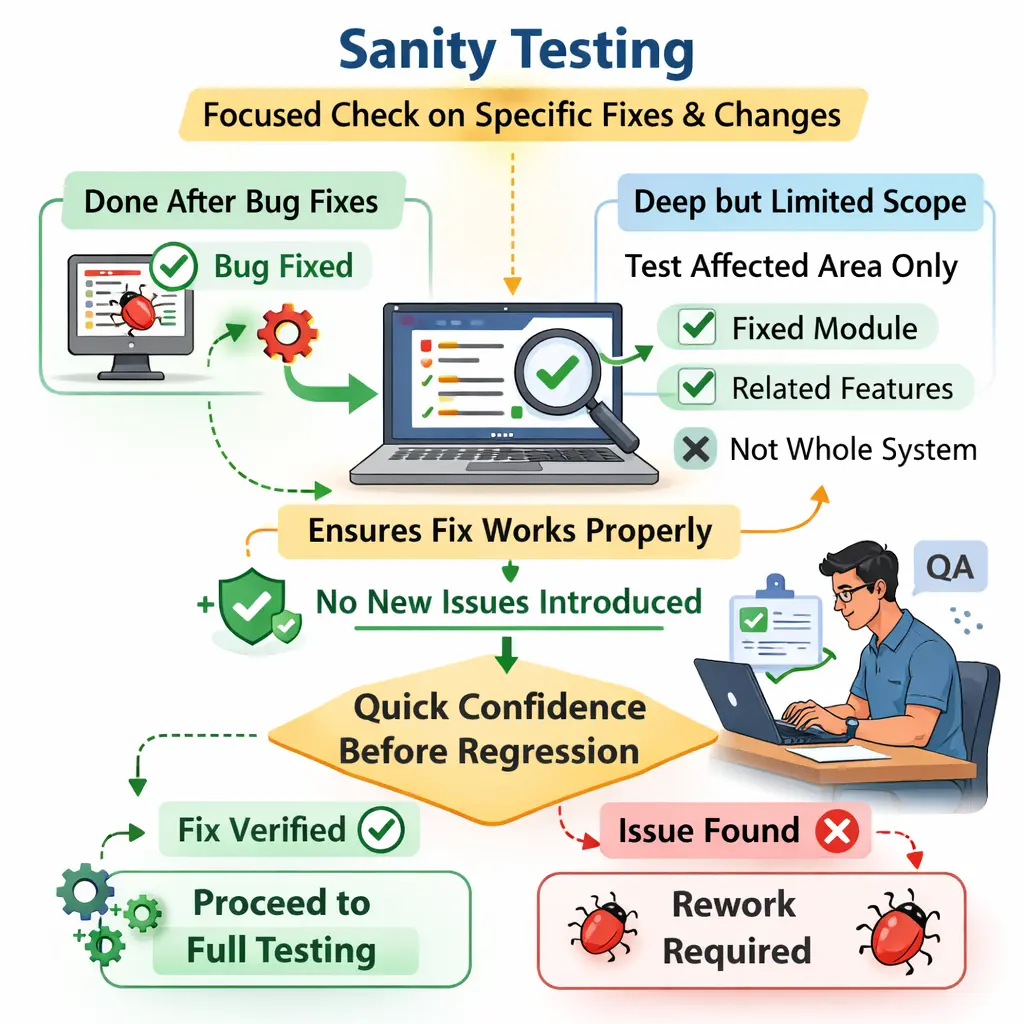
Sanity Testing is a narrow and focused level of testing performed after minor changes, enhancements, or defect fixes. Its objective is to verify that the specific modified functionality works correctly and that no major issues have been introduced. In simple terms, sanity testing answers the question: does the changed functionality make sense and operate as expected?
It is not a full system check, but a targeted validation of impacted areas.
Purpose of Sanity Testing
The main purpose of sanity testing is to quickly validate recent changes. When a developer fixes a defect, adds a small enhancement, or changes a limited piece of functionality, the QA team needs a focused way to confirm that the change makes sense before investing time in broader testing. Sanity testing provides that focused confirmation. It checks whether the modified area behaves correctly at a practical level.
Sanity testing also ensures that a fix truly resolves the reported issue. A bug may be marked as fixed, but the actual behavior may only be partially corrected. The original error may disappear in one condition but still occur in another. Sanity testing gives testers a quick opportunity to confirm whether the fix is useful, complete, and ready for deeper validation.
Another purpose is to catch obvious side effects around the changed area. Even a small code change can affect nearby validations, screens, workflows, or data handling. Sanity testing does not attempt to cover the whole system, but it does check the immediately related behavior so that the team does not move forward with a fix that breaks something close to it.
It helps testers decide whether the build is ready for deeper testing or whether additional corrections are required. If the changed functionality fails sanity testing, there is no need to spend time on full regression yet. The change should go back for correction, and broader testing can wait until the basic behavior is reasonable.
When Sanity Testing Is Performed
Sanity testing is typically performed after bug fixes, minor enhancements, small code changes, configuration adjustments, or targeted updates to an existing feature. It is especially useful when the change is limited enough that a full application check would be unnecessary, but important enough that the QA team must verify it before accepting the build.
It is often used when time is limited or when a quick validation is needed between regression cycles. For example, if a tester reports that the password reset link expires too early and the developer fixes the expiry logic, sanity testing may focus on password reset generation, link expiry behavior, and successful reset after the fix. The tester does not need to validate every unrelated module immediately.
Sanity testing is also common in Agile projects where fixes and small changes arrive frequently during a sprint. A tester may perform sanity testing several times in a week as developers deliver corrections. Because it is selective and focused, sanity testing is efficient in fast-paced development environments.
It can also happen before a formal regression cycle. If the modified feature fails sanity testing, a full regression run may be postponed because the build is not ready. This prevents the team from spending time on a broader validation cycle when the specific change itself is still questionable.
Who Performs Sanity Testing
Sanity testing is usually performed by manual testers. Since it requires contextual understanding of the affected functionality, experienced testers are often assigned to validate the change effectively. A tester must understand what was changed, why it was changed, what the original defect or enhancement requested, and which nearby workflows may be affected.
Developers may perform a basic check before sending the fix to QA, but formal sanity testing is normally a QA responsibility. The developer's check confirms that the code change appears to work from an implementation perspective. The tester's sanity check confirms that it works from a user and requirement perspective.
In some cases, a business analyst or product owner may help confirm the expected behavior, especially when the fix involves a business rule. However, the tester usually coordinates the validation, executes the scenarios, records the result, and decides whether the issue can move to re-tested, passed, reopened, or ready for regression.
Scope of Sanity Testing
The scope of sanity testing is limited to the specific modules or features affected by the change. It includes the changed functionality, the original failed scenario, closely related workflows, and obvious impacted areas. The scope should be narrow enough to remain quick but complete enough to give confidence that the change is reasonable.
For a payment fix, sanity testing may include the corrected payment scenario, related validation messages, payment confirmation, and order status update. It would usually not include unrelated areas such as profile editing, report export, user management, or marketing banners. Those may be covered later in regression if the change has broader risk.
It does not include full application coverage or extensive regression testing. The goal is targeted confidence, not complete validation. This distinction matters because sanity testing loses value when teams expand it until it becomes a slow mini-regression cycle.
The tester should still think about impact. A narrow scope does not mean blind scope. If a change in payment calculation affects invoice totals, order summaries, and confirmation emails, those connected areas may reasonably belong in sanity testing. The scope should follow the risk created by the change.
Sanity Testing Compared to Smoke Testing
Although both are quick validation techniques, they serve different purposes. Smoke testing verifies overall build stability and is broad but shallow. It is usually performed after a new build is deployed to decide whether the build is testable. Sanity testing verifies specific functionality after changes and is narrow but deeper in scope.
Smoke testing answers whether the build is testable. Sanity testing answers whether the recent change is correct. Smoke testing may touch login, navigation, dashboard loading, and a primary business flow at a high level. Sanity testing may focus only on a changed password reset feature, but it will examine that feature more carefully than a smoke test would.
Another practical difference is timing. Smoke testing happens early after deployment. Sanity testing happens after a targeted fix or small change. A build may pass smoke testing and still need sanity testing for a specific defect fix. Similarly, a sanity test may pass for a small fix, but the build may still need smoke or regression testing depending on release risk.
In interviews and real project discussions, this distinction is important. If a tester says they performed sanity testing on the whole build, the term is probably being used incorrectly. If the goal is overall build acceptance, it is smoke testing. If the goal is focused validation of a recent change, it is sanity testing.
A Practical Example
If a defect is fixed in a payment module, sanity testing would involve validating the payment flow, confirming that the issue is resolved, and checking related validations. Suppose the original defect was that payments failed when users applied a valid discount coupon. After the fix is deployed, sanity testing would check payment with the coupon, payment without the coupon, coupon validation, order confirmation, and the final amount displayed to the user.
The tester would not immediately validate every product search, profile update, admin report, or unrelated notification. The focus remains on the affected functionality and nearby risk. If the payment fix passes sanity testing, the team can then decide whether broader regression is needed before release.
Consider another example involving a login feature. If a defect is fixed where locked users could still log in, sanity testing would validate locked user login, active user login, the error message for locked users, and any account status display related to the fix. The tester may also check whether unlocking the account restores access correctly if that flow is directly related.
In a reporting module, if a date filter defect is fixed, sanity testing may include reports for today's date, a past date range, an invalid range, and the previously failing condition. The tester focuses on whether the updated filter logic is now sensible and whether obvious related behavior still works.
Entry and Exit Considerations
Sanity testing begins once the bug fix or minor change is deployed to the test environment and relevant scenarios are identified. The tester should know what changed, which defect or enhancement is being validated, which build contains the change, and what expected behavior has been agreed.
Good entry preparation also includes test data. If the change is related to payment, the tester needs payment-ready accounts, products, coupons, or cards depending on the scenario. If the change is related to user roles, the tester needs users with the relevant permissions. Without proper data, sanity testing can become slower than necessary or produce misleading results.
Sanity testing concludes when the affected functionality works correctly and no critical side effects are observed. If the fix fails, the defect may be reopened. If the fix works but related behavior breaks, a new defect may be logged. If the sanity check passes, the team may proceed with deeper regression, targeted exploratory testing, or release activities depending on the project's process.
This focused validation ensures efficient use of testing time. It gives the team a quick checkpoint without pretending that the whole application has been fully validated.
Common Defects Identified
Sanity testing often reveals fixes that do not fully resolve the issue, new defects introduced by the change, or unexpected side effects in related modules. It may also uncover data validation problems tied to the updated feature.
One common outcome is a partial fix. The original defect may be corrected for the exact test data used by the developer, but it may still fail for another valid condition. For example, a payment issue may be fixed for credit cards but still fail for saved cards. A report filter may work for one date range but fail for a boundary date.
Another common defect is a regression near the changed area. A fix to one validation may accidentally break another validation. A change to an order status rule may affect cancellation, refund, or invoice behavior. Sanity testing is useful because it checks the nearby impact while the change is still fresh.
Sanity testing may also reveal unclear behavior. Sometimes the change works technically but does not match business expectation. For example, a new warning message may appear, but the wording may be confusing or the message may appear at the wrong time. Manual testers are valuable in sanity testing because they can observe whether the updated behavior actually makes sense.
Common Pitfalls
A common mistake is confusing sanity testing with smoke testing. Another frequent issue is expanding sanity testing into full regression, which defeats its time-saving purpose. Skipping sanity testing under time pressure can allow faulty fixes to move forward.
Another pitfall is testing only the exact defect step and ignoring obvious related behavior. If the original issue was fixed in a checkout calculation, it may not be enough to test only one coupon. The tester should think about related totals, confirmation, order storage, and visible messages. Sanity testing is narrow, but it should still be thoughtful.
Poor communication can also weaken sanity testing. If developers do not clearly explain what changed, or if testers do not understand the intended fix, the sanity check may validate the wrong thing. A short note about the changed area, expected behavior, and known impact can greatly improve test accuracy.
Sanity testing should remain precise and purposeful. It should be small enough to run quickly, but not so small that it misses the actual risk of the change.
Best Practices for Sanity Testing
The first best practice is to understand the change before testing it. A tester should read the defect description, developer notes, acceptance criteria, or release comment before starting. Sanity testing is efficient only when the tester knows exactly what needs confirmation.
The second best practice is to identify the impacted area clearly. The tester should ask which screens, services, validations, data fields, roles, or workflows are connected to the change. This impact thinking prevents both under-testing and over-testing. It keeps sanity testing focused while still covering nearby risk.
The third best practice is to use the original defect scenario as a starting point, not as the only test. Reproducing the original issue confirms whether the specific failure is fixed. Adding a few related checks confirms whether the fix behaves sensibly beyond the exact original path.
The fourth best practice is to document the result clearly. If sanity testing passes, the tester should note which scenarios were checked. If it fails, the tester should provide clear steps, test data, actual result, expected result, and evidence. Since sanity testing often determines whether a fix moves forward, the result must be easy for the team to trust.
The fifth best practice is to avoid turning sanity testing into an uncontrolled checklist. It should not grow every time someone thinks of another possible scenario. When broader confidence is needed, the team should call it regression testing and plan it accordingly.
Sanity Testing in Agile Projects
In Agile projects, sanity testing is especially useful because fixes and small enhancements are delivered frequently. A user story may be returned to development after testing, corrected, and sent back to QA within the same sprint. The tester then performs sanity testing to confirm that the correction is acceptable before moving the story forward.
This fast feedback cycle helps teams avoid late surprises. If a fix is still wrong, the tester can reopen it quickly while the developer still has context. If the fix is correct, the team can proceed with confidence to regression, demo preparation, or story closure.
Sanity testing also supports sprint discipline. It prevents teams from assuming that a code fix is enough. A ticket is not truly ready simply because code was changed. It becomes ready when the changed behavior has been validated in the test environment against the expected outcome.
Sanity Testing and Automation
Sanity testing can be manual, automated, or a combination of both. Many sanity checks are performed manually because they are tied to recent changes that may not yet have stable automated coverage. Manual testing lets the tester quickly adapt to the exact change, observe behavior, and decide whether the result makes sense.
Some sanity checks can be automated when the changed area is stable and repeatedly validated. For example, if a critical login rule is frequently adjusted, automated checks can help confirm core login behavior after each fix. However, automation should not be forced for every sanity check. The value depends on frequency, stability, importance, and maintenance cost.
A practical approach is to use automation for stable high-value checks and manual sanity testing for new, changing, or judgment-heavy behavior. This keeps feedback fast without creating unnecessary automation maintenance.
Interview Perspective
In interviews, sanity testing is typically described as focused testing performed after minor changes or bug fixes. A strong explanation emphasizes its narrow scope and its role in confirming system stability before proceeding with broader testing.
A stronger interview answer also explains that sanity testing is not full regression. It validates the changed functionality and closely related impacted areas. It is usually performed after a bug fix or minor enhancement, and it helps decide whether the change is acceptable for further testing.
If asked for an example, a payment defect is a good choice. The tester can explain that after the payment fix is deployed, sanity testing checks the corrected payment scenario, related validation, order status, and confirmation. The tester does not test the whole application unless regression is planned separately.
If asked to compare sanity testing with smoke testing, the answer should be direct: smoke testing checks overall build stability after deployment, while sanity testing checks specific changed functionality after a fix or minor update. Smoke is broad and shallow; sanity is narrow and more focused.
Key Takeaway
Sanity Testing provides quick confidence after changes without performing exhaustive validation. It ensures that specific fixes work as intended and that the system remains stable, enabling efficient and controlled testing progression.
The value of sanity testing comes from focus. It gives testers a disciplined way to validate a recent change without expanding immediately into full application coverage. When done well, it saves time, catches faulty fixes early, and keeps regression testing meaningful.
A good sanity test is small, relevant, and based on impact. It confirms the corrected behavior, checks the closest related risks, and gives the team a clear next step. If it passes, deeper testing can continue. If it fails, the issue returns for correction before more time is spent.