Selenium WebDriver Architecture
Selenium WebDriver follows a clean, layered client-server architecture that enables direct and native control of real web browsers. This architecture is not just a theoretical concept; it is the foundation that explains how automation actually works behind the scenes. A strong understanding of Selenium architecture is critical for designing robust frameworks, debugging failures efficiently, and answering advanced interview questions with confidence.
In real-world automation projects, many failures are not caused by incorrect test logic but by misunderstandings of how Selenium communicates with browsers. Issues such as driver mismatches, synchronization failures, or environment misconfigurations often originate from gaps in architectural understanding. Therefore, mastering Selenium WebDriver architecture is a key step in transitioning from a script writer to a true automation engineer.
When a beginner writes a Selenium command, it may look as if the Java code is directly controlling Chrome, Firefox, Edge, or Safari. In reality, several layers participate in that single action. The Java test code calls Selenium methods. The Selenium client library converts those calls into standard WebDriver requests. A browser driver receives those requests and translates them into browser-specific behavior. The browser performs the action and sends a response back through the same chain. This layered movement is the essence of WebDriver architecture.
Understanding this architecture matters because Selenium automation is not only about writing commands. It is about knowing where commands travel, which component is responsible for each part of execution, and why a failure may happen before the test even reaches the application. If the browser does not launch, the problem may be driver configuration. If the browser launches but an element cannot be found, the issue may be locator strategy or synchronization. If the same test fails only on Grid, the issue may involve remote sessions, node capacity, browser availability, or network access.
This is why architecture knowledge separates a basic script writer from a practical automation engineer. A script writer may repeatedly change code hoping a failure disappears. An engineer analyzes the layer where the failure occurs and fixes the correct cause. Selenium WebDriver architecture gives that mental model.
Why WebDriver Architecture Matters
WebDriver architecture answers some of the most important questions in automation. It explains how your test code communicates with the browser, why browser drivers are mandatory, and where failures actually occur in the execution flow. It also clarifies how Selenium achieves cross-browser compatibility despite differences in browser implementations.
Without understanding the architecture, testers often struggle to debug issues effectively. For example, when a test fails, it is important to know whether the problem lies in the test script, the client library, the browser driver, or the browser itself. Architecture provides this clarity and helps isolate problems quickly.
In essence, WebDriver architecture transforms Selenium from a black box into a transparent system where each component has a defined role and responsibility.
Architecture also helps teams build frameworks that are easier to maintain. A framework that ignores architecture may scatter driver setup, waits, locators, screenshots, and configuration across many tests. When failures occur, nobody knows whether the issue is in the test flow, browser session, driver version, or environment. A framework designed with architecture in mind separates responsibilities: setup belongs in driver management, UI actions belong in page objects, assertions belong in tests, and execution configuration belongs in reusable configuration layers.
Another reason architecture matters is cross-browser compatibility. Browsers are not identical internally. Chrome, Firefox, Edge, and Safari have different engines, release cycles, and behaviors. WebDriver architecture hides many of these differences behind a standardized protocol and browser-specific drivers. Testers can write common test logic while drivers handle browser-specific execution details. Without this architectural separation, Selenium would need to know every browser's internal implementation directly, which would be difficult to maintain.
Finally, architecture matters for interviews because it proves depth. Anyone can memorize driver.get or click. A stronger candidate can explain why browser drivers are required, what the W3C WebDriver protocol does, how commands move from code to browser, and how Selenium Grid extends execution across machines. This kind of answer shows practical understanding.
High-Level WebDriver Architecture Components
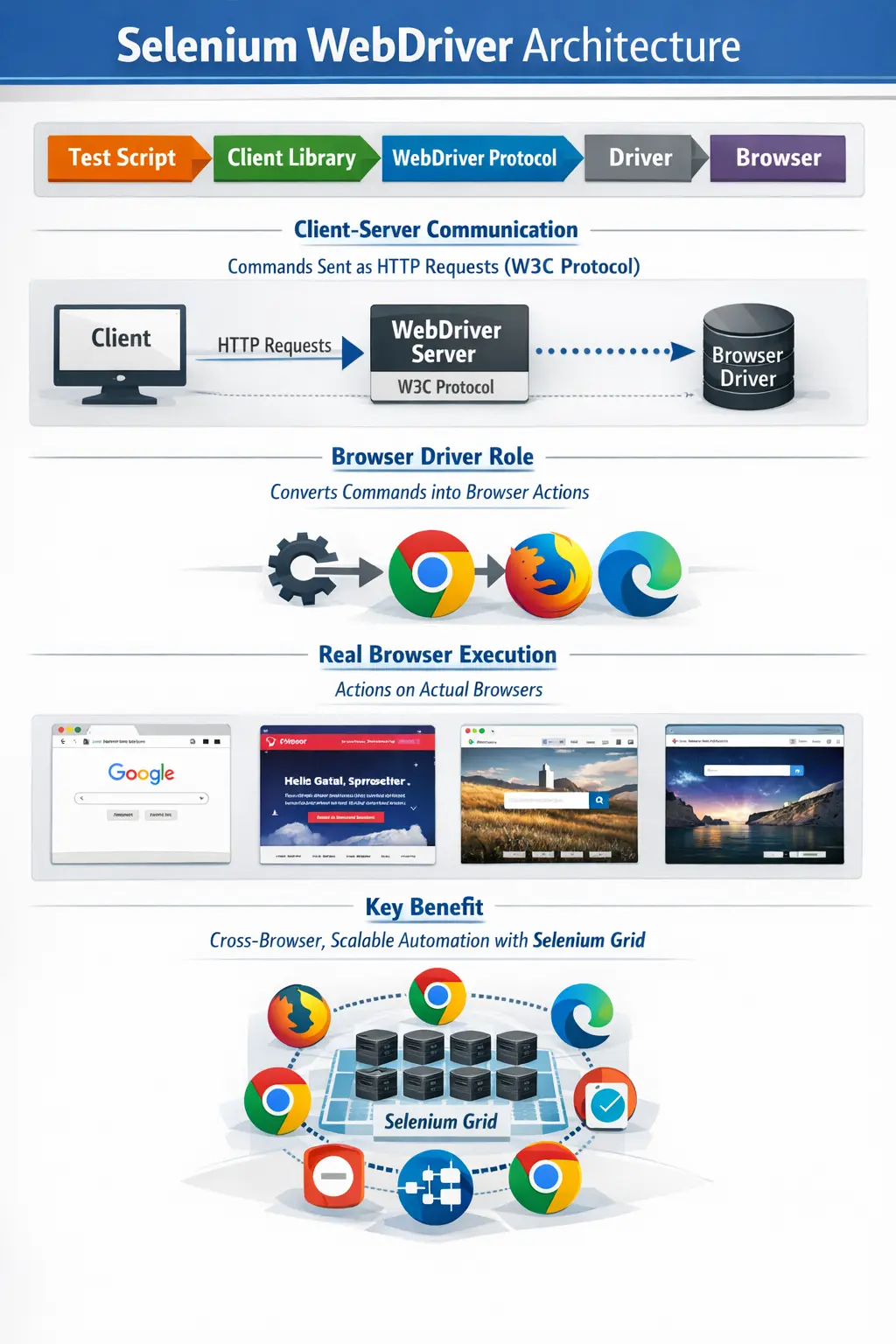
At a high level, Selenium WebDriver architecture consists of five core layers: the test script, Selenium client library, W3C WebDriver protocol, browser driver, and the real browser. Each of these layers plays a specific role in the execution process, and the system works only when all layers interact correctly.
The test script represents the automation logic written by the tester. The client library acts as a bridge that translates code into WebDriver commands. The W3C WebDriver protocol standardizes communication. The browser driver acts as a mediator between commands and browser actions. Finally, the real browser executes those actions and returns responses.
This layered approach ensures separation of concerns, making the system modular, scalable, and easier to maintain.
The five-layer model is simple, but it explains almost every WebDriver action. The test script is the human-readable automation intent. The client library gives that intent a language-specific API. The W3C protocol provides the common communication format. The browser driver handles browser-specific control. The real browser performs the user-facing action. Each layer depends on the previous layer, and every command travels through this chain.
This separation of concerns is what makes Selenium flexible. The same WebDriver idea can be used with Java, Python, C#, or JavaScript because each language has its own client library. The same high-level command can work on different browsers because browser vendors provide drivers that understand the protocol. The same test can run locally or remotely because protocol-based communication can travel over HTTP. These capabilities are not accidental; they come directly from the architecture.
In a real project, understanding these layers also helps with responsibility mapping. Test authors are responsible for clear test logic and assertions. Framework designers are responsible for clean client-library usage, driver creation, waits, and configuration. Infrastructure teams may be responsible for Grid nodes, browser versions, containers, or CI agents. When responsibilities are clear, automation support becomes more efficient.
Test Script (Automation Code Layer)
The test script is the starting point of Selenium automation. It is written by the tester or automation engineer using a programming language such as Java, Python, or C#. In most enterprise environments, Java is the preferred choice.
This layer is responsible for defining test steps, invoking WebDriver methods, and performing assertions. Commands such as driver.get(), driver.findElement(), click(), and sendKeys() originate from this layer.
It is important to note that the test script does not directly interact with the browser. Instead, it communicates with the Selenium client library, which handles the translation of commands. This abstraction ensures that test scripts remain independent of browser-specific implementations.
The test script layer should ideally express a business scenario rather than expose every low-level browser detail. In a weak script, every test directly finds elements, clicks buttons, types values, and repeats setup logic. In a strong framework, the test script calls reusable page methods and verifies business outcomes. For example, a test may say loginPage.loginAs(validUser) and dashboardPage.verifyUserIsLoggedIn. The browser details are hidden in the page layer, while the test remains readable.
This layer is also where assertions belong. WebDriver can perform actions, but the test script decides what correct behavior means. After clicking a submit button, the test must verify that the expected confirmation message appears, the URL changes, the record is created, or the error is displayed. Without assertions, a script may run many browser actions without proving that the application is correct.
Good test scripts also avoid hidden dependencies. If one test depends on another test creating data first, parallel execution becomes unreliable. If several tests use the same user and modify the same records, they can interfere with each other. The WebDriver architecture can execute commands, but test design determines whether those commands create stable automation.
Selenium Client Library (Language Binding Layer)
The Selenium client library acts as a bridge between the test script and the WebDriver protocol. It is language-specific, meaning there are separate libraries for Java, Python, C#, and other supported languages.
When a tester writes a command such as driver.get("https://example.com"), the client library converts this method call into a structured WebDriver request. This request is formatted according to the WebDriver protocol and sent to the browser driver.
Without the client library, automation would not be possible, as it handles the translation of human-readable code into machine-understandable commands. It also ensures consistency across different programming languages, allowing Selenium to maintain language independence.
Client libraries are the reason Selenium feels natural in different programming languages. A Java engineer uses Java classes, interfaces, methods, exceptions, and build tools. A Python engineer uses Python modules and idioms. A C# engineer works within the .NET ecosystem. Although the syntax changes, the architectural role remains the same: the client library converts language-specific method calls into WebDriver protocol requests.
The client library also returns protocol responses in a form the programming language can understand. If an element cannot be found, the Java binding may raise NoSuchElementException. If a browser session becomes invalid, the client library surfaces an appropriate WebDriver exception. These exceptions are not random; they are the language-level representation of what happened somewhere in the WebDriver command chain.
Version management of the client library is important. A Selenium Java dependency that is too old may lack newer protocol support, browser handling improvements, or Selenium Manager behavior. This is why real frameworks use Maven or Gradle to manage Selenium versions consistently. The client library is part of every command, so it should be treated as a critical framework dependency.
W3C WebDriver Protocol (Communication Layer)
The W3C WebDriver protocol is the backbone of Selenium WebDriver architecture. It is a standardized protocol defined by the World Wide Web Consortium (W3C) that specifies how automation tools communicate with web browsers.
This protocol uses HTTP requests and JSON payloads to send commands and receive responses. Because it is standardized, all modern browsers implement this protocol, ensuring consistent behavior across different environments.
The importance of this layer cannot be overstated. It eliminates browser-specific inconsistencies and allows Selenium to function as a truly cross-browser automation tool. Browser vendors such as Google, Mozilla, and Microsoft maintain their own drivers that comply with this protocol, ensuring compatibility and reliability.
The W3C WebDriver protocol gives Selenium a common language for browser automation. Commands such as creating a session, navigating to a URL, finding an element, clicking, typing, taking a screenshot, executing JavaScript, switching windows, and closing a browser can be described in a standard way. Browser drivers then implement those commands for their specific browsers. This standardization is one reason modern Selenium is more stable than older approaches.
The protocol is also what enables remote execution. A command can be sent to a local driver running on the same machine, or it can be sent to a remote Selenium Grid or cloud browser platform. The test code still uses WebDriver methods, but the execution location changes through configuration. This is a powerful architectural feature because it allows the same framework to run on a laptop, CI server, Docker Grid, or cloud provider.
Understanding the protocol layer also clarifies performance. Every browser interaction is a command that must travel through the client library, protocol, driver, and browser. In local execution this overhead is usually small. In remote execution, network latency and Grid routing can make excessive commands more noticeable. Efficient tests avoid unnecessary repeated element lookups and redundant browser actions while still preserving readability.
Browser Driver (Bridge Layer)
The browser driver is a critical component that acts as a bridge between the WebDriver protocol and the actual browser. Each browser requires its own driver, such as ChromeDriver for Chrome, GeckoDriver for Firefox, EdgeDriver for Edge, and SafariDriver for Safari.
The driver receives WebDriver commands from the client library and translates them into browser-specific instructions. It then executes these instructions in the browser and returns the results.
One important rule to remember is that each browser requires a matching driver version. A mismatch between browser and driver versions is one of the most common causes of automation failures in real projects.
The browser driver ensures that WebDriver commands are executed accurately and efficiently, making it a vital part of the architecture.
Browser drivers exist because browsers are not internally identical. Chrome, Firefox, Edge, and Safari each have their own engines, security models, release cycles, and implementation details. The browser driver hides those details from the test script. The test script sends a standardized command, and the driver translates it into the correct browser-specific action. This keeps the automation code cleaner and more portable.
Driver compatibility is one of the most common practical issues in Selenium projects. If Chrome updates but ChromeDriver is not compatible, a test may fail before the application opens. If a CI agent has a different browser version from a tester's machine, a test may pass locally and fail in the pipeline. Modern Selenium Manager and tools such as WebDriverManager help reduce this maintenance work, but automation engineers should still understand the driver-browser dependency.
In strong frameworks, driver setup is centralized. A driver factory or browser manager decides which browser to launch, whether execution is local or remote, what timeouts to apply, whether headless mode is enabled, and how the session should be closed. Since every test depends on browser setup, driver management is a core architecture concern rather than a small setup detail.
Real Browser (Execution Layer)
The final layer in the architecture is the real browser. Unlike some automation tools that simulate browser behavior, Selenium WebDriver interacts with actual browsers installed on the system.
The browser is responsible for rendering the user interface, executing JavaScript, processing user interactions, and returning responses to the driver. Because real browsers are used, test results closely reflect actual user behavior, which is essential for reliable validation.
This direct interaction with real browsers is one of the reasons Selenium WebDriver is trusted for enterprise automation.
Real browser execution gives Selenium strong credibility for end-to-end web validation. The browser renders the page, runs JavaScript, applies CSS, handles cookies, processes storage, reacts to user events, and enforces security rules. This means WebDriver tests can detect issues that lower-level tests may miss, such as broken navigation, incorrect validation messages, hidden overlays, browser-specific rendering behavior, or failures in integrated user flows.
Real browser execution also introduces challenges. Browsers take time to start, pages take time to load, JavaScript frameworks may update the DOM asynchronously, and network conditions can affect timing. This is why synchronization is such an important part of Selenium automation. A test must wait for the browser to reach the correct state before acting or asserting. Fixed sleeps are weak; explicit waits based on meaningful browser conditions are stronger.
Because WebDriver interacts with real browsers, UI tests are slower than unit or API tests. That does not make them less valuable; it means they should be used for the right scenarios. Critical user journeys, smoke tests, regression workflows, and cross-browser checks are good WebDriver candidates. Pure business logic and service-level validations are often better handled by lower-level tests.
Command Flow in WebDriver Architecture
Every action performed using Selenium WebDriver follows a structured flow. When a test script invokes a WebDriver method, the client library converts it into an HTTP request. This request follows the W3C WebDriver protocol and is sent to the browser driver.
The browser driver interprets the request and executes the corresponding action in the browser. Once the action is completed, the browser sends a response back to the driver, which is then returned to the test script.
This flow happens for every operation, whether it is a click, text entry, or validation. Understanding this flow helps testers identify where issues occur and how to resolve them effectively.
A single test can contain hundreds of WebDriver commands. Opening a page, finding a username field, typing a value, finding a password field, typing a value, clicking login, waiting for a dashboard, reading a heading, and validating text are all separate operations. Each command travels through the architecture and depends on the current browser state. If the state changes unexpectedly between commands, the next command may fail.
This explains common errors such as stale element references. A test may locate an element, but before it clicks, the application re-renders the page. The previously found element now belongs to an old DOM version. WebDriver reports the stale reference because the browser state changed. The correct solution is not random retry everywhere; it is understanding the command flow and designing waits or fresh lookups around dynamic page behavior.
Command flow also affects debugging in Grid or remote execution. In local execution, command travel is short. In Grid execution, commands are routed through remote infrastructure. If the Grid is overloaded, a node is unavailable, or network access to the application is blocked, the failure may appear as a WebDriver error even though the test logic is correct. Architecture helps separate test defects from environment defects.
WebDriver Architecture vs Selenium RC
Selenium WebDriver represents a significant improvement over Selenium RC. Selenium RC relied on a proxy-based architecture and JavaScript injection to control browsers. This made it slower, more complex, and less reliable.
WebDriver, on the other hand, uses direct browser control and native automation. It eliminates the need for JavaScript injection, resulting in faster execution and improved stability. Its architecture is simpler and more efficient, making it the preferred choice in modern automation.
This transition from RC to WebDriver is a clear example of how architectural improvements can enhance performance and usability.
Selenium RC was important historically because it helped popularize browser automation, but its architecture was more complex. It required a server component and relied heavily on JavaScript injection. That approach could be affected by browser security restrictions and was harder to align with modern browser behavior. As web applications became richer, the limitations became more visible.
WebDriver improved the model by making browser automation more native. Instead of controlling the browser indirectly through injected JavaScript, WebDriver communicates with browser drivers that are designed to control the browser. This reduced complexity, improved stability, and made browser vendor participation more practical. The result is the modern Selenium architecture used in professional frameworks today.
For interviews, the comparison should be concise: Selenium RC used a proxy and JavaScript-injection-based approach, while WebDriver uses direct browser control through browser drivers and the W3C WebDriver protocol. WebDriver is faster, more stable, and better suited for modern browser automation.
WebDriver Architecture with Selenium Grid
When Selenium Grid is introduced, the architecture expands to support distributed and parallel execution. Additional components such as the Hub and Nodes are added to the system.
The test script sends requests to the Hub, which acts as a central controller. The Hub identifies an appropriate Node based on browser and platform requirements. The Node, which contains the browser driver and browser, executes the test and sends the results back to the Hub, which then returns them to the test script.
This setup enables parallel execution, cross-browser testing, and distributed testing across multiple machines. It significantly reduces execution time and improves test coverage, making it essential for large-scale automation projects.
Selenium Grid does not change the basic WebDriver architecture; it extends it. The test still uses WebDriver commands, the client library still sends protocol requests, and a real browser still executes the actions. The difference is that the browser may run on a remote node rather than the same machine as the test code. Grid receives the session request, finds a matching browser environment, and routes commands to that environment.
This is valuable when test suites become large. A regression suite that takes four hours on one machine may finish much faster when distributed across many nodes. Grid also supports cross-browser testing because different nodes can provide different browser and operating system combinations. A Chrome test, Firefox test, and Edge test can run at the same time if enough node capacity exists.
Grid also introduces design responsibilities. Tests must be independent, test data must not conflict, browser sessions must close properly, and environment configuration must be consistent. A test suite that is unstable locally will usually become more unstable in parallel. Grid provides scalability, but good framework design makes scalability reliable.
Why WebDriver Architecture Is Powerful
The power of Selenium WebDriver lies in its architecture. By separating responsibilities across layers, it achieves loose coupling between test code and browser implementation. This makes the system flexible and adaptable to changes.
The use of a standardized protocol ensures browser independence, while vendor-supported drivers guarantee compatibility with browser updates. The architecture also supports scalability through Selenium Grid, enabling efficient execution of large test suites.
These design principles are the reason Selenium has remained the industry standard for UI automation for many years.
The architecture is powerful because it balances standardization and flexibility. The protocol standardizes communication, but teams can choose programming languages, test frameworks, build tools, reporting libraries, and execution environments. This is why Selenium can be used in small learning projects, enterprise Java frameworks, CI/CD pipelines, Dockerized Grids, and cloud browser platforms. The same architectural idea adapts to many contexts.
The architecture also supports maintainability by isolating change. If a browser changes, the browser driver layer absorbs much of that change. If a test framework evolves, the test script and client-library usage can be updated without changing the browser itself. If execution moves from local to Grid, the framework can change driver creation and remote configuration while keeping test scenarios mostly unchanged. Loose coupling is the reason these transitions are possible.
Another strength is transparency. Once engineers understand the layers, Selenium is no longer mysterious. Session creation, driver mismatch, protocol errors, stale elements, timeouts, and Grid failures all become easier to reason about. This does not eliminate failures, but it makes troubleshooting faster and more accurate.
Common Architecture-Related Failures
Many issues encountered in Selenium automation are related to architecture rather than code. Common problems include browser and driver version mismatches, incorrect driver configuration, and network issues in Grid setups.
Other issues may arise from unsupported browser capabilities or improper synchronization techniques. Understanding the architecture helps testers identify the root cause of these problems and resolve them quickly.
Instead of treating failures as random issues, testers can analyze them systematically based on the architectural layers involved.
A useful debugging habit is to ask which layer failed first. If the browser never opens, check the driver, browser version, executable path, permissions, or remote session setup. If the browser opens but the page does not load, check the URL, environment availability, network access, proxy, or authentication. If the page loads but an element action fails, check locator quality, waits, frame context, overlays, or element state. If the issue appears only in parallel, check shared data, ThreadLocal driver management, and test isolation.
Synchronization failures are often misdiagnosed as locator failures. A locator may be correct, but the element may not be ready when WebDriver searches for it. Dynamic applications built with React, Angular, Vue, or AJAX often update content after the initial page load. Explicit waits and meaningful conditions are the right response. Architecture reminds us that WebDriver executes commands against the current browser state, not against the future state we expect.
Grid failures require additional thinking. A node may not have the requested browser, a container may have limited memory, a remote machine may not access the test environment, or session capacity may be exhausted. The test script may be perfectly correct, but the distributed architecture may be misconfigured. Skilled Selenium engineers distinguish these causes instead of changing test code blindly.
Interview Perspective
From an interview standpoint, Selenium WebDriver architecture is a critical topic. A short answer would describe it as a client–server architecture where test scripts communicate with browsers through client libraries, the WebDriver protocol, and browser drivers.
A more detailed answer would explain the role of each layer, the communication flow, and the importance of the W3C WebDriver protocol. Mentioning Selenium Grid and its role in scaling execution adds further depth to the explanation.
Demonstrating a clear understanding of architecture shows that you are not just writing scripts but understand how the system works internally.
A strong interview answer should explain both components and flow. The components are test script, Selenium client library, W3C WebDriver protocol, browser driver, and real browser. The flow is that the test script calls WebDriver methods, the client library converts them into protocol requests, the browser driver receives those requests, the real browser executes the actions, and responses travel back to the test. Selenium Grid can be added to route sessions to remote nodes for parallel and cross-browser execution.
Interviewers may ask why browser drivers are mandatory. The answer is that browsers have different internal implementations, so each browser needs a driver that can translate standardized WebDriver commands into browser-specific actions. They may ask what the W3C protocol does. The answer is that it standardizes communication between automation tools and browsers, improving consistency across browsers. They may ask why tests fail due to driver mismatch. The answer is that the driver must be compatible with the browser it controls.
A concise interview-ready answer could be: Selenium WebDriver architecture is a layered client-server architecture where test scripts communicate with browsers through Selenium client libraries, the W3C WebDriver protocol, browser-specific drivers, and real browsers. It enables cross-browser automation, native browser control, and scalable execution through Selenium Grid.
Key Takeaway
Selenium WebDriver architecture is the foundation of modern UI automation. It ensures that test scripts do not directly interact with browsers but communicate through structured layers involving client libraries, standardized protocols, and browser drivers.
Browser drivers are mandatory for execution, and the W3C protocol ensures consistency across different browsers. Selenium Grid extends this architecture to support scalability and parallel execution.
A strong understanding of WebDriver architecture enables testers to design better frameworks, debug issues faster, and build reliable automation solutions. It is this understanding that distinguishes skilled automation engineers from basic script writers.
For Selenium with Java learners, WebDriver architecture should be studied before advanced framework topics. Driver factories, Page Object Model, waits, parallel execution, Grid, CI/CD, browser capabilities, and reporting all depend on understanding how WebDriver sessions are created and how commands travel. Without architecture knowledge, these topics feel disconnected. With architecture knowledge, they become parts of one coherent automation system.
The final lesson is practical: WebDriver architecture is the map of Selenium execution. It shows where your command starts, how it travels, who executes it, and how the result returns. When that map is clear, Selenium becomes easier to design, maintain, scale, and explain.