Selenium WebDriver Overview
Selenium WebDriver is the core and most important component of the Selenium ecosystem. It acts as the actual execution engine that enables testers and automation engineers to control web browsers programmatically. In modern software testing, where speed, accuracy, and repeatability are critical, WebDriver plays a foundational role by allowing applications to be tested in real browsers under real conditions.
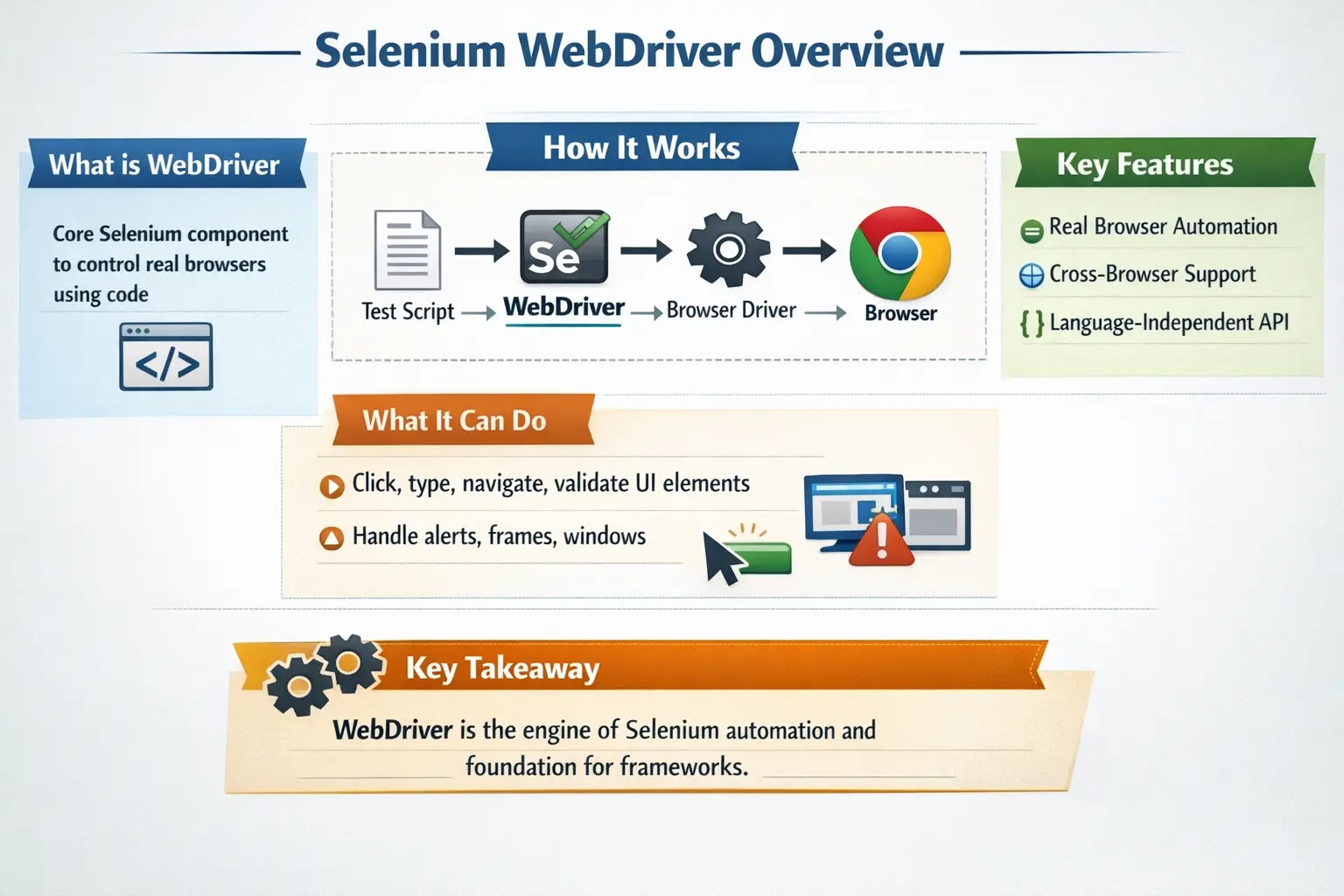
Unlike earlier automation approaches that relied on simulation or indirect control, Selenium WebDriver communicates directly with browsers, executing commands exactly as a real user would. This makes it not only powerful but also highly reliable for validating real-world application behavior. Understanding Selenium WebDriver is essential for anyone involved in automation testing, as it forms the backbone of most UI automation frameworks used in the industry today.
WebDriver is the component that turns Selenium from a concept into practical browser automation. A tester writes automation code in a supported programming language, and WebDriver carries that intent to the browser through a standardized communication model. The test can open pages, locate elements, click buttons, type values, switch windows, read messages, and verify expected behavior. These actions are not performed against a mock browser or a simple recording. They are performed in real browsers such as Chrome, Firefox, Edge, and Safari.
This real-browser nature is the reason WebDriver is so valuable for functional and regression testing. Modern web applications depend on HTML, CSS, JavaScript, browser events, cookies, storage, navigation, dynamic rendering, and backend communication. A unit test can validate a method, and an API test can validate a service, but WebDriver can validate how the finished application behaves from the user's point of view. It sits at the UI automation layer where business workflows, browser behavior, and application integration meet.
At the same time, WebDriver should not be misunderstood as a complete testing platform. It is a browser automation API. It does not provide full test management, rich reporting, framework structure, CI/CD orchestration, visual testing, or test data governance by itself. In professional projects, WebDriver is combined with Java, TestNG or JUnit, Maven or Gradle, reporting libraries, logging utilities, and CI/CD tools. WebDriver executes the browser actions, while the framework around it makes those actions maintainable and useful.
What is Selenium WebDriver
Selenium WebDriver is an API-based automation tool that allows testers to interact with web applications through real browsers. It provides a set of programming interfaces through which testers can perform actions such as clicking buttons, entering text, navigating pages, and validating UI elements.
At its core, WebDriver is not a standalone application but a collection of language bindings and protocols that enable communication between test scripts and browsers. This means that testers must write code—typically in Java, Python, C#, or JavaScript—to define automation logic.
Unlike record-and-playback tools, WebDriver requires programming knowledge, but this is precisely what makes it powerful. It allows fine-grained control over browser behavior, enabling testers to handle complex scenarios, dynamic elements, and real-time interactions. This shift from script recording to code-driven automation is what elevates WebDriver to an enterprise-grade solution.
Because WebDriver is code-driven, testers can use programming constructs such as conditions, loops, reusable methods, classes, exception handling, configuration files, and data providers. This is important because real applications do not always follow a single fixed path. A test may need to log in as different roles, run with multiple data combinations, handle optional pop-ups, validate dynamic tables, or recover cleanly when a setup step fails. Record-and-playback tools struggle with this kind of flexibility, while WebDriver frameworks can model it clearly.
WebDriver also encourages a more professional approach to automation design. Instead of writing a long sequence of raw browser commands inside every test, teams can create page objects, reusable actions, custom waits, driver factories, and shared validation helpers. The test code then expresses business intent while the framework handles browser details. This separation is the foundation of maintainable Selenium automation.
For Selenium with Java learners, WebDriver is usually the first major concept to master after understanding what Selenium is. Locators, browser drivers, waits, WebElement methods, alerts, frames, windows, JavaScript execution, screenshots, and Page Object Model all build on top of WebDriver. If WebDriver is understood clearly, advanced Selenium topics become much easier to learn.
Why Selenium WebDriver Was Introduced
To fully appreciate WebDriver, it is important to understand the limitations of its predecessor, Selenium RC (Remote Control). Selenium RC relied heavily on JavaScript injection to interact with browsers. While this approach worked, it introduced several significant problems.
Execution speed was slow because every command had to pass through a JavaScript layer. The architecture was complex, involving proxy servers and indirect communication. Browser security restrictions often interfered with test execution, leading to instability. Additionally, debugging issues in such a layered system was difficult and time-consuming.
WebDriver was introduced to address these limitations. It eliminated the dependency on JavaScript injection and instead interacted with browsers natively through dedicated browser drivers. This resulted in faster execution, improved stability, and a much simpler architecture.
Today, Selenium WebDriver has replaced Selenium RC entirely and is considered the industry standard for web UI automation. Its design aligns with modern browser architectures and industry standards, making it future-proof and widely adopted.
The introduction of WebDriver marked a major shift in Selenium's history. Selenium RC proved that browser automation could be useful, but its design had limitations that became more visible as applications became more dynamic and browsers became more security-conscious. WebDriver moved Selenium closer to how browsers actually work. Instead of injecting JavaScript to force behavior, it communicates with browser drivers that understand browser-specific control mechanisms.
This change improved reliability because actions became more native to the browser. Clicking, typing, navigating, and reading state could be performed through the browser's automation interface rather than through fragile workarounds. It also made Selenium more suitable for modern browser vendors because the WebDriver protocol created a shared standard. Browser vendors could maintain their own drivers while Selenium client libraries could speak a consistent command language.
For automation engineers, this history matters because it explains why WebDriver is the preferred Selenium component for serious automation. Selenium IDE may help with learning or quick prototyping, but WebDriver is the architecture that supports real frameworks, CI/CD execution, cross-browser testing, and long-term regression suites.
How Selenium WebDriver Works (Conceptual Flow)
The working of Selenium WebDriver can be understood as a structured flow of communication between different components. When a test is executed, the process begins with the automation script written by the tester.
The script invokes a WebDriver command, such as opening a URL or clicking an element. This command is passed to the Selenium client library, which converts it into a standardized WebDriver request. This request is then sent to the browser driver, such as ChromeDriver, GeckoDriver, EdgeDriver, or SafariDriver.
The browser driver acts as a bridge between the WebDriver API and the actual browser. It interprets the request and executes the corresponding action in the browser. Once the action is completed, the browser sends a response back through the driver, which is then returned to the test script.
This entire communication follows the W3C WebDriver protocol, which standardizes how commands are sent and responses are received. Because of this standardization, Selenium works consistently across different browsers and programming languages.
The conceptual flow is easier to understand as a chain. The test script expresses intent. The Selenium client library converts that intent into protocol-level communication. The browser driver receives the request and translates it into browser-specific action. The real browser performs the action. The browser then returns a response through the driver and client library back to the test script. This request-response cycle happens for every command that WebDriver executes.
For example, when a Java test calls driver.get("https://example.com"), the Java Selenium binding sends a navigation request. The browser driver opens the URL in the selected browser. When the page load completes or reaches the configured page load strategy, a response is returned to the test. When the next command locates an element, another request is sent. When the test clicks the element, another request is sent. WebDriver automation is therefore a sequence of structured commands, not one large script sent to the browser all at once.
This flow explains many common Selenium failures. If the browser driver cannot be started, the session fails before the page opens. If an element is not yet present when the command runs, the test may throw a NoSuchElementException. If the page re-renders after an element is found, the element reference may become stale. If a remote Grid node is unavailable, session creation may fail. Understanding WebDriver flow helps testers troubleshoot these issues logically.
Key Characteristics of Selenium WebDriver
One of the defining characteristics of WebDriver is its ability to control browsers directly without relying on JavaScript injection. This direct communication ensures higher accuracy and reliability, as actions are performed exactly as a user would perform them.
WebDriver operates on real browsers rather than simulators, which means tests reflect actual user behavior. This is critical for validating real-world scenarios, especially in applications where browser compatibility is important.
Another important characteristic is its language independence. WebDriver provides APIs for multiple programming languages, allowing teams to choose a language that fits their ecosystem. At the same time, its browser-independent design ensures that the same test logic can be executed across different browsers with minimal changes.
WebDriver is also highly extensible and integrates well with frameworks, making it suitable for building scalable automation solutions. These characteristics collectively make WebDriver a powerful and flexible tool for enterprise automation.
Another important characteristic is that WebDriver is session-based. When a test starts a browser, WebDriver creates a browser session with a unique session ID. Commands are sent to that session until the browser is closed or quit. This is why session management matters in automation frameworks. Each test should create, use, and close its browser session cleanly, especially during parallel execution. Poor session management can lead to browser leaks, test interference, and unstable CI runs.
WebDriver is also element-oriented. Most browser actions begin by locating a WebElement through a locator such as id, name, CSS selector, XPath, link text, class name, or tag name. Once the element is located, WebDriver can click it, type into it, read its text, inspect its attributes, or check its state. This model is powerful, but it also means locator strategy is critical. Weak locators create weak tests, while stable locators create maintainable automation.
Finally, WebDriver is framework-neutral. It does not force TestNG, JUnit, Cucumber, Maven, Gradle, Extent Reports, or any specific project structure. This flexibility is useful because teams can design the framework that fits their process. The trade-off is that teams must make good design decisions themselves. WebDriver gives the browser control layer; engineering discipline turns that layer into a reliable automation framework.
WebDriver vs Selenium IDE
To understand the significance of WebDriver, it is useful to compare it with Selenium IDE. Selenium IDE is a record-and-playback tool that allows users to create automation scripts without writing code. While this makes it easy for beginners, it comes with limitations.
Selenium IDE offers limited logic, poor scalability, and minimal support for complex scenarios. It is not suitable for building robust automation frameworks or integrating with CI/CD pipelines.
In contrast, WebDriver is code-based and requires programming knowledge, but it provides full control over automation logic. It supports complex workflows, dynamic elements, and advanced validations. WebDriver is highly scalable and framework-friendly, making it the preferred choice for professional automation.
In real-world projects, Selenium IDE is rarely used beyond initial learning or quick prototyping, while WebDriver forms the foundation of all serious automation efforts.
The difference between WebDriver and Selenium IDE is really the difference between recorded automation and engineered automation. IDE can record a path through the application, but recorded paths often become fragile when the UI changes. WebDriver requires code, but that code can be organized, reviewed, refactored, parameterized, and integrated into pipelines. This makes WebDriver more suitable for teams that need automation to support releases over time.
Selenium IDE still has value. It can help beginners understand automation commands, record a simple defect reproduction flow, or demonstrate a proof of concept. However, it is not usually enough for enterprise regression suites. WebDriver provides the control needed to handle dynamic elements, reusable login flows, test data, environment switching, custom waits, screenshots, and reporting integration.
Supported Programming Languages
Selenium WebDriver supports multiple programming languages, including Java, Python, C#, JavaScript, and Ruby. This flexibility allows teams to choose a language that aligns with their existing technology stack.
Among these, Java is the most widely used due to its strong ecosystem, stability, and enterprise adoption. However, the behavior of WebDriver remains consistent across all languages because of the standardized WebDriver protocol.
This language independence ensures that teams are not locked into a specific programming language and can adapt their automation strategy based on project needs.
Language support is one of the reasons WebDriver has remained popular for so long. A Java enterprise team can build Selenium tests in Java and integrate with TestNG, Maven, and Jenkins. A Python team can use PyTest and Python libraries. A Microsoft-focused team can use C# and .NET tooling. A frontend team can use JavaScript or TypeScript. The WebDriver commands remain conceptually similar, even though the syntax and surrounding frameworks differ.
This flexibility also helps organizations standardize automation around existing skills. Tool selection should consider who will maintain the suite. If the team already understands Java, a Java Selenium framework is easier to review and support. If developers and testers are already productive in Python or C#, those languages may be valid choices. WebDriver does not force a single language, which makes it adaptable across many project environments.
For this Selenium Java course, Java is emphasized because it is widely used in enterprise automation and supports clean framework design. Java's object-oriented structure works well with Page Object Model, utility classes, driver factories, custom exceptions, data-driven testing, and reusable components. WebDriver supplies the browser automation API, while Java supplies the framework engineering foundation.
Supported Browsers
WebDriver supports all major browsers through dedicated browser drivers. Each browser requires its own driver executable, which acts as an intermediary between WebDriver and the browser.
For example, Chrome is controlled using ChromeDriver, Firefox uses GeckoDriver, Edge uses EdgeDriver, and Safari uses SafariDriver. These drivers are maintained by browser vendors or the Selenium community to ensure compatibility with browser updates.
This support for multiple browsers enables cross-browser testing, which is essential for ensuring consistent user experience across different platforms.
Browser support is not just a checklist feature. Real users access applications through different browsers, operating systems, screen sizes, and corporate configurations. A workflow that works in Chrome may behave differently in Safari or Edge because browsers can differ in rendering, security handling, downloads, pop-ups, events, or JavaScript behavior. WebDriver allows teams to execute similar tests across supported browsers and detect these differences earlier.
Driver compatibility is a practical concern that every Selenium engineer should understand. The browser driver must be compatible with the installed browser version. If Chrome updates but ChromeDriver is outdated, session creation may fail. Tools such as Selenium Manager and WebDriverManager reduce this maintenance effort, but the architectural dependency remains. Reliable frameworks manage browser and driver configuration deliberately, especially in CI/CD and Grid environments.
Cross-browser testing should also be strategic. Running every test on every browser may be slow and expensive. Many teams run a small smoke suite across all supported browsers, a deeper regression suite on the primary browser, and selected critical flows across a wider browser matrix before release. WebDriver supports this strategy because browser choice can be configured while test logic remains mostly reusable.
What Selenium WebDriver Can Automate
Selenium WebDriver is capable of automating a wide range of user interactions within web applications. It can open URLs, navigate between pages, and perform actions such as clicking buttons, entering text, and selecting options from dropdowns.
It can handle form submissions, validate text and attributes, and verify application states. WebDriver also supports handling alerts, frames, and multiple browser windows. Advanced interactions such as mouse movements, drag-and-drop, and keyboard actions can also be automated.
Because WebDriver interacts with real browsers, it closely simulates actual user behavior, making it highly effective for functional and regression testing.
WebDriver can automate many common workflows found in real applications. It can validate login and logout, user registration, product search, checkout, form submission, profile updates, dashboard navigation, report generation, and role-based access. It can interact with text boxes, buttons, links, radio buttons, checkboxes, dropdowns, tables, alerts, frames, windows, tabs, and file upload fields when the application exposes them through the browser.
It can also support verification beyond simple clicks. A WebDriver test can verify page title, URL, displayed text, element attributes, enabled or disabled state, selected state, validation messages, table records, navigation changes, and the presence or absence of specific UI elements. In a well-designed framework, these validations become meaningful assertions that prove the application behaved as expected.
Advanced WebDriver usage includes Actions class interactions such as mouse hover, double click, right click, drag and drop, and keyboard combinations. JavaScriptExecutor can be used carefully for scenarios where normal WebDriver interaction is not enough, such as scrolling or reading browser-side information. Screenshots can be captured for failed tests and attached to reports. These capabilities make WebDriver suitable for broad web UI automation coverage.
What Selenium WebDriver Cannot Do
Despite its capabilities, WebDriver has certain limitations. It cannot automate desktop applications, as it is designed specifically for web browsers. Handling CAPTCHA or OTP-based authentication is also not possible directly, as these are intentionally designed to prevent automation.
WebDriver does not support visual or image-based comparison out of the box, and it cannot automate mobile native applications without additional tools like Appium.
These limitations are not weaknesses but deliberate design choices, as WebDriver focuses on reliable and controlled browser automation.
WebDriver also does not replace manual testing. It can repeat known checks, but it cannot think like a tester, question requirements, judge usability, or explore unexpected risks. Exploratory testing, visual design review, accessibility judgment, and business analysis still require human expertise. The best use of WebDriver is to automate stable, repeatable, high-value browser scenarios so testers can spend more time on analysis and discovery.
WebDriver is also not ideal for validations that can be handled more efficiently at lower levels. If the goal is to verify a calculation method, a unit test is faster. If the goal is to verify an API response, an API test is faster and more stable. If the goal is visual comparison, a visual testing tool is better. WebDriver should be used where browser-level confidence matters. This keeps the UI suite focused and maintainable.
Understanding what WebDriver cannot do prevents unrealistic automation planning. A strong automation strategy uses WebDriver alongside other testing layers. Unit tests, API tests, manual testing, exploratory testing, accessibility tools, performance tools, and visual testing tools all have roles. WebDriver is essential, but it is one piece of the testing ecosystem.
Role of WebDriver in Automation Frameworks
In real-world projects, WebDriver is rarely used in isolation. It is typically integrated into automation frameworks that provide structure, reusability, and scalability.
WebDriver is often combined with design patterns like the Page Object Model to separate test logic from UI interactions. It is integrated with testing frameworks such as TestNG or JUnit for execution management and assertions.
Automation frameworks also include reporting tools, logging mechanisms, and CI/CD integration. In this context, WebDriver acts as the core engine that executes browser actions, while the framework provides the surrounding structure.
In a real Selenium Java framework, WebDriver is usually wrapped inside a driver management layer. The framework decides whether to launch Chrome, Firefox, Edge, a headless browser, a remote Grid browser, or a cloud browser session. Tests should not duplicate browser setup everywhere. Centralized driver management makes it easier to switch browsers, enable parallel execution, configure timeouts, and close sessions reliably.
The Page Object Model is another major framework role. Page classes store locators and actions for specific pages or components. Tests call page methods instead of directly interacting with every locator. This reduces duplication and makes changes easier to maintain. For example, if a login button locator changes, the login page class can be updated once rather than updating every test that logs in.
Frameworks also add observability. When a WebDriver test fails, the team needs evidence: failure message, screenshot, browser name, environment, test data, stack trace, and sometimes logs. Selenium alone does not provide a complete reporting system. A framework adds reporting and logging so failures are actionable. This is why WebDriver is the engine, but the framework is the complete vehicle that makes automation useful in real projects.
Advantages of Selenium WebDriver
Selenium WebDriver offers several advantages that make it the preferred choice for UI automation. It is faster and more stable than legacy tools due to its native browser interaction.
It supports cross-browser testing, enabling validation across multiple browsers. Its large community ensures continuous improvement and extensive support. WebDriver integrates seamlessly with CI/CD pipelines, making it suitable for modern development practices.
These advantages have made WebDriver the dominant tool in the automation industry.
One of WebDriver's greatest advantages is realism. Since it controls real browsers, test results reflect user-facing behavior more accurately than pure simulation. This is important for regression testing because teams need confidence that important user journeys still work after code changes. A passing WebDriver test can validate that the browser, frontend, backend, routing, data, and UI interactions work together for a specific flow.
Another advantage is ecosystem maturity. WebDriver has been used for many years across industries, so teams can rely on extensive community knowledge, documentation, tutorials, libraries, integrations, and troubleshooting experience. This maturity reduces project risk. When issues arise, there is often existing guidance for driver management, waits, stale elements, Grid execution, CI setup, reporting, and framework design.
WebDriver is also flexible enough to support different automation styles. Teams can build simple smoke suites, large Page Object Model frameworks, BDD frameworks with Cucumber, data-driven frameworks, hybrid frameworks, or Grid-based cross-browser suites. WebDriver does not impose one pattern. This makes it useful across small teams, learning projects, and enterprise automation programs.
Common Beginner Misunderstandings
Many beginners misunderstand the role and capabilities of WebDriver. One common misconception is that WebDriver is a complete testing tool, whereas it is actually just an automation engine.
Some testers start writing automation scripts without proper test case design, leading to poor coverage and unreliable tests. Overuse of Thread.sleep() instead of proper waits often causes instability.
Another common issue is mixing test logic with UI logic, which reduces maintainability. Understanding best practices and following proper framework design is essential for effective use of WebDriver.
Another misunderstanding is assuming that a WebDriver script is valuable simply because it runs. A test must verify something meaningful. Clicking through pages without assertions gives little confidence. A strong WebDriver test has a clear purpose, reliable setup, meaningful actions, and precise validation. It should fail when the application behavior is wrong and pass when the expected behavior is correct.
Beginners also sometimes overuse XPath without understanding locator strategy. XPath is powerful, but brittle XPath expressions based on page position can break easily. Stable IDs, names, data attributes, accessible labels, and well-designed CSS selectors are often better. Locator quality directly affects WebDriver reliability because most actions begin with element lookup.
A final misunderstanding is blaming Selenium for every failure. Many failures come from application changes, environment instability, poor synchronization, bad test data, browser-driver mismatch, or weak framework design. Skilled engineers classify failures carefully and fix the correct layer. This is how trust in automation is maintained.
Interview Perspective
From an interview standpoint, Selenium WebDriver is a fundamental topic. A short answer would describe it as an API-based automation tool that interacts with web browsers to automate testing.
A more detailed answer would explain that WebDriver uses browser drivers and the W3C WebDriver protocol to control real browsers, enabling fast, stable, and scalable automation.
Demonstrating an understanding of its architecture, working flow, and real-world usage is key to answering interview questions effectively.
Interviewers commonly ask how WebDriver works internally. A good answer should explain the command flow from test script to client library, then to the W3C WebDriver protocol, then to the browser driver, and finally to the real browser. The browser executes the action and sends a response back through the same chain. This shows that the candidate understands WebDriver as an architecture, not just a list of methods.
Another common interview question is why WebDriver replaced Selenium RC. The answer is that WebDriver removed the dependency on JavaScript injection, provided more native browser control, improved performance and stability, and aligned with standardized browser automation through WebDriver protocol. This demonstrates historical understanding and explains why WebDriver became the modern standard.
A concise interview-ready answer could be: Selenium WebDriver is an API-based browser automation tool that controls real browsers through browser-specific drivers and the W3C WebDriver protocol. It supports multiple languages and browsers, is used to automate functional and regression scenarios, and forms the core engine inside Selenium automation frameworks.
Key Takeaway
Selenium WebDriver is the heart of Selenium automation. It is a code-driven, browser-native tool that enables direct interaction with web applications.
It is not a standalone solution but a core component that works within automation frameworks. Its ability to control real browsers, support multiple languages, and integrate with modern tools makes it enterprise-ready.
Mastering Selenium WebDriver is essential before moving on to advanced topics like framework design, Page Object Model, and CI/CD integration. It forms the foundation upon which all successful automation strategies are built.
The practical takeaway is that WebDriver is where Selenium automation truly begins. It provides the commands, browser sessions, element interactions, and protocol-based communication needed to automate real web applications. Every advanced Selenium topic builds on this foundation, including locators, waits, browser drivers, window handling, frames, alerts, screenshots, Grid, Page Object Model, reporting, and CI/CD execution.
For learners, the goal should not be memorizing every WebDriver method at once. The goal should be understanding how WebDriver thinks: find elements, perform actions, wait for the right browser state, verify outcomes, and close sessions cleanly. Once that model is clear, Selenium automation becomes easier to design, debug, and scale.