Selenium Components (IDE, WebDriver, Grid)
Selenium is widely recognized as one of the most powerful ecosystems for automating web applications. However, Selenium is not a single standalone tool with only one purpose. It is a suite of automation components, each designed to address a different aspect of browser-based testing.
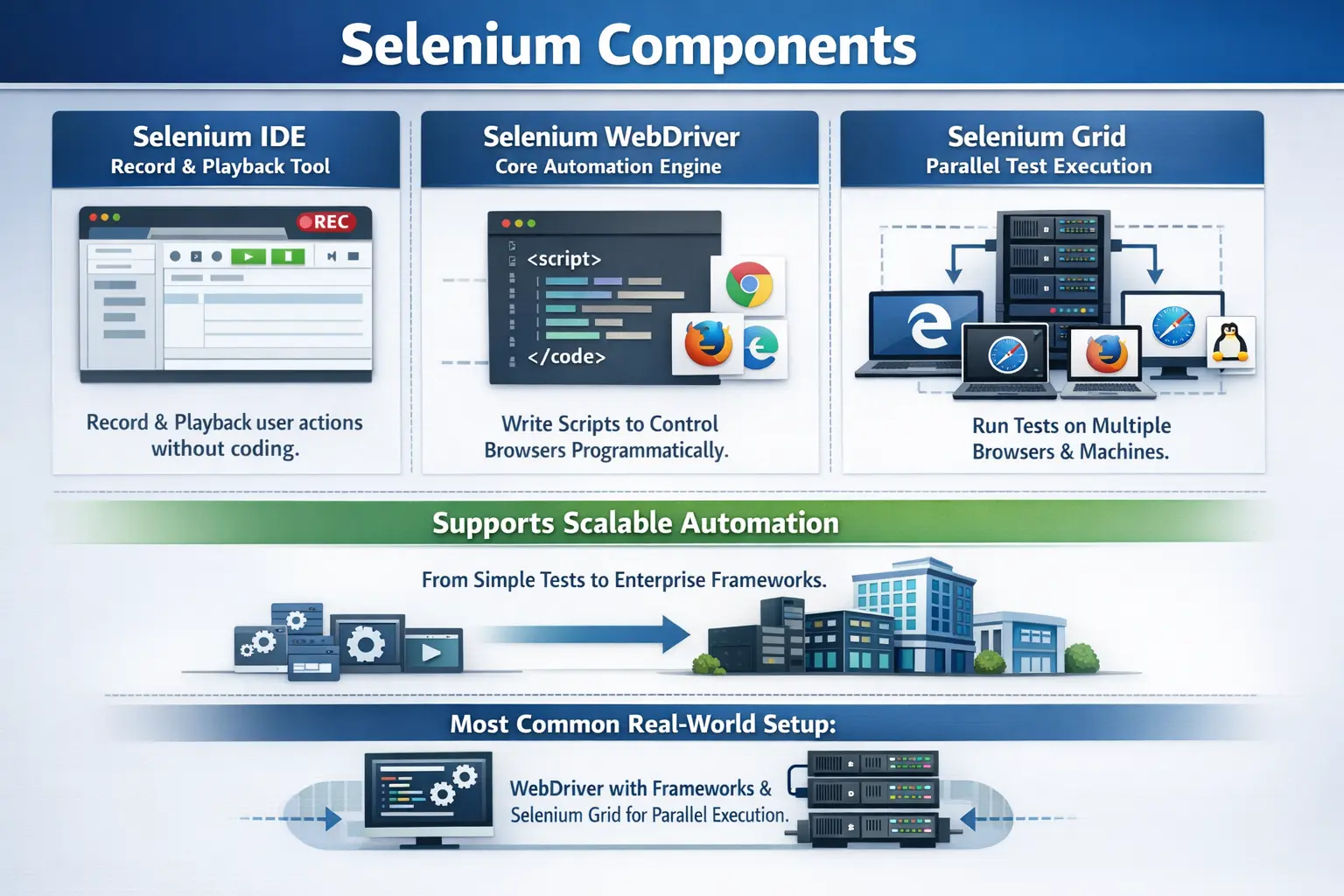
The Selenium ecosystem consists of three primary components:
- Selenium IDE
- Selenium WebDriver
- Selenium Grid
Each component serves a unique purpose within the automation lifecycle. Some components are designed for beginners and quick experimentation, while others are built for scalable automation frameworks used in enterprise projects.
Understanding how these components work individually and together is essential for building efficient automation strategies and for succeeding in automation testing interviews.
These components together enable testers to create, execute, and scale automated tests across different browsers and environments.
The reason Selenium is described as an ecosystem is that automation work has several layers. A beginner may first need a simple way to record a browser flow and understand how automation commands are formed. A professional automation engineer needs a programmable engine that can drive browsers, organize test logic, integrate with frameworks, and verify application behavior. A large team then needs a way to run those tests across multiple browsers, machines, and operating systems without waiting for a single computer to finish the entire suite. Selenium IDE, WebDriver, and Grid solve these different problems at different levels of automation maturity.
Understanding the difference between these components prevents a common beginner mistake: treating Selenium as only a record-and-playback tool or only a Java library. Selenium IDE is useful, but it is not the main choice for enterprise automation. Selenium WebDriver is the heart of most automation frameworks, but it does not automatically solve distributed execution by itself. Selenium Grid adds scalability, but it depends on well-designed WebDriver tests. When testers understand these boundaries clearly, they can choose the right component for the right problem instead of forcing one tool to do everything.
In interviews and real projects, this distinction matters because teams do not adopt Selenium only to click buttons. They use it to create a repeatable browser testing strategy. That strategy may start with learning and prototyping through IDE, mature into framework development through WebDriver, and scale into parallel execution through Grid. The three components are connected, but they are not interchangeable. Each has a role in the automation lifecycle.
Understanding the Selenium Ecosystem
Selenium was designed as a flexible automation ecosystem rather than a rigid single tool. This design allows teams to choose the components that best fit their automation needs.
Some projects may only require Selenium IDE for quick prototyping, workflow demonstration, or simple record-and-playback checks. Larger projects usually rely on Selenium WebDriver for maintainable automated test development and Selenium Grid for distributed and parallel execution.
Selenium IDE, on the other hand, provides an easy starting point for beginners who want to learn automation without programming.
Together, these components create a complete automation environment capable of supporting everything from simple tests to complex enterprise automation frameworks.
The ecosystem model also allows gradual learning. A tester can begin by recording a few steps in Selenium IDE and observing commands such as click, type, open, verify text, and assert element. The same tester can then move to WebDriver and learn how those ideas are expressed through code, locators, waits, assertions, and reusable methods. Later, the tester can learn Grid to understand how the same tests run on remote browsers and multiple machines. This progression makes Selenium practical for both beginners and experienced automation engineers.
In a mature project, the ecosystem is usually supported by additional tools. WebDriver tests may be written in Java and organized with TestNG or JUnit. Maven or Gradle may manage dependencies and execution commands. Jenkins, GitHub Actions, or another CI/CD tool may trigger the test suite. Extent Reports, Allure, or a custom reporting layer may present results. Selenium remains the browser automation foundation, while the surrounding tooling turns it into a complete quality engineering workflow.
The most important lesson is that Selenium components should be selected based on purpose. If the goal is learning, IDE is useful. If the goal is professional framework development, WebDriver is the correct foundation. If the goal is speed and scale across environments, Grid becomes important. Choosing correctly reduces maintenance effort and improves the reliability of the automation strategy.
Selenium IDE (Integrated Development Environment)
What is Selenium IDE
Selenium IDE is a browser-based tool that allows users to create automation scripts by recording interactions with a web application.
It works as a browser extension and captures actions such as clicking buttons, typing into input fields, and navigating between pages.
These actions are automatically converted into automation commands that can later be replayed.
Selenium IDE is available as an extension for browsers such as Google Chrome and Mozilla Firefox.
Because it requires minimal technical knowledge, Selenium IDE is often used by beginners who are new to automation testing.
The tool allows users to quickly create simple test scripts without writing code.
Selenium IDE is often the first component learners encounter because it gives immediate visual feedback. A user installs the browser extension, opens the target application, records actions, and replays them. This makes automation feel approachable because the learner does not need to set up Java, Maven, browser drivers, project folders, or test frameworks before seeing a browser execute automated steps. For training purposes, this direct experience can be very effective.
IDE is also useful for explaining automation vocabulary. When a recorded action appears as a command, learners can see that automation is built from instructions such as opening a URL, finding an element, entering text, clicking, waiting, and verifying outcomes. This helps bridge the gap between manual testing and coded automation. A manual tester who understands test steps can begin to see how those steps become executable instructions.
Key Features of Selenium IDE
One of the most important features of Selenium IDE is its record-and-playback capability.
Users can start recording, interact with the application as a normal user would, and Selenium IDE will capture those actions as automation steps.
Another important feature is the ability to play back recorded test cases to verify that the application behaves as expected.
Selenium IDE also allows users to export recorded scripts into programming languages such as Java and Python. This feature helps testers transition from basic recorded scripts to more advanced automation frameworks.
Basic assertions and validations can also be added to verify expected application behavior.
Selenium IDE also supports debugging features such as breakpoints and step-by-step execution.
These capabilities make Selenium IDE a useful learning tool for understanding automation concepts.
Record-and-playback is only one part of Selenium IDE. The tool also exposes learners to test organization, command ordering, basic assertions, and debugging. Breakpoints allow a user to pause execution at a specific step and observe the application state. Step-by-step execution helps identify which action is failing. These are the same debugging habits that become important later in WebDriver automation, where failures may come from timing issues, locator problems, test data mismatches, or unexpected application behavior.
The export feature is especially helpful because it shows that recorded actions can become code. A tester may record a simple login flow and export it into Java or Python to see how browser commands are represented in a programming language. The exported script may not be production-ready, but it provides a starting point for understanding WebDriver structure. This is why Selenium IDE is best viewed as a learning and prototyping component rather than a complete replacement for coded automation.
Advantages of Selenium IDE
One of the biggest advantages of Selenium IDE is its simplicity. It allows testers to create automation scripts without any programming experience.
The tool is easy to install and requires minimal configuration.
Another advantage is the speed at which tests can be created. Since interactions are recorded automatically, test creation becomes extremely fast.
Selenium IDE is also useful for demonstrating automation concepts during training sessions or proof-of-concept projects.
It can also be used for quickly reproducing bugs by recording the steps that lead to a failure.
These advantages make Selenium IDE a useful starting point for learning Selenium automation.
Selenium IDE can also be useful when a team needs quick evidence of a problem. If a tester finds a defect that requires several browser steps to reproduce, recording those steps can help developers see the exact path. Instead of writing a long reproduction note manually, the tester can share a recorded flow or use the recording as a guide for a clearer defect report. This is not the same as building a maintainable automation suite, but it can improve communication during investigation.
For proof-of-concept work, IDE can help answer simple questions quickly. A team may want to know whether a key application flow can be automated at all or whether a page structure exposes elements in a way Selenium can interact with. Recording a small scenario may reveal locator challenges, frame handling requirements, dynamic waits, or authentication issues before a full framework is built. Used this way, IDE supports exploration and planning.
Limitations of Selenium IDE
Despite its advantages, Selenium IDE has several limitations that make it unsuitable for complex automation frameworks.
Recorded scripts can become difficult to maintain as applications evolve.
The tool also has limited support for complex logic, dynamic test data, and advanced automation scenarios.
Selenium IDE scripts often struggle with modern web applications that rely heavily on dynamic elements and asynchronous behavior.
Another limitation is its lack of strong integration with CI/CD pipelines and enterprise automation frameworks.
Because of these limitations, Selenium IDE is rarely used in production-level automation projects.
The biggest maintenance problem with recorded scripts is that they often mirror exact user actions without enough abstraction. If a button locator changes, many recorded steps may fail. If the application introduces a loading delay, the script may become unstable. If the same login flow appears in many scripts, each script may need separate updates. Professional frameworks solve these problems with reusable methods, page objects, waits, shared configuration, and better test data handling. Selenium IDE is not designed to provide all of that structure by default.
Modern web applications also rely heavily on dynamic behavior. Elements may appear after API calls, content may refresh without a full page reload, and frameworks such as React, Angular, or Vue may rebuild parts of the DOM. Recorded scripts can struggle if they depend on fragile locators or fixed timing. A WebDriver framework gives engineers more control over synchronization, locator strategy, retry logic, and custom utilities. This is why teams usually move beyond IDE when automation becomes business-critical.
Real-Project Usage of Selenium IDE
In real-world automation projects, Selenium IDE is typically not used as the primary automation tool.
Instead, it is mainly used for learning automation basics or quickly validating simple application behaviors.
Sometimes business analysts or non-technical users use Selenium IDE to demonstrate workflows or reproduce defects.
However, most professional automation frameworks rely on Selenium WebDriver instead.
In real projects, Selenium IDE is best treated as a supporting tool. It can help new team members understand automation flow, help non-technical stakeholders visualize how automated browser steps work, and help testers capture simple workflows. But once the team needs reusable tests, source control, code reviews, CI/CD execution, environment configuration, reporting, and long-term maintenance, WebDriver becomes the practical choice.
Selenium WebDriver (Core Component)
What is Selenium WebDriver
Selenium WebDriver is the core automation engine of the Selenium ecosystem.
Unlike Selenium IDE, WebDriver requires programming knowledge because test scripts are written in programming languages such as Java, Python, or C#.
WebDriver interacts directly with web browsers using browser-specific drivers.
These drivers act as communication bridges between the automation script and the browser.
Using WebDriver, testers can simulate user actions such as clicking buttons, entering text, navigating pages, and validating application behavior.
Because it interacts with real browsers, WebDriver provides accurate and reliable test execution.
WebDriver is the component most people mean when they say they are using Selenium professionally. It provides the programming interface through which test code controls a real browser. In Java, for example, an automation engineer can create a WebDriver instance, open a URL, locate elements, perform actions, wait for conditions, and assert expected outcomes. This approach gives far more control than a recorded script because the engineer can use programming logic, reusable classes, test data files, helper methods, and framework patterns.
The key strength of WebDriver is that it works at the browser level. It does not simply test isolated code or backend responses. It validates how the application behaves when rendered in a real browser and interacted with like a user-facing product. This makes it valuable for end-to-end workflows where the user interface, client-side scripting, routing, form validation, and backend integration all meet. A passing WebDriver test can provide confidence that a critical browser journey still works after a change.
How Selenium WebDriver Works
The execution process in Selenium WebDriver follows a structured communication model.
First, a tester writes an automation script using a programming language.
The script uses the WebDriver API to send commands to a browser driver.
The browser driver then communicates with the actual browser and executes the requested actions.
For example, when a script instructs the browser to click a button, the command flows from the script to the WebDriver API, then to the browser driver, and finally to the browser itself.
This process follows the W3C WebDriver protocol, which standardizes communication between automation tools and browsers.
This standardized communication is one reason WebDriver became an industry standard. The automation script does not need to know every internal detail of Chrome, Firefox, Edge, or Safari. It sends commands through the WebDriver API, and the browser-specific driver translates those commands into browser actions. This creates a cleaner separation between test code and browser implementation. When browsers evolve, the driver layer handles much of the compatibility work.
Understanding this flow is important for debugging. If a Selenium test fails, the problem may be in the test code, the locator, the wait condition, the browser driver, the browser version, the application under test, or the test environment. A tester who understands the WebDriver communication chain can investigate failures more logically. For example, a driver-browser version mismatch produces a different kind of issue than an incorrect XPath or a missing test data record.
Key Features of Selenium WebDriver
One of the key strengths of Selenium WebDriver is its ability to automate real browser interactions.
Unlike earlier automation tools that simulated browser behavior, WebDriver interacts directly with browser engines.
This makes tests more reliable and accurate.
WebDriver also supports multiple programming languages, allowing teams to use the language they are most comfortable with.
Another important feature is its ability to handle complex user interactions such as drag-and-drop operations, keyboard events, and dynamic content loading.
WebDriver can also integrate with testing frameworks, reporting tools, and continuous integration pipelines.
These capabilities make WebDriver suitable for building scalable automation frameworks.
WebDriver becomes especially powerful when combined with good framework design. A framework can hide repetitive browser actions behind readable methods, centralize driver creation, manage waits consistently, capture screenshots on failure, and organize tests by feature or business workflow. This allows test cases to express intent clearly. Instead of every test containing many low-level find-and-click commands, a test can call methods such as loginAsUser, searchForProduct, addItemToCart, or verifyOrderConfirmation. This improves readability and reduces maintenance effort.
WebDriver also supports realistic automation patterns such as data-driven testing, where the same scenario runs with different input values, and cross-browser testing, where the same test suite runs against different browsers. It can work with Page Object Model, Page Factory, fluent APIs, behavior-driven frameworks, and custom utilities. These patterns are not built by Selenium automatically, but WebDriver provides the browser control layer that makes them possible.
Supported Browsers
Selenium WebDriver supports all major modern browsers.
These include Google Chrome, Mozilla Firefox, Microsoft Edge, and Apple Safari.
Each browser requires a specific driver that acts as the communication bridge between WebDriver and the browser.
Chrome uses ChromeDriver, Firefox uses GeckoDriver, Edge uses EdgeDriver, and Safari uses SafariDriver.
By switching drivers, the same automation script can run across different browsers.
This capability enables efficient cross-browser testing.
Browser driver compatibility is an important practical concern. The browser, driver, Selenium library, and operating system must work together correctly. In many modern Selenium setups, Selenium Manager or WebDriverManager can reduce manual driver management, but testers should still understand what browser drivers do. When a test starts, WebDriver needs a compatible driver to launch and control the browser session. If the driver is missing, blocked, outdated, or incompatible, the test may fail before the application is even opened.
Cross-browser support does not mean every browser behaves identically. A test may pass in Chrome but fail in Safari because of browser-specific behavior, stricter security handling, different timing, or UI rendering differences. Selenium helps reveal those differences by executing similar flows in real browser environments. Teams can then decide whether the issue is a product defect, an unsupported browser behavior, or a test design problem.
Advantages of Selenium WebDriver
One of the biggest advantages of Selenium WebDriver is its stability and performance.
Because WebDriver interacts directly with browsers, it provides accurate simulation of real user behavior.
Another advantage is its flexibility. Testers can build custom automation frameworks using WebDriver and integrate them with testing tools.
WebDriver also supports advanced automation scenarios such as data-driven testing and parallel execution.
Its widespread adoption makes it an industry standard for web automation testing.
Another advantage of WebDriver is maintainability when it is used correctly. Since tests are written in a programming language, teams can apply software engineering practices to automation code. They can use source control, code reviews, naming conventions, reusable libraries, object-oriented design, logging, exception handling, configuration files, and build pipelines. This makes automation a genuine engineering activity rather than a collection of isolated scripts.
WebDriver also supports collaboration between testers and developers. Developers can help review automation code, improve page object design, or troubleshoot environment problems. Testers can contribute domain knowledge, identify high-value scenarios, and design meaningful assertions. Because WebDriver automation is code, it can become part of the same engineering workflow used for application development.
Limitations of Selenium WebDriver
Although WebDriver is powerful, it also has certain limitations.
One limitation is the requirement for programming knowledge. Testers must understand programming concepts to use WebDriver effectively.
WebDriver is designed specifically for web applications and cannot automate desktop applications.
Another limitation involves CAPTCHA and OTP verification, which are designed to prevent automation.
WebDriver scripts can also become unstable if frameworks are not designed carefully.
These limitations highlight the importance of proper automation design and maintenance.
The most common WebDriver limitation in practice is not the tool itself but poor framework discipline. Tests become flaky when they rely on fixed sleeps, weak locators, shared unstable data, or assumptions about execution order. They become hard to maintain when every test duplicates the same setup and browser actions. Selenium gives the ability to automate, but it does not automatically guarantee quality automation. Engineers must design tests carefully, review failures honestly, and refactor automation code as the application changes.
Another limitation is execution cost. Browser tests are slower than unit tests and API tests because they launch real browsers and interact with rendered pages. This is acceptable for critical user journeys, but it is inefficient for every validation. Good teams use WebDriver where UI-level confidence is needed and rely on lower-level tests for logic and service validation. This balanced approach keeps Selenium valuable without making the test strategy too slow.
Real-Project Usage of Selenium WebDriver
Selenium WebDriver is the most widely used component of the Selenium ecosystem in real-world projects.
Organizations use WebDriver to automate regression testing, smoke testing, and sanity testing.
It is also widely used for cross-browser testing and CI/CD pipeline automation.
Most enterprise automation frameworks are built using Selenium WebDriver integrated with testing frameworks such as TestNG or JUnit.
Because of its flexibility and scalability, WebDriver forms the backbone of modern automation strategies.
In a real framework, WebDriver usually sits behind a driver management layer. The framework decides whether to run Chrome, Firefox, Edge, a headless browser, a remote Grid session, or a cloud browser. Test classes do not need to create browser sessions in an inconsistent way. This centralization is important because browser setup affects every test. A clean WebDriver layer makes it easier to switch execution modes, add parallel support, and integrate with CI/CD environments.
WebDriver is also commonly used with the Page Object Model. In this pattern, each important page or component is represented by a class that contains locators and actions for that page. Tests call page methods instead of directly manipulating low-level locators everywhere. This reduces duplication and makes UI changes easier to handle. For example, if a login button locator changes, the update happens in the login page object rather than in every test that logs in.
Selenium Grid (Parallel and Distributed Execution)
What is Selenium Grid
Selenium Grid is a component that allows automation tests to run across multiple machines, browsers, and operating systems simultaneously.
Instead of executing tests sequentially on a single machine, Selenium Grid distributes test execution across multiple environments.
This approach significantly reduces test execution time.
Selenium Grid is especially useful for large test suites that must be executed across many browser and operating system combinations.
Grid becomes important when the team has outgrown local execution. A single machine may be enough for a small smoke suite, but it becomes a bottleneck when hundreds of tests must run before every release. If one browser session runs at a time, feedback can take hours. Grid allows multiple browser sessions to run in parallel, so the same test suite can finish much faster. This speed matters because delayed automation results reduce the value of automation.
Grid also helps teams test environment diversity. An application may need validation on Chrome, Firefox, Edge, and Safari, or on different operating systems. Without Grid, testers may need to maintain separate machines and manually manage execution. With Grid, test requests can be routed to nodes that match the requested browser and platform capabilities. This makes cross-browser and cross-platform validation more systematic.
Why Selenium Grid Is Needed
Without Selenium Grid, automation tests typically run sequentially.
Sequential execution can take a long time when dealing with large regression test suites.
Selenium Grid enables parallel execution, allowing multiple tests to run at the same time.
Parallel execution reduces feedback time and accelerates testing cycles.
It also improves test coverage by allowing tests to run across different environments simultaneously.
This capability makes Selenium Grid essential for enterprise-scale automation environments.
The business value of Grid is faster feedback. If a regression suite takes six hours to run, teams may avoid running it frequently. If Grid reduces that time to one hour or less, the suite becomes more practical for daily or pipeline execution. Faster execution also supports earlier defect detection, better release confidence, and more efficient use of test infrastructure. Grid does not improve test quality by itself, but it improves how quickly a well-designed suite can provide information.
Grid is also useful when teams need to isolate browser sessions. Parallel execution should not mean that tests interfere with each other. Each test can request its own browser session, run independently, and close the session when complete. This model works well when tests are designed with independent data and no hidden dependency on execution order. Grid rewards good test design and exposes weaknesses in tests that rely on shared state.
Selenium Grid Architecture
Selenium Grid follows a distributed architecture consisting of a hub and nodes.
The hub acts as the central controller that receives test execution requests.
Nodes are machines that execute the tests.
Each node can have different browser and operating system configurations.
When a test is initiated, the hub determines which node is available and forwards the test request to that node.
The node executes the test and returns the result to the hub.
This architecture allows efficient distribution of automation tasks.
In Selenium Grid 4, the architecture is more evolved than the older hub-and-node explanation, but the basic idea remains easy to understand: one part receives session requests and routes them, while execution nodes provide browser capacity. The test script does not need to know which exact machine will run the test. It requests a browser with desired capabilities, and the Grid infrastructure finds a suitable execution slot. This abstraction is what makes distributed execution manageable.
For automation engineers, Grid architecture matters because configuration affects reliability. Nodes must have the right browsers, versions, drivers, memory, and network access to the application under test. If the Grid is overloaded, tests may wait for available sessions or fail due to infrastructure constraints. A strong Grid setup includes monitoring, capacity planning, clean session shutdown, and clear logs for debugging distributed failures.
Types of Execution Supported by Selenium Grid
Selenium Grid supports several types of execution scenarios.
Parallel execution allows multiple tests to run simultaneously.
Cross-browser testing ensures that applications work correctly across different browsers.
Cross-platform testing validates application behavior on different operating systems.
Distributed execution enables large automation suites to run across multiple machines.
These capabilities allow organizations to scale their automation infrastructure effectively.
Parallel execution is the most common use case, but it must be applied carefully. Tests that pass sequentially may fail in parallel if they share the same user account, modify the same records, write to the same files, or depend on one another. Grid enables parallelism, but framework and test data design make parallelism reliable. Before scaling execution, teams should remove hidden dependencies and make each test as independent as possible.
Cross-browser and cross-platform execution should also be planned based on risk. Running every test on every browser may be expensive and unnecessary. Many teams run a fast smoke suite across all supported browsers and a deeper regression suite on the primary browser. Before release, they may run selected critical flows across a wider matrix. Selenium Grid supports these strategies by allowing tests to request specific execution environments.
Selenium Grid Versions
Selenium Grid has evolved significantly over time.
Earlier versions required manual configuration and infrastructure setup.
Modern versions such as Selenium Grid 4 provide improved architecture and simplified configuration.
Many organizations now run Selenium Grid using container technologies such as Docker.
Docker-based Grid setups allow teams to quickly create and manage test environments.
These improvements make Selenium Grid more accessible and easier to maintain.
Docker has made Grid adoption easier because browser nodes can be created and removed more predictably. Instead of manually configuring many physical or virtual machines, teams can run containerized browser nodes with known versions. This supports repeatable infrastructure and works well with CI/CD pipelines. When test demand increases, more containers can be started. When execution is complete, they can be stopped to save resources.
Cloud-based browser platforms are another common extension of the Grid idea. Some organizations use services that provide many browser and operating system combinations without maintaining their own infrastructure. The WebDriver tests still communicate with remote browser sessions, but the provider manages the environment. Whether a team uses local Grid, Docker Grid, or cloud execution, the underlying goal is the same: run browser tests at scale and get reliable feedback quickly.
Advantages of Selenium Grid
Selenium Grid significantly reduces test execution time by enabling parallel execution.
It also improves resource utilization by distributing tests across multiple machines.
Grid supports large test suites that would otherwise take hours to execute sequentially.
For enterprise testing environments, Selenium Grid provides scalability and flexibility.
These advantages make it an essential component for organizations running large automation frameworks.
Grid also improves infrastructure utilization. Instead of depending on one powerful machine, teams can distribute execution across available resources. A node may provide Chrome sessions, another may provide Firefox sessions, and another may support a specific operating system. This distribution gives teams more control over how execution capacity is allocated. It also helps avoid long waiting times when several pipelines or testers need browser sessions at the same time.
For release testing, Grid can make broad validation practical. A team preparing for production may need to confirm that critical flows work across browsers and platforms. Running these checks one by one can delay release decisions. Running them in parallel provides faster evidence. This is why Grid often becomes important as organizations move from simple automation to release-level automation governance.
Limitations of Selenium Grid
Despite its benefits, Selenium Grid requires additional setup and infrastructure management.
Configuring the hub and nodes can be complex for beginners.
Debugging failures in distributed environments may also be more challenging.
For smaller projects with limited test suites, Selenium Grid may not be necessary.
Understanding when to use Selenium Grid is important for efficient automation planning.
Grid introduces infrastructure complexity, so it should be adopted when the benefit is clear. If a project has only a few tests, local execution may be simpler. If the suite is large, cross-browser coverage is required, or CI/CD feedback is too slow, Grid becomes more valuable. The decision should be based on execution time, browser coverage needs, team size, release frequency, and maintenance capacity.
Debugging distributed failures can be challenging because the failure may depend on a specific browser node, operating system, network condition, or resource limitation. Good logging, screenshots, videos when available, browser console logs, and environment details help reduce this difficulty. A Grid setup should be treated as part of the automation product, not as an invisible background service that never needs care.
Comparison of Selenium Components
Each Selenium component serves a different purpose within the automation ecosystem.
Selenium IDE is primarily used for learning automation concepts and creating quick test scripts through record-and-playback functionality.
Selenium WebDriver is the core automation tool used to build robust and maintainable automation frameworks.
Selenium Grid enables large automation suites to execute tests faster by supporting parallel and distributed execution.
Together, these components support different stages of automation maturity.
A simple comparison is useful: Selenium IDE helps create and learn; Selenium WebDriver helps build and verify; Selenium Grid helps scale and distribute. IDE is the easiest entry point but the least suitable for large frameworks. WebDriver requires programming but provides the control needed for professional automation. Grid requires infrastructure planning but provides the speed and coverage needed for large suites. Understanding this progression helps testers explain Selenium clearly in both project discussions and interviews.
These components also answer different questions. If someone asks how to record a quick browser test, the answer may involve IDE. If someone asks how to automate a regression suite using Java, the answer is WebDriver with a test framework. If someone asks how to run the suite on multiple browsers at the same time, the answer is Grid. Confusing these components leads to poor tool selection and unrealistic expectations.
How Selenium Components Work Together
In practical automation environments, Selenium components often complement each other.
Selenium IDE may be used by beginners to learn automation concepts or quickly record test steps.
Selenium WebDriver is then used to develop scalable automation scripts and frameworks.
Selenium Grid enables these automation suites to run efficiently across multiple environments.
In many real-world projects, automation frameworks combine Selenium WebDriver with testing frameworks such as TestNG and build tools such as Maven.
Selenium Grid is then used to run the tests in parallel across multiple machines.
This combination creates a powerful and scalable automation ecosystem.
A realistic team journey often starts with WebDriver rather than IDE once professional automation begins. The team creates a framework, identifies stable regression scenarios, develops page objects, adds reporting, and runs tests locally. As the suite grows, execution time increases. At that point, Grid becomes the natural next step. The same WebDriver tests can be configured to run remotely, allowing the team to scale without rewriting the core test logic.
In this workflow, the components are connected by automation maturity. IDE can help with learning and prototyping. WebDriver creates the maintainable test suite. Grid executes that suite efficiently across environments. Together, they support the full path from understanding browser automation to running enterprise-level automated checks in a delivery pipeline.
Interview Perspective
Understanding Selenium components is essential for automation testing interviews.
A short explanation may describe Selenium IDE as a record-and-playback tool, Selenium WebDriver as the main automation engine, and Selenium Grid as the component that enables parallel execution.
A more detailed explanation highlights how these components work together to support scalable automation frameworks.
Demonstrating this understanding shows familiarity with real-world automation practices.
A strong interview answer should mention both purpose and limitation. Selenium IDE is a browser extension used for record-and-playback and quick learning, but it is not preferred for complex frameworks. Selenium WebDriver is the main component used to write coded automation scripts and interact with real browsers. Selenium Grid is used to run WebDriver tests in parallel across multiple browsers, machines, and operating systems. This answer is concise, but it shows the candidate understands the role of each component.
Interviewers may also ask which Selenium component is used most in real projects. The answer is WebDriver, because professional automation requires programming control, framework integration, reusable design, assertions, reporting, and CI/CD support. Grid is added when scale and parallel execution are needed. IDE is useful for beginners or quick demonstrations, but it is not usually the foundation of enterprise automation.
Another common interview angle is to ask how the components work together. A practical answer is that WebDriver tests are written in a programming language and integrated with a test framework. When the suite becomes large or needs cross-browser coverage, Selenium Grid provides remote browser sessions so those WebDriver tests can run in parallel. Selenium IDE may be used separately for learning or prototyping, but professional suites generally rely on WebDriver and Grid.
Key Takeaway
Selenium is a comprehensive automation ecosystem rather than a single tool.
Selenium IDE provides an easy starting point for learning automation concepts.
Selenium WebDriver serves as the core automation engine used in professional automation frameworks.
Selenium Grid enables large test suites to run efficiently through parallel and distributed execution.
Understanding the strengths and appropriate use cases of each component helps testers build scalable automation solutions and succeed in real-world automation projects.
The main takeaway is that Selenium is successful because it covers different automation needs without forcing every team into the same usage model. Beginners can learn with IDE, automation engineers can build with WebDriver, and large teams can scale with Grid. Each component has a clear role, and each role becomes more valuable when it is used for the right purpose.
For anyone learning Selenium with Java, WebDriver should become the primary focus after the basic concepts are clear. IDE is useful for understanding recorded actions, and Grid is important for advanced execution strategy, but WebDriver is where framework design, coding skill, locator strategy, waits, assertions, test data, and maintainability come together. A tester who understands all three components can explain Selenium as a complete automation ecosystem rather than a single browser tool.