Selenium Architecture
WebDriver has become one of the most widely used tools for automating web applications. While many testers learn WebDriver by writing scripts and running automated tests, understanding the Grid behind Selenium is equally important. The internal design of Selenium explains how automation commands travel from the test script to the browser and how the browser responds to those commands.
Selenium WebDriver follows a client–server model, where automation scripts communicate with browsers through standardized protocols and browser-specific drivers. This design allows Selenium to support multiple browsers, programming languages, and operating systems while maintaining consistency and reliability.
Understanding Selenium architecture is important for several reasons. It helps testers design stable automation frameworks, troubleshoot automation failures, and understand the technical flow of command execution. Knowledge of Selenium architecture is also frequently tested in automation testing interviews because it demonstrates deeper technical understanding of how the tool works internally.
By understanding each component of the architecture and how they interact, testers can build more reliable automation solutions and diagnose issues more effectively.
Selenium architecture is best understood as a communication pipeline. A tester writes code in a familiar programming language, but the browser does not understand Java, Python, C#, or JavaScript test code directly. The browser understands browser-level instructions. Selenium sits between these two worlds and converts test intentions into standardized browser automation commands. This layered design is the reason Selenium can support many languages while still controlling real browsers in a consistent way.
This architecture also explains why Selenium is different from simple screen-recording tools. Selenium does not depend on image matching or blindly replaying mouse coordinates. It works with browser elements, browser sessions, commands, responses, and standardized protocols. When a script clicks a login button, Selenium does not merely move the mouse to a stored screen position. It locates the element, sends a click command through the WebDriver pipeline, and waits for the browser to perform that action according to browser rules.
For real projects, this knowledge turns Selenium from a black box into a system that can be reasoned about. If a test fails before the browser opens, the issue may be driver setup or browser compatibility. If the browser opens but the click fails, the issue may be locator strategy, synchronization, frame context, or application behavior. If a remote execution fails only on Grid, the problem may be network routing, node capacity, browser availability, or session configuration. Architecture helps testers ask better debugging questions.
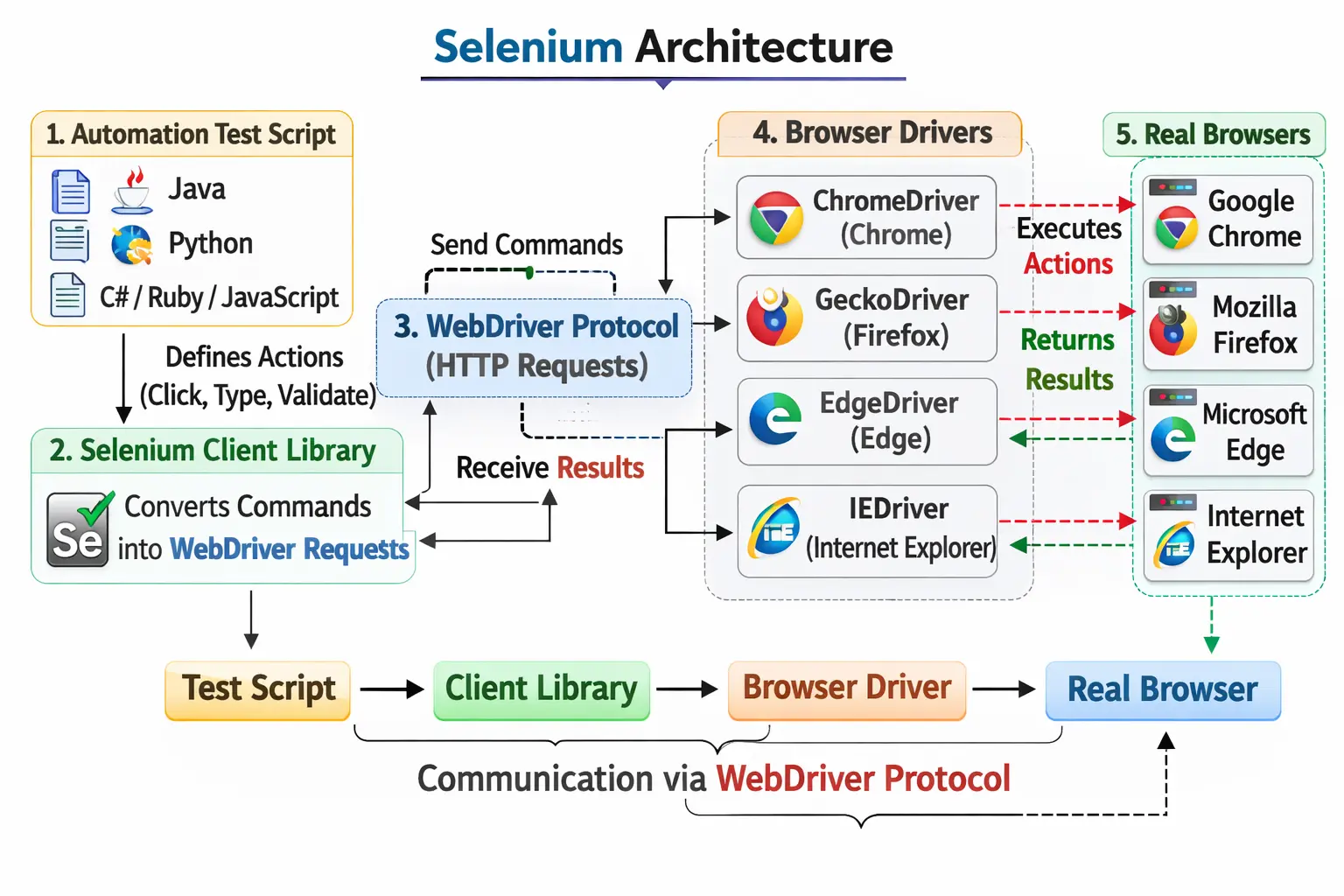
High-Level View of Selenium Architecture
At a high level, Selenium architecture consists of several layers that work together to execute automation commands. Each layer has a specific role in the automation process.
The primary components of Selenium architecture include the test script, Selenium client library, Grid API, browser driver, and the real browser. These components form a communication chain that allows automated tests to control browser behavior.
The test script represents the automation logic written by the tester. This script interacts with the Selenium client library, which translates commands into standardized requests.
These requests are processed by the WebDriver protocol, which communicates with the browser driver. The browser driver then interacts with the real browser to perform actions such as clicking buttons, entering text, or navigating between pages.
All these components must function together for Selenium automation to work correctly. If any layer fails or is misconfigured, the automation process may fail.
Understanding how these layers interact is essential for designing stable and scalable automation frameworks.
The layers are intentionally separated. The test script focuses on business flow and validation. The client library provides language-specific methods. The WebDriver protocol defines the standard command format. The browser driver understands the selected browser. The real browser performs the actual user-facing action. Because each layer has a clear responsibility, Selenium can evolve without forcing every automation script to be rewritten whenever a browser changes internally.
In a Java automation framework, for example, the test may call methods such as driver.get, findElement, click, sendKeys, or getText. These commands feel like ordinary Java methods to the tester. Internally, however, Selenium converts them into protocol-level requests. The browser driver receives those requests and interacts with the browser. The response then travels back through the same chain. This round trip happens repeatedly for every meaningful browser action.
A useful mental model is to think of Selenium architecture as a translator and routing system. The test script expresses intent, the client library translates that intent into WebDriver language, the browser driver routes it into browser-specific behavior, and the browser returns the outcome. Once this flow is clear, concepts such as browser drivers, remote execution, Grid, desired capabilities, session IDs, and driver compatibility become much easier to understand.
Test Script (Automation Code)
The test script is the starting point of Selenium automation. It represents the code written by the tester to define test scenarios and automation logic.
Automation scripts are typically written in programming languages supported by Selenium, such as Java, Python, C#, or JavaScript.
These scripts describe the actions that Selenium should perform on the web application. For example, the script may instruct Selenium to open a web page, locate a specific element, click a button, or verify displayed text.
The test script also contains validation logic in the form of assertions. These assertions verify whether the application behaves as expected.
For example, the script may verify that a successful login message appears after entering valid credentials.
Although the test script defines automation behavior, it does not interact directly with the browser. Instead, it sends commands to the Selenium client library, which handles communication with other components.
This separation allows Selenium to support multiple programming languages without changing the core automation architecture.
A well-designed test script should describe the scenario clearly rather than expose every low-level browser detail. In a beginner script, the code may directly locate each element and perform actions step by step. In a professional framework, those details are usually organized into page objects, reusable utility methods, setup classes, and test data layers. The test script then reads closer to a business workflow: open the login page, enter valid credentials, submit the form, and verify the dashboard.
The test script is also where assertion strategy matters. Selenium can perform actions, but the test script decides what success means. A click is not enough; the script must verify the expected result after the click. For example, after submitting a login form, a strong test may verify the page URL, dashboard heading, logged-in user name, and absence of error messages. Without assertions, a Selenium script may perform actions without proving that the application behaved correctly.
Test scripts are also responsible for using stable test data and avoiding hidden dependencies. If a script depends on another test running first, or if it modifies shared data without cleanup, it may fail during parallel execution. Selenium architecture can carry commands to the browser, but framework discipline determines whether the tests are reliable, readable, and suitable for CI/CD execution.
Selenium Client Library
The Selenium client library acts as the bridge between the automation script and the WebDriver protocol.
Each supported programming language has its own client library. For example, Java has Selenium Java bindings, while Python has Selenium Python bindings.
These libraries provide predefined classes and methods that testers use to write automation scripts.
When the test script calls a WebDriver method, such as navigating to a web page or locating an element, the client library translates that command into a format compatible with the WebDriver protocol.
For example, a command such as driver.get() in Java is converted into a structured request that the WebDriver protocol can understand.
The client library ensures that automation commands follow the correct communication format required by Selenium.
Without the Selenium client library, automation scripts would not be able to communicate with the WebDriver protocol or the browser driver.
This component is therefore essential for connecting test scripts with the Selenium automation infrastructure.
Client libraries are what make Selenium comfortable for different programming communities. Java testers use Java classes and interfaces, Python testers use Python modules, and C# testers use .NET bindings. The syntax differs, but the underlying architecture remains consistent. This is why the same Selenium concepts transfer across languages. A find element command, a click command, a navigation command, and a session command all map to WebDriver behavior even though the surface code looks different.
The client library also manages many practical details that testers do not want to manually implement. It creates command objects, manages browser sessions, converts method calls into protocol requests, receives responses, and exposes errors as language-specific exceptions. When a NoSuchElementException appears in a Java test, it is the client library presenting a protocol or browser response in a form that Java code can handle.
Because the client library is part of the execution chain, its version matters. A Selenium library that is too old may not support newer browser behavior or protocol improvements. A project should manage Selenium dependencies deliberately through tools such as Maven or Gradle rather than relying on random jar files. Dependency control is part of architecture hygiene because the client library participates in every command.
WebDriver API and the W3C WebDriver Protocol
The WebDriver API is the central communication mechanism within Selenium architecture.
It is based on the W3C WebDriver protocol, a standardized specification that defines how automation tools communicate with browsers.
The protocol ensures that Selenium commands are structured consistently regardless of the browser being automated.
Communication between the Selenium client library and the browser driver occurs through HTTP requests and JSON payloads.
When a command is issued in the test script, the client library sends an HTTP request containing the automation command.
The browser driver receives this request and processes it according to the WebDriver protocol.
Because the protocol is standardized, different browser vendors can create drivers that implement the same communication structure.
This standardization is the reason Selenium can automate multiple browsers using the same automation scripts.
The WebDriver protocol ensures consistency and reliability across different browser environments.
The W3C WebDriver protocol is one of the most important improvements in modern Selenium. Earlier browser automation approaches were less standardized, which made cross-browser behavior harder to maintain. With a common protocol, browser vendors can implement driver behavior in a predictable way. Selenium can then send standardized commands such as creating a session, navigating to a URL, locating an element, clicking, typing, executing script, taking screenshots, and closing the session.
The protocol is also the reason Selenium can support remote execution. A WebDriver command is not limited to a browser on the same machine. It can be sent over HTTP to a remote server, a Selenium Grid, a Dockerized browser node, or a cloud browser platform. The test code still uses familiar WebDriver methods, while the execution environment may be local or remote. This separation is central to scalable automation.
From a debugging point of view, the protocol explains why Selenium errors are often structured. A failed command produces a response that includes status information and error details. The client library converts that response into an exception or result object. Understanding this helps testers distinguish between application failures, browser failures, invalid session issues, stale elements, missing elements, timeout failures, and infrastructure problems.
Browser Driver
The browser driver is a critical component of Selenium architecture. It acts as the intermediary between the WebDriver protocol and the actual browser.
Each browser requires a specific driver that understands how to control that browser.
For example, Google Chrome requires ChromeDriver, Mozilla Firefox requires GeckoDriver, Microsoft Edge requires EdgeDriver, and Apple Safari requires SafariDriver.
The browser driver receives WebDriver commands from the client library and translates them into browser-specific actions.
For example, if the automation script instructs Selenium to click a button, the browser driver interprets that command and triggers the corresponding action inside the browser.
The driver also collects responses from the browser and sends them back to the Selenium client library.
Because each browser has its own architecture and internal implementation, a separate driver is required for each browser type.
This design allows Selenium to support multiple browsers while maintaining consistent automation behavior.
Browser drivers are separate because each browser has its own internal engine, release cycle, security model, and implementation details. Chrome, Firefox, Edge, and Safari do not expose exactly the same internal control mechanisms. The browser driver hides these differences from the test script. The script sends a WebDriver command, and the driver handles the browser-specific work needed to execute it.
Driver compatibility is one of the most common architecture-related causes of Selenium failure. If the installed browser is updated but the driver is old, session creation may fail or browser behavior may become unpredictable. Modern Selenium versions can reduce this pain through Selenium Manager, and many Java projects use WebDriverManager, but the architectural concept remains the same: the driver must be compatible with the browser it controls.
A strong framework centralizes browser driver management rather than scattering setup logic across many tests. This allows the team to control browser selection, headless mode, remote execution, download paths, window size, timeouts, and other capabilities consistently. Since every test depends on a browser session, driver setup is not a minor detail. It is a core part of the Selenium architecture.
Real Browser
The final component of Selenium architecture is the real browser.
Unlike some automation tools that simulate browser behavior, Selenium interacts with actual browsers installed on the system.
The browser performs all actions exactly as a real user would experience them.
For example, the browser renders web pages, executes JavaScript code, processes user events, and displays user interface elements.
By controlling real browsers, Selenium ensures that automation tests accurately reflect real user interactions.
This approach increases the reliability of test results because the tests run in the same environment used by actual users.
The browser sends responses back to the browser driver, which then forwards them to the Selenium client library and ultimately to the test script.
Running against a real browser is one of Selenium's biggest strengths. The browser performs actual rendering, executes JavaScript, applies CSS, handles cookies, enforces security restrictions, opens tabs and windows, and reacts to user-like events. This gives Selenium tests strong confidence for end-to-end browser workflows because the application is being exercised through the same type of environment used by real users.
At the same time, real browser execution is slower and more sensitive than lower-level testing. A unit test can verify logic in milliseconds, and an API test can validate service responses without rendering a page. A Selenium test must launch or connect to a browser, load pages, wait for UI changes, and interact with elements. This is why Selenium architecture should be used where browser-level confidence is needed, not for every possible validation.
Browser behavior also explains many synchronization challenges. A page may appear loaded while JavaScript is still updating content. An element may exist in the DOM but not yet be clickable. A button may be visible but covered by a spinner. Understanding that Selenium is communicating with a real browser helps testers design explicit waits and reliable conditions instead of depending on fixed sleeps.
Command Flow in Selenium Architecture
The automation process in Selenium follows a structured command flow.
The process begins when the tester executes the automation script.
The script sends a command using the WebDriver API. This command is received by the Selenium client library.
The client library converts the command into an HTTP request following the WebDriver protocol.
This request is then sent to the browser driver.
The browser driver interprets the request and executes the corresponding action in the browser.
For example, it may click a button, open a web page, or retrieve the text of an element.
After the action is completed, the browser returns a response to the driver.
The driver forwards this response back through the WebDriver protocol to the client library.
Finally, the response is returned to the test script, which may continue with the next step.
This process occurs for every automation command executed by Selenium.
This repeated request-response cycle is important because Selenium does not send the entire test to the browser at once. Each command travels independently. Open page is one command. Find element is another command. Click is another command. Read text is another command. Each command depends on the current browser state. If the state changes between commands, the next command may behave differently from what the script expects.
For example, a script may locate a button and then click it. If the page refreshes between those two steps, the element reference may become stale because it points to an element from the old DOM. This is not a random Selenium issue; it follows from the architecture. The browser changed, the previous element reference is no longer valid, and Selenium reports a stale element problem. Understanding command flow helps testers solve such failures with better waits and fresh element lookup.
Command flow also affects performance. A test with many unnecessary element lookups, repeated waits, or duplicated browser actions sends many commands through the architecture. Each command has overhead, especially in remote Grid execution. Efficient test design reduces unnecessary browser communication while still keeping the test readable and reliable.
Selenium Architecture with Selenium Grid
When Selenium Grid is introduced, the architecture expands to support distributed testing.
Selenium Grid allows tests to run across multiple machines, browsers, and operating systems simultaneously.
The architecture includes two additional components: the Hub and Nodes.
The hub acts as the central controller that receives automation requests.
Nodes are machines that execute the tests. Each node can have different browsers and operating systems installed.
When a test is executed, the automation request is first sent to the hub.
The hub determines which node is available and capable of executing the requested test.
The hub then forwards the request to that node.
The node runs the test using its browser driver and browser instance.
After execution, the node sends the results back to the hub, which returns them to the test script.
This architecture enables parallel execution, cross-browser testing, and distributed testing across multiple environments.
Selenium Grid extends the same architecture rather than replacing it. The test script still uses WebDriver commands, the client library still translates them, and a real browser still executes them. The difference is that the browser may run on a remote node instead of the local machine. The Grid receives the session request, chooses a suitable execution environment, and routes commands to that environment.
This is especially useful for large regression suites. If a suite has hundreds of browser tests, running them one by one on a local machine may take several hours. Grid allows tests to run in parallel across multiple browser sessions. A test requesting Chrome can run on one node, another requesting Firefox can run on another node, and a third can run on Edge at the same time. This reduces feedback time and makes automation more useful in CI/CD pipelines.
Grid architecture also introduces new responsibilities. Nodes must be available, browser versions must be controlled, network access to the application must work, and tests must be independent enough to run in parallel. A poorly designed test suite may become unstable when moved to Grid because hidden data dependencies are exposed. Selenium Grid provides scalability, but reliable distributed execution depends on disciplined framework and test data design.
Why Selenium Architecture Is Designed This Way
The architecture of Selenium is intentionally designed to provide flexibility, scalability, and browser independence.
By separating test scripts from browser drivers, Selenium ensures that automation code does not depend on a specific browser implementation.
The use of a standardized WebDriver protocol ensures consistent communication between automation tools and browsers.
This architecture also allows browser vendors to maintain their own drivers while following the same protocol.
Another benefit of this design is scalability. Selenium Grid can easily extend the architecture to support distributed testing environments.
The loosely coupled architecture also simplifies maintenance because changes in one component do not necessarily affect other components.
These design principles are the reason Selenium remains stable, flexible, and widely adopted in the industry.
The loose coupling between layers is one of Selenium's most practical design strengths. Test scripts do not need to know how Chrome internally performs a click or how Firefox handles a keyboard event. Browser vendors can update their drivers while Selenium clients continue to use the standard protocol. This separation protects automation code from many browser-specific implementation details.
The architecture is also flexible enough to support both local and remote execution. A beginner can run WebDriver tests on a laptop. A professional team can run the same style of tests on a CI agent. A large organization can route tests through Grid or cloud browser infrastructure. The test code may need configuration changes, but the fundamental command model remains the same. This scalability is a major reason Selenium continues to be used across different project sizes.
Another design advantage is language independence. Since the protocol is standardized, Selenium can provide bindings for multiple programming languages. This allows organizations to use Selenium in the language that fits their technology stack. Java teams can use Java, Microsoft-heavy teams can use C#, scripting-oriented teams can use Python, and front-end teams can use JavaScript. The architecture supports this flexibility without changing the browser control model.
Common Architecture-Related Issues
Many Selenium automation failures occur due to architectural or configuration problems rather than issues with the tool itself.
One common issue is version mismatch between the browser and its corresponding driver.
If the browser version is incompatible with the installed driver, Selenium may fail to start the browser.
Incorrect driver configuration can also cause execution failures.
Network issues may affect distributed environments when using Selenium Grid.
Improper synchronization strategies can lead to slow execution or unstable tests.
Automation frameworks that lack proper structure may also experience reliability issues.
Understanding Selenium architecture helps testers identify and resolve these problems more efficiently.
Architecture-related issues often look like test failures, but the root cause may be environmental. A session creation failure may indicate that the browser driver cannot start the browser. A timeout on a remote run may indicate Grid capacity or network latency. A test passing locally but failing on CI may point to headless browser behavior, screen resolution, missing dependencies, or application access restrictions. Without architectural understanding, testers may waste time changing locators when the real problem is lower in the execution chain.
Synchronization issues are another common source of instability. Selenium commands execute against the browser state at a specific moment. If the application is still loading data, rebuilding the DOM, or displaying overlays, the command may fail. The solution is not to add random waits everywhere. A better approach is to wait for meaningful conditions such as element visibility, clickability, URL change, text presence, or disappearance of loading indicators.
Framework structure can either reduce or increase architecture problems. A good framework centralizes driver setup, wait utilities, browser configuration, reporting, and exception handling. A weak framework repeats setup logic in many places, mixes test logic with low-level browser actions, and makes failures hard to diagnose. Selenium architecture is reliable when the automation framework respects the responsibilities of each layer.
Selenium Architecture vs Selenium RC
Before WebDriver became the standard automation approach, Selenium used an older architecture known as Selenium RC (Remote Control).
Selenium RC relied on a proxy-based architecture that injected JavaScript into browsers to control them.
This approach was slower and more complex compared to the modern WebDriver architecture.
Selenium WebDriver introduced direct browser control through browser drivers.
This new architecture improved performance, stability, and compatibility with modern browsers.
As a result, Selenium RC was eventually deprecated and replaced by WebDriver.
The transition to WebDriver represents a major improvement in Selenium’s architecture and usability.
Selenium RC is important historically because it shows why WebDriver architecture was needed. RC depended heavily on JavaScript injection and a server acting as an intermediary. This created limitations because browsers imposed security restrictions, JavaScript execution could behave differently across browsers, and the architecture was more complex. Tests could work, but the model was not as clean or native as modern WebDriver.
WebDriver changed the approach by communicating with browsers through browser-specific drivers and a standardized protocol. This allowed more direct browser control and better alignment with how browsers are built. The result was improved stability, better performance, stronger browser vendor participation, and a more maintainable automation model. For modern Selenium work, WebDriver architecture is the foundation testers should focus on.
In interviews, mentioning Selenium RC is useful only when it supports the comparison. The key point is that Selenium moved from a proxy and JavaScript-injection model toward a direct browser automation model based on WebDriver. This explains why WebDriver became the standard and why Selenium RC is no longer used in modern automation projects.
Interview Perspective
Understanding Selenium architecture is an important topic in automation testing interviews.
A short explanation may describe Selenium as a client–server architecture where automation scripts communicate with browsers through WebDriver APIs and browser drivers.
A more detailed explanation may describe the flow of commands from test scripts to client libraries, WebDriver protocol, browser drivers, and the real browser.
Candidates may also mention how Selenium Grid extends the architecture to support parallel and distributed execution.
Explaining these concepts clearly demonstrates strong technical understanding of Selenium automation.
A strong interview answer should not simply list components. It should explain the flow. The test script calls Selenium methods through a client library. The client library converts those calls into WebDriver protocol requests. The browser driver receives the requests and controls the real browser. The browser performs the action and returns a response through the same chain. Selenium Grid can be added to route those browser sessions to remote machines for parallel and cross-browser execution.
Interviewers may also test practical understanding by asking why browser drivers are required. The answer is that different browsers have different internal implementations, so a browser-specific driver translates standardized WebDriver commands into browser-specific actions. They may ask why Selenium supports multiple languages. The answer is that language-specific client libraries all communicate through the same WebDriver protocol. They may ask why tests fail due to driver mismatch. The answer is that the driver must be compatible with the browser it controls.
A concise interview-ready explanation is: Selenium WebDriver follows a client-server architecture. Automation code written in Java or another language uses Selenium client libraries to send WebDriver commands over the W3C protocol. Browser drivers such as ChromeDriver, GeckoDriver, EdgeDriver, and SafariDriver receive those commands, control real browsers, and return responses. Selenium Grid extends this architecture by distributing execution across multiple machines and browsers.
Key Takeaway
Selenium architecture is built on a client–server model where automation scripts communicate with real browsers through standardized protocols and browser-specific drivers.
The architecture includes several key components, including test scripts, Selenium client libraries, the WebDriver protocol, browser drivers, and real browsers.
Selenium Grid expands this architecture by enabling distributed and parallel test execution.
Understanding how these components interact helps testers design better automation frameworks, diagnose issues more effectively, and optimize test execution.
Ultimately, Selenium’s flexible and scalable architecture is one of the main reasons it has become the industry standard for web automation testing.
The practical value of Selenium architecture is that it helps testers move beyond basic script writing. Once the architecture is clear, browser drivers, client libraries, protocols, Grid sessions, timeouts, stale elements, remote execution, and cross-browser behavior all become easier to reason about. This knowledge leads to better framework design and faster troubleshooting.
For Selenium with Java learners, architecture should be studied early because it explains why the project needs dependencies, drivers, WebDriver interfaces, browser setup, waits, and execution configuration. It also prepares testers for advanced topics such as WebDriverManager, Selenium Manager, Grid, Docker-based execution, CI/CD integration, and cloud browser platforms. Every one of those topics builds on the same command flow from script to browser.
In short, Selenium architecture is the foundation that connects automation code with real browser behavior. When testers understand this foundation, they can write stronger tests, investigate failures more accurately, and explain Selenium confidently in real project discussions and interviews.