Installing Selenium Dependencies
Installing Selenium dependencies correctly is one of the most critical steps in building a stable, scalable, and enterprise-ready automation framework. While beginners often assume that adding a single Selenium library is sufficient, real-world automation requires a coordinated setup of multiple dependencies, each serving a specific purpose. Selenium itself is only one piece of a larger ecosystem that includes test frameworks, build tools, driver management utilities, and plugins for execution and reporting.
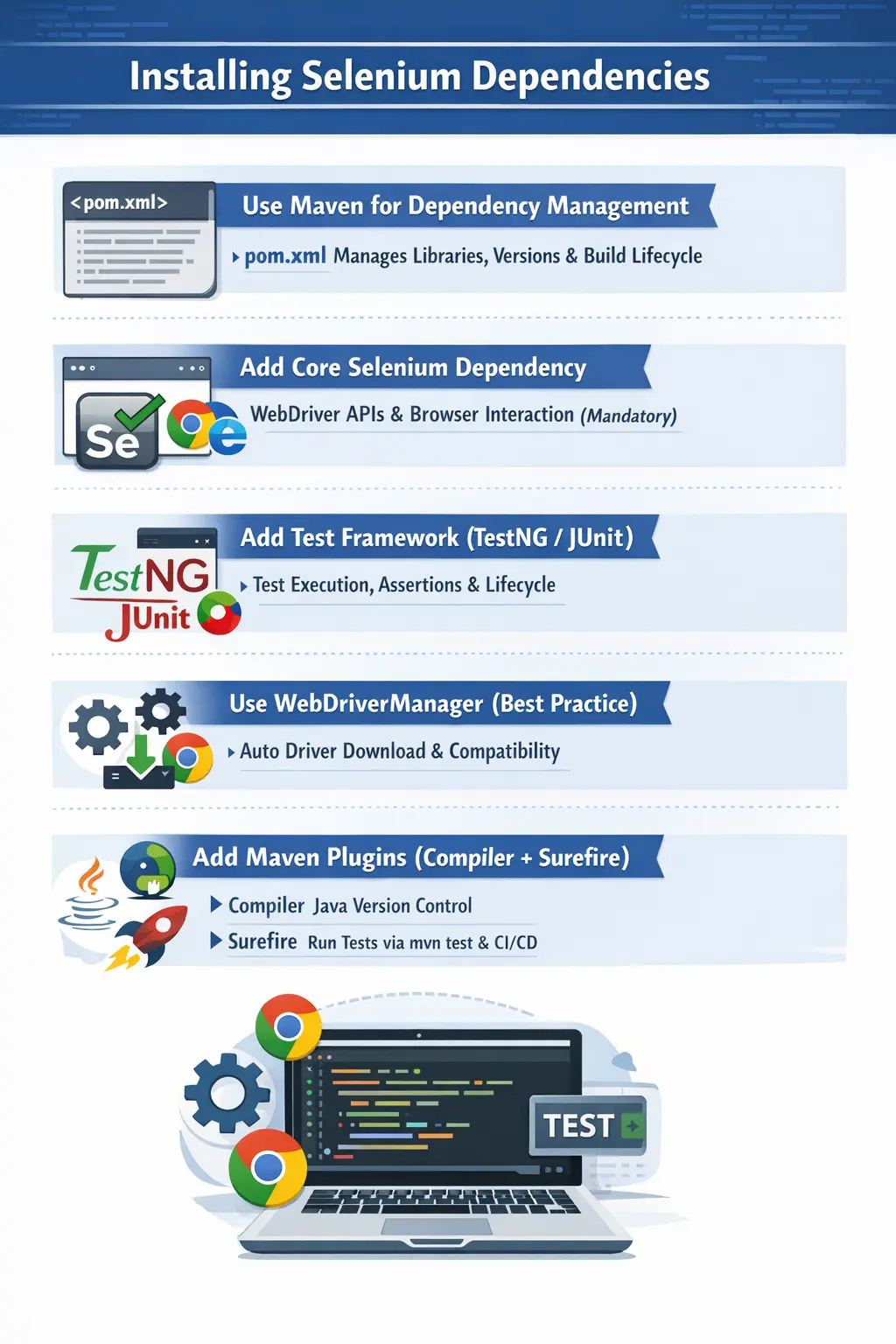
A well-configured dependency setup ensures that your automation code compiles correctly, executes reliably, integrates with CI/CD pipelines, and remains maintainable over time. On the other hand, poor dependency management leads to version conflicts, runtime failures, and unstable builds. In modern Selenium projects, Maven is the industry-standard tool used to manage dependencies, ensuring consistency across environments and simplifying project setup.
This article provides a complete, structured understanding of Selenium dependency installation, focusing not just on what to add, but why each component is required and how it fits into real-world automation frameworks.
Dependency installation is also where a Selenium project begins to shift from a local experiment into an engineering asset. A beginner may download a few JAR files, add them to the IDE, and run a browser launch script. That may work for one machine, but it rarely survives team development, code review, CI execution, browser updates, or long-term maintenance. A professional Selenium project needs a repeatable way to declare which libraries it uses, which versions are allowed, how tests are compiled, and how they are executed. That repeatability comes from dependency management.
In a real automation framework, dependencies affect almost every major capability. Selenium Java provides the browser automation API. TestNG or JUnit provides test lifecycle and assertions. WebDriverManager or Selenium Manager handles browser driver resolution. Maven plugins compile code and run tests. Reporting libraries help teams understand failures. Logging libraries expose execution flow. Data-handling libraries connect tests with JSON, CSV, Excel, or database-backed inputs. If these dependencies are not selected and managed carefully, the framework becomes fragile even when the test logic is correct.
This is why dependency installation should not be treated as a copy-paste task. The goal is not only to make the IDE stop showing red errors. The goal is to create a stable dependency foundation that can be rebuilt from source by any developer or pipeline. If a new team member clones the repository and runs Maven, the same dependencies should download and the same tests should execute. If a CI agent builds the project, it should not depend on hidden local files from one tester's computer. Good dependency setup creates that consistency.
Why Dependency Management Is Required
In any Java-based Selenium project, dependencies provide the foundational libraries and tools required for automation. These dependencies include Selenium WebDriver APIs, test execution frameworks, driver management utilities, and plugins that enable build and execution processes.
Without proper dependency management, projects quickly become unstable. Developers may face issues such as incompatible library versions, missing classes, or failed builds. Manual management of JAR files leads to inconsistency across machines, making collaboration difficult and CI/CD integration unreliable.
Maven solves these problems by acting as a centralized dependency management system. It automatically downloads required libraries, resolves transitive dependencies, and ensures that all developers and environments use the same versions. This standardization is essential for maintaining stability in automation frameworks.
Transitive dependency resolution is one of Maven's most important benefits. When you add Selenium Java, Maven does not download only one file. It also downloads related libraries that Selenium needs in order to function. When you add a reporting tool, that tool may bring its own dependencies. Without a build tool, managing this dependency tree manually is tedious and error-prone. Maven calculates the dependency graph, stores libraries in the local repository, and makes them available during compilation and execution.
Dependency management also supports collaboration. In a team, one engineer may use IntelliJ IDEA, another may use Eclipse, and CI may run from a command line on a Linux agent. If dependencies are manually attached to an IDE project, each environment may behave differently. With Maven, the pom.xml becomes the shared source of truth. The IDE reads it, Maven reads it, and CI reads it. That makes the project portable.
For Selenium specifically, dependency management prevents a common category of setup failures. Errors such as Cannot resolve symbol WebDriver, ClassNotFoundException, NoSuchMethodError, or tests not being discovered are often dependency or plugin problems rather than Selenium script problems. Understanding Maven helps you diagnose those failures by checking the project configuration before changing browser automation code.
Maven pom.xml – The Core of Dependency Management
At the heart of every Maven-based Selenium project lies the pom.xml file. This file is not just a configuration—it is the backbone of the entire project.
The pom.xml file defines:
- All required dependencies
- Their versions
- Build lifecycle configurations
- Plugin integrations
- Execution rules for tests
Every Selenium project starts with this file, and its correctness determines whether the project will build and run successfully. It also plays a crucial role in CI/CD pipelines, where automated builds rely entirely on Maven configurations.
A clean and well-structured pom.xml ensures that dependencies are resolved correctly and that the project remains maintainable as it grows.
A good pom.xml should be readable. It should not become a dumping ground for every library found in online examples. Each dependency should have a clear reason to exist. If a framework does not use Excel files, Apache POI is not needed. If it does not generate Allure reports, Allure dependencies should not be added. Unnecessary dependencies increase build time, introduce version conflicts, and make the framework harder to understand.
It is also helpful to separate versions from dependency declarations by using Maven properties. For example, Selenium version, TestNG version, Java source version, and plugin versions can be declared once near the top of the pom.xml. This makes upgrades easier and reduces mistakes. When the project upgrades Selenium, the team changes one property, runs the suite, and reviews the impact. This is more maintainable than scattering version numbers across several dependency blocks.
In professional projects, pom.xml is reviewed like code. Reviewers should ask whether the dependency is needed, whether the version is stable, whether it conflicts with existing libraries, whether it is safe from a licensing or security perspective, and whether it belongs in test scope or compile scope. This level of care may feel heavy for a small demo, but it matters when automation becomes part of the delivery pipeline.
Core Selenium Dependency (Mandatory)
The most fundamental dependency in any Selenium project is the Selenium Java library. This dependency provides the core WebDriver interfaces and APIs required to interact with web browsers.
It includes:
- WebDriver interface
- Browser-specific driver classes
- Support utilities for waits, actions, and interactions
Without this dependency, Selenium cannot function, as it contains the core logic required to send commands to browsers.
Best practice dictates that developers should always use stable Selenium 4.x versions rather than experimental releases. Stable versions ensure compatibility, better performance, and fewer unexpected issues during execution.
Selenium Java is usually declared as the central automation dependency because it brings the WebDriver API and browser-specific classes such as ChromeDriver, FirefoxDriver, EdgeDriver, ChromeOptions, WebDriverWait, Actions, and many support classes. Without it, Java code cannot compile statements like WebDriver driver = new ChromeDriver(); or use locators such as By.id and By.cssSelector. This dependency is therefore mandatory for every Selenium Java project.
However, adding Selenium Java does not automatically make the project a complete framework. Selenium knows how to automate browsers, but it does not define how test cases are grouped, how assertions are reported, how setup and teardown are executed, or how a CI build decides whether the suite passed. Those responsibilities belong to other dependencies and Maven plugins. This distinction is important in interviews because it shows that Selenium is an automation library, not the entire testing ecosystem.
When selecting a Selenium version, avoid mixing tutorials from different eras. Selenium 3 examples often use explicit driver paths and older setup patterns. Selenium 4 introduced stronger W3C WebDriver alignment and Selenium Manager support. A modern project should use a consistent Selenium 4 approach unless it is maintaining a legacy framework. Mixing old and new setup patterns creates unnecessary confusion.
Test Framework Dependency (Mandatory)
Selenium WebDriver is not a testing framework—it is only an automation tool. This means that Selenium alone cannot execute tests, manage test cases, or perform assertions. A separate test framework is required for these tasks.
Test frameworks provide:
- Test execution control
- Assertions for validation
- Test lifecycle management
- Support for parallel execution
The two most common frameworks used with Selenium are TestNG and JUnit. Among these, TestNG is widely preferred in enterprise projects due to its advanced features.
TestNG offers:
- Flexible annotations
- Built-in parallel execution
- Data-driven testing through DataProviders
- Test grouping and suite execution
These features make TestNG highly suitable for large-scale automation frameworks where scalability and flexibility are critical.
JUnit is also a strong option, especially in teams that already use it for Java application testing. JUnit 5 provides a modern lifecycle, assertions, parameterized tests, tags, and good build tool support. The decision between TestNG and JUnit should be based on the team's standards and framework needs, not on the assumption that one is always correct. TestNG is common in Selenium training and enterprise UI automation because its XML suite configuration, groups, and DataProviders are convenient for large UI suites. JUnit is common where teams want a standard Java testing stack across unit, integration, and UI tests.
The key point is that a test framework dependency is mandatory because Selenium itself does not decide pass or fail. Selenium can click a button or read text from a page, but an assertion library decides whether the observed result is acceptable. A test framework also controls setup and teardown. In Selenium, that lifecycle is crucial because browser sessions must be created and closed reliably.
If the test framework dependency is missing or misconfigured, tests may compile but not run, or Maven may report that no tests were executed. This is often misdiagnosed as a Selenium issue. In reality, the problem is usually Surefire configuration, naming conventions, test annotations, or framework dependency setup.
WebDriverManager Dependency (Highly Recommended)
One of the most common challenges in Selenium automation is managing browser drivers. Each browser requires a specific driver version, and mismatches between browser and driver versions lead to failures such as SessionNotCreatedException.
Traditionally, developers manually downloaded drivers and configured system paths. This approach is error-prone and difficult to maintain, especially when browsers update automatically.
WebDriverManager solves this problem by:
- Automatically detecting browser versions
- Downloading compatible drivers
- Managing driver caching
- Eliminating manual configuration
In modern Selenium projects, WebDriverManager is considered a best practice because it significantly reduces setup complexity and prevents compatibility issues. It also ensures consistency across local and CI environments.
Modern Selenium also includes Selenium Manager, which can resolve browser drivers automatically in many common situations. This means simple code using new ChromeDriver(), new FirefoxDriver(), or new EdgeDriver() may work without manually downloading driver executables. Selenium Manager is especially useful for beginners and for straightforward local projects because it reduces setup friction.
WebDriverManager is still used in many frameworks because it gives teams explicit control, mature driver handling behavior, caching features, and familiar setup patterns. Some organizations prefer it because their frameworks were built before Selenium Manager existed. Others use it because their network policies, CI environments, or internal repositories require a specific driver resolution strategy. Both approaches are valid when used consistently.
The main mistake is to mix several driver-management strategies without a reason. A project should not randomly set driver paths in one class, call WebDriverManager in another class, and rely on Selenium Manager elsewhere. That makes failures difficult to diagnose. Driver strategy should be centralized in a driver factory or base setup layer so tests remain clean and the framework can evolve safely.
Maven Compiler Plugin
The Maven Compiler Plugin is responsible for ensuring that the project is compiled using the correct Java version. This is particularly important in environments where multiple Java versions may be installed.
For example, if your project uses JDK 11 or JDK 17 but Maven is configured to compile with an older version, the build will fail.
The compiler plugin ensures:
- Consistent Java version usage
- Compatibility across environments
- Prevention of build-time errors
This plugin is essential for maintaining stability, especially in CI/CD pipelines where builds must run reliably on different machines.
The compiler plugin also prevents the common problem where the IDE uses one Java version while Maven uses another. A developer may successfully run tests from IntelliJ with JDK 17, but the command line may fail if Maven compiles using JDK 8. By declaring the source and target version, the project communicates its Java requirement clearly. CI can then be configured to use the same version.
This is important because Selenium frameworks often live longer than people expect. A quick local script can become a regression suite used for months or years. During that time, Java versions, Selenium versions, and CI images may change. A clear compiler configuration reduces accidental breakage when environments are updated.
Maven Surefire Plugin
The Maven Surefire Plugin is responsible for executing tests. Without this plugin, Maven cannot run Selenium tests during the build process.
Surefire enables:
- Execution of TestNG or JUnit tests
- Integration with mvn test command
- Control over test inclusion and exclusion
- Parallel test execution
- Suite-based execution
In CI/CD pipelines, Surefire is the component that triggers test execution. It ensures that automation tests run as part of the build process, providing immediate feedback on code changes.
Surefire also connects Maven with the chosen test framework. If the project uses TestNG suite XML files, Surefire can be configured to run those suites. If the project uses naming conventions, Surefire discovers matching test classes. If the project needs to include or exclude certain tests, Surefire configuration controls that behavior. This is why tests may run from the IDE but not from Maven: the IDE can launch a class directly, while Maven follows Surefire rules.
For UI automation, Maven execution is especially important because CI/CD tools usually call Maven commands. A Selenium project that only works from the IDE is incomplete. The dependency and plugin setup should support a command such as mvn test or mvn clean test. Once that works, the same project can be integrated into Jenkins, GitHub Actions, Azure DevOps, GitLab CI, or another pipeline tool.
In larger projects, Surefire may also be paired with Maven profiles. A local profile might run a smaller smoke suite in Chrome. A CI profile might run headless tests. A nightly profile might run a broader regression suite. Dependencies and plugins make these execution modes reproducible.
Optional Dependencies in Real Projects
While the core dependencies are sufficient for basic execution, real-world Selenium frameworks often include additional libraries to enhance functionality.
These include:
Reporting Tools
Tools like Extent Reports and Allure provide detailed test reports with visual insights, making it easier to analyze test results.
Logging Frameworks
Libraries such as Log4j and SLF4J help track execution flow and debug issues effectively.
Test Data Handling
Libraries like Apache POI, Jackson, and OpenCSV enable reading and writing test data from external sources such as Excel, JSON, and CSV files.
Configuration Management
Frameworks like Apache Commons Configuration allow centralized management of environment-specific settings.
These dependencies are not mandatory initially but become essential as the framework matures.
Optional dependencies should be added only when the framework has a clear need. Reporting tools are useful when teams need readable execution results, screenshots, timelines, and failure summaries. Logging frameworks are useful when failures must be debugged from pipeline logs. Data libraries are useful when tests are driven from structured files or APIs. Configuration libraries are useful when the project must manage several environments. Adding these tools too early can make a beginner project unnecessarily complicated, but delaying them too long can limit framework maturity.
Scope matters for optional dependencies. A library used only for tests should usually be declared with test scope. A library required by shared framework code may need compile scope. Incorrect scope can expose libraries unnecessarily or cause runtime failures. Understanding Maven scope is part of writing a clean pom.xml.
Security also matters. Automation projects sometimes run inside company networks and handle credentials, URLs, test data, and reports. Dependencies should be kept updated enough to avoid known vulnerabilities. This does not mean upgrading randomly every day. It means tracking important library updates, testing upgrades safely, and removing unused dependencies so the dependency footprint stays small.
Dependency Version Compatibility
One of the most critical aspects of dependency management is ensuring version compatibility. Mismatched versions can lead to runtime errors, build failures, and unexpected behavior.
Key rules include:
- Use stable Selenium versions
- Ensure TestNG compatibility with Surefire
- Match Java version with compiler plugin
- Avoid mixing outdated and latest libraries
Most dependency-related issues arise from version conflicts or incorrect configurations. Maintaining version discipline is essential for a stable framework.
Version compatibility should be managed deliberately. Selenium, Java, TestNG, JUnit, WebDriverManager, Maven plugins, reporting libraries, and logging libraries all evolve independently. An upgrade to one library can affect another. For example, a newer TestNG version may require compatible Surefire behavior. A newer Selenium version may change browser setup expectations. A newer reporting library may bring updated transitive dependencies. These changes are normal, but they should be tested.
One practical approach is to upgrade dependencies in small batches. Upgrade Selenium and verify browser execution. Upgrade TestNG or JUnit and verify test discovery. Upgrade reporting libraries and verify report generation. This makes failures easier to locate. Upgrading everything at once may save time initially, but it makes troubleshooting harder if the build breaks.
Maven also provides tools for inspecting dependency trees. When two libraries bring different versions of the same transitive dependency, a dependency tree can reveal the conflict. In real projects, this is valuable for debugging NoSuchMethodError or ClassNotFoundException issues that do not appear during compilation but fail during execution.
Common Dependency Issues and Fixes
Even with proper setup, developers may encounter dependency-related problems.
Missing Selenium Classes
Errors like “Cannot resolve symbol WebDriver” usually indicate that dependencies are not downloaded. Reloading the Maven project or running mvn clean install resolves this issue.
Tests Not Running
If tests do not execute, the Surefire plugin may be missing or misconfigured. Adding the plugin and verifying test annotations fixes the problem.
Version Conflicts
Conflicts occur when incompatible versions of libraries are used. Aligning versions and using dependency management sections helps resolve these issues.
Tests Run in IDE but Not from Maven
This issue usually points to Maven Surefire configuration, test naming conventions, missing TestNG suite configuration, or incorrect dependency scope. The IDE can run a class directly, but Maven relies on its build lifecycle. A professional framework must pass from the command line, not only from the IDE.
ClassNotFoundException or NoSuchMethodError
These runtime errors often indicate version conflicts or missing transitive dependencies. The project may compile successfully but fail when a method expected by one library is not available in the resolved version of another library. Inspecting the dependency tree and aligning versions usually resolves the issue.
Build Works Locally but Fails in CI
This often happens when the local machine has cached dependencies, a different Java version, or network access that CI does not have. CI must be able to resolve dependencies from approved repositories. If the company uses an internal Maven repository, the pipeline settings must point to it correctly.
Understanding these problems and their solutions is crucial for debugging real-world automation frameworks.
The fastest way to debug dependency issues is to identify the layer where failure occurs. If Java imports fail, inspect the dependency declaration and Maven reload. If tests are not discovered, inspect Surefire and test framework setup. If browser startup fails, inspect Selenium version, driver management, and browser compatibility. If reporting fails after tests finish, inspect reporting dependencies and plugin configuration. This layered approach avoids random fixes.
Best Practices for Dependency Management
A clean and well-maintained dependency setup is essential for long-term success. Best practices include:
- Always use Maven instead of manual JAR files
- Lock dependency versions explicitly
- Avoid unnecessary libraries
- Upgrade dependencies cautiously
- Keep pom.xml organized and readable
A well-structured pom.xml directly translates to a stable and maintainable automation framework.
Another best practice is to keep dependency updates intentional. Updating dependencies is good, but it should be done with verification. Before upgrading Selenium, check whether the project uses APIs that changed. Before upgrading TestNG or JUnit, check test discovery and lifecycle behavior. Before upgrading reporting tools, check whether existing report configuration remains compatible. After upgrading, run a smoke suite locally and through Maven.
Teams should also avoid committing downloaded JAR files into the project when Maven is already used. The pom.xml should describe dependencies, and Maven should retrieve them. Committed JARs create confusion because the build may depend on files outside Maven's lifecycle. They also make upgrades harder and increase repository noise.
For enterprise projects, documenting dependency setup is useful. A short README can list the required JDK version, Maven command, browser driver strategy, test framework, and how to run smoke or regression suites. This documentation helps new team members and reduces onboarding time.
Interview Perspective
From an interview standpoint, understanding dependency management is a key expectation.
A concise answer would explain that Selenium dependencies are managed using Maven by adding Selenium, TestNG, and WebDriverManager in pom.xml, along with necessary plugins.
A more advanced answer would highlight real-world practices such as version management, CI/CD integration, and framework scalability.
Demonstrating practical knowledge of dependency setup shows that you understand not just Selenium, but the ecosystem required to run it effectively.
A strong interview answer should clearly say that Selenium Java is required for browser automation, but it is not enough by itself. A complete Maven-based Selenium project usually includes Selenium Java, a test framework such as TestNG or JUnit, driver management through Selenium Manager or WebDriverManager, Maven Compiler Plugin for Java version control, and Maven Surefire Plugin for test execution. Real frameworks may also include reporting, logging, configuration, and data-handling libraries.
If the interviewer asks about common problems, mention missing dependencies, Maven not reloaded, tests not discovered by Surefire, driver-browser mismatch, dependency version conflicts, and builds that pass locally but fail in CI. If asked about best practices, mention explicit version management, avoiding manual JAR files, keeping pom.xml clean, using stable releases, centralizing dependency versions, and verifying through mvn clean test.
This answer is stronger than simply listing dependency names because it explains why each dependency exists. Interviewers want to know whether you understand the ecosystem, not whether you can copy a pom.xml from the internet.
Key Takeaway
Installing Selenium dependencies is not just about adding a single library—it is about building a complete, stable foundation for automation.
A professional Selenium setup includes:
- Selenium WebDriver for browser automation
- TestNG or JUnit for test execution
- WebDriverManager for driver handling
- Maven plugins for compilation and execution
- Additional tools for reporting, logging, and data management
When configured correctly, this setup ensures reliability, scalability, and seamless integration with modern development workflows.
Mastering dependency management is one of the most important steps in becoming proficient in Selenium automation and building enterprise-grade testing frameworks.
A dependency setup should be simple enough for beginners to run and disciplined enough for professional teams to maintain. Start with the mandatory dependencies, verify execution through Maven, then add optional libraries only when the framework needs them. Keep versions visible, keep plugins explicit, and keep setup behavior reproducible. This approach prevents the most common Selenium project failures before test execution even begins.
In practical terms, a clean dependency foundation gives the automation team confidence. Developers can pull the project and run tests. Testers can add new page objects and test cases without fighting setup problems. CI can execute the suite consistently. Framework owners can upgrade libraries with controlled risk. That is the real purpose of installing Selenium dependencies correctly: not just to compile code, but to create a dependable base for continuous automation.
When dependency management is handled with this level of care, Selenium automation becomes easier to scale, easier to debug, and easier to trust across every release cycle.