Feature File Structure
Feature files are the core artifacts of Behavior Driven Development (BDD). They represent the bridge between business intent and technical implementation, expressed in a format that is both human-readable and machine-executable. Written using Gherkin syntax and stored with a .feature extension, these files define how an application should behave from a business perspective. In modern automation frameworks, especially those built with Cucumber, feature files serve multiple roles simultaneously—they act as requirement specifications, acceptance criteria, living documentation, and entry points for automation.
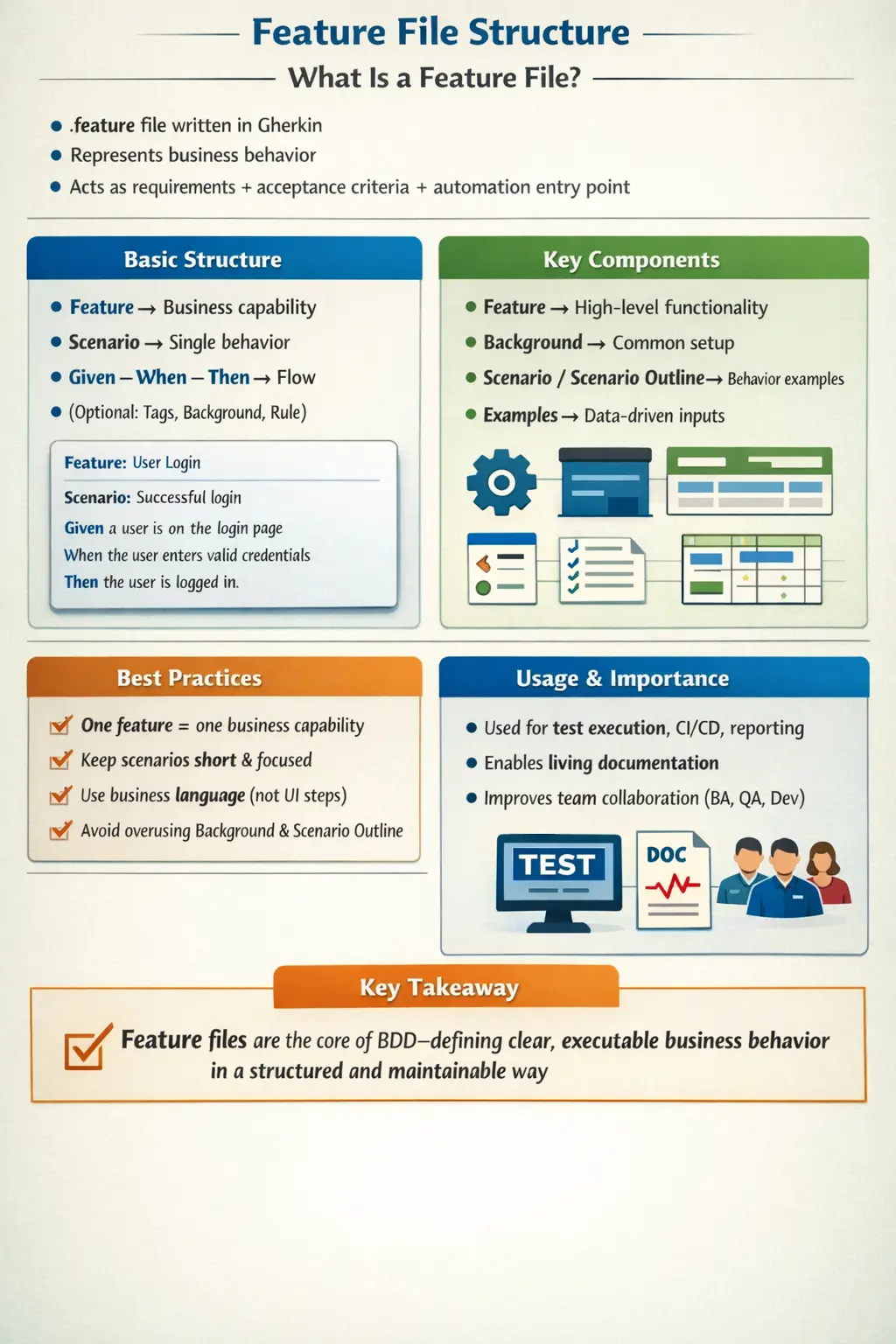
Understanding feature file structure is not just about knowing keywords like Feature or Scenario. It is about understanding how to organize behavior, how to express intent clearly, and how to design specifications that remain stable, maintainable, and valuable over time. A well-structured feature file can significantly improve collaboration, reduce ambiguity, and increase confidence in the system. A poorly structured one, on the other hand, becomes a maintenance burden and loses its purpose.
Why Feature File Structure Matters
A feature file is often the first artifact a stakeholder reads when trying to understand expected behavior in a Cucumber project. If the file is clear, focused, and well organized, it helps everyone understand the business capability quickly. If the file is confusing, overloaded, or written like a technical script, it becomes difficult to maintain and loses its value as living documentation. Structure matters because feature files are read by more than automation engineers. They may be reviewed by product owners, business analysts, developers, testers, and sometimes support or operations teams.
Good structure also improves automation maintainability. Feature files are connected to step definitions, test data, tags, reports, and CI/CD execution. If scenarios are poorly grouped or written inconsistently, step definitions become duplicated and reports become harder to interpret. A clean feature file structure reduces this friction. It makes behavior easier to locate, failures easier to understand, and changes easier to manage.
In real projects, feature files often grow over time. A file that begins with three simple scenarios can become a large specification as new rules are added. Without structure, the file becomes a collection of unrelated examples. With structure, it remains readable because the feature title, description, tags, background, rules, scenarios, and scenario outlines each serve a clear purpose.
Feature Files as Executable Specifications
The most important role of a feature file is to act as an executable specification. It is not only a document that describes what the system should do. It can also be connected to automation code and executed to verify whether the system still behaves as described. This dual nature makes feature files different from ordinary requirement documents. A requirement document may become outdated silently, but an executable scenario can fail and reveal that the implementation and specification are no longer aligned.
This does not mean every scenario must be automated immediately. In many teams, some scenarios may begin as discussion artifacts and later become automated checks. The value still comes from expressing behavior clearly. When automation is added, the feature file becomes part of the feedback system. A failing scenario tells the team that either the application is wrong, the test setup is wrong, or the specification needs to be updated. This feedback keeps documentation alive.
Because feature files serve as executable specifications, their structure should support both reading and execution. A file should be understandable to humans and practical for automation. Overly vague scenarios are hard to automate. Overly technical scenarios are hard for business stakeholders to read. A good feature file balances both needs.
Choosing the Right Scope for a Feature File
One of the most important design decisions is scope. A feature file should normally represent one business capability or closely related group of behaviors. If the scope is too broad, the file becomes hard to navigate. If the scope is too narrow, the project may end up with too many small files that are difficult to manage. The right scope depends on the application, but the guiding question should be: does this file describe one meaningful business area?
For example, a file named login.feature can include successful login, invalid password, locked account, and role-based redirect scenarios. These all belong to the login capability. But if the same file also includes password reset, user registration, profile update, and account deletion, the scope is too broad. Those behaviors deserve separate feature files because they represent different capabilities and may have different rules.
A well-scoped feature file improves traceability. When a test fails in the login feature, the team immediately knows the affected business area. When reports are generated, stakeholders can understand which capability has problems. Scope discipline helps feature files remain useful as the automation suite grows.
Feature File Naming in Real Projects
Feature file names should communicate business intent. A good name is short, descriptive, and stable. Names such as user-login.feature, password-reset.feature, order-checkout.feature, and loan-eligibility.feature make the purpose obvious. Names such as test1.feature, new-flow.feature, or sprint-22.feature are poor because they do not describe behavior and may become meaningless over time.
Many teams use lowercase names with hyphens because they are readable and consistent across operating systems and repositories. The exact naming style is less important than consistency. If one team uses hyphens and another uses underscores, navigation becomes messy. A shared convention helps developers and testers find files quickly.
Feature file location also matters. In Cucumber JVM projects, files are commonly placed under src/test/resources/features. Some teams organize them by module, such as features/login, features/payments, or features/admin. This is useful when the suite becomes large. The directory structure should match how the team thinks about the product, not just how the code is organized internally.
Writing a Useful Feature Description
The feature description is optional in Gherkin, but it is valuable when used well. It explains why the feature exists and what business value it provides. A feature title may say Feature: Password reset, but the description can explain that registered users need a secure way to regain account access when they forget their password. This gives context to the scenarios that follow.
The description should remain business-focused. It should not explain implementation details such as database tables, page objects, endpoint names, or locator strategies. Those details belong in automation code or technical documentation. The feature description should answer business questions: who benefits, what capability is provided, and why it matters. This makes the file more useful to non-technical readers.
Many teams use the format “As a user, I want, so that” because it highlights role, goal, and value. This format is helpful but not mandatory. The real requirement is clarity. A concise plain-language description is often better than a forced template that adds little meaning.
Designing Independent Scenarios
Scenarios should be independent. One scenario should not depend on another scenario running first. This is important because Cucumber scenarios may be executed in different orders, filtered by tags, or run in parallel. If one scenario creates data that another scenario requires, the suite becomes fragile. A failed earlier scenario can cause later scenarios to fail for the wrong reason.
Each scenario should establish its own required context using Given steps, background setup, hooks, fixtures, or data preparation. The reader should understand what conditions are true at the start of the scenario. Independence also improves debugging. When a scenario fails, the team can investigate that scenario directly without reconstructing a chain of previous executions.
In real automation projects, independence requires good test data strategy. A scenario may need a registered user, an active account, an empty cart, or a specific product state. These conditions should be created reliably through APIs, database setup, test fixtures, or controlled environments. Feature file structure and framework design must work together.
Keeping Scenarios Focused
A scenario should normally validate one behavior or one meaningful outcome. If a scenario covers too much, it becomes hard to read and harder to debug. For example, a scenario that logs in, searches for a product, adds it to cart, applies a coupon, checks out, pays, verifies email, and cancels the order may be useful as an end-to-end smoke test, but it is too broad for everyday behavior specification. If it fails, many different parts of the system could be responsible.
Focused scenarios are easier to maintain. A login scenario validates login. A coupon scenario validates coupon behavior. A payment scenario validates payment outcome. This separation helps the team identify failures quickly and update scenarios when one business rule changes. It also makes feature files easier for stakeholders to review because each scenario has a clear purpose.
There are exceptions. Critical end-to-end scenarios are sometimes valuable because they validate a complete business journey. But they should be used selectively. Most feature file scenarios should remain focused on specific business behavior.
Ordering Content Inside a Feature File
The order of content inside a feature file should help readers. A typical file begins with feature-level tags if needed, then the Feature line, then a short description, then optional Background or Rule sections, followed by scenarios. Within scenarios, teams often place the most common or happy path scenario first, followed by alternate paths, negative paths, and edge cases. This creates a natural reading flow.
Ordering matters because feature files are documentation. A reader should be able to understand the main behavior before reading exceptions. If the first scenario is a rare technical edge case, the file may feel confusing. Starting with the primary business flow gives context. Then additional scenarios can explain variations and constraints.
For complex features, Rule sections can improve ordering. Each rule groups related scenarios and makes the file easier to scan. For example, a pricing feature may have rules for member discounts, coupon restrictions, tax calculation, and excluded products. This is clearer than listing all scenarios in one flat sequence.
Using Background Carefully
Background can reduce repetition, but it can also hide important context. If every scenario in a feature requires the same simple setup, Background is useful. For example, Given the user is logged in may be reasonable if all scenarios require an authenticated user. But a long Background with many setup steps forces readers to scroll back and combine hidden context with each scenario.
A good Background should be short, stable, and truly common to every scenario. If some scenarios do not need the setup, it probably does not belong in Background. If the setup is complex, it may be better expressed as a single higher-level Given step or handled by test fixtures. The purpose is readability, not only avoiding repeated lines.
Teams should review Background sections regularly. As features evolve, what was once common may no longer apply to every scenario. An outdated Background can create confusion and unnecessary execution overhead.
Tags at Feature and Scenario Level
Tags can be applied at the feature level or scenario level. A feature-level tag applies to every scenario in the file. This is useful for broad categories such as module names or application areas. Scenario-level tags are useful for execution groups such as smoke, regression, critical, api, ui, or wip. Tags help teams run selected scenarios in CI/CD pipelines and organize reports.
Tag discipline is important. If tags are created casually, the suite becomes hard to filter. Teams should define a small set of approved tag types and use them consistently. For example, priority tags, suite tags, module tags, and environment tags can be useful if each has a clear meaning. Duplicate or overlapping tags create confusion.
Tags should support execution and reporting; they should not compensate for poor file structure. A well-named feature file and clear scenario title should already explain most of the behavior. Tags add metadata, but they should not become the only way to understand what a scenario does.
Feature Files and Step Definitions
Feature files are connected to step definitions. Each Given, When, Then, And, or But step is matched to automation code. This connection means feature file structure affects code structure. If feature files use inconsistent wording, step definitions may become duplicated. If scenarios are written too technically, step definitions may become tightly coupled to UI details. If scenarios are written at a clean business level, step definitions can delegate to reusable automation components.
A good Cucumber framework separates responsibilities. Feature files describe behavior. Step definitions connect language to code. Page objects, API clients, service helpers, and utilities perform technical operations. Assertions validate outcomes. When feature files contain too much implementation detail, this separation breaks down.
Step reuse should not be forced at the expense of readability. Sometimes two business steps may look similar but represent different concepts. However, uncontrolled duplication is a common maintenance problem. Consistent feature file language helps maintain a clean step definition layer.
Feature File Structure in CI/CD
In modern projects, feature files are often executed in CI/CD pipelines. This makes structure even more important. CI jobs may run scenarios by tag, module, branch, environment, or execution type. If files and tags are organized clearly, pipeline execution becomes easier to manage. If the structure is inconsistent, CI configuration becomes fragile and confusing.
Reports generated from feature files are also read by stakeholders. A report showing failures in order-checkout.feature or password-reset.feature is easier to understand than a report with vague file names. Scenario titles also appear in reports, so they should describe behavior clearly. Good structure improves both execution and communication.
CI/CD also reveals flaky or dependent scenarios. If scenarios fail only when run in a different order or in parallel, they may not be independent. Feature file structure, test data setup, and framework design should support reliable execution across environments.
Common Real-World Feature File Problems
One common problem is feature file sprawl. Teams create many files without a naming or folder strategy. Over time, nobody knows where to add new scenarios. Another problem is scenario duplication, where the same behavior is described in multiple files with different wording. This creates inconsistent documentation and duplicate automation code.
Another issue is technical leakage. Feature files begin to mention button IDs, API endpoints, database tables, page objects, and internal workflows. This makes scenarios harder for business stakeholders to review and more likely to change when implementation changes. A feature file should describe business behavior; technical details belong below the Gherkin layer.
Teams also struggle with oversized scenarios, excessive Background sections, unclear tags, and Scenario Outlines with too many unrelated examples. These problems are not caused by Gherkin itself. They come from weak structure and lack of review discipline.
Reviewing Feature Files
Feature files should be reviewed like any important project artifact. BA should review business accuracy. QA should review coverage, clarity, and testability. Developers should review feasibility and automation impact. This review prevents poor scenarios from entering the codebase and becoming long-term maintenance problems.
A useful review asks several questions. Does the feature file focus on one business capability? Is the feature title clear? Does the description explain value? Are scenarios independent and focused? Are steps written in business language? Are tags consistent? Is Background necessary and minimal? Are Scenario Outlines used only for related data variations? Can stakeholders understand the file without reading automation code?
Review discipline is especially important in large teams. Without review, each contributor may write Gherkin in a different style. Over time, the suite becomes inconsistent. A shared standard keeps feature files readable and maintainable.
Interview-Ready Understanding of Feature File Structure
In interviews, feature file structure can be explained as the organized layout of a Cucumber feature file that defines business behavior using Gherkin syntax. A feature file usually contains a Feature keyword, optional description, tags, optional Background, optional Rule sections, scenarios, scenario outlines, examples tables, and comments. The purpose is to express behavior clearly and make it executable through step definitions.
A strong answer should mention that each feature file should focus on one business capability, scenarios should be independent and business-readable, Background should be used carefully, tags should be consistent, and Scenario Outline should be used for data variations of the same behavior. It should also explain that feature files act as executable specifications, acceptance criteria, and living documentation in BDD projects.
What Is a Feature File?
A feature file is a plain text file that describes a business capability using structured examples. Each file focuses on a single feature or functionality of the application and expresses expected behavior in terms of scenarios. These scenarios are written in Gherkin, making them readable by business stakeholders while still being executable by automation tools.
Unlike traditional requirement documents, which often become outdated, feature files are continuously validated through automated execution. This makes them a form of living documentation. If a scenario fails, it indicates that either the system behavior has changed or the specification is no longer accurate. This tight feedback loop ensures that documentation remains relevant and trustworthy.
Feature files also act as acceptance criteria. They define what it means for a feature to be complete. Developers implement functionality to satisfy these scenarios, and testers validate that the behavior matches expectations. In this way, feature files unify requirements, development, and testing into a single artifact.
Standard Feature File Layout
A well-structured feature file follows a logical hierarchy. At the top level is the Feature, which defines the overall business capability. Below it, optional elements such as descriptions, tags, and background provide context and organization. The core of the file consists of scenarios or scenario outlines, which define specific examples of behavior.
The typical layout includes the Feature keyword, followed by a description that explains the business value. Tags may be added for categorization. A Background section may define common preconditions. Rules can group related scenarios under specific constraints. Finally, scenarios and scenario outlines describe the actual behavior.
This structured approach ensures that feature files remain organized and easy to understand, even as they grow in size and complexity.
File Naming and Location
Naming and placement of feature files play a significant role in maintainability. Feature files should have a .feature extension and be named in a way that clearly reflects the business capability they represent. Names should be concise, descriptive, and written in lowercase using hyphens or underscores for readability.
For example, names like login.feature or user-registration.feature clearly communicate their purpose. Avoid vague or technical names that do not convey business intent.
In Cucumber JVM projects, feature files are typically stored under src/test/resources/features/. This location aligns with Maven conventions and ensures that the files are accessible during test execution. Maintaining a consistent structure across projects helps teams navigate and manage feature files efficiently.
The Feature Keyword and Its Role
The Feature keyword defines the scope of the file. It represents a high-level business capability and sets the context for all scenarios within the file. A well-written feature title should be clear, concise, and focused on business value rather than technical implementation.
Below the Feature line, it is common to include a short description that explains the purpose of the feature. This description is written in natural language and is not executed. It provides context for readers and helps stakeholders understand why the feature exists.
A common pattern is to describe the feature using the “As a… I want… So that…” format. This format emphasizes user intent and business value, making the feature more meaningful and easier to understand.
Feature Description and Its Importance
Although optional, the feature description is highly recommended. It provides additional context that cannot always be captured in the feature title alone. This description helps stakeholders understand the broader purpose of the feature and how it fits into the system.
The description should focus on business value and avoid technical details. It should explain what the feature enables and why it is important. This narrative adds depth to the feature file and makes it more useful as documentation.
Tags and Their Usage
Tags are annotations that can be applied to features or scenarios. They begin with the @ symbol and are used for categorization and selective execution. Tags are particularly useful in large projects where tests need to be grouped and executed based on specific criteria.
For example, tags like @smoke, @regression, or @login can be used to organize tests. In CI/CD pipelines, tags allow teams to run only relevant subsets of scenarios, improving execution speed and efficiency.
Tags also support environment-based execution and can be used to control test behavior in different contexts. When used consistently, they become a powerful tool for managing large test suites.
Background and Its Role
The Background section is used to define common preconditions that apply to all scenarios within a feature. It is executed before each scenario, ensuring that the system is in a consistent state.
Background is useful for reducing duplication. Instead of repeating the same setup steps in every scenario, they can be defined once in the Background section. This keeps scenarios focused on their unique behavior.
However, Background should be used carefully. Overusing it can make scenarios harder to understand, as important context is hidden. It is best used for simple, shared setup steps that are truly common across all scenarios.
Rule Keyword for Organization
The Rule keyword is an advanced feature that allows grouping of scenarios under a specific business rule. This is particularly useful when a feature contains multiple distinct rules or constraints.
By organizing scenarios under rules, the feature file becomes more structured and easier to navigate. It also helps clarify the intent of each group of scenarios, making the file more readable and maintainable.
Rules are especially valuable in complex features where multiple business conditions need to be validated.
Scenario: The Core of Behavior Definition
Scenarios are the heart of a feature file. Each scenario represents a single example of behavior and follows the Given–When–Then structure. This structure enforces clarity by separating preconditions, actions, and outcomes.
A well-written scenario focuses on one behavior. It should have a clear and descriptive name that reflects the expected outcome. The steps should be concise and written in business language.
Scenarios should avoid technical details and UI-specific actions. Instead, they should describe behavior in terms of what the system does, not how it does it. This ensures that scenarios remain stable even when implementation changes.
Scenario Outline for Data-Driven Testing
Scenario Outline is used when the same behavior needs to be tested with multiple sets of data. It allows a single scenario template to be executed multiple times with different inputs.
This approach reduces duplication and improves maintainability. Instead of writing multiple similar scenarios, a single outline with an Examples table can cover all variations.
However, Scenario Outline should be used judiciously. It is most effective when testing variations of the same behavior. Overusing it for unrelated scenarios can reduce clarity.
Comments and Their Purpose
Comments in feature files are used to provide additional context or explanations. They begin with the # symbol and are ignored during execution.
Comments can be helpful for documenting assumptions, clarifying intent, or providing notes for future reference. However, they should not replace clear and well-written scenarios. The primary source of understanding should always be the scenarios themselves.
Complete Feature File Example
A complete feature file brings together all the elements discussed. It includes a clear feature definition, optional tags and background, organized scenarios, and possibly scenario outlines for data-driven testing.
Such a file not only defines behavior but also serves as documentation and automation input. It reflects the collaboration between business, QA, and development teams.
Common Mistakes in Feature File Design
One of the most common mistakes is mixing multiple features in a single file. This reduces clarity and makes the file harder to maintain. Each feature file should focus on a single business capability.
Another common issue is writing scenarios as UI scripts. This introduces technical details and makes scenarios fragile. Overusing Background can hide important context, while long and complex scenarios reduce readability.
Using Scenario Outline unnecessarily can also make feature files harder to understand. Each element should be used with a clear purpose.
Best Practices for Feature File Structure
A strong feature file follows a set of best practices. It focuses on one business capability, keeps scenarios short and clear, and uses business language consistently. It avoids technical details and emphasizes behavior.
Scenarios should be independent and self-contained. Tags should be used consistently for organization. Background should be minimal and meaningful.
By following these practices, teams can create feature files that are both effective and maintainable.
Real-World Importance
In real projects, feature files are more than just test artifacts. They are communication tools that align teams and ensure shared understanding. They provide a single source of truth for behavior and enable continuous validation.
When integrated with CI/CD pipelines, feature files become part of the development lifecycle. They are executed on every build, providing immediate feedback and ensuring that behavior remains consistent.
This makes feature files a critical component of modern software development.
Interview Perspective
From an interview standpoint, feature file structure is a key topic in BDD discussions. Candidates should be able to explain the purpose of feature files, their structure, and the role of each component.
A strong answer should highlight how feature files act as executable specifications and living documentation. It should also demonstrate understanding of best practices and common pitfalls.
Interviewers often look for practical experience—how feature files are used in real projects and how they contribute to collaboration and quality.
Key Takeaway
Feature files are the foundation of BDD. They define behavior, enable collaboration, and serve as both documentation and automation entry points. A well-structured feature file improves clarity, reduces ambiguity, and supports long-term maintainability.
Mastering feature file structure is not just about syntax. It is about understanding how to express behavior effectively, organize specifications logically, and maintain discipline in writing scenarios.
When used correctly, feature files become a powerful tool for building reliable, scalable, and collaborative software systems.