Gherkin Syntax Overview
Gherkin is the language that powers Behavior Driven Development (BDD). It sits at the intersection of business intent and technical implementation, providing a structured yet human-readable way to describe how a system should behave. Unlike traditional requirement documents or test cases, Gherkin is both descriptive and executable. It allows stakeholders from different backgrounds—business analysts, developers, and testers—to collaborate using a shared language while ensuring that those descriptions can be directly translated into automated tests.
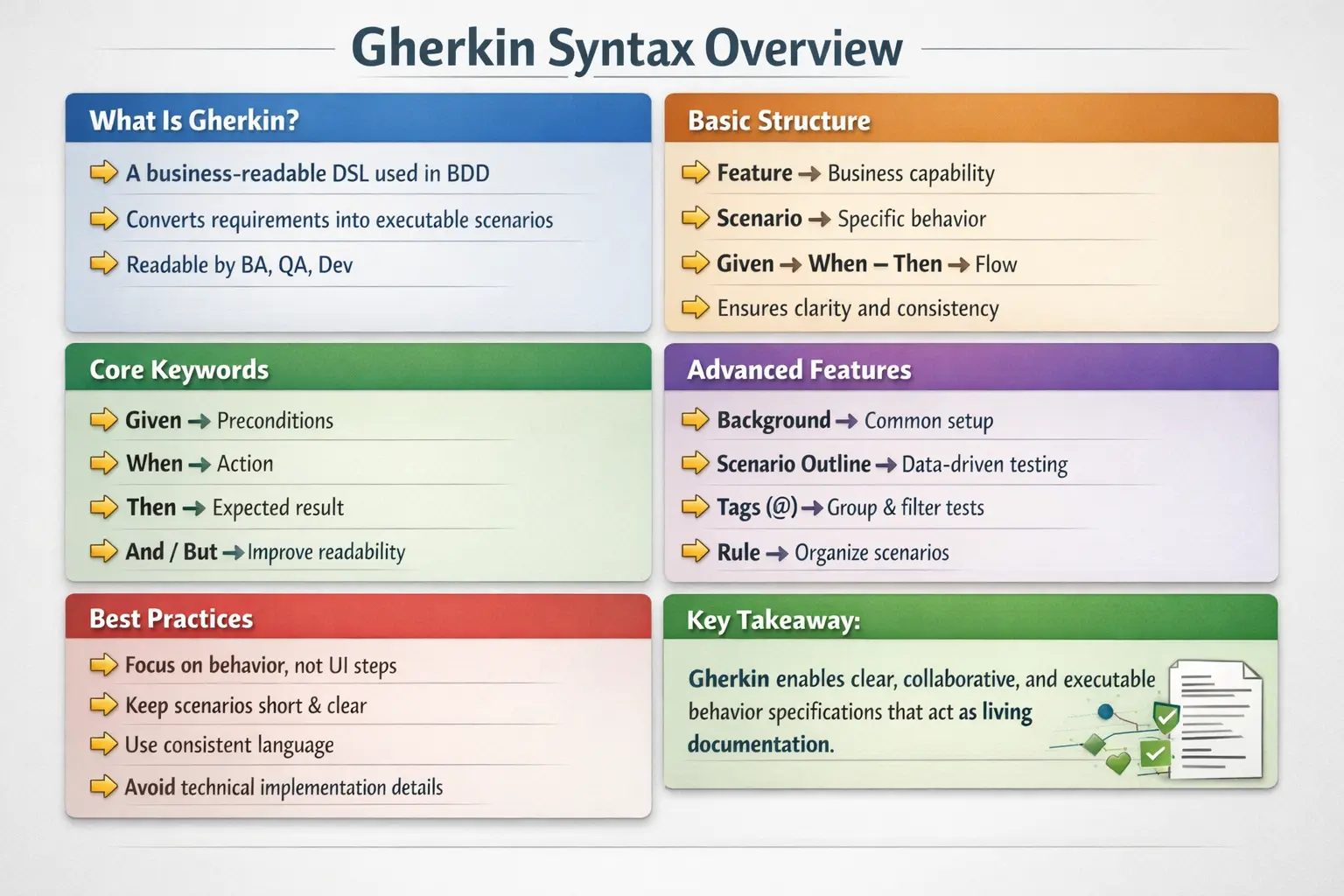
In modern software development, where clarity, speed, and collaboration are critical, Gherkin plays a unique role. It eliminates ambiguity by enforcing structure, promotes alignment through shared understanding, and enables continuous validation by linking requirements to automation. However, to use Gherkin effectively, one must understand not only its syntax but also its intent and best practices.
Gherkin as a Shared Language
Gherkin is valuable because it creates a shared language for people who usually think differently. Business analysts think in terms of business rules, goals, and customer outcomes. Developers think in terms of implementation, APIs, data models, and system constraints. Testers think in terms of scenarios, coverage, validation, and risk. Gherkin gives all of them one structured format to describe behavior without forcing business stakeholders to read code or forcing developers to interpret vague requirement text.
This shared language is the foundation of Behavior Driven Development. A Gherkin scenario should be readable enough for business users, precise enough for testers, and structured enough for developers to automate. When written well, it becomes a bridge between conversation and executable verification. The scenario is not merely a test case. It is a behavior example that the team agrees on before or during implementation.
The shared-language purpose is also why Gherkin should avoid unnecessary technical detail. If the scenario is full of CSS selectors, database table names, internal service calls, or low-level UI actions, it stops serving business communication. It becomes a technical script written in English-like words. Good Gherkin stays focused on what the system should do from a behavior perspective.
Gherkin Is Not Just Syntax
Many beginners treat Gherkin as a set of keywords to memorize: Feature, Scenario, Given, When, Then, And, But, Background, Scenario Outline, Examples, Rule, and tags. While knowing the keywords is necessary, it is not enough. Gherkin is useful only when the team understands why the structure exists. The syntax is designed to guide thinking. It forces the team to describe context, action, and outcome clearly.
A poorly written scenario can still use correct syntax. For example, a scenario may contain Given, When, and Then steps but still describe button clicks, page elements, and implementation details rather than behavior. Another scenario may be syntactically valid but too long, combining many behaviors into one flow. Correct syntax does not guarantee good specification. Effective Gherkin requires discipline, abstraction, and shared vocabulary.
Good Gherkin expresses examples of business behavior. It should help the team answer questions such as: what condition is true before the action, what event occurs, and what result should the system produce? When Gherkin is used this way, it becomes much more than a file format. It becomes a practical tool for clarification.
The Role of Examples in Gherkin
Examples are at the heart of Gherkin. Abstract requirements often hide ambiguity. A statement such as “the user should receive a discount when eligible” sounds clear until the team asks what eligible means. Does eligibility depend on membership level, order amount, coupon code, location, previous purchases, or campaign period? A concrete example reveals the missing details and gives the team something specific to discuss.
Gherkin scenarios turn requirements into examples. Instead of only saying that eligible users receive a discount, the team can write a scenario where a premium customer with an order above a certain amount receives a specific discount. Another scenario can cover an ineligible customer. Another can cover an expired coupon. Each example defines behavior more clearly than a broad sentence.
This is why Gherkin is closely connected to collaboration. Scenarios should come from conversations, not from a tester writing alone after development is complete. The best examples are discovered when BA, QA, and Dev discuss the requirement together and identify the cases that matter most.
Feature Keyword in Practice
The Feature keyword defines the business capability being described. A feature should represent a meaningful area of behavior, such as user login, password reset, order checkout, loan eligibility, search filtering, report generation, or account management. The feature description should provide enough context to understand why the capability exists and what value it provides.
A weak feature description may simply repeat the title. A stronger feature description explains the user goal and business value. For example, instead of only writing “Feature: Password Reset,” the description can explain that registered users should be able to regain access to their accounts securely when they forget their password. This helps readers understand intent before they read individual scenarios.
The Feature section should not become a long requirement document. It should provide concise context. Detailed behavior belongs in scenarios. The feature level gives scope; scenarios give examples. This separation keeps the file organized and readable.
Scenario Keyword in Practice
The Scenario keyword defines one concrete example of behavior. Each scenario should have a clear purpose and focus on one outcome. A common mistake is writing one long scenario that covers login, search, selection, checkout, payment, confirmation, and email notification all at once. While end-to-end scenarios are sometimes useful, oversized scenarios are hard to read, debug, and maintain. A scenario should be focused enough that failure clearly points to a specific behavior.
A good scenario title should describe the behavior outcome, not the test mechanics. “Successful password reset with a valid link” is clearer than “Click reset password link.” The first title describes business behavior. The second title describes a UI action. Scenario titles help readers scan feature files quickly, so they should be meaningful and consistent.
Scenarios should also avoid unnecessary setup details. If a detail does not affect the behavior being described, it may not belong in the scenario. The goal is clarity, not exhaustive narration. A scenario should contain enough information to understand and validate the behavior, but not so much that the main point becomes hidden.
Given, When, Then as Behavior Flow
Given, When, and Then represent the natural structure of behavior. Given describes the starting context. When describes the action or event. Then describes the expected outcome. This flow helps teams avoid unclear requirements because it separates state, trigger, and result. If a scenario cannot be expressed clearly in this form, the team may not fully understand the behavior yet.
The Given section should establish relevant preconditions. It should not describe actions that belong to the behavior being tested. For example, if the behavior is password reset, a Given step may say that a registered user has requested a password reset link. It should not include a long sequence of UI actions unless those actions are the actual focus. Given prepares the world of the scenario.
The When step should usually describe one primary action. This keeps the scenario focused. The Then step should describe observable outcomes. It may include business state changes, visible messages, notifications, or generated records. A strong Then step makes validation clear. Weak Then steps such as “Then it should work” or “Then success happens” do not provide enough detail.
And and But for Readability
And and But are supporting keywords used to make scenarios read naturally. They do not introduce new behavior categories. They continue the meaning of the previous keyword. If an And follows a Given, it adds another precondition. If an And follows a Then, it adds another expected outcome. This keeps scenarios readable without repeating Given or Then multiple times.
But is useful when the scenario needs to express contrast. For example, a Then step may say that the user sees an error message, and a But step may say that the account remains active. This reads naturally and clarifies expected behavior. However, And and But should not be used to overload a scenario with many unrelated conditions. If there are too many And steps, the scenario may be doing too much.
Good use of And and But improves readability. Poor use turns scenarios into long paragraphs. The same discipline applies: keep the scenario focused on one behavior and use supporting keywords only when they clarify the flow.
Background Keyword and Its Tradeoffs
Background defines common context that applies to every scenario in a feature file. It is useful when several scenarios share the same setup. For example, if every scenario in an account management feature requires a registered user to be logged in, Background can reduce duplication. This makes individual scenarios shorter and cleaner.
However, Background can be overused. If the background contains many steps, readers must constantly look back to understand each scenario. Hidden setup can make scenarios less self-contained. A scenario should still be understandable without requiring the reader to mentally combine a long background with the scenario body. Background is best for simple, stable, shared context.
A practical rule is to keep Background short and obvious. If common setup becomes complex, it may be better to express it through a higher-level Given step or split the feature file. The goal is readability, not only removing repeated lines.
Scenario Outline and Examples
Scenario Outline is used when the same behavior should be tested with multiple sets of data. Instead of writing separate scenarios for each input combination, the team can define a template with placeholders and provide values in an Examples table. This is useful for validating business rules with several data variations, such as different login credentials, eligibility conditions, discount levels, or validation inputs.
Scenario Outline improves maintainability when used carefully. It reduces duplication and makes data variations visible in a compact table. However, it should not become a dumping ground for unrelated cases. All rows in an Examples table should represent the same behavior pattern. If rows require different meanings or different outcomes that are hard to understand together, separate scenarios may be clearer.
The Examples table should use meaningful column names. Data should be realistic enough to communicate the rule. If the table becomes too large, readability suffers. Scenario Outline is powerful, but it requires discipline just like every other Gherkin feature.
Rule Keyword for Business Organization
The Rule keyword helps group scenarios under a specific business rule. This is useful when a feature contains multiple rules and each rule has several examples. For instance, a discount feature may have rules for premium users, seasonal coupons, minimum order value, and excluded products. Using Rule can organize scenarios around these business policies and make the feature file easier to navigate.
Rule is especially helpful when the same feature has many scenarios. Without grouping, readers may struggle to understand which scenarios relate to which business condition. Rule gives structure without creating separate feature files for every small policy. It also reinforces the BDD idea that scenarios are examples of business rules.
Teams should use Rule when it improves clarity. If a feature has only a few simple scenarios, Rule may be unnecessary. Like other Gherkin constructs, it should serve readability and understanding rather than be used mechanically.
Tags as Execution and Organization Tools
Tags are used to categorize and filter scenarios. A team might tag scenarios as smoke, regression, login, api, ui, critical, wip, or payment. Tags allow selective execution in local runs and CI/CD pipelines. For example, a smoke suite may run on every build, while a full regression suite may run nightly. Tags make this selection practical.
Tags can also express ownership, module, priority, or environment. However, too many tags can create confusion. If every scenario has a long list of inconsistent tags, filtering becomes unreliable. Teams need tagging conventions. A small number of well-defined tag categories is usually better than uncontrolled tagging.
Tags should not replace good scenario organization. They are useful for execution control and reporting, but the feature file should still be readable without depending on tags. Tags are metadata; scenarios remain the core behavior description.
Comments in Gherkin
Comments can provide context inside Gherkin files, but they should be used sparingly. A comment is ignored during execution, so it does not validate behavior. If a comment contains important business rules, those rules may become disconnected from executable scenarios. Whenever possible, important behavior should be expressed through scenarios rather than comments.
Comments are useful for temporary notes, explanations of unusual conditions, or reminders during development. They can also help clarify why a scenario exists when the reason is not obvious. But too many comments may indicate that the scenarios themselves are not clear enough. Good Gherkin should mostly explain itself through readable scenario names and steps.
Writing Business-Level Steps
Business-level steps describe what the system does from the user or business perspective. For example, “Given a registered customer has an active account” is better than “Given I insert a row into the users table.” The first describes business context. The second describes implementation detail. Business-level steps make scenarios stable because they are less likely to change when the UI or database structure changes.
This does not mean automation code avoids technical details. The technical details belong in step definitions, page objects, API clients, fixtures, or helper classes. The feature file should remain focused on behavior. This separation is what allows Gherkin to serve as living documentation while automation code handles implementation.
When teams write business-level steps consistently, scenarios become easier to review. Business stakeholders can read them without understanding automation code. Developers can map them to system behavior. QA can automate them cleanly. This is the ideal use of Gherkin.
Good Gherkin Requires Shared Vocabulary
Shared vocabulary is critical in Gherkin. If one scenario says customer, another says user, another says member, and another says account holder for the same concept, step definitions may become duplicated and readers may become confused. The team should agree on domain terms and use them consistently. This is part of building a ubiquitous language in BDD.
Shared vocabulary also improves automation maintainability. Consistent wording allows step reuse. Inconsistent wording creates duplicate glue code. Over time, poor vocabulary discipline leads to a messy step definition layer. Teams should review feature files not only for correctness but also for language consistency.
Common Anti-Patterns in Gherkin
One common anti-pattern is writing scenarios as UI scripts. Steps such as clicking buttons, entering values into specific fields, and selecting dropdowns may be necessary in automation code, but they should not dominate business scenarios. Another anti-pattern is writing very long scenarios that cover multiple behaviors. These scenarios become hard to debug because one failure can occur for many possible reasons.
A third anti-pattern is using Scenario Outline for unrelated cases just because it reduces line count. Data-driven structure is useful only when the rows represent the same behavior pattern. Another mistake is hiding too much setup in Background. Readers should not need to reconstruct the scenario from distant context. Good Gherkin is clear, focused, and business-oriented.
How Gherkin Connects to Automation
Gherkin becomes executable through step definitions. Each step in a feature file is matched to code that performs actions or assertions. In Cucumber with Java, these step definitions are methods annotated with expressions that match Gherkin steps. The step definition may call page objects, API clients, service helpers, database utilities, or assertion libraries. This is where business language connects to technical execution.
The feature file should not contain automation logic. It should describe behavior. Step definitions should not contain all framework logic either. They should delegate to reusable components. This layered design keeps the project maintainable. If feature files, steps, and automation code are not separated properly, Gherkin projects become difficult to scale.
Interview-Ready Understanding of Gherkin
In interviews, Gherkin can be explained as a domain-specific language used in BDD to describe application behavior in a structured, human-readable, and executable format. It uses keywords such as Feature, Scenario, Given, When, Then, And, But, Background, Scenario Outline, Examples, Rule, and tags. The purpose is to create shared understanding between business, development, and testing teams while enabling automation through tools like Cucumber.
A strong interview answer should go beyond keyword definitions. It should explain that good Gherkin focuses on behavior, not implementation details. It should mention that scenarios should be short, clear, business-readable, and based on real examples. It should also mention common mistakes such as writing UI scripts, mixing multiple behaviors, overusing Background, and using inconsistent terminology. This shows practical understanding rather than memorization.
What Is Gherkin?
Gherkin is a domain-specific language designed specifically for describing software behavior in a way that is both human-readable and machine-executable. It is not a programming language in the traditional sense. Instead, it is a structured specification language that uses plain English (or other supported languages) combined with a fixed set of keywords.
The primary goal of Gherkin is to bridge the communication gap between technical and non-technical stakeholders. By expressing requirements in a consistent, structured format, it ensures that everyone involved in the project has a shared understanding of what the system is supposed to do.
At the same time, Gherkin is tightly integrated with automation tools such as Cucumber. Each step written in Gherkin can be mapped to executable code, making it possible to validate requirements continuously.
Purpose of Gherkin
The introduction of Gherkin addresses several longstanding challenges in software development. Traditional requirement documents are often ambiguous, outdated, and disconnected from implementation. Test cases, on the other hand, are usually technical and difficult for business stakeholders to understand.
Gherkin solves these problems by providing a unified format that serves multiple purposes. It clarifies requirements by forcing them into concrete examples. It enables collaboration by making scenarios readable by all roles. It supports automation by linking scenarios to executable steps. And it acts as living documentation by staying in sync with the system through continuous execution.
This combination of clarity, collaboration, and executability is what makes Gherkin a cornerstone of BDD.
Core Characteristics of Gherkin
Gherkin is defined by a set of key characteristics that distinguish it from other forms of documentation or scripting. It uses plain language, making it accessible to non-technical users. At the same time, it follows a strict structure, ensuring consistency and clarity.
The language is keyword-driven, meaning that specific words such as Feature, Scenario, Given, When, and Then define the structure of each specification. These keywords are not arbitrary—they represent a logical flow that mirrors how humans think about behavior.
Another important characteristic is its technology independence. Gherkin does not depend on any specific programming language or framework. It can be used with Java, JavaScript, Python, .NET, and more, making it highly adaptable across different environments.
Finally, Gherkin is both human-readable and machine-executable. This dual nature is what enables it to function as both documentation and test specification.
Basic Structure of a Gherkin File
Every Gherkin file follows a consistent structure that enforces clarity and organization. At the top level, a file describes a feature, which represents a high-level business capability. Within that feature, one or more scenarios define specific behaviors.
Each scenario follows a structured sequence of steps: Given, When, and Then. This sequence reflects the natural flow of behavior—starting with a context, followed by an action, and ending with an outcome.
This structure is not just a convention; it is a discipline that ensures scenarios remain focused, readable, and meaningful. By adhering to this format, teams can avoid ambiguity and maintain consistency across their specifications.
Primary Gherkin Keywords
The power of Gherkin lies in its keywords. Each keyword has a specific purpose and contributes to the overall clarity of the scenario.
The Feature keyword defines the scope of the file. It describes what business capability is being addressed. This is typically written in business language and should be understandable without technical knowledge.
The Scenario keyword represents a single example of behavior. Each scenario should focus on one specific outcome, ensuring that it remains clear and testable.
The Given keyword sets up the initial context. It defines the preconditions required for the scenario to execute. This might include system state, user conditions, or environmental setup.
The When keyword describes the action or event that triggers the behavior. It represents the core interaction being tested.
The Then keyword defines the expected outcome. It specifies what should happen as a result of the action, ensuring that the behavior is validated.
Together, these keywords create a narrative that is both logical and intuitive.
Supporting Keywords and Their Role
In addition to the primary keywords, Gherkin provides supporting keywords that enhance readability and flexibility.
And and But are used to extend existing steps without introducing new behavior types. They allow scenarios to flow naturally without repeating keywords unnecessarily.
Background is used to define common preconditions that apply to all scenarios in a feature. This reduces duplication and keeps scenarios focused on their unique aspects.
Scenario Outline enables data-driven testing by allowing the same scenario to be executed with multiple sets of data. This is particularly useful for validating variations of behavior without duplicating scenarios.
Rule is used to group related scenarios under a specific business rule. This improves organization and helps clarify the intent of the feature.
These supporting keywords make Gherkin more expressive while maintaining its structured nature.
Comments and Tags
Gherkin also supports comments and tags, which play an important role in organization and execution.
Comments are used to provide context or explanations within the file. They are ignored during execution and serve purely as documentation.
Tags are used to categorize scenarios. They enable selective execution, allowing teams to run specific subsets of tests such as smoke, regression, or integration tests.
Tags are particularly useful in CI/CD pipelines, where different test suites may be executed based on context.
Grammar Rules and Best Practices
While Gherkin is simple in syntax, it requires discipline in usage. Each scenario should represent a single behavior. Mixing multiple behaviors in one scenario reduces clarity and makes debugging difficult.
Scenarios should avoid technical language and focus on business intent. They should describe what the system does, not how it does it.
Consistency in wording is critical. Using different terms for the same concept can lead to confusion and duplicate step definitions.
Keeping scenarios short and focused improves readability and maintainability. Long scenarios with multiple responsibilities are harder to understand and maintain.
Good vs Bad Gherkin
The difference between good and bad Gherkin lies in the level of abstraction. Bad Gherkin focuses on implementation details, such as UI interactions. This makes scenarios fragile and tightly coupled to the system.
Good Gherkin focuses on behavior. It describes outcomes in business terms, making scenarios stable and meaningful.
This distinction is crucial. Gherkin is not a scripting language—it is a specification language. Treating it as a script defeats its purpose.
Localization Support
Gherkin supports multiple languages, allowing teams to write scenarios in their preferred language. This makes it accessible to global teams and ensures that business stakeholders can fully participate in the process.
Localization does not change the structure or behavior of Gherkin. It simply translates the keywords, preserving the same logical flow.
Common Mistakes
Despite its simplicity, Gherkin is often misused. Overusing Background can hide important context and make scenarios harder to understand. Writing overly long scenarios reduces clarity.
Mixing multiple behaviors in a single scenario violates the principle of single responsibility. Writing steps as test scripts introduces technical details that should be avoided.
Inconsistent terminology leads to confusion and duplication. Avoiding these mistakes requires discipline and adherence to best practices.
Real-World Impact
In real-world projects, Gherkin serves as a communication tool, a specification format, and a testing mechanism. It aligns teams, clarifies requirements, and ensures that behavior is validated continuously.
When used correctly, it reduces misunderstandings, improves collaboration, and provides confidence in the system. When misused, it becomes a maintenance burden.
The difference lies in how well teams understand and apply its principles.
Interview Perspective
From an interview standpoint, Gherkin is a key topic in BDD discussions. A strong answer should highlight its role as a domain-specific language that enables collaboration and executable specifications.
Candidates should be able to explain its structure, keywords, and purpose. They should also demonstrate understanding of best practices and common pitfalls.
Interviewers often look for practical insight—how Gherkin is used in real projects, not just its syntax.
Key Takeaway
Gherkin is more than a syntax—it is a communication framework that connects business intent with technical implementation. Its structured approach ensures clarity, consistency, and collaboration.
By focusing on behavior, maintaining discipline, and avoiding common mistakes, teams can leverage Gherkin to create meaningful, maintainable, and executable specifications.
Ultimately, mastering Gherkin is not about memorizing keywords—it is about understanding how to express behavior clearly and effectively.