Introduction to Cucumber for BDD-Based Automation
In modern software development, one of the biggest challenges teams face is not writing code—it is ensuring that everyone understands what needs to be built in the first place. Miscommunication between business stakeholders, developers, and testers often leads to defects, rework, and delayed releases. This is precisely the problem that Behavior Driven Development (BDD) aims to solve, and Cucumber is one of the most widely adopted tools that brings BDD into practical implementation.
Cucumber is not just another automation tool; it represents a shift in how teams think about requirements, testing, and collaboration. Instead of focusing purely on technical validation, Cucumber enables teams to define system behavior in a business-readable format, ensuring that requirements are clear, testable, and executable. By doing so, it bridges the long-standing gap between business intent and technical implementation.
This article provides a comprehensive, real-world understanding of Cucumber—what it is, why it exists, how it works, and how it fits into modern testing ecosystems.
Why Cucumber Became Important in Modern Projects
Cucumber became important because modern software teams need more than test automation. They need a way to keep business expectations, development decisions, and testing activities aligned throughout the project. In many traditional projects, requirements are written in one place, test cases are written in another place, and automation scripts are written somewhere else. Over time, these artifacts can drift apart. The requirement may change, the test case may not be updated, and the automation script may continue checking outdated behavior.
Cucumber reduces this gap by making behavior the central artifact. A feature file describes what the system should do in readable language. The same feature file can be reviewed by stakeholders, used by testers, connected to step definitions, executed by automation, and reported as test evidence. This makes Cucumber valuable not only as a testing tool but also as a communication and documentation tool.
In Agile and DevOps environments, speed can create misunderstanding if communication is weak. Teams work in short iterations, releases are frequent, and changes happen continuously. Cucumber helps by giving teams a common language for discussing expected behavior before implementation and for validating that behavior after implementation. This is why Cucumber is often introduced in projects where requirement clarity, stakeholder collaboration, and automation maintainability are important.
Cucumber Is Not Only About Automation
One of the most important things to understand about Cucumber is that its value does not begin with automation code. Its value begins with conversation. A team can install Cucumber, create feature files, and run tests, but if the scenarios are written by one person after development is complete, the team is not getting the full benefit of BDD. Cucumber supports BDD, but BDD is a collaborative practice before it becomes an automation practice.
In a healthy Cucumber workflow, scenarios are discussed before coding starts. The product owner explains the business need, testers identify edge cases and negative flows, developers ask technical questions, and the team agrees on examples. These examples are then written in Gherkin. When this happens, Cucumber becomes a tool for shared understanding. Automation is then built on top of that shared understanding.
This distinction matters in interviews and real projects. A person who says Cucumber is only an automation tool may miss its main purpose. A stronger explanation is that Cucumber is a BDD tool that uses business-readable scenarios to connect requirements, collaboration, documentation, and automation. Selenium can drive the browser, Java can implement the step definitions, TestNG or JUnit can run the tests, but Cucumber provides the behavior-focused layer.
How Cucumber Improves Requirement Clarity
Requirements often look clear until the team starts asking examples-based questions. A requirement such as "user should be able to transfer money" may sound simple, but it hides many rules. What happens if the balance is insufficient? What happens if the recipient account is invalid? Is there a daily transfer limit? Should the user receive a confirmation message? Should the transaction be recorded immediately? Should an OTP be required? These questions define the real behavior.
Cucumber encourages the team to express these rules as scenarios. Instead of depending only on broad statements, the team writes examples that describe context, action, and expected result. A valid transfer, an insufficient balance transfer, an invalid recipient transfer, and a transfer above the daily limit can each become a separate scenario. This makes the requirement testable and less ambiguous.
This clarity helps everyone. Business stakeholders can confirm whether the scenario represents the correct rule. Developers can implement with fewer assumptions. Testers can design better coverage. Automation engineers can connect the scenario to executable code. The result is a stronger link between business language and working software.
Gherkin as a Shared Language
Gherkin is the language that makes Cucumber readable. It uses simple keywords such as Feature, Scenario, Given, When, Then, And, and But. These keywords structure the scenario so that it reads like a business example instead of a technical script. The goal is not to make non-technical people read code. The goal is to make expected behavior understandable before code is involved.
The Given step describes the precondition or context. The When step describes the action or event. The Then step describes the expected outcome. And and But are used to continue the same idea without repeating keywords. This structure keeps scenarios focused and consistent. For example, "Given the user has valid credentials, When the user logs in, Then the dashboard should be displayed" is easy for both business and technical people to understand.
Good Gherkin avoids unnecessary technical detail. A scenario should not usually say "When the user clicks the blue button with CSS selector #loginBtn." That is implementation detail. A better step is "When the user logs in." The step definition can handle the technical interaction. This separation keeps the feature file stable even if the UI implementation changes.
Feature Files as Living Documentation
One of the strongest benefits of Cucumber is living documentation. Traditional documentation often becomes outdated because it is separate from the actual tests and application behavior. A requirement document may describe an old rule, while the application has already changed. A test case may be updated, but the business document may not be. This creates confusion.
Cucumber feature files can reduce that problem because they are tied to executable tests. When a scenario is automated and included in the regular execution cycle, it provides documentation that is also verified. If the application behavior changes and the scenario fails, the team must either fix the application or update the scenario to match the new accepted behavior. This keeps documentation closer to reality.
Living documentation is especially useful for long-running projects. New team members can read feature files to understand how important business workflows are expected to behave. Product owners can review scenarios to confirm rules. Testers can use them as coverage references. Developers can use them as acceptance guidance. This makes feature files valuable beyond test execution.
Step Definitions as the Automation Bridge
Step definitions are where Cucumber connects readable scenarios to executable automation. A step in a feature file is plain language. A step definition is code that tells Cucumber what to do when that step appears. For example, the step "When the user logs in" may map to Java code that enters a username, enters a password, clicks the login button, and waits for the dashboard.
This mapping is powerful because it separates the business expression from the technical implementation. The feature file says what behavior is expected. The step definition handles how the automation performs the action. If the UI locator changes, the step definition or page object can be updated without changing the business-readable scenario.
Good step definitions should be reusable, clear, and not overly broad. If every scenario has unique steps, maintenance becomes difficult. If steps are too generic, they can become ambiguous. A well-built Cucumber framework usually combines feature files, step definitions, page objects, utility classes, test data handling, hooks, runners, and reporting. Cucumber provides the structure, but engineering discipline keeps the framework maintainable.
Cucumber with Selenium in UI Automation
Cucumber is commonly used with Selenium for browser automation. In this combination, Cucumber defines the behavior and Selenium performs browser actions. Cucumber does not know how to click a button or enter text by itself. Selenium handles those browser interactions. This is why saying "Cucumber replaces Selenium" is incorrect. They solve different problems.
A typical UI automation flow may look like this: the feature file contains a scenario, the Cucumber runner executes it, each Gherkin step maps to a step definition, the step definition calls page object methods, and the page object uses Selenium WebDriver to interact with the browser. This layered design keeps business scenarios readable while keeping technical automation code organized.
This combination is useful for validating business-critical workflows such as login, registration, checkout, search, payment, booking, account update, and report generation. However, teams should avoid putting every small technical check into UI-based Cucumber scenarios. UI automation can be slower and more fragile than API or unit tests. Cucumber should be used thoughtfully for meaningful behavior.
Where Cucumber Fits in a Test Strategy
Cucumber works best when it is part of a broader test strategy. It should not be the only testing approach in a project. Unit tests are better for low-level code checks. API tests are often better for service-level validation. Manual exploratory testing is better for discovery, usability, and unexpected behavior. Cucumber is strongest where business-readable behavior and acceptance-level validation are needed.
In a balanced automation strategy, Cucumber scenarios may cover high-value business flows and important acceptance criteria. Unit tests cover detailed logic. API tests cover service behavior quickly. Manual testers explore risk areas and user experience. This keeps the automation suite efficient and prevents Cucumber from becoming a slow collection of overly detailed UI scripts.
The best use of Cucumber is not maximum scenario count. The best use is meaningful scenario coverage. A small set of clear, business-critical scenarios can be more valuable than hundreds of repetitive scenarios that are hard to maintain. Quality matters more than quantity.
Common Adoption Problems
Many teams struggle with Cucumber because they adopt the tool without adopting the mindset. One common problem is writing scenarios after automation code already exists. In that case, feature files become another layer of script documentation rather than a source of shared understanding. Another problem is writing scenarios with too much UI detail, making them brittle and hard for business stakeholders to read.
Another common issue is duplicate or inconsistent steps. If different testers write similar steps in different ways, the step definition layer becomes messy. For example, "When user logs in," "When the user enters credentials," and "When I perform login" may all mean the same thing. Without step design discipline, the framework becomes difficult to maintain.
Teams also sometimes automate too much through Cucumber. Not every validation needs a Gherkin scenario. If a check is purely technical and not meaningful to business stakeholders, a unit test or API test may be better. Cucumber should be used where readable behavior provides value.
What Is Cucumber?
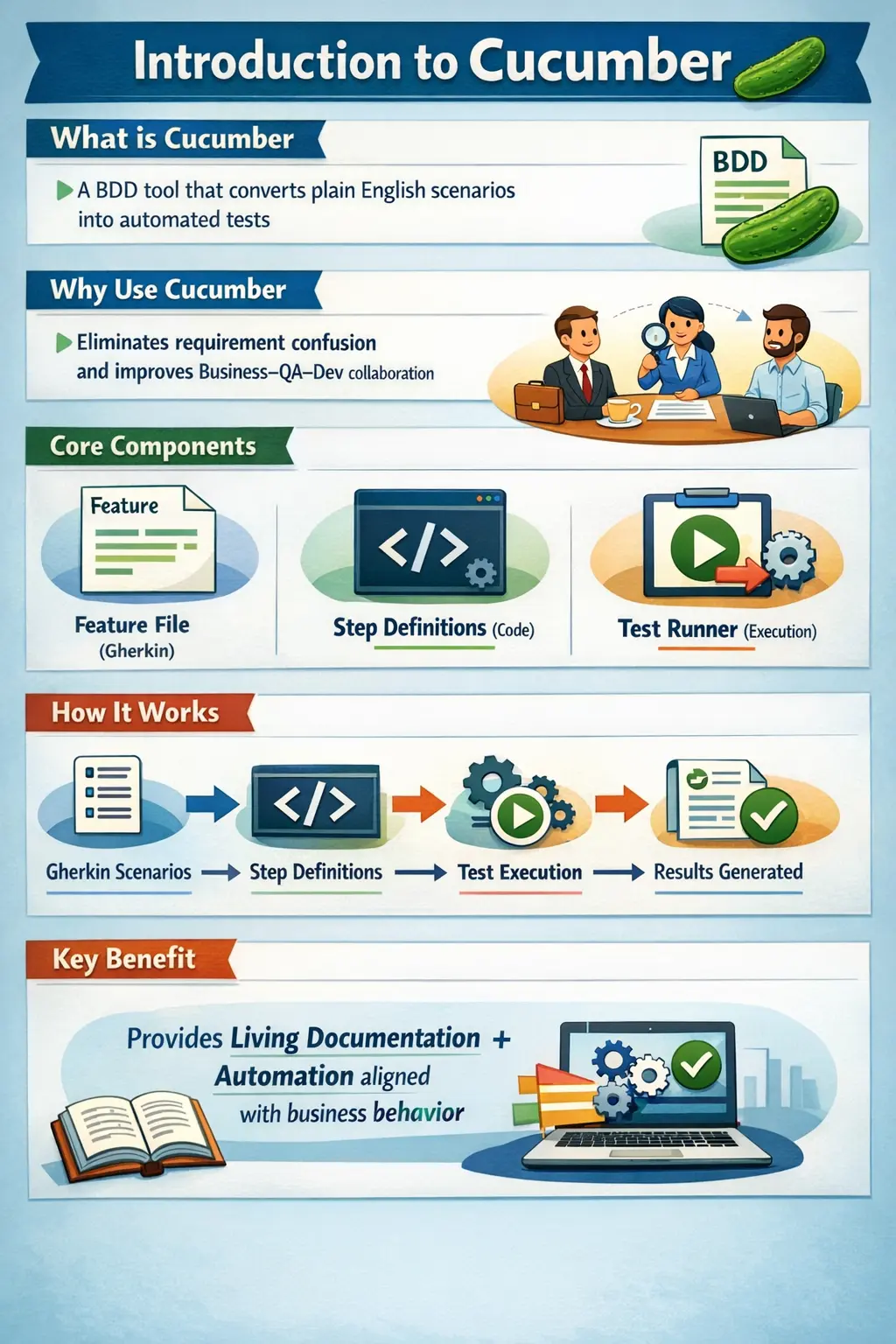
Cucumber is a Behavior Driven Development (BDD) testing tool that allows teams to define application behavior using plain English scenarios and automatically execute them as tests. Unlike traditional automation frameworks that rely heavily on technical scripts, Cucumber introduces a shared language that both technical and non-technical stakeholders can understand.
At its core, Cucumber acts as a bridge between business requirements and automation code. Business users define what the system should do, testers translate those expectations into structured scenarios, and developers implement the logic that fulfills those scenarios. This unified approach ensures that everyone involved in the project operates with the same understanding of system behavior.
The most distinctive feature of Cucumber is its use of a language called Gherkin, which allows requirements to be written in a structured yet readable format. These scenarios are not just documentation—they are directly tied to automation, making them executable specifications.
Why Cucumber Exists
To understand the value of Cucumber, it is important to examine the limitations of traditional testing and development practices. Historically, requirements were documented in lengthy documents, often filled with ambiguity. Developers interpreted these requirements in their own way, testers validated the implementation after development, and business stakeholders were left out of the validation process.
This approach led to several common problems:
- Requirements were misunderstood or incomplete
- Communication gaps between teams caused inconsistencies
- Test cases were too technical for business stakeholders
- Automation scripts lacked alignment with business value
- Defects were discovered late in the lifecycle
Cucumber was created to address these issues by ensuring that requirements are not just written—they are executable. Instead of relying on static documentation, Cucumber enables teams to define behavior in a way that can be validated automatically. This reduces ambiguity, improves collaboration, and ensures that the final product aligns with business expectations.
How Cucumber Fits into BDD
It is essential to understand that Cucumber is not BDD itself—it is a tool that implements BDD principles. BDD defines how teams should collaborate and express requirements, while Cucumber provides the mechanism to write and execute those requirements.
In a typical BDD workflow:
- Business stakeholders describe expected behavior
- Teams collaborate to refine scenarios
- Scenarios are written using Gherkin
- Automation code is linked to these scenarios
- Tests are executed continuously
Cucumber plays a central role in this process by enabling teams to:
- Express behavior using Gherkin
- Map scenarios to code using step definitions
- Execute tests using a runner framework
This integration ensures that requirements, testing, and automation are tightly aligned.
Core Components of Cucumber
To fully understand how Cucumber works, it is important to explore its core components. Each component has a specific responsibility, and together they form a complete automation ecosystem.
Feature Files
Feature files are the foundation of Cucumber. They are written in Gherkin language and describe application behavior from a business perspective. These files use structured keywords such as Feature, Scenario, Given, When, and Then to define behavior clearly.
For example:
Feature: Login functionality
Scenario: Successful login
Given the user has valid credentials
When the user logs in
Then the user should see the dashboard
This format ensures that scenarios are easy to read, understand, and validate by all stakeholders.
Step Definitions
Step definitions are the implementation layer of Cucumber. They connect the plain English steps in feature files to actual automation code. These are written in programming languages such as Java, JavaScript, or Python.
Each step in a feature file must have a corresponding step definition. This mapping ensures that business-readable scenarios are executed as real tests.
Test Runner
The test runner is responsible for executing Cucumber tests. It defines:
- Which feature files to run
- Where step definitions are located
- Execution configurations such as tags
- Reporting mechanisms
Cucumber integrates with frameworks like JUnit and TestNG, allowing seamless execution within existing automation setups.
Supported Languages and Platforms
One of the strengths of Cucumber is its flexibility across different technology stacks. It is not limited to a single programming language or platform.
Cucumber supports:
- Cucumber JVM for Java and Kotlin
- Cucumber JS for JavaScript and TypeScript
- SpecFlow for .NET environments
- Behave for Python
This makes Cucumber a technology-agnostic solution, allowing teams to adopt it regardless of their existing ecosystem.
How Cucumber Works – Execution Flow
Understanding the execution flow of Cucumber is critical for both development and debugging.
When a Cucumber test runs, the following steps occur:
- The feature file is read and parsed
- Scenarios are identified and processed
- Each step is matched with its corresponding step definition
- Step definition code is executed
- Results are generated and reported
A key rule in Cucumber is that each step must have exactly one matching implementation. If a step is missing or duplicated, execution will fail. This strict mapping ensures consistency and reliability in automation.
Advantages of Using Cucumber
Cucumber offers several advantages that make it a preferred choice in many projects.
First, it enables business-readable test cases, ensuring that non-technical stakeholders can understand and validate scenarios. This significantly improves communication and reduces misunderstandings.
Second, it promotes strong collaboration between business, QA, and development teams. Instead of working in silos, teams work together to define and validate behavior.
Third, it supports early validation of requirements, allowing defects to be identified before development begins. This reduces rework and improves efficiency.
Additionally, Cucumber provides:
- Reusable and maintainable automation
- Living documentation that stays up to date
- Seamless integration with CI/CD pipelines
- Improved traceability between requirements and tests
These benefits make Cucumber particularly valuable in Agile and DevOps environments.
Cucumber vs Traditional Automation
Traditional automation focuses on validating functionality using technical scripts. While effective, it often lacks alignment with business requirements.
In contrast, Cucumber introduces a behavior-driven approach.
Traditional automation typically involves:
- Technical test scripts
- Limited business involvement
- Separate documentation
- Higher maintenance effort
Cucumber, on the other hand, offers:
- Business-readable scenarios
- High stakeholder involvement
- Built-in documentation
- Better maintainability
This shift from technical validation to behavior validation is what makes Cucumber unique.
When to Use Cucumber
Cucumber is not a one-size-fits-all solution. It is most effective in scenarios where collaboration and clarity are critical.
It is ideal when:
- Requirements change frequently
- Business rules are complex
- Multiple teams collaborate
- Automation is part of long-term strategy
However, Cucumber may not be suitable for:
- Small scripts or utilities
- Proof-of-concept tasks
- Projects with minimal collaboration
Choosing the right context is essential for successful adoption.
Role of a Tester in Cucumber
In a Cucumber-based project, the role of a tester evolves beyond traditional testing responsibilities.
A tester acts as:
- A behavior analyst, understanding business requirements
- A scenario designer, writing clear and effective Gherkin scenarios
- A quality advocate, ensuring comprehensive coverage
Testers are responsible for:
- Identifying edge cases and negative scenarios
- Designing reusable step definitions
- Maintaining clarity and readability of scenarios
- Ensuring behavior-focused testing
This role requires both technical and domain knowledge, making it more strategic than traditional testing roles.
Common Misconceptions About Cucumber
Despite its popularity, there are several misconceptions about Cucumber.
One common myth is that Cucumber replaces tools like Selenium. In reality, Cucumber works with Selenium, not instead of it. Selenium handles browser automation, while Cucumber defines behavior.
Another misconception is that Cucumber is only for testers. In practice, it is a collaborative tool used by business, QA, and development teams.
Some also assume that writing scenarios is equivalent to automation. However, scenarios are only one part—the actual automation lies in step definitions.
Finally, BDD is often reduced to Given–When–Then syntax, but it is fundamentally about collaboration and shared understanding, not just format.
Real-Time Mapping of BDD to Cucumber
To understand how Cucumber implements BDD, consider the following mapping:
- Behavior → Feature file
- Example → Scenario
- Implementation → Step definition
- Validation → Report
This mapping shows how Cucumber transforms abstract BDD concepts into practical automation components.
Interview-Ready Summary
From an interview perspective, Cucumber is best described as a BDD automation tool that converts business-readable scenarios into executable tests.
Key points to remember:
- Cucumber uses Gherkin to define behavior
- It bridges the gap between business and automation
- It improves collaboration and requirement clarity
- It produces living documentation
- It integrates with tools like Selenium and CI/CD pipelines
Key Takeaway
Cucumber is more than a testing tool—it is a collaboration framework that transforms how teams define, validate, and automate software behavior. By aligning business requirements with executable tests, it ensures that software is built correctly, tested effectively, and understood by everyone involved.
In a world where speed, quality, and collaboration are critical, Cucumber provides a structured yet flexible approach to delivering reliable software.