When NOT to Use Cucumber
Cucumber has become one of the most recognized tools in modern test automation, especially within teams practicing Behavior Driven Development (BDD). Its promise is compelling: write business-readable scenarios, align teams through shared understanding, and turn those scenarios into executable tests that double as living documentation. In the right context, Cucumber delivers significant value by bridging the gap between business intent and technical implementation.
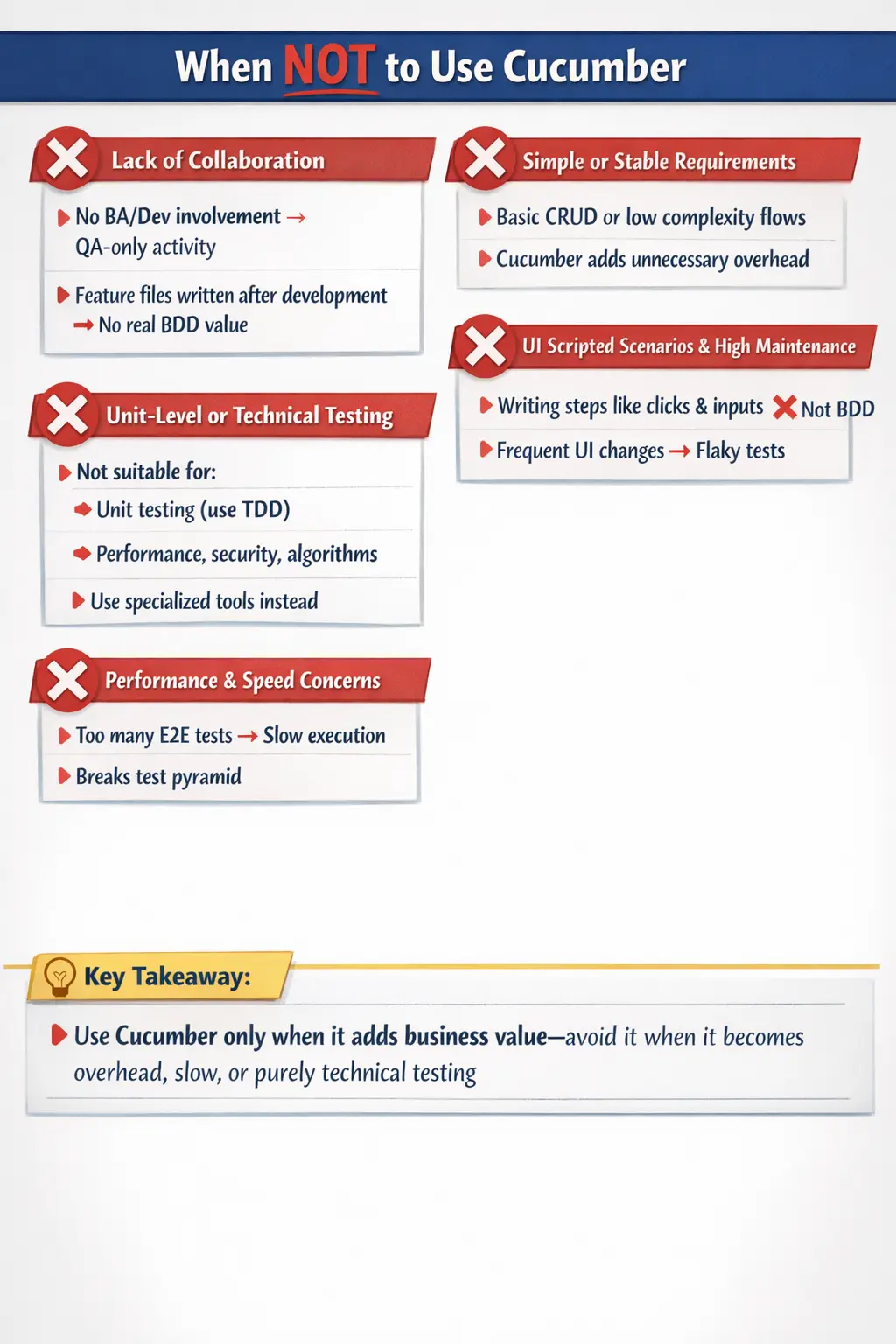
However, like any tool or methodology, Cucumber is not universally applicable. Its effectiveness depends heavily on context, team maturity, problem complexity, and the nature of the system under test. When used in the wrong situations, Cucumber can introduce unnecessary overhead, reduce productivity, and even degrade test quality.
Understanding when not to use Cucumber is just as important as knowing when to use it. This distinction separates mature engineering teams from those that adopt tools blindly. In this article, we will explore the scenarios where Cucumber is not the right fit, why these situations arise, and what better alternatives exist.
Cucumber Is a Collaboration Tool Before It Is an Automation Tool
Cucumber works best when it supports collaboration. Its value comes from helping business analysts, testers, developers, product owners, and stakeholders discuss system behavior through concrete examples. The feature file is not supposed to be a decorative layer on top of automation code. It is supposed to be the visible result of shared understanding. When teams forget this, Cucumber becomes expensive very quickly.
In a healthy BDD process, scenarios are written before or during development planning. They help clarify expected behavior and acceptance criteria. Developers use them to understand what must be built. QA uses them to guide validation and automation. Business stakeholders can read them and confirm whether the behavior reflects real needs. If feature files are written only after the product is already implemented, the main advantage of Cucumber has already been lost.
This is why the first question should never be, “Can we automate this with Cucumber?” The better question is, “Will writing this behavior in business-readable form improve shared understanding?” If the answer is no, Cucumber may not be the right tool for that situation. Simpler test frameworks can validate behavior with less overhead when collaboration and living documentation are not required.
When Cucumber Becomes Ceremony
Cucumber becomes ceremony when teams follow the format but miss the purpose. They create feature files because the framework requires them, not because stakeholders read them or discuss them. They write Given, When, Then statements mechanically, but no one uses the scenarios to make decisions. The feature files become another artifact to maintain, similar to traditional test cases, but with extra glue code and execution complexity.
This kind of ceremonial usage often happens when organizations adopt BDD from the outside in. They choose Cucumber first and try to force their process around it later. A team may be told to write all tests in Gherkin without changing how requirements are discussed. In that case, Cucumber does not improve communication. It only changes the syntax of test cases. The result is usually frustration because the tool adds work without solving the underlying collaboration problem.
A mature team should be willing to say that not every project needs Cucumber. If a team already has clear requirements, direct stakeholder communication, and stable automation at the unit or API level, adding Cucumber may create unnecessary ceremony. The tool should serve the workflow, not the other way around.
When Business Stakeholders Do Not Read Feature Files
A major promise of Cucumber is business readability. Feature files are written in Gherkin so non-technical stakeholders can understand expected behavior. But this promise only matters if those stakeholders actually read, review, or participate in scenario creation. If feature files are read only by QA engineers, then the business-readable layer may not be delivering enough value to justify its cost.
In many real teams, business stakeholders are too busy, unavailable, or uninterested in reviewing Gherkin. They may prefer user stories, acceptance criteria, designs, demos, spreadsheets, or formal requirement documents. If that is the organizational reality, forcing every test into Cucumber may not improve alignment. The team may end up writing English-like scenarios for people who never consume them.
This does not automatically mean Cucumber should be abandoned. It may still be useful for a smaller set of critical flows where shared business documentation matters. But it should not be assumed that business-readable syntax creates business collaboration by itself. Readability is useful only when it is part of a real review and feedback process.
When Requirements Are Too Technical
Cucumber is not ideal when the test objective is deeply technical and does not represent business behavior. For example, testing a sorting algorithm, validating a cache eviction policy, checking a retry mechanism, verifying thread synchronization, or testing a parser implementation is usually better handled through unit, integration, or component tests. These tests need precision, speed, and technical assertions rather than business-language scenarios.
Trying to describe technical internals in Gherkin often creates awkward scenarios. A feature file may begin to say things like “Given the cache contains key A and the eviction queue has priority B,” or “When the internal parser receives token stream X.” At that point, the scenario is no longer useful business documentation. It is a technical test expressed indirectly. Direct code-based tests are usually clearer, faster, and easier to maintain.
The rule is simple: use Cucumber when the behavior matters to business understanding. Use lower-level tests when the behavior is primarily internal implementation logic. Mixing these levels creates confusion and makes both the feature files and the automation code harder to maintain.
When the Team Needs Fast Developer Feedback
Cucumber tests are often slower than unit tests because they execute through an additional abstraction layer and often involve broader system behavior. If scenarios run through the UI, they may also depend on browsers, environments, test data, network timing, and application state. This makes them valuable for acceptance validation but less suitable for fast developer feedback during coding.
Developers need immediate feedback when changing internal logic. Unit tests and focused integration tests can run quickly and identify failures close to the code. If every small logic rule is tested only through Cucumber, feedback becomes slower and debugging becomes harder. A failed Cucumber scenario may require tracing through feature files, step definitions, page objects, services, and application code before the real cause is found.
Good engineering teams use different test levels for different feedback needs. Unit tests give fast code-level confidence. API and integration tests validate service behavior. Cucumber scenarios validate important business workflows and acceptance behavior. Using Cucumber for all feedback makes the test suite heavy and delays learning.
When Test Data Is Difficult to Control
Cucumber scenarios are most effective when test data can be created, controlled, and reset reliably. In real projects, this is not always easy. Some systems depend on third-party services, shared test environments, asynchronous processing, complex database states, or production-like data restrictions. If data setup is unstable, Cucumber scenarios can become flaky and difficult to trust.
Feature files may look clean, but the underlying step definitions may contain complicated setup logic. A simple Given step such as “Given a customer has an active subscription” may require database records, API calls, payment status, identity setup, permissions, and time-based conditions. If that setup fails frequently, the scenario becomes unreliable. The business-readable layer hides the complexity but does not remove it.
In such environments, teams should be selective. Critical workflows may still deserve Cucumber coverage, but broad usage may create maintenance pain. API-level tests, contract tests, service-level tests, or controlled test doubles may provide better reliability for many scenarios. Cucumber should not be used to hide poor test data strategy.
When UI Automation Is Already Fragile
If a team already struggles with fragile UI automation, adding Cucumber usually does not solve the problem. It may make the problem harder to see. Cucumber can wrap unstable Selenium or Playwright tests in readable Gherkin, but the underlying fragility remains. If locators are unstable, waits are poor, environments are inconsistent, or test data is unreliable, feature files will not fix those issues.
In fact, Cucumber may add another maintenance layer. When a UI changes, teams may need to update feature files, step definitions, page objects, locators, and test data setup. If scenarios are written with UI-specific wording, even small label changes may affect Gherkin. This increases maintenance cost and slows delivery.
Before adopting Cucumber for UI automation, teams should first stabilize their automation foundation. They need good locator strategy, explicit waits, clean page objects, reliable data setup, environment control, and clear reporting. Once the automation base is healthy, Cucumber can be added selectively where business-readable scenarios provide real value.
When Scenarios Duplicate Existing Test Cases
Another warning sign is duplication. Some teams maintain manual test cases in a test management tool, automated tests in code, and Cucumber feature files that repeat the same steps in slightly different language. This creates three sources of truth. When the application changes, all three must be updated. If one is missed, documentation becomes inconsistent and trust decreases.
Cucumber is supposed to reduce ambiguity by creating executable specifications. If it simply duplicates existing artifacts, it may increase confusion instead. A team should decide what role feature files play. Are they acceptance criteria? Are they living documentation? Are they automated regression checks? Are they replacing some manual test documentation? Without a clear purpose, Cucumber becomes another file format to maintain.
Before adopting Cucumber widely, teams should review their documentation and test strategy. If existing artifacts already provide clarity and automation already provides coverage, Cucumber should be introduced only where it removes duplication or improves collaboration. Adding it on top of everything else without removing anything is a common source of waste.
When the Product Is Too Volatile
Some products change too quickly for detailed Cucumber scenarios to remain stable. Early-stage startups, prototypes, proof-of-concept applications, experimental workflows, and rapidly redesigned user interfaces may change every few days. In such contexts, writing and maintaining detailed feature files can slow the team down. The scenarios may become outdated before they provide value.
Volatility does not mean testing should be ignored. It means the test strategy should match the product stage. Exploratory testing, lightweight checklists, unit tests, API tests, and focused smoke tests may provide better value while the product is still being discovered. Once the workflow stabilizes and business rules become important to preserve, Cucumber can be introduced for critical behavior.
Cucumber works best when behavior is important enough to document and verify repeatedly. If the team expects the behavior to change significantly tomorrow, heavy scenario automation today may be premature. The right timing matters as much as the right tool.
When Step Definitions Become a Second Programming Language
Step definitions are the glue between Gherkin and automation code. In a clean Cucumber project, step definitions are reusable, simple, and connected to lower-level automation components. In a poorly managed project, step definitions become a messy second programming language. Teams create many similar steps with small wording differences. Some steps perform too much logic. Others are tightly coupled to UI details. Over time, no one knows which step should be reused.
This problem grows with team size. Without naming conventions and review discipline, one tester writes “Given user logs in,” another writes “Given the user is logged into application,” and another writes “Given I login with valid credentials.” These may all do similar things but exist as separate code paths. The project becomes hard to maintain and debugging becomes slow.
If a team cannot maintain step hygiene, Cucumber can become harmful. Before scaling Cucumber, teams need step definition standards, code review, shared vocabulary, reusable domain steps, and clear separation between steps and implementation details. Otherwise, the abstraction layer becomes a maintenance liability.
When Cucumber Is Used to Avoid Good Test Design
Cucumber does not automatically create good tests. A poorly designed test remains poor even if it is written in Given, When, Then format. Some teams assume that if a scenario is written in Gherkin, it is automatically BDD and automatically valuable. This is not true. Good test design still requires risk analysis, boundary thinking, negative scenarios, data variation, dependency awareness, and clear assertions.
A scenario can be too vague, too broad, too technical, too brittle, or too redundant. It can miss important business rules. It can validate the wrong outcome. It can pass while the user experience is still poor. Cucumber provides a structure, but the quality of the scenario depends on the team’s thinking. If a team lacks test design discipline, Cucumber may make weak tests look more formal without making them better.
Teams should not use Cucumber as a substitute for testing skill. They should use it only when strong test design and collaboration already exist or when they are intentionally building those practices. The format helps express behavior; it does not replace critical thinking.
Better Alternatives in the Wrong Context
When Cucumber is not the right fit, there are often better alternatives. For unit-level logic, JUnit, TestNG, Mockito, or similar tools are more appropriate. For service behavior, API tests using Rest Assured, Postman collections, or contract testing tools may be clearer and faster. For UI automation where business-readable scenarios are not needed, Selenium, Playwright, or Cypress tests written directly in code may be easier to maintain.
For exploratory or early-stage work, manual testing supported by lightweight notes and risk-based charters may be better than formal Gherkin. For performance testing, tools such as JMeter, Gatling, k6, or specialized profiling tools are more suitable. For security validation, penetration testing tools, static analysis, dynamic scanning, and manual security review are better aligned with the goal. Tool choice should follow the testing problem, not the other way around.
This does not reduce Cucumber’s value. It clarifies its place. Cucumber is strong when behavior needs to be discussed, documented, automated, and validated in a shared language. It is weak when the main need is fast technical feedback, low-level verification, heavy performance measurement, unstable prototype testing, or simple automation without stakeholder collaboration.
Selective Use Is Often the Best Use
Many teams do not need to choose between using Cucumber everywhere and not using it at all. Selective use is often the best strategy. A team can use Cucumber for a small number of critical business workflows and use other testing approaches for the rest. For example, checkout, payment, password reset, user onboarding, loan approval, or claim submission may deserve BDD scenarios because they represent important business behavior. Simple field validations or internal utility logic may not.
Selective use keeps the suite focused and valuable. It prevents feature files from becoming a dumping ground for every possible test. It also helps stakeholders trust the scenarios because they represent meaningful behavior, not thousands of low-level checks. A smaller, well-maintained Cucumber suite can be more useful than a large, slow, fragile one.
This approach aligns with the test pyramid. Let unit tests handle most internal logic. Let API and integration tests validate service behavior. Let Cucumber cover business-readable acceptance flows where collaboration and living documentation matter. This balance produces faster feedback and lower maintenance cost.
Decision Checklist Before Choosing Cucumber
Before choosing Cucumber, a team should ask several practical questions. Do business stakeholders participate in scenario review? Are requirements complex enough to benefit from examples? Will feature files act as living documentation? Are BA, QA, and Dev willing to collaborate before coding? Is the team disciplined enough to maintain reusable step definitions? Are the scenarios stable enough to automate? Will Cucumber reduce ambiguity or simply add another layer?
If the answers are mostly yes, Cucumber may be valuable. If the answers are mostly no, the team should be cautious. A tool adopted without the conditions needed for success often becomes a burden. Cucumber requires collaboration, clarity, and maintenance discipline. Without those, simpler approaches usually provide better results.
The decision should be revisited over time. A team that is not ready for Cucumber today may become ready later after improving requirements practices, automation design, and stakeholder collaboration. Conversely, a team that once benefited from Cucumber may need to reduce its scope if the suite becomes slow or difficult to maintain.
The Hidden Cost of Cucumber
Before diving into specific scenarios, it is important to understand that Cucumber introduces an additional abstraction layer. Unlike plain automation frameworks, it requires:
- Writing feature files in Gherkin
- Maintaining step definitions (glue code)
- Enforcing naming discipline
- Coordinating between roles (BA, QA, Dev)
This overhead is justified only when it delivers business value—primarily through collaboration and clarity. If that value is missing, Cucumber becomes a liability rather than an asset.
Lack of Real Collaboration: The Biggest Red Flag
Cucumber is fundamentally built on collaboration. The “Three Amigos” model—Business Analyst, Developer, and Tester—forms the backbone of BDD. If this collaboration does not exist, the entire purpose of Cucumber collapses.
In many teams, feature files are written after development is complete. Instead of guiding implementation, they simply document what has already been built. This turns Cucumber into what is often described as “automation in English.”
In such cases, feature files are no longer a shared artifact. They become a QA-owned deliverable with no real input from business or development. The result is duplication of effort, where teams maintain both traditional test cases and Gherkin scenarios without gaining any additional clarity.
When collaboration is absent, Cucumber adds complexity without delivering value. In such environments, simpler automation approaches are more effective.
Simple and Stable Requirements: Overengineering the Solution
Not all systems require behavior-driven specifications. In applications with simple, stable workflows—such as basic CRUD operations—the added layer of Gherkin scenarios often provides little benefit.
For example, a straightforward form submission or data entry screen does not require elaborate behavior descriptions. Writing feature files for such scenarios can feel forced and redundant.
In these situations, traditional automation using tools like TestNG, JUnit, Selenium, or Playwright is more efficient. These approaches allow direct expression of test logic without the overhead of mapping Gherkin steps to code.
Cucumber shines when business rules are complex and require shared understanding. When the logic is simple and well-understood, it becomes unnecessary abstraction.
Unit-Level Testing: The Wrong Tool for the Job
Cucumber is designed for behavior validation, not internal logic verification. It operates at a higher level of abstraction, focusing on what the system does rather than how it does it.
When the goal is fast feedback, code correctness, and design validation, unit testing frameworks such as JUnit, TestNG, and Mockito are far more appropriate. These tools allow developers to test individual components in isolation, providing immediate feedback during development.
Using Cucumber for unit testing is inefficient. It introduces unnecessary layers, slows down execution, and obscures the intent of tests. The principle here is simple:
- Use unit tests for internal logic
- Use Cucumber for business behavior
Mixing these responsibilities leads to confusion and inefficiency.
When Feature Files Become UI Scripts
One of the most common anti-patterns in Cucumber usage is writing scenarios that describe UI interactions instead of behavior. Statements like “click login button,” “enter username,” and “click submit” indicate that the team is focusing on implementation details rather than business outcomes.
This approach defeats the purpose of BDD. Instead of describing what the system should do, the scenarios describe how it is implemented. This makes the tests fragile, as any UI change requires updates to feature files and step definitions.
Proper BDD scenarios should focus on outcomes, such as “user logs in successfully” or “error message is displayed for invalid credentials.” When feature files degrade into UI scripts, Cucumber becomes a verbose wrapper around standard automation.
Frequently Changing Applications: High Maintenance Overhead
In applications where the user interface, labels, or workflows change frequently, maintaining Cucumber scenarios can become a burden. Each change may require updates to feature files, step definitions, or both.
This creates a constant maintenance cycle that slows down development and reduces productivity. In such environments, it is often better to keep tests at a lower level, such as API or component testing, where changes are less frequent.
Cucumber can still be used selectively for critical end-to-end scenarios, but it should not be the primary testing approach. Limiting its scope helps balance coverage with maintainability.
Technical Testing Scope: Beyond Cucumber’s Strengths
Cucumber is not designed for all types of testing. It is particularly weak in areas that require deep technical validation, such as:
- Performance testing
- Security penetration testing
- Concurrency and threading issues
- Algorithm correctness
- Protocol-level validations
These areas require specialized tools and frameworks that operate closer to the system internals. Attempting to use Cucumber for such purposes leads to inefficiency and poor test coverage.
Cucumber should be reserved for behavior validation, not technical deep dives.
Rapid Prototyping and Experimental Work
During early stages of development, teams often build prototypes or conduct exploratory experiments. In such scenarios, requirements are fluid and subject to change.
Writing Gherkin scenarios and step definitions for unstable requirements is counterproductive. It slows down experimentation and creates artifacts that may be discarded later.
For prototypes and proof-of-concept work, lightweight automation or manual testing is more appropriate. Once requirements stabilize, Cucumber can be introduced if it adds value.
Execution Speed and the Test Pyramid Problem
One of the risks of adopting Cucumber is the tendency to push too many scenarios into end-to-end testing. Since Cucumber scenarios often map to user journeys, teams may overuse them for UI-level validation.
This leads to slow execution, delayed feedback, and increased flakiness. The test suite becomes difficult to maintain and less reliable.
A balanced approach follows the test pyramid:
- Unit tests for the majority of coverage
- API and integration tests for business logic
- Cucumber scenarios for critical end-to-end flows
Using Cucumber as the default for all testing violates this principle and reduces overall efficiency.
Compliance and Formal Documentation Constraints
In regulated industries, documentation requirements are often strict and standardized. These may include detailed requirement specifications, traceability matrices, and formal verification artifacts.
While Cucumber provides living documentation, it may not fully satisfy these formal requirements. Teams may end up maintaining both Cucumber scenarios and traditional documentation, leading to duplication of effort.
In such environments, Cucumber can complement documentation but should not replace it entirely.
Lack of Discipline: Step Definitions and Naming Chaos
Cucumber requires strict discipline in writing and maintaining step definitions. Without proper governance, teams may create duplicate steps, inconsistent naming conventions, and ambiguous mappings.
This leads to a fragmented codebase where steps are difficult to reuse and maintain. Scenarios become longer, less readable, and harder to debug.
When discipline is lacking, Cucumber introduces more problems than it solves. Establishing clear guidelines and maintaining step hygiene is essential for success.
Practical Rule of Thumb
Cucumber should be used when it delivers clear business value. This typically happens when:
- Business rules are complex
- Multiple roles need shared understanding
- Acceptance criteria must be executable
- Living documentation is valuable
On the other hand, Cucumber should be avoided or limited when:
- Collaboration is weak or absent
- Requirements are simple and stable
- Fast, unit-level feedback is needed
- Scenarios degrade into UI scripts
- Maintenance overhead outweighs benefits
Making this distinction ensures that Cucumber is used strategically rather than indiscriminately.
Interview Perspective
From an interview standpoint, this topic tests practical understanding rather than theoretical knowledge. A strong answer demonstrates awareness of both benefits and limitations.
A concise response would highlight that Cucumber should not be used when it adds overhead without delivering collaboration or business clarity. A detailed response would include scenarios such as lack of collaboration, simple requirements, unit testing needs, and excessive UI-driven scenarios.
Interviewers look for balanced thinking—recognizing that no tool is universally applicable.
Key Takeaway
Cucumber is a powerful tool, but it is not a universal solution. Its value lies in enabling collaboration, clarifying requirements, and providing living documentation. When these benefits are absent, it becomes an unnecessary layer of complexity.
The key to effective use of Cucumber is intentionality. Use it where it adds value, limit it where it introduces overhead, and complement it with other testing approaches.
Ultimately, good engineering is not about using more tools—it is about using the right tool for the right problem.