Scenario Keyword
In Behavior Driven Development (BDD), the Scenario keyword is where abstract business intent becomes concrete, testable behavior. While the Feature defines what capability the system provides, the Scenario defines how that capability behaves under specific conditions. It is the smallest meaningful unit of behavior in a feature file and the primary driver of both development and automation.
Why the Scenario Keyword Matters
The Scenario keyword matters because it is where BDD becomes practical. A Feature may describe a broad capability such as user login, password reset, or order placement, but the Scenario explains one specific example of how that capability should behave. This is the level where business expectations become concrete enough to build, test, discuss, and automate.
Without clear scenarios, teams often rely on assumptions. A requirement may say that a user can log in, but that statement alone is incomplete. Does the system allow inactive users to log in? What happens when the password is wrong? How many failed attempts are allowed? What message should appear? A Scenario gives the team a precise example that removes ambiguity and creates a shared understanding.
Scenarios also make quality visible. When a scenario passes, it provides evidence that a specific behavior works. When it fails, it points to a mismatch between expected and actual behavior. In this way, scenarios become more than documentation. They become executable agreements between business, development, and testing roles.
Scenario as an Executable Example
A Scenario is best understood as an executable example of behavior. It does not describe every possible detail of the system. Instead, it captures a representative situation that matters to the business. For example, "Successful login with valid credentials" is an example of authentication behavior. It tells the team that when a registered user provides correct credentials, the system should grant access.
This example-driven approach is one of the reasons BDD is powerful. People often understand examples more easily than abstract rules. A business rule such as "Only active users can access the system" may still leave room for interpretation. A scenario showing an inactive user being denied access makes the rule clearer. Another scenario showing an active user logging in successfully completes the picture.
Because scenarios are executable, they also serve as safety checks. Once automated, the same scenario can be run repeatedly whenever the application changes. This protects important behavior from regression. If a future change breaks login behavior, the scenario fails and alerts the team. The specification and the test stay connected.
Scenario as Acceptance Criteria
In Agile and BDD teams, scenarios often act as detailed acceptance criteria. A user story may explain a need, but scenarios define what acceptance looks like through examples. They help the team answer whether the story is complete, not in vague terms but through observable behavior.
For example, a user story may state, "As a registered user, I want to reset my password so that I can regain access to my account." This story can produce several scenarios: requesting a reset link with a registered email, attempting reset with an unknown email, using an expired link, entering a weak password, and successfully logging in with the new password. Each scenario expresses one acceptance condition.
This makes sprint work clearer. Developers know what behavior to implement. Testers know what behavior to validate. Product owners can review whether the examples match business intent. A scenario therefore becomes a bridge between requirement discussion and working software.
Scenario Granularity
Scenario granularity refers to how broad or narrow a scenario should be. A scenario that is too broad becomes hard to understand and maintain. A scenario that is too narrow may become a technical script rather than a meaningful behavior example. Good scenario design finds the right level of detail.
A scenario should usually describe one business behavior and one expected outcome. For example, "Successful login with valid credentials" is focused. "User logs in, updates profile, changes password, adds product to cart, checks out, and logs out" is too broad because it mixes many behaviors. If it fails, the team may not know which behavior is broken without extra investigation.
On the other hand, "Click username field" is too narrow because it describes a UI action rather than business behavior. BDD scenarios should not be written as step-by-step manual scripts. They should express meaningful examples of system behavior. Granularity affects readability, automation reliability, and long-term maintenance.
Scenario Names as Documentation
The scenario name is not a small detail. It is a heading in living documentation, a label in test reports, and often the first clue when a test fails. A good scenario name should explain the behavior clearly without requiring the reader to inspect every step. It should be specific enough to identify the case and business-oriented enough to make sense to non-technical readers.
Names such as "Successful login with valid credentials," "Password reset link expires after configured time," and "Order total updates when item quantity changes" are useful because they describe outcomes. Names such as "TC_001," "Click login," or "Verify screen" are weak because they do not communicate business behavior. They may satisfy a tool, but they do not help people understand the system.
Good names also improve defect triage. If a CI report says that "Payment is declined when card authorization fails" is failing, the impact is immediately clear. If the report says "Scenario 8 failed," the team must open the file and investigate before understanding the issue. Clear scenario names save time every time the suite is reviewed.
Given as Context, Not Action History
The Given step sets the context for the scenario. It describes what must already be true before the behavior occurs. A common mistake is using Given steps to describe a long sequence of UI actions. For example, "Given I open the browser, enter the URL, click login, type username, type password..." turns the scenario into an automation script. This reduces readability and makes the scenario more fragile.
A better Given focuses on state. "Given the user is registered and active" is clearer than listing every action required to create that user. The scenario should not force business readers to read setup mechanics unless those mechanics are part of the behavior being specified. Technical setup can be handled inside step definitions, hooks, test data utilities, or background sections when appropriate.
This distinction keeps scenarios readable. The Given step should answer, "What is the starting condition?" It should not become a detailed implementation recipe. When Given steps remain focused on context, the rest of the scenario becomes easier to understand.
When as the Triggering Action
The When step describes the action or event that triggers the behavior being tested. Ideally, a scenario has one main When step because it should validate one behavior. Multiple major When steps often indicate that the scenario is testing multiple behaviors at once. This makes the scenario harder to understand and debug.
For example, in a login scenario, "When the user signs in with valid credentials" is the triggering action. In a payment scenario, "When the customer submits the payment" is the action. In a search scenario, "When the user searches for a product name" is the action. The When step should move the system from the initial context toward the expected outcome.
If a scenario contains several actions, the team should ask whether it should be split. Sometimes a workflow legitimately includes more than one interaction, but the main behavior should still be clear. A focused When step strengthens the scenario's purpose.
Then as Observable Outcome
The Then step defines the expected outcome. It should be observable and verifiable. A weak Then step says something vague such as "Then it should work." A strong Then step says exactly what should be true, such as "Then the user should be redirected to the account dashboard" or "Then an invalid credentials message should be displayed."
Good Then steps focus on outcomes rather than internal implementation. Business stakeholders usually care that the order is confirmed, the payment is rejected, the email is sent, or the account is locked. They usually do not need to know which method was called or which class handled the request. Internal checks may belong in unit tests rather than Gherkin scenarios.
The Then step is where the scenario proves value. It tells the team what result matters. If the expected outcome cannot be observed, the scenario may not be testable. Testability is a key quality of good scenarios.
Scenario and Business Language
BDD scenarios should be written in business language. This does not mean they must be simplistic. It means they should use vocabulary that stakeholders understand. If the business says "customer," "policy," "claim," "cart," "invoice," or "appointment," the scenario should use those words. This creates a shared language between requirements, tests, and implementation.
Technical language should be used only when the behavior itself is technical or when the audience expects it. For UI automation, scenarios should avoid excessive references to IDs, CSS classes, locators, and buttons unless the UI element is meaningful to the user. For API testing, some technical terms may be appropriate, but the scenario should still express behavior clearly.
Business language improves collaboration. A product owner can review scenarios and confirm whether they match expectations. A tester can derive meaningful cases. A developer can connect the expected behavior to implementation. When scenarios are written only in technical language, this collaboration weakens.
Scenario Design Before Development
In true BDD, scenarios should be discussed before implementation, not written after the feature is already built. Writing scenarios early helps the team clarify requirements, identify missing rules, and agree on acceptance behavior. This is where BDD provides preventive value. It reduces defects by improving shared understanding before code exists.
If scenarios are written only after development, they often become a translation of existing behavior rather than a guide to desired behavior. The team may automate what was built, even if what was built does not match the business need. That turns BDD into a testing format rather than a collaboration practice.
Early scenario design does not mean every detail must be frozen. Agile teams can refine scenarios as understanding improves. The important point is that scenarios should guide conversation and development, not merely document the final result after the fact.
Scenario-Level Tags in Real Execution
Scenario-level tags help teams control execution and reporting. A tag such as @smoke can identify scenarios that validate the most critical behaviors. A tag such as @regression can mark scenarios that should run in broader regression cycles. Module tags such as @login, @payment, or @profile can help teams filter by functional area.
Tags are powerful, but they need discipline. If every scenario receives many tags without a clear strategy, execution becomes confusing. Teams should define what each tag means and when it should be used. A @smoke tag should not be applied just because a scenario is important; it should mean the scenario belongs to the agreed smoke suite. A @wip tag should not remain forever after development is complete.
Good tagging supports CI/CD. Smoke scenarios may run on every build. Regression scenarios may run nightly. Critical scenarios may run before release. Scenario-level tags allow this control without changing the scenario text itself.
Scenario vs Manual Test Case
A Scenario and a manual test case are related, but they are not exactly the same. A manual test case often contains detailed steps, specific data, preconditions, expected results, and execution notes. A BDD scenario is usually higher level and behavior-focused. It expresses the example in a form that business and technical roles can both read.
For example, a manual test case may say to open a browser, navigate to a URL, enter a username, enter a password, click a button, and verify a dashboard. A BDD scenario may say, "Given the user has valid credentials, When the user signs in, Then the account dashboard should be displayed." The automation code handles the technical actions behind the steps.
This does not make one better than the other in every context. Manual test cases can be useful for detailed execution, especially in non-automated testing. BDD scenarios are strongest when the goal is shared understanding and executable specification. Teams should understand the difference and use each artifact intentionally.
Scenario Outline Decision Making
Choosing between Scenario and Scenario Outline is a common design decision. A normal Scenario is best when the behavior is represented by one clear example. A Scenario Outline is best when the same behavior should be validated with multiple data combinations. Using an outline unnecessarily can make simple behavior harder to read. Avoiding an outline when many duplicate scenarios exist can create maintenance problems.
For example, login with different invalid credential combinations may be a good fit for a Scenario Outline if the behavior and expected result are similar. But successful login with valid credentials may not need an outline if there is only one meaningful example. The goal is clarity, not cleverness.
Scenario Outlines are powerful for data-driven examples, but they should not be used to hide different behaviors inside one template. If different rows have different meanings or outcomes, separate scenarios may be clearer. The best choice depends on readability and maintainability.
Common Scenario Anti-Patterns
One common anti-pattern is the long scenario. Long scenarios often combine setup, multiple actions, multiple validations, and cleanup. They become hard to read and harder to debug. If a long scenario fails, the team may need extra effort to locate the actual problem. Splitting long scenarios into focused examples usually improves quality.
Another anti-pattern is the UI-script scenario. These scenarios describe every click, field, and page interaction in detail. They may work as automation scripts, but they are poor living documentation. They are also fragile because small UI changes can make the scenario text misleading or obsolete.
A third anti-pattern is the vague scenario. A title such as "Check login" and a Then step like "Then login should be successful" may be too unclear. The expected outcome should be specific enough to verify. Vague scenarios create weak automation and weak communication.
Review Checklist for Scenarios
When reviewing a scenario, first check whether the name clearly describes the behavior. Then check whether the scenario belongs under the Feature. Next, confirm that the scenario has a clear context, one main action, and a verifiable outcome. If any of these parts are missing, the scenario may need refinement.
Reviewers should also check whether the scenario uses business language and avoids unnecessary implementation details. Steps should not expose locators, database queries, CSS classes, or internal method names unless the feature is explicitly technical. The scenario should be understandable to someone who knows the business domain.
Finally, review whether the scenario is too broad, too narrow, duplicated, or better represented as a Scenario Outline. Scenario reviews are valuable because they improve requirements, testing, and automation before defects appear.
Practical Example of Scenario Design
Consider the Feature "User Login." A good scenario could be named "Successful login with valid credentials." The Given step can state that a registered active user exists. The When step can state that the user signs in with valid credentials. The Then step can state that the account dashboard is displayed. This scenario is short, clear, and behavior-focused.
A weaker version would describe opening the browser, entering the URL, clicking the username field, typing the username, clicking the password field, typing the password, clicking the button, waiting for the page, and checking text. That version may resemble automation code, but it is not good BDD communication. The technical details can live in step definitions.
The strong version communicates the behavior to stakeholders and still supports automation. It is stable even if the login button changes position, the UI layout changes, or the automation implementation changes. That stability is one of the reasons behavior-focused scenarios are valuable.
Interview-Ready Understanding of Scenario Keyword
In interviews, the Scenario keyword should be explained as the Gherkin keyword used to define one concrete, executable example of system behavior. It belongs under a Feature and is usually written using Given, When, and Then steps. A scenario acts as executable acceptance criteria and helps developers, testers, and business stakeholders share the same understanding.
A strong answer should mention that each scenario should focus on one behavior, use business language, have a clear name, avoid unnecessary technical details, and produce an observable expected result. It is also useful to explain the difference between Scenario and Scenario Outline: Scenario is for one example, while Scenario Outline is for repeating the same behavior with multiple data sets.
To show practical experience, include an example such as "Successful login with valid credentials." Explain that the Given sets context, the When triggers the login action, and the Then verifies the dashboard or successful access. This demonstrates that you understand both the syntax and the purpose behind the syntax.
Understanding the Scenario keyword is critical because it sits at the intersection of requirements, implementation, and validation. A well-written scenario is simultaneously a requirement, a test case, and a piece of living documentation. It tells developers what to build, testers what to validate, and stakeholders what to expect. In this sense, the Scenario is not just a syntactic element—it is the operational core of BDD.
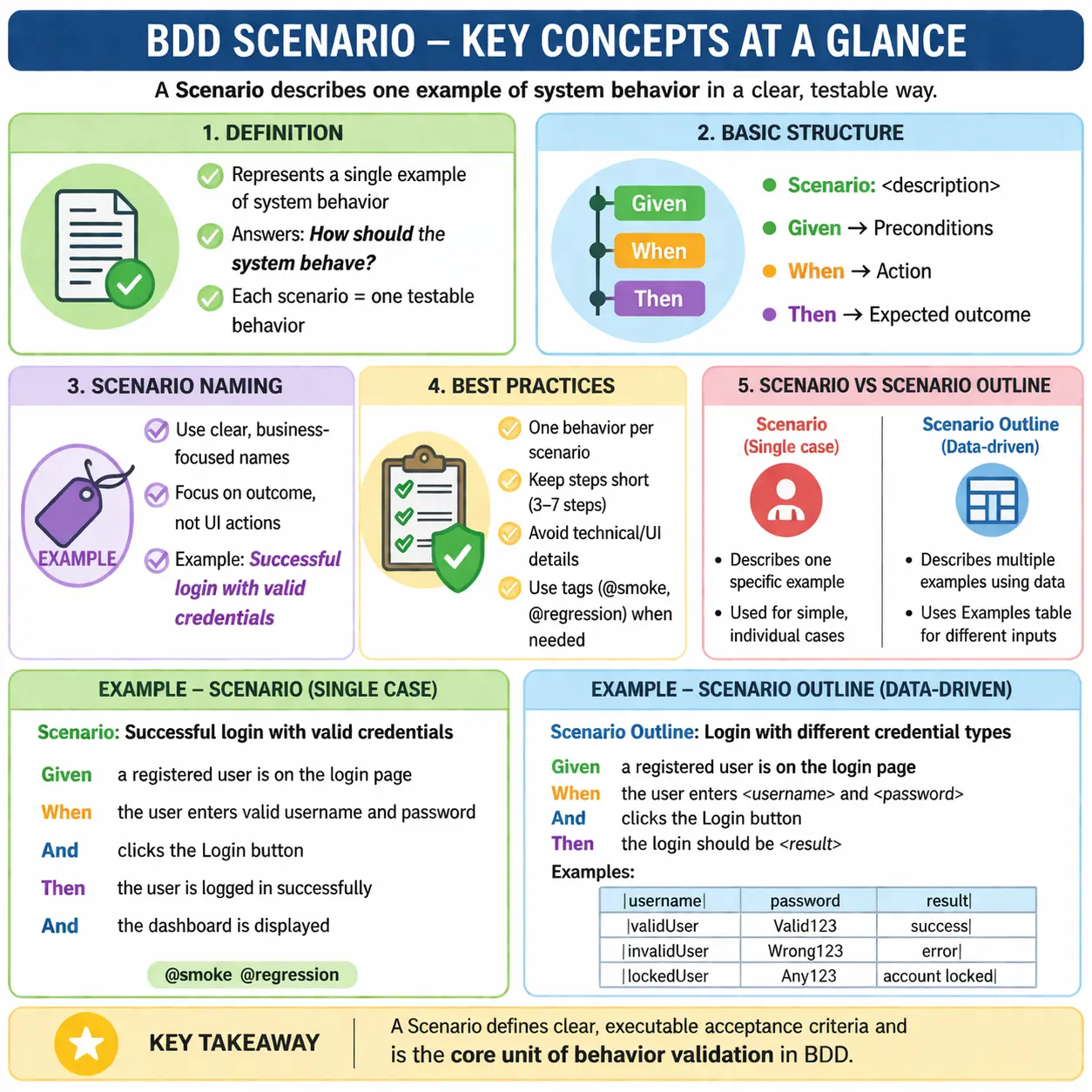
What Is the Scenario Keyword?
The Scenario keyword defines a single, concrete example of system behavior under a specific set of conditions. It answers a focused question: How should the system behave in this particular situation?
Each scenario represents one behavior that can be executed and validated. It is not a collection of loosely related steps, nor is it a script of UI actions. Instead, it is a precise description of a business outcome, expressed in a structured format that can be understood by both humans and machines.
From an execution standpoint, each scenario maps directly to an automated test. When a scenario runs, it validates whether the system behaves as expected under the defined conditions. If it passes, the behavior is confirmed. If it fails, it signals a mismatch between expectation and implementation.
Purpose of a Scenario
The Scenario keyword exists to bring clarity and precision to behavior specification. Its primary purpose is to describe an example of business behavior in a way that is both understandable and testable.
Scenarios act as acceptance criteria. Instead of vague requirements, they provide concrete examples that define what “done” looks like. Developers use scenarios as a guide for implementation, ensuring that the system behaves as expected. Testers use them to validate functionality, while business stakeholders use them to confirm that requirements are correctly captured.
Scenarios also drive automation. Each scenario is mapped to step definitions that execute the corresponding actions. This makes scenarios executable specifications—they are not just documentation, but active validations of system behavior.
Finally, scenarios contribute to living documentation. As they are executed continuously in CI/CD pipelines, they provide real-time visibility into the system’s behavior. This ensures that documentation remains accurate and trustworthy.
Basic Syntax and Structure
The structure of a scenario is built around the Given–When–Then format. This structure enforces clarity by separating context, action, and outcome.
The Scenario begins with a descriptive name that summarizes the behavior. This is followed by steps that define the preconditions, the action, and the expected result. The Given step establishes the initial state, the When step describes the triggering action, and the Then step defines the expected outcome.
This structure is not arbitrary. It reflects a logical flow that mirrors how humans think about behavior: starting from a known state, performing an action, and observing the result. By enforcing this structure, Gherkin ensures that scenarios remain clear and consistent.
Importance of Scenario Naming
The name of a scenario is one of its most important elements. It is the first thing stakeholders see, and it provides a concise summary of the behavior being tested. A well-written scenario name should clearly describe the expected outcome and be understandable by non-technical users.
Good scenario names focus on behavior and outcomes. For example, “Successful login with valid credentials” immediately conveys what is being validated. It is clear, specific, and business-oriented.
Bad scenario names, on the other hand, focus on actions or technical details. Names like “Click login button” or “TC_001_Login” provide little context and do not communicate the actual behavior. These names reduce readability and make the feature file less useful as documentation.
Effective scenario naming requires thinking in terms of business value rather than implementation. It is about describing what happens, not how it happens.
Structure of a Scenario: Given, When, Then
The Given–When–Then structure is central to scenario design. Each part has a specific role and contributes to the overall clarity of the scenario.
The Given step defines the context. It sets up the system state required for the scenario. This could include conditions such as a user being registered or having valid credentials. The focus is on the state, not on how that state is achieved.
The When step represents the action. It describes the event or interaction that triggers the behavior. This should be a single, clear action that drives the scenario forward.
The Then step defines the expected outcome. It specifies what should happen as a result of the action. This outcome must be observable and verifiable, ensuring that the scenario can be validated objectively.
Together, these steps create a narrative that is both logical and easy to understand.
One Behavior per Scenario
One of the most important principles in scenario design is that each scenario should represent only one behavior. This ensures that scenarios remain focused, clear, and maintainable.
When multiple behaviors are combined into a single scenario, it becomes difficult to understand what is being tested. It also makes debugging harder, as a failure could be caused by any part of the scenario.
For example, combining login and logout into a single scenario introduces unnecessary complexity. It is better to separate them into two distinct scenarios, each focusing on a single behavior.
This principle aligns with the idea of atomic tests—each scenario should validate one specific outcome. This improves readability, maintainability, and reliability.
Scenario-Level Tags and Their Role
Tags can be applied to individual scenarios to categorize and manage execution. These tags provide flexibility in how scenarios are executed, especially in large test suites.
Scenario-level tags are useful for grouping tests into categories such as smoke, regression, or module-specific tests. They also enable selective execution, allowing teams to run only relevant scenarios based on context.
In CI/CD pipelines, tags play a crucial role in optimizing test execution. For example, smoke tests can be run on every build, while full regression suites can be executed less frequently.
Using tags effectively requires consistency and discipline. Well-defined tagging strategies improve scalability and maintainability.
Scenario vs Scenario Outline
While the Scenario keyword defines a single example of behavior, the Scenario Outline is used for data-driven testing. Understanding the difference between these two constructs is important for effective test design.
A Scenario is used when there is only one clear example of behavior. It is straightforward and focused. A Scenario Outline, on the other hand, allows the same behavior to be tested with multiple sets of data using an Examples table.
Choosing between Scenario and Scenario Outline depends on the nature of the behavior. If the behavior varies based on input data, an outline is appropriate. If not, a simple scenario is sufficient.
Using the right construct ensures clarity and avoids unnecessary complexity.
Good vs Bad Scenario Design
The quality of a scenario depends on how well it adheres to BDD principles. A good scenario focuses on behavior, uses business language, and avoids technical details.
Bad scenarios often resemble UI scripts. They describe clicks, inputs, and technical steps rather than business outcomes. This approach makes scenarios fragile and difficult to maintain.
A good scenario abstracts away implementation details and focuses on what the system does. It describes behavior in terms of user actions and outcomes, making it meaningful and stable.
This distinction is critical for maintaining the value of BDD. Scenarios should describe behavior, not implementation.
Common Mistakes in Scenario Writing
Several common mistakes can reduce the effectiveness of scenarios. Writing long scenarios with many steps is one such mistake. It makes scenarios harder to read and understand.
Mixing multiple outcomes in a single scenario is another issue. It introduces ambiguity and reduces clarity. Using technical language or UI-specific steps also detracts from the business focus of the scenario.
Writing scenarios after development is a process mistake. In BDD, scenarios should be defined before implementation to guide development and prevent defects.
Duplicating scenarios across features is another common problem. It leads to redundancy and increases maintenance effort.
Avoiding these mistakes requires discipline and a clear understanding of BDD principles.
Best Practices for Scenario Design
Effective scenario design follows a set of best practices. Scenarios should be short, typically containing three to seven steps. This keeps them concise and focused.
Using business language is essential. Scenarios should be understandable by all stakeholders, not just developers or testers. This ensures that they serve as a communication tool.
Focusing on outcomes rather than implementation helps maintain stability. Scenarios should describe what happens, not how it is achieved.
Reviewing scenarios with Business Analysts and Developers ensures alignment and completeness. This collaborative approach is a core principle of BDD.
Finally, it is better to write multiple simple scenarios than one complex one. This improves clarity and maintainability.
Real-World Importance of Scenarios
In real-world projects, scenarios play a central role in development and testing. They are discussed during backlog refinement, implemented during development, and executed in CI/CD pipelines.
Scenarios provide a shared understanding of behavior across roles. They eliminate ambiguity and ensure that everyone is aligned on what the system should do.
In automation frameworks, scenarios drive execution. They are mapped to step definitions that interact with the system. This makes them an integral part of the testing process.
As part of living documentation, scenarios provide visibility into system behavior. Stakeholders can review reports to understand what is working and what is not.
Interview Perspective
From an interview perspective, the Scenario keyword is a fundamental concept in BDD. Candidates should be able to explain its purpose, structure, and role in defining behavior.
A strong answer should emphasize that a scenario represents a single example of behavior and serves as executable acceptance criteria. It should also highlight the Given–When–Then structure and the importance of writing scenarios in business language.
Understanding best practices and common mistakes demonstrates practical experience. Interviewers often look for candidates who can apply these principles in real projects.
Key Takeaway
The Scenario keyword is the core of behavior specification in BDD. It defines a single, testable example of system behavior and serves as a bridge between requirements and implementation.
A well-written scenario is clear, concise, and focused on business outcomes. It improves communication, drives development, and enables reliable automation.
Mastering scenario design is essential for building effective BDD frameworks. It requires not only understanding syntax but also thinking in terms of behavior, collaboration, and long-term maintainability.