Cucumber Ecosystem Overview
In modern software development, tools are rarely used in isolation. Instead, they operate within ecosystems—collections of complementary components that work together to solve complex problems. Cucumber is a perfect example of this. While many beginners initially think of Cucumber as a single tool used for writing BDD scenarios, in reality, it is a comprehensive ecosystem that integrates multiple layers of specification, execution, automation, reporting, and DevOps.
Understanding the Cucumber ecosystem is critical for anyone working in automation testing, especially in enterprise environments. It enables teams to design scalable frameworks, select the right tools, and build maintainable automation solutions that align with business goals. More importantly, it helps bridge the gap between business expectations and technical implementation in a structured and collaborative way.
Why the Ecosystem View Matters
Understanding Cucumber as an ecosystem matters because real automation projects are never built with a single tool alone. A beginner may see a feature file and think that Cucumber is only about writing Given, When, and Then statements. In practice, a working Cucumber framework involves requirement discussion, Gherkin design, step definitions, page objects or service clients, test data, hooks, runners, reporting, logging, configuration, version control, build tools, and CI/CD execution. Each layer has a responsibility, and the framework becomes stable only when those layers work together cleanly.
This ecosystem view also helps teams avoid poor design choices. If a team places all browser automation logic directly inside step definitions, the framework may work at first but become difficult to maintain. If feature files contain too many technical details, business stakeholders may stop reading them. If test data is hardcoded everywhere, scenarios become fragile. If reporting is weak, failed builds become hard to diagnose. Seeing the full ecosystem helps automation engineers design for scale rather than only for the first few scenarios.
In enterprise environments, the ecosystem becomes even more important because multiple teams may use the same framework, tests may run in pipelines, results may be reviewed by stakeholders, and automation may need to support different browsers, environments, APIs, and data sources. Cucumber provides the behavior layer, but the surrounding ecosystem turns that behavior layer into a complete quality solution.
Feature Files as the Entry Point
Feature files are usually the most visible part of the Cucumber ecosystem. They describe behavior in Gherkin and create the bridge between business expectations and automation. A feature file should be easy to read, focused on business behavior, and organized around a meaningful feature. It should not become a dumping ground for technical instructions or low-level UI details.
Good feature files use scenario names that describe intent clearly. They keep steps concise and avoid repeating unnecessary details. They separate different behavior examples into separate scenarios or use scenario outlines when the same behavior must be tested with multiple data combinations. When feature files are designed well, they serve as readable documentation and useful automation specifications.
Poor feature file design creates long-term problems. If scenarios are too broad, failures become hard to diagnose. If scenarios are too small and technical, they lose business value. If the same steps are written in many different ways, step definition duplication increases. The ecosystem starts with feature files, so their quality strongly influences everything below them.
Step Definitions as the Translation Layer
Step definitions are the translation layer between Gherkin and executable code. Cucumber reads a step from a feature file, searches for a matching step definition, and executes the associated code. This layer is where business-readable language becomes automation behavior. Because of that, step definitions must be designed carefully.
A common mistake is putting too much logic inside step definitions. For example, a step definition should not contain long blocks of WebDriver code, complex waits, test data creation, assertions, and reporting logic all together. That makes the framework hard to maintain. A cleaner approach is for step definitions to call reusable page object methods, API clients, service classes, utility methods, and assertion helpers.
This separation keeps the ecosystem modular. Feature files describe behavior. Step definitions connect behavior to code. Page objects or service clients perform interactions. Utilities handle reusable support work. Reports communicate results. When each layer has a clear responsibility, the framework becomes easier to extend and debug.
Automation Libraries Inside the Ecosystem
Cucumber does not directly automate browsers, APIs, databases, or mobile applications by itself. It needs automation libraries to interact with the system under test. For UI testing, Selenium, Playwright, Cypress, or WebdriverIO may perform browser actions. For API testing, REST Assured, Axios, SuperTest, Requests, or similar libraries may send requests and validate responses. For database checks, JDBC, ORM tools, or SQL helpers may be used.
This is one of the most important ecosystem concepts: Cucumber defines and executes behavior, while other libraries perform the actual interaction. In a Java Selenium framework, Cucumber reads the scenario, step definitions receive each step, page objects use Selenium WebDriver to interact with the browser, and assertions verify the result. In an API framework, step definitions may call REST Assured methods instead of browser actions.
Understanding this separation helps testers explain Cucumber correctly in interviews. Cucumber is not a replacement for Selenium or REST Assured. It works with them. Cucumber provides the BDD structure and readable scenario layer, while automation libraries perform the technical validation.
Framework Architecture Around Cucumber
A real Cucumber framework usually contains more than feature files and step definitions. It may include a pages package for page objects, a runners package for execution configuration, hooks for setup and teardown, utilities for screenshots and waits, configuration files for environment details, test data files, reporting setup, logging setup, and reusable API or database helpers. These pieces make the framework practical for real projects.
Hooks are an important part of this architecture. Before hooks can initialize browsers, load configuration, prepare test data, or start logging. After hooks can capture screenshots, close browsers, clean up data, and attach evidence to reports. Tags can control which hooks run for which scenarios. This makes the ecosystem flexible and allows different execution flows for smoke tests, regression tests, API tests, or UI tests.
Configuration management is another important piece. A framework may need to run against QA, staging, UAT, or production-like environments. URLs, credentials, browser types, timeouts, and report paths should not be hardcoded inside step definitions. They should be managed through configuration files, environment variables, or build parameters. This makes the same Cucumber framework usable across environments.
Reporting as Communication
Reporting is not only a technical output. In the Cucumber ecosystem, reports are a communication mechanism. They show which scenarios passed, which failed, which were skipped, and where failures occurred. Since the scenario names and steps are business-readable, reports can be useful to more than automation engineers. Product owners, testers, managers, and developers can understand what behavior was validated.
Basic Cucumber reports may be enough for small projects, but larger teams often integrate richer reporting tools. Allure Reports, Extent Reports, Cucumber HTML reports, JSON reports, JUnit XML reports, and CI dashboards can provide different levels of detail. Screenshots, logs, request-response details, tags, and execution history can make failures easier to analyze.
Good reporting reduces debugging time. If a scenario fails in a pipeline, the team should be able to see the failed step, error message, screenshot, environment, browser, test data, and related logs. Without good reporting, teams waste time reproducing issues manually. Reporting completes the feedback loop in the ecosystem.
CI/CD as the Execution Environment
In modern delivery, Cucumber tests often run inside CI/CD pipelines. Jenkins, GitHub Actions, GitLab CI, Azure DevOps, or similar tools can trigger Cucumber execution after code changes, scheduled builds, release candidates, or deployment events. This makes behavior validation continuous rather than occasional.
Pipeline execution changes how the framework must be designed. Tests should be stable, environment-aware, and capable of running without manual intervention. Browser drivers, dependencies, test data, reports, and credentials must be handled reliably. Parallel execution may be needed to reduce runtime. Flaky tests must be controlled because unstable tests reduce trust in pipeline results.
CI/CD integration is where the ecosystem becomes operational. Feature files and step definitions are not just local assets on a tester's machine. They become part of the delivery process. When a build fails due to a broken business scenario, the team receives fast feedback and can fix the problem before release.
Choosing the Right Ecosystem Components
The best Cucumber ecosystem depends on the project context. A Java-based Selenium project may choose Cucumber JVM, TestNG or JUnit, Maven or Gradle, Selenium WebDriver, Extent Reports, Log4j, and Jenkins. A JavaScript project may choose Cucumber JS, Playwright, npm, GitHub Actions, and an HTML reporting library. A .NET project may use SpecFlow, NUnit, Azure DevOps, and Microsoft-focused tooling.
Tool choice should be practical, not fashionable. Teams should consider existing technology stack, team skills, application architecture, reporting needs, CI/CD platform, maintenance capacity, and long-term support. A tool that works well in one organization may not be ideal in another. The ecosystem should serve the project, not the other way around.
A strong automation engineer understands these tradeoffs. They can explain why one runner, reporting tool, dependency injection library, or automation library fits a given project. This practical ecosystem knowledge is more valuable than memorizing tool names.
What Is the Cucumber Ecosystem?
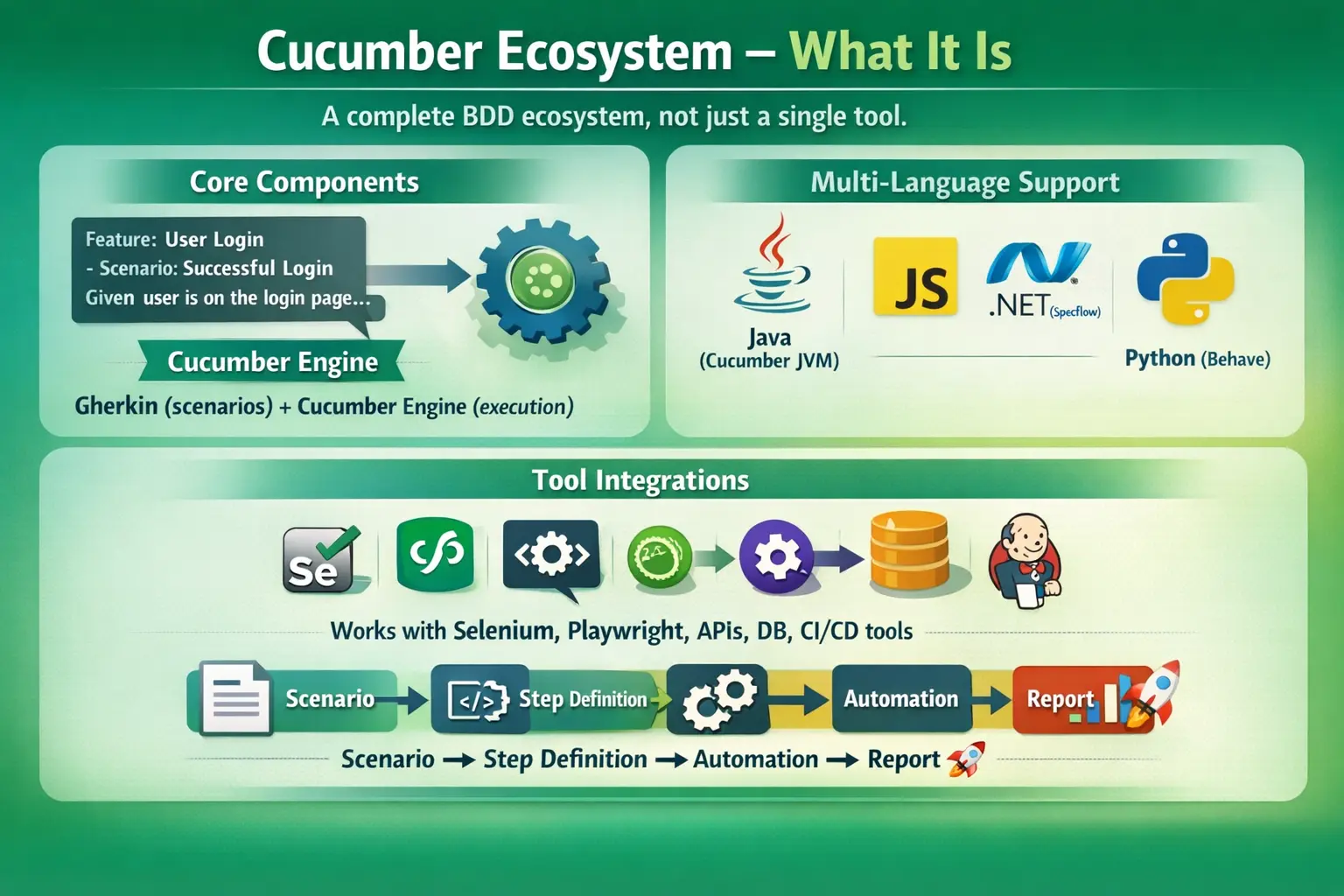
The Cucumber ecosystem refers to the collection of tools, libraries, frameworks, and integrations that together enable Behavior Driven Development (BDD). It is not limited to writing scenarios in Gherkin; it extends to executing those scenarios, integrating with automation tools, managing dependencies, generating reports, and running tests in CI/CD pipelines.
At its core, the ecosystem transforms business-readable scenarios into executable automated tests. These tests can validate user interfaces, APIs, databases, and system integrations across different platforms and programming languages.
This multi-layered architecture makes Cucumber highly adaptable. Whether a team is working on a Java-based enterprise application, a JavaScript frontend system, or a Python-based backend service, the ecosystem provides the necessary components to implement BDD effectively.
Core Components of the Cucumber Ecosystem
The Cucumber ecosystem is built on a few foundational components that define how behavior is described, interpreted, and executed.
Gherkin: The Specification Layer
At the top of the ecosystem lies Gherkin, a domain-specific language designed to describe system behavior in a business-readable format. Gherkin uses structured keywords such as Feature, Scenario, Given, When, and Then to define behavior in a clear and consistent way.
Gherkin serves as the specification layer. It answers the question: “What should the system do?” By focusing on behavior rather than implementation, it ensures that scenarios remain understandable to all stakeholders, including business users.
This shared language is one of the most powerful aspects of the ecosystem. It eliminates ambiguity and creates a single source of truth for requirements.
Cucumber Engine: The Execution Layer
Beneath Gherkin lies the Cucumber engine, which acts as the execution layer. This engine is responsible for reading feature files, parsing scenarios, matching steps with their corresponding implementations, and executing them.
The engine ensures that each step written in Gherkin has a corresponding step definition in code. It orchestrates the execution flow and generates results in various formats.
Although the concept of the engine remains consistent, its implementation varies depending on the programming language and platform being used.
Cucumber Implementations Across Platforms
One of the defining strengths of the Cucumber ecosystem is its multi-platform support. Different implementations exist to cater to various programming environments, making Cucumber technology-agnostic.
Cucumber JVM (Java / Kotlin)
Cucumber JVM is the most widely used implementation, especially in enterprise environments. It integrates seamlessly with Java-based tools and frameworks such as Selenium for UI automation, REST Assured for API testing, and Spring for dependency management.
It also works well with test runners like JUnit and TestNG, making it a natural choice for large-scale automation frameworks. Its maturity and strong community support make it the default option in many organizations.
Cucumber JS (JavaScript / TypeScript)
Cucumber JS is designed for Node.js environments and is commonly used in modern frontend automation projects. It integrates with tools like Playwright, Cypress, and WebdriverIO.
With the rise of JavaScript-based development, this implementation has gained significant popularity. It allows teams to maintain consistency by using the same language across development and testing.
SpecFlow (.NET)
SpecFlow is the Cucumber implementation for the .NET ecosystem. It uses C# and integrates with frameworks like NUnit and MSTest.
This implementation is widely used in organizations that rely on Microsoft technologies. It brings the same BDD principles to the .NET world while maintaining compatibility with existing tools and workflows.
Behave (Python)
Behave is a Python-based framework inspired by Cucumber. It uses Gherkin syntax and integrates with Python libraries for UI and API testing.
Although it is not officially part of the Cucumber project, it follows the same principles and fits naturally into the ecosystem for Python developers.
Integration with Automation Tools
The true power of the Cucumber ecosystem emerges when it integrates with automation tools. These integrations enable scenarios to interact with real systems and validate behavior.
UI Automation
For user interface testing, Cucumber integrates with tools such as Selenium WebDriver, Playwright, Cypress, and WebdriverIO. These tools perform browser-based actions like clicking, typing, and navigating.
The role of these tools is to execute the behavior described in Gherkin scenarios. They simulate real user interactions and validate UI behavior.
API Automation
Cucumber also supports API testing through integrations with tools like REST Assured in Java, Axios or SuperTest in JavaScript, and Requests in Python.
API automation focuses on validating backend services, ensuring that business logic works correctly even without a user interface.
Database Validation
In many real-world scenarios, verifying UI or API responses is not enough. Backend data must also be validated. The ecosystem supports database validation through JDBC, ORM frameworks, or direct SQL execution.
This allows testers to confirm that system behavior is correctly reflected in the database.
Test Runner and Build Tool Integration
Execution control is another critical aspect of the ecosystem. Test runners and build tools manage how tests are executed and how dependencies are handled.
Test runners such as JUnit, TestNG, NUnit, and MSTest control the lifecycle of test execution. They handle setup, teardown, grouping, and parallel execution.
Build tools like Maven, Gradle, npm, yarn, and the .NET CLI manage dependencies and orchestrate execution. They ensure that all required libraries are available and that tests can be executed consistently across environments.
Reporting and Documentation
One of the major advantages of the Cucumber ecosystem is its ability to generate meaningful reports that double as documentation.
Cucumber provides built-in reporting formats such as Pretty, HTML, JSON, and JUnit XML. These reports show which scenarios passed or failed and provide insights into execution.
For more advanced reporting, tools like Allure Reports and Extent Reports can be integrated. These tools offer rich visualizations, detailed logs, and historical analysis.
Since reports are generated directly from executable scenarios, they act as living documentation, always reflecting the current state of the system.
Dependency Injection and Context Management
As automation frameworks grow, managing shared data and object lifecycle becomes challenging. The Cucumber ecosystem addresses this through dependency injection frameworks such as PicoContainer, Spring, and Guice.
These frameworks allow objects to be shared across steps while maintaining clean architecture and avoiding tight coupling. They enable scalable and maintainable test design, especially in large projects.
CI/CD and DevOps Integration
In modern development, testing must be integrated into CI/CD pipelines to provide continuous feedback. The Cucumber ecosystem supports this through integration with tools like Jenkins, GitHub Actions, GitLab CI, and Azure DevOps.
Scenarios can be executed automatically on every build, ensuring that changes are validated immediately. This reduces the risk of defects and increases confidence in deployments.
Automated acceptance testing becomes a key part of the delivery pipeline, aligning testing with DevOps practices.
Supporting Tools and Utilities
Beyond the core components, the ecosystem includes various supporting tools that enhance functionality.
Logging frameworks such as Log4j, Logback, and SLF4J provide detailed execution logs. Configuration management tools allow settings to be defined using properties files or YAML.
Data handling libraries enable reading and writing of JSON, CSV, and Excel files. Version control systems like Git ensure collaboration and code management.
These utilities play a crucial role in building robust and maintainable automation frameworks.
High-Level Ecosystem Architecture
The overall architecture of the Cucumber ecosystem follows a clear flow. Business stakeholders define behavior using Gherkin scenarios. The Cucumber engine interprets these scenarios and maps them to step definitions.
Step definitions execute automation code, which interacts with the application through UI, API, or database layers. Finally, reports are generated to document the results.
This structured flow ensures traceability, consistency, and alignment between requirements and implementation.
Why Understanding the Ecosystem Matters
For automation engineers, understanding the Cucumber ecosystem is not optional—it is essential. Without this understanding, it is difficult to design scalable frameworks or integrate tools effectively.
Knowledge of the ecosystem enables better tool selection, improved maintainability, and smoother collaboration across teams. It also ensures that automation efforts align with business objectives.
In enterprise environments, where systems are complex and teams are large, this understanding becomes even more critical.
Interview Perspective
From an interview standpoint, candidates are often expected to explain that Cucumber is not just a tool but an ecosystem. A strong answer highlights the role of Gherkin as the specification layer, the Cucumber engine as the execution layer, and the various integrations that enable end-to-end testing.
Candidates should also demonstrate awareness of different implementations and how Cucumber integrates with UI, API, database, and CI/CD tools.
Key Takeaway
The Cucumber ecosystem is a comprehensive framework for implementing Behavior Driven Development. It combines specification, execution, automation, reporting, and DevOps into a unified system.
By understanding this ecosystem, teams can build scalable, maintainable, and business-aligned automation frameworks. More importantly, they can ensure that software behavior is clearly defined, continuously validated, and consistently delivered.
Cucumber is not just about writing scenarios—it is about creating a complete, collaborative, and automated approach to software quality.