Selenium vs Other Automation Tools
In today’s fast-paced software development landscape, automation is no longer optional—it is essential. With continuous delivery, rapid release cycles, and increasing application complexity, teams rely heavily on automation tools to ensure quality and stability. However, one critical reality often overlooked is that automation tools are not interchangeable. Each tool is built with a specific philosophy, architecture, and intended use case.
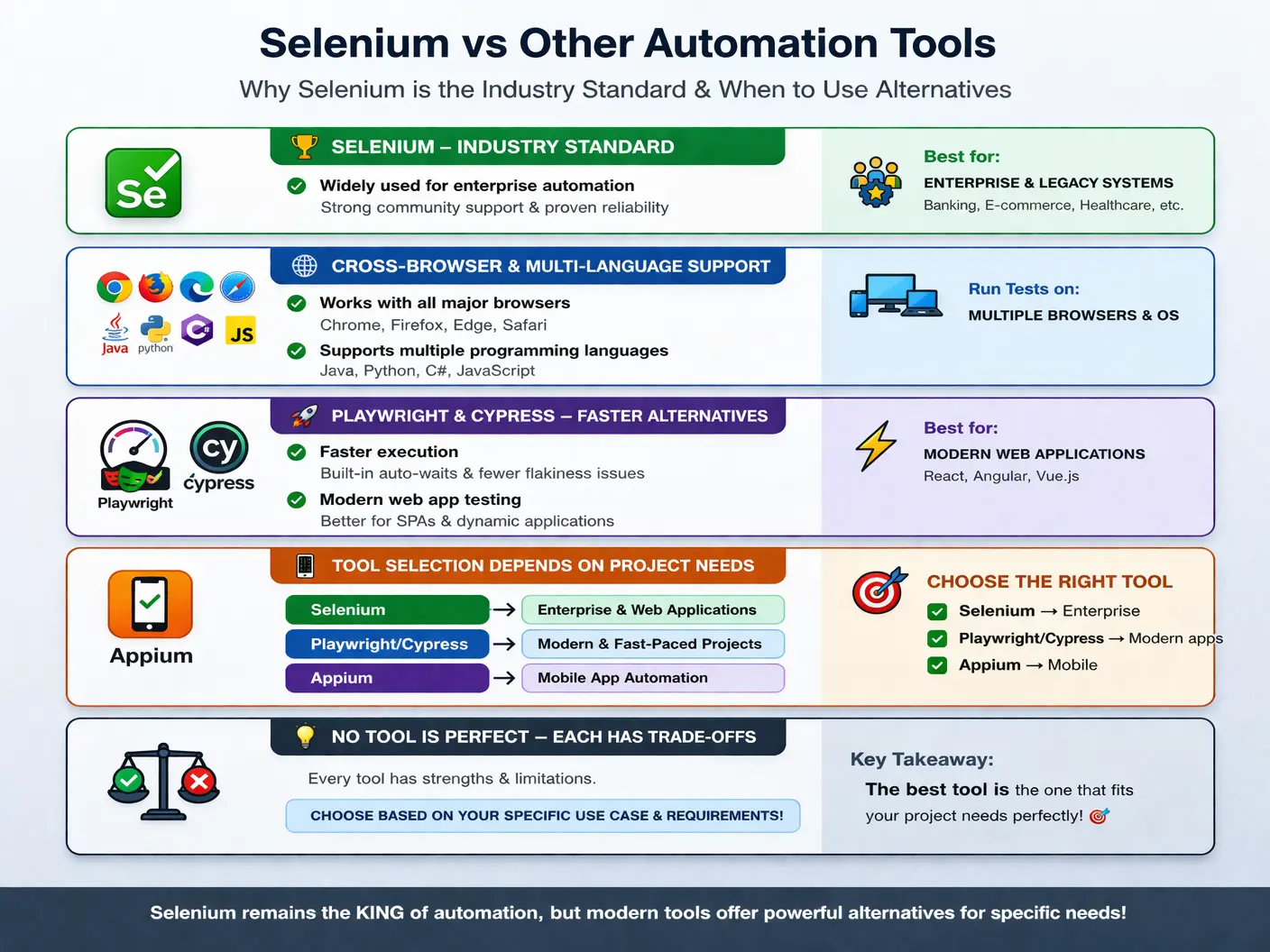
Among all automation tools, WebDriver has established itself as the industry standard. It has been widely adopted across enterprises for more than a decade. Yet, newer tools such as Playwright and Cypress have emerged, offering modern features and addressing some of architecture’s limitations. At the same time, tools like UFT, Appium, and Robot Framework continue to serve specific niches.
Understanding the differences between these tools is not just important—it is essential for tool selection, framework design, and interview readiness. Choosing the wrong tool can lead to high maintenance costs, poor scalability, and mismatched team capabilities. This article provides a comprehensive, real-world comparison of Selenium with other major automation tools, helping you understand when and why each tool should be used.
A useful way to compare automation tools is to avoid asking which tool is universally better. That question usually leads to weak answers because every serious tool has strengths and trade-offs. A better question is: which tool fits this application, this team, this release model, this browser requirement, and this long-term maintenance plan? Selenium, Playwright, Cypress, UFT, Appium, and Robot Framework all solve different automation problems. Some focus on web browsers, some on mobile, some on legacy systems, and some on readable keyword-driven testing.
Selenium remains important because it is mature, open-source, language-flexible, and browser-focused. Newer tools have introduced excellent developer experience, automatic waiting, faster execution, and modern debugging features. Commercial tools still exist in organizations with legacy investments. Mobile tools are necessary when the product is not only web-based. Keyword-driven frameworks help teams where business readability matters more than low-level coding control. The automation engineer's job is to understand this landscape and select tools with engineering discipline rather than trend-following.
This comparison is also useful for Selenium learners because it clarifies Selenium's identity. Selenium is not a test management tool, not a visual testing platform, not a mobile automation tool, and not a complete framework by itself. It is a powerful browser automation foundation. Once that foundation is clear, comparisons with other tools become practical instead of emotional.
Why Tool Comparison Matters
In real-world projects, selecting an automation tool is a strategic decision. It impacts not only the testing process but also team productivity, long-term maintenance, and integration with development workflows.
Choosing the wrong tool can result in:
- High maintenance due to unstable tests
- Limited browser or platform support
- Challenges in CI/CD integration
- Skill mismatch within the team
- Reduced return on automation investment
For example, using a JavaScript-only tool in a Java-heavy enterprise environment can create friction, while selecting a tool with limited browser support can lead to incomplete testing.
Selenium, being the most mature and widely adopted tool, often becomes the default choice. However, newer tools are designed to solve specific modern challenges such as faster execution, better synchronization, and improved developer experience.
The key insight is simple: there is no one-size-fits-all tool. The best tool depends on project requirements, team expertise, and long-term goals.
Tool comparison matters most when the automation suite will live for years. A proof-of-concept can make almost any tool look attractive because the first few tests are usually simple. Real difficulty appears after the application changes, the suite grows, execution moves into CI/CD, multiple team members contribute, and failures need to be investigated quickly. At that point, browser support, debugging quality, reporting integration, coding standards, test data strategy, parallel execution, and community maturity become more important than demo speed.
Team skills are just as important as tool features. A Java-heavy QA team may build a maintainable Selenium Java framework faster than adopting a JavaScript-first tool. A frontend team already working in TypeScript may be highly productive with Playwright or Cypress. A business-facing team with limited coding experience may prefer Robot Framework for readable test cases. A legacy enterprise with desktop workflows may still need a commercial tool such as UFT. A mobile-first product needs Appium or another mobile automation solution, not Selenium alone.
The cost of tool selection should also include maintenance cost, not only license cost. Selenium is free, but a poorly designed Selenium framework can become expensive to maintain. A commercial tool may have a license cost but provide value in a legacy environment that it supports well. A modern tool may be fast, but if it does not support the required browsers or the team lacks the required language skills, the project may suffer. Good tool selection balances technical fit, people fit, ecosystem fit, and business risk.
Selenium vs Playwright
Playwright is a relatively modern automation framework developed by Microsoft. It was designed to overcome several limitations of traditional tools, including Selenium. While Selenium relies on browser drivers, Playwright uses direct browser communication, resulting in faster and more reliable execution.
One of the most noticeable differences is in browser control architecture. Selenium interacts with browsers through browser-specific drivers such as ChromeDriver, GeckoDriver, EdgeDriver, and SafariDriver. Playwright, on the other hand, communicates directly with browsers using modern protocols. This reduces overhead and improves performance.
Another key difference lies in wait handling. Selenium requires explicit or implicit waits to handle synchronization issues. Without proper waits, tests can become flaky. Playwright solves this problem with built-in auto-waiting, which automatically waits for elements to be ready before performing actions.
In terms of speed, Playwright is generally faster because it avoids the additional layer of browser drivers. It also provides strong support for mobile emulation, which is limited in Selenium.
However, Selenium still holds a significant advantage in browser support and ecosystem maturity. It supports all major browsers, including Safari, and has a massive community with extensive documentation and tools.
From a practical perspective:
- Selenium is better suited for enterprise applications, long-term projects, and existing frameworks
- Playwright is ideal for modern web applications, faster execution, and teams starting fresh
Playwright is growing rapidly, but Selenium’s stability and ecosystem make it a safer choice for large-scale systems.
Playwright is attractive because it was designed for modern web applications from the beginning. It handles many synchronization problems automatically, supports browser contexts, works well with multiple tabs, and provides strong debugging tools. For applications built with modern frontend frameworks, these features can reduce flaky tests and improve developer productivity. Teams starting a new automation framework often evaluate Playwright seriously because its default experience feels smooth and complete.
Selenium's advantage is maturity and reach. Many enterprise teams already have Selenium frameworks, Selenium knowledge, Grid infrastructure, reporting integrations, and established coding patterns. Replacing all of that with a newer tool may not be worth the disruption unless there is a clear business reason. Selenium also has a long history of browser vendor alignment through the W3C WebDriver standard. For organizations that prioritize stability, long-term support, and broad skill availability, Selenium remains a dependable choice.
A practical comparison is this: if a team is building a new frontend-focused automation suite and values fast execution, auto-waiting, and modern debugging, Playwright may be a strong choice. If a team is maintaining a long-running enterprise automation platform with Java, CI/CD pipelines, Grid, and broad cross-browser requirements, Selenium may remain the better fit. The decision should come from project reality, not from tool popularity.
Selenium vs Cypress
Cypress is a JavaScript-based automation tool that operates differently from Selenium. Instead of controlling the browser externally, Cypress runs inside the browser itself. This architectural difference significantly impacts how tests are executed.
Because Cypress runs within the browser, it offers faster execution and real-time feedback. It also provides built-in features such as automatic waiting and easy debugging. This makes it highly appealing for frontend developers.
However, Cypress has limitations. It primarily supports JavaScript and has limited browser compatibility, with weak support for Safari. It also struggles with scenarios involving multiple tabs or windows.
Selenium, in contrast, supports multiple programming languages, including Java, Python, and C#. It also provides strong cross-browser support, making it more suitable for enterprise environments.
In real-world usage:
- Selenium is preferred for cross-browser enterprise applications and large-scale automation frameworks
- Cypress is better suited for frontend-heavy applications and JavaScript-based teams
Cypress excels in simplicity and speed, but Selenium remains superior in flexibility and coverage.
Cypress became popular because it gives frontend teams a productive testing experience. Its test runner, command log, time-travel style debugging, automatic waiting, and JavaScript-native workflow make it easy for developers to write and debug tests quickly. For teams building single-page applications with a JavaScript stack, Cypress can feel natural because it lives close to the application code and development workflow.
Selenium is more flexible when the team needs language choice, broad browser coverage, or classic end-to-end browser automation patterns. It can be used with Java, Python, C#, JavaScript, Ruby, and other bindings. It is not tied to one frontend development ecosystem. That flexibility matters in organizations where QA automation is owned by a separate automation team, where backend and frontend technologies vary, or where long-term browser compatibility is a major requirement.
The main trade-off is control versus convenience. Cypress provides many conveniences out of the box, but it works within a more specific model. Selenium requires more framework setup, but it gives teams more freedom to structure automation around their language, tools, and execution environment. For interview purposes, a strong answer should mention that Cypress is excellent for JavaScript frontend testing, while Selenium is stronger for multi-language and cross-browser enterprise automation.
Selenium vs UFT (QTP)
UFT (Unified Functional Testing), formerly known as QTP, is a commercial automation tool widely used in traditional enterprise environments. Unlike Selenium, which is open-source, UFT requires a paid license.
One of the biggest differences between the two tools is cost. Selenium is completely free, while UFT is expensive, making it less accessible for many organizations.
UFT supports both web and desktop applications, whereas Selenium is limited to web automation. However, Selenium offers far greater flexibility and integration capabilities, especially with modern CI/CD pipelines.
Another key difference is vendor dependency. UFT is controlled by a single vendor, which can lead to vendor lock-in. Selenium, being open-source, is community-driven and continuously evolving.
Over time, many companies have migrated from UFT to Selenium due to:
- Zero licensing cost
- Better integration with DevOps tools
- Greater flexibility
- Strong community support
While UFT still has relevance in legacy systems, Selenium has become the preferred choice for modern automation.
UFT is most relevant in organizations that already have legacy automation assets, enterprise licensing, and applications that include desktop components. In those environments, UFT may continue to provide value because replacing an entire automation suite can be expensive and risky. It also supports some technologies outside Selenium's browser-only scope. This makes the comparison more nuanced than simply saying Selenium is better because it is free.
Selenium became more attractive as development practices shifted toward open-source tooling, CI/CD, cloud infrastructure, and custom frameworks. Selenium fits naturally with Maven, Gradle, TestNG, JUnit, Jenkins, GitHub Actions, Docker, Grid, and modern source control workflows. Teams can design their own architecture and avoid vendor lock-in. For web-only automation in modern delivery pipelines, this flexibility is a major advantage.
The practical rule is straightforward. If a project is primarily web-based and the team wants an open-source, customizable, DevOps-friendly approach, Selenium is usually the stronger option. If the organization has deep UFT investment or must automate legacy desktop workflows, UFT may still be part of the toolset. Many real enterprises use more than one automation tool because their application landscape is mixed.
Selenium vs Appium
It is important to clarify that Selenium and Appium are not competitors. Instead, they complement each other.
Selenium is designed for web application automation, while Appium is used for mobile application automation. Both tools are built on the same WebDriver protocol, which means they share similar concepts and architecture.
In projects that involve both web and mobile platforms, Selenium and Appium are often used together. For example:
- Selenium handles browser-based testing
- Appium handles Android and iOS applications
This integration allows teams to maintain consistency in their automation approach.
The key takeaway is that Selenium and Appium serve different purposes but can coexist within the same automation strategy.
Appium can be understood as Selenium's mobile-world counterpart in many ways. It uses WebDriver-style concepts but applies them to Android and iOS applications. The tester still works with sessions, capabilities, locators, actions, and assertions, but the target environment is a mobile device or emulator rather than a desktop browser. This similarity makes it easier for Selenium automation engineers to learn Appium because many architectural ideas transfer.
The difference is scope. Selenium is not the right tool for native mobile app automation. If a banking product has a web portal and a native mobile app, Selenium can cover the portal while Appium covers the mobile application. If the mobile app opens a webview, there may be some overlap in concepts, but the mobile execution environment still requires mobile automation support. Treating Selenium and Appium as competitors is therefore incorrect; they solve different parts of a multi-platform testing problem.
In interviews, this distinction is useful. A candidate can say that Selenium is for web browser automation, Appium is for mobile automation, and both can be used together in products that have web and mobile channels. This answer shows practical understanding because real products often exist on multiple platforms.
Selenium vs Robot Framework
Robot Framework is a keyword-driven automation framework that emphasizes readability and simplicity. Unlike Selenium, which requires programming knowledge, Robot Framework allows tests to be written in a more human-readable format.
Interestingly, Robot Framework often uses Selenium internally for browser automation. This means it acts as a layer on top of Selenium rather than a replacement.
Robot Framework is useful for teams that prefer:
- Minimal coding
- Business-readable test cases
- Faster onboarding for non-technical users
However, it has limitations in flexibility and customization compared to Selenium.
In practice:
- Selenium is better for full control, complex frameworks, and scalable automation
- Robot Framework is suitable for simpler projects and teams with limited coding expertise
Robot Framework is different from Selenium because it is not primarily a browser control engine. It is a generic automation framework built around keywords. For browser automation, it often uses Selenium libraries underneath. This means Robot Framework can make Selenium-based testing more readable for some teams, but the underlying browser automation may still depend on Selenium concepts such as locators, waits, and browser sessions.
The advantage of Robot Framework is communication. Tests can be written in a style that non-programmers may find easier to read. A business analyst or manual tester may understand a keyword-driven test more quickly than a Java class with page objects and annotations. This can be helpful in teams where collaboration and readability are more important than deep customization.
The trade-off is flexibility. Complex automation frameworks often need custom utilities, advanced control flow, reusable libraries, data handling, and deep integration with engineering systems. Selenium with a programming language gives more direct control for those needs. Robot Framework is useful when readability and quick onboarding matter, while Selenium code frameworks are stronger when engineering flexibility and long-term scalability matter.
Why Selenium Still Dominates the Industry
Despite the emergence of newer tools, Selenium continues to dominate the automation landscape. This is not by chance but due to several strong advantages.
Selenium has a mature ecosystem built over many years. It is supported by a massive community, extensive documentation, and a wide range of integrations.
It also offers multi-language support, making it adaptable to different team skill sets. Its compatibility with CI/CD tools such as Jenkins and GitHub Actions ensures seamless integration into modern development workflows.
Another key factor is its proven stability in enterprise environments. Large organizations prioritize reliability and long-term support over adopting new tools.
Additionally, Selenium follows the W3C WebDriver standard, ensuring consistency and compatibility across browsers.
All these factors make Selenium a reliable and trusted choice for automation.
Selenium's dominance is also connected to hiring and knowledge availability. Because Selenium has been used widely for many years, there is a large pool of testers, automation engineers, SDETs, trainers, and community contributors who understand it. This reduces adoption risk. A company can hire Selenium engineers more easily than specialists in some niche tools. Existing online examples, documentation, plugins, framework patterns, and troubleshooting discussions also make problem-solving easier.
Another reason Selenium remains strong is that it does not force one framework style. Teams can use Page Object Model, Screenplay pattern, BDD with Cucumber, data-driven testing, keyword-driven wrappers, or custom framework structures. Selenium provides the browser automation layer, while teams decide how to organize the automation code. This flexibility has helped Selenium adapt to many industries, including banking, healthcare, retail, telecom, insurance, SaaS, and government systems.
Selenium also remains valuable because many organizations prefer proven tools for critical regression suites. A modern tool may be attractive, but large enterprises often evaluate long-term stability, support, compatibility, security approval, team knowledge, and migration cost. Selenium's track record gives it credibility in those environments. New tools may be adopted for new projects, but Selenium often continues to support major existing automation investments.
Tool Selection in Real Projects
In real-world scenarios, tool selection should be driven by project requirements rather than trends.
Selenium is the best choice when:
- The project is enterprise-scale
- Cross-browser testing is critical
- The team uses Java or multiple languages
- Long-term maintenance is required
Playwright or Cypress may be better when:
- The project is new
- The team is JavaScript-heavy
- Fast execution is a priority
- Browser requirements are limited
A skilled automation engineer evaluates these factors carefully before choosing a tool.
Tool selection should begin with application type. If the product is web-only and must support several browsers, Selenium or Playwright may be candidates. If the product is a JavaScript-heavy single-page app owned by frontend developers, Cypress or Playwright may be attractive. If the product has native mobile apps, Appium enters the discussion. If the product includes desktop or legacy enterprise components, UFT or another specialized tool may be needed. If readable keyword-driven tests are a priority, Robot Framework may fit.
The next factor is execution environment. A tool that works beautifully on a developer laptop must also work in CI/CD, test environments, containers, grids, or cloud execution platforms. Teams should ask how tests will run after every build, how reports will be published, how browsers will be managed, how test data will be isolated, and how failures will be debugged. A tool that does not fit the delivery pipeline can become a bottleneck even if its local experience is excellent.
Finally, teams should consider long-term ownership. Who will maintain the framework? What language do they know? How often does the UI change? How much cross-browser coverage is required? What integrations are mandatory? What is the migration cost if the tool is replaced later? These questions move the decision from opinion to engineering analysis.
Practical Decision Framework
A practical decision framework starts with risk. If the biggest risk is that the application may fail in different browsers, Selenium remains a strong candidate because of its broad cross-browser history and mature Grid ecosystem. If the biggest risk is slow feedback for a modern frontend team, Playwright or Cypress may provide faster local execution and better debugging. If the biggest risk is mobile coverage, Appium becomes necessary. If the biggest risk is legacy desktop workflow coverage, Selenium alone is not enough and a specialized tool must be considered.
The second decision point is maintainability. A tool should make the future suite easier to own, not just the first test easier to write. Teams should evaluate locator stability, waiting strategy, reporting options, test data support, parallel execution, community support, and ease of debugging failures. A tool with a beautiful demo can still become costly if the team cannot maintain it after the application changes. Selenium requires more framework setup, but that setup can be shaped to fit enterprise needs. Playwright and Cypress provide more modern defaults, but the team must still design tests carefully.
The third decision point is organizational fit. A tool that aligns with the team's language, source control process, CI/CD pipeline, review culture, and release governance is easier to sustain. For a Java automation team, Selenium with Java may be natural. For a TypeScript frontend team, Playwright may be more productive. For business-readable acceptance tests, Robot Framework may help. Tool selection is strongest when it respects both technical requirements and the people who will maintain the tests.
Interview Perspective
From an interview standpoint, candidates are often asked to compare Selenium with other tools. A strong answer should highlight both strengths and trade-offs.
A concise response would explain that Selenium is a mature, cross-browser automation tool, while newer tools like Playwright and Cypress offer faster execution and built-in features but have limitations in ecosystem and browser support.
A more detailed answer should include real-world scenarios, emphasizing why Selenium is still preferred in enterprise environments.
A strong interview answer should compare tools by scope, not just features. Selenium is a mature open-source tool for web browser automation with multi-language and cross-browser support. Playwright is a modern automation framework with strong auto-waiting, speed, and developer experience. Cypress is excellent for JavaScript frontend teams and fast feedback. UFT is a commercial tool still useful in some legacy enterprise and desktop scenarios. Appium is for mobile automation and complements Selenium. Robot Framework is a keyword-driven framework that can use Selenium underneath for readable browser tests.
Interviewers may also ask which tool is best. The safest answer is that there is no universal best tool. Selenium is often preferred for enterprise web automation because of maturity, language support, browser coverage, and ecosystem. Playwright or Cypress may be better for new modern web applications where speed and JavaScript/TypeScript workflow matter. Appium is required for native mobile automation. Tool choice depends on application type, team skill, browser requirements, integration needs, and maintenance goals.
A concise interview-ready answer could be: Selenium is still widely used because it is mature, open-source, cross-browser, multi-language, and integrates well with enterprise frameworks and CI/CD tools. Playwright and Cypress provide modern features and faster feedback for many web projects, but Selenium remains strong where broad compatibility, long-term maintenance, and existing enterprise automation investments matter.
Key Takeaway
There is no single “best” automation tool. Each tool is designed to solve specific problems.
- Selenium remains the enterprise standard due to its stability and flexibility
- Playwright represents a modern, fast alternative
- Cypress is ideal for JavaScript-focused frontend testing
- UFT serves legacy enterprise needs
- Appium extends automation to mobile platforms
The true skill of an automation engineer lies not in mastering one tool, but in choosing the right tool for the right problem.
Understanding these differences ensures better decision-making, stronger frameworks, and more effective automation strategies in real-world projects.
The most important takeaway is that automation tools should serve the testing strategy, not the other way around. Selenium is excellent when the team needs real browser automation with broad language and browser support. Playwright and Cypress may be excellent when the team wants a modern, fast, developer-friendly workflow. Appium is necessary for mobile. UFT may still fit legacy environments. Robot Framework can help with keyword-driven readability. The right choice is the one that matches the product, people, pipeline, and risk profile.
For Selenium with Java learners, comparing tools is valuable because it prevents narrow thinking. Selenium is a strong skill, but the best automation engineers understand the wider ecosystem. They can explain why Selenium is used, where it fits, where it does not fit, and how it compares with newer and specialized tools. That kind of reasoning is what separates tool users from automation engineers.
In practice, the strongest automation strategy may use more than one tool. Selenium can protect core web regression flows, API tools can validate services quickly, Appium can cover mobile apps, and visual tools can catch layout defects. The goal is not tool loyalty; the goal is dependable quality feedback.