Selenium Project Folder Structure
A well-defined project folder structure is the backbone of any professional Selenium automation framework. While many beginners focus heavily on writing test scripts, experienced engineers understand that structure determines scalability, maintainability, and long-term success. In real-world projects, poorly structured frameworks quickly become unmanageable, leading to duplicated code, flaky tests, and high maintenance overhead. On the other hand, a clean and modular structure enables teams to collaborate efficiently, debug issues faster, and integrate seamlessly with CI/CD pipelines.
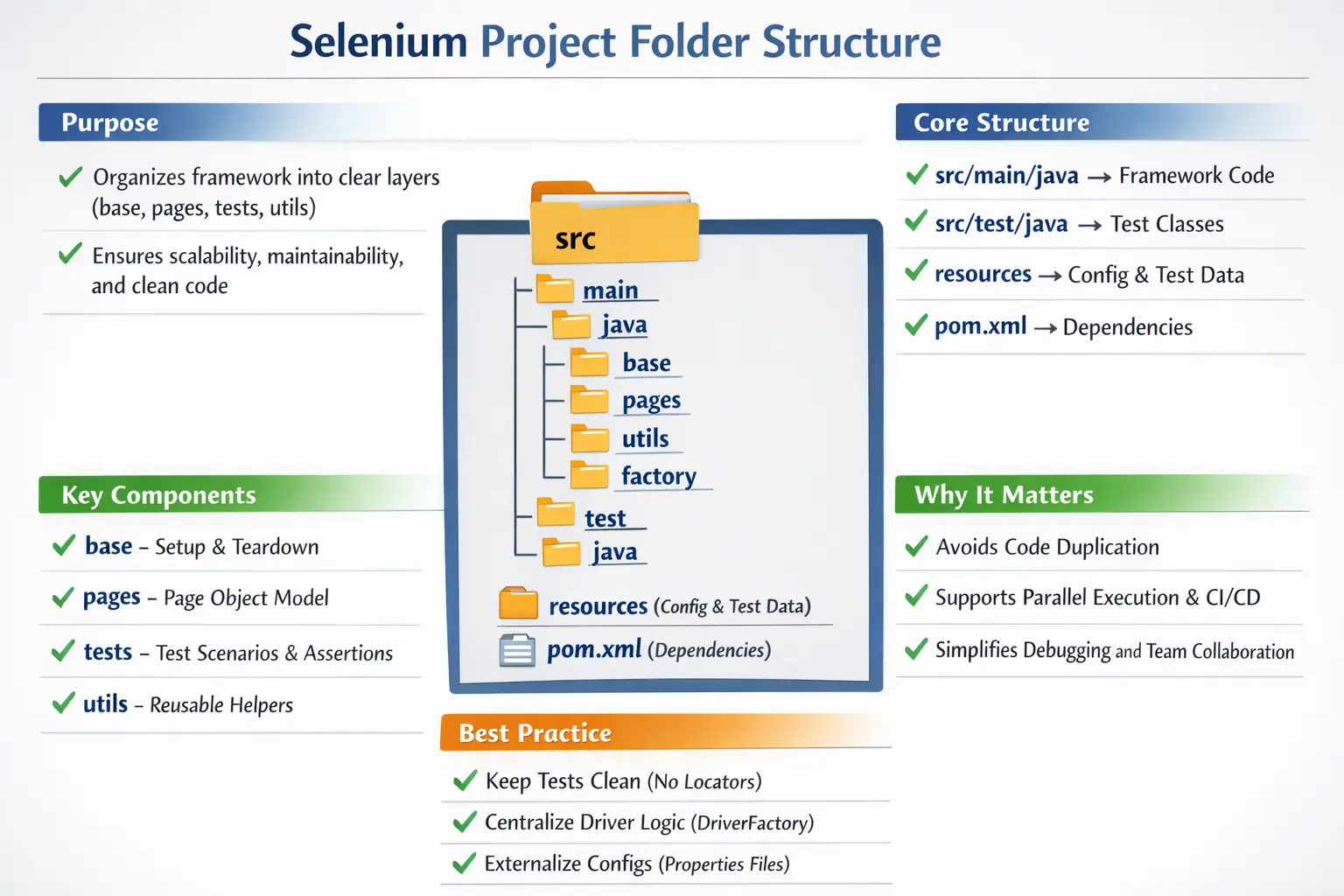
When Selenium is combined with Java and Maven, the expectation is not just to automate tests, but to build an engineering-grade system. This system must support multiple environments, parallel execution, reusable components, and continuous integration. Achieving this requires a disciplined approach to organizing code, separating responsibilities, and following industry conventions. Understanding Selenium project folder structure is therefore not optional—it is foundational.
A good folder structure also communicates the framework's design to every engineer who opens the project. Without reading a long document, a tester should be able to recognize where browser setup lives, where page classes live, where test cases live, where configuration files are stored, and where reusable helper code belongs. This is important because automation frameworks are maintained by teams, not by one person forever. Clear structure reduces dependency on memory and makes the framework easier to hand over, review, and improve.
Project structure is also closely tied to failure analysis. When a test fails, a well-organized framework helps the team narrow the issue quickly. If the browser fails to start, check the base or factory layer. If a locator fails, check the page object. If an assertion fails, check the test class or application behavior. If the wrong URL opens, check configuration. If reports are missing, check listeners or reporting utilities. A flat, unstructured project hides these boundaries and turns every failure into a search exercise.
Why Folder Structure Matters in Selenium Frameworks
The importance of folder structure becomes evident as soon as a project grows beyond a few test cases. In small scripts, it may seem convenient to place everything—driver setup, locators, test logic, and utilities—in a single file or package. However, this approach quickly breaks down as complexity increases.
A proper folder structure enforces separation of concerns. Test logic is separated from UI interaction logic, configuration is externalized, and reusable utilities are centralized. This separation ensures that changes in one part of the framework do not unintentionally impact others.
Another key benefit is reusability. When components such as page objects and utilities are organized properly, they can be reused across multiple tests. This reduces duplication and improves consistency.
From a debugging perspective, a structured framework makes it easier to locate issues. If a test fails, engineers can quickly determine whether the problem lies in the test logic, the page object, or the configuration.
In CI/CD environments, structure plays an even more critical role. Automation pipelines rely on predictable layouts to locate tests, resources, and configuration files. A well-structured project integrates smoothly with these pipelines, whereas a poorly structured one leads to execution failures.
Ultimately, folder structure is not just about organization—it is about enabling scalability, maintainability, and collaboration.
Scalability does not only mean running hundreds of tests. It also means allowing the framework to support new pages, new browsers, new environments, new utilities, new reports, and new contributors without collapsing into duplicated code. A good structure creates safe places for growth. New page objects go into pages. New tests go into tests. New wait helpers go into utils. New browser setup behavior goes into the factory. This predictability keeps the framework from becoming a collection of unrelated scripts.
Maintainability improves because changes are localized. When the login button locator changes, the login page object can be updated once. When the browser setup changes from local Chrome to remote Grid, the driver factory can be updated. When a timeout value changes, the constants or configuration layer can be updated. This is much better than searching dozens of test classes for repeated code.
Collaboration improves because team members can work in different parts of the framework with fewer conflicts. One engineer can add page objects while another works on utilities and another updates CI configuration. Code reviews also become easier because reviewers can judge whether a change belongs in the correct layer. Folder structure therefore supports both technical quality and team workflow.
Standard Maven Project Structure as the Foundation
Every Selenium project that uses Maven starts with a standard directory layout. This layout is defined by Maven conventions and must be followed for the build system to work correctly.
At the root of the project, the pom.xml file defines dependencies, plugins, and build configurations. Alongside it, files such as testng.xml may be present to control test execution.
Inside the src directory, the project is divided into two main sections: main and test. The main/java directory contains framework code such as utilities, base classes, and page objects. The test/java directory contains test classes. The corresponding resources folders store configuration files and test data.
This structure is the minimum requirement for Maven-based projects. It ensures that the build tool can compile code, execute tests, and package artifacts correctly. However, for real-world Selenium frameworks, this baseline structure must be extended with additional layers and packages.
The Maven structure matters because Maven expects code and resources in specific locations. Files under src/main/java are compiled as main source code. Files under src/test/java are compiled as test source code. Files under src/test/resources are available on the test classpath. When files are placed randomly outside these conventions, the project may work from the IDE but fail from the command line or CI pipeline. Following Maven conventions makes execution predictable.
In many Selenium frameworks, most automation-specific code lives under src/test/java because it exists only for testing. Some teams place reusable framework code under src/main/java if they treat it as a separate support library. Both approaches can work, but the team should be consistent. The important point is that test classes, page objects, driver setup, and utilities should be discoverable and organized according to a clear standard.
The resources folder is often underestimated. Configuration files, logging settings, test data files, environment mappings, and TestNG suite files should not be hidden inside Java packages or absolute file paths. Storing them under resources allows Maven, the IDE, and CI tools to load them consistently. This helps the same tests run on Windows, Linux, local machines, and build agents.
Recommended Enterprise-Level Selenium Structure
In professional environments, the basic Maven structure is enhanced to support modular design and scalability. The project is organized into multiple packages, each serving a specific purpose.
The base package typically contains classes responsible for test setup and teardown. The factory package handles WebDriver creation and management. The pages package implements the Page Object Model, encapsulating UI interactions. The utils package provides reusable helper methods, while the constants package stores static values.
On the testing side, the tests package contains test classes that define scenarios and assertions. The resources directory stores configuration files, test data, and other non-code assets.
This layered structure aligns with best practices such as separation of concerns and modular design. It also makes the framework easier to extend and maintain as new features and test cases are added.
A recommended enterprise structure is not about creating many folders for decoration. Each package should solve a real problem. The base package controls lifecycle. The factory package creates drivers. The pages package models application screens. The tests package contains scenarios and assertions. The utils package contains reusable helpers. The config package reads environment settings. The constants package stores shared fixed values. The listeners package may handle reporting hooks. The data package may manage test data models or providers.
As the project grows, more specialized packages can be introduced carefully. For example, components can store reusable UI fragments such as headers, menus, calendars, or tables. APIs can store helper clients when UI tests need backend setup or cleanup. Enums can store browser names, environment names, or user roles. Reports can store report manager classes. The structure should evolve from actual framework needs, not from copying a large folder tree before the project needs it.
A practical folder structure should remain understandable to a junior tester and useful to a senior automation engineer. Too little structure creates chaos. Too much structure too early creates confusion. The goal is a balanced design where every folder has an obvious purpose.
The Role of the Base Layer
The base layer is responsible for initializing and managing the test environment. It typically includes classes such as BaseTest, which handle browser setup, configuration loading, and cleanup after test execution.
By centralizing setup and teardown logic, the base layer eliminates duplication. Instead of writing driver initialization code in every test class, it is defined once and reused across the framework.
This layer also integrates with test frameworks such as TestNG, using annotations like @BeforeMethod and @AfterMethod. These hooks ensure that tests start and end in a consistent state.
A well-designed base layer is critical for stability. It ensures that tests run reliably and that resources such as browser instances are managed correctly.
The base layer should be thin but important. It should not contain business test logic, locators, page-specific methods, or random utility code. Its main responsibility is test lifecycle. It prepares the test environment before execution and cleans it after execution. This may include reading configuration, creating the driver, setting timeouts, opening the application URL, initializing reports, and quitting the browser after the test.
When the base layer becomes too large, it turns into a hidden dumping ground. That makes the framework hard to maintain because unrelated responsibilities are mixed together. A better design delegates work. The base class can call ConfigReader to read properties, DriverFactory to create the browser, ScreenshotUtil to capture failures, and ReportManager to attach logs. This keeps the base layer clean and makes each helper testable and replaceable.
The base layer is also where error handling must be careful. If test setup fails, teardown should not throw a second confusing exception. If driver creation fails, the framework should log the browser name, environment, and failure reason. If a test fails, screenshot capture should happen before the driver quits. These details make the difference between a framework that merely runs and one that is useful when failures happen.
Driver Factory and Browser Management
The factory layer is responsible for creating and managing WebDriver instances. In modern frameworks, this is often implemented using a DriverFactory class.
This layer abstracts browser initialization logic, allowing tests to run on different browsers without modifying test code. It also supports advanced features such as parallel execution using ThreadLocal WebDriver instances.
By centralizing driver management, the factory layer ensures consistency and reduces the risk of errors. It also makes it easier to integrate with tools such as Selenium Grid or cloud-based testing platforms.
In enterprise frameworks, this layer is essential for achieving scalability and supporting cross-browser testing.
The driver factory should hide browser-specific creation details from tests. A test should not need to know whether Chrome is created with ChromeOptions, Firefox is created with FirefoxOptions, Edge is created with EdgeOptions, or remote execution uses RemoteWebDriver. The test should request a browser session, and the factory should create the correct implementation based on configuration.
Parallel execution makes driver management more complex. If multiple tests run at the same time, they cannot safely share a single WebDriver instance. A common design uses ThreadLocal WebDriver so each test thread gets its own driver. Without this isolation, one test may close a browser while another test is still using it, or commands may be sent to the wrong session. Folder structure helps by placing this complexity inside the factory layer instead of scattering it across tests.
The factory is also the correct place to integrate driver-management tools such as WebDriverManager or Selenium Manager, and remote execution tools such as Selenium Grid. This keeps browser infrastructure decisions separate from test scenarios. If the team later moves from local execution to Grid, the tests should not need major rewrites.
Page Object Model (pages Package)
The pages package implements the Page Object Model (POM), which is a design pattern used to separate UI interactions from test logic. Each page or screen in the application is represented by a class that contains locators and methods for interacting with elements.
For example, a login page class would include methods for entering a username, entering a password, and clicking the login button. These methods encapsulate the underlying Selenium code, allowing tests to interact with the page at a higher level of abstraction.
One important rule is that page classes should not contain assertions. Their responsibility is to interact with the UI, not to validate outcomes. This separation ensures that tests remain focused on validation, while pages handle interaction.
The Page Object Model improves maintainability. If a locator changes, it needs to be updated in only one place, rather than in multiple test classes.
Good page objects expose actions that make sense from a user's perspective. A login page may provide loginAs(user), enterUsername, enterPassword, and clickLogin. A checkout page may provide addShippingAddress, choosePaymentMethod, and placeOrder. The test should read like a business flow, while the page object hides the Selenium details needed to perform that flow.
Page objects should not become too large. If one page class contains hundreds of locators and unrelated methods, it may need to be split into smaller page components. Modern web applications often use reusable UI components such as navigation bars, search panels, date pickers, tables, and modals. Modeling those components separately can improve readability and reduce duplication.
Assertions generally belong in tests, but page objects may expose state-checking methods that tests can assert against. For example, a page object can return getSuccessMessageText or isErrorMessageDisplayed. The test decides whether that result is correct. This keeps validation intent in the test layer while keeping UI interaction knowledge in the page layer.
Test Layer (tests Package)
The tests package contains the actual test cases. These classes define scenarios, perform actions using page objects, and validate outcomes using assertions.
Tests should be clean, readable, and focused on behavior. They should not contain low-level Selenium code such as locators or driver setup. Instead, they should rely on page objects and utilities.
This separation makes tests easier to understand and maintain. It also aligns with the principles of behavior-driven development, where tests describe what the system should do rather than how it is implemented.
A clean test should tell a story. It should set up preconditions, perform user actions through page objects, and verify outcomes through assertions. It should not contain repeated locator definitions, raw sleeps, browser setup code, or file path logic. When tests are written at the right level of abstraction, non-authors can read them and understand the business scenario.
The tests package can be organized by module, feature, or suite. For example, tests.login, tests.checkout, tests.search, and tests.profile can group related scenarios. This structure helps teams find tests quickly and run targeted suites. The organization should match the application domain rather than arbitrary technical categories.
Tests should also be independent. One test should not rely on another test having run before it. Folder structure cannot enforce this by itself, but a good structure supports independence by providing data setup utilities, base setup, and clear test boundaries. Independent tests are easier to run in parallel and more reliable in CI.
Utilities Layer (utils Package)
The utils package contains reusable helper methods that are used across the framework. These may include classes for handling waits, taking screenshots, reading configuration files, and generating test data.
By centralizing these utilities, the framework avoids duplication and promotes consistency. For example, instead of writing explicit waits in multiple places, a single utility method can be used.
This layer plays a crucial role in improving code quality and maintainability.
Utility classes should contain reusable technical behavior, not business-specific test logic. A WaitUtil can wrap explicit waits. A ScreenshotUtil can capture images on failure. A FileUtil can read files. A JsonUtil can parse test data. A DateUtil can generate dates. These helpers reduce duplication and make test code cleaner.
However, utils should not become a miscellaneous folder where every unclear method is placed. If a helper belongs to driver creation, keep it near the factory. If it belongs to reporting, keep it in a reporting package. If it belongs to configuration, keep it in config. The utils package is useful, but overusing it can hide poor design.
Wait utilities deserve special attention in Selenium frameworks. Many flaky tests come from inconsistent waiting strategies. Centralizing waits helps enforce a standard approach and reduces the temptation to use Thread.sleep in test classes. A good wait utility supports visibility, clickability, presence, URL changes, text checks, and other common synchronization needs.
Constants and Configuration Management
The constants package stores static values such as timeout durations, browser names, and environment identifiers. This prevents hardcoding values in multiple places, making the framework easier to update.
The resources directory contains configuration files such as config.properties, which define environment-specific settings. These files allow the framework to run in different environments without changing the code.
Externalizing configuration is a key best practice in automation frameworks. It enables flexibility and simplifies environment management.
Configuration should answer questions such as which browser to use, which environment URL to open, whether execution is headless, how long default timeouts should be, whether to use local or remote execution, and where reports should be stored. These values should not be hardcoded in tests because they vary by machine, pipeline, and environment.
A config package typically includes a ConfigReader or PropertyReader class that loads values from files or environment variables. In CI, some values may come from pipeline parameters. In local execution, they may come from config.properties. The framework should allow these values to be changed without recompiling code.
Constants are different from configuration. A constant is a stable value used by the framework, such as a default timeout key, browser enum, or file extension. A configuration value is something that may change between runs, such as the target URL or browser. Mixing these concepts creates confusion. Keeping them separate makes the framework clearer.
Role of testng.xml in Execution Control
The testng.xml file is used to control test execution. It defines which tests to run, groups tests into categories, and configures parallel execution.
This file is particularly important in CI/CD pipelines, where it allows teams to run specific test suites such as smoke or regression tests. It also enables advanced features such as parameterization and environment-based execution.
TestNG XML files are often stored in the project root or under src/test/resources, depending on the team's convention. They may define smoke suites, regression suites, module suites, or cross-browser suites. Maven Surefire can be configured to run a specific suite file, which makes the same execution path available locally and in CI.
Parameters from testng.xml can be used to pass browser names, environment names, or execution modes. This makes the framework more flexible. For example, one suite can run Chrome locally, while another runs multiple browsers in parallel. The test code remains the same; the execution configuration changes.
As suites grow, it is important to keep XML files readable. Overly complex suite files can become as hard to maintain as messy code. Use clear suite names, logical grouping, and comments sparingly where they explain intent.
Reporting, Logs, and Evidence Folders
Professional Selenium frameworks usually generate evidence such as screenshots, logs, HTML reports, JSON reports, or videos from remote providers. These outputs should have a predictable location, often under a target, reports, screenshots, or test-output folder depending on the framework and tools used.
Generated outputs should usually not be committed to source control. The source repository should contain code, configuration templates, and test resources, not build artifacts from previous runs. CI pipelines can archive reports as build artifacts. Locally, generated reports can be cleaned by Maven or ignored through gitignore.
Listeners or reporting packages often connect test lifecycle events with report generation. For example, a TestNG listener may capture screenshots when a test fails and attach them to an Extent Report or Allure report. This logic belongs in a reporting or listeners package, not inside every test class. Keeping evidence generation centralized prevents duplication and ensures consistent failure analysis.
Common Mistakes to Avoid
Many beginners make mistakes when structuring Selenium projects. One common mistake is placing all code in a single package, which leads to confusion and duplication.
Another mistake is writing locators directly in test classes. This violates the principles of the Page Object Model and makes maintenance difficult.
Mixing setup code with test logic is another issue. This creates tightly coupled code that is hard to debug and extend.
Hardcoding environment values and duplicating driver initialization are also common problems. These practices reduce flexibility and increase maintenance effort.
Avoiding these mistakes is essential for building a robust framework.
Another common mistake is creating too many packages before the framework needs them. A structure copied from a large enterprise framework may overwhelm a beginner project. If a package has no clear responsibility, it should not exist yet. Structure should guide growth, not create ceremony.
A different mistake is placing test data inside Java classes. Test data that changes often should live in resources, external files, databases, APIs, or data providers. Hardcoded data makes tests harder to maintain and harder to run in different environments.
Teams also sometimes place screenshots, reports, downloaded files, and temporary files in source folders. This pollutes the project and can lead to accidental commits. Generated runtime output should be separated from source code and ignored where appropriate.
Folder Structure and CI/CD Compatibility
CI/CD tools expect projects to follow standard conventions. Maven-based structures are widely supported, making them ideal for automation frameworks.
By placing tests in src/test/java and resources in src/test/resources, the framework becomes compatible with CI tools out of the box. This enables seamless integration and reduces setup effort.
A well-structured project ensures that tests can be executed consistently across environments, which improves reliability and confidence in the automation pipeline.
In CI/CD, predictable structure allows pipeline scripts to stay simple. The pipeline can run Maven commands, collect Surefire results, archive reports, and publish screenshots without custom searching. If each developer uses different folders or local paths, pipeline integration becomes fragile. Standard structure reduces that operational cost.
CI execution also reveals whether the folder structure is truly portable. A project may work locally because the IDE knows where everything is, but fail in CI because resources are outside the classpath or file paths are absolute. Following Maven conventions and using resources correctly prevents these failures.
For distributed execution, structure helps even more. A Grid-based or cloud-based run may require remote capabilities, browser configuration, environment URLs, and report attachments. Keeping these concerns in config, factory, and reporting layers allows the framework to run in different execution modes without rewriting tests.
Interview Perspective
In interviews, candidates are often asked about Selenium project structure. A concise answer should mention the use of a Maven-based structure with separate packages for base setup, page objects, tests, utilities, and configuration.
A more detailed answer should explain how these layers work together to support scalability, maintainability, and CI/CD integration.
Demonstrating practical understanding, rather than just theoretical knowledge, is key to answering such questions effectively.
A strong interview answer should describe the structure as a design decision, not just a folder list. Mention Maven's src/main/java, src/test/java, and src/test/resources layout. Then explain packages such as base for setup and teardown, factory for WebDriver creation, pages for Page Object Model classes, tests for test scenarios, utils for reusable helpers, config for environment settings, constants for fixed values, and listeners or reports for execution evidence. Explain that this separation keeps tests clean and makes the framework easier to scale.
If asked about mistakes, mention putting all code in one class, writing locators in tests, mixing assertions into page classes, duplicating driver setup, hardcoding URLs and credentials, using Thread.sleep everywhere, and committing generated reports. If asked about CI, explain that Maven-compatible structure helps pipelines find tests, resources, and reports consistently.
Key Takeaway
A strong Selenium framework is built on a solid foundation of structure and design. It separates concerns, promotes reusability, and supports scalability.
Good structure ensures that the framework can grow with the project, accommodate new features, and remain maintainable over time. It also enables seamless integration with CI/CD pipelines, ensuring reliable and consistent execution.
Before writing a single test, the framework must be structured correctly. Because in automation, as in software engineering, good structure is the difference between short-term success and long-term sustainability.
The best Selenium folder structure is not the biggest one; it is the clearest one. It gives every responsibility a home, keeps test code readable, supports framework growth, and makes execution reliable across local machines and pipelines. With that foundation in place, the automation team can focus on building meaningful coverage instead of fighting project chaos.