Client–Server Model (HTML Perspective)
The client–server model is the foundational architecture that powers the modern web. Every time a user opens a website, clicks a link, or submits a form, this model is at work behind the scenes. At its core, it defines how a browser (the client) communicates with a server to request resources—most importantly HTML—and how the browser transforms that response into a visible, interactive webpage.
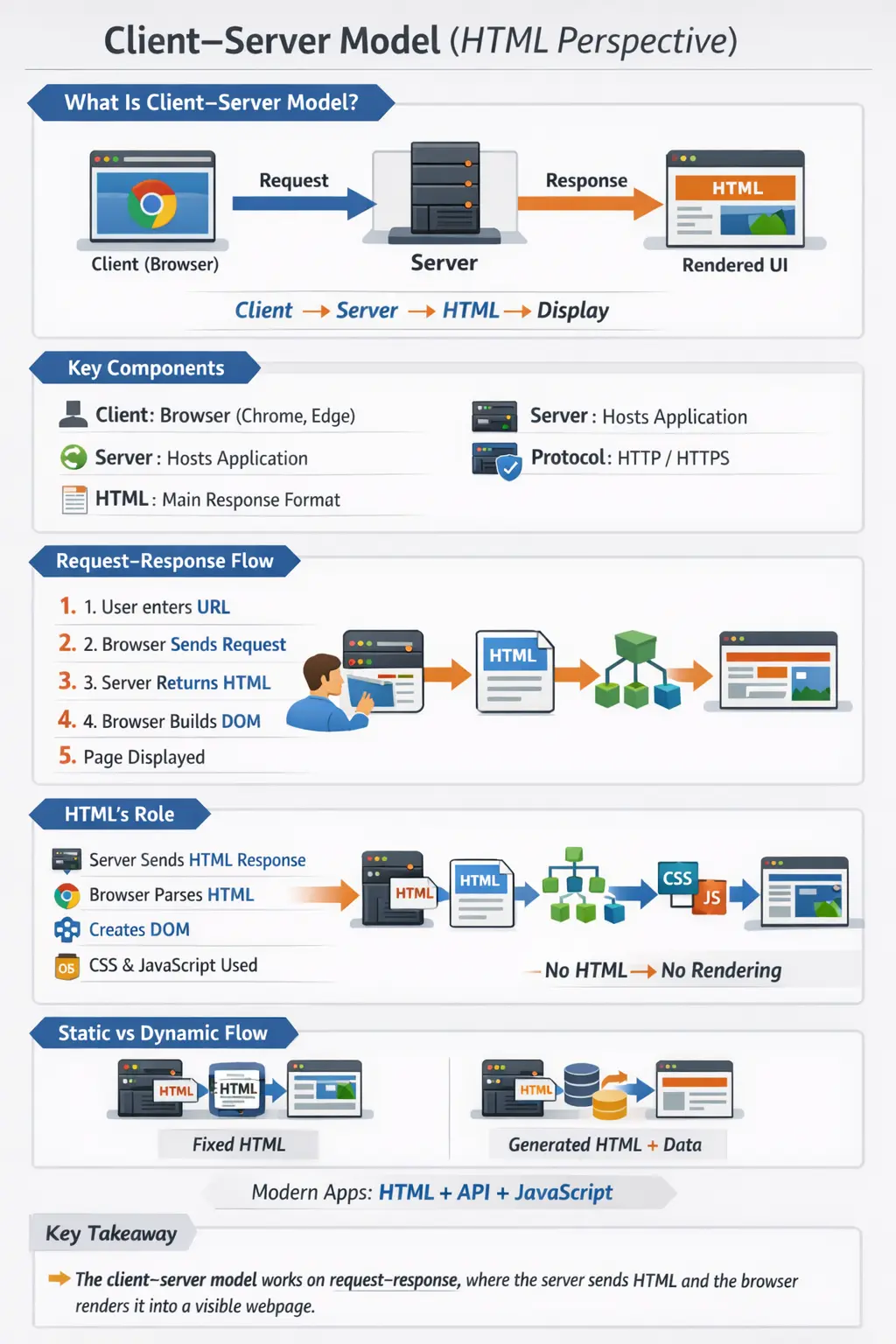
Understanding this model from an HTML perspective is critical because HTML is the primary medium of communication between server and browser for rendering content. While CSS and JavaScript enhance appearance and interactivity, it is HTML that forms the structural backbone of what the user ultimately sees. For developers, testers, and system designers, a deep understanding of this flow is essential for debugging issues, optimizing performance, and building scalable applications.
Core Definition of the Client–Server Model
The client–server model is a communication architecture where two primary entities interact: the client and the server. The client, typically a web browser such as Chrome, Edge, or Firefox, initiates requests for resources. The server, which hosts the application, processes these requests and sends back responses.
From an HTML perspective, the interaction can be summarized simply: the client requests an HTML page, the server responds with HTML, and the browser renders that HTML into a user interface.
This model ensures a clear separation of responsibilities. The client focuses on presentation and interaction, while the server handles data processing, business logic, and resource management. This separation is one of the reasons why the web has been able to scale globally.
Key Components of the Client–Server Model
To understand how the model works in practice, it is important to examine its core components. The client is responsible for initiating communication. It sends HTTP requests, receives responses, parses HTML, constructs the Document Object Model (DOM), and renders the final UI.
The server acts as the processing unit. It receives requests, executes business logic, interacts with databases or APIs if needed, and generates responses. These responses may include HTML, JSON, images, or other resources.
The communication between client and server is governed by protocols, primarily HTTP and HTTPS. These protocols define how requests and responses are structured, ensuring consistent and reliable communication across different systems and platforms.
Together, these components form a cohesive system that enables users to access and interact with web applications seamlessly.
Step-by-Step Flow of Client–Server Interaction
The interaction between client and server follows a structured sequence of steps. It begins when a user enters a URL into the browser. The browser then sends an HTTP request to the server associated with that URL.
Once the server receives the request, it processes it. This may involve retrieving a static HTML file or dynamically generating content based on business logic and data sources. After processing, the server sends an HTTP response back to the client.
The browser then takes over. It parses the HTML content, constructs the DOM, and renders the page visually. This process happens within milliseconds, creating the seamless experience users expect.
This step-by-step flow highlights the importance of HTML as the central artifact that bridges the server and the browser.
Example of Request–Response Interaction
To make this process more concrete, consider a simple example. When a user requests a webpage, the browser sends an HTTP request like:
GET /index.html HTTP/1.1
Host: example.com
The server responds with an HTML document:
<!DOCTYPE html>
<html>
<body>
    <h1>Hello User</h1>
</body>
</html>
Upon receiving this response, the browser parses the HTML, builds the DOM, and renders the content on the screen. This entire cycle represents a single request–response interaction.
HTML’s Role in the Client–Server Model
HTML plays a central role in this architecture. It is the primary format used by servers to deliver content to clients. Without HTML, browsers would have no structured information to render.
When the browser receives HTML, it parses it into a tree-like structure known as the DOM. This DOM serves as the foundation for all subsequent operations, including styling with CSS and dynamic manipulation with JavaScript.
In essence, HTML is both the input for rendering and the foundation for interaction. It defines what content exists and how it is structured, enabling the browser to create a meaningful user interface.
Static vs Dynamic HTML in Client–Server Communication
The client–server model supports both static and dynamic content delivery. In the case of static HTML, the server simply retrieves a pre-built HTML file and sends it to the client. This approach is fast and straightforward but lacks flexibility.
Dynamic HTML, on the other hand, is generated at runtime. The server may use user input, database queries, or API responses to construct the HTML before sending it to the client. This allows for personalized and data-driven experiences.
The choice between static and dynamic HTML depends on the requirements of the application. Many modern systems use a combination of both to balance performance and functionality.
Modern Client–Server Variations
While the traditional client–server model involves the server sending complete HTML pages, modern web applications often follow a different approach. In Single Page Applications (SPAs), the server sends minimal HTML along with JavaScript. The JavaScript then makes additional API calls to fetch data and update the DOM dynamically.
In this model, the initial HTML still plays a critical role. It provides the base structure upon which the application is built. Without it, the browser would have nothing to render initially.
This evolution demonstrates how the client–server model has adapted to support more interactive and responsive user experiences while still relying on HTML as a core component.
Request–Response Lifecycle (HTML Focus)
The request–response lifecycle is the backbone of the client–server model. It begins with the browser requesting HTML from the server. The server processes the request and prepares a response, which is then sent back to the browser.
Once the browser receives the HTML, it parses it, builds the DOM, and renders the content. This lifecycle repeats for every interaction that requires server communication.
Understanding this lifecycle is crucial for identifying performance bottlenecks and debugging issues. For example, delays in server processing or large HTML responses can impact page load times.
Real-World Example
Consider a user visiting a website like https://example.com. The browser sends a request to the server, which responds with HTML content. The browser then renders text, images, and links based on that HTML.
Even in complex applications, this fundamental process remains the same. Whether it is a simple blog or a sophisticated e-commerce platform, the client–server model governs how content is delivered and displayed.
Testing Perspective (Critical Insight)
From a testing standpoint, understanding the client–server model is invaluable. UI automation tools such as Selenium and Playwright interact with the DOM, which is generated from HTML. If the HTML structure is incorrect or changes dynamically, tests may fail.
API testing focuses on validating server responses, ensuring that the correct data is returned. Issues can arise at both the client and server levels, making it essential to understand how they interact.
For example, if a page does not load correctly, the issue could be due to a server-side error, a network problem, or a client-side rendering issue. A clear understanding of the model helps testers pinpoint the root cause efficiently.
Advantages of the Client–Server Model
The client–server model offers several advantages. It enables centralized data management, allowing servers to maintain and control data consistently. It also supports scalability, as servers can be upgraded or distributed to handle increased load.
Another advantage is the separation of concerns. Clients handle presentation, while servers manage logic and data. This separation simplifies development and maintenance.
Limitations of the Client–Server Model
Despite its strengths, the client–server model has limitations. It relies on network connectivity, meaning that performance can be affected by latency or connectivity issues. Server overload is another concern, as a high volume of requests can strain resources.
Additionally, the model introduces complexity in distributed systems, where multiple servers and services must coordinate effectively.
Interview Perspective
In interviews, candidates are often asked to explain the client–server model in simple terms. A strong answer should clearly describe the roles of the client and server, the request–response cycle, and the role of HTML in rendering web pages.
Providing real-world examples and mentioning modern variations such as SPAs can demonstrate a deeper understanding of the topic.
Key Takeaway
The client–server model is the backbone of web communication. It defines how browsers request resources and how servers respond with HTML content that is rendered into a user interface.
HTML plays a central role in this process, acting as the foundation for the DOM and enabling the browser to display content. Understanding this model is essential for building, testing, and optimizing modern web applications.
One-Line Insight
Client requests HTML, server responds, and the browser renders it into a visible webpage.