Common Myths About HTML
HTML is often treated as the simplest layer of web development—a basic markup language that can be “picked up quickly” and then largely ignored. This perception is not only incomplete but actively harmful in real-world engineering environments. Misunderstandings about HTML lead to poor architecture, fragile automation, accessibility violations, degraded performance, and weak SEO outcomes. Ironically, many of these issues surface not because teams lack advanced tooling, but because they underestimate the foundational role HTML plays in the system.
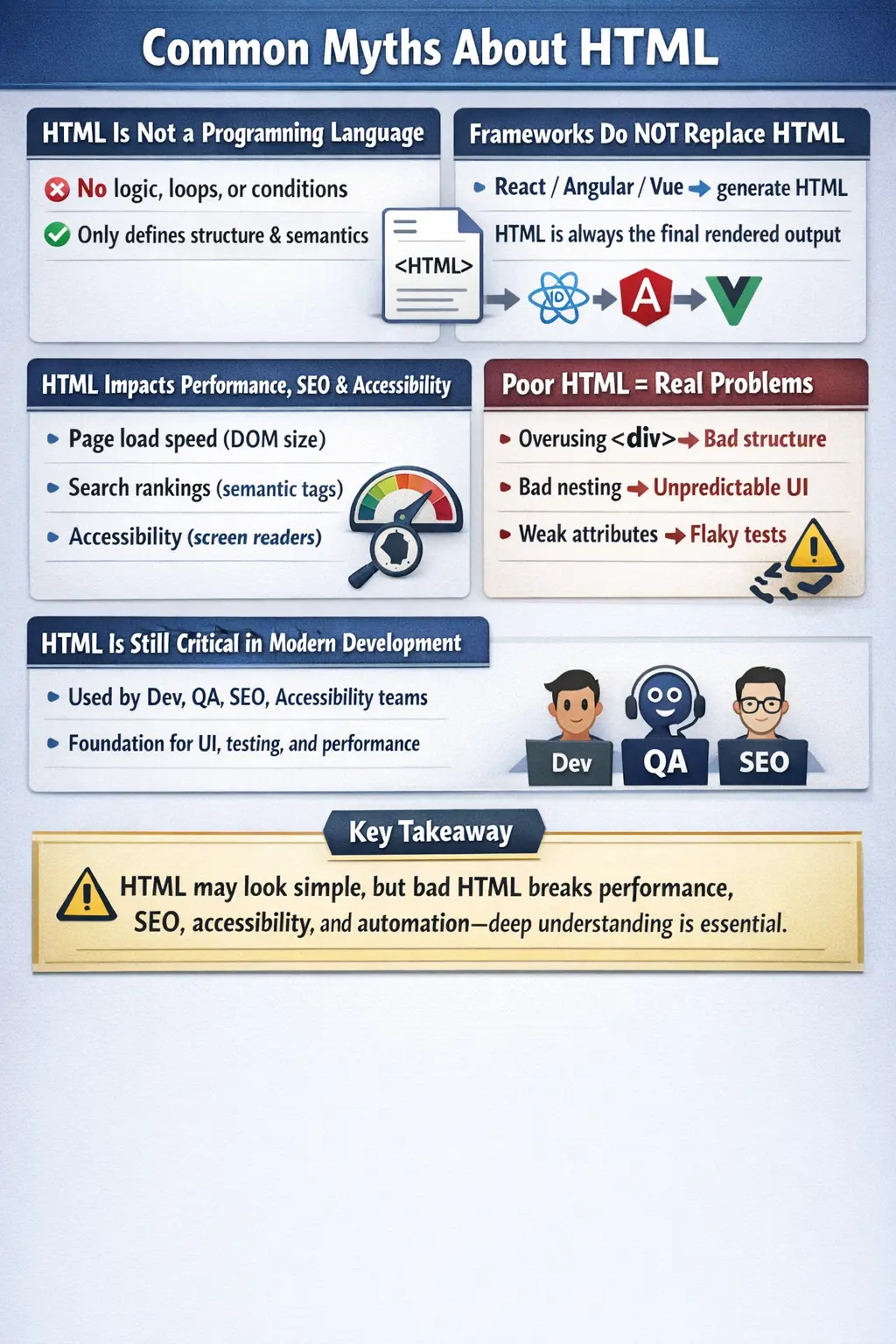
In modern development—especially within Agile, DevOps, and component-based ecosystems—HTML is not just a static structure. It is the contract between design and implementation, the substrate for the DOM, the anchor for CSS and JavaScript, and the primary interface for automation tools. Clearing common myths about HTML is therefore essential for building robust, scalable, and maintainable applications.
The Myth That HTML Is a Programming Language
One of the most persistent misconceptions is that HTML is a programming language. This assumption often stems from the fact that HTML uses syntax resembling code—tags, attributes, and structured elements. However, HTML does not execute logic. It does not support variables, loops, conditions, or control flow. It cannot make decisions or perform computations.
HTML is a markup language, meaning its sole purpose is to define structure and semantics. It tells the browser what elements exist and how they relate to each other. Any behavior or logic must be implemented using JavaScript or server-side technologies. Confusing HTML with a programming language leads to poor separation of concerns, where developers attempt to embed logic into markup rather than keeping structure and behavior distinct.
The Misconception That HTML Alone Can Build Full Applications
It is technically possible to build simple static pages using only HTML, but the idea that HTML alone can support full applications is misleading. Modern applications require styling, interactivity, and data-driven behavior—capabilities that HTML does not provide on its own.
CSS is responsible for presentation, controlling layout, colors, and responsiveness. JavaScript adds behavior, enabling dynamic updates, event handling, and communication with APIs. HTML provides the structural foundation, but without CSS and JavaScript, the result is limited to static content.
Understanding this division is critical. Treating HTML as sufficient for application development leads to incomplete solutions and poor user experiences.
The False Belief That Frameworks Replace HTML
With the rise of frameworks like React, Angular, and Vue, some developers assume that HTML is no longer necessary. In reality, these frameworks abstract HTML but do not eliminate it. JSX in React, Angular templates, and Vue templates all compile down to HTML structures that the browser renders.
The browser itself only understands HTML, CSS, and JavaScript. Regardless of how sophisticated the framework is, the final output must conform to these standards. Developers who neglect HTML fundamentals often struggle with framework usage, debugging, and performance optimization.
Frameworks may change how HTML is written, but they do not replace its role. HTML remains the underlying structure that everything else builds upon.
The Overuse of Generic Containers Like <div>
Another common myth is that using <div> elements everywhere is acceptable. While <div> is a flexible container, overusing it leads to several problems. It reduces readability, making it harder for developers to understand the structure of the page. It also negatively impacts SEO and accessibility, as search engines and assistive technologies rely on semantic meaning to interpret content.
Semantic elements such as <header>, <nav>, <article>, <section>, and <footer> provide context. They communicate the purpose of content, improving both machine interpretation and human understanding. Ignoring these elements in favor of generic containers results in poorly structured and less accessible applications.
The Dangerous Assumption That HTML Is Too Simple to Learn Deeply
Because HTML is easy to start with, many developers assume there is no need to study it in depth. This assumption is particularly risky. Advanced HTML concepts—such as semantic structure, accessibility standards, and performance implications—have a significant impact on real-world applications.
Poor HTML design can lead to inaccessible interfaces, weak SEO performance, and unstable automation scripts. In contrast, well-structured HTML enhances maintainability, improves user experience, and supports robust testing strategies. Treating HTML as trivial undermines the entire development process.
Confusion Between HTML and CSS
Another misconception is that HTML and CSS are interchangeable or serve similar purposes. In reality, they have distinct responsibilities. HTML defines structure, while CSS defines presentation. Mixing these responsibilities—such as using inline styles extensively—violates separation of concerns and makes code harder to maintain.
A clean architecture keeps HTML focused on content and structure, while CSS handles visual styling. This separation improves readability, scalability, and collaboration across teams.
The Myth That HTML Does Not Affect Performance
Performance is often associated with JavaScript optimization or backend efficiency, but HTML plays a crucial role. The size and complexity of the DOM directly influence rendering speed. A large or deeply nested HTML structure increases the cost of layout calculations and repaint operations.
Efficient HTML design—minimizing unnecessary elements and maintaining a clean hierarchy—improves rendering performance. Ignoring this aspect can lead to slow page loads and poor user experience, especially on resource-constrained devices.
The Misbelief That HTML Is Irrelevant for SEO
Search engines rely heavily on HTML structure to understand and index content. Elements such as headings, semantic tags, and meta information provide critical context. Poorly structured HTML can result in incorrect indexing or lower search rankings.
SEO is not just about keywords; it is about how content is organized and presented. HTML is the primary medium through which search engines interpret a webpage. Neglecting it undermines visibility and discoverability.
Accessibility Is Not Just a CSS or JavaScript Concern
Accessibility begins with HTML. Semantic elements, proper labeling, and attributes such as alt for images are essential for users relying on assistive technologies. CSS and JavaScript can enhance accessibility, but they cannot compensate for poor HTML structure.
Ignoring accessibility in HTML design excludes users and may violate compliance standards. Incorporating accessibility considerations from the start ensures inclusive and usable applications.
The Importance of IDs and Classes
Some developers underestimate the importance of IDs and classes, viewing them as optional or purely stylistic. In reality, these attributes are critical for multiple aspects of development. They enable CSS styling, JavaScript interaction, and test automation.
Automation tools depend on stable and unique identifiers to locate elements. Poorly defined or inconsistent attributes lead to fragile tests and increased maintenance effort. Treating IDs and classes as first-class design elements improves both development and testing workflows.
The Misconception That HTML Cannot Be Dynamic
HTML itself is static, but it is not limited to static behavior. JavaScript can modify the DOM dynamically, and servers can generate HTML based on data and logic. This combination enables dynamic, interactive applications.
Understanding this distinction is important. HTML provides the structure, while other technologies introduce dynamism. Together, they create modern web experiences.
The Risky Assumption That Browsers Fix All Errors
Browsers are forgiving and often attempt to correct malformed HTML. While this behavior improves user experience, it can mask underlying issues. Invalid HTML may render differently across browsers, leading to inconsistencies and bugs.
Relying on browser error correction is risky. Validating HTML ensures predictable behavior, better compatibility, and easier debugging.
The Misuse of Inline Styles
Inline styles may seem convenient for quick changes, but they are not suitable for scalable applications. Embedding styles directly in HTML leads to duplication, reduced maintainability, and difficulty in applying global changes.
Separating styling into CSS files maintains a clean architecture and supports reuse. Inline styles should be used sparingly, if at all.
HTML Is Not Just for Frontend Developers
HTML is often associated exclusively with frontend development, but its relevance extends beyond that. QA engineers rely on HTML for DOM inspection and automation. SEO specialists analyze HTML structure for indexing. Accessibility experts depend on semantic markup to ensure usability.
This cross-functional usage highlights HTML’s role as a shared language within development teams.
The Myth That More Tags Improve Structure
Adding more elements does not necessarily improve structure. Over-nesting creates complex DOM trees, which can degrade performance and complicate maintenance. A well-designed HTML document is concise and purposeful, using only the elements necessary to convey structure and meaning.
The False Idea That HTML Is Outdated
HTML is not an outdated technology. HTML5 introduced significant enhancements, including semantic elements, multimedia support, and APIs. It continues to evolve alongside modern web standards.
Far from being obsolete, HTML remains the foundation of all web applications.
HTML’s Impact on Automation
Automation tools interact directly with the DOM, making HTML structure critical for test stability. Poorly designed HTML leads to unreliable locators and flaky tests. Stable, well-structured markup enables robust automation and reduces maintenance effort.
The Importance of Proper Tag Usage and Validation
HTML has rules governing element hierarchy and nesting. Ignoring these rules can break structure and cause unpredictable behavior. Validation ensures consistency across browsers and improves maintainability.
The Value of Deep HTML Knowledge
Finally, the idea that learning HTML deeply is not worth the effort is entirely incorrect. A strong understanding of HTML enhances debugging skills, improves performance optimization, and supports better collaboration across teams.
Key Takeaway
HTML may appear simple, but it underpins every aspect of web development. Misunderstanding its role leads to widespread issues across performance, accessibility, SEO, and automation. Mastering HTML is not optional—it is essential for building high-quality applications.
One-Line Insight
HTML seems simple on the surface, but poor HTML design can break performance, accessibility, SEO, and automation all at once.