User Acceptance Support (UAT Support)
User Acceptance Support, often called UAT Support, is the assistance provided by QA and testing teams during the User Acceptance Testing phase. Software testing does not end when the QA team completes system testing, regression testing, or defect verification. Before a product is released to production, the business must confirm that the application supports real operational needs. That final business-facing validation is User Acceptance Testing, and QA plays a critical support role in making it successful.
During User Acceptance Testing, business users, product owners, domain experts, or selected end users interact with the system to confirm whether it satisfies business expectations. They are not testing only whether buttons work or screens load. They are validating whether real business processes can be completed, whether business rules are correctly represented, whether the workflow feels practical, and whether the product is acceptable for release. This is why UAT is owned by business stakeholders, not by QA.
Even though the business owns the acceptance decision, QA teams provide the structure, coordination, and technical support needed for UAT to run smoothly. Business users may not be familiar with test environments, defect reporting tools, test data setup, build versions, or technical troubleshooting. QA helps remove those barriers so business users can focus on validating the product from a business point of view. This support is what makes UAT organized rather than chaotic.
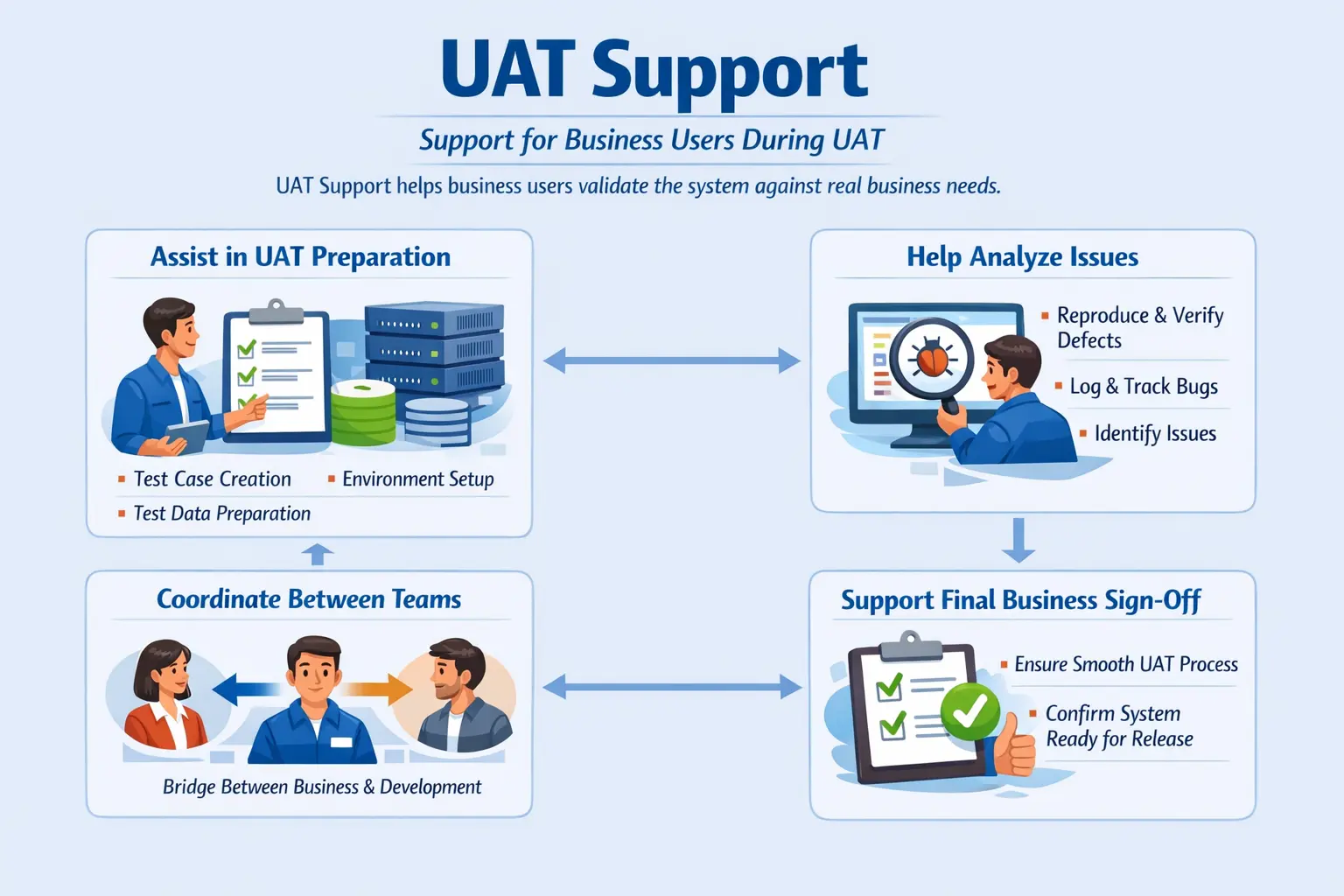
User Acceptance Support answers a practical delivery question: how do we help business users validate the product confidently? QA does not force the business to accept the system. QA does not replace business judgment. Instead, QA prepares the environment, supports test data, clarifies expected behavior, analyzes reported issues, logs valid defects, coordinates with developers, tracks resolution, and helps collect the information needed for final sign-off.
Understanding User Acceptance Support
User Acceptance Support is the set of activities performed by QA to help business users execute UAT effectively. It includes preparation before UAT, assistance during UAT, and closure support after UAT. The goal is not to take ownership away from the business. The goal is to make sure business validation happens in a controlled, informed, and efficient way.
UAT support is different from normal QA execution. During system testing, QA validates the system against functional and technical requirements. Testers design test cases, execute them, log defects, verify fixes, and provide quality reports. During UAT, business users execute or review business scenarios. QA supports them by ensuring that they have the right environment, data, process guidance, and issue-handling support.
In real projects, UAT can become difficult if support is weak. Business users may not know which scenarios to execute. They may not have access to the environment. Test data may be missing. A reported issue may be unclear. Some concerns may be defects, while others may be change requests or misunderstandings. Without QA support, these problems can delay sign-off and create confusion near release.
Good UAT support creates a bridge between business and technical teams. Business users describe problems in operational language. Developers need clear technical information to investigate. QA helps translate business observations into reproducible defects or clarification points. This translation is one of the most valuable contributions testers make during UAT.
Purpose of UAT Support
The main purpose of UAT support is to help business users validate the application with confidence. Business users may be experts in their domain, but they may not be experts in testing process, defect tools, environment setup, or test documentation. QA support gives them a smoother path through acceptance testing.
Another purpose is reducing confusion. During UAT, business users may encounter behavior that looks incorrect but is actually expected based on requirements or design decisions. They may also find behavior that is technically working but does not support the business process well. QA helps separate these cases. This prevents unnecessary defects while still protecting valid business concerns.
UAT support also improves issue turnaround. If a user reports a problem, QA can reproduce it, collect evidence, identify whether it is data-related, environment-related, requirement-related, or a genuine defect, and route it to the right team. Fast triage is important because UAT usually happens close to release, when delays can affect deployment dates.
Finally, UAT support helps achieve formal business sign-off. Sign-off requires more than completing scenarios. Stakeholders need visibility into what was tested, what passed, what failed, what defects remain, what risks are accepted, and whether the business is comfortable moving forward. QA helps gather and organize this information.
Understanding UAT Context
User Acceptance Testing is the validation phase where business representatives confirm that the system is fit for real use. It is not merely another QA cycle. The focus shifts from technical correctness to business readiness. A feature may pass QA test cases but still fail UAT if it does not match how users actually work. UAT brings that real-world perspective into the release decision.
UAT participants may include business users, product owners, operations users, compliance reviewers, domain experts, customer representatives, or client stakeholders. Their role is to verify whether the system supports business goals. They may validate workflows such as order approval, customer onboarding, loan processing, invoice generation, claim settlement, report review, or user administration depending on the domain.
UAT is often performed in a dedicated UAT environment or pre-production environment. This environment should be stable, close to production configuration, and loaded with realistic test data. If the environment is unstable, business users may lose confidence in the process. If the data is unrealistic, validation may not reflect actual operations. QA support helps ensure that these readiness conditions are met.
The final acceptance decision belongs to business stakeholders. QA may recommend, warn, analyze, and report, but QA does not own business acceptance. This distinction is important. QA confirms quality from a testing perspective; UAT confirms readiness from a business perspective.
Scope of QA Support During UAT
QA support during UAT covers preparation, execution assistance, issue triage, defect management, communication, reporting, and closure support. The exact scope depends on the organization and project model, but the principle remains the same: QA enables business validation without taking over the business decision.
One common support activity is reviewing UAT scenarios. Business users may write high-level scenarios, and QA can help make them clearer, executable, and traceable to requirements. QA may suggest missing scenarios, edge cases, dependency checks, or data needs. This does not mean QA writes all UAT tests alone; it means QA helps improve the quality of business validation material.
Environment readiness is another important part of scope. QA may verify that the latest build is deployed, user accounts are created, roles are configured, integrations are available, and known environment issues are communicated. Business users should not spend UAT time struggling with avoidable setup problems.
QA also supports defect handling. When business users report issues, QA helps reproduce them and classify them correctly. Some issues are valid defects. Some are change requests. Some are duplicate issues. Some are caused by test data. Some are expected behavior that needs explanation. Accurate classification keeps the UAT process efficient.
Before UAT: Preparation Responsibilities
UAT support begins before business users start testing. Preparation is critical because UAT often happens near release, when time is limited. If preparation is weak, business users may face delays, access problems, missing data, unclear scenarios, and confusion about how to report issues.
QA should review UAT scenarios for clarity and completeness. A good UAT scenario should describe a real business flow, not just a technical feature. For example, instead of saying “verify submit button,” a UAT scenario may say “business user submits a completed loan application for approval.” This helps users validate outcomes that matter.
Test data preparation is another major responsibility. UAT data should represent realistic business conditions. If users need pending orders, inactive accounts, approved requests, rejected claims, expired subscriptions, or different customer types, those records should be prepared before UAT begins. Poor data preparation can block testing or create false issues.
QA should also provide execution guidelines. Business users need to know where to access the environment, which credentials to use, which scenarios to run, how to record results, how to report issues, whom to contact, and what timelines apply. Clear instructions reduce dependency and make UAT smoother.
During UAT: Execution Support
During UAT execution, QA remains available to assist business users. This support must be responsive but not controlling. Business users should be allowed to validate the system from their perspective, while QA helps remove blockers and clarify process questions.
One common activity is helping users understand scenarios. A business user may ask what data to use, how to reach a particular screen, or what a scenario expects. QA can guide them without influencing the acceptance decision. The goal is to help users execute validation correctly.
QA also helps reproduce reported issues. If a user says that a workflow failed, the tester may repeat the steps, check whether the issue occurs consistently, capture evidence, and identify whether it is related to data, role, environment, or application behavior. Reproduction is important because developers need clear information to fix issues quickly.
Another key responsibility is distinguishing between defects and misunderstandings. Sometimes users may not know that a behavior is expected. Sometimes the requirement may have changed but the user is unaware. Sometimes the system may work as designed but not as the business now wants. QA helps clarify these differences and ensures that the right action is taken.
After UAT: Closure Support
UAT support continues after test execution ends. QA helps track open UAT defects, verify fixes, update reports, and support sign-off documentation. This closure phase is important because acceptance decisions often depend on the status of remaining issues and the business’s willingness to accept known risks.
Testers may prepare UAT summary reports showing scenarios executed, scenarios passed, issues raised, defects fixed, defects pending, rejected issues, change requests, and overall status. This report provides transparency and helps stakeholders understand whether UAT objectives were met.
QA may also support final defect review meetings. Open issues are discussed with business, development, product, and release teams. Some defects may be fixed before release. Some may be deferred. Some may be converted into change requests. Some may be accepted as known limitations. QA helps ensure these decisions are documented clearly.
Sign-off support is the final step. QA may prepare or coordinate the sign-off document, but business stakeholders approve it. The sign-off confirms that business users have completed their validation and accept the system for production release, either fully or with documented conditions.
Common Issues Raised During UAT
UAT often reveals issues that earlier testing did not catch because business users bring real operational knowledge. A common issue is a functional mismatch, where the system behaves differently from what users expected. This may be a true defect, a requirement misunderstanding, or a design decision that needs review.
Missing business rules are also common. QA may test based on documented requirements, but business users may know exceptions, approvals, thresholds, or workflow variations that were never fully captured. UAT can reveal these gaps. When this happens, the issue may become a defect if the requirement was missed, or a change request if it represents new scope.
Data-related issues appear frequently. Business users may need realistic data combinations that were not used in QA. They may identify incorrect calculations, missing historical records, wrong report values, or mismatched statuses. These issues are valuable because they show whether the system supports real business information, not just clean test data.
Usability concerns are another common UAT finding. A workflow may be technically correct but difficult for users to perform. Screens may be confusing, labels may not match business terminology, or too many steps may be required. UAT is often where these practical concerns become visible.
UAT Support vs System Testing
System testing and UAT support are different in ownership, purpose, and execution. System testing is owned and performed by QA. It validates whether the complete application meets functional and technical requirements. QA designs test cases, executes them, reports defects, and verifies fixes.
UAT is owned by business stakeholders. Business users validate whether the application supports real business operations. QA supports the process but does not replace the users. This distinction is important because a system can be technically correct but still not acceptable from a business perspective.
During system testing, the question is usually, “Does the system work according to requirements?” During UAT, the question becomes, “Can the business use this system effectively?” UAT support helps business users answer that second question with confidence.
Defect Handling During UAT
Defect handling during UAT requires careful triage. Not every concern raised by a business user should automatically become a defect. QA must analyze the issue, reproduce it where possible, compare it with requirements, and classify it correctly. This prevents confusion and avoids unnecessary development effort.
A valid UAT defect occurs when the system does not behave according to agreed requirements or accepted business rules. Such defects should be logged with clear steps, expected result, actual result, environment details, screenshots, and business impact. Since UAT is close to release, priority and severity should be assigned carefully.
A change request occurs when the business wants behavior that was not part of the agreed scope. This may still be important, but it should not be treated as a defect unless the original requirement supports it. Change requests need business prioritization and impact analysis.
Some issues are misunderstandings. In those cases, QA may explain the intended behavior, share requirement references, or involve the product owner for clarification. Handling misunderstandings respectfully is important because UAT depends on business trust and collaboration.
Best Practices for Effective UAT Support
Effective UAT support begins with clear communication. QA should use business-friendly language rather than technical jargon. Business users do not need to hear unnecessary details about code, database queries, or framework behavior. They need clear explanations about what the system does, what is expected, and how issues will be handled.
Responsiveness is also important. UAT windows are often short, and business users may be balancing testing with their regular work. If QA takes too long to respond to questions or issues, momentum is lost. A dedicated support channel, scheduled check-ins, and clear ownership can keep the process moving.
QA should maintain transparency through regular status updates. Stakeholders should know how many scenarios are completed, how many issues are open, which defects are critical, and whether sign-off is at risk. Transparent reporting prevents surprises at the end of UAT.
Another best practice is respecting business ownership. QA can guide and support, but should not pressure users to pass scenarios or sign off. If users are uncomfortable with the system, that concern must be heard. UAT is valuable because it represents the business voice.
Common Mistakes in UAT Support
One common mistake is treating UAT as another QA testing phase. When QA takes over execution completely, the business perspective is weakened. UAT should involve real business users because they understand operational needs better than anyone else. QA supports; business validates.
Another mistake is poor preparation. If the UAT environment is unstable, test data is missing, access is not ready, or scenarios are unclear, users may lose confidence. Preparation should happen before the UAT window begins, not after users are already waiting.
Logging every user concern as a defect without analysis is also a mistake. It creates noise and slows development. QA should classify issues properly as defects, change requests, questions, data problems, environment problems, or expected behavior. Good triage keeps UAT focused.
Slow communication is another frequent problem. UAT happens near release, so delays can affect deployment plans. QA should provide timely responses, quick issue analysis, and regular updates. Silence during UAT creates uncertainty.
Real-Time Example
Consider a loan management application entering UAT. Business users need to validate loan application submission, document upload, credit review, approval workflow, rejection workflow, and report generation. QA prepares the UAT environment, creates test users with different roles, loads sample applicants, prepares loan records in different statuses, and shares a UAT execution guide.
During execution, a business user reports that a loan cannot move from credit review to approval. QA reproduces the issue, checks the user role, verifies the test data, compares the behavior with the requirement, and confirms that the approval button is hidden for a valid approver role. QA logs a defect with evidence and assigns the correct severity because the issue blocks a critical business workflow.
Another user reports that a label is confusing. QA reviews the requirement and confirms that the label matches the approved design, but the business agrees that it should be changed for clarity. QA classifies this as a change request rather than a defect. This example shows how UAT support requires analysis, communication, and correct classification.
Interview-Ready Explanation
In interviews, UAT support can be explained as the assistance provided by QA teams to help business users perform User Acceptance Testing effectively. QA helps with scenario review, environment readiness, test data preparation, issue analysis, defect logging, communication, and sign-off support, while the final acceptance decision remains with business stakeholders.
A strong answer should clarify that UAT is business-owned, not QA-owned. QA supports the process but does not decide whether the system is accepted. Mentioning activities such as reproducing user-reported issues, distinguishing defects from change requests, and preparing UAT status reports shows practical understanding.
A concise interview answer could be: UAT support is the role QA plays during User Acceptance Testing to help business users validate the application. QA prepares the environment and data, clarifies scenarios, analyzes reported issues, logs valid defects, coordinates with development, and helps with final sign-off documentation. The business team owns the acceptance decision.
Key Takeaway
User Acceptance Support is essential for smooth business validation before production release. It ensures that business users can test confidently with the right environment, data, guidance, and issue-handling support. QA acts as a facilitator between business and technical teams.
Effective UAT support reduces confusion, improves defect triage, accelerates issue resolution, and helps stakeholders make informed sign-off decisions. It also strengthens trust because business users feel supported rather than left alone during a critical validation stage.
Ultimately, UAT support helps confirm that the product is not only technically tested but also business-ready. QA does not own acceptance, but strong QA support makes acceptance testing more reliable, transparent, and successful.