Browser Rendering Basics
Browser rendering is the core process that transforms raw web resources—HTML, CSS, and JavaScript—into a visually interactive web page. While users perceive this as an instant display of content, under the hood the browser executes a highly optimized, multi-stage pipeline involving parsing, computation, and rendering. Understanding this pipeline is not just an academic exercise; it is essential for diagnosing performance issues, building responsive user interfaces, and ensuring stable automation in tools like Selenium and Playwright.
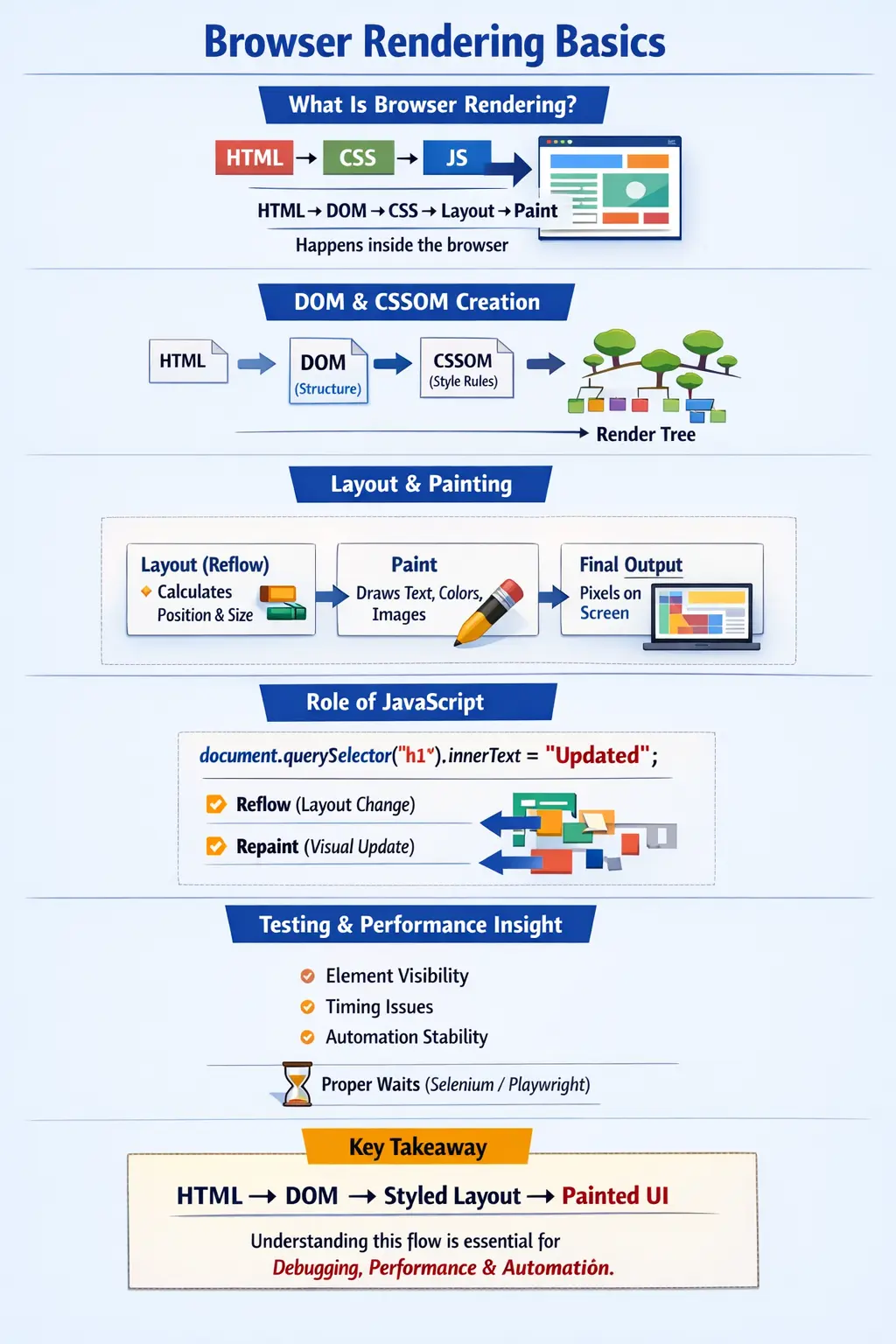
At a high level, browser rendering can be summarized as a sequence of operations: parsing HTML into a DOM, parsing CSS into a CSSOM, combining them into a render tree, computing layout, painting pixels, and finally compositing layers to display the UI. Each step is tightly coupled with the others, and inefficiencies in one stage can ripple through the entire rendering process.
High-Level Definition of Browser Rendering
Browser rendering is the process by which a web browser converts code into pixels. More formally, it involves parsing HTML and CSS, constructing internal representations (DOM and CSSOM), calculating layout, and painting visual elements onto the screen.
This process is often described as:
Parsing → DOM creation → Styling → Layout → Painting → Compositing
Each phase contributes to transforming abstract markup into a concrete visual representation. The efficiency of this pipeline directly impacts page load time, responsiveness, and user experience.
End-to-End Rendering Flow
The rendering pipeline follows a structured sequence:
Request → HTML → DOM → CSS → CSSOM → Render Tree → Layout → Paint → Screen
When a browser requests a webpage, the server responds with HTML. The browser begins parsing this HTML immediately, even before the entire document is downloaded. As it encounters CSS and JavaScript, it integrates them into the rendering pipeline.
This streaming and incremental processing is what allows modern browsers to render pages progressively rather than waiting for all resources to load.
Step 1: HTML Parsing and DOM Creation
The first step in rendering is parsing HTML. The browser reads the HTML document and converts it into a tree structure known as the Document Object Model (DOM). Each HTML element becomes a node in this tree.
For example:
<h1>Hello</h1>
This is converted into a DOM node representing the <h1> element with its text content. The DOM is hierarchical, meaning elements are nested within one another, reflecting the structure of the HTML document.
The DOM serves as the foundational representation of the page. All subsequent operations—styling, scripting, and rendering—are based on this structure.
Step 2: CSS Parsing and CSSOM Creation
While HTML is being parsed, the browser also processes CSS. CSS rules are parsed into another tree-like structure called the CSS Object Model (CSSOM).
For example:
h1 {
    color: blue;
}
This rule is converted into a CSSOM representation that maps selectors to style declarations. The CSSOM defines how elements in the DOM should be styled.
Unlike HTML parsing, CSS parsing can block rendering because the browser needs complete style information before it can accurately compute layout and paint elements.
Step 3: Combining DOM and CSSOM into Render Tree
Once the DOM and CSSOM are ready, the browser combines them to create the render tree. This structure contains only the elements that will actually be displayed on the screen.
For instance, elements with display: none are excluded from the render tree because they are not visible. Similarly, non-visual elements like <head> are not included.
The render tree represents the visual structure of the page, including both content and styling information. It is the blueprint for layout and painting.
Step 4: Layout (Reflow)
The layout phase, also known as reflow, involves calculating the position and size of each element in the render tree. The browser determines where each element should appear on the screen and how much space it should occupy.
This process considers factors such as:
- Element dimensions
- Box model properties (margin, padding, border)
- Viewport size
- CSS positioning rules
Layout is computationally expensive because changes to one element can affect the positioning of others. For example, increasing the width of a container may push other elements down the page.
Step 5: Painting
After layout is complete, the browser proceeds to the painting phase. In this step, the browser converts the layout information into actual pixels.
Painting involves rendering:
- Text
- Colors
- Images
- Borders
- Shadows
Each visual aspect of the page is drawn onto layers. This step transforms abstract layout data into a visual representation that users can see.
Step 6: Compositing
Modern browsers use a compositing step to improve performance. Instead of painting the entire page repeatedly, the browser divides the page into layers. These layers are then combined (composited) to produce the final image.
Compositing often leverages GPU acceleration, making animations and transitions smoother. By isolating changes to specific layers, the browser can avoid repainting the entire page, significantly improving performance.
Role of JavaScript in Rendering
JavaScript plays a dynamic role in the rendering pipeline. It can modify both the DOM and CSSOM, triggering updates to the render tree.
For example:
document.querySelector("h1").innerText = "Updated";
This change updates the DOM, which may trigger a reflow and repaint. If the change affects layout (such as altering size or position), a reflow occurs. If it only affects appearance (such as color), a repaint is sufficient.
Because JavaScript can interrupt and modify rendering, poorly optimized scripts can significantly degrade performance.
Blocking vs Non-Blocking Resources
Certain resources can block rendering. Synchronous JavaScript is one of the primary blockers. When the browser encounters a <script> tag, it pauses HTML parsing to execute the script.
CSS can also block rendering because the browser needs complete style information before constructing the render tree.
To mitigate these issues, developers use techniques such as:
- async and defer attributes for scripts
- Minimizing critical CSS
- Loading non-critical resources lazily
Proper handling of blocking resources is essential for improving page load performance.
Critical Rendering Path
The critical rendering path refers to the sequence of steps required to render the initial view of a webpage. It includes:
- Parsing HTML into DOM
- Parsing CSS into CSSOM
- Constructing the render tree
- Performing layout
- Painting pixels
Optimizing the critical rendering path is key to improving perceived performance. Techniques such as reducing resource size, minimizing HTTP requests, and deferring non-critical scripts can significantly enhance load times.
Reflow vs Repaint
Understanding the difference between reflow and repaint is crucial for performance optimization.
Reflow occurs when the layout of the page changes. This is expensive because it requires recalculating positions and sizes of elements.
Repaint occurs when only the visual appearance changes without affecting layout. This is less expensive but still consumes resources.
For example, changing the width of an element triggers a reflow, while changing its color triggers a repaint.
Minimizing reflows is a key performance optimization strategy.
Real-World Rendering Example
When a user opens a webpage, the browser initiates a series of operations almost instantaneously. It downloads HTML, parses it into a DOM, processes CSS into a CSSOM, constructs the render tree, calculates layout, and paints the page.
All of this happens within milliseconds, creating the illusion of instantaneous rendering. However, for complex applications with large DOMs and heavy scripts, this process can become noticeably slower.
Testing Perspective (Critical for Automation)
From a testing standpoint, browser rendering introduces several challenges. Automation tools interact with the DOM, which is dynamically constructed and updated during rendering.
Common issues include:
- Elements not yet visible
- DOM not fully loaded
- Timing and synchronization problems
These issues require the use of explicit waits and synchronization mechanisms. Understanding the rendering pipeline helps testers identify whether a failure is due to delayed rendering, JavaScript execution, or incorrect element identification.
Performance Optimization Insights
Efficient rendering is essential for modern web applications. Developers can optimize performance by reducing DOM size, minimizing CSS complexity, and avoiding unnecessary reflows.
Using asynchronous JavaScript loading, deferring non-critical resources, and optimizing layout calculations can significantly improve rendering speed.
Performance tools such as Chrome DevTools provide insights into rendering behavior, helping developers identify bottlenecks and optimize the critical rendering path.
Interview Perspective
In interviews, browser rendering is often explained as the process by which the browser converts HTML, CSS, and JavaScript into a visible page. A strong answer includes mentioning DOM, CSSOM, render tree, layout, and painting.
Candidates who can explain the impact of JavaScript, blocking resources, and performance considerations demonstrate a deeper understanding of the topic.
Key Takeaway
Browser rendering is a multi-stage pipeline that transforms code into pixels. It involves parsing HTML into a DOM, applying CSS to create a render tree, calculating layout, and painting the final UI.
Every optimization, bug, and performance issue in a web application is tied to this pipeline. Mastering it is essential for developers, testers, and performance engineers.
One-Line Insight
HTML builds the DOM, CSS styles it, layout positions it, and painting displays it on the screen.