API vs UI Testing
In modern software engineering, testing is no longer a single-layer activity. Applications today are distributed, API-driven, and often built using microservices and rich frontend frameworks. As a result, validating system behavior requires testing at multiple layers. Among these, API testing and UI testing represent two of the most critical—but fundamentally different—approaches. Understanding how they differ, where they overlap, and how they complement each other is essential for designing an effective and scalable test strategy.
Why This Difference Matters
Understanding the difference between API testing and UI testing matters because many automation problems come from testing the right behavior at the wrong layer. If a team validates every business rule only through the UI, the automation suite becomes slow, fragile, and expensive to maintain. If a team validates only APIs and ignores the UI, the backend may work correctly while users still face broken screens, poor navigation, rendering problems, or unusable workflows. A strong test strategy uses both layers intentionally.
The difference is not simply technical. It affects delivery speed, defect detection, release confidence, debugging effort, and automation cost. API tests help teams validate backend behavior quickly and repeatedly. UI tests help teams confirm that users can actually complete tasks through the application interface. Both provide value, but their value is different. Confusing them leads to redundant tests, slow pipelines, and unclear failure analysis.
For example, a login feature can be tested at both layers. API tests can verify valid credentials, invalid password, locked account, expired token, missing fields, and authorization behavior. UI tests can verify that the login page accepts input, shows validation messages, navigates to the dashboard, and displays errors correctly. The API test proves backend authentication logic. The UI test proves the user journey. Together, they provide stronger confidence than either one alone.
API Testing Looks Below the Surface
API testing looks below the surface of the application. It interacts with endpoints directly and validates the response from the service layer. This makes it powerful for checking data, business rules, integrations, and error handling. A tester can send a request with specific headers, parameters, and body data, then inspect the exact response returned by the system.
This direct access allows testers to cover cases that are difficult to reproduce through the UI. A UI may prevent invalid input, but an API can still be called directly with invalid data. A UI may hide certain fields, but the API response may expose them. A UI may show a generic error, while the API returns the real status code and error body. API testing gives testers a clearer view of backend behavior.
This is especially useful in systems with complex business logic. Pricing, discount calculation, tax, account permissions, order status, payment processing, inventory updates, and workflow transitions are often handled at the API or service layer. Testing those rules directly reduces dependence on browser interaction and helps find defects closer to their source.
UI Testing Validates the Human Experience
UI testing validates what the user actually experiences. Even if APIs work perfectly, users interact with screens, forms, menus, buttons, error messages, dashboards, and navigation flows. A backend may return correct data, but the UI may display it incorrectly, fail to update the page, hide an important message, or make the workflow confusing. UI testing catches these user-facing problems.
For example, an API may return a successful order response, but the checkout page may not show the confirmation number. An API may return validation errors, but the UI may not display them near the correct fields. An API may return user data, but the frontend may format dates incorrectly. These are not API defects; they are UI behavior defects. Users still experience them as product quality problems.
UI testing is also important for browser behavior, responsive layouts, accessibility, visual workflow, and end-to-end confirmation. It answers questions such as: Can the user complete the checkout? Can the user recover from an error? Does the page navigate correctly? Are important controls visible and usable? API testing cannot fully answer these questions because it does not interact with the interface.
Choosing the Right Layer for Each Check
A practical testing strategy begins by asking where a behavior should be tested most efficiently. If the goal is to verify a calculation, API testing is often better. If the goal is to verify that a button appears and triggers the correct workflow, UI testing is necessary. If the goal is to verify that a service rejects unauthorized access, API testing is direct. If the goal is to verify that an error message is shown to the user, UI testing is needed.
Testing at the wrong layer creates waste. Checking hundreds of invalid input combinations through a browser may be slow and fragile when the same validations can be tested quickly through APIs. On the other hand, testing only the API response for a login feature does not prove that the user can actually enter credentials, click login, and reach the dashboard. The test layer should match the risk being validated.
A good rule is to push detailed logic tests lower and keep UI tests focused on critical user journeys. API tests should cover business rules, data handling, negative cases, and integration behavior. UI tests should cover the most important end-to-end workflows and user-facing behavior. This balance keeps the test suite faster and more reliable.
Failure Diagnosis in Real Projects
Failure diagnosis is one of the strongest reasons to separate API and UI testing. When a UI test fails, many layers may be responsible. The page may not load, the locator may be wrong, the JavaScript may fail, the API may return an error, the database may contain wrong data, or the test data may be invalid. This makes debugging more complex.
API tests narrow the problem. If an API test fails with an incorrect status code or wrong response body, the issue is likely in backend logic, data, authentication, authorization, or integration. The failure is closer to the system component being validated. Developers can reproduce the request using Postman, curl, Rest Assured, logs, or service-level debugging. This reduces investigation time.
In a layered strategy, API tests can act as a diagnostic gate. If core API tests fail, running many UI tests may be unnecessary because the backend is already broken. If API tests pass but UI tests fail, the problem may be in frontend rendering, UI logic, locators, browser behavior, or end-to-end integration. This layered feedback helps teams isolate defects faster.
Maintenance Cost and Automation Stability
Automation maintenance is a long-term concern. UI tests often require more maintenance because they depend on locators, page structure, timing, browser behavior, and visual changes. A designer may move a button, rename a class, change a modal, or redesign a form. Even if business behavior remains the same, UI tests may need updates. This does not mean UI tests are bad; it means they should be used carefully.
API tests usually have lower maintenance when the API contract is stable. If the endpoint, request format, response schema, and status codes remain consistent, the tests continue to work even when the UI changes. This makes API tests suitable for larger regression coverage. They can validate many rules repeatedly without depending on browser interaction.
However, API tests also need maintenance when contracts change. If fields are renamed, endpoints are versioned, authentication changes, or response schemas evolve, API tests must be updated. The difference is that API changes are usually more deliberate and contract-driven, while UI changes may happen more frequently. Stable contracts make API automation more sustainable.
API and UI Testing in an E-Commerce Example
Consider an e-commerce checkout flow. API testing can validate product availability, cart updates, coupon rules, tax calculation, shipping charges, payment authorization, order creation, inventory reduction, and confirmation response. These checks directly validate the backend rules that determine whether the order is correct.
UI testing can validate whether the user can search for a product, add it to the cart, view the cart, apply a coupon, enter shipping details, complete payment, and see the order confirmation page. It can also check whether validation messages appear correctly, whether the checkout button is enabled or disabled at the right time, and whether the user is guided through the flow smoothly.
If the discount calculation is wrong, an API test is likely to catch it faster and more precisely. If the discount is correct but the UI does not show it, a UI test is needed. If the order API works but the checkout page freezes after payment, only UI or end-to-end testing will reveal the user-facing failure. This example shows why both layers are necessary but should not duplicate each other blindly.
API and UI Testing in CI/CD
In CI/CD pipelines, speed and reliability matter. API tests are well suited for frequent execution because they run quickly and provide stable feedback. Teams can run API smoke tests after every build, API regression tests before deployment, and contract tests when services change. This helps catch backend issues early without slowing the pipeline too much.
UI tests are usually more selective in CI/CD. Critical UI smoke tests may run on every build, while broader UI regression may run nightly or before release. This prevents pipelines from becoming too slow or flaky. A small set of reliable UI tests provides confidence in key user journeys without overwhelming the delivery process.
The best pipeline strategy depends on risk. A financial application may need stronger end-to-end validation before release. A content website may rely more on API and visual checks. A microservices platform may emphasize contract and API tests heavily. The principle remains the same: run the fastest reliable tests early and reserve slower UI tests for high-value flows.
Common Mistakes When Comparing API and UI Testing
One common mistake is assuming API testing can replace UI testing completely. It cannot. API testing validates backend and service behavior, but users interact with the UI. If the interface is broken, confusing, inaccessible, or unable to complete a workflow, the product still fails from the user's perspective. UI testing remains necessary for critical journeys.
Another mistake is overusing UI testing for everything. Some teams automate every validation through the browser because that is how users interact with the system. This creates slow, brittle suites. Many data validation, negative testing, and business-rule checks are better at the API layer. Moving them down improves speed and stability.
A third mistake is duplicating the same checks at every layer without purpose. If a tax calculation is deeply tested through API tests, the UI test may only need to confirm that the final amount is displayed and checkout can proceed. It does not need to repeat every tax combination through the browser. Each layer should add unique value.
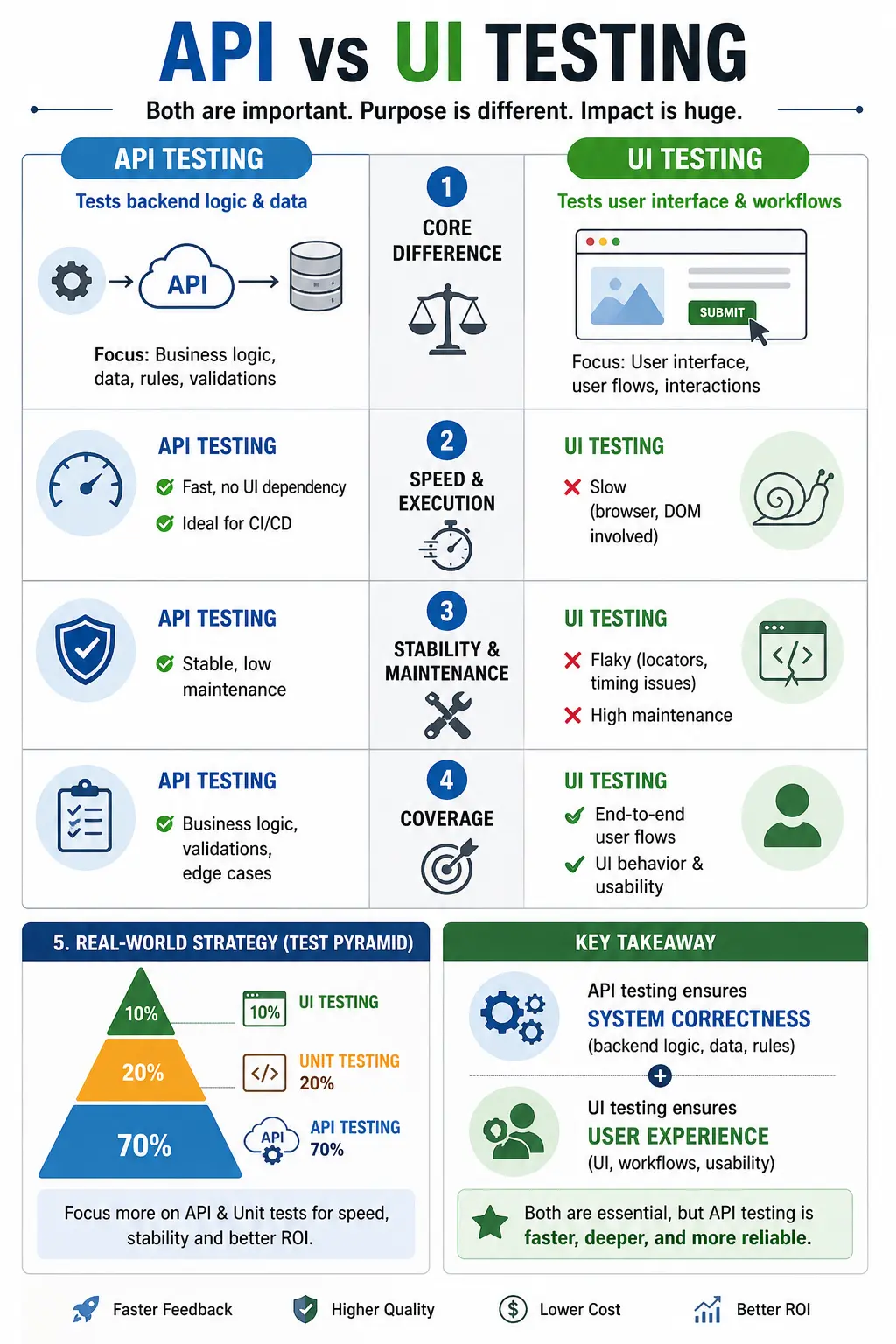
API testing operates at the service layer, focusing on backend logic, data contracts, and integrations. UI testing operates at the presentation layer, validating what users actually see and interact with. Both are necessary, but they serve different purposes, have different trade-offs, and must be balanced correctly to achieve speed, reliability, and coverage.
Core Definitions and Intent
At a conceptual level, the distinction between API testing and UI testing begins with what each is designed to validate.
API testing is concerned with verifying the correctness of backend systems. It directly interacts with application endpoints using HTTP requests and validates responses such as status codes, headers, and payloads. It ensures that business logic, data transformations, and integrations behave as expected.
UI testing, in contrast, focuses on validating the behavior of the user interface. It simulates real user interactions—clicking buttons, entering data, navigating pages—and verifies that the application behaves correctly from an end-user perspective.
In simple terms:
- API testing answers: Does the system work correctly?
- UI testing answers: Does the system work correctly for the user?
This distinction is subtle but critical. A system may pass all API tests yet fail in the UI due to rendering issues or broken workflows. Conversely, a UI may appear functional while hiding incorrect backend logic that only API testing can detect.
Position in the Test Pyramid
The test pyramid is a widely accepted model that emphasizes a balanced distribution of test types. It consists of three primary layers:
- Unit tests (bottom layer)
- API/integration tests (middle layer)
- UI/end-to-end tests (top layer)
API testing sits in the middle layer, where it provides high coverage with relatively low execution cost. UI testing sits at the top layer, where tests are fewer but validate complete user journeys.
The pyramid suggests that:
- API tests should be more numerous than UI tests
- UI tests should be limited to critical flows
This structure exists because API tests are faster and more stable, while UI tests are slower and more fragile. Overloading the top layer leads to slow pipelines and unreliable feedback.
Speed and Execution Characteristics
One of the most significant differences between API and UI testing is execution speed.
API tests are inherently fast because they bypass the UI entirely. They do not require:
- Browser initialization
- DOM rendering
- Element interaction
- Visual validation
Instead, they operate directly at the protocol level, sending requests and validating responses. This makes them ideal for continuous integration pipelines, where rapid feedback is essential.
UI tests, on the other hand, are slower due to multiple dependencies:
- Browser engines
- Network latency
- Rendering pipelines
- JavaScript execution
Each UI test involves several layers of processing before validation can occur. This overhead makes UI testing significantly slower and less suitable for large-scale regression suites.
Stability and Maintenance
Stability is a major concern in test automation, and this is where API testing has a clear advantage.
API tests are relatively stable because they are not affected by UI changes. As long as the API contract remains consistent, the tests continue to work. This results in low maintenance overhead.
UI tests are more fragile. They depend on:
- Element locators (IDs, classes, XPath)
- Page structure (DOM hierarchy)
- Timing and synchronization
Even minor UI changes—such as renaming a class or moving an element—can break tests. This leads to flaky tests, which are tests that fail intermittently without actual defects. Flakiness reduces trust in automation and increases maintenance effort.
Scope and Coverage
API and UI testing differ significantly in the type of coverage they provide.
API testing covers:
- Business logic validation
- Data processing and transformations
- Error handling and edge cases
- Backend workflows
- Integration between services
UI testing covers:
- End-to-end user flows
- Visual behavior and layout
- Interaction with UI elements
- Usability and navigation
API testing provides deeper coverage of system logic, while UI testing provides broader coverage of user experience. Both are necessary, but API testing typically achieves higher coverage with fewer tests.
Debugging and Failure Analysis
Debugging is another area where API testing offers advantages.
When an API test fails, the failure is usually clear:
- Incorrect status code
- Invalid response body
- Missing fields
- Unexpected data
These failures are easy to trace back to specific backend issues.
UI test failures are more complex. A failure could be caused by:
- A backend issue
- A frontend rendering problem
- A locator mismatch
- A timing issue
This multi-layer dependency makes debugging UI tests more time-consuming and less deterministic.
Dependency and Test Timing
API testing is largely independent of the UI. This independence allows it to be executed early in the development lifecycle.
In Agile environments:
- APIs are often developed before the UI
- API tests can begin immediately
- Defects can be identified early
This aligns with shift-left testing, where testing is performed as early as possible.
UI testing, however, depends on the availability of a stable UI. This typically occurs later in the development cycle, making UI testing a late-stage validation activity.
Tooling Ecosystem
The tools used for API and UI testing reflect their different purposes.
Common API testing tools include:
- Postman (manual and automated testing)
- Rest Assured (Java-based automation)
- Karate (BDD-style API testing)
These tools focus on request–response validation and are optimized for speed and flexibility.
UI testing tools include:
- Selenium (cross-browser automation)
- Cypress (modern JavaScript-based testing)
- Playwright (fast, reliable browser automation)
These tools simulate user interactions and validate UI behavior across browsers and devices.
When to Use API Testing vs UI Testing
Choosing the right testing approach depends on the scenario.
API testing is best suited for:
- Validating backend logic
- Regression testing
- Testing microservices
- CI/CD pipeline execution
- Data validation and edge cases
UI testing is best suited for:
- Validating user journeys
- Testing navigation and workflows
- Verifying UI behavior and layout
- End-to-end system validation
A common mistake is overusing UI testing for scenarios that could be validated at the API level. This leads to slower and less reliable test suites.
Real-World Testing Strategy
In practice, a balanced strategy is essential. A commonly recommended distribution is:
- 70% API testing
- 20% unit testing
- 10% UI testing
This distribution maximizes speed, coverage, and reliability. API tests handle the bulk of validation, while UI tests focus on critical user flows.
For example, in an e-commerce application:
- API tests validate pricing, inventory, and order processing
- UI tests validate checkout flow and user experience
This approach ensures that both system correctness and user experience are covered without unnecessary redundancy.
Interplay Between API and UI Testing
API and UI testing are not competing approaches—they are complementary.
A robust testing strategy uses:
- API tests for depth and speed
- UI tests for end-to-end validation
For instance, if a login feature is implemented:
- API tests validate authentication logic
- UI tests validate the login flow from a user perspective
If API tests fail, there is no need to run UI tests, as the system is already broken at a lower level. This layered approach improves efficiency and reduces unnecessary execution.
Challenges in Modern Applications
Modern applications introduce additional complexities:
- Dynamic UIs (React, Angular)
- Asynchronous data loading
- Distributed microservices
These challenges make UI testing more difficult and increase the importance of API testing. By validating logic at the API layer, teams can reduce reliance on fragile UI tests.
Interview-Ready Summary
API testing and UI testing operate at different layers of an application. API testing validates backend logic, data exchange, and service contracts, while UI testing validates user interface behavior and end-to-end workflows. API testing is faster, more stable, and suitable for CI/CD pipelines, whereas UI testing is slower but essential for validating user experience.
Key Takeaway
API testing ensures that the system works correctly at its core, while UI testing ensures that the system works correctly for the user. Both are essential, but API testing provides faster, deeper, and more reliable validation in modern applications.
One-Line Insight
👉 API testing validates how the system works; UI testing validates how the system feels to the user.