State Transition Testing to Validating Workflow-Based Systems
Modern software systems are rarely static. They do not simply accept an input and produce an output in isolation. Instead, they move through different conditions, statuses, or modes depending on user actions, system events, or business rules.
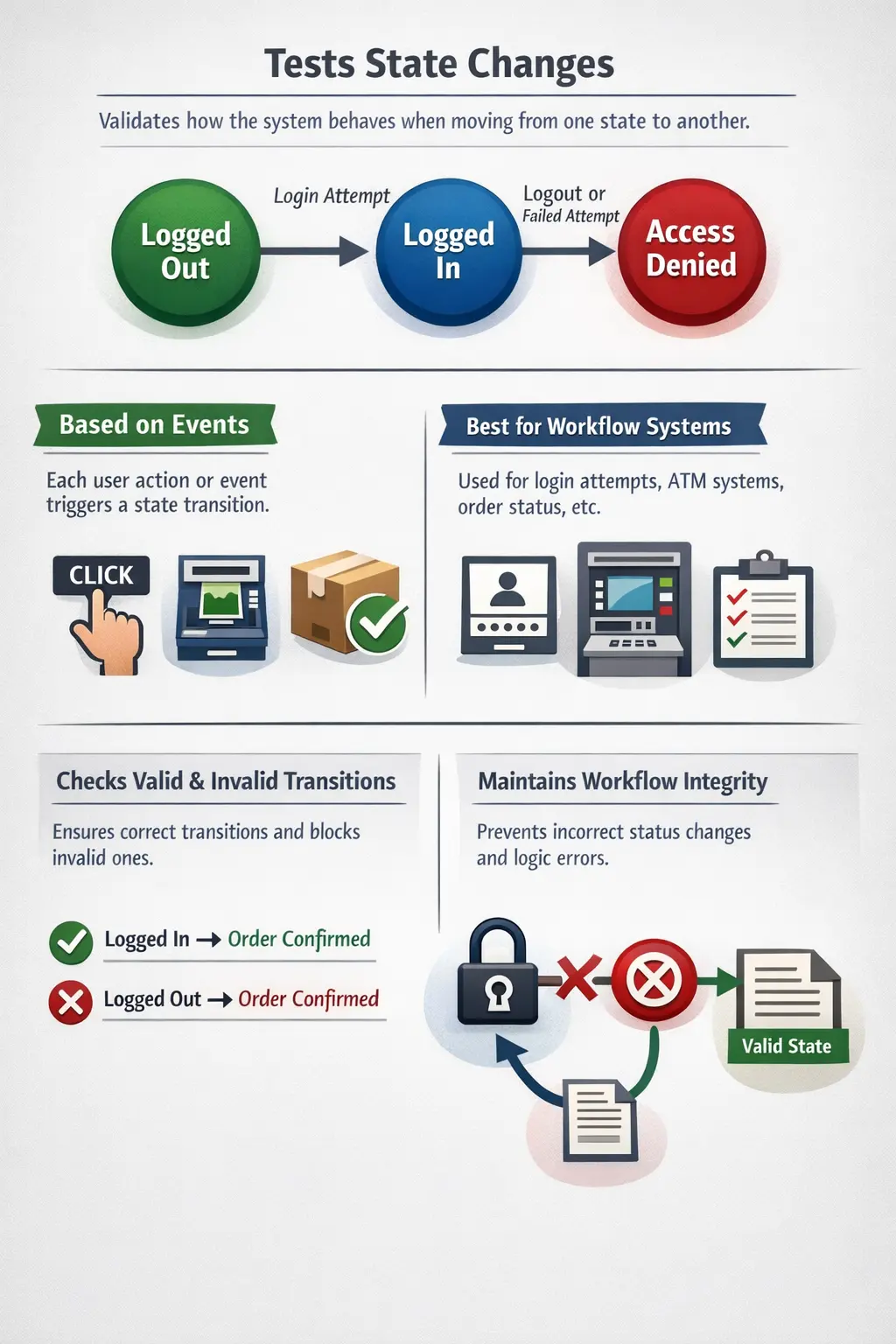
A banking application transitions from “Logged Out” to “Logged In.” An e-commerce order moves from “Placed” to “Shipped” to “Delivered.” An ATM card session moves through authentication and transaction states. In all such systems, behavior depends not only on current input but also on the system’s current state.
This dynamic nature of software introduces a specific category of defects—errors that occur during transitions from one state to another. Testing such systems requires a structured technique known as State Transition Testing.
State Transition Testing is a test case design technique used to verify how a system behaves when it moves from one state to another, based on events or actions. It answers a crucial question:
“Does the system behave correctly as it changes states?”
Understanding this technique is essential for testers working on workflow-driven applications, lifecycle-based systems, and applications where previous actions influence current behavior.
State Transition Testing is important because many defects are not visible when a feature is tested as a single screen or a single action. A button may work correctly in one state and fail in another. A status may update correctly after the first action but remain wrong after the second action. A user may be allowed to perform an operation that should only be available after a previous step is completed. These are not simple input validation problems; they are workflow integrity problems.
In real projects, users rarely interact with systems in isolated steps. They log in, search, select, submit, approve, cancel, retry, pay, download, close, reopen, and continue later. Each action can change the system state. If the system does not remember or enforce the correct state, business rules break. State Transition Testing gives testers a structured way to validate this behavior over time.
Understanding the Concept of State in Software
Before exploring the technique itself, it is important to understand what a “state” means in software systems. A state represents a specific condition or mode in which a system exists at a given point in time. It defines how the system should respond to incoming events.
For example, consider a login system. When a user is not authenticated, the system is in a “Logged Out” state. Once credentials are validated, the system transitions to a “Logged In” state. The same input— clicking the “Logout” button—will produce different results depending on the current state. If the user is logged in, the system logs them out. If the user is already logged out, the action may produce an error or do nothing.
This dependency on previous conditions makes simple input-output testing insufficient. Instead, testers must validate how the system behaves over time as it transitions through states.
A state is not always visible as a label on the screen. Sometimes it is stored in a database column, session variable, token status, order status, workflow flag, queue message, or backend process. For example, an order page may display "Processing", but the real system may internally track states such as payment captured, inventory reserved, invoice generated, shipment requested, and notification sent. Testers must understand both visible and business-relevant states.
A good way to identify states is to ask what the system allows or blocks at a given moment. If the available actions change, the system is likely in a different state. For example, a submitted expense claim may allow edit action before approval, but after approval it may allow only download or view. That difference in allowed actions indicates a state change.
Definition of State Transition Testing
State Transition Testing is a structured test case design technique used to validate systems whose outputs depend on both current input and previous state. It ensures that all valid transitions occur correctly and that invalid transitions are properly handled.
Unlike techniques that focus solely on input validation, State Transition Testing emphasizes the flow of behavior. It validates that state changes happen as expected and that the system maintains workflow integrity.
It is especially effective when testing systems where the order of operations matters.
The phrase "order of operations matters" is the heart of this technique. In a shopping application, payment should not happen before checkout. In a ticketing tool, closure should not happen before resolution. In a password reset flow, the reset link should not be usable after expiry. In an approval workflow, final approval should not happen before required intermediate approvals. State Transition Testing validates these ordered rules.
This technique is also useful when the same event has different outcomes in different states. Clicking "Cancel" on a draft order may simply discard the order. Clicking "Cancel" after payment may trigger refund. Clicking "Cancel" after shipment may be blocked or converted into a return request. The event name is the same, but the expected behavior changes because the state is different.
When to Use State Transition Testing
State Transition Testing is most suitable in systems where behavior changes depending on prior events. If the system’s response to an action depends on what happened before, this technique becomes critical.
Applications that commonly require this approach include:
- Workflow-based systems such as order processing or approval systems
- Lifecycle-based applications such as subscription management
- Authentication systems with lockout mechanisms
- Status-driven systems like ticketing or issue tracking platforms
- Financial transaction systems
- Mode-based systems such as online/offline functionality
In such systems, testing only individual features is insufficient. The sequence of operations must be validated.
This technique should be considered whenever requirements contain words such as status, state, lifecycle, workflow, step, stage, transition, approve, reject, submit, reopen, expire, block, activate, deactivate, lock, unlock, cancel, complete, or retry. These words usually indicate that behavior changes over time.
State Transition Testing is less useful for simple static fields. If a field only accepts a value between 1 and 100, Boundary Value Analysis is usually better. If a field accepts valid and invalid input classes, Equivalence Partitioning is useful. But when the system remembers what happened earlier and changes behavior based on that memory, State Transition Testing becomes the right technique.
Key Concepts in State Transition Testing
To apply State Transition Testing effectively, several foundational concepts must be understood.
A state represents a condition or situation of the system at a specific time. It defines how the system behaves in response to events.
An event is an action or trigger that causes a state change. It can be user-driven, system-driven, or time-driven.
A transition is the movement from one state to another when an event occurs.
The initial state is the starting point of the system before any events occur.
The final state is the resulting condition after a sequence of transitions.
The relationship between states and events forms the basis of State Transition Testing. Instead of validating isolated inputs, testers validate sequences of transitions.
Another useful concept is a guard condition. A guard condition is a rule that must be true before a transition can happen. For example, an order can move from "Placed" to "Shipped" only if payment is successful and stock is reserved. The event may be "ship order", but the transition should occur only when the guard condition is satisfied. If the guard condition is false, the transition should be blocked.
Testers should also understand terminal states. A terminal state is a final state from which no further normal transition is expected. Examples include cancelled, delivered, expired, closed, blocked, or archived. If the system allows unexpected actions from a terminal state, it may create serious workflow defects. For example, an expired reset link should not become usable again without a new request.
Designing State Transition Test Cases
Designing effective state transition test cases requires a structured approach.
The first step is identifying all possible states in the system. This requires careful requirement analysis and collaboration with stakeholders.
The second step involves identifying valid and invalid events that trigger transitions between states.
The third step is drawing a state transition diagram or state transition table. A diagram visually represents states as nodes and transitions as arrows triggered by events.
The final step is creating test cases that validate both valid and invalid transitions. It is not enough to test only correct flows; testers must also verify that invalid transitions are blocked.
This systematic approach ensures comprehensive coverage.
Test cases should include the starting state, event, expected next state, and expected system response. A weak test case says "verify order shipment." A stronger state transition test says "Given the order is in paid state, when the warehouse confirms dispatch, then the order should move to shipped state and shipment notification should be generated." This makes the starting point, event, next state, and outcome clear.
Testers should also design reset or setup steps carefully. State-based tests often require the system to be in a specific state before execution. If the test data is not prepared correctly, the test may fail for the wrong reason. In manual testing, this means checking the current status before performing the event. In automation, it may require API setup, database preparation, or reusable workflow helpers.
State Transition Table Structure
A state transition table is a practical way to document workflow behavior. It usually contains current state, event, condition if any, expected next state, and expected action. This format is easy to review and easy to convert into test cases. It also helps identify missing behavior because every current state can be checked against relevant events.
| Current State | Event | Expected Next State | Expected Result |
|---|---|---|---|
| Logged Out | Valid login | Logged In | Dashboard is shown |
| Logged Out | Invalid login | Logged Out | Error message is shown |
| Logged In | Logout | Logged Out | Session is ended |
| Logged Out | Access protected page | Logged Out | Access is denied or redirected |
This table shows a simple but important idea: the same event may be valid in one state and invalid in another. Accessing a protected page while logged in may be valid. Accessing it while logged out should be blocked. State Transition Testing makes this distinction explicit.
Real-Time Example: ATM Card Workflow
Consider an ATM card system. When a card is inserted into the machine, the system transitions through multiple states.
Initially, the system is in an idle state. When the card is inserted, it moves to the “Inserted” state. Once the user enters a valid PIN, the system transitions to the “Authenticated” state. If the user selects a transaction, it moves to “Transaction In Progress.” After completion, the system transitions to “Completed.” If the PIN is entered incorrectly three times, the system moves to a “Blocked” state.
These states can be visualized conceptually:
Inserted → Authenticated → Transaction → Completed
Inserted → Invalid PIN (3 times) → Blocked
Testing this system requires validating:
- Valid transitions, such as Inserted to Authenticated
- Invalid transitions, such as attempting a transaction without authentication
- Boundary conditions, such as exactly three invalid attempts
- Final states, ensuring the card is blocked after repeated failures
State Transition Testing ensures that the workflow behaves correctly over time.
The ATM example also includes important negative flows. What happens if the user removes the card during a transaction? What happens if the session times out after authentication? What happens if the PIN is correct after two previous failures? What happens after the third failure? These questions are state-based because the answer depends on the current status of the session and previous attempts.
A strong ATM test suite would validate more than the happy path. It would confirm that money cannot be withdrawn before authentication, transaction cannot continue after timeout, a blocked card cannot be used again, and the system returns to idle state after completion or cancellation. These are exactly the defects State Transition Testing is designed to catch.
Real-Time Example: E-Commerce Order Lifecycle
An e-commerce order usually moves through several states: cart, placed, paid, packed, shipped, delivered, cancelled, returned, or refunded. Not every transition is valid. A user may cancel an order before shipment, but after delivery the same action may become a return request. A warehouse may pack an order only after payment confirmation. A refund may be allowed only after cancellation or return approval.
State Transition Testing helps validate the complete order lifecycle. The tester can verify that an order moves from placed to paid after successful payment, from paid to shipped after dispatch, and from shipped to delivered after delivery confirmation. The tester should also verify invalid transitions, such as shipping an unpaid order, refunding an order that was never paid, or editing an order after it has been delivered.
Order workflows are business-critical because incorrect transitions affect customers, inventory, payment, accounting, delivery partners, and support teams. A small state defect can create large operational problems. This makes State Transition Testing essential for commerce systems.
Real-Time Example: Defect Lifecycle
Testing teams also see state transitions in defect tracking. A defect may move from New to Assigned, Open, Fixed, Retest, Verified, Closed, Reopened, or Deferred. Each transition has rules. A tester may move a fixed defect to reopened if retesting fails. A developer may move an assigned defect to fixed after code change. A closed defect should usually not move directly to fixed without reopening.
Validating a defect management workflow requires checking both allowed and blocked transitions. For example, can a developer close a defect without tester verification? Can a tester reopen a defect after closure? Can a deferred defect be included in release notes? State Transition Testing clarifies these workflow rules and prevents process violations.
State Transition Diagrams
A state transition diagram visually represents system behavior. States are represented as circles or rectangles, while transitions are arrows labeled with triggering events.
For example:
Inserted → Authenticated → Transaction → Completed
Inserted → Blocked
Such diagrams make it easier to identify missing transitions or invalid paths.
They also help stakeholders validate business logic before implementation.
A diagram is especially useful when the workflow is easier to understand visually than through paragraphs. States can be drawn as boxes or circles, and transitions can be drawn as arrows. Each arrow should have an event label, such as submit, approve, reject, cancel, expire, retry, or complete. When a diagram has an unlabeled arrow, unclear event, or missing end state, it usually means the requirement needs more clarity.
Testers should review diagrams for three things: missing states, missing transitions, and unexpected shortcuts. A missing state may hide an important intermediate step. A missing transition may leave the system undefined for a valid event. An unexpected shortcut may allow the user to skip required business controls. These reviews are valuable before implementation begins.
Valid and Invalid Transitions
One of the most important aspects of State Transition Testing is verifying both valid and invalid transitions.
A valid transition is one that is expected according to business rules. For example, entering a correct PIN should transition from “Inserted” to “Authenticated.”
An invalid transition occurs when an action is attempted in the wrong state. For example, attempting to withdraw cash before authentication should be blocked.
Testing invalid transitions is crucial because many defects occur when systems fail to restrict incorrect flows.
Invalid transition testing should verify more than failure. The system should remain in the correct state after the invalid action. For example, if a user attempts to withdraw cash before authentication, the ATM should not move to transaction state. It should remain in the proper pre-authentication state, display an appropriate message, and avoid any account impact. The absence of state change is part of the expected result.
Invalid transitions are especially important for security and compliance. A user should not access an admin page from a normal-user state. A rejected request should not move to approved state through direct URL manipulation. A closed ticket should not be edited by an unauthorized role. These tests confirm that the system enforces workflow rules, not just screen navigation.
Positive and Negative State Transition Tests
Positive state transition tests validate expected flows. They confirm that valid events move the system from one state to the correct next state. For example, submitting a completed application may move it from Draft to Submitted. Approving a submitted application may move it from Submitted to Approved. These tests prove that the normal workflow works.
Negative state transition tests validate blocked flows. They confirm that invalid events do not cause incorrect movement. For example, approving a draft application may be invalid because the application has not been submitted yet. Editing an approved application may be invalid because the approval is final. These negative tests protect workflow integrity.
A balanced state transition test suite includes both. Testing only valid flows may miss serious defects where users bypass controls. Testing only invalid flows may miss normal workflow failures. The tester must cover both expected movement and expected restriction.
State Transition Testing and Boundary Conditions
State transitions often include boundary conditions. The ATM example has a clear boundary: three invalid PIN attempts. The system should not block the card after the first or second invalid attempt, but it should block after the third. This combines State Transition Testing with Boundary Value Analysis.
Other examples include password reset links expiring after 24 hours, accounts locking after five failed logins, sessions expiring after 15 minutes of inactivity, or orders becoming non-cancellable after shipment. These are state rules with time, count, or threshold boundaries. Testers should validate the state just before the boundary, at the boundary, and just after the boundary where applicable.
Comparison with Decision Table Testing
State Transition Testing and Decision Table Testing serve different purposes.
Decision Table Testing focuses on combinations of conditions that lead to specific outcomes. It is best suited for rule-based logic.
State Transition Testing focuses on changes over time. It validates how the system moves between states in response to events.
Decision tables handle logical combinations.
State transitions handle sequential behavior.
Both techniques are complementary and often used together in complex systems.
For example, an insurance claim system may use Decision Table Testing to decide whether a claim requires manual review based on amount, policy type, and customer history. Once the claim enters manual review, State Transition Testing validates whether it moves correctly through submitted, under review, approved, rejected, paid, or reopened states. One technique validates decision logic; the other validates lifecycle movement.
In practice, testers should not treat test design techniques as competitors. A complex workflow may require Equivalence Partitioning for inputs, Boundary Value Analysis for thresholds, Decision Table Testing for rule combinations, and State Transition Testing for lifecycle behavior. The skill is choosing the right technique for the risk being tested.
Common Defects Found Using State Transition Testing
State Transition Testing is particularly effective in identifying workflow-related defects.
One common defect is allowing invalid transitions. For example, allowing a user to skip required approval steps.
Another issue is missing transitions. The system may fail to define behavior for a specific event in a given state.
Incorrect final states are also frequent. A system may remain stuck in an intermediate state rather than progressing correctly.
Sometimes, the state variable is not updated properly, causing inconsistent behavior.
Such defects can have severe business consequences.
Another common defect is duplicate processing. If a user refreshes a payment confirmation page, the system may incorrectly repeat a transaction instead of recognizing that the payment is already completed. This is a state management issue. The system should know that the transaction has already moved to completed state and should prevent duplicate execution.
Race conditions can also appear in state-based systems. Two users or two processes may try to update the same item at nearly the same time. For example, one user may approve a request while another user rejects it. The system must handle this correctly and maintain a valid final state. While deep concurrency testing may require technical tools, manual testers should still understand the risk and report suspicious workflow behavior.
Importance in Real-World Systems
State Transition Testing plays a critical role in industries where workflows determine business integrity.
In banking systems, incorrect state transitions can lead to transaction errors.
In order processing systems, skipping intermediate states may result in shipment without payment confirmation.
In authentication systems, failure to block after multiple invalid attempts creates security vulnerabilities.
Workflow integrity ensures reliability, compliance, and trust.
In healthcare systems, incorrect workflow states can affect patient records, approvals, prescriptions, or lab results. In payroll systems, incorrect state movement can cause premature salary processing or missed approvals. In subscription systems, a user may retain access after cancellation or lose access before expiry. These are not cosmetic issues. They affect business accuracy and user trust.
State Transition Testing is therefore a risk-reduction technique. It helps ensure that the application does not merely show the right screens, but follows the correct business lifecycle. For any system with important statuses, this testing should be planned deliberately.
Common Mistakes in Applying State Transition Testing
One common mistake is ignoring invalid transitions. Testers often focus only on happy paths.
Another error is missing intermediate states. Overlooking a temporary state can leave gaps in coverage.
Some testers fail to consider the impact of previous states. Since behavior depends on history, previous actions must always be considered.
Incomplete state diagrams lead to incomplete testing.
A disciplined and systematic approach is essential.
Another mistake is checking only the UI label and not the real state. A screen may show "approved", but the backend status, notification, audit trail, or downstream system may not be updated. State validation should include the observable business effects of the transition. Depending on the project, this may include UI status, database status, API response, email notification, report entry, or audit log.
Testers may also forget recovery paths. What happens if payment fails after an order is placed? What happens if approval is rejected? What happens if a user abandons a workflow midway and returns later? Recovery and alternate paths are often where state defects appear.
State Transition Tables
In addition to diagrams, testers can use state transition tables. These tables list current states, events, next states, and expected results.
This tabular format provides clarity and traceability.
It also helps in automation, where each row can become a test scenario.
A good state transition table should include invalid events too. Many tables document only the happy path, such as Draft to Submitted to Approved. But a complete table also asks what happens if the user tries to approve a draft, edit an approved item, reopen a closed item, cancel a shipped order, or retry an expired session. These rows make the table useful for testing, not just documentation.
State transition tables are also helpful for regression planning. When a workflow changes, testers can quickly identify which rows are affected. If a new state is added, such as "Pending Compliance Review", the table shows which transitions must be added, removed, or modified. This makes maintenance more controlled.
State Transition Testing in Automation
State Transition Testing integrates well with automation frameworks.
Test cases can be designed to simulate sequences of actions. Automation scripts can validate state changes by checking system responses or database updates.
Automation is particularly effective for regression testing in workflow-based systems.
Automated state transition tests should be designed carefully because they often depend on data setup. A test that validates the transition from submitted to approved must start with an item that is already in submitted state. Automation teams may create helper methods to prepare states through APIs, database setup, or reusable UI flows. Without reliable setup, state-based automation becomes unstable.
Automation should also verify the state after each important action. For example, after submitting an order, the script should confirm the order status is submitted or placed. After payment, it should confirm paid. After shipment, it should confirm shipped. If the script checks only the final screen, it may miss an incorrect intermediate state.
State transition tests are good candidates for regression automation when the workflow is business-critical and stable. Login lockout, order lifecycle, subscription activation, approval workflows, and payment status changes are common examples. Low-value or frequently changing workflows may be better tested manually until they stabilize.
State Transition Testing in Agile Projects
In Agile projects, state transition thinking should begin during backlog refinement. If a user story adds a new status or changes a workflow, testers should ask how the item enters that state, how it leaves that state, who can perform the transition, what happens if the transition fails, and what should be blocked. These questions improve acceptance criteria.
During sprint testing, testers can use small state diagrams or tables to validate the story. The table does not need to be overly formal, but it should clarify the current state, event, expected next state, and invalid transitions. This keeps testing focused and makes discussions with developers easier.
When workflows evolve across multiple sprints, state transition models become valuable documentation. They help new team members understand the lifecycle and help existing team members see the effect of changes. This is especially useful in products where status behavior grows over time.
Practical Checklist for State Transition Testing
Before finalizing state transition test cases, testers should identify all important states, including initial, intermediate, final, blocked, cancelled, expired, and error states. They should list all events that can trigger movement between states. They should define which transitions are valid and which are invalid. They should also confirm expected messages, status updates, notifications, audit entries, and data changes.
Testers should verify whether role permissions affect transitions. An admin may be allowed to approve, while a normal user may not. They should verify timeout and retry behavior where relevant. They should also include recovery scenarios, such as failure during payment, rejected approval, or resubmission after correction.
Finally, testers should review the state model whenever requirements change. A new state or event can affect several existing transitions. Without review, old test cases may no longer provide correct coverage.
Interview Perspective
State Transition Testing is a common interview topic for QA and SDET roles.
A concise explanation would be:
State transition testing verifies system behavior as it moves between different states based on events.
A detailed explanation would include:
State transition testing validates systems where output depends on both current input and previous state. It ensures correct state changes, prevents invalid transitions, and maintains workflow integrity.
Interviewers often expect candidates to draw a simple state diagram to demonstrate understanding.
Project-based answer:
In a real project, I use State Transition Testing when a feature has statuses or workflow stages. I identify the possible states, events that trigger movement, valid transitions, invalid transitions, and expected final states. For example, in an order workflow, I validate transitions such as placed to paid, paid to shipped, and shipped to delivered. I also test invalid transitions such as shipping an unpaid order or cancelling an already delivered order.
A strong interview answer should mention that this technique is different from Decision Table Testing. Decision tables are better for condition combinations, while State Transition Testing is better for sequence-based behavior where previous state affects the current result.
Advantages of State Transition Testing
State Transition Testing provides structured validation of workflows. It ensures that sequences of actions are handled correctly.
It reduces risk in state-dependent systems.
It identifies logical gaps early.
It enhances system reliability over time.
It also improves requirement clarity because states and transitions must be named explicitly. It helps testers find missing paths, invalid shortcuts, incorrect final states, and incomplete error handling. For workflow-heavy systems, this gives much stronger coverage than testing each screen independently.
Limitations of State Transition Testing
This technique can become complex in systems with many states. The number of transitions may grow significantly.
Maintaining diagrams requires discipline.
It is less useful for simple input validation scenarios.
However, for workflow-based systems, it is indispensable.
Another limitation is that state information may not always be visible to testers. If the system stores state only in backend services or asynchronous queues, testers may need logs, APIs, reports, or database access to confirm the actual transition. Without observability, some state defects may be difficult to diagnose.
State Transition Testing also requires stable test data. If multiple testers or automated scripts modify the same workflow item, the starting state may change unexpectedly. Good test data management is therefore important for reliable execution.
Key Takeaway
State Transition Testing ensures workflow integrity and correct system behavior over time. It validates not just isolated actions but sequences of actions.
In systems where previous state influences current behavior, this technique becomes essential.
By systematically identifying states, events, and transitions, testers can ensure that software behaves predictably and reliably across its lifecycle.
When applied correctly, State Transition Testing transforms complex workflows into structured and testable models, strengthening the overall quality of the system.