Reliability Testing: Ensuring Consistent and Stable Software Behavior
Introduction to Reliability Testing
Reliability Testing is the process of evaluating whether a software application performs consistently and correctly over a defined period under normal usage conditions, without unexpected failures or degradation.
Reliability testing answers an important stability question: does the system work consistently over time?
A system that works once but fails intermittently cannot be considered reliable.
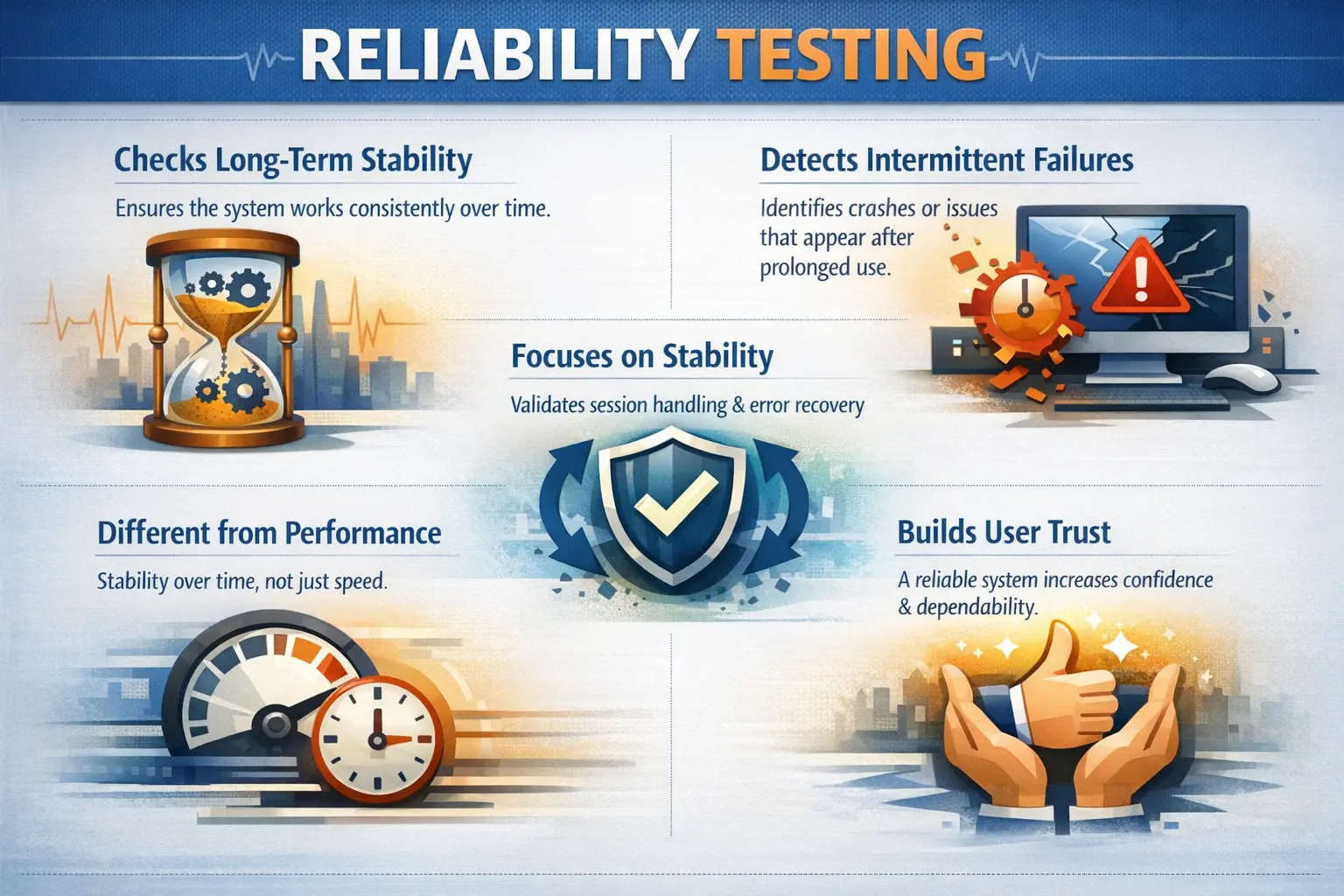
Reliability testing focuses on dependability. A reliable application does not merely pass a test once in a controlled condition; it continues to behave correctly when users repeat the same actions, stay logged in for a long period, move between screens, submit multiple transactions, and recover from expected interruptions. In production, users expect the system to behave consistently every day, not only during a demonstration or a short functional test cycle.
This makes reliability an essential part of software quality. An application can be functionally correct, visually polished, and even fast, but still fail users if it behaves unpredictably. A page that sometimes saves data and sometimes fails, a session that randomly drops, a report that works in the morning but crashes after long use, or a transaction that produces inconsistent results can damage trust quickly. Users need confidence that the system will work when they need it.
Reliability testing is especially important for applications that support business-critical workflows. Banking, healthcare, education, government services, e-commerce, logistics, HR, and customer support systems often run for long hours and serve many repeated operations. In such environments, intermittent failure is not a minor inconvenience. It can interrupt service, cause data inconsistency, increase support cost, and create business risk.
Purpose of Reliability Testing
The primary objective of reliability testing is to ensure long-term system stability. It helps detect intermittent failures, validate recovery mechanisms, and confirm that repeated usage does not degrade system behavior.
Reliability directly impacts user trust. Frequent crashes, session drops, or inconsistent results reduce confidence in the application.
One major purpose of reliability testing is to detect defects that do not appear during a single test execution. Many systems behave correctly during the first few operations but begin to degrade after repeated usage. This degradation may appear as slower screens, frozen pages, failed transactions, unexpected logouts, memory-related instability, or inconsistent database updates. Reliability testing gives testers time and repetition to uncover these patterns.
Reliability testing also validates recovery behavior. Real systems face interruptions. Network calls may fail, external services may respond slowly, users may refresh pages, sessions may expire, and temporary errors may occur. A reliable application should handle these situations gracefully. It should show meaningful messages, preserve data where appropriate, avoid duplicate transactions, and allow users to continue without confusion.
Another purpose is protecting user confidence. Users may forgive a rare, well-handled error, but they lose trust when the system behaves inconsistently. If the same action produces different results without explanation, users begin to doubt the application. Reliability testing helps teams find and fix these inconsistent behaviors before they affect real users.
Reliability also supports operational readiness. Production systems are expected to run continuously. They must survive repeated use, background jobs, long sessions, scheduled tasks, data growth, and normal user behavior. Testing reliability before release helps teams understand whether the application is ready for sustained operation or whether hidden stability risks remain.
Manual Tester’s Scope
From a manual testing perspective, reliability validation involves:
- Repeated execution of critical workflows
- Observing behavior during long-running sessions
- Monitoring stability after continuous usage
- Validating error handling and recovery scenarios
Manual testers should document patterns, especially intermittent failures that are difficult to reproduce.
Manual testers contribute by repeating important workflows under realistic conditions. A tester may execute login, search, record creation, update, approval, logout, and re-login multiple times to confirm that behavior remains stable. The purpose is not to create unnecessary repetition, but to observe whether the same workflow remains predictable when executed again and again.
Long-running session observation is another important manual activity. Testers can keep the application open for an extended period, continue normal navigation, submit forms at intervals, and observe whether the session remains valid according to requirements. They should check whether timeout behavior is predictable, whether warning messages appear when expected, and whether data is handled safely when a session expires.
Manual testers also observe recovery after errors. If a save operation fails, the application should not leave the user in an unknown state. If an upload fails, the user should understand whether the file was saved or rejected. If a payment confirmation is delayed, the system should not create duplicate transactions. Reliability testing looks closely at these uncertain moments because they often reveal weak error handling.
Documentation matters because reliability defects can be difficult to reproduce. A tester should record the sequence of actions, time of occurrence, data used, browser or device, user role, environment, and any patterns noticed before failure. If a failure occurs after repeated actions, the report should mention the approximate number of repetitions or duration. This information helps developers investigate time-dependent or state-dependent issues.
Reliability vs Performance Testing
Although related, reliability and performance focus on different aspects of quality.
Performance testing measures speed and responsiveness under load, typically in shorter durations. Reliability testing evaluates stability and consistency over extended periods.
Performance issues involve slowness or timeouts, whereas reliability issues involve crashes, hangs, and inconsistent behavior.
The two areas often overlap in real projects. A system that slowly consumes memory may first appear as a performance problem because screens become slower. Later, the same issue may become a reliability problem when the application freezes or crashes. Similarly, a long-running background process may produce acceptable response times at first but fail after repeated executions. This is why testers should observe both speed and stability during sustained use.
Performance testing usually measures how quickly and efficiently the system responds under certain load conditions. Reliability testing asks whether the system continues to behave correctly over time. A page that always loads in five seconds may be acceptable from a performance perspective, but if it fails every tenth time, it is unreliable. A system must be both fast enough and dependable enough to satisfy users.
Functional testing is also different. A functional test may confirm that a transaction can be submitted successfully. Reliability testing confirms that the transaction can be submitted repeatedly, across long sessions, with consistent outcomes and proper recovery when something goes wrong. It extends confidence beyond a single pass.
Key Reliability Factors
Several factors contribute to reliability:
- Consistent functional behavior across repeated executions
- Absence of crashes or application freezes
- Proper session handling without unexpected drops
- Graceful recovery from unexpected errors
- No resource degradation over time (conceptual awareness of memory or resource leaks)
These factors ensure sustained operational stability. Consistent functional behavior means the same valid action should produce the same expected result under the same conditions. If a form saves successfully sometimes and fails without a clear reason at other times, reliability is weak even if the form passes during a single test.
Absence of crashes and freezes is a basic reliability expectation. Users should not lose work because the browser becomes unresponsive or the application stops responding. If long forms, reports, dashboards, or file operations frequently freeze the interface, the system cannot be considered dependable.
Proper session handling is another key factor. Sessions should not expire earlier than expected, remain active longer than allowed, or drop randomly during normal activity. Session behavior should be predictable and aligned with business and security requirements. Unplanned session drops are especially harmful when users are entering data or completing transactions.
Graceful recovery separates reliable systems from fragile ones. Even well-designed systems encounter errors. A reliable application catches recoverable failures, communicates clearly, avoids data corruption, and allows users to retry safely. Recovery behavior should be tested, not assumed.
Resource degradation is a conceptual but important concern for manual testers. They may not inspect memory directly, but they can observe symptoms such as gradual slowdown, increasing browser memory usage, repeated freezing, or failures after long operation. These symptoms may point to memory leaks, unclosed connections, growing client-side state, or background processes that do not clean up correctly.
Repeated Execution and Consistency
Repeated execution is one of the simplest ways to evaluate reliability manually. A tester selects important workflows and performs them multiple times using realistic data. The goal is to confirm that the application continues to produce correct and stable results without unexpected variation.
Repetition should be purposeful. Critical workflows such as login, search, create record, update record, approve request, generate report, upload file, download file, submit payment, and logout are good candidates. These workflows represent real user behavior and often involve multiple layers of the system, including UI, backend logic, database, and integrations.
Testers should watch for small signs of instability during repetition. A page may take longer each time, a button may become disabled unexpectedly, a message may not appear, data may duplicate, or navigation may stop working after several cycles. These early symptoms often reveal reliability issues before a complete crash occurs.
Long-Running Session Stability
Many applications are used for long periods without users logging out frequently. Customer service agents, administrators, finance teams, operations users, and support staff may keep an application open throughout the day. Reliability testing should consider this type of sustained usage.
During long-running session testing, the tester may remain logged in, navigate across modules, perform actions at intervals, leave the system idle, resume activity, and observe session behavior. The application should handle active and inactive periods according to defined rules. If the user is active, the system should not randomly terminate the session. If the user is inactive beyond the allowed limit, the timeout should be clear and secure.
Long sessions also reveal frontend stability issues. Some applications accumulate client-side data, event listeners, timers, or temporary state as users navigate. Over time, this can cause slow behavior, broken controls, or browser instability. Manual testers can report these symptoms even without knowing the technical root cause.
Error Handling and Recovery Reliability
Reliable systems must handle failure gracefully. This includes validation errors, temporary server errors, network interruptions, session expiration, external service failures, and user interruptions. The system should not leave users unsure whether an action succeeded or failed.
A common reliability risk appears during form submission. If the connection fails after the user clicks Submit, the application should make it clear whether the data was saved. If the user retries, the system should avoid unintended duplicates where possible. This is especially important for payments, orders, ticket creation, applications, and approval workflows.
Recovery testing should include refreshing the page, navigating back, retrying after failure, logging in again after timeout, and resuming interrupted workflows. A reliable application should recover in a controlled way instead of exposing blank pages, duplicate records, inconsistent states, or unexplained errors.
Real-Time Example
An application may function correctly during initial testing but crash after several hours of continuous usage. Alternatively, sessions may expire unexpectedly or data may become inconsistent after repeated transactions.
Reliability testing helps uncover such time-dependent or usage-dependent defects. For example, consider a web-based customer support application. A support agent logs in at the start of the day, opens customer profiles, updates tickets, adds notes, searches records, and uploads attachments. The application may work correctly for the first few tickets but become slower after many profile views. Later, file upload may stop responding or the browser may freeze. This is a reliability concern because the system does not remain stable during normal work.
Another example is an online learning platform. A student watches lessons, attempts quizzes, navigates between modules, and leaves the session idle during breaks. If quiz answers disappear after a session refresh, if progress is not saved consistently, or if the session expires without warning during an assessment, users lose trust in the platform.
In an e-commerce application, reliability issues may appear when users repeatedly add and remove items from the cart, apply coupons, refresh pages, and proceed to checkout. If totals become inconsistent or cart contents disappear unexpectedly, the issue is not simply functional. It is a reliability problem because the system cannot maintain consistent state over normal usage.
Entry and Exit Criteria
Reliability testing begins when a stable build is available and key workflows are identified for repeated execution. It concludes when no critical stability issues are observed and known reliability risks are documented.
Testing should simulate realistic user behavior over extended durations. Useful entry criteria include a stable build, clearly identified critical workflows, prepared test data, defined session rules, known recovery expectations, and an environment that is stable enough for long observation. If the environment itself is unstable, reliability results may be misleading.
Key workflows should be selected based on business importance and usage frequency. A rarely used admin configuration screen may not need the same reliability focus as login, search, checkout, payment, report generation, or customer record updates. The goal is to validate sustained stability where failure would matter most.
Exit criteria should consider whether repeated executions completed successfully, whether long sessions behaved as expected, whether recovery scenarios were validated, and whether any intermittent failures remain unresolved. If known reliability risks remain, they should be documented clearly with impact, frequency, and recommended action.
Common Reliability Defects
Typical issues include application crashes, unexpected session termination, data inconsistency over time, unhandled exceptions, and progressive slowdown after repeated use.
These defects may not appear during short functional tests but emerge under sustained operation.
Application crashes are the most visible reliability defects. They may appear as browser freezes, blank screens, server errors, or complete application unavailability. Crashes that occur after a specific sequence or duration require careful documentation because developers need enough detail to reproduce the failure.
Unexpected session termination is another common defect. Users may be actively working, but the application logs them out without warning or loses their state. This is frustrating and can lead to data loss. The opposite problem can also occur: sessions may remain active longer than allowed, creating security concerns.
Data inconsistency over time is especially serious. A record may show one value in a list and another value in the details page. A transaction may be submitted twice. A status may update in one module but not another. These issues often appear after repeated actions, interrupted workflows, or integration delays.
Progressive slowdown is a reliability warning sign. The system may not fail immediately, but each repeated action becomes slower. Over time, users experience degraded behavior. This can indicate memory leaks, inefficient caching, growing logs, database locking, unclosed connections, or frontend resource accumulation.
Common Mistakes
A frequent mistake is validating only short scenarios and assuming stability. Ignoring intermittent issues because they are not easily reproducible can lead to production failures. Stability must be validated through repeated and sustained testing efforts.
Reliability cannot be confirmed through a single successful test execution. A single pass confirms that the workflow can work once. It does not prove that the workflow will continue to work after repeated use, long sessions, interrupted actions, or extended operation.
Another mistake is dismissing intermittent failures as unimportant because they are hard to reproduce. Intermittent issues are often the most dangerous reliability defects because they may appear unpredictably in production. If a tester sees a failure once, it should be documented with as much context as possible rather than ignored.
Teams also make the mistake of testing reliability only with ideal data and clean workflows. Real users may refresh pages, navigate away, retry actions, leave sessions idle, upload large files, or work with old records. Reliability testing should include realistic user behavior, not only perfectly controlled paths.
A further mistake is confusing reliability with performance. A system may be fast but unstable, or slower but dependable. Both qualities matter, but they require different observations. Reliability focuses on consistency and failure-free operation over time.
Reliability Testing in Agile Projects
In Agile projects, reliability testing should not wait until the final release. Each sprint may introduce changes that affect stability. A new validation rule, background process, integration, cache, or UI component can create intermittent failures. Testers should include reliability awareness in sprint-level validation.
Reliability concerns can be discussed during story refinement. Testers can ask how the feature behaves after repeated use, what happens if the user refreshes during processing, how errors are recovered, whether the feature depends on external services, and whether session behavior is affected. These questions improve requirements before coding begins.
Regression testing should include known reliability-sensitive areas. If a module has a history of intermittent failures, session problems, or inconsistent data, it should receive extra attention after related changes. Reliability regression helps prevent old stability problems from returning.
Reporting Reliability Defects
Reliability defects require careful reporting because they are often harder to reproduce than simple functional defects. A strong report includes the environment, user role, data used, sequence of actions, number of repetitions, approximate duration, observed failure, expected behavior, and any logs or screenshots available.
If the issue is intermittent, the report should say so clearly. For example, "The save action failed once after approximately fifteen successful saves during a thirty-minute session" is more useful than "Save sometimes fails." Specific context helps developers search for patterns in logs, timing, data state, or resource usage.
Testers should also report user impact. A crash during a rarely used setup screen may be less severe than an intermittent failure during payment submission or medical record update. Severity should reflect how the instability affects real users and business operations.
Best Practices for Reliability Testing
Start with critical workflows. Reliability matters most where failure causes business disruption, user frustration, data loss, or financial impact. Login, transaction submission, approval workflows, payments, reports, file operations, and long-running sessions should be prioritized.
Repeat important actions deliberately. Repetition should be planned, not random. Testers can decide how many times to execute a workflow, how long to keep a session active, and which recovery actions to try. This makes observations easier to compare and reproduce.
Use realistic data and realistic behavior. Reliability issues often appear with larger records, older data, multiple roles, or interrupted workflows. Testing only fresh, simple data may hide the problems that production users will face.
Document everything early. If a tester notices a small reliability symptom such as a delayed response, flickering error, unexpected refresh, or temporary freeze, it should be noted. Small symptoms can lead to larger failures during prolonged use.
Interview Perspective
In interviews, reliability testing is generally defined as verifying that an application performs consistently and remains stable over time. A strong answer highlights prolonged usage, repeated execution, and validation of recovery behavior.
A strong interview answer should also mention that reliability testing helps find intermittent failures, crashes, hangs, unexpected session drops, data inconsistency, and degradation after continuous use. It should explain that reliability testing is different from functional testing because it validates sustained consistency, not just one-time correctness.
It is also useful to compare reliability with performance testing. Performance testing focuses on speed, responsiveness, and capacity. Reliability testing focuses on stability, consistency, and failure-free operation over time. In real projects they may overlap, but their primary questions are different.
Key Takeaway
Reliability Testing ensures that software is stable, dependable, and trustworthy during continuous operation. It validates not just correctness, but sustained consistency—an essential requirement for production-quality systems.
The core idea is that a system must work again and again, not only once. Reliability testing gives teams confidence that important workflows remain stable during repeated use, long sessions, recovery situations, and realistic user behavior. When reliability is validated properly, users can trust the application to support their work without unexpected failure.